开发函数计算的正确姿势——网页截图服务
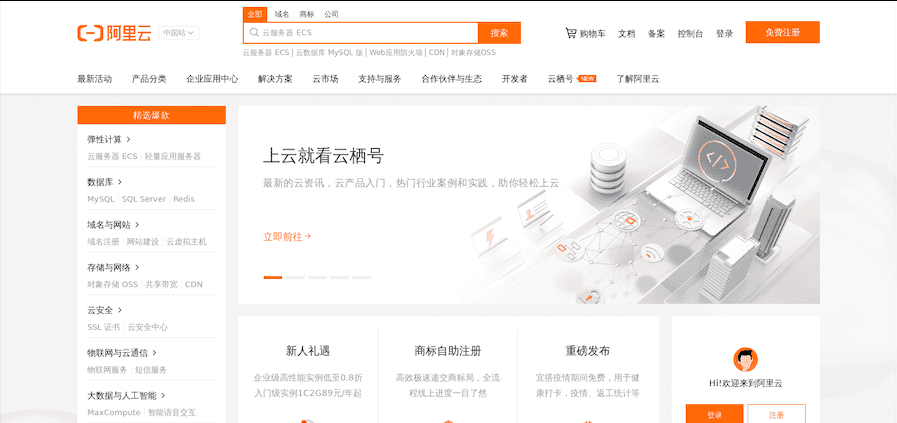
前言 首先介绍下在本文出现的几个比较重要的概念: 函数计算(Function Compute): 函数计算是一个事件驱动的服务,通过函数计算,用户无需管理服务器等运行情况,只需编写代码并上传。函数计算准备计算资源,并以弹性伸缩的方式运行用户代码,而用户只需根据实际代码运行所消耗的资源进行付费。函数计算更多信息参考。 Fun: Fun 是一个用于支持 Serverless 应用部署的工具,能帮助您便捷地管理函数计算、API 网关、日志服务等资源。它通过一个资源配置文件(template.yml),协助您进行开发、构建、部署操作。Fun 的更多文档参考。 备注: 本文介绍的技巧需要 Fun 版本大于等于 3.5.0。 依赖工具 本项目是在 MacOS 下开发的,涉及到的工具是平台无关的,对于 Linux 和 Windows 桌面系统应该也同样适用。在开始本例之前请确保如下工具已经正确地安装,更新到最新版本,并进行正确的配置。 Docker Fun Fun 工具依赖于 docker 来模拟本地环境。 MacOS 用户可以使用 homebrew 进行安装: brew cask install docker brew tap vangie/formula brew install fun Windows 和 Linux 用户安装请参考: https://github.com/aliyun/fun/blob/master/docs/usage/installation.md https://github.com/aliyun/fcli/releases 安装好后,记得先执行 fun config 初始化一下配置。 初始化 使用 fun init 命令可以快捷地将本模板项目初始化到本地。 fun init vangie/puppeteer-example 安装依赖 fun install fun install 会执行 Funfile 文件里的指令,依次执行如下任务: 安装 chrome headless 二进制文件; 安装 puppeteer 依赖的 apt 包; 安装 npm 依赖。 部署 同步大文件到 nas 盘。 fun nas sync 部署代码。 $ fun deploy using template: template.yml using region: cn-hangzhou using accountId: ***********3743 using accessKeyId: ***********Ptgk using timeout: 600 Waiting for service puppeteer to be deployed... make sure role 'aliyunfcgeneratedrole-cn-hangzhou-puppeteer' is exist role 'aliyunfcgeneratedrole-cn-hangzhou-puppeteer' is already exist attaching police 'AliyunECSNetworkInterfaceManagementAccess' to role: aliyunfcgeneratedrole-cn-hangzhou-puppeteer attached police 'AliyunECSNetworkInterfaceManagementAccess' to role: aliyunfcgeneratedrole-cn-hangzhou-puppeteer using 'VpcConfig: Auto', Fun will try to generate related vpc resources automatically vpc already generated, vpcId is: vpc-bp1wv9al02opqahkizmvr vswitch already generated, vswitchId is: vsw-bp1kablus0jrcdeth8v35 security group already generated, security group is: sg-bp1h2swzeb5vgjfu6gpo generated auto VpcConfig done: {"vpcId":"vpc-bp1wv9al02opqahkizmvr","vswitchIds":["vsw-bp1kablus0jrcdeth8v35"],"securityGroupId":"sg-bp1h2swzeb5vgjfu6gpo"} using 'NasConfig: Auto', Fun will try to generate related nas file system automatically nas file system already generated, fileSystemId is: 0825a4a395 nas file system mount target is already created, mountTargetDomain is: 0825a4a395-rrf16.cn-hangzhou.nas.aliyuncs.com generated auto NasConfig done: {"UserId":10003,"GroupId":10003,"MountPoints":[{"ServerAddr":"0825a4a395-rrf16.cn-hangzhou.nas.aliyuncs.com:/puppeteer","MountDir":"/mnt/auto"}]} Checking if nas directories /puppeteer exists, if not, it will be created automatically Checking nas directories done ["/puppeteer"] Waiting for function html2png to be deployed... Waiting for packaging function html2png code... The function html2png has been packaged. A total of 7 files files were compressed and the final size was 2.56 KB Waiting for HTTP trigger httpTrigger to be deployed... triggerName: httpTrigger methods: [ 'GET' ] url: https://xxxxxx.cn-hangzhou.fc.aliyuncs.com/2016-08-15/proxy/puppeteer/html2png/ Http Trigger will forcefully add a 'Content-Disposition: attachment' field to the response header, which cannot be overwritten and will cause the response to be downloaded as an attachment in the browser. This issue can be avoided by using CustomDomain. trigger httpTrigger deploy success function html2png deploy success service puppeteer deploy success ===================================== Tips for nas resources ================================================== Fun has detected the .nas.yml file in your working directory, which contains the local directory: /Users/vangie/Workspace/puppeteer-example/{{ projectName }}/.fun/root /Users/vangie/Workspace/puppeteer-example/{{ projectName }}/node_modules The above directories will be automatically ignored when 'fun deploy'. Any content of the above directories changes,you need to use 'fun nas sync' to sync local resources to remote. =============================================================================================================== 验证 curl https://xxxxxx.cn-hangzhou.fc.aliyuncs.com/2016-08-15/proxy/puppeteer/html2png/ > screenshot.png 如果不传递查询参数,默认会截取阿里云的首页: 如果想换一个网址,可以使用如下命令格式: curl https://xxxxxx.cn-hangzhou.fc.aliyuncs.com/2016-08-15/proxy/puppeteer/html2png/?url=http://www.alibaba.com > screenshot.png 调试 如果需要在本地调试代码,可以使用如下命令: $ fun local start using template: template.yml HttpTrigger httpTrigger of puppeteer/html2png was registered url: http://localhost:8000/2016-08-15/proxy/puppeteer/html2png methods: [ 'GET' ] authType: ANONYMOUS function compute app listening on port 8000! 浏览器打开 http://localhost:8000/2016-08-15/proxy/puppeteer/html2png 即可。 参考阅读 三分钟学会如何在函数计算中使用 puppeteer