首页 文章 精选 留言 我的

精选列表

搜索[模糊效果],共10000篇文章
优秀的个人博客,低调大师

MoonBit 社区开发者开发了一个依赖健康诊断工具 MoonBit Depsight,效果堪比 npm audit

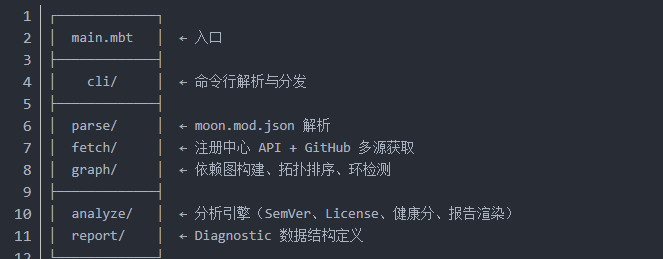
MoonBit 生态正在快速发展,越来越多的包发布到http://mooncakes.io。MoonBit社区开发者Tino-hue发现大家面临着一些共同的问题: 我的依赖版本是否已经过时了? 某个包用了 GPL 许可证,会不会影响我的商业项目? 依赖链中是否有被标记为@deprecated的 API? 依赖树有没有循环依赖? 这些风险不会在编译时报错,但它们可能在未来某个时刻成为线上故障的导火索。 为了提前发现这些风险,MoonBit 社区开发者开发了一个依赖健康诊断工具——MoonBit Depsight。 作为一个 MoonBit 依赖健康诊断 CLI 工具,MoonBit Depsight可以从多个维度给项目依赖做体检,包括版本新鲜度、许可证风险、废弃 API、依赖体积、活跃度等,还能输出终端报告、HTML、JSON、Markdown、SARIF 等格式。 整个项目采用分层架构:parse 负责数据输入,fetch 封装网络获取(含多源 fallback),graph 构建有向依赖图,analyze 在此基础上运行多维度分析,最终通过各种 reporter 输出结果。 MoonBit Depsight 是一个完全使用 MoonBit 语言开发的实用 CLI 工具,具有多项核心能力。它证明了 MoonBit 不仅能做算法和教学,完全可以胜任真实的工程开发。 267 个测试用例全部通过,构建和测试体验流畅。如果你也在 MoonBit 生态中开发项目,不妨试试 Depsight,让你的依赖健康透明可控。项目代码仓库:https://github.com/Tino-hue/moonmark 感谢Tino-hue,我们欢迎更多开发者使用MoonBit创造出有价值的项目!

优秀的个人博客,低调大师

Bitmap图片加圆角效果

/** * 处理图片的工具类. * */public class ImageTools {/***//** * 图片去色,返回灰度图片 * @param bmpOriginal 传入的图片 * @return 去色后的图片*/public static Bitmap toGrayscale(Bitmap bmpOriginal) {int width, height; height = bmpOriginal.getHeight(); width = bmpOriginal.getWidth(); Bitmap bmpGrayscale = Bitmap.createBitmap(width, height, Bitmap.Config.RGB_565); Canvas c = new Canvas(bmpGrayscale); Paint paint = new Paint(); ColorMatrix cm = new ColorMatrix(); cm.setSaturation(0); ColorMatrixColorFilter f = new ColorMatrixColorFilter(cm); paint.setColorFilter(f); c.drawBitmap(bmpOriginal, 0, 0, paint);return bmpGrayscale; }/***//** * 去色同时加圆角 * @param bmpOriginal 原图 * @param pixels 圆角弧度 * @return 修改后的图片*/public static Bitmap toGrayscale(Bitmap bmpOriginal, int pixels) {return toRoundCorner(toGrayscale(bmpOriginal), pixels); }/***//** * 把图片变成圆角 * @param bitmap 需要修改的图片 * @param pixels 圆角的弧度 * @return 圆角图片*/public static Bitmap toRoundCorner(Bitmap bitmap, int pixels) { Bitmap output = Bitmap.createBitmap(bitmap.getWidth(), bitmap .getHeight(), Config.ARGB_8888); Canvas canvas = new Canvas(output);final int color = 0xff424242;final Paint paint = new Paint();final Rect rect = new Rect(0, 0, bitmap.getWidth(), bitmap.getHeight());final RectF rectF = new RectF(rect);final float roundPx = pixels; paint.setAntiAlias(true); canvas.drawARGB(0, 0, 0, 0); paint.setColor(color); canvas.drawRoundRect(rectF, roundPx, roundPx, paint); paint.setXfermode(new PorterDuffXfermode(Mode.SRC_IN)); canvas.drawBitmap(bitmap, rect, rect, paint);return output; }/***//** * 使圆角功能支持BitampDrawable * @param bitmapDrawable * @param pixels * @return*/public static BitmapDrawable toRoundCorner(BitmapDrawable bitmapDrawable, int pixels) { Bitmap bitmap = bitmapDrawable.getBitmap(); bitmapDrawable = new BitmapDrawable(toRoundCorner(bitmap, pixels));return bitmapDrawable; } } 本文转自java豆子博客园博客,原文链接:http://www.cnblogs.com/error404/archive/2011/11/07/2239370.html,如需转载请自行联系原作者

优秀的个人博客,低调大师

少年郎,是时候打造自己的第一款狂拽酷炫的3D效果了!

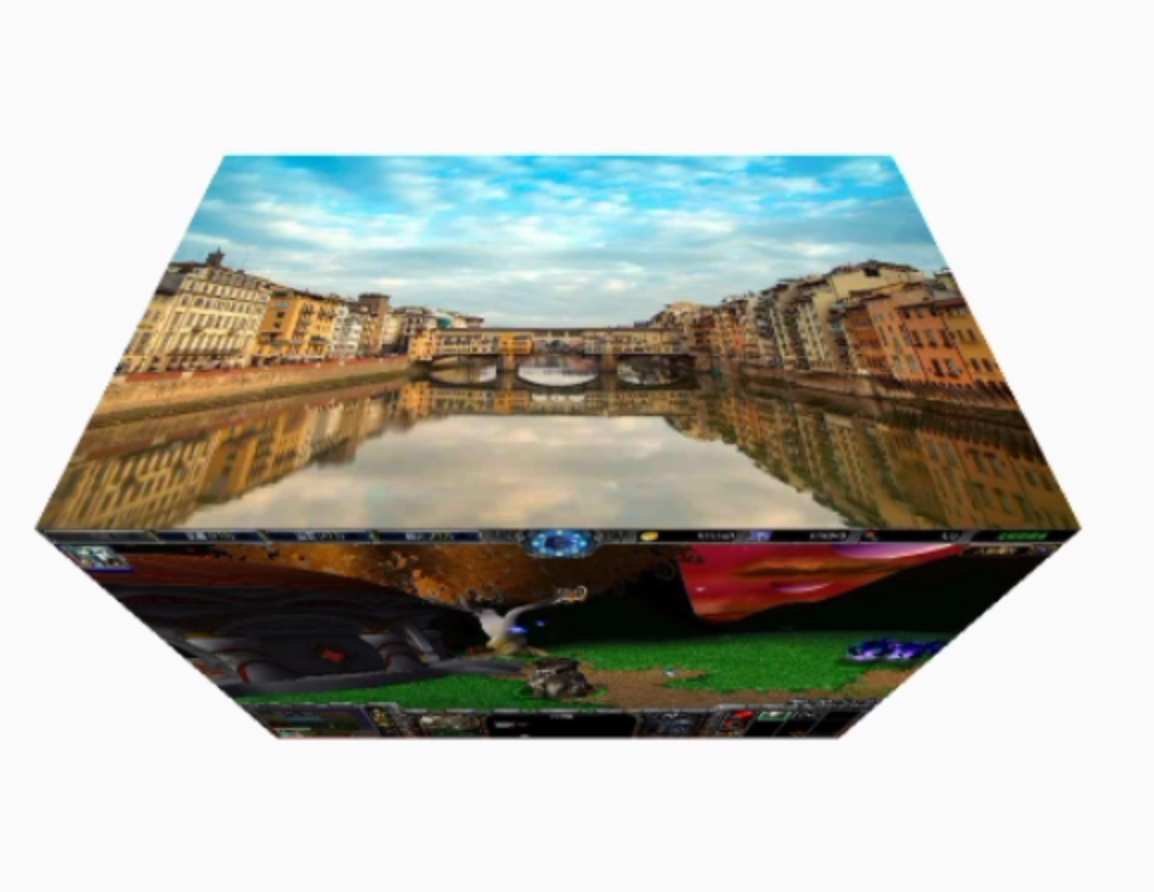
封面 背景介绍 Android中有两个Camera类。一个是android.hardware.Camera,用于对设备的摄像头进行操作。另一个是android.graphics.Camera,可用于进行3D变换,然后把变换后的矩阵Matrix作用于Canvas等,我们本篇要介绍的就是这个Camera类。 玩转Camera 前面我们提到过,Camera是一个能够进行3D变化的类,在进行玩3D变换后,我们能够通过mCamera.getMatrix(Matrix)把变换矩阵Matrix赋值,然后可以用在Canvas上。或者,你可以直接通过mCamera.applyToCanvas(Canvas)直接把变换作用到一个Canvas上。 Android中的三维坐标系 Android中的三维坐标轴符合左手坐标系。需要注意,Android中的三维坐标系中的Y轴和二维的是相反的。 Android三维坐标系 Camera默认的位置是在(0, 0, -8)点。 Camera的变换操作 方法 说明 getMatrix(mMatrix) 给mMatrix赋值。 applyToCanvas(mCanvas) 将变换获得的Matrix直接作用到mCanvas上。 rotate(x,y,z) 旋转。 rotateX、rotateY、rotateZ 旋转。 getLocationX、getLocationY、getLocationZ 获得Camera的位置,默认是在(0,0,-8)点。 setLocation(x,y,z) 设置camera的位置。 translate(x,y,z) 平移Camera。 save() 与Canvas的类似。 restore() 与Canvas类似。 Camera的方法并不多,所以使用起来也是比较简单明了的。 Camera的使用实例 由于使用Camera的核心就是获得一个变换后的Matrix,所以你需要对Matrix具有一定的认识。关于Matrix的入门级使用,可以参考一下我的这两篇博客。Android——Matrix变换矩阵的探索(1);Android——Matrix变换矩阵的探索(2) 演示Demo1 image 下面是github源码的链接: Github源码链接 3D ViewGroup演示 image Github源码链接 Camera用于自定义动画 直接上个代码实例,用法和前面的例子没什么本质区别,都是通过Camera变换之后获得Matrix矩阵。 public class Custom3DAnimation extends Animation { private Camera mCamera; private int centerWidth; private int centerHeight; public void setmRotateY(float mRotateY) { this.mRotateY = mRotateY; } private float mRotateY; public Custom3DAnimation() { mCamera = new Camera(); mRotateY = 90; } @Override protected void applyTransformation(float interpolatedTime, Transformation t) { Matrix matrix = t.getMatrix(); //获得Transformation的Matrix mCamera.save();//保存当前镜头状态 mCamera.rotateY(mRotateY * interpolatedTime); //使相机旋转 mCamera.getMatrix(matrix); //将旋转变换作用到matrix上 mCamera.restore(); //合并镜头层 matrix.preTranslate(centerWidth, centerHeight);//操作前平移 matrix.postTranslate(-centerWidth, -centerHeight); //操作后平移 } @Override public void initialize(int width, int height, int parentWidth, int parentHeight) { super.initialize(width, height, parentWidth, parentHeight); setDuration(5 * 1000); //设置默认持续时间 setFillAfter(true); //设置动画结束后是否保持状态 setInterpolator(new LinearInterpolator()); //设置插值器 centerWidth = width / 2; centerHeight = height / 2; } } 总结 Camera的使用其实并不复杂,只需要记住前面提到的几个方法就行。由于Camera最终是输出一个矩阵,所以还需要对矩阵有一定的掌握。上面我已经给出了矩阵快速使用的指南,大家可以根据情况自行参考。 如果你觉得还不错,那就动动小捶捶敲个关注、点个赞哦!

资源下载

更多资源
Mario

Mario

马里奥是站在游戏界顶峰的超人气多面角色。马里奥靠吃蘑菇成长,特征是大鼻子、头戴帽子、身穿背带裤,还留着胡子。与他的双胞胎兄弟路易基一起,长年担任任天堂的招牌角色。

腾讯云软件源

腾讯云软件源

为解决软件依赖安装时官方源访问速度慢的问题,腾讯云为一些软件搭建了缓存服务。您可以通过使用腾讯云软件源站来提升依赖包的安装速度。为了方便用户自由搭建服务架构,目前腾讯云软件源站支持公网访问和内网访问。

Sublime Text

Sublime Text

Sublime Text具有漂亮的用户界面和强大的功能,例如代码缩略图,Python的插件,代码段等。还可自定义键绑定,菜单和工具栏。Sublime Text 的主要功能包括:拼写检查,书签,完整的 Python API , Goto 功能,即时项目切换,多选择,多窗口等等。Sublime Text 是一个跨平台的编辑器,同时支持Windows、Linux、Mac OS X等操作系统。

WebStorm

WebStorm

WebStorm 是jetbrains公司旗下一款JavaScript 开发工具。目前已经被广大中国JS开发者誉为“Web前端开发神器”、“最强大的HTML5编辑器”、“最智能的JavaScript IDE”等。与IntelliJ IDEA同源,继承了IntelliJ IDEA强大的JS部分的功能。

用户登录
用户注册