Redis配置-主从服务器-phpredis-phpRedisAdmin-php调用
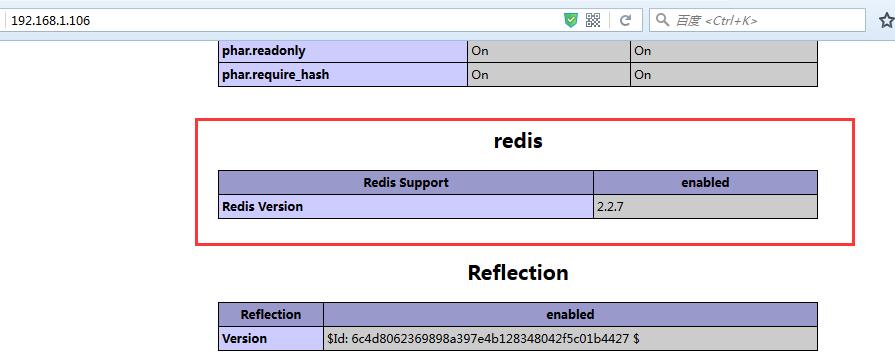
1.准备开发环境 yumgroupinstall-y"DevelopmentTools""ServerPlatformDevelopment" 2.更新时间 3.下载redis-3.2.1.tar.gz,网站地址是:www.redis.io 4.编译安装 tarxfredis-3.2.1.tar.gz cdredis-3.2.1 make 启动redis服务,默认的端口号是6379 注意:有时因为redis配置文件不一样的原因,我们在启动服务配置文件时候,需要指定配置文件,不指定为默认配置文件 切换目录至源码包文件中 [root@centos7src]#pwd /root/redis-3.2.1/src [root@centos7src]#redis-server./../redis.conf 查看是否开启服务 [root@centos7src]#netstat-tunlp|grep6379 tcp000.0.0.0:63790.0.0.0:*LISTEN 1387/redis-server0 进入交互式命令 [root@centos7src]#redis-cli-p6379 127.0.0.1:6379> 配置一个主从服务器,master/slave其实配置都是雷同的,因此简单点直接克隆刚才配置的服务器 刚才的服务器的ip地址为192.168.1.104 克隆后的ip地址为192.168.1.107,作为一个slave服务器 编辑slave服务器的配置文件/root/redis-3.2.1/redis.conf,修改以下相关参数 bind0.0.0.0 daemonizeyes slaveof192.168.1.1046379 保存退出后开启redis服务即可 回到192.168.1.104的master主机上进行测试 [root@centos7src]#redis-cli-p6379 127.0.0.1:6379>info #Replication role:master connected_slaves:1 slave0:ip=192.168.1.107,port=6379,state=online,offset=631,lag=1 master_repl_offset:631 repl_backlog_active:1 repl_backlog_size:1048576 repl_backlog_first_byte_offset:2 repl_backlog_histlen:630 在192.168.1.107的slave主机上进行测试 [root@centos7src]#redis-cli-p6379 127.0.0.1:6379>info #Replication role:slave master_host:192.168.1.104 master_port:6379 master_link_status:up------->连接成功 master_last_io_seconds_ago:7 master_sync_in_progress:0 slave_repl_offset:617 slave_priority:100 slave_read_only:1 connected_slaves:0 master_repl_offset:0 repl_backlog_active:0 repl_backlog_size:1048576 repl_backlog_first_byte_offset:0 repl_backlog_histlen:0 master服务器可写,例如 在192.168.1.104master上 127.0.0.1:6379>settoday1 OK 127.0.0.1:6379>gettoday "1" 127.0.0.1:6379> 在192.168.1.107slave上 127.0.0.1:6379>gettoday "1" 127.0.0.1:6379> 下面测试lamp环境中的使用 准备环境: yuminstall-yaprapr-utilhttpdphpphp-develphp-mysqlmariadbmariadb-server lamp主机为192.168.1.106 安装phpredis的扩展, 下载地址:wget https://github.com/phpredis/phpredis/archive/2.2.7.tar.gz 解压后进入phpredis中需要生成配置文件,因此执行phpize 配置编译安装 ./configure--with-php-config=/usr/bin/php-config--enable-redis make makeinstall 配置php加载扩展 vim/etc/php.ini 在extension处添加extension=redis.so 在web根目录下添加一个首页(注意httpd.conf中添加DirectoryIndex index.php) cat/var/www/html/index.php <?php phpinfo(); ?> 在浏览器中查看是否有扩展 验证php是否能使用redis 在根目录下创建一个文件夹为Redis mkdirredis catredis/test.php <?php $redis=newRedis(); $redis->connect('192.168.1.104','6379'); $redis->set('name','xuelong'); echo$redis->get('name'); ?> 查看http://192.168.1.106/redis/test.php phpRedisAdmin后台管理配置 下载地址:wget https://github.com/ErikDubbelboer/phpRedisAdmin/archive/v1.1.0.tar.gz 下载后解压到web目录下,进入phpRedisAdmin-1.1.0目录 克隆一个文件到phpRedisAdmin-1.1.0下,命令为: gitclonehttps://github.com/nrk/predis.gitvendor 配置连接服务器地址的配置文件在phpRedisAdmin-1.1.0/includes/config.sample.inc.php,因此备份该文件,且重名为config.inc.php 修改配置文件为: array( 'name'=>'Remoteserver',//--->自己随意命名. 'host'=>'192.168.1.104',--->Redis服务器的地址 'port'=>6379,--->端口号 'filter'=>'*' //OptionalRedisauthentication. //'auth'=>'redispasswordhere'//Warning:Thepasswordissentinplain-texttotheRedisserver. ), php会话保存在redis中 编辑192.168.1.104web主机上的/etc/php.ini文件,定义session的存储方式为: session.save.handler=redis session.save_path="tcp://192.168.1.104:6379" 或者,redis.conf提供认证的时候使用以下的方式; session.save_path="tcp://192.168.1.104:6379?auth=password