首页 文章 精选 留言 我的

精选列表

搜索[学习],共10000篇文章
优秀的个人博客,低调大师

python标准库学习6

使用 apply 函数 def function(a, b): print a, b apply (function, ( "whither" , "canada?" )) apply (function, ( 1 , 2 + 3 )) whither canada? 1 5 使用 apply 函数传递关键字参数 def function(a, b): print a, b apply (function, ( "crunchy" , "frog" )) apply (function, ( "crunchy" ,), { "b" : "frog" }) apply (function, (), { "a" : "crunchy" , "b" : "frog" }) crunchy frog crunchy frog crunchy frog 使用 apply 函数调用基类的构造函数 class Rectangle: def _ _init_ _( self , color = "white" , width = 10 , height = 10 ): print "create a" , color, self , "sized" , width, "x" , height class RoundedRectangle(Rectangle): def _ _init_ _( self , * * kw): apply (Rectangle._ _init_ _, ( self ,), kw) rect = Rectangle(color = "green" , height = 100 , width = 100 ) rect = RoundedRectangle(color = "blue" , height = 20 ) create a green <Rectangle instance at 8c8260 > sized 100 x 100 create a blue <RoundedRectangle instance at 8c84c0 > sized 10 x 20 使用 _ _import_ _ 函数获得特定函数 def getfunctionbyname(module_name, function_name): module = _ _import_ _(module_name) return getattr (module, function_name) print repr (getfunctionbyname( "dumbdbm" , "open" )) <function open at 794fa0 > 使用 _ _import_ _ 函数实现 延迟导入 class LazyImport: def _ _init_ _( self , module_name): self .module_name = module_name self .module = None def _ _getattr_ _( self , name): if self .module is None : self .module = _ _import_ _( self .module_name) return getattr ( self .module, name) string = LazyImport( "string" ) print string.lowercase abcdefghijklmnopqrstuvwxyz 使用 dir 函数 def dump(value): print value, "=>" , dir (value) import sys dump( 0 ) dump( 1.0 ) dump( 0.0j ) # complex number dump([]) # list dump({}) # dictionary dump( "string" ) dump( len ) # function dump(sys) # module 0 = > [] 1.0 = > [] 0j = > [ 'conjugate' , 'imag' , 'real' ] [] = > [ 'append' , 'count' , 'extend' , 'index' , 'insert' , 'pop' , 'remove' , 'reverse' , 'sort' ] {} = > [ 'clear' , 'copy' , 'get' , 'has_key' , 'items' , 'keys' , 'update' , 'values' ] string = > [] <built - in function len > = > [ '_ _doc_ _' , '_ _name_ _' , '_ _self_ _' ] <module 'sys' (built - in )> = > [ '_ _doc_ _' , '_ _name_ _' , '_ _stderr_ _' , '_ _stdin_ _' , '_ _stdout_ _' , 'argv' , 'builtin_module_names' , 'copyright' , 'dllhandle' , 'exc_info' , 'exc_type' , 'exec_prefix' , 'executable' , ... 使用 dir 函数查找类的所有成员 class A: def a( self ): pass def b( self ): pass class B(A): def c( self ): pass def d( self ): pass def getmembers(klass, members = None ): # get a list of all class members, ordered by class if members is None : members = [] for k in klass._ _bases_ _: getmembers(k, members) for m in dir (klass): if m not in members: members.append(m) return members print getmembers(A) print getmembers(B) print getmembers(IOError) [ '_ _doc_ _' , '_ _module_ _' , 'a' , 'b' ] [ '_ _doc_ _' , '_ _module_ _' , 'a' , 'b' , 'c' , 'd' ] [ '_ _doc_ _' , '_ _getitem_ _' , '_ _init_ _' , '_ _module_ _' , '_ _str_ _' ] 使用 callable 函数 def dump(function): if callable (function): print function, "is callable" else : print function, "is *not* callable" class A: def method( self , value): return value class B(A): def _ _call_ _( self , value): return value a = A() b = B() dump( 0 ) # simple objects dump( "string" ) dump( callable ) dump(dump) # function dump(A) # classes dump(B) dump(B.method) dump(a) # instances dump(b) dump(b.method) 0 is * not * callable string is * not * callable <built - in function callable > is callable <function dump at 8ca320 > is callable A is callable B is callable <unbound method A.method> is callable <A instance at 8caa10 > is * not * callable <B instance at 8cab00 > is callable <method A.method of B instance at 8cab00 > is callable 使用 eval 函数 def dump(expression): result = eval (expression) print expression, "=>" , result, type (result) dump( "1" ) dump( "1.0" ) dump( "'string'" ) dump( "1.0 + 2.0" ) dump( "'*' * 10" ) dump( "len('world')" ) 1 = > 1 < type 'int' > 1.0 = > 1.0 < type 'float' > 'string' = > string < type 'string' > 1.0 + 2.0 = > 3.0 < type 'float' > '*' * 10 = > * * * * * * * * * * < type 'string' > len ( 'world' ) = > 5 < type 'int' > 使用 eval 函数执行任意命令 print eval ( "_ _import_ _('os').getcwd()" ) print eval ( "_ _import_ _('os').remove('file')" ) / home / fredrik / librarybook Traceback (innermost last): File "builtin-eval-example-2" , line 2 , in ? File "<string>" , line 0 , in ? os.error: ( 2 , 'No such file or directory' ) 使用 compile 函数检查语法 NAME = "script.py" BODY = """ prnt 'owl-stretching time' """ try : compile (BODY, NAME, "exec" ) except SyntaxError, v: print "syntax error:" , v, "in" , NAME # syntax error: invalid syntax in script.py 执行已编译的代码 BODY = """ print 'the ant, an introduction' """ code = compile (BODY, "<script>" , "exec" ) print code exec code <code object ? at 8c6be0 , file "<script>" , line 0 > the ant, an introduction Python 还提供了execfile函数, 一个从文件加载代码, 编译代码, 执行代码的快捷方式. 使用 execfile 函数 execfile ( "hello.py" ) def EXECFILE (filename, locals = None , globals = None ): exec compile ( open (filename).read(), filename, "exec" ) in locals , globals EXECFILE ( "hello.py" ) hello again, and welcome to the show hello again, and welcome to the show 显式地访问 _ _builtin_ _ 模块中的函数 def open (filename, mode = "rb" ): import _ _builtin_ _ file = _ _builtin_ _. open (filename, mode) if file .read( 5 ) not in ( "GIF87" , "GIF89" ): raise IOError, "not a GIF file" file .seek( 0 ) return file fp = open ( "samples/sample.gif" ) print len (fp.read()), "bytes" fp = open ( "samples/sample.jpg" ) print len (fp.read()), "bytes" 3565 bytes Traceback (innermost last): File "builtin-open-example-1.py" , line 12 , in ? File "builtin-open-example-1.py" , line 5 , in open IOError: not a GIF file 使用 exceptions 模块 # python imports this module by itself, so the following # line isn't really needed # python 会自动导入该模块, 所以以下这行是不必要的 # import exceptions class HTTPError(Exception): # indicates an HTTP protocol error def _ _init_ _( self , url, errcode, errmsg): self .url = url self .errcode = errcode self .errmsg = errmsg def _ _str_ _( self ): return ( "<HTTPError for %s: %s %s>" % ( self .url, self .errcode, self .errmsg) ) try : raise HTTPError( "http://www.python.org/foo" , 200 , "Not Found" ) except HTTPError, error: print "url" , "=>" , error.url print "errcode" , "=>" , error.errcode print "errmsg" , "=>" , error.errmsg raise # reraise exception url = > http: / / www.python.org / foo errcode = > 200 errmsg = > Not Found Traceback (innermost last): File "exceptions-example-1" , line 16 , in ? HTTPError: <HTTPError for http: / / www.python.org / foo: 200 Not Found> 使用 os 模块重命名和删除文件 import os import string def replace( file , search_for, replace_with): # replace strings in a text file back = os.path.splitext( file )[ 0 ] + ".bak" temp = os.path.splitext( file )[ 0 ] + ".tmp" try : # remove old temp file, if any os.remove(temp) except os.error: pass fi = open ( file ) fo = open (temp, "w" ) for s in fi.readlines(): fo.write(string.replace(s, search_for, replace_with)) fi.close() fo.close() try : # remove old backup file, if any os.remove(back) except os.error: pass # rename original to backup... os.rename( file , back) # ...and temporary to original os.rename(temp, file ) # # try it out! file = "samples/sample.txt" replace( file , "hello" , "tjena" ) replace( file , "tjena" , "hello" ) 使用 os 列出目录下的文件 import os for file in os.listdir( "samples" ): print file sample.au sample.jpg sample.wav ... getcwd和chdir函数分别用于获得和改变当前工作目录 使用 os 模块改变当前工作目录 import os # where are we? cwd = os.getcwd() print "1" , cwd # go down os.chdir( "samples" ) print "2" , os.getcwd() # go back up os.chdir(os.pardir) print "3" , os.getcwd() 1 / ematter / librarybook 2 / ematter / librarybook / samples 3 / ematter / librarybook makedirs和removedirs函数用于创建或删除目录层 使用 os 模块创建/删除多个目录级 import os os.makedirs( "test/multiple/levels" ) fp = open ( "test/multiple/levels/file" , "w" ) fp.write( "inspector praline" ) fp.close() # remove the file os.remove( "test/multiple/levels/file" ) # and all empty directories above it os.removedirs( "test/multiple/levels" ) removedirs函数会删除所给路径中最后一个目录下所有的空目录. 而mkdir和rmdir函数只能处理单个目录级 使用 os 模块创建/删除目录 import os os.mkdir( "test" ) os.rmdir( "test" ) os.rmdir( "samples" ) # this will fail Traceback (innermost last): File "os-example-7" , line 6 , in ? OSError: [Errno 41 ] Directory not empty: 'samples' 如果需要删除非空目录, 你可以使用shutil模块中的rmtree函数 >>> import shutil shutil.rmtree( "d:\\a" ) 复制文件目录(包括内部文件) >>> shutil.copytree( "d:\\new" , "d:\\a" ) 复制文件操作: shutil.copyfile( "d:\\new\\a.txt" , "d:\\a.txt" ) 目录或文件的移动操作 shutil.move( "d:\\new\\a.txt" , "d:\\" ) 使用 os 模块获取文件属性 import os import time file = "samples/sample.jpg" def dump(st): mode, ino, dev, nlink, uid, gid, size, atime, mtime, ctime = st print "- size:" , size, "bytes" print "- owner:" , uid, gid print "- created:" , time.ctime(ctime) print "- last accessed:" , time.ctime(atime) print "- last modified:" , time.ctime(mtime) print "- mode:" , oct (mode) print "- inode/dev:" , ino, dev # # get stats for a filename st = os.stat( file ) print "stat" , file dump(st) print # # get stats for an open file fp = open ( file ) st = os.fstat(fp.fileno()) print "fstat" , file dump(st) stat samples / sample.jpg - size: 4762 bytes - owner: 0 0 - created: Tue Sep 07 22 : 45 : 58 1999 - last accessed: Sun Sep 19 00 : 00 : 00 1999 - last modified: Sun May 19 01 : 42 : 16 1996 - mode: 0100666 - inode / dev: 0 2 fstat samples / sample.jpg - size: 4762 bytes - owner: 0 0 - created: Tue Sep 07 22 : 45 : 58 1999 - last accessed: Sun Sep 19 00 : 00 : 00 1999 - last modified: Sun May 19 01 : 42 : 16 1996 - mode: 0100666 - inode / dev: 0 0 可以使用chmod和utime函数修改文件的权限模式和时间属性 使用 os 模块修改文件的权限和时间戳 import os import stat, time infile = "samples/sample.jpg" outfile = "out.jpg" # copy contents fi = open (infile, "rb" ) fo = open (outfile, "wb" ) while 1 : s = fi.read( 10000 ) if not s: break fo.write(s) fi.close() fo.close() # copy mode and timestamp st = os.stat(infile) os.chmod(outfile, stat.S_IMODE(st[stat.ST_MODE])) os.utime(outfile, (st[stat.ST_ATIME], st[stat.ST_MTIME])) print "original" , "=>" print "mode" , oct (stat.S_IMODE(st[stat.ST_MODE])) print "atime" , time.ctime(st[stat.ST_ATIME]) print "mtime" , time.ctime(st[stat.ST_MTIME]) print "copy" , "=>" st = os.stat(outfile) print "mode" , oct (stat.S_IMODE(st[stat.ST_MODE])) print "atime" , time.ctime(st[stat.ST_ATIME]) print "mtime" , time.ctime(st[stat.ST_MTIME]) original = > mode 0666 atime Thu Oct 14 15 : 15 : 50 1999 mtime Mon Nov 13 15 : 42 : 36 1995 copy = > mode 0666 atime Thu Oct 14 15 : 15 : 50 1999 mtime Mon Nov 13 15 : 42 : 36 1995 system函数在当前进程下执行一个新命令, 并等待它完成 使用 os 执行操作系统命令 import os if os.name = = "nt" : command = "dir" else : command = "ls -l" os.system(command) - rwxrw - r - - 1 effbot effbot 76 Oct 9 14 : 17 README - rwxrw - r - - 1 effbot effbot 1727 Oct 7 19 : 00 SimpleAsyncHTTP.py - rwxrw - r - - 1 effbot effbot 314 Oct 7 20 : 29 aifc - example - 1.py - rwxrw - r - - 1 effbot effbot 259 Oct 7 20 : 38 anydbm - example - 1.py ... 命令通过操作系统的标准 shell 执行, 并返回 shell 的退出状态. 需要注意的是在 Windows 下, shell 通常是command.com, 它的推出状态总是 0. exec函数会使用新进程替换当前进程(或者说是"转到进程"). 使用 os 模块启动新进程 import os import sys program = "python" arguments = [ "hello.py" ] print os.execvp(program, (program,) + tuple (arguments)) print "goodbye" hello again, and welcome to the show execvp函数, 它会从标准路径搜索执行程序, 把第二个参数(元组)作为单独的参数传递给程序, 并使用当前的环境变量来运行程序. 其他七个同类型函数请参阅Python Library Reference. 在 Unix 环境下, 你可以通过组合使用exec,fork以及wait函数来从当前程序调用另一个程序,fork函数复制当前进程,wait函数会等待一个子进程执行结束. 使用 os 模块调用其他程序 (Unix) import os import sys def run(program, * args): pid = os.fork() if not pid: os.execvp(program, (program,) + args) return os.wait()[ 0 ] run( "python" , "hello.py" ) print "goodbye" hello again, and welcome to the show goodbye fork函数在子进程返回中返回 0 (这个进程首先从fork返回值), 在父进程中返回一个非 0 的进程标识符(子进程的 PID ). 也就是说, 只有当我们处于子进程的时候 "not pid" 才为真. fork和wait函数在 Windows 上是不可用的, 但是你可以使用spawn函数不过,spawn不会沿着路径搜索可执行文件, 你必须自己处理好这些. 或许系统当前的“PATH”变量的值 >>> import string >>> import os >>> for path in string.split(os.environ[ "PATH" ],os.pathsep): print path C:\Program Files\NVIDIA Corporation\PhysX\Common d:\program files\Python27\Lib\site - packages\PyQt4 C:\windows\system32 C:\windows C:\windows\System32\Wbem C:\windows\System32\WindowsPowerShell\v1. 0 \ C:\Program Files\Common Files\Thunder Network\KanKan\Codecs D:\Program Files\python D:\Program Files\Java\jdk1. 6.0_23 / bin D:\Program Files\Java\jdk1. 6.0_23 / jre / bin C:\Program Files\Microsoft SQL Server\ 90 \Tools\binn\ D:\vs2010 - qt - src - 4.7 . 4 \qt - src - 4.7 . 4 \ bin C:\Program Files\Intel\WiFi\ bin \ C:\Program Files\Common Files\Intel\WirelessCommon\ C:\Program Files\Lenovo\Bluetooth Software\ D:\vs2010 - qt - src - 4.7 . 4 \qt - src - 4.7 . 4 \ bin D:\vs2010 - qt - src - 4.7 . 4 \qt - src - 4.7 . 4 \lib D:\vs2010 - qt - src - 4.7 . 4 \qt - src - 4.7 . 4 \include D:\Qt\ 4.7 . 4 \ bin >>> 使用 os 模块调用其他程序 (Windows) import os import string def run(program, * args): # find executable for path in string.split(os.environ[ "PATH" ], os.pathsep): file = os.path.join(path, program) + ".exe" try : return os.spawnv(os.P_WAIT, file , ( file ,) + args) except os.error: pass raise os.error, "cannot find executable" run( "python" , "hello.py" ) print "goodbye" hello again, and welcome to the show goodbye spawn函数还可用于在后台运行一个程序.下面这个例子给run函数添加了一个可选的mode参数; 当设置为os.P_NOWAIT时, 这个脚本不会等待子程序结束, 默认值os.P_WAIT时spawn会等待子进程结束. 其它的标志常量还有os.P_OVERLAY,它使得spawn的行为和exec类似, 以及os.P_DETACH, 它在后台运行子进程, 与当前控制台和键盘焦点隔离. import os import string def run(program, * args, * * kw): # find executable mode = kw.get( "mode" , os.P_WAIT) for path in string.split(os.environ[ "PATH" ], os.pathsep): file = os.path.join(path, program) + ".exe" try : return os.spawnv(mode, file , ( file ,) + args) except os.error: pass raise os.error, "cannot find executable" run( "python" , "hello.py" , mode = os.P_NOWAIT) print "goodbye" goodbye hello again, and welcome to the show 下面这个例子提供了一个在 Unix 和 Windows 平台上通用的spawn方法 使用 spawn 或 fork/exec 调用其他程序 import os import string if os.name in ( "nt" , "dos" ): exefile = ".exe" else : exefile = "" def spawn(program, * args): try : # possible 2.0 shortcut! return os.spawnvp(program, (program,) + args) except AttributeError: pass try : spawnv = os.spawnv except AttributeError: # assume it's unix pid = os.fork() if not pid: os.execvp(program, (program,) + args) return os.wait()[ 0 ] else : # got spawnv but no spawnp: go look for an executable for path in string.split(os.environ[ "PATH" ], os.pathsep): file = os.path.join(path, program) + exefile try : return spawnv(os.P_WAIT, file , ( file ,) + args) except os.error: pass raise IOError, "cannot find executable" # # try it out! spawn( "python" , "hello.py" ) print "goodbye" hello again, and welcome to the show goodbye 处理守护进程 Unix 系统中, 你可以使用fork函数把当前进程转入后台(一个"守护者/daemon"). 一般来说, 你需要派生(fork off)一个当前进程的副本, 然后终止原进程 使用 os 模块使脚本作为守护执行 (Unix) import os import time pid = os.fork() if pid: os._exit( 0 ) # kill original print "daemon started" time.sleep( 10 ) print "daemon terminated" 使用 os 模块终止当前进程 importos importsys try: sys.exit(1) exceptSystemExit, value: print"caught exit(%s)"%value try: os._exit(2) exceptSystemExit, value: print"caught exit(%s)"%value print"bye!" caught exit(1) 本文转自被遗忘的博客园博客,原文链接:http://www.cnblogs.com/rollenholt/archive/2011/11/26/2264597.html,如需转载请自行联系原作者

优秀的个人博客,低调大师

数据分析学习笔记

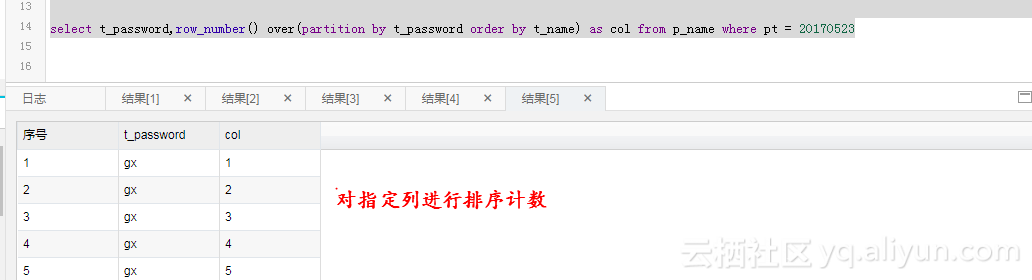
row_number() row_number() over(partition by col1[, col2…] order by col1 [asc|desc][, col2[asc|desc]…]) 函数说明: 可以用于开窗,排序,计数,返回当前窗口的排序值。 参数说明:partition by col1[, col2..]:指定开窗口的列。 order by col1 [asc|desc], col2[asc|desc]:指定结果返回时的排序的值。 WM_CONCAT 函数声明:string wm_concat(string separator, string str) 函数说明:该函数用指定的 spearator 做分隔符,链接 str 中的值。可以用于多行变一行。 参数说明:separator:String 类型常量,分隔符。其他类型或非常量将引发异常。str:String 类型,若输入为 Bigint,Double 或者 Datetime 类型,会隐式转换为 String 后参与运算,其它类型报异常。返回值:返回 String 类型。

优秀的个人博客,低调大师

iOS开发学习笔记(一)

一、必要条件 1、一台运行Snow Leopard(os x 10.6.5或者更高版本)的基于Intel的Macintosh计算机。 2、注册成为iOS开发人员,下载iOS SDK。 3、下载XCode集成开发环境。 二、开发者选择: 1、免费的SDK包含一个模拟器,它支持在mac上创建和运行iPhone和iPad程序。但是模拟器不支持依赖硬件的某些特性,如iPhone的加速计或者摄像头,也不支持将应用程序安装到实际的iPhone或其他设备上。开发的应用也不能发布到appstore上。如果要实现这些功能,需要注册另外两个收费的选项。 2、标准方案是99美元一年。提供了大量的开发工具、资源和技术支持,支持在appstore上发布应用。最重要的是支持在iOS上而不是模拟器上调试和测试代码。 3、企业方案是299美元一年。面向开发专用的、内部的iOS应用程序的企业。 三、编写iOS程序用何不同: 1、只有一个应用程序正在运行 在iOS上,特定时间段内仅激活一个应用程序并在屏幕上显示。从iOS 4开始,当用户按下home按钮后应用程序有时可能继续在后台运行,但是这种情况也只限于特定的场合。 当应用程序未激活或未运行于后台时,它不会引起CPU任何形式的注意,这将导致网络连接断开以及其他问题。iOS 4在后台处理能力方面已经有了大幅提升,但要使你的应用程序在这种情况下仍运行良好,还需要你自身的努力。 2、只有一个窗口 在桌面及笔记本电脑操作系统中,多个程序可以同时运行,并且可以分别创建和控制多个窗口。而iOS则有所不同,它只允许应用程序操作一个“窗口”。应用程序与用户的所有交互都在这个窗口中完成,而且这个窗口的大小就是iOS屏幕的大小,是固定的。 3、受限访问 计算机上的程序可以访问其用户能够访问的任何内容,而iOS则严格限制了应用程序的访问权限。 你只能在iOS为应用程序创建的文件系统中读写文件。此区域称为应用程序的沙盒,应用程序在其中存储文档、首选项等需要存储的各种数据。 应用程序还存在其他方面的限制。举例来说,你不能访问iOS上端口号较小的网络端口,也不能执行台式计算机中需要有根用户或管理员权限才能执行的操作。 4、有限的响应时间 由于使用方式特殊,iOS及其应用程序需要具备较快的响应时间。启动应用程序时,需要先打开它,载入首选项和数据,并尽快在屏幕上显示主视图,这一切要在几秒之内完成。 只要应用程序在运行,就可以从其下方拖出一个菜单条。如果用户按home按钮,iOS就会返回主页,用户需要快速保存一切内容并退出。如果未在5秒之内保存并放弃控制,则应用程序进程将终止,无论用户是否已经完成保存。 请注意,在iOS 4中,这种情况因为一种新API的存在而有所改善。这种API允许你的应用程序在终止前申请多一些的时间来处理。 5、有限的屏幕大小 iPhone的屏幕显示效果非常出色,从推出到现在,它一直是消费设备中分辨率最高的屏幕。 但是,iPhone的显示屏幕并不大,你施展的空间要比现代计算机小很多,最新的Retina显示器(iPhone 4和第4代iPod touch)仅有640×960像素,更老的仅有320×480像素。 而且,现在的尺寸与以前相同,只不过Retina显示屏为640×960像素,所以不要以为可以放更多的控件或什么了——仅仅是分辨率比以前高了。 iPad稍大一些,是1024×768像素,但也不算很大。与此形成鲜明对比的是,在撰写本书时,苹果公司最便宜的iMac支持1920×1080像素,最便宜的笔记本电脑MacBook支持1280×800像素。而苹果公司最大的显示器,27英寸的LED Cinema Display,支持超大的2560×1440像素。 6、有限的系统资源 阅读本书的任何资深程序员可能都会对256 MB内存、8 GB存储空间的机器嗤之以鼻,因为其资源实在是非常有限,但这种机器却是真实存在的。或许,开发iOS应用程序与在内存为48 KB的机器上编写复杂的电子表格应用程序不属于同一级别,二者之间没有可比性,但由于iOS的图形属性和它的功能,其内存不足是非常容易出现的。 目前上市的iOS的物理内存要么是256 MB,要么是512 MB,当然今后内存还会不断增长。内存的一部分用于屏幕缓冲和其他一些系统进程。通常,不到一半(也可能更少)的内存将留给应用程序使用。 虽然这些内存对于这样的小型计算机可能已经足够了,但谈到iOS的内存时还有另一个因素需要考虑:现代计算机操作系统,如Mac OS X,会将一部分未使用的内存块写到磁盘的交换文件中。这样,当应用程序请求的内存超过计算机实际可用的内存时,它仍然可以运行。但是,iOS并不会将易失性内存(如应用程序数据)写到交换文件中。因此,应用程序可用的内存量将受到手机中未使用的物理内存量的限制。 Cocoa Touch提供了一种内置机制,可以将内存不足的情况通知给应用程序。出现这种情况时,应用程序必须释放不需要的内存,甚至可能被强制退出。 7、不支持垃圾收集 之前已经说过,Cocoa Touch使用的是Objective-C 2.0,但该语言中的一个关键特性在iOS中并不可用:Cocoa Touch不支持垃圾收集。 8、新功能 前面提过,Cocoa Touch缺少Cocoa的一些功能,但iOS SDK中也有一些新功能是Cocoa所没有的,或者至少不是在任何Mac上都可用的。 iPhone SDK为应用程序提供了一种定位方法,即用Core Location确定手机的当前地理坐标。 大部分iOS还提供了一个内置的照相机和照片库,并且SDK允许应用程序访问这两者。 iOS还提供了一个内置的加速计(在最新的iPhone、iPod touch中有陀螺仪),用于检测机子的握持和移动方式。 9、与众不同的方法 iOS没有键盘和鼠标,这意味着在编程时它与用户的交互方式和通用的计算机截然不同。所幸的是,大多数交互都不需要你来处理。例如,如果在应用程序中添加一个文本字段,则iOS知道在用户单击该字段时调用键盘,你不需要编写任何额外的代码。 说明目前的设备支持通过蓝牙连接外部键盘,这提供了一种不错的键盘体验并节省了一定的屏幕空间,但这种使用情形仍然非常少。连接鼠标仍然完全行不通。 本文转自麒麟博客园博客,原文链接:http://www.cnblogs.com/zhuqil/archive/2012/05/24/2517176.html,如需转载请自行联系原作者

优秀的个人博客,低调大师

Android被逼学习例子2

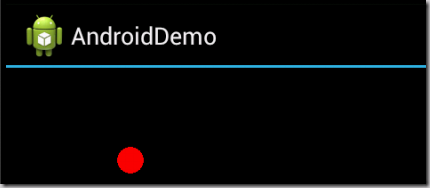
接下来的这个小例子演示当手指在触摸屏上拖动的时候,一个红色的小球更随手指进行移动。不过这个例子大致演示了一下自定义UI组件。 先来看看效果吧: 代码大致如下: AndroidDemoActivity.java package Android.Demo; import android.app.Activity; import android.os.Bundle; import android.provider.ContactsContract.CommonDataKinds.Event; import android.view.MotionEvent; import android.view.View; import android.view.View.OnTouchListener; import android.widget.LinearLayout; public class AndroidDemoActivity extends Activity { /** Called when the activity is first created. */ @Override public void onCreate(Bundle savedInstanceState) { super.onCreate(savedInstanceState); setContentView(R.layout.main); LinearLayout layout = (LinearLayout) findViewById(R.id.root); final DrawView draw = new DrawView(this); draw.setMinimumHeight(300); draw.setMinimumWidth(300); draw.setOnTouchListener(new OnTouchListener() { @Override public boolean onTouch(View arg0, MotionEvent evnet) { // TODO Auto-generated method stub draw.currentX = evnet.getX(); draw.currentY = evnet.getY(); draw.invalidate(); return false; } }); layout.addView(draw); } } DrawView.java代码如下: package Android.Demo; import android.content.Context; import android.graphics.Canvas; import android.graphics.Color; import android.graphics.Paint; import android.view.View; public class DrawView extends View { public DrawView(Context context) { super(context); } @Override protected void onDraw(Canvas canvas) { super.onDraw(canvas); Paint p = new Paint(); p.setColor(Color.RED); canvas.drawCircle(currentX, currentY, 15, p); } public float currentX = 40; public float currentY = 40; } main.xml代码如下: <?xml version="1.0" encoding="utf-8"?> <LinearLayout xmlns:android="http://schemas.android.com/apk/res/android" android:id="@+id/root" android:layout_width="fill_parent" android:layout_height="fill_parent" android:orientation="vertical" > </LinearLayout> ============================================================================== 本文转自被遗忘的博客园博客,原文链接:http://www.cnblogs.com/rollenholt/archive/2012/05/16/2505374.html,如需转载请自行联系原作者

优秀的个人博客,低调大师

Docker Swarm学习教程【转载】

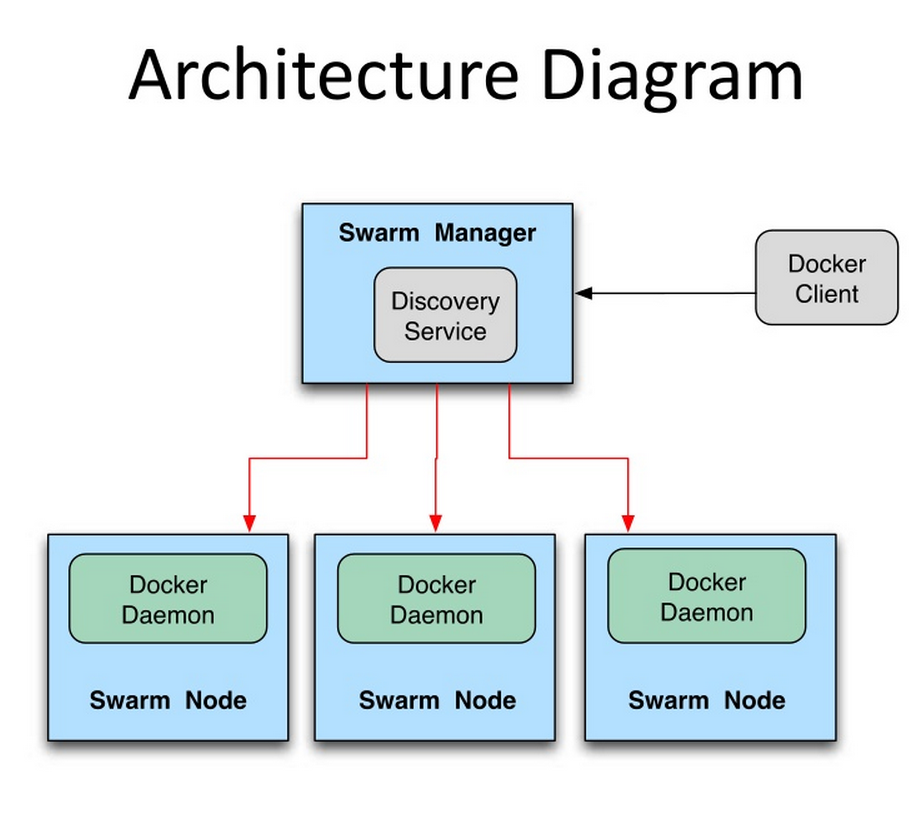
Swarm介绍 Swarm是Docker公司在2014年12月初发布的一套较为简单的工具,用来管理Docker集群,它将一群Docker宿主机变成一个单一的,虚拟的主机。Swarm使用标准的Docker API接口作为其前端访问入口,换言之,各种形式的Docker Client(dockerclient in go, docker_py, docker等)均可以直接与Swarm通信。Swarm几乎全部用Go语言来完成开发,上周五,4月17号,Swarm0.2发布,相比0.1版本,0.2版本增加了一个新的策略来调度集群中的容器,使得在可用的节点上传播它们,以及支持更多的Docker命令以及集群驱动。 Swarm deamon只是一个调度器(Scheduler)和路由器(router),Swarm自己不运行容器,它只是接受docker客户端发送过来的请求,调度适合的节点来运行容器,这意味着,即使Swarm由于某些原因挂掉了,集群中的节点也会照常运行,当Swarm重新恢复运行之后,它会收集重建集群信息。下面是Swarm的结构图: 如何使用Swarm 有3台机器,sclu083,IP地址是10.13.181.83,sclu084,IP地址是10.13.181.84,atsg124 ,IP地址是10.32.105.124,利用这三台机器创建一个Docker集群,其中sclu083同时充当swarm manager管理集群. Swarm安装 最简单的安装Swarm的方式就是用Docker官方提供的Swarm镜像: sudo docker pull swarm Docker集群管理需要服务发现(Discovery service backend)功能.Swarm支持以下几种discovery service backend:Docker Hub上面内置的服务发现功能,本地的静态文件描述集群(static file describing the cluster),etcd(顺带说一句,etcd这玩意貌似很火很有前途,有时间研究下),consul,zookeeper和一些静态的ip列表(a static list of ips).本文会详细介绍前面两种方法backend的使用。 在使用Swarm进行集群管理之前,需要先把准备加入集群的所有的节点的docker deamon的监听端口修改为0.0.0.0:2375,可以直接使用 sudo docker –H tcp://0.0.0.0:2375 &命令,也可以在配置文件中修改 sudo vim /etc/default/docker 在文件的最后面添加下面这句 D0OCKER_OPTS=”-H 0.0.0.0:2375 –H unix:///var/run/docker.sock” 注意:一定是要在所有的节点上进行修改,修改之后要重启docker deamon sudo service docker restart 第一种方法:使用Docker Hub上面内置的服务发现功能 第一步:在任何一台节点上面执行swarm create命令来创建一个集群标志。这条命令执行完毕之后,swarm会前往Docker Hub上内建的发现服务中获取一个全球唯一的token,用以唯一的标识swarm管理的Docker集群。 sudo docker run –-rm swarm create 我们在sclu084 这台机器上执行上面的命令,效果如下: 返回的token是d947b55aa8fb9198b5d13ad81f61ac4d,这个token一定要记住,因为接下来的操作都会用到这一个token。 第二步:在所有的要加入集群的机器上面执行swarm join命令,把机器加入集群 本次试验就是要在所有的三台机器上执行命令: sudo docker run –-rm swarm join –addr=ip_address:2375 token://d947b55aa8fb9198b5d13ad81f61ac4d 在IP地址为10.13.181.84机器上面执行的效果如下图: 执行这条命令后不会立即返回 ,我们手动通过Ctrl+C返回。 第三步:启动swarm manager 因为我们是要让sclu083充当Swarm管理节点,所以我们要在这条机器上面执行swarm manage这条命令: sudo docker run –d –p 2376:2375 swarm manage token:// d947b55aa8fb9198b5d13ad81f61ac4d 需要注意的是:在这条命令中,第一:要以daemon的形式运行swarm。第二:端口映射:2376可以更换成任何一个本机没有占用的端口,一定不能是2375。否则就会出问题。 执行结果如下如所示: 执行完这个命令之后,整个集群已经启动起来了。 现在可以在任何一台节点上查看集群上的所有节点了。 之后可以在任何一台安装了docker的机器上面通过命令(命令中要指明swarm maneger 机器的IP地址和端口)在这个集群上面运行Dcoker容器操作。 现在在10.13.181.85这台机器上面查看集群的节点的信息。info命令可以换成任何一个Swarm支持的docker命令,这些命令可以查看官方文档 sudo docker –H 10.13.181.83:2376 info 由上图的结果,我们可以发现一个问题:明明这个小集群中是有3个节点的,但是info命令只显示了2个节点。还缺少节点10.32.105.124。为什么会出现这个情况呢? 因为10.32.105.124这台机器没有设置上面的docker daemon监听0.0.0.0:2375这个端口,所以Swarm没办法吧这个节点加入集群中来。 在使用Docker Hub内置的发现服务时,会出现一个问题,就是使用swarm create时会出现 time="2015-04-21T08:56:25Z" level=fatal msg="Get https://discovery-stage.hub.docker.com/v1/clusters/d947b55aa8fb9198b5d13ad81f61ac4d: dial tcp: i/o timeout" 类似于这样的错误,不知道是什么原因,有待解决。 当使用Docker Hub内置的服务发现功能出现问题时,可以使用下面的第二种方法。 第二种方法:使用文件 第二种方法相对而言比第一种方法要简单,也更不容易出现timeout的问题。 第一步:在sclu083这台机器上新建一个文件,把要加入集群的机器的IP地址写进去 第二步:在sclu083这台机器上面执行swarm manage命令: sudo docker run –d –p 2376:2375 –v $(pwd)/cluster:/tmp/cluster swarm manage file:///tmp/cluster 注意:这里一定要使用-v命令,因为cluster文件是在本机上面,启动的容器默认是访问不到的,所以要通过-v命令共享。还有,file:///千万不能忘记了 可以看到,swarm已经运行起来了。现在可以查看下集群节点信息了,使用命令: sudo docker run –rm –v $(pwd)/cluster:/tmp/cluster swarm list file:///tmp/cluster (在使用文件作为服务发现的时候,貌似manage list命令只能在swarm manage节点上使用,在其他节点上好像是用不了) 好了,现在集群也已经运行起来了,可以跟第一种方法一样在其他机器上使用集群了。同样在sclu085 机器上做测试: 可以看到,成功访问并且节点信息是正确的。接下来可以把上面的info命令替换成其他docker可执行命令来使用这个晓得Docker集群了。 Swarm调度策略 Swarm在schedule节点运行容器的时候,会根据指定的策略来计算最适合运行容器的节点,目前支持的策略有:spread,binpack,random. Random顾名思义,就是随机选择一个Node来运行容器,一般用作调试用,spread和binpack策略会根据各个节点的可用的CPU,RAM以及正在运行的容器的数量来计算应该运行容器的节点。 在同等条件下,Spread策略会选择运行容器最少的那台节点来运行新的容器,binpack策略会选择运行容器最集中的那台机器来运行新的节点(The binpack strategy causes Swarm to optimize for the container which is most packed.)。 使用Spread策略会使得容器会均衡的分布在集群中的各个节点上运行,一旦一个节点挂掉了只会损失少部分的容器。 Binpack策略最大化的避免容器碎片化,就是说binpack策略尽可能的把还未使用的节点留给需要更大空间的容器运行,尽可能的把容器运行在一个节点上面。 Constraint Filter 通过label来在指定的节点上面运行容器。这些label是在地洞docker daemon时指定的,也可以卸载/etc/default/docker这个配置文件里面。 sudo docker run –H 10.13.181.83:2376 run –name redis_083 –d –e constraint:label==083 redis Affinity Filter 使用-e affinity:container==container_name / container_id –-name container_1可以让容器container_1紧挨着容器container_name / container_id执行,也就是说两个容器在一个node上面执行(You can schedule 2 containers and make the container #2 next to the container #1.) 先在一台机器上启动一个容器 sudo docker -H 10.13.181.83:2376 run --name redis_085 -d -e constraint:label==085 redis 接下来启动容器redis_085_1,让redis_085_1紧挨着redis_085容器运行,也就是在一个节点上运行 sudo docker –H 10.13.181.83:2376 run –d –name redis_085_1 –e affinity:container==redis_085 redis 通过-e affinity:image=image_name命令可以指定只有已经下载了image_name的机器才运行容器(You can schedule a container only on nodes where the images are already pulled) 下面命令在只有redis镜像的节点上面启动redis容器: sudo docker –H 100.13.181.83:2376 run –name redis1 –d –e affinity:image==redis redis 下面这条命令达到的效果是:在有redis镜像的节点上面启动一个r名字叫做redis的容器,如果每个节点上面都没有redis容器,就按照默认的策略启动redis容器。 sudo docker -H 10.13.181.83:2376 run -d --name redis -e affinity:image==~redis redis Port filterPort也会被认为是一个唯一的资源 sudo docker -H 10.13.181.83:2376 run -d -p 80:80 nginx 执行完这条命令,任何使用80端口的容器都是启动失败。 结束语: 本文详细介绍了两种方法来使用Swarm管理Docker集群。但是Swarm是一个比较新的项目,目前还处于研发阶段,Swarm的发展十分快速,功能和特性的变更迭代还非常频繁。因此,可以说Swarm还不推荐被用于生产环境中,但可以肯定的是Swarm是一项很有前途的技术。 最近在学Go,准备抽时间好好研究下Swarm源码。Go是一门很有前途的语言。

优秀的个人博客,低调大师

Docker Toolbox 学习教程【转载】

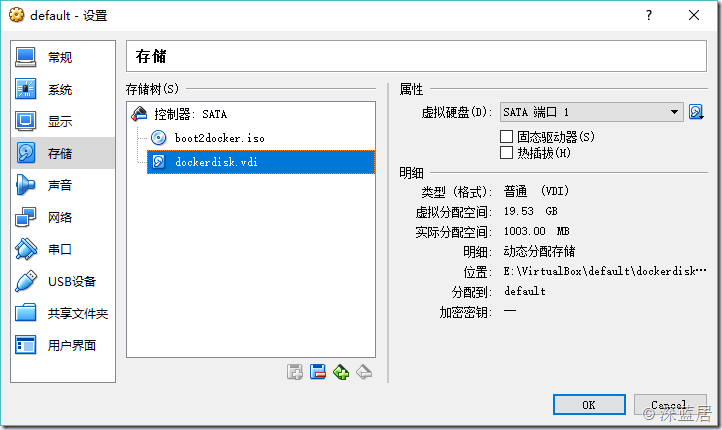
最近在研究虚拟化,容器和大数据,所以从Docker入手,下面介绍一下在Windows下怎么玩转Docker。Docker本身在Windows下有两个软件,一个就是Docker,另一个是Docker Toolbox。这里我选择的是Docker Toolbox,为什么呢?参见官方文档:https://blog.docker.com/2015/08/docker-toolbox/首先我们从官网下载最新版的Windows Docker Toolbox。安装后会安装一个VirtualBox虚拟机,一个Kitematic,这是GUI管理Docker的工具,没有发布正式版,不推荐使用,另外还有就是我们在命令行下用到的docker-machine和docker命令了。 基本使用 安装完成Toolbox后会有一个Docker Quickstart Terminal的快捷方式,双击运行如果报错,那可能是因为你已经安装了Hyper-v,所以VirtualBox无法用64位的虚拟机。需要卸载Hyper-v。 运行后会在Virtualbox中创建一个叫做default的虚拟机,然后很有可能会卡在waiting for an IP的命令下,然后就死活不动了。我的做法是彻底放弃Docker Quickstart Terminal,根本不用这玩意儿,关掉,我们用PowerShell进行虚拟机的管理。 打开PowerShell,输入: docker-machine ls 我们可以看到我们当前的Docker虚拟机的状态。如果什么都没有的话,那么我们可以使用以下命令创建一个Docker虚拟机。 docker-machine create --driver=virtualbox default 创建完毕后,我们在用docker-machine ls确认我们的Docker虚拟机在运行中。 然后使用以下命令获得虚拟机的环境变量: docker-machine env default 然后再输入: docker-machine env default | Invoke-Expression 这样我们就把当前的PowerShell和虚拟机里面的Docker Linux建立的连接,接下来就可以在PowerShell中使用docker命令了。 比如我们要查看当前有哪些镜像: docker images 当前有哪些容器: docker ps –a 其他各种docker命令我就不在这里累述了。 Docker虚拟机文件地址修改 默认情况下,docker-machine创建的虚拟机文件,是保存在C盘的C:\Users\用户名\.docker\machine\machines\default 目录下的,如果下载和使用的镜像过多,那么必然导致该文件夹膨胀过大,如果C盘比较吃紧,那么我们就得考虑把该虚拟机移到另一个盘上。具体操作如下: 1.使用docker-machine stop default停掉Docker的虚拟机。 2.打开VirtualBox,选择“管理”菜单下的“虚拟介质管理”,我们可以看到Docker虚拟机用的虚拟硬盘的文件disk。 3.选中“disk”,然后点击菜单中的“复制”命令,根据向导,把当前的disk复制到另一个盘上面去。 4.回到VirtualBox主界面,右键“default”这个虚拟机,选择“设置”命令,在弹出的窗口中选择“存储”选项。 5.把disk从“控制器SATA”中删除,然后重新添加我们刚才复制到另外一个磁盘上的那个文件。 这是我设置好后的界面,可以看到我在步骤3复制的时候,复制到E:\VirtualBox\default\dockerdisk.vdi文件去了。 6.确定,回到PowerShell,我们使用docker-machine start default就可以启动新地址的Docker虚拟机了。确保新磁盘的虚拟机没有问题。就可以把C盘那个disk文件删除了。 【注意:不要在Window中直接去复制粘贴disk文件,这样会在步骤5的时候报错的,报错的内容如下,所以一定要在VirtualBox中去复制!】 Failed to open the hard disk file D:\Docker\boot2docker-vm\boot2docker-vm.vmdk. Cannot register the hard disk 'D:\Docker\boot2docker-vm\boot2docker-vm.vmdk' {9a4ed2ae-40f7-4445-8615-a59dccb2905c} because a hard disk C:\Users\用户名\.docker\machine\machines\default\disk.vmdk' with UUID {9a4ed2ae-40f7-4445-8615-a59dccb2905c} already exists. Result Code: E_INVALIDARG (0x80070057) Component: VirtualBox Interface: IVirtualBox {fafa4e17-1ee2-4905-a10e-fe7c18bf5554} Callee RC: VBOX_E_OBJECT_NOT_FOUND (0x80BB0001) 镜像加速 在国内使用Docker Hub的话就特别慢,为此,我们可以给Docker配置国内的加速地址。我看了一下,DaoCloud和阿里云的镜像加速还不错,另外还有网易的蜂巢。选一个就行了。以DaoClound为例,注册账号,然后在https://www.daocloud.io/mirror就可以看到DaoClound提供给您的镜像加速的URL。然后到PowerShell中去依次执行: docker-machine ssh default sudo sed -i "s|EXTRA_ARGS='|EXTRA_ARGS='--registry-mirror=加速地址 |g" /var/lib/boot2docker/profile exit docker-machine restart default 这样重启Docker后就可以用国内的镜像来加速下载了。 试一下下载一个mysql看看快不快: docker pull mysql 下载完镜像,我们运行一个容器: docker run -d -p 3306:3306 --name mysql -e MYSQL_ROOT_PASSWORD=123 mysql:latest 接下来我们打开windows下的mysql客户端,服务器地址填docker虚拟机的IP地址,通过docker-machine env可以看到,我这里是192.168.99.100,然后用户名root,密码123,这样我们就可以连接到docker容器里面的mysql了。 【注意,Docker容器是在VirtualBox的虚拟机里面,不是在Windows里面,所以不能用127.0.0.1访问】

优秀的个人博客,低调大师

contentprovider的学习实例总结

工作中遇到了contentprovider数据共享机制,下面来总结一下: 一、ContentProvider简介 当应用继承ContentProvider类,并重写该类用于提供数据和存储数据的方法,就可以向其他应用共享其数据。虽然使用其他方法也可以对外共享数据,但数据访问方式会因数据存储的方式而不同,如:采用文件方式对外共享数据,需要进行文件操作读写数据;采用sharedpreferences共享数据,需要使用sharedpreferencesAPI读写数据。而使用ContentProvider共享数据的好处是统一了数据访问方式。 二、Uri类简介 Uri代表了要操作的数据,Uri主要包含了两部分信息:1.需要操作的ContentProvider,2.对ContentProvider中的什么数据进行操作,一个Uri由以下几部分组成: 1.scheme:ContentProvider(内容提供者)的scheme已经由Android所规定为:content://。 2.主机名(或Authority):用于唯一标识这个ContentProvider,外部调用者可以根据这个标识来找到它。 3.路径(path):可以用来表示我们要操作的数据,路径的构建应根据业务而定,如下: •要操作contact表中id为10的记录,可以构建这样的路径:/contact/10 •要操作contact表中id为10的记录的name字段,contact/10/name •要操作contact表中的所有记录,可以构建这样的路径:/contact 要操作的数据不一定来自数据库,也可以是文件等他存储方式,如下: 要操作xml文件中contact节点下的name节点,可以构建这样的路径:/contact/name 如果要把一个字符串转换成Uri,可以使用Uri类中的parse()方法,如下: Uriuri=Uri.parse("content://com.changcheng.provider.contactprovider/contact") 三、UriMatcher、ContentUrist和ContentResolver简介 因为Uri代表了要操作的数据,所以我们很经常需要解析Uri,并从Uri中获取数据。Android系统提供了两个用于操作Uri的工具类,分别为UriMatcher和ContentUris。掌握它们的使用,会便于我们的开发工作。 UriMatcher:用于匹配Uri,它的用法如下: 1.首先把你需要匹配Uri路径全部给注册上,如下: //常量UriMatcher.NO_MATCH表示不匹配任何路径的返回码(-1)。 UriMatcheruriMatcher=newUriMatcher(UriMatcher.NO_MATCH); //如果match()方法匹配content://com.changcheng.sqlite.provider.contactprovider/contact路径,返回匹配码为1 uriMatcher.addURI(“com.changcheng.sqlite.provider.contactprovider”,“contact”,1);//添加需要匹配uri,如果匹配就会返回匹配码 //如果match()方法匹配content://com.changcheng.sqlite.provider.contactprovider/contact/230路径,返回匹配码为2 uriMatcher.addURI(“com.changcheng.sqlite.provider.contactprovider”,“contact/#”,2);//#号为通配符 2.注册完需要匹配的Uri后,就可以使用uriMatcher.match(uri)方法对输入的Uri进行匹配,如果匹配就返回匹配码,匹配码是调用addURI()方法传入的第三个参数,假设匹配content://com.changcheng.sqlite.provider.contactprovider/contact路径,返回的匹配码为1。 ContentUris:用于获取Uri路径后面的ID部分,它有两个比较实用的方法: •withAppendedId(uri,id)用于为路径加上ID部分 •parseId(uri)方法用于从路径中获取ID部分 ContentResolver:当外部应用需要对ContentProvider中的数据进行添加、删除、修改和查询操作时,可以使用ContentResolver类来完成,要获取ContentResolver对象,可以使用Activity提供的getContentResolver()方法。ContentResolver使用insert、delete、update、query方法,来操作数据。 四、ContentProvider示例程序 Manifest.xml中的代码: ? 1 2 3 4 5 6 7 8 9 10 11 12 13 14 15 16 <applicationandroid:icon= "@drawable/icon"android:label="@string/app_name"> <activityandroid:name= ".TestWebviewDemo"android:label="@string/app_name"> <intent-filter> <actionandroid:name= "android.intent.action.MAIN"/> <categoryandroid:name= "android.intent.category.LAUNCHER"/> </intent-filter> <intent-filter> <dataandroid:mimeType= "vnd.android.cursor.dir/vnd.ruixin.login"/> </intent-filter> <intent-filter> <dataandroid:mimeType= "vnd.android.cursor.item/vnd.ruixin.login"/> </intent-filter> </activity> <providerandroid:name= "MyProvider"android:authorities="com.ruixin.login"/> </application> 需要在<application></application>中为provider进行注册!!!! 首先定义一个数据库的工具类: ? 1 2 3 4 5 6 7 8 9 10 11 12 13 14 15 16 17 18 19 20 21 22 publicclassRuiXin{ publicstaticfinalStringDBNAME="ruixinonlinedb"; publicstaticfinalStringTNAME="ruixinonline"; publicstaticfinalintVERSION=3; publicstaticStringTID="tid"; publicstaticfinalStringEMAIL="email"; publicstaticfinalStringUSERNAME="username"; publicstaticfinalStringDATE="date"; publicstaticfinalStringSEX="sex"; publicstaticfinalStringAUTOHORITY="com.ruixin.login"; publicstaticfinalintITEM=1; publicstaticfinalintITEM_ID=2; publicstaticfinalStringCONTENT_TYPE="vnd.android.cursor.dir/vnd.ruixin.login"; publicstaticfinalStringCONTENT_ITEM_TYPE="vnd.android.cursor.item/vnd.ruixin.login"; publicstaticfinalUriCONTENT_URI=Uri.parse( "content://" +AUTOHORITY+"/ruixinonline"); } 然后创建一个数据库: ? 1 2 3 4 5 6 7 8 9 10 11 12 13 14 15 16 17 18 19 20 21 22 23 24 25 26 27 28 29 publicclassDBliteextendsSQLiteOpenHelper{ publicDBlite(Contextcontext){ super(context,RuiXin.DBNAME,null,RuiXin.VERSION); //TODOAuto-generatedconstructorstub } @Override publicvoidonCreate(SQLiteDatabasedb){ //TODOAuto-generatedmethodstub db.execSQL( "createtable"+RuiXin.TNAME+"("+ RuiXin.TID+"integerprimarykeyautoincrementnotnull,"+ RuiXin.EMAIL+ "textnotnull,"+ RuiXin.USERNAME+ "textnotnull,"+ RuiXin.DATE+"intergernotnull,"+ RuiXin.SEX+"textnotnull);"); } @Override publicvoidonUpgrade(SQLiteDatabasedb,intoldVersion,intnewVersion){ //TODOAuto-generatedmethodstub } publicvoidadd(Stringemail,Stringusername,Stringdate,Stringsex){ SQLiteDatabasedb=getWritableDatabase(); ContentValuesvalues= newContentValues(); values.put(RuiXin.EMAIL,email); values.put(RuiXin.USERNAME,username); values.put(RuiXin.DATE,date); values.put(RuiXin.SEX,sex); db.insert(RuiXin.TNAME,"",values); } } 接着创建一个Myprovider.java对数据库的接口进行包装: ? 1 2 3 4 5 6 7 8 9 10 11 12 13 14 15 16 17 18 19 20 21 22 23 24 25 26 27 28 29 30 31 32 33 34 35 36 37 38 39 40 41 42 43 44 45 46 47 48 49 50 51 52 53 54 55 56 57 58 59 60 61 62 63 64 65 66 67 68 69 70 71 72 73 74 75 76 77 78 79 80 81 82 83 84 85 86 87 88 89 90 91 92 93 94 95 96 97 98 99 100 101 102 publicclassMyProviderextendsContentProvider{ DBlitedBlite; SQLiteDatabasedb; privatestaticfinalUriMatchersMatcher; static{ sMatcher= newUriMatcher(UriMatcher.NO_MATCH); sMatcher.addURI(RuiXin.AUTOHORITY,RuiXin.TNAME,RuiXin.ITEM); sMatcher.addURI(RuiXin.AUTOHORITY,RuiXin.TNAME+"/#",RuiXin.ITEM_ID); } @Override publicintdelete(Uriuri,Stringselection,String[]selectionArgs){ //TODOAuto-generatedmethodstub db=dBlite.getWritableDatabase(); intcount=0; switch(sMatcher.match(uri)){ caseRuiXin.ITEM: count=db.delete(RuiXin.TNAME,selection,selectionArgs); break; caseRuiXin.ITEM_ID: Stringid=uri.getPathSegments().get(1); count=db.delete(RuiXin.TID,RuiXin.TID+"="+id+(!TextUtils.isEmpty(RuiXin.TID="?")?"AND("+selection+')':""),selectionArgs); break; default: thrownewIllegalArgumentException("UnknownURI"+uri); } getContext().getContentResolver().notifyChange(uri,null); returncount; } @Override publicStringgetType(Uriuri){ //TODOAuto-generatedmethodstub switch(sMatcher.match(uri)){ caseRuiXin.ITEM: returnRuiXin.CONTENT_TYPE; caseRuiXin.ITEM_ID: returnRuiXin.CONTENT_ITEM_TYPE; default: thrownewIllegalArgumentException("UnknownURI"+uri); } } @Override publicUriinsert(Uriuri,ContentValuesvalues){ //TODOAuto-generatedmethodstub db=dBlite.getWritableDatabase(); longrowId; if(sMatcher.match(uri)!=RuiXin.ITEM){ thrownewIllegalArgumentException("UnknownURI"+uri); } rowId=db.insert(RuiXin.TNAME,RuiXin.TID,values); if(rowId>0){ UrinoteUri=ContentUris.withAppendedId(RuiXin.CONTENT_URI,rowId); getContext().getContentResolver().notifyChange(noteUri,null); returnnoteUri; } thrownewIllegalArgumentException("UnknownURI"+uri); } @Override publicbooleanonCreate(){ //TODOAuto-generatedmethodstub this.dBlite=newDBlite(this.getContext()); //db=dBlite.getWritableDatabase(); //return(db==null)?false:true; returntrue; } @Override publicCursorquery(Uriuri,String[]projection,Stringselection, String[]selectionArgs,StringsortOrder){ //TODOAuto-generatedmethodstub db=dBlite.getWritableDatabase(); Cursorc; Log.d("-------",String.valueOf(sMatcher.match(uri))); switch(sMatcher.match(uri)){ caseRuiXin.ITEM: c=db.query(RuiXin.TNAME,projection,selection,selectionArgs,null,null,null); break; caseRuiXin.ITEM_ID: Stringid=uri.getPathSegments().get(1); c=db.query(RuiXin.TNAME,projection,RuiXin.TID+"="+id+(!TextUtils.isEmpty(selection)?"AND("+selection+')':""),selectionArgs,null,null,sortOrder); break; default: Log.d("!!!!!!","UnknownURI"+uri); thrownewIllegalArgumentException("UnknownURI"+uri); } c.setNotificationUri(getContext().getContentResolver(),uri); returnc; } @Override publicintupdate(Uriuri,ContentValuesvalues,Stringselection, String[]selectionArgs){ //TODOAuto-generatedmethodstub return0; } } 最后创建测试类: ? 1 2 3 4 5 6 7 8 9 10 11 12 13 14 15 16 17 18 19 20 21 22 23 24 25 26 27 28 29 30 publicclassTestextendsActivity{ /**Calledwhentheactivityisfirstcreated.*/ privateDBlitedBlite1=newDBlite(this);; privateContentResolvercontentResolver; publicvoidonCreate(BundlesavedInstanceState){ super.onCreate(savedInstanceState); setContentView(R.layout.main); //先对数据库进行添加数据 dBlite1.add(email,username,date,sex); //通过contentResolver进行查找 contentResolver=TestWebviewDemo.this.getContentResolver(); Cursorcursor=contentResolver.query( RuiXin.CONTENT_URI, newString[]{ RuiXin.EMAIL,RuiXin.USERNAME, RuiXin.DATE,RuiXin.SEX},null,null,null); while(cursor.moveToNext()){ Toast.makeText( TestWebviewDemo.this, cursor.getString(cursor.getColumnIndex(RuiXin.EMAIL)) +"" +cursor.getString(cursor.getColumnIndex(RuiXin.USERNAME)) +"" +cursor.getString(cursor.getColumnIndex(RuiXin.DATE)) +"" +cursor.getString(cursor.getColumnIndex(RuiXin.SEX)), Toast.LENGTH_SHORT).show(); } startManagingCursor(cursor);//查找后关闭游标 } } 注:上面是在一个程序中进行的测试,也可以再新建一个工程来模拟一个新的程序,然后将上面查询的代码加到新的程序当中!这样就模拟了contentprovider的数据共享功能了! 新建个工程:TestProvider 创建一个测试的activity ? 1 2 3 4 5 6 7 8 9 10 11 12 13 14 15 16 17 18 19 20 21 22 23 24 25 26 27 publicclassTestextendsActivity{ /**Calledwhentheactivityisfirstcreated.*/ privateContentResolvercontentResolver; publicvoidonCreate(BundlesavedInstanceState){ super.onCreate(savedInstanceState); setContentView(R.layout.main); //通过contentResolver进行查找 contentResolver=TestWebviewDemo.this.getContentResolver(); Cursorcursor=contentResolver.query( RuiXin.CONTENT_URI, newString[]{ RuiXin.EMAIL,RuiXin.USERNAME, RuiXin.DATE,RuiXin.SEX},null,null,null); while(cursor.moveToNext()){ Toast.makeText(TestWebviewDemo.this, cursor.getString(cursor.getColumnIndex(RuiXin.EMAIL)) +"" +cursor.getString(cursor.getColumnIndex(RuiXin.USERNAME)) +"" +cursor.getString(cursor.getColumnIndex(RuiXin.DATE)) +"" +cursor.getString(cursor.getColumnIndex(RuiXin.SEX)), Toast.LENGTH_SHORT).show(); } startManagingCursor(cursor);//查找后关闭游标 } } 运行此程序就能实现共享数据查询了! 注:新建的程序中的manifest.xml中不需要对provider进行注册,直接运行就行,否则会报错! 摘自:http://www.cnblogs.com/chenglong/articles/1892029.html 本文转自 wbb827 51CTO博客,原文链接:http://blog.51cto.com/wbb827/1243322

优秀的个人博客,低调大师

Docker学习笔记之compose

一、compose compose 作用 你的应用可能需要很多个服务,比如web服务,数据库服务,缓存服务等等。我们可以把这些服务放到单独的容器里面,如果手工去配置这些服务会有些麻烦,docker compose可以帮我们解决这个问题。 我们可以创建一个compose文件,在这个文件上面描述你都需要哪些服务,服务使用什么镜像、数据卷、网络等等,然后再用一条命令就可以管理、启动所有的服务。 compose 文件 compose文件用的yml格式,docker规定了一些指令,使用它们可以去设置对应的东西,它主要分为了3个区域: services:是服务,在它下面可以定义应用需要的一些服务,每个服务都有自己的名字、使用的镜像、挂载的数据卷、所属的网络、依赖哪些其他服务等等; networks:是应用的网络,在它下面可以定义应用的名字、使用的网络类型等等; volumes:是数据卷,在它下面可以定义的数据卷(名字等等),然后挂载到不同的服务下去使用; 二、Services 先创建一个文件夹beck-docker,并在里面新建docker-compose.yml文件,然后使用version指定一下compose使用的版本号。 定义服务 在应用里需要定义的服务,可以放到services下面。比如,我们去定义一个dog的服务,使用nginx镜像,指定主机上的8080端口映射到容器中得80端口,也就是nginx的http的访问端口。 version:'2' services: dog: image:nginx ports: -"8080:80" 以同样的方式,定义一个cat的服务,同样使用nginx镜像,然后指8081端口对应80端口。 version:'2' services: dog: image:nginx ports: -"8080:80" cat: image:nginx ports: -"8081:80" 需要注意的是,cat与dog要在同一个级别,还有ports是个数组,可以指定多个端口映射关系。 启动服务 定义好服务以后,在项目的目录启动这些服务,可以执行: docker-composeup 这样会启动,在compose文件下定义的所有服务。由于这是第一次启动这个服务,所以可以看到它是creating,也就是去创建相关的东西。首先会创建这个服务使用的网络,这里是叫做「beckdocker_default」的网络,然后是dog和cat的服务,这些网络和服务的名字,默认会加上一个前缀,由于在创建应用的时候没有指定名字,所以会默认使用项目目录的名字,后面还有一个数字的后缀。最后会有一个「Attaching to …」,将网络应用到服务上。 启动成功后,在浏览器访问一下。8080对应的是dog的服务,8081是cat的服务。 回到终端,可以看到服务的访问日志,日志的开头会有服务的名字,标志着日志是从哪个服务来的: 如果希望服务在后台运行,可以使用-d选项(也就是detach): docker-composeup-d 服务的生命周期 查看正在运行的服务 docker-composeps 停止一个服务 docker-composestop[服务名] 如果后面不加服务名,会停止所有的服务。 启动某一个服务 docker-composestart[服务名] 如果后面不加服务名,会启动所有的服务。 查看服务运行的log docker-composelogs-f 加上-f选项,可以持续跟中服务产生的log。 进入服务容器中 docker-composeexecdogbash 删除服务 docker-composerm 注意这个docker-compose rm不会删除应用的网络和数据卷。查看一下网络,可以看到应用创建的网络「beckdocker_default」,如果要删除所有的这些,可以使用: docker-composedown 会提示我们删除网络 beckdocker_default。 三、Networks 网络决定了服务之间以及服务和外界之间如何去通信,在执行docker-compose up的时候,docker会默认创建一个默认的网络,创建的服务也会默认地属于这个默认网络。服务和服务之间,可以使用服务的名字进行通信。也可以自己创建网络,并将服务属于到这个网络之中,这样服务之间可以相互通信,而外界就不能够与这个网络中的服务通信,可以保持隔离性。 下面登录dog服务去连接cat服务,登录到cat服务连接dog服务: 可以通过服务的名称进行连接。 自定义网络 1、在networks中先定义一个名为animal,类型为bridge的网络: version:'2' services: dog: image:nginx ports: -"8080:80" cat: image:nginx ports: -"8081:80" networks: animal: driver:bridge 2、让dog和cat服务使用这个网络: **version:'2' services: dog: image:nginx ports: -"8080:80" networks: -"animal" cat: image:nginx ports: -"8081:80" networks: -"animal" networks: animal: driver:bridge 3、再增加一个叫pig的服务,使用默认网络,来体现于自定义网络的隔离性: version:'2' services: dog: image:nginx ports: -"8080:80" networks: -"animal" cat: image:nginx ports: -"8081:80" networks: -"animal" pig: image:nginx ports: -"8082:80" networks: -"default" networks: animal: driver:bridge 4、重新启动应用 5、登录cat服务,尝试去连接dog服务和pig服务: 因为cat与dog同在animal网络,所以可以通过名字连接,而pig在default网络中,所以不能。 四、Volumes 在compose文件中,还可以指定一些有名字的数据卷,让服务去使用。方法是:在与networks同级的地方,添加volumes,接着是数据卷的名字,下面使用driver去指定数据卷的类型。 定义好数据卷后,就将这个数据卷交给一个服务去使用。可以用volumes给服务指定需要使用的数据卷: dog: ... volumes: -nest:/mnt 以dog服务为例,volumes下指定使用的数据卷,冒号左边是数据卷名称,冒号右边是挂载到的docker对应目录位置。接着给cat服务也添加同样的数据卷。 回到终端,执行docker-compose up -d,下面测试一下数据卷: 因为cat与dog服务都使用nest的数据卷,所以在dog中/mnt目录下创建的data1,在cat服务的/mnt目录下可以看到。 指定位置的数据卷 dog和cat都是一个web服务,现在我想将主机的某一个位置当做是服务的一个内容,那么我们可以去创一个指定位置的数据卷。首先可以在当前目录,创建./app/web文件夹,在里面创建个index.html。 编辑内容: 内容编辑好后,就给dog与cat服务指定数据卷,冒号左边是主机上的目录,冒号右边是服务内挂载的目录: 说明:/usr/share/nginx/html 目录是nginx默认主机的根目录,也就是nginx欢迎界面的目录。 本文转自 dengaosky 51CTO博客,原文链接:http://blog.51cto.com/dengaosky/1854570,如需转载请自行联系原作者

优秀的个人博客,低调大师

Mycat学习实战-Mycat初识

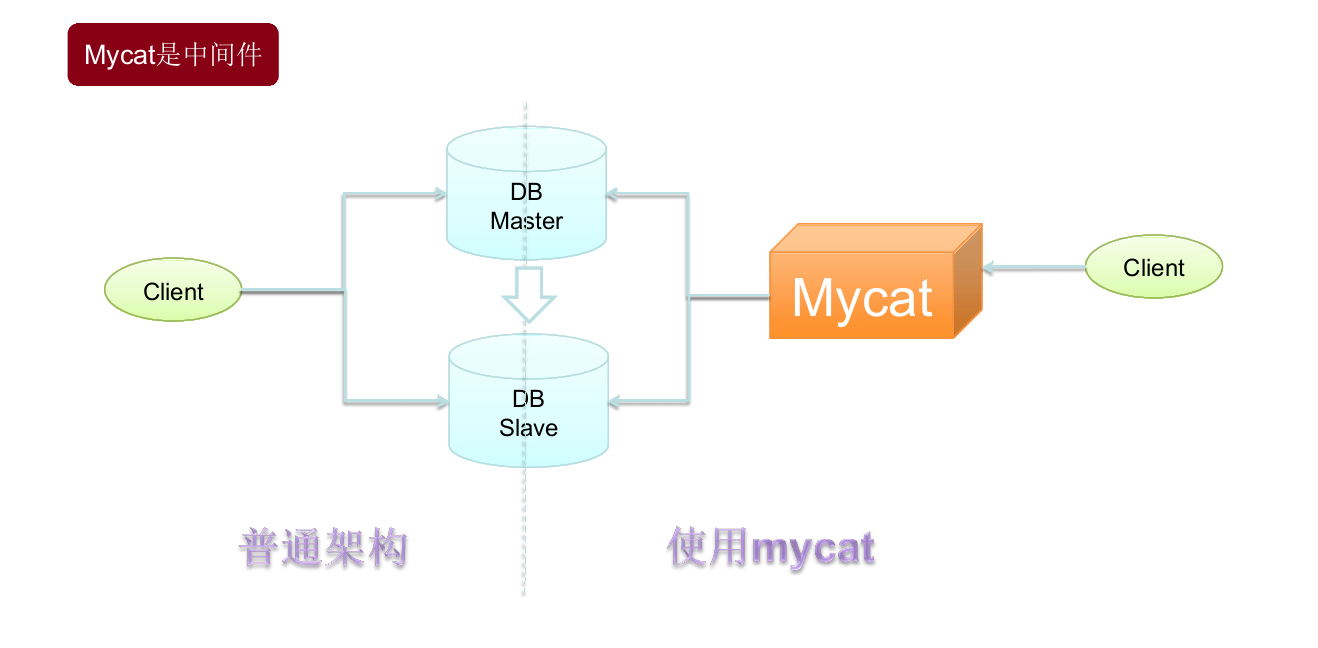
1. Mycat是什么 Mycat是一个彻底开源的面向企业应用开发的大数据库集群,支持事务、ACID,是可以替代MySQL的加强版数据库。Mycat被视为MySQL集群的企业级数据库,用来替代昂贵的Oracle集群,它是融合了内存缓存技术、NoSQL技术、HDFS大数据的新型SQL Server,是结合了传统数据库和新型分布式数据仓库的新一代的企业级数据库产品,也是一个优秀的数据库中间件。 2. Mycat与其他中间件的区别 目前的数据库中间件有很多。 2.1 Mango Mango的中文名是“芒果”,它是一个轻量级的极速数据层访问框架,目前已有十多个大型线上项目在使用它。据称,某一支付系统利用Mango承载了每秒12万的支付下单请求,其超高的性能及超快的响应速度几乎相当于直接使用JDBC。它采用接口与注解的形式定义DAO,完美地结合了db与cache操作;支持动态SQL,可以构造任意复杂的SQL语句;支持多数据源、分表、分库、事务;内嵌“函数式调用”功能,能将任意复杂的对象映射到数据库的表中。但是从整体上看Mango是一个Java Dao Framework,是一个jar包,它的运行依赖于应用系统的项目代码和服务器,采用了JDBC Shard思想,与TDDL是同款产品。 2.2 Cobar Cobar是阿里巴巴研发的关系型数据的分布式处理系统(Amoeba的升级版,该产品成功替代了原先基于Oracle的数据存储方案,目前已经接管了3000多个MySQL数据库的scheme,平均每天处理近50亿次的SQL执行请求。 2.3 Heisenberg Heisenberg源于Cobar,结合了Cobar和TDDL的优势,让其分片策略变为分库分表策略,节约了大量的连接。优点是分库分表与应用脱离,分库分表如同使用单库表一样,减少了db连接数的压力,采用热重启配置,可水平扩容,并遵循 MySQL原生协议,采用读写分离,无语言限制。MySQL Client、C、Java等都可以使用Heisenberg服务器通过管理命令查看和调整连接数、线程池、节点等。Heisenberg采用velocity的分库分表脚本进行自定义分库分表,相当灵活。 2.4 Atlas Atlas是由奇虎360的Web平台部基础架构团队开发维护的一个基于MySQL协议的数据库中间层项目。它在MySQL-proxy 0.8.2版本的基础上进行了优化,增加了一些新的功能和特性。奇虎360内部使用Atlas运行的MySQL业务,每天承载的读写请求数达几十亿条。Atlas位于应用程序与MySQL之间,实现了MySQL的客户端与服务端协议,作为服务端与应用程序通信,同时作为客户端与MySQL通信。它对应用程序屏蔽了db的细节,同时为了降低MySQL的负担,维护了连接池。 2.5 Ameoba Ameoba是一个以MySQL为底层数据存储,并对应用提供MySQL协议接口的Proxy。它集中响应应用的请求,依据用户事先设置的规则,将SQL请求发送到特定的数据库上执行,基于此可以实现负载均衡、读写分离、高可用性等需求。与MySQL官方的MySQL Proxy相比,Ameoba的作者强调的是Amoeba配置的便捷性(基于XML的配置文件,用SQLJEP语法书写规则,比基于Lua脚本的MySQL Proxy简单)。 Mycat与以上中间件的对比如下表所示。 对比项目 Mycat Mango Coba Heisenberg Atlas Amoeba 数据切片 支持 支持 支持 支持 支持 支持 读写分离 支持 支持 支持 支持 支持 支持 宕机自动切换 支持 不支持 支持 不支持 半支持,影响写 不支持 MySQL协议 前后端支持 JDBC 前端支持 前后端支持 前后端支持 JDBC 支持的数据库 MySQL、Oracle、MongoDB、PostgreSQL MySQL MySQL MySQL MySQL MySQL、MongoDB 社区活跃度 高 活跃 停滞 低 中等 停滞 文档资料 极丰富 较齐全 较齐全 缺少 中等 缺少 是否开源 开源 开源 开源 开源 开源 开源 是否支持事务 弱XA 支持 单库强一致、分布式弱事务 单库强一致、多库弱事务 单库强一致、分布式弱事务 不支持 3. Mycat能解决的问题 4. Mycat核心概念 4.1 逻辑库(schema) 业务开发人员通常在实际应用中并不需要知道中间件的存在,只需要关注数据库,所以数据库中间件可以被当作一个或多个数据库集群构成的逻辑库。 在云计算时代,数据库中间件可以以多租户的形式为一个或多个应用提供服务,每个应用访问的可能是一个独立或者共享的物理库。 4.2 逻辑表(table) 4.2.1 分片表 分片表是将指数据量很大的表切分到多个数据库实例中,所有分片组合起来构成了一张完整的表。 4.2.2 非分片表 并非所有的表在数据量很大时都需要进行分片,某些表可以不用分片。非分片表是相对于分片表而言的不需要进行数据切片的表。 4.2.3 ER表 关系型数据库是基于实体关系模型(Entity Relationship Model)的,Mycat中的ER表便来源于此。基于此思想,Mycat提出了基于E-R关系的数据分片策略,子表的记录与其所关系的父表的记录存放在同一个数据分片上,即子表依赖于父表,通过表分组(Table Group)保证数据关联查询不会跨库操作。 表分组(Table Group)是解决跨分片数据关联查询的一种很好的思路,也是数据切分的一条重要规则。 4.2.4 全局表 在一个真实的业务场景中往往存在大量类似的字典表,这些字典表中的数据变动不频繁,而且数据规模不大,很少有超过数十万条的记录。 当业务表因为规模进行分片后,业务表这些附属的字典表之间的关联查询就成了比较棘手的问题,所以在Mycat中通过数据冗余来解决这类表的关联查询,即所有分片都复制了一份数据,我们把这些冗余数据的表定义为全局表。 数据冗余是解决跨分片数据关联查询的一种很好的思路,也是数据切分规划的另一条重要规则。 4.3 分片节点(dataNode) 将数据切分后,一个多大个被分到不同的分片数据 库上,每个表分片所在的数据库就是分片节点。 4.4 节点主机(dataHost) 将数据切分后,每个分片节点不一定会独占一台机器,同一台机器上可以有多个分片数据库,这样一个或多个分片节点所在的机器就是节点主机。为了规避单节点主机并发数量的限制,尽量将读写压力高的分片节点均匀地放在不同的节点主机上。 5. Mycat文件夹以及文件介绍 本文转自 ygqygq2 51CTO博客,原文链接:http://blog.51cto.com/ygqygq2/1973653,如需转载请自行联系原作者

优秀的个人博客,低调大师

Android UI学习 - 用户通知

本文是在网上的文章《Android开发指南-用户界面-用户通知》的基础上添加内容的。里面的相同内容,版权归原翻译作者所有。 通知用户Notifying the User 某些情况下需要通知用户你的应用程序中发生了一个事件。一些事件请求用户应答而另外一些则不需要。比如: 当一个事件比如保存文件结束时,应该出现一条消息确认保存成功。(Toast适用) 如果一个后台运行的应用程序需要用户关注,这个应用程序应该创建一个通知来允许用户在方便时进行应答。(后台程序,状态栏通知适用) 如果这个应用程序在执行一个用户必须等待的任务(比如加载一个文件),那么应用程序应该显示一个盘旋的进度轮或进度条。(进度条Dialog适用) 所有这些通知任务可以通过一个不同的技术获取到: 一个消息条通知Toast Notification, 用于从后台出现的简短信息。for brief messages that come from the background. 一个状态条通知A Status Bar Notification, 用于来自后台的持续提醒并请求用户应答。 一个对话框通知A Dialog Notification, 用于活动相关的通知。 消息条通知Toast Notification 一个消息条通知是一个在窗口表面弹出的信息。它只填充内容所需的空间并且用户当前活动仍然保持可见和可交互。这个通知自动渐入渐出,而且不接受交互事件。因为消息条可以从一个后台服务Service中创建,即便应用程序不可见,它也将呈现出来。 默认的Toast 自定义的Toast Toast的创建和显示都很简单,如果不使用自定义的view,只是显示文字,makeText函数就能做到了: Toast.makeText(getApplicationContext(), // Context context "This is a simple toast!", //显示的text或者引用resource.string的id Toast.LENGTH_LONG) //显示的时间长度, //LENGTH_LONG - 时间长些,>1s; //LENGTH_SHORT- 时间短 .show(); //显示出来 自定义Toast 而如果想使用custom view,首先要写个custom Layout xml文件(toastlayout.xml): <?xml version="1.0" encoding="utf-8"?> <LinearLayout xmlns:android="http://schemas.android.com/apk/res/android" android:id="@+id/toast_layout" android:orientation="horizontal" android:layout_width="fill_parent" android:layout_height="fill_parent" android:padding="10dp" android:background="#DAAA" > <ImageView android:id="@+id/toast_icon" android:layout_width="wrap_content" android:layout_height="fill_parent" android:layout_marginRight="10dp" android:src="@drawable/icon" /> <TextView android:id="@+id/toast_text" android:layout_width="wrap_content" android:layout_height="fill_parent" android:textColor="#FFF" /> </LinearLayout> 注意:TextView的layout_height设置为wrap_content的话,发现左边的图片会跟随文字内容的高度而变化,就是说当文字只有一行的时候,图片的高度就变得只有一行的高度,不好看!图片的src可以不在xml文件里面定义,可以在真正显示时用以下语句来设置: ImageView image = (ImageView) layout.findViewById(R.id.image); image.setImageResource(R.drawable.android); 以下是显示custom toast view: //加载Layout View view = getLayoutInflater().inflate( R.layout.toastlayout, //resource id (ViewGroup) findViewById(R.id.toast_layout)); //ViewGroup对象 //设置Text ((TextView) view.findViewById(R.id.toast_text)) .setText("This is a custom toast!"); //创建Toast Toast toast = new Toast(getApplicationContext()); // 设置显示的位置 toast.setGravity( Gravity.CENTER_VERTICAL, //垂直居中 0, //xOffset 0 //yOffset ); toast.setDuration(Toast.LENGTH_LONG); toast.setView(view); // ** 这个很重要 toast.show(); **官方提示:只有使用custom view,setView(View)的时候,才使用new Toast(Content content)来得到Toast对象,否则必须用makeText(Context, int, int)方法来创建toast对象。 消息条Toast是用来显示简短文本信息的最好方法,比如“文件已保存”,当你很确信用户正在关注屏幕时。一个消息条不能接受用户交互事件;如果你希望用户应答并采取相应动作,请考虑使用一个状态条通知Status Bar Notification。 状态条通知Status Bar Notification 一个状态条通知添加一个图标到系统状态栏上(以及一个可选的滚动条文本信息)以及在这个“通知”窗口中的一个扩展消息。当用户选择这个扩展消息时,Android发出这个通知所定义的一个意图(通常是启动一个活动)。你也可以配置这个通知来通过一个声音,震动和设备上的闪烁灯来警告用户。 当你的应用程序以后台服务运行并需要通知用户事件时,这类通知是一个理想的方式。如果你需要在活动仍处于焦点下时警告用户一个发生的事件,请考虑使用对话框通知Dialog Notification 。 自定义View和默认的Notification 状态栏Notification的创建流程大概是这样的: // 获取NotificationManager mNotificationManager = (NotificationManager) getSystemService(Context.NOTIFICATION_SERVICE); // 创建PendingIntent, 明确响应后转向的Activity contentIntent = PendingIntent.getActivity( getApplicationContext(), 0, new Intent(getApplicationContext(), FrameDemo.class), //响应Notification转向的Activity 0); //实例化一个Notification,并指定其图标和标题(在提示栏上显示) mNotification = new Notification( R.drawable.icon, // icon "Notification", // 状态栏上显示的滚动提示文字tickerText System.currentTimeMillis());//Notification计划执行的开始时间 //设置Notification的Title和详细内容(打开提示栏后在通知列表中显示) mNotification.setLatestEventInfo( getApplicationContext(), "Notification open", // Title "This is a simple notification", //content contentIntent); //PendingIntent是在这时候用的 //100 毫秒延迟后,震动 250 毫秒,暂停 100 毫秒后,再震动 500 毫秒 mNotification.vibrate = new long[] { 100, 250, 100, 500 }; //mNotification.defaults |= Notification.DEFAULT_VIBRATE; //或者设置默认的震动效果 //设置闪灯绿光,也可以设置默认的效果,请参考API DOC mNotification.ledARGB = 0xff00ff00; mNotification.ledOnMS = 300; mNotification.ledOffMS = 1000; mNotification.flags |= Notification.FLAG_SHOW_LIGHTS; //设置声音,可以选择以下任一方式,但要注意,当defaults已经包含了DEFAULT_SOUND,将覆盖之前指定的音频文件的设置 mNotification.defaults |= Notification.DEFAULT_SOUND; //系统默认的通知声音 //mNotification.sound = Uri.parse("file:///sdcard/notification/ringer.mp3"); //或者指定某个音频文件 //设置声音持续重复,直至用户点击或者清除通知 mNotification.flags |= Notification.FLAG_INSISTENT; //最后一步: NotificationManager发出通知 mNotificationManager.notify( R.id.notice1, //该Notification的ID mNotification); 清除通知Clear 如果需要把Notification清除(clear),则调用NotificationManager.cancel(Notification的ID),或者直接NotificationManager.clearAll()清除所有。也可以添加Notification对象的FLAG_AUTO_CANCEL属性来自动清除。 更新通知Update the notification 可以通过notification对象的setLatestEventInfo()方法来修改/更新信息,也可以通过其他函数来修改notification对象的属性,最后是调用NotificationManager.notify(原来的ID, 修改/更新后的notification对象)完成的。 //修改Title & content mNotification.setLatestEventInfo( getApplicationContext(), "Notification update", // Title "This is the second notification", //content contentIntent); //修改Icon mNotification.icon = R.drawable.robot; //设置自动清除 mNotification.flags |= Notification.FLAG_AUTO_CANCEL; //重新发出通知 mNotificationManager.notify(R.id.notice1, mNotification); 自定义view的Notification 首先定义Layout xml文件(notifylayout.xml): <?xml version="1.0" encoding="utf-8"?> <LinearLayout xmlns:android="http://schemas.android.com/apk/res/android" android:id="@+id/notify_layout" android:orientation="horizontal" android:layout_width="fill_parent" android:layout_height="fill_parent" android:padding="3dp" > <ImageView android:id="@+id/notify_image" android:layout_width="wrap_content" android:layout_height="fill_parent" android:layout_marginRight="10dp" /> <TextView android:id="@+id/notify_text" android:layout_width="wrap_content" android:layout_height="fill_parent" android:textColor="#000" /> </LinearLayout> 然后使用RemoteView加载Layout,并设置Image,Text: RemoteViews contentView = new RemoteViews(getPackageName(), R.layout.notifylayout); contentView.setImageViewResource(R.id.notify_image, R.drawable.robot); contentView.setTextViewText(R.id.notify_text, "Hello, this message is in a custom expanded view"); Notification notification = new Notification( R.drawable.icon, //icon "Notification", // 状态栏上显示的提示文字 System.currentTimeMillis()); notification.contentIntent = contentIntent; notification.contentView = contentView; //就是这里不同,set view // 以R.layout.notify_layout为ID mNotificationManager.notify(R.layout.notifylayout, notification); 官方提示,使用custom view的Notification要注意在不同规格的屏幕下的显示效果。个人认为,Notification的自定义View用途不大。更详细的内容可以查阅http://androidappdocs.appspot.com/guide/topics/ui/notifiers/notifications.html 对话框通知Dialog Notification 一个对话框通常是出现在当前活动前面的一个小窗口。背后的活动丢失焦点而由这个对话框接受所有的用户交互。对话框通常用做和运行中应用程序直接相关的通知和短暂活动。 你应该使用对话框来显示一个进度条或者一个需要用户确认的短消息(比如带有“确认”和“取消”按钮的一个警告)。你也可以把对话框作为构成应用程序界面整体的组件以及用于除了通知之外的其它目的。 如何使用对话框通知,请参考对话框Dialoghttp://android.blog.51cto.com/268543/333769。 本文转自 Icansoft 51CTO博客,原文链接: http://blog.51cto.com/android/333573

资源下载

更多资源
Mario

Mario

马里奥是站在游戏界顶峰的超人气多面角色。马里奥靠吃蘑菇成长,特征是大鼻子、头戴帽子、身穿背带裤,还留着胡子。与他的双胞胎兄弟路易基一起,长年担任任天堂的招牌角色。

Spring

Spring

Spring框架(Spring Framework)是由Rod Johnson于2002年提出的开源Java企业级应用框架,旨在通过使用JavaBean替代传统EJB实现方式降低企业级编程开发的复杂性。该框架基于简单性、可测试性和松耦合性设计理念,提供核心容器、应用上下文、数据访问集成等模块,支持整合Hibernate、Struts等第三方框架,其适用范围不仅限于服务器端开发,绝大多数Java应用均可从中受益。

Rocky Linux

Rocky Linux

Rocky Linux(中文名:洛基)是由Gregory Kurtzer于2020年12月发起的企业级Linux发行版,作为CentOS稳定版停止维护后与RHEL(Red Hat Enterprise Linux)完全兼容的开源替代方案,由社区拥有并管理,支持x86_64、aarch64等架构。其通过重新编译RHEL源代码提供长期稳定性,采用模块化包装和SELinux安全架构,默认包含GNOME桌面环境及XFS文件系统,支持十年生命周期更新。

Sublime Text

Sublime Text

Sublime Text具有漂亮的用户界面和强大的功能,例如代码缩略图,Python的插件,代码段等。还可自定义键绑定,菜单和工具栏。Sublime Text 的主要功能包括:拼写检查,书签,完整的 Python API , Goto 功能,即时项目切换,多选择,多窗口等等。Sublime Text 是一个跨平台的编辑器,同时支持Windows、Linux、Mac OS X等操作系统。

用户登录
用户注册