首页 文章 精选 留言 我的

精选列表

搜索[协同工作],共10000篇文章
优秀的个人博客,低调大师

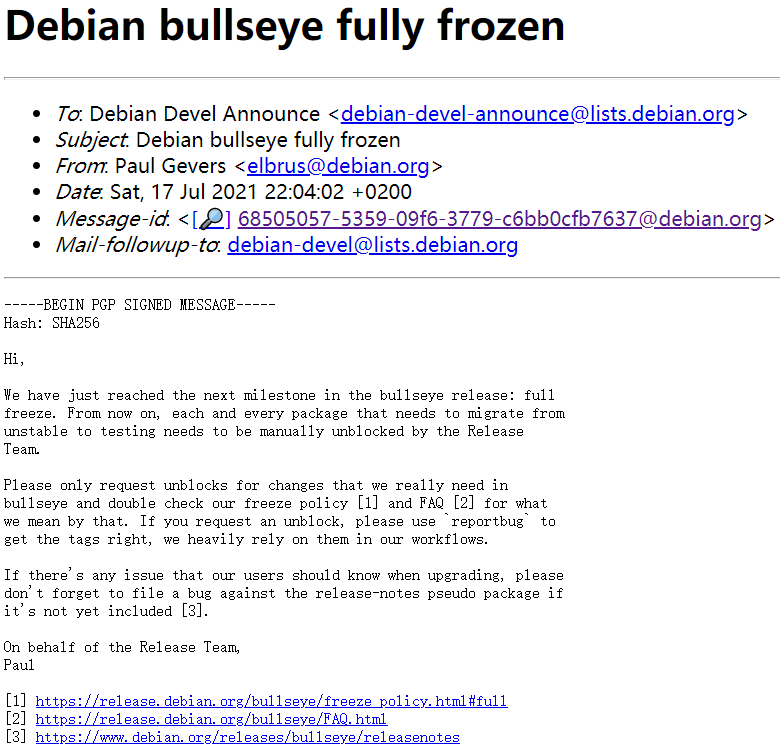
Debian 11 Bullseye 开发工作进入 Full Freeze 阶段

经过软冻结和硬冻结之后,Debian 开发团队宣布Debian 11 'Bullseye' 已于 7 月 17 日开始进入“完全冻结 (Full Freeze)”阶段。 "Full Freeze" 意味着新版本即将发布。根据官方团队的介绍,在此阶段,每一个从不稳定状态 (unstable) 迁移到测试状态 (testing) 的软件包都需要发布团队手动解锁。如果有软件包希望在这个阶段进入系统,必须经过发布团队的手动审查才可以进行。详情查看Bullseye冻结策略页面。 根据以往的经验,Debian 10 的"Full Freeze"开始于 2019 年 3 月,然后在 7 月发布稳定版;Debian 9的"Full Freeze"开始于 2017 年 2 月,然后在 6 月发布正式版。因此,Debian 11 很有可能在未来 3 个月内发布。

优秀的个人博客,低调大师

CSReid库在NetCore工作场景中的使用

关于我 作者博客|文章首发 过去 .net 最有名望的 ServiceStack.Redis 早已沦为商业用途,在 .NETCore 中使用只能充值。后来居上的 StackExchange.Redis 虽然能用,但是之前出现的各种Timeout错误也是让人很无语,所以也不作为使用的首选。经过网上的一些整理和推荐,发现了一款开源库CSReidsCore。 CSRedisCore是国人开源的一套Redis操作库,现在最新版本已经V3.6.5,经过几个实际公司项目的使用情况来看,还没有出现什么大的问题,本文主要介绍一下在使用这个库的过程中的一些自己的想法。 特征 CSRedisClient和RedisHelper保持所有方法名称与redis-cli一致 支持地理类型命令(需要redis-server 3.2或更高版本) 支持Redis集群redis-trib.rb 支持Redis Sentinel和主从 支持流类型命令(需要redis-server 5.0及更高版本) 官方参数 范围 默认 解释 密码 <空> Redis服务器密码 defaultDatabase 0 Redis服务器数据库 asyncPipeline 错误的 异步方法自动使用管道,并且10W并发时间为450ms(欢迎反馈) 池大小 50 连接池大小 空闲超时 20000 连接池(MS)中元素的空闲时间,适用于连接到远程Redis服务器 connectTimeout 5000 连接超时(MS) syncTimeout 10000 发送/接收超时(MS) 预热 5 预热连接,接收预热等值= 5个预热5个连接 自动处置 真的 跟踪系统退出事件以自动释放 ssl 错误的 启用加密传输 测试集群 真的 是否尝试正常模式,阿里云,腾讯云合并需要设置此选项为false 试试吧 0 执行错误,重试尝试 姓名 <空> 连接名称,使用客户端列表命令查看 字首 <空> key前辍,所有方法都会附有海军辍,csredis.Set(前缀+“ key”,111); 开始使用 Redis单机 Redis唯一Db使用 根据Github作者推荐,如果你是唯一DB的使用场景,推荐使用这种方式初始化和使用 使用RedisHelper初始化和调用,是唯一Db下的推荐方式 var rds = new CSRedis.CSRedisClient("127.0.0.1:6379,password=123,defaultDatabase=0,poolsize=50,ssl=false,writeBuffer=10240"); RedisHelper.Initialization(rds); //使用RedisHelper RedisHelper.Set("test", DateTime.Now.ToString()); RedisHelper.Get("test"); Redis多个Db使用 实例数组作为单例注入 推荐方式: 将实例后的各个RedisDb整合在数组中,单例截注入services var connectionString = "127.0.0.1:6379,password=123,poolsize=10"; var redis = new CSRedisClient[14]; for (var a = 0; a < redis.Length; a++) redis[a] = new CSRedisClient(connectionString + ",defaultDatabase=" + a); service.AddSingleton(redis); 创建多个ReidsHepler 每一个库对应一个RedisHelper,初始化指定Helper的Client实例 public abstract class MyHelper1 : RedisHelper<MyHelper1> {} public abstract class MyHelper2 : RedisHelper<MyHelper2> {} MyHelper1.Initialization(new CSRedisClient("....")); MyHelper2.Initialization(new CSRedisClient("....")); Redis集群 var csredis = new CSRedis.CSRedisClient(null, "127.0.0.1:6371,password=123,defaultDatabase=11,poolsize=10,ssl=false,writeBuffer=10240", "127.0.0.1:6372,password=123,defaultDatabase=12,poolsize=11,ssl=false,writeBuffer=10240", "127.0.0.1:6373,password=123,defaultDatabase=13,poolsize=12,ssl=false,writeBuffer=10240", "127.0.0.1:6374,password=123,defaultDatabase=14,poolsize=13,ssl=false,writeBuffer=10240"); csredis.Set("test", DateTime.Now.ToString()); csredis.Get("test"); 哨兵模式 var csredis = new CSRedis.CSRedisClient("mymaster,password=123", new[] { "192.169.1.10:26379", "192.169.1.11:26379", "192.169.1.12:26379" }); csredis.Set("test", DateTime.Now.ToString()); csredis.Get("test"); 分布式缓存 基于CSRedisCore开源库的分布式缓存用法也很简单,大体的思路和上文一致只是方法体变了而已 普通模式 var csredis = new CSRedis.CSRedisClient("127.0.0.1:6379,password=123,defaultDatabase=13,ssl=false,writeBuffer=10240,poolsize=50,prefix=key前辍"); services.AddSingleton<IDistributedCache>(new Microsoft.Extensions.Caching.Redis.CSRedisCache(csredis)); 集群模式 var csredis = new CSRedis.CSRedisClient(null, "127.0.0.1:6371,password=123,defaultDatabase=11,poolsize=10,ssl=false,writeBuffer=10240,prefix=key前辍", "127.0.0.1:6372,password=123,defaultDatabase=12,poolsize=11,ssl=false,writeBuffer=10240,prefix=key前辍", "127.0.0.1:6373,password=123,defaultDatabase=13,poolsize=12,ssl=false,writeBuffer=10240,prefix=key前辍", "127.0.0.1:6374,password=123,defaultDatabase=14,poolsize=13,ssl=false,writeBuffer=10240,prefix=key前辍"); services.AddSingleton<IDistributedCache>(new Microsoft.Extensions.Caching.Redis.CSRedisCache(csredis)); 如果你存在多数据库切换的需求,可以参照”Redis多个Db使用“标签进行设置 高级用法 CSRedis的高级用法可以参考这篇文章 .NETCore 简单且高级的库 csredis v3.0.0和Github官方库。一般情况使用不到,等到需要用到的时候再来回顾一下即可。 最后 本文到此结束,希望对你有帮助 😃 如果还有什么疑问或者建议,可以多多交流,原创文章,文笔有限,才疏学浅,文中若有不正之处,万望告知。 更多精彩技术文章汇总在我的 公众号【程序员工具集】,持续更新,欢迎关注订阅收藏。


优秀的个人博客,低调大师

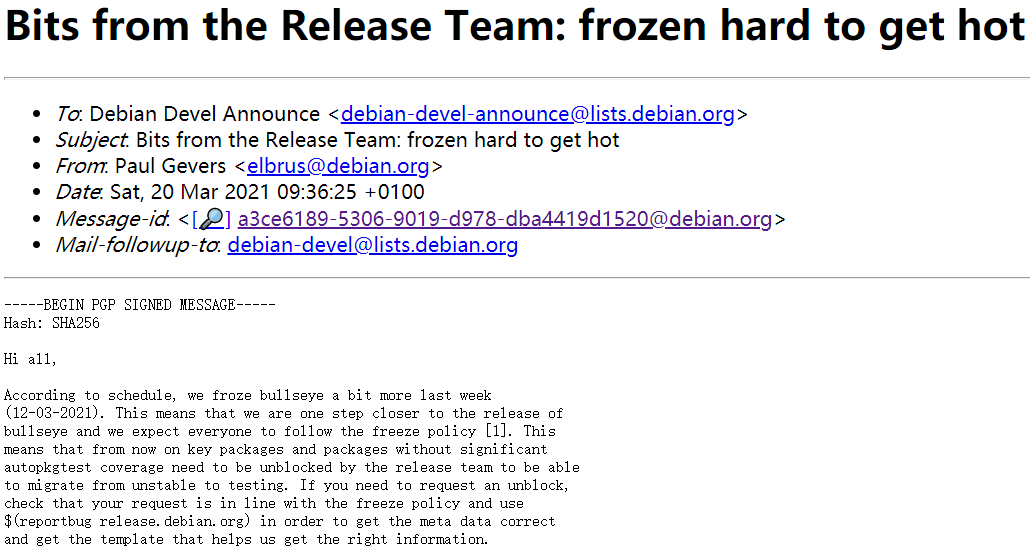
Debian 11 Bullseye 开发工作进入硬冻结阶段

Debian 开发团队宣布 Debian 11 'Bullseye' 已于3月12日开始进入“硬冻结” (Hard Freeze) 阶段。 在此阶段,关键软件包和缺少自动化测试 (Autopkgtest) 的软件包被视为完全冻结 (Full Freeze),需要被发布团队解封才能够从不稳定状态 (unstable) 迁移到测试状态 (testing)。而支持自动化测试的非关键软件包仍为软冻结状态。Autopkgtest 是 Debian 集成的解决方案,用于自动运行软件包验收/一致性测试。 如果需要从 Debian unstable 迁移到测试版,缺少 Autopkgtest 覆盖的关键软件包和 Debian 软件包需要由 Debian 发布团队解除阻止。详情查看 Bullseye冻结策略页面。 硬冻结阶段之后便是完全冻结,不过日期还没确定。根据质量情况和其他的迁移,预计几个月后会正式发布 Debian 11。

优秀的个人博客,低调大师

Java JUnit框架里@Category注解的工作原理

Suppose you have a large number of unit test cases and you don’t want them to be executed all at the same time during Maven build. You can simply achieve it via annotation @Category. (1) Create empty class FastTests and SlowTests.(2) In your test case class, categorize your test method using @Category annotation: (3) Append the following code to your pom.xml: <profiles> <profile> <id>SlowTests</id> <properties> <testcase.groups>com.sap.SlowTests</testcase.groups> </properties> </profile> <profile> <id>FastTests</id> <properties> <testcase.groups>com.sap.FastTests</testcase.groups> </properties> </profile> </profiles> <build> <plugins> <plugin> <groupId>org.apache.maven.plugins</groupId> <artifactId>maven-compiler-plugin</artifactId> <version>3.1</version> <configuration> <source>1.8</source> <target>1.8</target> </configuration> </plugin> <plugin> <groupId>org.apache.maven.plugins</groupId> <artifactId>maven-surefire-plugin</artifactId> <version>2.13</version> <dependencies> <dependency> <groupId>org.apache.maven.surefire</groupId> <artifactId>surefire-junit47</artifactId> <version>2.13</version> </dependency> </dependencies> <configuration> <groups>${testcase.groups}</groups> </configuration> </plugin> </plugins> </build> (4) In my project, by default all 7 test methods will be executed during Maven build: Suppose you only want to execute unit test belonging to category “SlowTests”, use the following command line: Since now I only marked one method with annotation SlowTests, only one test method is executed: If you would like to execute all unit tests EXCEPT @SlowTests, simply add another profile in pom.xml: <profile> <id>NonSlowTests</id> <build> <plugins> <plugin> <groupId>org.apache.maven.plugins</groupId> <artifactId>maven-surefire-plugin</artifactId> <configuration> <excludedGroups>com.sap.SlowTests</excludedGroups> </configuration> </plugin> </plugins> </build> </profile> Before test, in order to prove that Slow method is NOT really executed, I add a system.out.println in each method: Use command line: mvn test -P NonSlowTestsFrom console output, I can ensure that the method with @Category(SlowTests.class) is NOT executed at all. 本文来自云栖社区合作伙伴“汪子熙”,了解相关信息可以关注微信公众号"汪子熙"。

资源下载

更多资源
腾讯云软件源

腾讯云软件源

为解决软件依赖安装时官方源访问速度慢的问题,腾讯云为一些软件搭建了缓存服务。您可以通过使用腾讯云软件源站来提升依赖包的安装速度。为了方便用户自由搭建服务架构,目前腾讯云软件源站支持公网访问和内网访问。

Nacos

Nacos

Nacos /nɑ:kəʊs/ 是 Dynamic Naming and Configuration Service 的首字母简称,一个易于构建 AI Agent 应用的动态服务发现、配置管理和AI智能体管理平台。Nacos 致力于帮助您发现、配置和管理微服务及AI智能体应用。Nacos 提供了一组简单易用的特性集,帮助您快速实现动态服务发现、服务配置、服务元数据、流量管理。Nacos 帮助您更敏捷和容易地构建、交付和管理微服务平台。

Rocky Linux

Rocky Linux

Rocky Linux(中文名:洛基)是由Gregory Kurtzer于2020年12月发起的企业级Linux发行版,作为CentOS稳定版停止维护后与RHEL(Red Hat Enterprise Linux)完全兼容的开源替代方案,由社区拥有并管理,支持x86_64、aarch64等架构。其通过重新编译RHEL源代码提供长期稳定性,采用模块化包装和SELinux安全架构,默认包含GNOME桌面环境及XFS文件系统,支持十年生命周期更新。

Sublime Text

Sublime Text

Sublime Text具有漂亮的用户界面和强大的功能,例如代码缩略图,Python的插件,代码段等。还可自定义键绑定,菜单和工具栏。Sublime Text 的主要功能包括:拼写检查,书签,完整的 Python API , Goto 功能,即时项目切换,多选择,多窗口等等。Sublime Text 是一个跨平台的编辑器,同时支持Windows、Linux、Mac OS X等操作系统。

用户登录
用户注册