首页 文章 精选 留言 我的

精选列表

搜索[容器配置],共10000篇文章
优秀的个人博客,低调大师

统一tomcat的程序包路径,日志路径,自定义变量,JAVA启动项的配置文件示例

在企业环境中,将tomcat里的日志和程序包统一到不同的路径, 自定义全局变量,自定义JAVA_OPTS都是很常见的操作。 现将相关文件作一示例, 以后可照猫画虎了。 (有时,tomcat日志的时间不对,系统的时间是对的,这里就要用GMT+8参数) bin/setenv.sh CLASSPATH=$CLASSPATH:/xxx/webconfigs LOG_DIR="/xxx/weblogs/${MY_POD_NAMESPACE}_${MY_POD_NAME}" JAVA_OPTS="$JAVA_OPTS -Duser.timezone=GMT+08" JAVA_OPTS="$JAVA_OPTS -Dlog.home=${LOG_DIR}" JAVA_OPTS="$JAVA_OPTS -Dxxx.log=${LOG_DIR}" JAVA_OPTS="$JAVA_OPTS -Xms4096m -Xmx6144m -XX:MaxNewSize=512m -XX:MaxPermSize=512m" JAVA_OPTS="$JAVA_OPTS -XX:+UseConcMarkSweepGC -XX:CMSInitiatingOccupancyFraction=85 -XX:+PrintGCDetails -XX:+PrintGCDateStamps -XX:+PrintGCTimeStamps" JAVA_OPTS="$JAVA_OPTS -XX:+HeapDumpOnOutOfMemoryError -XX:HeapDumpPath=${LOG_DIR} -verbose:gc -Xloggc:${LOG_DIR}/gc.log" conf/server.xml <Server port="59076" shutdown="SHUTDOWN"> <Listener className="org.apache.catalina.core.AprLifecycleListener" /> <!--Listener className="org.apache.catalina.mbeans.ServerLifecycleListener" /--> <Listener className="org.apache.catalina.mbeans.GlobalResourcesLifecycleListener" /> <Listener className="org.apache.catalina.storeconfig.StoreConfigLifecycleListener"/> <GlobalNamingResources> <!-- Used by Manager webapp --> <Resource name="UserDatabase" auth="Container" type="org.apache.catalina.UserDatabase" description="User database that can be updated and saved" factory="org.apache.catalina.users.MemoryUserDatabaseFactory" pathname="conf/tomcat-users.xml" /> </GlobalNamingResources> <Service name="Catalina"> <Connector port="8080" protocol="HTTP/1.1" maxThreads="150" minSpareThreads="25" enableLookups="false" redirectPort="8443" acceptCount="200" connectionTimeout="40000" disableUploadTimeout="false"/> <!-- This is here for compatibility only, not required --> <!-- <Connector port="59009" protocol="AJP/1.3" /> --> <Engine name="Catalina" defaultHost="localhost"> <Realm className="org.apache.catalina.realm.UserDatabaseRealm" resourceName="UserDatabase" /> <Host name="localhost" appBase="/xxx/webapps" unpackWARs="true"> <Valve className="org.apache.catalina.valves.AccessLogValve" rotatable="true" directory="${xxx.log}" prefix="localhost_access.log" pattern="%h %{X-FORWARDED-FOR}i %l %u %t %r %s %b %q %{User-Agent}i %T %D" resolveHosts="false"/> </Host> </Engine> </Service> </Server> conf/logging.properties # Licensed to the Apache Software Foundation (ASF) under one or more # contributor license agreements. See the NOTICE file distributed with # this work for additional information regarding copyright ownership. # The ASF licenses this file to You under the Apache License, Version 2.0 # (the "License"); you may not use this file except in compliance with # the License. You may obtain a copy of the License at # # http://www.apache.org/licenses/LICENSE-2.0 # # Unless required by applicable law or agreed to in writing, software # distributed under the License is distributed on an "AS IS" BASIS, # WITHOUT WARRANTIES OR CONDITIONS OF ANY KIND, either express or implied. # See the License for the specific language governing permissions and # limitations under the License. handlers = 1catalina.org.apache.juli.AsyncFileHandler, 2localhost.org.apache.juli.AsyncFileHandler, 3manager.org.apache.juli.AsyncFileHandler, 4host-manager.org.apache.juli.AsyncFileHandler, java.util.logging.ConsoleHandler .handlers = 1catalina.org.apache.juli.AsyncFileHandler, java.util.logging.ConsoleHandler ############################################################ # Handler specific properties. # Describes specific configuration info for Handlers. ############################################################ 1catalina.org.apache.juli.AsyncFileHandler.level = FINE 1catalina.org.apache.juli.AsyncFileHandler.directory = ${xxx.log} 1catalina.org.apache.juli.AsyncFileHandler.prefix = catalina. 2localhost.org.apache.juli.AsyncFileHandler.level = FINE 2localhost.org.apache.juli.AsyncFileHandler.directory = ${xxx.log} 2localhost.org.apache.juli.AsyncFileHandler.prefix = localhost. 3manager.org.apache.juli.AsyncFileHandler.level = FINE 3manager.org.apache.juli.AsyncFileHandler.directory = ${xxx.log} 3manager.org.apache.juli.AsyncFileHandler.prefix = manager. 4host-manager.org.apache.juli.AsyncFileHandler.level = FINE 4host-manager.org.apache.juli.AsyncFileHandler.directory = ${xxx.log} 4host-manager.org.apache.juli.AsyncFileHandler.prefix = host-manager. java.util.logging.ConsoleHandler.level = FINE java.util.logging.ConsoleHandler.formatter = org.apache.juli.OneLineFormatter ############################################################ # Facility specific properties. # Provides extra control for each logger. ############################################################ org.apache.catalina.core.ContainerBase.[Catalina].[localhost].level = INFO org.apache.catalina.core.ContainerBase.[Catalina].[localhost].handlers = 2localhost.org.apache.juli.AsyncFileHandler org.apache.catalina.core.ContainerBase.[Catalina].[localhost].[/manager].level = INFO org.apache.catalina.core.ContainerBase.[Catalina].[localhost].[/manager].handlers = 3manager.org.apache.juli.AsyncFileHandler org.apache.catalina.core.ContainerBase.[Catalina].[localhost].[/host-manager].level = INFO org.apache.catalina.core.ContainerBase.[Catalina].[localhost].[/host-manager].handlers = 4host-manager.org.apache.juli.AsyncFileHandler # For example, set the org.apache.catalina.util.LifecycleBase logger to log # each component that extends LifecycleBase changing state: #org.apache.catalina.util.LifecycleBase.level = FINE # To see debug messages in TldLocationsCache, uncomment the following line: #org.apache.jasper.compiler.TldLocationsCache.level = FINE # To see debug messages for HTTP/2 handling, uncomment the following line: #org.apache.coyote.http2.level = FINE # To see debug messages for WebSocket handling, uncomment the following line: #org.apache.tomcat.websocket.level = FINE

优秀的个人博客,低调大师

kafka_2.10-0.8.1.1.tgz的1或3节点集群的下载、安装和配置(图文详细教程)绝对干货

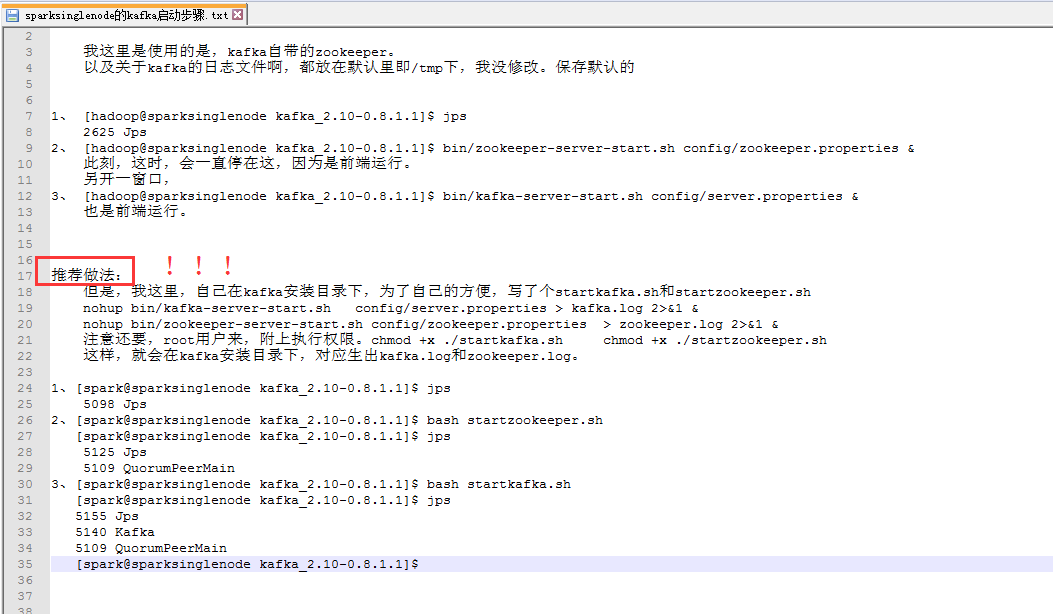
kafka_2.10-0.8.1.1.tgz的1节点集群 我这里是使用的是,kafka自带的zookeeper。 以及关于kafka的日志文件啊,都放在默认里即/tmp下,我没修改。保存默认的 1、 [hadoop@sparksinglenode kafka_2.10-0.8.1.1]$ jps 2625 Jps 2、 [hadoop@sparksinglenode kafka_2.10-0.8.1.1]$ bin/zookeeper-server-start.sh config/zookeeper.properties & 此刻,这时,会一直停在这,因为是前端运行。 另开一窗口, 3、 [hadoop@sparksinglenode kafka_2.10-0.8.1.1]$ bin/kafka-server-start.sh config/server.properties & 也是前端运行。 推荐做法!!! 但是,我这里,自己在kafka安装目录下,为了自己的方便,写了个startkafka.sh和startzookeeper.sh nohup bin/kafka-server-start.sh config/server.properties > kafka.log 2>&1 & nohup bin/zookeeper-server-start.sh config/zookeeper.properties > zookeeper.log 2>&1 & 注意还要,root用户来,附上执行权限。chmod +x ./startkafka.sh chmod +x ./startzookeeper.sh 这样,就会在kafka安装目录下,对应生出kafka.log和zookeeper.log。 1、[spark@sparksinglenode kafka_2.10-0.8.1.1]$ jps 5098 Jps 2、[spark@sparksinglenode kafka_2.10-0.8.1.1]$bash startzookeeper.sh [spark@sparksinglenode kafka_2.10-0.8.1.1]$ jps 5125 Jps 5109 QuorumPeerMain 3、[spark@sparksinglenode kafka_2.10-0.8.1.1]$bash startkafka.sh [spark@sparksinglenode kafka_2.10-0.8.1.1]$ jps 5155 Jps 5140 Kafka 5109 QuorumPeerMain [spark@sparksinglenode kafka_2.10-0.8.1.1]$ 我了个去,启动是多么方便! kafka_2.10-0.8.1.1.tgz的3节点集群 关于下载,和安装,解压,这些,我不多赘述了。见我的单节点博客。 root@SparkMaster:/usr/local/kafka/kafka_2.10-0.8.1.1/config# cat server.properties # Licensed to the Apache Software Foundation (ASF) under one or more # contributor license agreements. See the NOTICE file distributed with # this work for additional information regarding copyright ownership. # The ASF licenses this file to You under the Apache License, Version 2.0 # (the "License"); you may not use this file except in compliance with # the License. You may obtain a copy of the License at # # http://www.apache.org/licenses/LICENSE-2.0 # # Unless required by applicable law or agreed to in writing, software # distributed under the License is distributed on an "AS IS" BASIS, # WITHOUT WARRANTIES OR CONDITIONS OF ANY KIND, either express or implied. # See the License for the specific language governing permissions and # limitations under the License. # see kafka.server.KafkaConfig for additional details and defaults ############################# Server Basics ############################# # The id of the broker. This must be set to a unique integer for each broker.broker.id=0 ############################# Socket Server Settings ############################# # The port the socket server listens on port=9092 # Hostname the broker will bind to. If not set, the server will bind to all interfaces #host.name=localhost # Hostname the broker will advertise to producers and consumers. If not set, it uses the # value for "host.name" if configured. Otherwise, it will use the value returned from # java.net.InetAddress.getCanonicalHostName(). #advertised.host.name=<hostname routable by clients> # The port to publish to ZooKeeper for clients to use. If this is not set, # it will publish the same port that the broker binds to. #advertised.port=<port accessible by clients> # The number of threads handling network requests num.network.threads=2 # The number of threads doing disk I/O num.io.threads=8 # The send buffer (SO_SNDBUF) used by the socket server socket.send.buffer.bytes=1048576 # The receive buffer (SO_RCVBUF) used by the socket server socket.receive.buffer.bytes=1048576 # The maximum size of a request that the socket server will accept (protection against OOM) socket.request.max.bytes=104857600 ############################# Log Basics ############################# # A comma seperated list of directories under which to store log fileslog.dirs=/kafka-logs # The default number of log partitions per topic. More partitions allow greater # parallelism for consumption, but this will also result in more files across # the brokers. num.partitions=2 ############################# Log Flush Policy ############################# # Messages are immediately written to the filesystem but by default we only fsync() to sync # the OS cache lazily. The following configurations control the flush of data to disk. # There are a few important trade-offs here: # 1. Durability: Unflushed data may be lost if you are not using replication. # 2. Latency: Very large flush intervals may lead to latency spikes when the flush does occur as there will be a lot of data to flush. # 3. Throughput: The flush is generally the most expensive operation, and a small flush interval may lead to exceessive seeks. # The settings below allow one to configure the flush policy to flush data after a period of time or # every N messages (or both). This can be done globally and overridden on a per-topic basis. # The number of messages to accept before forcing a flush of data to disk #log.flush.interval.messages=10000 # The maximum amount of time a message can sit in a log before we force a flush #log.flush.interval.ms=1000 ############################# Log Retention Policy ############################# # The following configurations control the disposal of log segments. The policy can # be set to delete segments after a period of time, or after a given size has accumulated. # A segment will be deleted whenever *either* of these criteria are met. Deletion always happens # from the end of the log. # The minimum age of a log file to be eligible for deletion log.retention.hours=168 # A size-based retention policy for logs. Segments are pruned from the log as long as the remaining # segments don't drop below log.retention.bytes. #log.retention.bytes=1073741824 # The maximum size of a log segment file. When this size is reached a new log segment will be created. log.segment.bytes=536870912 # The interval at which log segments are checked to see if they can be deleted according # to the retention policies log.retention.check.interval.ms=60000 # By default the log cleaner is disabled and the log retention policy will default to just delete segments after their retention expires. # If log.cleaner.enable=true is set the cleaner will be enabled and individual logs can then be marked for log compaction. log.cleaner.enable=false ############################# Zookeeper ############################# # Zookeeper connection string (see zookeeper docs for details). # This is a comma separated host:port pairs, each corresponding to a zk # server. e.g. "127.0.0.1:3000,127.0.0.1:3001,127.0.0.1:3002". # You can also append an optional chroot string to the urls to specify the # root directory for all kafka znodes.zookeeper.connect=SparkMaster:2181,SparkWorker1:2181,SparkWorker2:2181 # Timeout in ms for connecting to zookeeper zookeeper.connection.timeout.ms=1000000 root@SparkMaster:/usr/local/kafka/kafka_2.10-0.8.1.1/config# SparkWorker1和SparkWorker2分别只把broker.id=0改成broker.id=1 ,broker.id=2。 即SparkMaster: broker.id=0 log.dirs=/kafka-logs zookeeper.connect=SparkMaster:2181,SparkWorker1:2181,SparkWorker2:2181 即SparkWorker1: broker.id=1 log.dirs=/kafka-logs zookeeper.connect=SparkMaster:2181,SparkWorker1:2181,SparkWorker2:2181 即SparkWorker2: broker.id=2 log.dirs=/kafka-logs zookeeper.connect=SparkMaster:2181,SparkWorker1:2181,SparkWorker2:2181 kafka的3节点如何启动 步骤一:先,分别在SparkMaster、SpakrWorker1、SparkWorker2节点上,启动zookeeper进程。 root@SparkMaster:/usr/local/kafka/kafka_2.10-0.8.1.1#bash startkafka.sh 其他,两台机器,一样的,不多赘述。 本文转自大数据躺过的坑博客园博客,原文链接:http://www.cnblogs.com/zlslch/p/6073192.html,如需转载请自行联系原作者


优秀的个人博客,低调大师

阿里云服务器共享型实例xn4 n4 ——配置性能使用场景及注意事项

阿里云服务器共享型实例xn4 n4 属于多台小鸡共享一台母鸡资源,小鸡之间存在资源争抢的情况。本文介绍共享型实例的特点,以及基准性能、CPU积分、性能模式、使用场景及注意事项。 共享型实例xn4、n4介绍 共享型实例xn4 n4属于阿里云上一代实例机型,不过现在还是有很多人在普遍使用这几款机型。因为大多数业务环境都可以在这种机型中流畅的运行。 共享型实例xn4、n4特点 处理器:2.5 GHz主频的Intel ® Xeon ® E5-2682 v4(Broadwell)搭配DDR4内存多种处理器和内存配比xn4 共享基本型实例 1:1n4 共享计算型实例 1:2 共享型实例xn4、n4适用场景 共享型实例xn4适用于:Web应用前端机,轻负载应用、微服务,开发测试压测服务应用,网站和Web应用程序共享型实例n4适用于:开发环境、构建服务器、代码存储库、微服务、测试和暂存环境,轻量级企业应用 共享基本型xn4包括的实例规格及指标数据 共享基本型n4包括的实例规格及指标数据 建议是普通的个人博客、中小型网站可以使用共享型实例,从性能上可以满足这类业务需要。云小站详情 购买可领取: 阿里云代金券

优秀的个人博客,低调大师

阿里云服务器共享型实例xn4 n4 配置性能使用场景及注意事项

阿里云服务器共享型实例xn4 n4 属于多台小鸡共享一台母鸡资源,小鸡之间存在资源争抢的情况。老魏介绍共享型实例的特点,以及基准性能、CPU积分、性能模式、使用场景及注意事项。 共享型实例xn4、n4介绍 共享型实例xn4 n4属于阿里云上一代实例机型,不过现在还是有很多人在普遍使用这几款机型。因为大多数业务环境都可以在这种机型中流畅的运行。 共享型实例xn4、n4特点 处理器:2.5 GHz主频的Intel ® Xeon ® E5-2682 v4(Broadwell)搭配DDR4内存多种处理器和内存配比xn4 共享基本型实例 1:1n4 共享计算型实例 1:2 共享型实例xn4、n4适用场景 共享型实例xn4适用于:Web应用前端机,轻负载应用、微服务,开发测试压测服务应用,网站和Web应用程序共享型实例n4适用于:开发环境、构建服务器、代码存储库、微服务、测试和暂存环境,轻量级企业应用 共享基本型xn4包括的实例规格及指标数据 共享基本型n4包括的实例规格及指标数据 建议是普通的个人博客、中小型网站可以使用共享型实例,从性能上可以满足这类业务需要。云小站详情

资源下载

更多资源
Nacos

Nacos

Nacos /nɑ:kəʊs/ 是 Dynamic Naming and Configuration Service 的首字母简称,一个易于构建 AI Agent 应用的动态服务发现、配置管理和AI智能体管理平台。Nacos 致力于帮助您发现、配置和管理微服务及AI智能体应用。Nacos 提供了一组简单易用的特性集,帮助您快速实现动态服务发现、服务配置、服务元数据、流量管理。Nacos 帮助您更敏捷和容易地构建、交付和管理微服务平台。

Spring

Spring

Spring框架(Spring Framework)是由Rod Johnson于2002年提出的开源Java企业级应用框架,旨在通过使用JavaBean替代传统EJB实现方式降低企业级编程开发的复杂性。该框架基于简单性、可测试性和松耦合性设计理念,提供核心容器、应用上下文、数据访问集成等模块,支持整合Hibernate、Struts等第三方框架,其适用范围不仅限于服务器端开发,绝大多数Java应用均可从中受益。

Rocky Linux

Rocky Linux

Rocky Linux(中文名:洛基)是由Gregory Kurtzer于2020年12月发起的企业级Linux发行版,作为CentOS稳定版停止维护后与RHEL(Red Hat Enterprise Linux)完全兼容的开源替代方案,由社区拥有并管理,支持x86_64、aarch64等架构。其通过重新编译RHEL源代码提供长期稳定性,采用模块化包装和SELinux安全架构,默认包含GNOME桌面环境及XFS文件系统,支持十年生命周期更新。

Sublime Text

Sublime Text

Sublime Text具有漂亮的用户界面和强大的功能,例如代码缩略图,Python的插件,代码段等。还可自定义键绑定,菜单和工具栏。Sublime Text 的主要功能包括:拼写检查,书签,完整的 Python API , Goto 功能,即时项目切换,多选择,多窗口等等。Sublime Text 是一个跨平台的编辑器,同时支持Windows、Linux、Mac OS X等操作系统。

用户登录
用户注册