首页 文章 精选 留言 我的

精选列表

搜索[c ],共10000篇文章
优秀的个人博客,低调大师

C++访问者模式

简述 访问者模式(Visitor Pattern)表示一个作用于某对象结构中的各元素的操作,它使你可以在不改变各元素类的前提下定义作用于这些元素的新操作。 简述 模式结构 优缺点 适用场景 案例分析 代码实现 版权所有:一去丶二三里,转载请注明出处:http://blog.csdn.net/liang19890820 模式结构 UML 结构图: Vistor(访问者):为对象结构中每一个 ConcreteElement 声明一个 visit() 操作,从这个操作的名称或参数类型可以清楚知道需要访问的具体元素的类型。 ConcreteVisitor(具体访问者):实现每个由 Visitor 声明的操作。 Element(元素):定义一个 accept() 操作,它通常以一个 Vistor 作为参数。 ConcreteElement(具体元素):实现 accept() 操作,通过调用 Visitor 的 visit() 方法来实现对元素的访问。 ObjectStructure(对象结构):能够枚举它的元素,同时提供一个高层的接口,以允许访问者访问它的元素。 优缺点 优点: 增加新的访问操作很方便。使用访问者模式,增加新的访问操作就意味着增加一个新的具体访问者类,实现简单,无须修改源代码,符合“开闭原则”。 将有关元素对象的访问行为集中到一个访问者对象中,而不是分散在一个个的元素类中。类的职责更加清晰,有利于对象结构中元素对象的复用,相同的对象结构可以供多个不同的访问者访问。 让用户能够在不修改现有元素类层次结构的情况下,定义作用于该层次结构的操作。 缺点: 增加新的元素类困难。每增加一个新的元素类都意味着要在访问者中增加一个新的操作,并在每一个具体访问者类中增加相应的具体操作,这违背了“开闭原则”的要求。 破坏封装。访问者模式要求访问者对象访问并调用每一个元素对象的操作,这意味着元素对象有时候必须暴露一些自己的内部操作和内部状态,否则无法供访问者访问。 适用场景 一个对象结构包含多个类型的对象,希望对这些对象实施一些依赖其具体类型的操作。在访问者中针对每一种具体的类型都提供了一个访问操作,不同类型的对象可以有不同的访问操作。 需要对一个对象结构中的对象进行很多不同的并且不相关的操作,而需要避免让这些操作“污染”这些对象的类,也不希望在增加新操作时修改这些类。访问者模式使得我们可以将相关的访问操作集中起来定义在访问者类中,对象结构可以被多个不同的访问者类所使用,将对象本身与对象的访问操作分离。 对象结构中对象对应的类很少改变,但经常需要在此对象结构上定义新的操作。 案例分析 古城西安 - 访问记 西安历史悠久,有着 7000 多年文明史、3100 多年建城史、1100 多年的建都史,是中华文明和中华民族重要发祥地,丝绸之路的起点。。。西安与雅典、罗马、开罗并称为世界四大古都。 二十年中国看深圳,一百年中国看上海,一千年中国看北京,而五千年中国则看西安。 作为中国最佳的旅游胜地,西安有很多著名的景点:秦始皇兵马俑、大雁塔、大唐芙蓉园、华清池、钟/鼓楼、骊山、古城墙、历史博物馆。。。 在访问西安时,访问者会参观各个景点。对于景点来说,无论访问者是谁,它们都是不变的。而作为访问者,不同角色的访问方式也不尽相同,游客只负责旅游 - 吃喝玩乐,而清洁工则需要打扫卫生、清理垃圾。 这里,游客和清洁工是具体访问者,兵马俑、钟楼等景点是具体元素,西安这座城市是结构对象。 代码实现 创建访问者 访问者需要为每个景点都提供一个访问方法: // visitor.h #ifndef VISITOR_H #define VISITOR_H class BellTower; class TerracottaWarriors; // 访问者 class IVisitor { public: virtual ~IVisitor() {} virtual void Visit(BellTower *) = 0; virtual void Visit(TerracottaWarriors *) = 0; }; #endif // VISITOR_H 创建具体访问者 具体访问者有两种 - 游客、清洁工,它们分别实现了不同的访问操作(游客只管吃喝玩乐,清洁工负责清理垃圾): // concrete_visitor.h #ifndef CONCRETE_VISITOR_H #define CONCRETE_VISITOR_H #include "visitor.h" #include "concrete_element.h" // 游客 class Tourist : public IVisitor { public: virtual void Visit(BellTower *) override { std::cout << "I'm visiting the Bell Tower!" << std::endl; } virtual void Visit(TerracottaWarriors *) override { std::cout << "I'm visiting the Terracotta Warriors!" << std::endl; } }; // 清洁工 class Cleaner : public IVisitor { public: virtual void Visit(BellTower *) override { std::cout << "I'm cleaning up the garbage of Bell Tower!" << std::endl; } virtual void Visit(TerracottaWarriors *) override { std::cout << "I'm cleaning up the garbage of Terracotta Warriors!" << std::endl; } }; #endif // CONCRETE_VISITOR_H 创建元素 景点中定义了一个 Accept() 接口,用于接受访问者的访问: // element.h #ifndef ELEMENT_H #define ELEMENT_H class IVisitor; // 地方 class IPlace { public: virtual ~IPlace() {} virtual void Accept(IVisitor *visitor) = 0; }; #endif // ELEMENT_H 创建具体元素 具体元素有两个 - 钟楼、兵马俑,它们实现了 Accept() 方法: // concrete_element.h #ifndef CONCRETE_ELEMENT_H #define CONCRETE_ELEMENT_H #include "element.h" #include "visitor.h" #include <iostream> // 钟楼 class BellTower : public IPlace { public: virtual void Accept(IVisitor *visitor) override { std::cout << "Bell Tower is accepting visitor." << std::endl; visitor->Visit(this); } }; // 兵马俑 class TerracottaWarriors : public IPlace { public: virtual void Accept(IVisitor *visitor) override { std::cout << "Terracotta Warriors is accepting visitor." << std::endl; visitor->Visit(this); } }; #endif // CONCRETE_ELEMENT_H 注意: 在 Accept() 方法中,通过调用 Visitor 的 visit() 方法(以当前对象为参数)来实现对景点的访问。 创建对象结构 添加景点,并为每一个景点添加访问者: // object_structure.h #ifndef OBJECT_STRUCTURE_H #define OBJECT_STRUCTURE_H #include "element.h" #include <list> // 城市(西安) class City { public: void Attach(IPlace *place) { m_places.push_back(place); } void Detach(IPlace *place) { m_places.remove(place); } void Accept(IVisitor *visitor) { // 为每一个 element 设置 visitor,进行对应的操作 for (std::list<IPlace*>::iterator it = m_places.begin(); it != m_places.end(); ++it) { (*it)->Accept(visitor); } } private: std::list<IPlace *> m_places; }; #endif // OBJECT_STRUCTURE_H 创建客户端 欢迎来到古城西安,开始访问之旅吧: // main.cpp #include "concrete_visitor.h" #include "object_structure.h" #ifndef SAFE_DELETE #define SAFE_DELETE(p) { if(p){delete(p); (p)=NULL;} } #endif int main() { City *city = new City(); // 景点 - 钟楼、兵马俑 IPlace *bellTower = new BellTower(); IPlace *warriors = new TerracottaWarriors(); // 访问者 - 游客、清洁工 IVisitor *tourist = new Tourist(); IVisitor *cleaner = new Cleaner(); // 添加景点 city->Attach(bellTower); city->Attach(warriors); // 接受访问 city->Accept(tourist); city->Accept(cleaner); SAFE_DELETE(cleaner); SAFE_DELETE(tourist); SAFE_DELETE(warriors); SAFE_DELETE(bellTower); SAFE_DELETE(city); getchar(); return 0; } 输出如下: Bell Tower is accepting visitor. I’m visiting the Bell Tower! Terracotta Warriors is accepting visitor. I’m visiting the Terracotta Warriors! Bell Tower is accepting visitor. I’m cleaning up the garbage of Bell Tower! Terracotta Warriors is accepting visitor. I’m cleaning up the garbage of Terracotta Warriors!

优秀的个人博客,低调大师

C++备忘录模式

简述 备忘录模式(Memento Pattern)在不破坏封装的前提下,捕获一个对象的内部状态,并在该对象之外保存这个状态,这样可以在以后将对象恢复到原先保存的状态。 简述 模式结构 优缺点 适用场景 案例分析 代码实现 版权所有:一去丶二三里,转载请注明出处:http://blog.csdn.net/liang19890820 模式结构 UML 结构图: Originator(发起人):负责创建一个 Memento,以记录当前时刻自身的内部状态,并可以使用 Memento 恢复内部状态。Originator 可以根据需要决定 Memento 储存自己的哪些内部状态。 Memento(备忘录):负责存储 Originator 对象的内部状态,并可以防止 Originator 以外的其他对象访问备忘录。 Caretaker(管理者):负责管理 Memento,但不能对 Memento 的内容进行访问或者操作。 优缺点 优点: 提供了一种状态恢复机制,使用户能够方便地回到某个历史的状态。 实现了信息的封装,使得用户不需要关心状态的保存细节。 缺点: 如果 Originator 对象很大,那么 Memento 对象也会很大,这势必会占用较大的存储空间,而且每保存一次都需要消耗一定的系统资源。 适用场景 保存一个对象在某一个时刻的全部(或部分)状态,这样在以后需要时便能够恢复到先前的状态,实现撤销操作。 防止外界对象破坏一个对象历史状态的封装性,避免将对象历史状态的实现细节暴露给外界对象。 案例分析 月光宝盒 - 让时光倒流 很多人说年少时看《大话西游》,看着看着就笑了;长大之后再看,看着看着就哭了。无论是笑了还是哭了,心中总有很多疑惑无法解开。 《大话西游》依托于“月光宝盒”,构建了几个平行时空中发生的爱情故事。其中,有一个经典桥段: 至尊宝在盘丝洞找到盘丝大仙留下的月光宝盒,此时牛魔王带白晶晶来到盘丝洞。白晶晶以为春三十娘和二当家生下的孩子是她和至尊宝所生,愤而自刎。至尊宝为了救白晶晶,使用月光宝盒使时光倒流,几次后产生故障,竟将其带回五百年前,这时紫霞仙子向他走来 … 和“月光宝盒”一样,备忘录模式也提供了时光倒流的机制,将一个对象某个时刻的状态进行备份,当用户后悔(需要返回之前的状态)时,可以把备份调用出来! 代码实现 创建备忘录 穿越至某一时刻,这个时刻指具体的日期时间,用 DateTime 表示,并为其提供相应的 setter 和 getter 方法: // memento.h #ifndef MEMENTO_H #define MEMENTO_H #include <iostream> #include <string> // 日期时间 class DateTime { public: DateTime(std::string dt) : m_dateTime(dt) {} void SetDateTime(std::string dt) { m_dateTime = dt; } std::string GetDateTime() { return m_dateTime; } private: std::string m_dateTime; }; #endif // MEMENTO_H 创建发起人 Life 用于创建 DateTime,以记录当前的日期时间,并可以使用 DateTime 进行恢复: // originator.h #ifndef ORIGINATOR_H #define ORIGINATOR_H #include "memento.h" #include <iostream> #include <string> // 一生 class Life { public: void SetDateTime(std::string dt) { std::cout << "Set date time to " << dt << std::endl; m_dateTime = dt; } // 仅用于打印 std::string GetDateTime() { return m_dateTime; } // 恢复日期时间 void SetMemento(DateTime *dt) { m_dateTime = dt->GetDateTime(); } // 创建日期时间 DateTime *CreateMemento() { return new DateTime(m_dateTime); } private: std::string m_dateTime; }; #endif // ORIGINATOR_H 创建管理者 这是时光倒流的关键,通过 PandoraBox,至尊宝才可以弥补遗憾: // care_taker.h #ifndef CARE_TAKER_H #define CARE_TAKER_H #include "originator.h" #include <iostream> #include <vector> // 月光宝盒 class PandoraBox { public: PandoraBox(Life *life) : m_pLife(life) {} ~PandoraBox() { for (int i = 0; i < m_history.size(); i++) { delete m_history.at(i); } m_history.clear(); } // 保存备份 void Save() { std::cout << "Save ..." << std::endl;; m_history.push_back(m_pLife->CreateMemento()); } // 穿越至上一时刻 void Undo() { std::cout << "Undo ..." << std::endl;; m_pLife->SetMemento(m_history.back()); m_history.pop_back(); } private: Life *m_pLife; std::vector<DateTime *> m_history; }; #endif // CARE_TAKER_H 创建客户端 想启动“月光宝盒”,体验一把穿越的感觉?大声喊出那句烂熟于心的“般bō若rě波罗蜜”: // main.cpp #include "originator.h" #include "care_taker.h" #ifndef SAFE_DELETE #define SAFE_DELETE(p) { if(p){delete(p); (p)=NULL;} } #endif int main() { Life *life = new Life(); PandoraBox *box = new PandoraBox(life); // 设置并保存一个历史时间 life->SetDateTime("2000/10/01 00:00:00"); box->Save(); // 设置并保存一个历史时间 life->SetDateTime("2010/10/01 00:00:00"); box->Save(); // 设置一个历史时间 life->SetDateTime("2018/10/01 00:00:00"); // 穿越 box->Undo(); std::cout << "Actual date time is " << life->GetDateTime() << std::endl; // 再次穿越 box->Undo(); std::cout << "Actual date time is " << life->GetDateTime() << std::endl; SAFE_DELETE(life); SAFE_DELETE(box); getchar(); return 0; } 输出如下: Set date time to 2000/10/01 00:00:00 Save … Set date time to 2010/10/01 00:00:00 Save … Set date time to 2018/10/01 00:00:00 Undo … Actual date time is 2010/10/01 00:00:00 Undo … Actual date time is 2000/10/01 00:00:00

优秀的个人博客,低调大师

C# 中?和??的用法

最近在看官方的源码时,经常看到有 Int? sum; 和 FileProvider = FileProvider ??builder.GetFileProvider(); 一个问号: 很多数据类型时不允许为空的,比如int类型,在类型的后面加? 表示允许该数据为null 所以 Int? sum的含义时sum可以为int类型也可以为null 两个问号: 两个数据中间有两个问号,含义是 问号的左边的数据类型为空吗?如果为空,那么返回问号右边的数据,如果不为空,就返回问号左边的数据 所以 FileProvider = FileProvider ??builder.GetFileProvider(); 表示 FileProvider为空吗?如果为空,那么FileProvider=builder.GetFileProvider()否则FileProvider = FileProvider 意义和 FileProvider = FileProvider ==null?builder.GetFileProvider():FileProvider; 相同。

优秀的个人博客,低调大师

C#获取枚举描述代码

public class MusterEnum { /// 获取枚举的描述信息 /// </summary> /// <param name="e">传入枚举对象</param> /// <returns>得到对应描述信息</returns> public String GetEnumDesc(Enum e) { FieldInfo EnumInfo = e.GetType().GetField(e.ToString()); if (EnumInfo == null) { return ""; } DescriptionAttribute[] EnumAttributes = (DescriptionAttribute[])EnumInfo.GetCustomAttributes(typeof(DescriptionAttribute), false); if (EnumAttributes.Length > 0) { return EnumAttributes[0].Description; } return e.ToString(); } /// <summary> /// 将含有描述信息的枚举绑定到列表控件中 /// </summary> /// <param name="listControl"></param> /// <param name="enumType"></param> private Dictionary<string, string> BindDesEnumToListControl(System.Type enumType) { Dictionary<string, string> dic = new Dictionary<string, string>(); foreach (object enumValue in Enum.GetValues(enumType)) { Enum e = (Enum)enumValue; dic.Add(((int)enumValue).ToString(), GetEnumDesc(e)); } return dic; } } 还有一个是根据传入的枚举的数字索引直接获取 public static string GetEnumDesc<T>(Object obj) { obj = (T)obj; if (obj == null) throw new ArgumentNullException("参数不能为null"); if (!obj.GetType().IsEnum) throw new Exception("参数类型不正确"); FieldInfo fieldinfo = obj.GetType().GetField(obj.ToString()); string str = string.Empty; Object[] objs = fieldinfo.GetCustomAttributes(typeof(DescriptionAttribute), false); if (objs != null && objs.Length != 0) { DescriptionAttribute des = (DescriptionAttribute)objs[0]; str = des.Description; } return str; } 本文转自左正博客园博客,原文链接:http://www.cnblogs.com/soundcode/p/4846916.html ,如需转载请自行联系原作者

优秀的个人博客,低调大师

C#中函数的使用

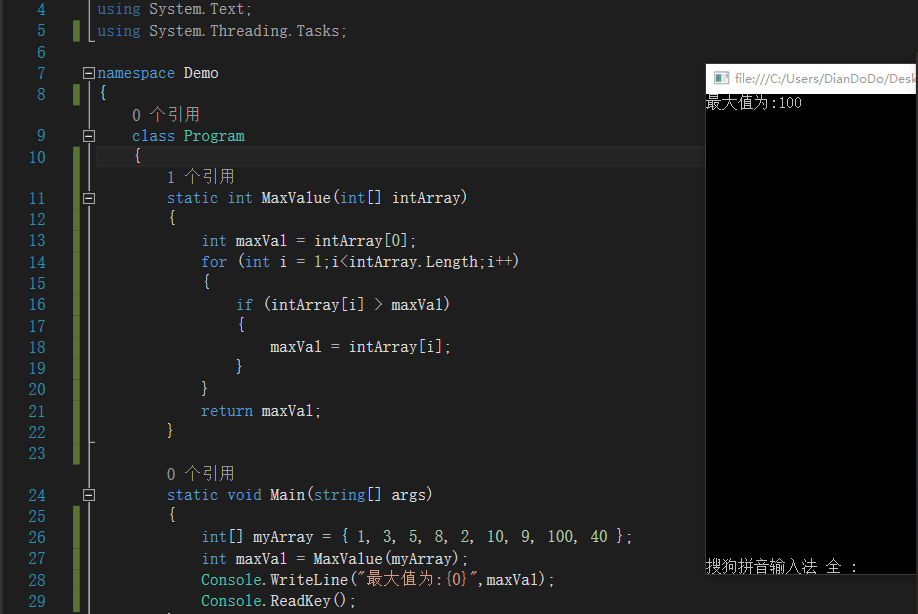
using System; using System.Collections.Generic; using System.Linq; using System.Text; using System.Threading.Tasks; namespace Demo { class Program { static int MaxValue(int[] intArray) { int maxVal = intArray[0]; for (int i = 1;i<intArray.Length;i++) { if (intArray[i] > maxVal) { maxVal = intArray[i]; } } return maxVal; } static void Main(string[] args) { int[] myArray = { 1, 3, 5, 8, 2, 10, 9, 100, 40 }; int maxVal = MaxValue(myArray); Console.WriteLine("最大值为:{0}",maxVal); Console.ReadKey(); } } } params传参 using System; using System.Collections.Generic; using System.Linq; using System.Text; using System.Threading.Tasks; namespace Demo { class Program { static int MaxValue(params int[] intArray) { int maxVal = intArray[0]; for (int i = 1;i<intArray.Length;i++) { if (intArray[i] > maxVal) { maxVal = intArray[i]; } } return maxVal; } static void Main(string[] args) { int maxVal = MaxValue(1,3,4,100,200,3); Console.WriteLine("最大值为:{0}",maxVal); Console.ReadKey(); } } } out使用,类似于callback。 using System; using System.Collections.Generic; using System.Linq; using System.Text; using System.Threading.Tasks; namespace Demo { class Program { static int MaxValue(out int maxIndex,params int[] intArray) { int maxVal = intArray[0]; maxIndex = 0; for (int i = 1;i<intArray.Length;i++) { if (intArray[i] > maxVal) { maxVal = intArray[i]; maxIndex = i; } } return maxVal; } static void Main(string[] args) { int maxIndex; int maxVal = MaxValue(out maxIndex,1,3,4,100,200,3); Console.WriteLine("最大值为:{0}",maxVal); Console.WriteLine("索引为:{0}", maxIndex); Console.ReadKey(); } } } 本文转自TBHacker博客园博客,原文链接:http://www.cnblogs.com/jiqing9006/p/6728921.html,如需转载请自行联系原作者

优秀的个人博客,低调大师

C#中数组的使用

1.for using System; using System.Collections.Generic; using System.Linq; using System.Text; using System.Threading.Tasks; namespace Demo { class Program { static void Main(string[] args) { string[] friendNames = { "张三","李四","王五" }; int i; Console.WriteLine("我有{0}个朋友!",friendNames.Length); for (i = 0;i<friendNames.Length;i++) { Console.WriteLine(friendNames[i]); } Console.ReadKey(); } } } 2.foreach using System; using System.Collections.Generic; using System.Linq; using System.Text; using System.Threading.Tasks; namespace Demo { class Program { static void Main(string[] args) { string[] friendNames = { "张三","李四","王五" }; Console.WriteLine("我有{0}个朋友!",friendNames.Length); foreach(string friendName in friendNames) { Console.WriteLine(friendName); } Console.ReadKey(); } } } 本文转自TBHacker博客园博客,原文链接:http://www.cnblogs.com/jiqing9006/p/6728651.html,如需转载请自行联系原作者

优秀的个人博客,低调大师

C#变量的作用域

using System;using System.Collections.Generic;using System.Linq;using System.Text;using System.Threading.Tasks; namespace Demo{ class Program { static string text; static void Main(string[] args) { int i; //string text=""; for (i=0;i<10;i++) { text = "Line" + Convert.ToString(i); Console.WriteLine("{0}",text); } Console.WriteLine("Last text output in loop:{0}",text); Console.ReadKey(); } } } 本文转自TBHacker博客园博客,原文链接:http://www.cnblogs.com/jiqing9006/p/6748003.html,如需转载请自行联系原作者

优秀的个人博客,低调大师

C#中的类型转换

using System; using System.Collections.Generic; using System.Linq; using System.Text; using System.Threading.Tasks; namespace Demo { class Program { static void Main(string[] args) { int val = 97 ; Console.WriteLine( "{0}" ,val); // 97 bool boolVal = Convert.ToBoolean(val); Console.WriteLine( "{0}" , boolVal); // true byte byteVal = Convert.ToByte(val); Console.WriteLine( "{0}" , byteVal); // 97 char charVal = Convert.ToChar(val); Console.WriteLine( "{0}" ,charVal); // a decimal decimalVal = Convert.ToDecimal(val); Console.WriteLine( "{0}" , decimalVal); // 97 double doubleVal = Convert.ToDouble(val); Console.WriteLine( "{0}" , doubleVal); // 97 short shortVal = Convert.ToInt16(val); Console.WriteLine( "{0}" , shortVal); // 97 int intVal = Convert.ToInt32(val); Console.WriteLine( "{0}" , intVal); // 97 long longVal = Convert.ToInt64(val); Console.WriteLine( "{0}" , longVal); // 97 sbyte sbyteVal = Convert.ToSByte(val); Console.WriteLine( "{0}" , sbyteVal); // 97 float floatVal = Convert.ToSingle(val); Console.WriteLine( "{0}" , floatVal); // 97 string stringVal = Convert.ToString(val); Console.WriteLine( "{0}" , stringVal); // 97 ushort ushortVal = Convert.ToUInt16(val); Console.WriteLine( "{0}" , ushortVal); // 97 uint uintVal = Convert.ToUInt32(val); Console.WriteLine( "{0}" , uintVal); // 97 ulong ulongVal = Convert.ToUInt64(val); Console.WriteLine( "{0}" , ulongVal); // 97 Console.ReadKey(); } } } 本文转自TBHacker博客园博客,原文链接:http://www.cnblogs.com/jiqing9006/p/6728339.html,如需转载请自行联系原作者

资源下载

更多资源
Mario

Mario

马里奥是站在游戏界顶峰的超人气多面角色。马里奥靠吃蘑菇成长,特征是大鼻子、头戴帽子、身穿背带裤,还留着胡子。与他的双胞胎兄弟路易基一起,长年担任任天堂的招牌角色。

腾讯云软件源

腾讯云软件源

为解决软件依赖安装时官方源访问速度慢的问题,腾讯云为一些软件搭建了缓存服务。您可以通过使用腾讯云软件源站来提升依赖包的安装速度。为了方便用户自由搭建服务架构,目前腾讯云软件源站支持公网访问和内网访问。

Nacos

Nacos

Nacos /nɑ:kəʊs/ 是 Dynamic Naming and Configuration Service 的首字母简称,一个易于构建 AI Agent 应用的动态服务发现、配置管理和AI智能体管理平台。Nacos 致力于帮助您发现、配置和管理微服务及AI智能体应用。Nacos 提供了一组简单易用的特性集,帮助您快速实现动态服务发现、服务配置、服务元数据、流量管理。Nacos 帮助您更敏捷和容易地构建、交付和管理微服务平台。

Rocky Linux

Rocky Linux

Rocky Linux(中文名:洛基)是由Gregory Kurtzer于2020年12月发起的企业级Linux发行版,作为CentOS稳定版停止维护后与RHEL(Red Hat Enterprise Linux)完全兼容的开源替代方案,由社区拥有并管理,支持x86_64、aarch64等架构。其通过重新编译RHEL源代码提供长期稳定性,采用模块化包装和SELinux安全架构,默认包含GNOME桌面环境及XFS文件系统,支持十年生命周期更新。

用户登录
用户注册