Java并发编程基础-线程间通信
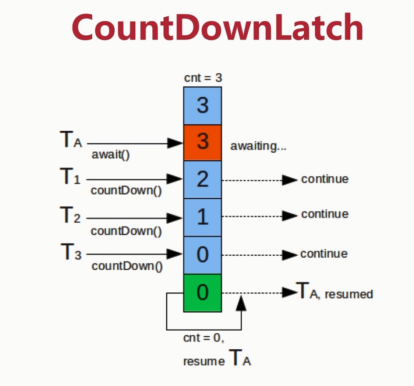
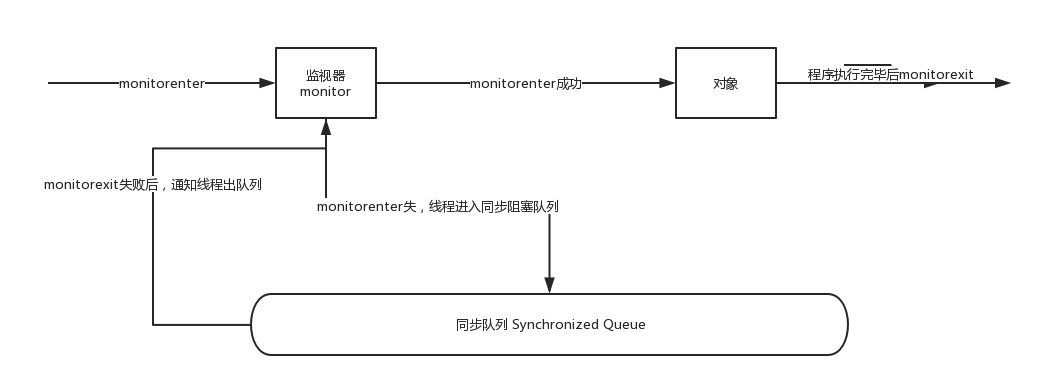
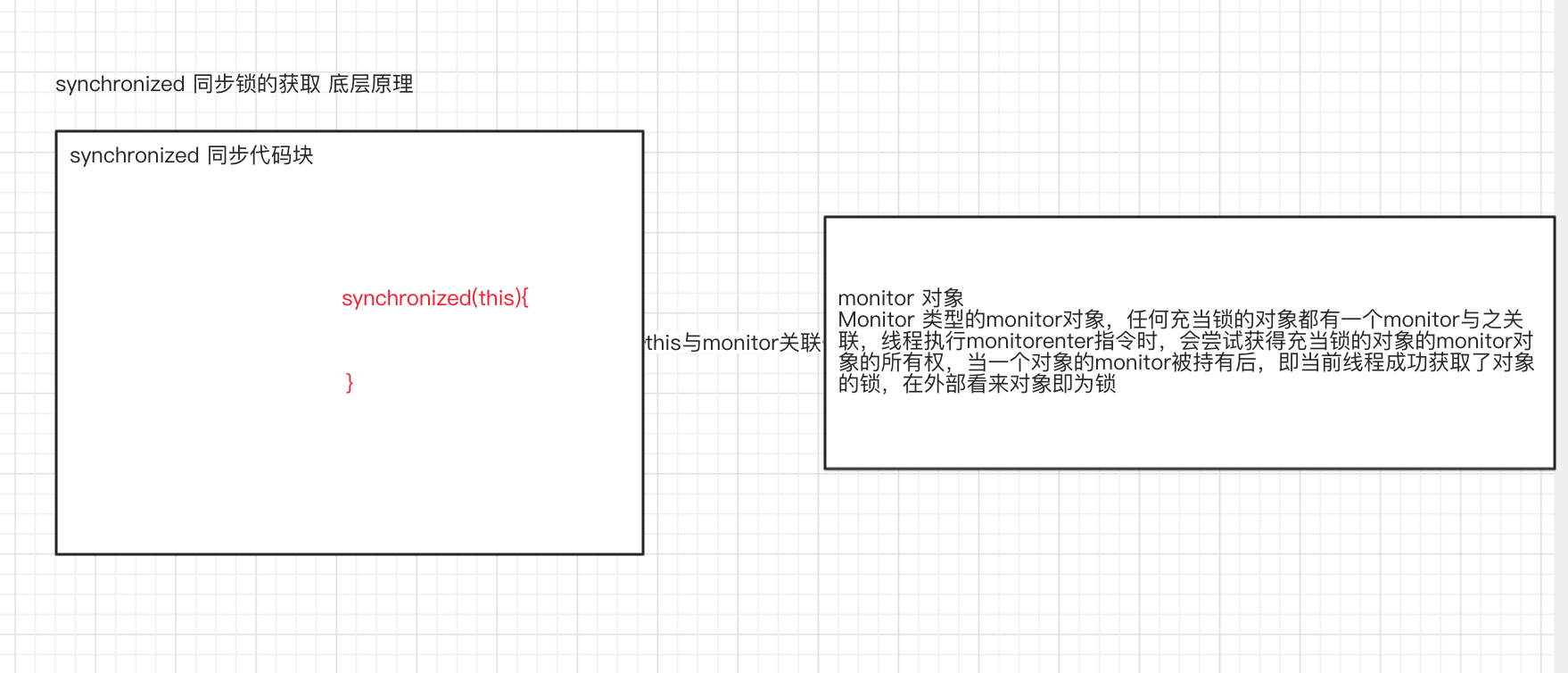
章节目录 volatile 与 synchronized 关键字 等待/通知机制 等待/通知经典范式 管道输入/输出流 Thread.join() 的 使用 1. volatile 与 synchronized 关键字 线程开始运行,拥有自己的栈空间,就如同一个脚本一样,按照既定的代码一行一行的执行,直到终止。如果每个运行中的线程,仅仅是孤立的运行,那么没有价值,或者说价值很少,如果多个线程能够 相互配合 完成工作,这将带来巨大的价值。 1.1 Java 线程操作的共享变量是对共享内存变量的一份拷贝 Java支持多个线程同时访问一个对象或者对象的成员变量,由于每个线程可以拥有这个共享变量的一份拷贝 (虽然对象以及成员变量分配的内存是在共享内存中,但是每个执行的线程还是可以拥有一份拷贝,这样做的目的是 加速程序的执行)。这是现代多核处理器的一个显著特性, 所以在程序执行过程中,(未同步的程序代码块),一个线程看到的变量并不一定是最新的。 1.2 volatile 关键字-线程间通信 关键字volatile可以用来修饰字段(成员变量),就是告知任何对该变量的访问均 需要从共享内存中获取,而对它的改变必须同步刷新到共享内存, 它能保证虽有线程对共享变量的可见性。 举个例子,定义一个程序是否运行的成员变量,boolean on = true; 那么另一个 线程可能对它执行关闭动作(on = false),这涉及多个线程对变量的访问,因此 需要将其定义为 volatile boolean on = true,这样其他线程对他进行改变时,可 以让所有线程感知到变化,因为所有对共享变量的访问(load)和修改(store)都需 要以共享内存为准。但是过多的使用volatile是不必要的,因为它会降低程序执行的效率。 1.3 synchronized 关键字-线程间通信 关键字 synchronized 可以修饰方法 或者以同步块的形来进行使用,它主要确 保多个线程在同一时刻,只能有一个线程执行同步方法或同步块,它保证了线 程对变量访问的可见性、排他性。 如下所示,类中使用了同步块和同步方法,通过使用javap 工具查看生成的class文件信息来分析synchronized关键字实现细节,示例如下: package org.seckill.Thread; public class Synchronized { public static void ls(String[] args) { synchronized (Synchronized.class) { }//静态同步方法,对Synchronized Class对象进行加锁 m(); } public static synchronized void m(){ } } 执行 javap -v Synchronized.class 输出如下所示: public static void main(java.lang.String[]); descriptor: ([Ljava/lang/String;)V flags: ACC_PUBLIC, ACC_STATIC Code: stack=2, locals=3, args_size=1 0: ldc #2 // class org/seckill/Thread/Synchronized 2: dup 3: astore_1 4: monitorenter 5: aload_1 6: monitorexit 7: goto 15 10: astore_2 11: aload_1 12: monitorexit 13: aload_2 14: athrow 15: invokestatic #3 // Method m:()V 18: return public static synchronized void m(); descriptor: ()V flags: ACC_PUBLIC, ACC_STATIC, ACC_SYNCHRONIZED Code: stack=0, locals=0, args_size=0 0: return 对上述汇编指令进行解读 对于同步代码块(临界区)的实现使用了monitorenter 和 monitorexit 指令。 同步方法则是依靠方法修饰符上的ACC_SYNCHRONIZED。 另种同步方式的原理是 对一个充当锁的对象的monitor 进行获取,而这个获取过程是排他的,也就是同一时刻只能有一个线程获取到由syntronized 所保护的对象的监视器。 任何一个对象都拥有自己的监视器,当这个对象由同步块或者这个对象的同步方法调用时,执行方法的线程必须先获取到对象的监视器才能进入到同步块或者同步方法中,那么没有获取到监视器(执行改方法)的线程将会被阻塞在同步块和同步方法的入口处,进入blocked 状态。 如下是对上述解读过程的图示: 对象、监视器、同步队列、执行线程之间的关系 2.等待/通知机制 等待通知相关方法 方法名称 描述 wait() 调用lock.wait()(lock是充当锁的对象)的线程将进入waiting状态,只有等待另外线程的通知或者线程对象.interrupted()才能返回,wait()调用后,会释放对象的锁 wait(long) 超时一段时间,这里的参数是毫秒,也就是等待n毫秒,如果没有通知就超时返回 wait(long,int) 对于超时间的更细粒度控制,可以达到纳秒级别 notify() 通知一个在锁对象上等待的线程,使其从wait()方法返回,而返回的前提是该线程获取到了对象的锁(其实是线程获取到了该对象的monitor对象的控制权) notifyAll() 通知所有等待在充当锁的对象上的线程 对等待通知机制的解释 等待通知机制,是指一个线程A调用了充当锁的对象的wait()方法进入等 waiting 状态 另一个线程B调用了对象的O的 notify() 或者 notifyAll() 方法,线程A接收到通知后从充当锁的对象上的wait()方法返回,进而执行后续操作,最近一次操作是线程从等待队列进入到同步阻塞队列。 上述两个线程通过充当锁的对象 lock 来完成交互,而lock对象上的wait()/notify/notifyAll()的关系就如同开关信号一样,用来完成等待方和通知方的交互工作 如下代码清单所示,创建两个线程 WaitThread & NotifyThread,前者检查flag是否为false,如果符合要求,进行后续操作,否则在lock上wait,后者在睡眠一段时间后对lock进行通知。 package org.seckill.Thread; public class WaitNotify { static boolean flag = true; static Object lock = new Object();//充当锁的对象 public static void main(String[] args) { //新建wait线程 Thread waitThread = new Thread(new WaitThread(),"waitThread"); Thread notifyThread = new Thread(new NotifyThread(),"notifyThread"); waitThread.start();//等待线程开始运行 Interrupted.SleepUnit.second(5);//主线程sleep 5s notifyThread.start(); } //wait线程 static class WaitThread implements Runnable { public void run() { synchronized (lock) { //判定flag while (flag) { try { System.out.println(Thread.currentThread().getName() + "获取flag 信息" + flag); //判定为true 直接wait lock.wait(); } catch (InterruptedException e) { e.printStackTrace(); } } System.out.println(Thread.currentThread().getName() + "获取flag 信息 为" + flag); } } } static class NotifyThread implements Runnable { public void run() { synchronized (lock) { while (flag) { System.out.println(Thread.currentThread().getName() + "获取flag 信息 为" + flag+"可以运行"); lock.notify();//唤醒wait在lock上的线程,此时wait线程只能能从waiting队列进入阻塞队列,但还没有开始重新进行monitorenter的动作 // 因为锁没有释放 flag = false; Interrupted.SleepUnit.second(5); } } synchronized (lock){//有可能获取到lock对象monitor,获取到锁 System.out.println(Thread.currentThread().getName()+" hold lock again"); Interrupted.SleepUnit.second(5); } } } } 运行结果如下所示: 运行结果 对如上程序运行流程的解释如下所示: 上图中"hold lock again 与 最后一行输出"的位置可能互换,上述例子说明调用wait()、notify()、notifyAll需要注意的细节 使用wait()、notify() 和 notifyAll() 时需要在同步代码块或同步方法中使用,且需要先对调用的锁对象进行加锁(获取充当锁的对象的monitor对象) 调用wait() 方法后,线程状态由running 变为 waiting,并将当前线程放置到等待队列中 notify()、notifyAll() 方法调用后,等待线程依旧不会从wait()方法返回,需要调用notify()、notifyAll()的线程释放锁之后,等待线程才有机会从wait()方法返回 notify() 方法将waiting队列中的一个等待线程从waiting队列 移动到同步队列中,而notifyAll() 则是将等待队列中所有的线程全部移动到同步队列,被移动的线程状态由waiting status change to blocked状态 从wait() 方法返回的前提是获得了调用对象的锁等待/通知机制依托于同步机制,其目的就是确保等待线程从wait()方法返回时能够感知到通知线程对变量做出的修改 3.等待/通知经典范式 等待/通知经典范式 该范式分为两部分,分别针对等待方(消费方)、和通知方(生产方)等待方遵循如下原则: 获取对象的锁 如果条件不满足,则调用对象的wait() 方法,被通知后仍要检查条件 条件满足则执行对应的逻辑 对应伪代码 syntronized (lock) { while( !条件满足 ){ lock.wait(); } //对应的处理逻辑 } 通知方遵循如下原则: 获取对象锁 改变条件 通知所有等待在锁对象的线程 syntronized(lock) { //1.执行逻辑 //2.更新条件 lock.notify(); } 4.管道输入输出流 管道输入 / 输出流和普通的文件输入/输出流 或者网络输入/输出流的不同之处在于它主要用于线程之间的数据传输,而传输的媒介为内存。 管道输入 / 输出流主要包括如下4种具体实现:PipedOutputStream、PipedInputStream、PipedReader 、PipedWriter 前两种面向字节,后两种面向字符 对于Piped类型的流,必须先进行绑定,也就是调用connect()方法,如果没有输入/输出流绑定起来,对于该流的访问将抛出异常。 5.Thread.join() 的 使用 如果使用了一个线程A执行了thread.join ,其含义是线程A等待thread线程终止之后才从thread.join()返回。 如下笔试题: 有A、B、C、D四个线程,在main线程中运行,要求 执行顺序是A->B->C->D->mian 变种->main等待A、B、C、D四个线程顺序执行,且进行sum,之后main线程打印sum解法1-join() 其实就是插队 package org.seckill.Thread; public class InOrderThread { static int num = 0; public static void main(String[] args) throws InterruptedException { Thread previous = null; for (int i = 0; i < 4; i++) { char threadName = (char) (i + 65); Thread thread = new Thread(new RunnerThread(previous), String.valueOf(threadName)); previous = thread; thread.start(); } previous.join(); System.out.println("total num=" + num); System.out.println(Thread.currentThread().getName() + "terminal"); } static class RunnerThread implements Runnable { Thread previous;//持有前一个线程引用 public RunnerThread(Thread previous) { this.previous = previous; } public void run() { if (this.previous == null) { // num += 25; System.out.println(Thread.currentThread().getName() + " terminate "); } else { try { previous.join(); } catch (InterruptedException e) { e.printStackTrace(); } // num += 25; System.out.println(Thread.currentThread().getName() + " terminate "); } } } } 解法2-wait/notify package org.seckill.Thread; //wait/notify public class InOrderThread2 { // static int state = 0;//运行标志 // static Object lock = new Object(); public static void main(String[] args) { // RunnerThread runnerThreadA = new RunnerThread(); // RunnerThread runnerThreadB = new RunnerThread(); // RunnerThread runnerThreadC = new RunnerThread(); // RunnerThread runnerThreadD = new RunnerThread(); // Thread threadA = new Thread(runnerThreadA, "A"); // Thread threadB = new Thread(runnerThreadB, "B"); // Thread threadC = new Thread(runnerThreadC, "C"); // Thread threadD = new Thread(runnerThreadD, "D"); RunnerThread runnerThread = new RunnerThread(); Thread threadA = new Thread(runnerThread, "A"); Thread threadB = new Thread(runnerThread, "B"); Thread threadC = new Thread(runnerThread, "C"); Thread threadD = new Thread(runnerThread, "D"); threadD.start(); threadA.start(); threadB.start(); threadC.start(); } static class RunnerThread implements Runnable { // private boolean flag = true; static int state = 0;//运行标志 static Object lock = new Object(); public void run() { String threadName = Thread.currentThread().getName(); // while (flag) { // synchronized (lock) { // if (state % 4 == threadName.charAt(0) - 65) { // state++; // flag = false; // System.out.println(threadName + " run over"); // } // } // } synchronized (lock) { while (state % 4 != threadName.charAt(0) - 65) { try { lock.wait(); }catch (InterruptedException e){ e.printStackTrace(); } } state++; System.out.println(threadName+" run over "); lock.notifyAll(); } } } } 等待/通知范式做线程同步 是非常方便的。 解法3-循环获取锁 package org.seckill.Thread; //wait/notify public class InOrderThread2 { static int state = 0;//运行标志 static Object lock = new Object(); public static void main(String[] args) { RunnerThread runnerThreadA = new RunnerThread(); RunnerThread runnerThreadB = new RunnerThread(); RunnerThread runnerThreadC = new RunnerThread(); RunnerThread runnerThreadD = new RunnerThread(); Thread threadA = new Thread(runnerThreadA, "A"); Thread threadB = new Thread(runnerThreadB, "B"); Thread threadC = new Thread(runnerThreadC, "C"); Thread threadD = new Thread(runnerThreadD, "D"); // RunnerThread runnerThread = new RunnerThread(); // Thread threadA = new Thread(runnerThread, "A"); // Thread threadB = new Thread(runnerThread, "B"); // Thread threadC = new Thread(runnerThread, "C"); // Thread threadD = new Thread(runnerThread, "D"); threadD.start(); threadA.start(); threadB.start(); threadC.start(); } static class RunnerThread implements Runnable { private boolean flag = true;//每个线程的私有变量 // static int state = 0;//运行标志 // static Object lock = new Object(); public void run() { String threadName = Thread.currentThread().getName(); while (flag) {//主动循环加锁 synchronized (lock) { if (state % 4 == threadName.charAt(0) - 65) { state++; flag = false; System.out.println(threadName + " run over"); } } } // // synchronized (lock) { // while (state % 4 != threadName.charAt(0) - 65) { // try { // lock.wait(); // }catch (InterruptedException e){ // e.printStackTrace(); // } // } // state++; // System.out.println(threadName+" run over "); // lock.notifyAll(); // } } } } 开销是极大的、难以确保及时性 解法4-CountDownLatch package org.seckill.Thread; import java.util.concurrent.CountDownLatch; public class InOrderThread3 { // static int state = 0;//运行标志 // static Object lock = new Object(); public static void main(String[] args) throws InterruptedException{ CountDownLatch countDownLatchA = new CountDownLatch(1); CountDownLatch countDownLatchB = new CountDownLatch(1); CountDownLatch countDownLatchC = new CountDownLatch(1); CountDownLatch countDownLatchD = new CountDownLatch(1); RunnerThread runnerThreadA = new RunnerThread(countDownLatchA); RunnerThread runnerThreadB = new RunnerThread(countDownLatchB); RunnerThread runnerThreadC = new RunnerThread(countDownLatchC); RunnerThread runnerThreadD = new RunnerThread(countDownLatchD); Thread threadA = new Thread(runnerThreadA, "A"); Thread threadB = new Thread(runnerThreadB, "B"); Thread threadC = new Thread(runnerThreadC, "C"); Thread threadD = new Thread(runnerThreadD, "D"); // RunnerThread runnerThread = new RunnerThread(); // Thread threadA = new Thread(runnerThread, "A"); // Thread threadB = new Thread(runnerThread, "B"); // Thread threadC = new Thread(runnerThread, "C"); // Thread threadD = new Thread(runnerThread, "D"); threadA.start(); countDownLatchA.await();//主线程阻塞,待countDownLatch 减为0即可继续向下运行 threadB.start(); countDownLatchB.await(); threadC.start(); countDownLatchC.await(); threadD.start(); countDownLatchD.await(); System.out.println(Thread.currentThread().getName()+" run over "); } static class RunnerThread implements Runnable { // private boolean flag = true; // static int state = 0;//运行标志 // static Object lock = new Object(); CountDownLatch countDownLatch; RunnerThread(CountDownLatch countDownLatch){ this.countDownLatch = countDownLatch; } public void run() { String threadName = Thread.currentThread().getName(); System.out.println(threadName+" run over"); countDownLatch.countDown(); // while (flag) { // synchronized (lock) { // if (state % 4 == threadName.charAt(0) - 65) { // state++; // flag = false; // System.out.println(threadName + " run over"); // } // } // } // // synchronized (lock) { // while (state % 4 != threadName.charAt(0) - 65) { // try { // lock.wait(); // }catch (InterruptedException e){ // e.printStackTrace(); // } // } // state++; // System.out.println(threadName+" run over "); // lock.notifyAll(); // } } } } countDownLatch 的使用场景 :比如系统完全开启需要等待系统软件全部运行之后才能开启。最终的结果一定是发生在子(部分)结果完成之后的。也可作为线程同步的一种方式Thread join() 源码 public final synchronized void join() throws InterruptedException { while (isAlive) { wait(0); } } 当被调用thread.join() 的线程(thread)终止运行时,会调用自身的notifyAll()方法,会通知所有等待该线程对象上完成运行的线程,可以看到join方法的逻辑结构与等待/通知经典范式一致,即加锁、循环、处理逻辑3个步骤。