[To be translated] Nova:libvirt image 的生命周期
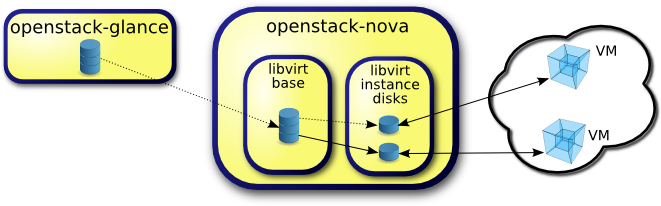
翻译自:http://www.pixelbeat.org/docs/openstack_libvirt_images/ The main stages of a Virtual Machine disk image as it transfers through OpenStack to be booted under libvirt are: Initially the image is downloaded from glance and cached in libvirt base. We'll consider the options for handling a qcow2 image stored in glance, as that format can be downloaded quite efficiently from glance as it supports compression, and image sparseness can be maintained. This article will focus on the flow and transformations in "libvirt base", which is used to cache, preprocess and optionally back, VM disk images. Configuration First we'll summarize the config variables involved, before presenting the operations associated with each config combination, in each OpenStack release. Note I'm describing upstream OpenStack here, and not my employer'sRed Hat OpenStackwhich has back-ported enhancements between versions where appropriate. Config Default Release Description use_cow_images True Cactus Whether to useCoWimages for "libvirt instance disks" force_raw_images True Essex Allows disablingconvert to rawin "libvirt base" foroperational reasons libvirt_images_type 'default' Folsom Deprecates use_cow_images and allows selecting LVM libvirt images [libvirt]/images_type 'default' Icehouse Deprecates libvirt_images_type in the [DEFAULT] section preallocate_images 'none' Grizzly Instance disks preallocation mode. 'space' =>fallocateimages resize_fs_using_block_device False Havana Allows enabling of direct resize for qcow2 images The main reason that raw images are written in "libvirt base" by default (since Diablo), is to remove possible compression from the qcow2 image received from glance. Note compression in qcow2 images is read only, and so this will impact reads from unwritten portions of the qcow2 image. Users may want to change this option, depending on CPU resources and I/O bandwidth available. For example, systems with slower I/O or less space available, may want to trade the higher CPU requirements of compression, to minimize input bandwidth. Note raw images are used unconditionally with libvirt_images_type=lvm. Whether to use CoW images for the "libvirt instance disks" also depends on I/O characteristics of the user's system. Without CoW, more space will be used for common parts of the disk image, but on the flip side depending on the backing store and host caching, there may be better concurrency achieved by having each VM operate on its own copy. Enabling preallocation of space for the "libvirt instance disks" can help with both space guarantees and I/O performance. Even when not using CoW instance disks, the copy each VM gets is sparse and so the VM may fail unexpectedly at run time with ENOSPC. By running fallocate(1) on the instance disk images, we immediately and efficiently allocate the space for them in the file system (if supported). Also run time performance should be improved as the file system doesn't have to dynamically allocate blocks at run time, reducing CPU overhead and more importantly file fragmentation. Disk image operations For each release and config combination, here are the created files and associated operations in getting aqcow2image from glance through to being booted in a libvirt Virtual Machine. Folsom, force_raw_images=True, use_cow_images=True This results in each instance booting from a CoW image, backed by a resized raw image. Novacommand Source code Notes wget http://glance/$image -Obase_/$hex.part images.fetch qemu-img convert -O raw $hex.part $hex.converted images.fetch_to_raw Creates sparse file mv $hex.converted $hex;rm $hex.part images.fetch_to_raw imagebackend.create_image cp $hex $hex_$size libvirt.utils.copy_image Creates sparse file qemu-img resize $hex_$size $size disk.extend resize2fs $hex_size disk.extend Unpartitioned ext[234] qemu-img create -f qcow2 -o backing_file=...$instance_dir/disk libvirt.utils.create_image Folsom, force_raw_images=True, use_cow_images=False This results in each instance booting from a copy of a resized raw image. Novacommand Source code Notes wget http://glance/$image -Obase_/$hex.part images.fetch qemu-img convert -O raw $hex.part $hex.converted images.fetch_to_raw Creates sparse file mv $hex.converted $hex;rm $hex.part images.fetch_to_raw imagebackend.create_image cp $hex$instance_dir/disk libvirt.utils.copy_image qemu-img resize disk disk.extend resize2fs disk disk.extend Unpartitioned ext[234] Folsom, force_raw_images=False, use_cow_images=False This results in each instance booting from a copy of a resized qcow2 image. Novacommand Source code Notes wget http://glance/$image -Obase_/$hex.part images.fetch mv $hex.part $hex images.fetch_to_raw imagebackend.create_image cp $hex$instance_dir/disk libvirt.utils.copy_image qemu-img resize disk disk.extend resize2fs disk disk.extend Ignored for qcow2¹ Folsom, force_raw_images=False, use_cow_images=True This results in each instance booting from a CoW image, backed by a resized qcow2 image. Novacommand Source code Notes wget http://glance/$image -Obase_/$hex.part images.fetch mv $hex.part $hex images.fetch_to_raw imagebackend.create_image cp $hex $hex_$size libvirt.utils.copy_image qemu-img resize $hex_$size $size disk.extend resize2fs $hex_size disk.extend Ignored for qcow2¹ qemu-img create -f qcow2 -o backing_file=...$instance_dir/disk libvirt.utils.create_image Grizzly, force_raw_images=True, use_cow_images=True Grizzlyintroducesa change for use_cow_images=True, where it will resize in the $instance_dir rather than in base_. So the resize will not be cached, but this is minimal CPU tradeoff per instance boot, for the extra space saved in base_. We'll just present the default config values here which illustrates the only significant change from Folsom. This results in each instance booting from a resized CoW image, backed by a raw image. Novacommand Source code Notes wget http://glance/$image -Obase_/$hex.part images.fetch qemu-img convert -O raw $hex.part $hex.converted images.fetch_to_raw Creates sparse file mv $hex.converted $hex;rm $hex.part images.fetch_to_raw imagebackend.create_image qemu-img create -f qcow2 -o backing_file=...$instance_dir/disk libvirt.utils.create_image qemu-img resize disk $size disk.extend resize2fs disk disk.extend Grizzly always ignores² [²UpdateSep 2013: Stanislaw Pitucha also noticed that the above referenced Grizzly change introduced a regression where unpartitioned qcow2 images were no longer resized. See the Havanaresize_fs_using_block_deviceoption below for details.] Grizzly, preallocate_images='space' Grizzly also hasnew fallocate functionalityin this area controlled by thepreallocate_imagesconfig option. If that is set to 'space', then after the operations above, the $instance_dir/ images will befallocated to immediately determine if enough space is available, and to possibly improve VM I/O performance due to ongoing allocation avoidance, and better locality of block allocations. ¹ Havana, resize_fs_using_block_device=False As noted in the first Grizzly change above, Stanislaw Pitucha noticed that change introduced a regression where unpartitioned qcow2 images were no longer resized. He supplied afix to resize qcow directlyrather than relying on the raw image being available, which would also cater for the force_raw_images=False case that even pre Grizzly did not. This new option can be used to enable this support, but there are somelarge performance and possible security issuesso it's not enabled by default. This support will be available in the upcomingHavanarelease. General performance considerations Performance has improved in this area through each OpenStack release, with some of the main topics to consider, for past and future changes being: Minimize I/O Note these wereimplemented in Essex: Copy images, then resize, rather than vice versa Directly generating images in the $instance_dir/ Intelligent reading of sparse input Reproduction of sparse input on output Use compression Note this was implemented in Folsom: Avoid file sytem overhead by setting libvirt_images_type=lvm. Note file system overheadvaries depending on file system Minimize storage Use compression Use sparse output/generation Avoid resized copies when not needed Use CoW if appropriate Improve caching Avoid thrashing the page cache with large intermediate images Improve low level caching through better storage allocation Preprocessing Preprocessing may be possible on images likepreallocation=metadatawhich trades off initial CPU cost for possibly much better run time I/O performance Such cost would be some what alleviated by havingasynchronous populationof the base_ cache 本文转自SammyLiu博客园博客,原文链接:http://www.cnblogs.com/sammyliu/p/4427567.html,如需转载请自行联系原作者