首页 文章 精选 留言 我的

精选列表

搜索[字符触发],共10010篇文章
优秀的个人博客,低调大师

Java 调用Jenkins API远程触发部署

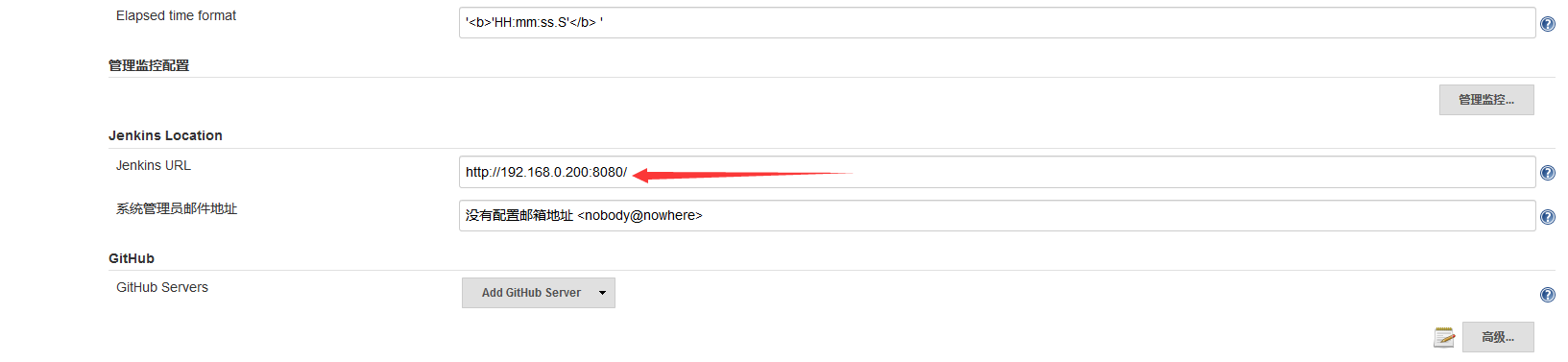
第一步:引入相关的包 // Jenkins-client compile group: 'com.offbytwo.jenkins', name: 'jenkins-client', version: '0.3.6' 第二步:写代码 JenkinsServer jenkins = new JenkinsServer(new URI("此处是Jenkins访问路径,eg:http://localhost:8088/"), "此处是用户名,eg: zhangsan", "此处是用户密码:eg: 110110"); // 判断jenkins是否running if(jenkins.isRunning()){ // 获取jenkins构建脚本 String jobXml = jenkins.getJobXml("jobName"); // 修改构建脚本 jenkins.updateJob("jobName",newJobXml); // 构建对应的job jenkins.getJob("jobName").build(); // 获取html格式日志 jenkins.getJob("jobName").getLastBuild().details().getConsoleOutputHtml() // 获取text格式日志 jenkins.getJob("jobName").getLastBuild().details().getConsoleOutputText() // 获取执行结果(是否成功) jenkins.getJob("jobName").getLastBuild().details().getResult() } 遇到的问题在调用build的时候一定要确保jenkins的全局配置文件的这个地方要正确: 该地址为jenkins的访问地址;否则执行build的时候会无法链接Jenkins 参考链接:http://blog.chenmiao.cf/2016/12/28/java%E8%B0%83%E7%94%A8jenkins%E8%BF%9C%E7%A8%8Bapi,%E9%99%84%E4%BB%A3%E7%A0%81/

优秀的个人博客,低调大师

JAVA之带转义字符的json字符串解析

Json数据: { "ret":"0", "Weathers":"[{\"date\":\"2017-03-20\",\"weatherType\":\"阴,大部分地区有零星小雨或小雨,上午能见度2-5km转阴天间多云\",\"temperature_min\":\"6\",\"wind_force\":\"微风\",\"temperature_max\":\"12\",\"wind_direction\":\"\"},{\"date\":\"2017-03-21\",\"weatherType\":\"阴转多云\",\"temperature_min\":\"6\",\"wind_force\":\"微风\",\"temperature_max\":\"13\",\"wind_direction\":\"\"},{\"date\":\"2017-03-22\",\"weatherType\":\"多云转阴\",\"temperature_min\":\"6\",\"wind_force\":\"微风\",\"temperature_max\":\"14\",\"wind_direction\":\"\"},{\"date\":\"2017-03-23\",\"weatherType\":\"阴转小雨\",\"temperature_min\":\"3\",\"wind_force\":\"微风\",\"temperature_max\":\"10\",\"wind_direction\":\"\"},{\"date\":\"2017-03-24\",\"weatherType\":\"雨夹雪转多云\",\"temperature_min\":\"0\",\"wind_force\":\"微风\",\"temperature_max\":\"5\",\"wind_direction\":\"\"},{\"date\":\"2017-03-25\",\"weatherType\":\"多云转晴\",\"temperature_min\":\"5\",\"wind_force\":\"微风转3到4级\",\"temperature_max\":\"13\",\"wind_direction\":\"\"},{\"date\":\"2017-03-26\",\"weatherType\":\"晴\",\"temperature_min\":\"4\",\"wind_force\":\"3到4级\",\"temperature_max\":\"14\",\"wind_direction\":\"\"}]" } JSONObjectjsonObject=newJSONObject(result); Stringweathers=jsonObject.getString("Weathers"); JSONArrayweathersArray=newJSONArray(weathers); //直接这样解析会报错 //JSONArrayweathersArray=jsonObject.getJSONArray("weathers"); 转载于:http://blog.csdn.net/panyzyw/article/details/64130020

优秀的个人博客,低调大师

Java 字符串 之 字符串 记事本实例

http://www.verejava.com/?id=17159658585531 import java.util.Scanner; public class Test { private Scanner in; private StringBuffer sb = new StringBuffer(); private boolean flag = true; private String clipBoard;//剪贴板 public Test() { in = new Scanner(System.in); System.out.println("1 : 键盘输入编辑文字"); System.out.println("2 : 追加文字"); System.out.println("3 : 插入文字 (索引号:要插入的文字)"); System.out.println("4 : 替换文字 (要替换的文字:新文字)"); System.out.println("5 : 查找文字(返回找到的文字的索引号)"); System.out.println("6 : 删除文字(开始索引号:结束索引号)"); System.out.println("7 : 复制文字 (开始索引号:结束索引号)"); System.out.println("8 : 粘贴文字(索引号)"); System.out.println("9 : 剪切文字(开始索引号:结束索引号)"); System.out.println("10 : 转换成大写"); System.out.println("11 : 转换成小写"); System.out.println("12 : 文字反转"); System.out.println("-1 : 退出编辑"); while (flag) { String key = in.nextLine(); if ("1".equals(key)) { input(); } if ("-1".equals(key)) { exit(); } if ("2".equals(key)) { append(); } if ("3".equals(key)) { insert(); } if ("4".equals(key)) { replace(); } if ("5".equals(key)) { search(); } if ("6".equals(key)) { delete(); } if ("7".equals(key)) { copy(); } if ("8".equals(key)) { paste(); } if ("9".equals(key)) { cut(); } if ("10".equals(key)) { toUpperCase(); } if ("11".equals(key)) { toLowerCase(); } if ("12".equals(key)) { rerverse(); } System.out.println("记事本当前文本:" + sb.toString()); } } private void rerverse() { sb.reverse(); } private void toLowerCase() { String buffer = sb.toString(); buffer = buffer.toLowerCase(); sb.delete(0, sb.length()); sb.append(buffer); } private void toUpperCase() { String buffer = sb.toString(); buffer = buffer.toUpperCase(); sb.delete(0, sb.length()); sb.append(buffer); } private void cut() { System.out.println("请输入要剪切文字(开始索引号:结束索引号)"); String text = in.nextLine(); String[] texts = text.split(":"); int startIndex = Integer.parseInt(texts[0]); int endIndex = Integer.parseInt(texts[1]); clipBoard = sb.substring(startIndex, endIndex); //删除记事本文字 sb.delete(startIndex, endIndex); } private void paste() { System.out.println("请输入要粘贴文字(索引号)"); String text = in.nextLine(); int index = Integer.parseInt(text); //粘贴 sb.insert(index, clipBoard); } private void copy() { System.out.println("请输入要复制文字 (开始索引号:结束索引号)"); String text = in.nextLine(); String[] texts = text.split(":"); int startIndex = Integer.parseInt(texts[0]); int endIndex = Integer.parseInt(texts[1]); clipBoard = sb.substring(startIndex, endIndex); } private void delete() { System.out.println("请输入要删除文字(开始索引号:结束索引号)"); String text = in.nextLine(); String[] texts = text.split(":"); int startIndex = Integer.parseInt(texts[0]); int endIndex = Integer.parseInt(texts[1]); //删除 sb.delete(startIndex, endIndex); } private void search() { System.out.println("请输入要查找文字(返回找到的文字的索引号)"); String text = in.nextLine(); int index = sb.indexOf(text); if (index >= 0) { System.out.println(text + " 索引号:" + index); } else { System.out.println(text + " 不存在"); } } private void replace() { System.out.println("请输入要替换文字 (要替换的文字:新文字)"); String text = in.nextLine(); String[] texts = text.split(":"); String oldText = texts[0]; String newText = texts[1]; //替换 String buffer = sb.toString(); buffer = buffer.replace(oldText, newText); sb.delete(0, sb.length());//清空记事本文字 sb.append(buffer); } private void insert() { System.out.println("请输入要插入的文字: (索引号:要插入的文字)"); String text = in.nextLine(); String[] texts = text.split(":"); int index = Integer.parseInt(texts[0]); String str = texts[1]; //插入文字 sb.insert(index, str); } private void append() { System.out.println("请输入要追加文字:"); String text = in.nextLine(); //追加文字 sb.append(text); } private void exit() { flag = false; System.exit(0);//退出应用程序 } private void input() { System.out.println("请输入要编辑的文字:"); String text = in.nextLine(); //添加到 sb 记事本的缓冲区 sb.append(text); } public static void main(String[] args) { new Test(); } } http://www.verejava.com/?id=17159658585531

资源下载

更多资源
Nacos

Nacos

Nacos /nɑ:kəʊs/ 是 Dynamic Naming and Configuration Service 的首字母简称,一个易于构建 AI Agent 应用的动态服务发现、配置管理和AI智能体管理平台。Nacos 致力于帮助您发现、配置和管理微服务及AI智能体应用。Nacos 提供了一组简单易用的特性集,帮助您快速实现动态服务发现、服务配置、服务元数据、流量管理。Nacos 帮助您更敏捷和容易地构建、交付和管理微服务平台。

Spring

Spring

Spring框架(Spring Framework)是由Rod Johnson于2002年提出的开源Java企业级应用框架,旨在通过使用JavaBean替代传统EJB实现方式降低企业级编程开发的复杂性。该框架基于简单性、可测试性和松耦合性设计理念,提供核心容器、应用上下文、数据访问集成等模块,支持整合Hibernate、Struts等第三方框架,其适用范围不仅限于服务器端开发,绝大多数Java应用均可从中受益。

Rocky Linux

Rocky Linux

Rocky Linux(中文名:洛基)是由Gregory Kurtzer于2020年12月发起的企业级Linux发行版,作为CentOS稳定版停止维护后与RHEL(Red Hat Enterprise Linux)完全兼容的开源替代方案,由社区拥有并管理,支持x86_64、aarch64等架构。其通过重新编译RHEL源代码提供长期稳定性,采用模块化包装和SELinux安全架构,默认包含GNOME桌面环境及XFS文件系统,支持十年生命周期更新。

WebStorm

WebStorm

WebStorm 是jetbrains公司旗下一款JavaScript 开发工具。目前已经被广大中国JS开发者誉为“Web前端开发神器”、“最强大的HTML5编辑器”、“最智能的JavaScript IDE”等。与IntelliJ IDEA同源,继承了IntelliJ IDEA强大的JS部分的功能。

用户登录
用户注册