首页 文章 精选 留言 我的

精选列表

搜索[云数据库 Redis®],共10034篇文章
优秀的个人博客,低调大师

Android -- Drag&&Drop

Android3.0提供了drag/drop框架,利用此框架可以实现使用拖放手势将一个view拖放到当前布局中的另外一个view中。 实现拖放的步骤 首先,我们先了解一下拖放过程,从官方文档可以知道,整个拖放过程共分为4个步骤,具体如下: 1、 Started:启动拖放,主要是调用被拖放View的startDrag方法。此方法原型为: public final boolean startDrag(ClipData data, View.DragShadowBuilder shadowBuilder, Object myLocalState, int flags) 启动后,系统生成拖放阴影并发送action为ACTION_DRAG_STARTED的拖放事件到当前布局中已经设置了拖放监听的View。 2、 Continuing:保持拖动状态。在此过程中系统可能会发送一个或多个拖动事件给设置了拖放监听器的View,比如ACTION_DRAG_ENTERED、ACTION_DRAG_LOCATION等。 3、 Dropped:用户在目标区域内释放拖动阴影,系统会向设置了拖放监听器的View发送action为ACTION_DROP的事件。 4、 Ended:用户释放了拖动阴影,系统会向设置了拖放监听器的View发送action为ACTION_DRAG_ENDED事件,完成拖放。 拖放过程中关键的接口和类 其次,我们要了解清楚拖放过程中的几个关键的接口和类,主要有OnDragListener、DragEvent、DragShadowBuilder、ClipData、ClipDescription等。 1、OnDragListener:接口,拖放事件监听器。当发生Drag时,回调此接口中的方法。接口中只含有一个方法onDrag,方法原型为: boolean onDrag(View v, DragEvent event) //参数v:设置了监听器的View //参数event:拖放事件的参数,封装了拖放相关的数据 //返回值:true-事件已处理;false事件未处理。 2、DragEvent:拖放事件对象,根据action的不同,包含不同的事件数据。 3、DragShadowBuilder:拖放阴影构造者对象,用于构造拖放阴影。 4、ClipData、ClipDescription:用于拖放的移动数据。 code <?xml version="1.0" encoding="utf-8"?> <RelativeLayout xmlns:android="http://schemas.android.com/apk/res/android" android:id="@+id/topContainer" android:layout_width="match_parent" android:layout_height="match_parent" android:orientation="vertical" > <ImageView android:id="@+id/img" android:layout_width="wrap_content" android:layout_height="wrap_content" android:contentDescription="@null" android:src="@drawable/ic_launcher" /> <LinearLayout android:id="@+id/container" android:layout_width="match_parent" android:layout_height="100dp" android:layout_alignParentBottom="true" android:orientation="vertical" android:background="#cccccc" > <TextView android:id="@+id/title" android:layout_width="fill_parent" android:layout_height="wrap_content" android:textColor="#ff0000" android:textSize="18sp" /> </LinearLayout> </RelativeLayout> 为ImageView绑定长点击事件 imageView.setOnLongClickListener(new OnLongClickListener() { @Override public boolean onLongClick(View v) { //创建移动数据 ClipData.Item item = new ClipData.Item((String) v.getTag()); ClipData data = new ClipData(IMAGEVIEW_TAG, new String[] { ClipDescription.MIMETYPE_TEXT_PLAIN }, item); //调用startDrag方法,第二个参数为创建拖放阴影 v.startDrag(data, new View.DragShadowBuilder(v), null, 0); return true; } }); 为目标View绑定拖拽监听: container.setOnDragListener(new OnDragListener() { @Override public boolean onDrag(View v, DragEvent event) { final int action = event.getAction(); switch (action) { case DragEvent.ACTION_DRAG_STARTED: //拖拽开始事件 if (event.getClipDescription().hasMimeType( ClipDescription.MIMETYPE_TEXT_PLAIN)) { return true; } return false; case DragEvent.ACTION_DRAG_ENTERED: //被拖放View进入目标View container.setBackgroundColor(Color.YELLOW); return true; case DragEvent.ACTION_DRAG_LOCATION: return true; case DragEvent.ACTION_DRAG_EXITED: //被拖放View离开目标View container.setBackgroundColor(Color.BLUE); title.setText(""); return true; case DragEvent.ACTION_DROP: //释放拖放阴影,并获取移动数据 ClipData.Item item = event.getClipData().getItemAt(0); String dragData = item.getText().toString(); title.setText(dragData+event.getY()+":"+event.getX()); return true; case DragEvent.ACTION_DRAG_ENDED: //拖放事件完成 return true; default: break; } return false; } }); imageView的位置 topContainer.setOnDragListener(new OnDragListener() { @Override public boolean onDrag(View v, DragEvent event) { final int action = event.getAction(); switch (action) { case DragEvent.ACTION_DRAG_STARTED: return true; case DragEvent.ACTION_DRAG_ENTERED: return true; case DragEvent.ACTION_DRAG_LOCATION: return true; case DragEvent.ACTION_DRAG_EXITED: return true; case DragEvent.ACTION_DROP: imageView.setX(event.getX()-imageView.getWidth()/2); imageView.setY(event.getY()-imageView.getHeight()/2); return true; case DragEvent.ACTION_DRAG_ENDED: return true; default: break; } return false; } }); 效果 我是天王盖地虎的分割线 本文转自我爱物联网博客园博客,原文链接:http://www.cnblogs.com/yydcdut/p/4473992.html,如需转载请自行联系原作者

优秀的个人博客,低调大师

Choosing Between ElasticSearch, MongoDB &amp;amp; Hadoop

An interesting trend has been developing in the IT landscape over the past few years. Many new technologies develop and immediately latch onto the “Big Data” buzzword. And as older technologies add “Big Data” features in an attempt to keep up with the Joneses, we areseeing a blurring of the boundaries between various technologies. Say you have search engines such as ElasticSearch or Solr storing JSON documents, MongoDB storing JSON documents, or a pile of JSON documents stored in HDFS on a Hadoop cluster. Interestingly enough, you can fulfill many of the same use cases with any of these three configurations. ElasticSearch as a NoSQL database? Superficially, that doesn’t sound right, but nonethelessit is a valid scenario. Likewise, MongoDB with support for MapReduce over sharded collections can accomplish many of the same things as Hadoop. And, of course, with the many tools that you can layer on top of a Hadoop base (Hive, HBase, Pig, and the like) you can query data from your Hadoop cluster in a multitude of ways. Given that, can we now say that Hadoop, MongoDB and ElasticSearch are all exactly equivalent? Of course not. Each tool still has a niche for which it is most ideally suited, but each has enough flexibility to fulfill multiple roles. The question now becomes “What is the ideal use for each of these technologies”, and that my friends is what we will explore now. ElasticSearch has begun to spread beyond its roots as a “pure” search engine and now adds some features for analytics and visualization - but at its core,remains primarily a full-text search engine for locating documents by keyword. ElasticSearch builds on top of Lucene and supports extremely fast lookup and a rich query syntax. If you have millions (or more) of text documents and you need to locate documents by keywords located in that text, ElasticSearch fits the bill perfectly. Yes, if your documents are JSON you can treat ElasticSearch as a sort of lightweight “NoSQL database”. But ElasticSearch is not quite a “database engine” and provides less support for complex calculations and aggregation as part of a query - although the “statistics” facet does provide some ability to retrieve calculated statistical information scoped to the given query. Facets in ElasticSearch are intended mainly to support a “faceted navigation” facility. If you are looking to return a (usually small) collection of documents in response to a keyword query, and want the ability to support faceted navigation around those documents, then ElasticSearch is probably your best, first choice. If you need to perform more complex calculations, run server-side scripts against your data, and easily run MapReduce jobs on your data, then MongoDB or Hadoop enter the picture. 假设你的目的是通过指定keyword查询取得一个文档集合(一般是较小的),而且具有支持对文档基于切面的导航,elasticsearch会非常合适,可是假设你希望支持很多其它复杂的计算,在server端你的数据上执行脚本,非常easy的在你的数据上执行mapreduce成寻。那么MongoDB和Hadoop就在被考虑的范围里边了。 MongoDB is a “NoSQL” database which is designed from the ground up to be highly scalable, with automatic sharding support and a number of additional performance optimizations. MongoDB is a document oriented database which stores document in a “JSON like” format (technically BSON) with some extensions beyond plain JSON - for example, a native date type. MongoDB provides a text index type for supporting full-text search against fields which contain text, so we can see that there is overlap between what you can do with ElasticSearch and MongoDB, in terms of basic keyword search against a collection of documents. Where MongoDB goes beyond ElasticSearch is its support for features like server-side scripts in Javascript, aggregation pipelines, MapReduce support and capped collections. With MongoDB, you can use aggregation pipelines to process documents in a collection, streaming them through a sequence of pipeline operators where each operator transforms the document. Pipeline operators can generate entirely new documents or remove documents from the final output. This is a very powerful facility for filtering, processing and transforming data as it is retrieved. MongoDB also supports running map/reduce jobs over the data in a collection, using custom Javascript functions for the map and reduce phases of the operation. This allows for ultimate flexibility in performing any type of calculation or transformation to the selected data. 与ES相比,MongoDB超过es的地方是支持server端的javascript和聚合管道 以及MapReduce的支持和capped collections Another extremely powerful feature in MongoDB is known as “capped collections”. With the capped collections facility, a user can define a maximum size for a collection - after which the collection can simply be written to blindly, and it will roll-over data as necessary to maintain the specified size limit. This feature is extremely useful for capture logs and other streaming data for analysis. 另外一个很NB的特征是capped collections;通过capped collections。用户能够定义为一个collection定义最大的size,用来插入数据(仅仅能插入更新 不能删除)。依照LRU挤出数据存放新插入的数据,这个特点很适合获取log数据和流数据的存储和分析 科普一下capped collections 特点: 1.仅仅能插入,更新,不能删除doc,能够使用drop()删除整个collection 2.LRU列表。相信大家对这个应该非常了解了,oracle里面非常多地方就是用的这个规则,假设指定的集合大小满了。那么会依照LRU挤出数据存放新插入的数据,这里记得更新是不能超出collection的大小的,不能挤出空间存放更新的数据,这个也合情合理。 3.插入的记录都是依照插入的顺序排列,普通的collection在_id上是肯定有索引的,可是这里是没有的 4.能够高速的查询和插入。假设写比读的比例大。建议不要建立索引。否则写会耗费非常多额外的资源。 As you can see, while ElasticSearch and MongoDB have some overlap in possible use cases, they are not the same tool. But what about Hadoop? Isn’t Hadoop “just MapReduce” which is supported by MongoDB anyway? Is there really a use case for Hadoop where MongoDB isjust as suitable. In a word, yes. Hadoop is the grand-father of MapReduce based cluster computing frameworks. Hadoop provides probably the overall most flexible and powerful environment for processing large amounts of data, and definitely fits niches for which you would not use ElasticSearch or MongoDB. To understand why this is true, look at how Hadoop abstracts storage - via HDFS - from the associated computational facility. With data stored in HDFS, any arbitrary job can be run against that data, using either Java code written to the core MapReduce API, or arbitrary code written in native languages using Hadoop Streaming. And starting with Hadoop2 and YARN, even the core programming model is abstracted so that you aren’t limited to MapReduce. With YARN you can, for example, implement MPI on top of Hadoop and write jobs in that style. Additionally, the Hadoop ecosystem provides a staggering array of tools that build on top of HDFS and core MapReduce to query, analyze and process data. Hive provides a “SQL like” language that allows Business Analysts to query data using a syntax they are already familiar with. HBase provides a column oriented database on top of Hadoop. Pig and Sizzle provide two more alternative programming models for querying Hadoop Data. With data stored in HDFS using Hadoop, you inherit the ability to simply plugin Apache Mahout to use advanced machine learning algorithms on your data. While using RHadoopis straightforward to use the R statistical language to perform advanced statistical analyses on Hadoop data. So while Hadoop and MongoDB also have some overlapping use cases, and share some useful functionality (seamless horizontal scalability, for example) it remains the case that each tool serves a specific purpose in enterprise computing. If you simply want to locate documents by keyword and perform simple analytics, then ElasticSearch mayfit the bill. If you need to query documents that can be modeled as JSON and perform moderately more sophisticated analysis, then MongoDB becomes a compelling choice. And if you have a huge quantity of data that needs a wide variety of different types of complex processing and analysis, then Hadoop provides the broadest range of tools and the most flexibility. As always, it is important to choose the right tool(s) for the job at hand. And in the “Big Data” space the sheer number of technologies and the blurry lines can make this difficult. As we can see, there are specific scenarios which best suit each of these technologies and, more importantly,the differences do matter. Though, the best news of all isyou are notlimited to using only one of these tools. Depending on the details of your use case, it may actually make sense to build a combination platform. For example, ElasticSearch and Hadoop are known to work well together, with ElasticSearch providing rapid keyword search, and Hadoop jobs powering the more complicated analytics. In the end, it takes ample research and careful analysis to make the best choices for your computing environment. Before selecting any technology or platform, take the time to evaluate it carefully, understand what scenarios it was designed to optimize for, and what tradeoffs and sacrifices it makes. Start with a small pilot project to “kick the tires” before converting your entire enterprise to a new platform, and slowly grow into the new stack. Follow these steps and you can successfully navigate the maze of “Big Data” technologies and reap the associated benefits.\ 本文转自:http://www.osintegrators.com/opensoftwareintegrators%7CChoosing-Between-ElasticSearch-MongoDB-%2526-Hadoop 本文转自mfrbuaa博客园博客,原文链接:http://www.cnblogs.com/mfrbuaa/p/5208702.html,如需转载请自行联系原作者


优秀的个人博客,低调大师

Android Step Counter &amp;amp; Detector Sensor

package zhangphil.sensor; import android.content.Context; import android.hardware.Sensor; import android.hardware.SensorEvent; import android.hardware.SensorEventListener; import android.hardware.SensorManager; import android.support.v7.app.AppCompatActivity; import android.os.Bundle; import android.util.Log; public class MainActivity extends AppCompatActivity { private String TAG = "ZHANG PHIL"; private SensorManager mSensorManager; @Override protected void onCreate(Bundle savedInstanceState) { super.onCreate(savedInstanceState); startSensor(); } /** * 启动传感器。 */ private void startSensor() { mSensorManager = (SensorManager) this.getSystemService(Context.SENSOR_SERVICE); Sensor mStepCounterSensor = mSensorManager.getDefaultSensor(Sensor.TYPE_STEP_COUNTER); Sensor mStepDetectorSensor = mSensorManager.getDefaultSensor(Sensor.TYPE_STEP_DETECTOR); if (mSensorManager == null || mStepCounterSensor == null || mStepDetectorSensor == null) { throw new UnsupportedOperationException("设备不支持"); } mSensorManager.registerListener(mSensorEventListener, mStepCounterSensor, SensorManager.SENSOR_DELAY_NORMAL); mSensorManager.registerListener(mSensorEventListener, mStepDetectorSensor, SensorManager.SENSOR_DELAY_NORMAL); } private SensorEventListener mSensorEventListener = new SensorEventListener() { private float step, stepDetector; @Override public void onSensorChanged(SensorEvent sensorEvent) { /** * 计步计数传感器传回的历史累积总步数 */ if (sensorEvent.sensor.getType() == Sensor.TYPE_STEP_COUNTER) { step = sensorEvent.values[0]; Log.d(TAG, "STEP_COUNTER:" + step); } /** * 计步检测传感器检测到的步行动作是否有效? */ if (sensorEvent.sensor.getType() == Sensor.TYPE_STEP_DETECTOR) { stepDetector = sensorEvent.values[0]; Log.d(TAG, "STEP_DETECTOR:" + stepDetector); if (stepDetector == 1.0) { Log.d(TAG, "一次有效的步行"); } } } @Override public void onAccuracyChanged(Sensor sensor, int i) { } }; @Override protected void onDestroy() { super.onDestroy(); mSensorManager.unregisterListener(mSensorEventListener); } }

优秀的个人博客,低调大师

Ubuntu SVN安装&amp;使用&amp;命令

SVN 安装 apt-get install subversion checkout svn checkout svn://192.168.1.110/app 按提示输入相应的用户名和密码。 往版本库中添加新的文件 svn add *.c //(添加当前目录下所有的 c文件) 将改动的文件提交到版本库 svn commit -m “my commit“ test.cpp 删除文件 svn delete svn://192.168.1.100/app/php/helloworld.php -m “delete file” help帮助 svn help chechout checkout (co): Check out a working copy from a repository. usage: checkout URL[@REV]... [PATH] SVN常用命令 checkout svn checkout path(path 是服务器上的目录) //例如:svn checkout svn://192.168.1.100/app/ 添加新的文件 svn add file //例如:svn add test.php(添加test.php) 将改动的文件提交到版本库 svn commit -m “LogMessage“ [-N] [--no-unlock] PATH (如果选择了保持锁,就使用–no- unlock开关) //例如:svn commit -m “add test file for my test“ test.php 加锁/解锁 svn lock -m “LockMessage“ [--force] PATH //例如:svn lock -m “lock test file“ test.php 更新到某个版本 svn update -r m path //例如: //svn update如果后面没有目录,默认将当前目录以及子目录下的所有文件都更新到最新版本。 //svn update -r 200 test.php(将版本库中的文件test.php还原到版本200) //svn update test.php(更新,于版本库同步。如果在提交的时候提示过期的话,是因为冲突,需要先update,修改文件,然后清除svn resolved,最后再提交commit) 查看文件或者目录状态 svn status path(目录下的文件和子目录的状态,正常状态不显示) //【?:不在svn的控制中;M:内容被修改;C:发生冲突;A:预定加入到版本库;K:被锁定】 svn status -v path(显示 文件和子目录状态) //第一列保持相同,第二列显示工作版本号,第三和第四列显示最后一次修改的版本号和修改人。 //注:svn status、svn diff和 svn revert这三条命令在没有网络的情况下也可以执行的,原因是svn在本地的.svn中保留了本地版本的原始拷贝。 删除文件 svn delete path -m “delete test fle“ //例如:svn delete svn://192.168.1.100/app/php/test.php -m “delete test file” //或者直接svn delete test.php 然后再svn ci -m ‘delete test file‘,推荐使用这种 查看日志 svn log path //例如:svn log test.php 显示这个文件的所有修改记录,及其版本号的变化 查看文件详细信息 svn info path //例如:svn info test.php 比较差异 svn diff path(将修改的文件与基础版本比较) //例如:svn diff test.php svn diff -r m:n path(对版本m和版本n比较差异) //例如:svn diff -r 200:201 test.php 将两个版本之间的差异合并到当前文件 svn merge -r m:n path //例如:svn merge -r 200:205 test.php(将版本200与205之间的差异合并到当前文件,但是一般都会产生冲突,需要处理一下) 恢复本地修改 svn revert: 恢复原始未改变的工作副本文件 (恢复大部份的本地修改)。revert: //注意: 本子命令不会存取网络,并且会解除冲突的状况。但是它不会恢复被删除的目录 本文转自我爱物联网博客园博客,原文链接:http://www.cnblogs.com/yydcdut/p/4300332.html如需转载请自行联系原作者

优秀的个人博客,低调大师

Openstack API 类型 &amp;amp; REST 风格

目录 目录 Openstack 提供了三种操作方式 Web界面 CIL 指令行 RESTful API REST 风格 RESTFul风格的API设计 基于HTTP协议的RESTful API OpenStack中的RESTful API开发框架 Openstack 提供了三种操作方式 Web界面 也就是通过Dashboard(儀表板)来使用Openstack雲計算平台上的功能。通过Web界面使用 OpenStack Services 这种方式是通过 OpenStack Horizon Project 提供的。Horizon Project 是一个Django Web Application。Horizon Project 会通过API来和各个 OpenStack Services 进行交互,然后在 Web 界面上顯示這些 Services 的状态和交互結果。 CIL 指令行 通过以往的 keystone、nova、neutron 等指令,或者通过最新的 OpenStack 指令来操作各个 Services 的功能。社区目前希望使用統一的 OpenStack 指令來代替以往每个 Project 都有各自的 Commands 的方式,这些 Commands 是由命名为 client(EG. keystoneclient、novaclient) 的項目所實現的。這些 client 項目除了爲用户提供命令行操作界面方式之外還提供了 Python 的 SDK (其实是在SDK的基础上实现了命令行)。这些 client 项目提供的 SDK 本質是封装了這些 Openstack services 的 API 的调用。現在 Openstack 社區希望僅使用 openstackclient 作爲统一的命令行工具,然后使用各个 Services 的 client 项目所提供的 SDK 来完成相应的操作。 RESTful API 通过各个 OpenStack Project 提供的 API 来使用各 Services 的功能。API 这种方式是支撐上述兩種方式的基础,由各个 Services 自身來实现使用 API 操作 OpenStack 的方式。这些 API 具有统一的形式,均采用了基於 HTTP 协议的 Restful 风格来实现。Openstack API 服务进程在接收了客户端的HTTP Request之后,一个所谓的 路由 模块就会将URL转换成为相应的资源,并路由到合适的操作函数上去。以此来实现了从API到具体操作的映射。 REST 风格 REST(Representational State Transfer)表述性状态转换,是一种软件架构的设计风格,而不是一种标准,为软件设计提供了一组原则和约束条件,但这是原则和约束的条件也同样不具有标准性。所以也可以将REST理解为是一组没有严格标准的架构约束条件和设计原则。REST的软件设计倾向于简单轻量的方法设计和实现,以及**REST具有通过HTTP直接传输数据的特性。**REST风格的软件架构必须满足下面两点规范: URI 标识资源:首先从Restful的角度来看,互联网上的任何东西(文本/图片/视频/歌曲/Services)都是一个资源。每个资源都使用了一个特定的URI来唯一标示,访问这一个URI就是访问这一个资源,而且这个资源具有至少一种状态。 无状态原则: 再一个就是,Client 和 Server 之间互相传递的只是资源的表述,即:调用资源的URI并获取资源的不同表现形式。并且 Client 和 Server 之间的交互是由 HTTP 无状态协议来支撑的,所以资源的所有状态都只会保存在 Server 中。当 Client 应用 HTTP 协议中的 GET/POST/PUT/DELETE 操作资源时,会使得 Server 中的资源的状态发生转换,这就是所谓的“表述性状态转换”。 RESTFul风格的API设计 你的URI中应该都是名词,表示一个事物,而非动词。EG. /resources/142 是好的URI,它看起来像是一个事物 而 /resources/142/get 则不是好的URI,因为它看起来更像是一个动作,只有事物才符合资源的定义。 面向资源的体系结构 URI使用名词,不使用动词 资源地址即URI 无状态性 灵活使用单数和复数 传输资源的表现形式(Web Server 接收和返回的互联网媒体类型,JSON/XML) 对资源的操作与HTTP内置方法映射 基于HTTP协议的RESTful API 由于这种软件设计风格非常适合采用HTTP协议来实现,因此HTTP协议是目前实现RESTful API的主要方案。 OpenStack 就是基于 HTTP 协议和 JSON 来实现自己的 RESTful API(之前OpenStack还有采用XML来表示数据的,现在都已经转到JSON了)。当一个 Service 要对外提供 API 时,它就会启动一个 HTTP Web Server,用来对外提供 RESTful API。 OpenStack 的 API 都是有详细的文档记录的,可以查看所有的API文档。 OpenStack 的 API 服务都是使用 WSGI 的方式来部署的。部署WSGI,一般会使用 Web Server + Application Server + Application(框架) 的部署方式。OpenStack 官方推荐的是使用 Apache + mod_wsgi ,当然你也可以选 nginx + uWSGI 。还有些项目会提供使用 eventlet 的单进程部署方案(EG. Keystone项目的keystone-all命令)。 OpenStack中的RESTful API开发框架 OpenStack 早期的核心项目(EG. Keystone/Nova/Glance/Neutron)使用了由几个模块组合出来的一个框架: Paste + PasteDeploy + Routes + WebOb 。这些模块分别负责了应用的 WSGI 化、URL 路由和请求处理等功能。但是这种框架存在着较为复杂的弊端,所以现在 Openstack 社区的新项目已经开始使用新的 Web 框架 Pecan。 Pecan 是一个基于对象路由的框架,即灵活又简单。Pecan 主要实现了 URL 路由功能,支持 RESTful API 。Pecan 没有实现模板、session 管理、 ORM 等功能,但是这些功能可以通过其他的模块来实现。对于 OpenStack 来说,Pecan 是一个很好的选择,因为 OpenStack 项目中统一使用 sqlalchemy 来实现ORM,API的实现也不需要模板功能,安全控制则基于 Keystone 体系。使用 Pecan 来开发 REST 服务,代码量很少,代码结构也清晰。

优秀的个人博客,低调大师

分布式处理与大数据平台(RabbitMQ&amp;Celery&amp;Hadoop&amp;Spark&amp;Storm&amp;Elasticsearch)

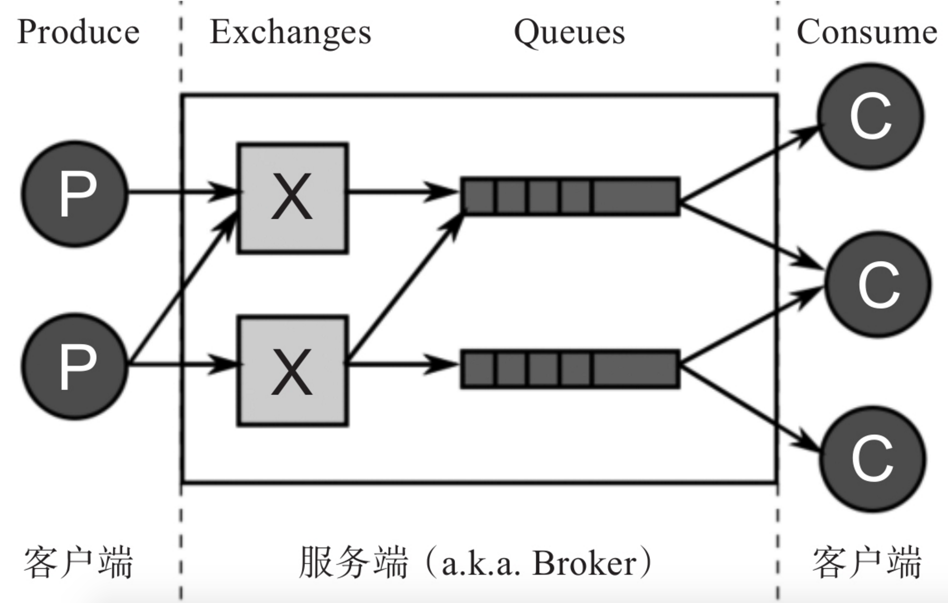
热门的消息队列中间件RabbitMQ,分布式任务处理平台Celery,大数据分布式处理的三大重量级武器:Hadoop、Spark、Storm,以及新一代的数据采集和分析引擎Elasticsearch。 RabbitMQ RabbitMQ是一个支持Advanced Message Queuing Protocol(AMQP)的开源消息队列实现,由Erlang编写,因以高性能、高可用以及可伸缩性出名。它支持多种客户端,如:Java、Python、PHP、.NET、Ruby、JavaScript等。它主要用于在分布式系统中存储和转发消息,方便组件之间的解耦,消息的发送者无需知道消息使用者的存在,反之亦然。 AMQP架构中有两个主要组件:Exchange和Queue,两者都在服务端,又称Broker,由RabbitMQ实现的。客户端通常有Producer和Consumer两种类型。 在使用RabbitMQ过程中需要注意的是,它将数据存储在Node中,默认情况为hostname。因此在使用docker run指令运行容器的时候,应该通过-h/--hostname参数指定每一个rabbitmq daemon运行的主机名。这样就可以轻松地管理和维护数据了: $ docker run -d --hostname my-rabbit --name some-rabbit rabbitmq:3 3f28f6290e05375363ee661151170d37fbc89ada004c3235f02997b711b4cb2b 用户使用rabbitmqctl工具进行远程管理,或跨容器管理的时候,会需要设置持久化的cookie。这里可以使用RABBITMQ_ERLANG_COOKIE参数进行设置: $ docker run -d --hostname my-rabbit --name some-rabbit -e RABBITMQ_ERLANG_COOKIE='secret cookie here'rabbitmq:3 使用cookie连接至一个独立的实例: $ docker run -it --rm --link some-rabbit:my-rabbit -e RABBITMQ_ERLANG_COOKIE='secret cookie here'rabbitmq:3 bash root@f2a2d3d27c75:/# rabbitmqctl -n rabbit@my-rabbit list_users Listing users ... guest [administrator] 同样,用户也可以使用RABBITMQ_NODENAME简化指令: $ docker run -it --rm --link some-rabbit:my-rabbit -e RABBITMQ_ERLANG_COOKIE='secret cookie here'-e RABBITMQ_NODENAME=rabbit@my-rabbit rabbitmq:3 bash root@f2a2d3d27c75:/# rabbitmqctl list_users Listing users ... guest [administrator] 默认情况下,rabbitmq会安装并启动一些管控插件,如rabbitmq:3-management。通常可以通过默认用户名密码以及标准管控端口15672访问这些插件: $ docker run -d --hostname my-rabbit --name some-rabbit rabbitmq:3-management 用户可以通过浏览器访问http://container-ip:15672,如果需要从宿主机外访问,则使用8080端口: $ docker run -d --hostname my-rabbit --name some-rabbit -p 8080:15672 rabbitmq:3-management 如果需要修改默认用户名与密码(guest:guest),则可以使用RABBITMQ_DEFAULT_USER和RABBITMQ_DEFAULT_PASS环境变量: $ docker run -d --hostname my-rabbit --name some-rabbit -e RABBITMQ_DEFAULT_USER=user -e RABBITMQ_DEFAULT_PASS=password rabbitmq:3-management 如果需要修改默认vhost,可以修改RABBITMQ_DEFAULT_VHOST环境变量: $ docker run -d --hostname my-rabbit --name some-rabbit -e RABBITMQ_DEFAULT_VHOST=my_vhost rabbitmq:3-management 然后连接至daemon: $ docker run --name some-app --link some-rabbit:rabbit -d application-that-uses-rabbitmq 用户也可以访问官方镜像仓库,并对Dockerfile进行更多定制。 Celery 除了通用的消息队列外,任务队列在分布式处理中也十分重要。任务队列的输入是工作的一个单元,称为任务,有多个工作者监听队列来获取任务并执行。 Celery是一个简单、灵活、高可用、高性能的开源(BSD许可)分布式任务处理系统,专注于实时处理的任务队列管理,同时也支持任务调度。Celery基于Python实现,跟包括Django、Pyramid、Pylons、Flask、Tornado等Web框架都无缝集成,有庞大的用户与贡献者社区。Celery可以单机运行,也可以在多台机器上运行,甚至可以跨越数据中心运行。 1.使用官方镜像 启动一个celery worker,即RabbitMQ Broker: $ docker run --link some-rabbit:rabbit --name some-celery -d celery:latest 检查集群状态: $ docker run --link some-rabbit:rabbit --rm celery celery status 启动一个celery worker,即Redis Broker: $ docker run --link some-redis:redis -e CELERY_BROKER_URL=redis://redis --namesome-celery -d celery 检查集群状态: $ docker run --link some-redis:redis -e CELERY_BROKER_URL=redis://redis --rmcelery celery status 2.使用Celery库 如果用户使用的框架已有Celery库,那么使用起来会更方便。 下面是Python中调用Celery的hello world程序: from celery import Celery app = Celery('hello', broker='amqp://guest@localhost//') @app.task def hello(): return 'hello world' Hadoop 作为当今大数据处理领域的经典分布式平台,Apache Hadoop主要基于Java语言实现,由三个核心子系统组成:HDFS、YARN、MapReduce,其中,HDFS是一套分布式文件系统;YARN是资源管理系统,MapReduce是运行在YARN上的应用,负责分布式处理管理。如果从操作系统的角度看,HDFS相当于Linux的ext3/ext4文件系统,而Yarn相当于Linux的进程调度和内存分配模块。 1.使用官方镜像 可以通过docker run指令运行镜像,同时打开bash命令行,如下所示: $ docker run -it sequenceiq/hadoop-docker:2.7.0 /etc/bootstrap.sh -bash bash-4.1# 此时可以查看各种配置信息和执行操作,例如查看namenode日志等信息: bash-4.1# cat /usr/local/hadoop/logs/hadoop-root-namenode-d4e1e9d8f24f.out ulimit -a for user root core file size (blocks, -c) 0 data seg size (kbytes, -d) unlimited scheduling priority (-e) 0 file size (blocks, -f) unlimited pending signals (-i) 7758 max locked memory (kbytes, -l) 64 max memory size (kbytes, -m) unlimited open files (-n) 1048576 pipe size (512 bytes, -p) 8 POSIX message queues (bytes, -q) 819200 real-time priority (-r) 0 stack size (kbytes, -s) 8192 cpu time (seconds, -t) unlimited max user processes (-u) unlimited virtual memory (kbytes, -v) unlimited file locks (-x) unlimited 2.安装验证 需要验证Hadoop环境是否安装成功。打开容器的bash命令行环境,进入Hadoop目录: bash-4.1# cd $HADOOP_PREFIX bash-4.1# pwd /usr/local/hadoop 然后通过运行Hadoop内置的实例程序来进行测试: bash-4.1# bin/hadoop jar share/hadoop/mapreduce/hadoop-mapreduce-examples-2.7.0.jargrep input output'dfs[a-z.]+' 16/08/31 10:00:11 INFO client.RMProxy: Connecting to ResourceManager at /0.0.0.0:8032 16/08/31 10:00:15 INFO input.FileInputFormat: Total input paths to process : 31 16/08/31 10:00:16 INFO mapreduce.JobSubmitter: number of splits:31 ... 最后可以使用hdfs指令检查输出结果: bash-4.1# bin/hdfs dfs -cat output/* Spark Apache Spark是一个围绕速度、易用性和复杂分析构建的大数据处理框架,基于Scala开发。最初在2009年由加州大学伯克利分校的AMPLab开发,并于2010年成为Apache的开源项目之一。与Hadoop和Storm等其他大数据和MapReduce技术相比,Spark支持更灵活的函数定义,可以将应用处理速度提升一到两个数量级,并且提供了众多方便的实用工具,包括SQL查询、流处理、机器学习和图处理等。 Spark体系架构包括如下三个主要组件:数据存储、API、管理框架,如图13-3所示。 1.使用官方镜像 用户可以使用sequenceiq/spark镜像,版本方面支持Hadoop 2.6.0,Apache Spark v1.6.0(CentOS)。同时此镜像还包含Dockerfile,用户可以基于它构建自定义的Apache Spark镜像。 用户使用docker pull指令直接获取镜像: $ docker pull sequenceiq/spark:1.6.0 也可以使用docker build指令构建spark镜像: $ docker build --rm -t sequenceiq/spark:1.6.0 . 另外,用户在运行容器时,需要映射YARN UI需要的端口: $ docker run -it -p 8088:8088 -p 8042:8042 -h sandbox sequenceiq/spark:1.6.0 bash 启动后,可以使用bash命令行来查看namenode日志等信息: bash-4.1# cat /usr/local/hadoop/logs/hadoop-root-namenode-sandbox.out 2.验证 基于YARN部署Spark系统时,用户有两种部署方式可选:YARN客户端模式和YARN集群模式。 下面分别论述两种部署方式。 1.YARN客户端模式 在YARN客户端模式中,SparkContext(或称为驱动程序,driver program)运行在客户端进程中,应用的master仅处理来自YARN的资源管理请求: #运行spark shell spark-shell \ --master yarn-client \ --driver-memory 1g \ --executor-memory 1g \ --executor-cores 1 #执行以下指令,若返回1000则符合预期 scala> sc.parallelize(1 to 1000).count() 2.YARN集群模式 在YARN集群模式中,Spark driver驱动程序运行于应用master的进程中,即由YARN从集群层面进行管理。 下面,用户以Pi值计算为例子,展现两种模式的区别: Pi计算(YARN集群模式): #执行以下指令,成功后,日志中会新增记录"Pi is roughly 3.1418" #集群模式下用户必须制定--files参数,以开启metrics spark-submit \ --class org.apache.spark.examples.SparkPi \ --files $SPARK_HOME/conf/metrics.properties \ --master yarn-cluster \ --driver-memory 1g \ --executor-memory 1g \ --executor-cores 1 \ $SPARK_HOME/lib/spark-examples-1.6.0-hadoop2.6.0.jar Pi计算(YARN客户端模式): #执行以下指令,成功后,命令行将显示"Pi is roughly 3.1418" spark-submit \ --class org.apache.spark.examples.SparkPi \ --master yarn-client \ --driver-memory 1g \ --executor-memory 1g \ --executor-cores 1 \ $SPARK_HOME/lib/spark-examples-1.6.0-hadoop2.6.0.jar 3.容器外访问Spark 如果需要从容器外访问Spark环境,则需要设置YARN_CONF_DIR环境变量。只能使用根用户访问Docker的HDFS环境。 yarn-remote-client文件夹内置远程访问的配置信息: export YARN_CONF_DIR="`pwd`/yarn-remote-client" 当用户从容器集群外部,使用非根用户访问Spark环境时,则需要配置HADOOP_USER_NAME环境变量: export HADOOP_USER_NAME=root Storm Apache Storm是一个实时流计算框架,由Twitter在2014年正式开源,遵循Eclipse Public License 1.0。Storm基于Clojure等语言实现。 Storm集群与Hadoop集群在工作方式上十分相似,唯一区别在于Hadoop上运行的是MapReduce任务,在Storm上运行的则是topology。MapReduce任务完成处理即会结束,而topology则永远在等待消息并处理(直到被停止)。 使用Compose搭建Storm集群 利用Docker Compose模板,用户可以在本地单机Docker环境快速地搭建一个Apache Storm集群,进行应用开发测试。 1.Storm示例架构,Storm架构图。 其中包含如下容器: ·Zookeeper:Apache Zookeeper三节点部署。 ·Nimbus:Storm Nimbus。 ·Ui:Storm UI ·Supervisor:Storm Supervisor(一个或多个)。 ·Topology:Topology部署工具,其中示例应用基于官方示例storm-starter代码构建。 2.本地开发测试 首先从Github下载需要的代码: $ gitclonehttps://github.com/denverdino/docker-storm.git $ cd docker-swarm/local 代码库中的docker-compose.yml文件描述了典型的Storm应用架构。 用户可以直接运行下列命令构建测试镜像: $ docker-compose build 现在可以用下面的命令来一键部署一个Storm应用: $ docker-compose up -d 当UI容器启动后,用户可以访问容器的8080端口来打开操作界面。 利用如下命令,可以伸缩supervisor的数量,比如伸缩到3个实例: $ docker-compose scale supervisor=3 用户也许会发现Web界面中并没有运行中的topology。这是因为Docker Compose目前只能保证容器的启动顺序,但是无法确保所依赖容器中的应用已经完全启动并可以被正常访问了。为了解决这个问题,需要运行下面的命令来再次启动topolgoy服务应用来提交更新的拓扑: $ docker-compose start topology 稍后刷新Storm UI,可以发现Storm应用已经部署成功了。 Elasticsearch Elasticsearch是一个基于Lucene的开源搜索服务器,主要基于Java实现。它提供了一个分布式的,多租户的全文搜索引擎,内含RESTful web接口。 Elasticsearch提供了实时的分布式数据存储和分析查询功能,很容易扩展到上百台服务器,支持处理PB级结构化或非结构化数据。配合Logstash、Kibana等组件,可以快速构建一套对日志消息的分析平台。 可以使用官方镜像,快速运行Elasticsearch容器: $ docker run -d elasticsearch 也可以在启动时传入一些额外的配置参数: $ docker run -d elasticsearch elasticsearch -Des.node.name="TestNode" 目前使用的镜像内含默认配置文件,包含了预先定义好的默认配置。 如果用户要使用自定义配置,可以使用数据卷,挂载自定义配置文件至/usr/share/elasticsearch/config: $ docker run -d -v "$PWD/config":/usr/share/elasticsearch/config elasticsearch 如果需要数据持久化,可以使用数据卷指令,挂载至/usr/share/elasticsearch/data: $ docker run -d -v "$PWD/esdata":/usr/share/elasticsearch/data elasticsearch 此镜像会暴露9200 9300两个默认的HTTP端口,可以通过此端口进行服务访问。9200端口是对外提供服务的API使用的端口。9300端口是内部通信端口,这些通信包括心跳,集群内部信息同步。 小结 分布式处理与大数据处理领域的典型热门工具,包括Rabbitmq、Celery、Hadoop、Spark、Storm和Elasticsearch等。这些开源项目的出现,极大降低了开发者进行分布式处理和数据分析的门槛。 实际上,摩尔定律的失效,必将导致越来越多的复杂任务必须采用分布式架构进行处理。在新的架构和平台下,如何实现高性能、高可用性,如何让应用容易开发、方便调试,都是十分复杂的问题。已有的开源平台项目提供了很好的实现参考,方便用户将更多的精力放到核心业务的维护上。通过基于容器的部署和使用,极大简化了对如此复杂系统的使用和维护。

优秀的个人博客,低调大师

让 ESS 更灵活的新特性:UserData &amp; KeyPair &amp; RamRole &amp; Tags

弹性伸缩(Elastic Scaling Service, ESS)是一种根据业务需求和策略,自动调整其弹性计算资源的管理服务,在满足业务需求高峰增长时无缝地增加 ECS 实例,并在业务需求下降时自动减少 ECS 实例以节约成本。 为了提供更加弹性、灵活的伸缩服务,ESS 弹性伸缩配置中新增了 UserData、KeyPair、RamRole、Tags 四个特性。使用 UserData,您可以快速安全的完成自动化的配置过程,在 ECS 实例数量随着业务需求弹性变化的同时,您还能够安全、快速地完成应用级别的扩容和缩容。您还可以通过配置 KeyPair、Tags 等参数,实现更加高效、智能的 ECS 实例管理服务。 本文将详细介绍 ESS 新增的四个特性,并结合具体场景,向您阐述这些特性在 ESS 中的使用方式。您可以根据自己的业务场景,

资源下载

更多资源
Mario

Mario

马里奥是站在游戏界顶峰的超人气多面角色。马里奥靠吃蘑菇成长,特征是大鼻子、头戴帽子、身穿背带裤,还留着胡子。与他的双胞胎兄弟路易基一起,长年担任任天堂的招牌角色。

Nacos

Nacos

Nacos /nɑ:kəʊs/ 是 Dynamic Naming and Configuration Service 的首字母简称,一个易于构建 AI Agent 应用的动态服务发现、配置管理和AI智能体管理平台。Nacos 致力于帮助您发现、配置和管理微服务及AI智能体应用。Nacos 提供了一组简单易用的特性集,帮助您快速实现动态服务发现、服务配置、服务元数据、流量管理。Nacos 帮助您更敏捷和容易地构建、交付和管理微服务平台。

Sublime Text

Sublime Text

Sublime Text具有漂亮的用户界面和强大的功能,例如代码缩略图,Python的插件,代码段等。还可自定义键绑定,菜单和工具栏。Sublime Text 的主要功能包括:拼写检查,书签,完整的 Python API , Goto 功能,即时项目切换,多选择,多窗口等等。Sublime Text 是一个跨平台的编辑器,同时支持Windows、Linux、Mac OS X等操作系统。

WebStorm

WebStorm

WebStorm 是jetbrains公司旗下一款JavaScript 开发工具。目前已经被广大中国JS开发者誉为“Web前端开发神器”、“最强大的HTML5编辑器”、“最智能的JavaScript IDE”等。与IntelliJ IDEA同源,继承了IntelliJ IDEA强大的JS部分的功能。

用户登录
用户注册