mapreduce调试查询System.out的结果
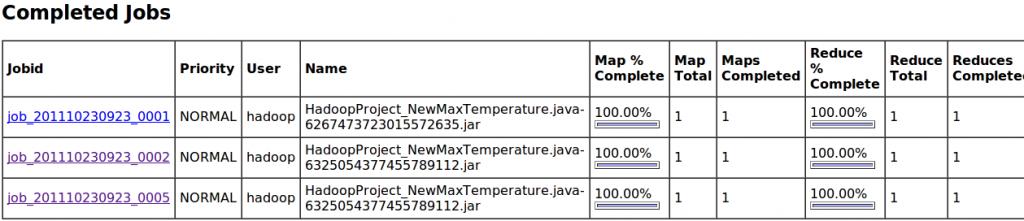
1.前言 刚接触mapreduce的人肯定为碰到这样的问题,就是我们在程序中如下类似的命令 [cpp] view plain copy print ? System.out.println(year+""+airTemperature);//无效,控制台没有输出。 但是console控制台不给我们输出相应的结果,这对于很多通过System.out来调试的人来说,会是一个很头疼的事情,我也对这个很头疼。昨天在看《hadoop权威指南第二版》的第五章的时候,书中有介绍通过web界面来浏览hadoop的作业信息,发现在web界面中能看到许多作业的相关信息。并且知道mapreduce的作业信息都写在了用户日志中,存放在目录hadoop_home/logs/userlogs中。其他日志存放地点参考《hadoop权威指南第二版》p152的表5-2。通过web界面很容用找到这些日志。 2.给出测试程序的代码 NewMaxTemperature.java [cpp] view plain copy print ? packagehadoop.chapter2; //ccNewMaxTemperatureApplicationtofindthemaximumtemperatureintheweatherdatasetusingthenewcontextobjectsMapReduceAPI importjava.io.IOException; importorg.apache.hadoop.fs.Path; importorg.apache.hadoop.io.*; importorg.apache.hadoop.mapreduce.*; importorg.apache.hadoop.mapreduce.lib.input.FileInputFormat; importorg.apache.hadoop.mapreduce.lib.output.FileOutputFormat; //vvNewMaxTemperature publicclassNewMaxTemperature{ staticclassNewMaxTemperatureMapper extendsMapper<LongWritable,Text,Text,IntWritable>{ privatestaticfinalintMISSING=9999; publicvoidmap(LongWritablekey,Textvalue,Contextcontext) throwsIOException,InterruptedException{ Stringline=value.toString(); Stringyear=line.substring(15,19); intairTemperature; if(line.charAt(87)=='+'){//parseIntdoesn'tlikeleadingplussigns airTemperature=Integer.parseInt(line.substring(88,92)); }else{ airTemperature=Integer.parseInt(line.substring(87,92)); } Stringquality=line.substring(92,93); if(airTemperature!=MISSING&&quality.matches("[01459]")){ context.write(newText(year),newIntWritable(airTemperature)); System.out.println(year+""+airTemperature);//无效,控制台没有输出。 /* *stdoutlogs *19500 *195022 *1950-11 *1949111 *194978 **/ } } } staticclassNewMaxTemperatureReducer extendsReducer<Text,IntWritable,Text,IntWritable>{ publicvoidreduce(Textkey,Iterable<IntWritable>values, Contextcontext) throwsIOException,InterruptedException{ intmaxValue=Integer.MIN_VALUE; for(IntWritablevalue:values){ maxValue=Math.max(maxValue,value.get()); System.out.println(key+""+value.get());//无效,控制台没有输出。 /* *stdoutlogs *1949111 *194978 *19500 *195022 *1950-11 **/ } context.write(key,newIntWritable(maxValue)); } } publicstaticvoidmain(String[]args)throwsException{ if(args.length!=2){ System.err.println("Usage:NewMaxTemperature<inputpath><outputpath>"); System.exit(-1); } ///home/hadoop/input/sample.txt/home/hadoop/output/tmp1 Jobjob=newJob(); job.setJarByClass(NewMaxTemperature.class); FileInputFormat.addInputPath(job,newPath(args[0])); FileOutputFormat.setOutputPath(job,newPath(args[1])); job.setMapperClass(NewMaxTemperatureMapper.class); job.setReducerClass(NewMaxTemperatureReducer.class); job.setOutputKeyClass(Text.class); job.setOutputValueClass(IntWritable.class); System.exit(job.waitForCompletion(true)?0:1); } } //^^NewMaxTemperature 3.然后给出用于测试该程序的数据 sample.txt [cpp] view plain copy print ? 0067011990999991950051507004+68750+023550FM-12+038299999V0203301N00671220001CN9999999N9+00001+99999999999 0043011990999991950051512004+68750+023550FM-12+038299999V0203201N00671220001CN9999999N9+00221+99999999999 0043011990999991950051518004+68750+023550FM-12+038299999V0203201N00261220001CN9999999N9-00111+99999999999 0043012650999991949032412004+62300+010750FM-12+048599999V0202701N00461220001CN0500001N9+01111+99999999999 0043012650999991949032418004+62300+010750FM-12+048599999V0202701N00461220001CN0500001N9+00781+99999999999 4.最后给出该程序的输入参数 我们在eclipse上运行该程序,不通过命令行来执行。 [cpp] view plain copy print ? /home/hadoop/input/sample.txt/home/hadoop/output/tmp1 5.查找System.out的内容 这是文章的主题,就是在console中我们没有找到我们想要打印的输出,那么我们应该如何查找。 首先我们登录web控制台,网址是:http://localhost:50030/。这里顺便给出相关的web控制界面的一些网址: [cpp] view plain copy print ? http://localhost:50030/-Hadoop管理介面 http://localhost:50060/-HadoopTaskTracker状态 http://localhost:50070/-HadoopDFS状态 在登录管理界面以后,我们能够在Completed Jobs中找到我们刚才运行的作业,如下图所示: 我们进入:job_201110230923_0002这个作业,会看到如下界面: 在这里就可以看到map任务于reduce人物的详情,我们首先点击map,进入如下界面: 再点击相应的task:task_201110230923_0002_m_000000,进入如下界面: 我们点击Task Logs列中的ALL,会出现如下界面: 上面的stdout logs就是我们System.out的内容。reduce任务也可以通过同样的方法得到System.out的内容。其实web管理界面访问的内容都写在本地,我们可以从本地的用户日志文件中找到。比如上述例子中的stdout logs可以在目录:hadoop_home/logs/userlogs/attempt_201110230923_0002_m_000000_0目录下找到。该目录下有以下几个文件:log.index stderr stdout syslog。其中stderr中的内容是通过System.err.println输出的。 6.总结 文中提到很多作业job,任务task等相关的内容,具体这些关系可以参考《hadoop权威指南第二版》p147的内容。 本文转自xwdreamer博客园博客,原文链接:http://www.cnblogs.com/xwdreamer/archive/2011/10/23/2296953.html,如需转载请自行联系原作者