首页 文章 精选 留言 我的

精选列表

搜索[学习],共10000篇文章
优秀的个人博客,低调大师

Spark 概念学习系列之Spark计算工作流(十二)

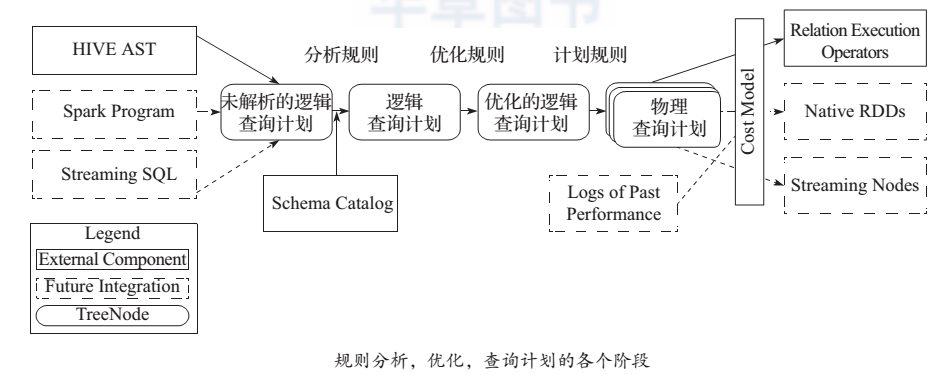
下图 中描述了 Spark 的输入、运行转换、输出。 在运行转换中通过算子对 RDD进行转换。 算子是 RDD 中定义的函数,可以对 RDD 中的数据进行转换和操作。 输入:在 Spark 程序运行中,数据从外部数据空间(例如, HDFS、 Scala 集合或数据)输入到 Spark,数据就进入了 Spark 运行时数据空间,会转化为 Spark 中的数据块,通过 BlockManager 进行管理。运行:在 Spark 数据输入形成 RDD 后,便可以通过变换算子 f liter 等,对数据操作并将 RDD 转化为新的 RDD,通过行动(Action)算子,触发 Spark 提交作业。如果数据需要复用,可以通过 Cache 算子,将数据缓存到内存。 输出:程序运行结束数据会输出 Spark 运行时空间,存储到分布式存储中(如saveAsTextFile 输出到 HDFS)或 Scala 数据或集合中( collect 输出到 Scala 集合,count 返回 Scala Int 型数据)。 图 1 Spark 算子和数据空间 Spark的核心数据模型是RDD,但RDD是个抽象类,具体由各子类实现,如MappedRDD、Shuff ledRDD等子类。Spark将常用的大数据操作都转化成为RDD 的子类。 本文转自大数据躺过的坑博客园博客,原文链接:http://www.cnblogs.com/zlslch/p/5724027.html,如需转载请自行联系原作者

优秀的个人博客,低调大师

[BigData]关于Hadoop学习笔记第三天(PPT总结)(一)

课程安排 MapReduce原理*** MapReduce执行过程** 数据类型与格式*** Writable接口与序列化机制*** ---------------------------加深拓展---------------------- MapReduce的执行过程源码分析 问题:怎样解决海量数据的计算? MapReduce概述 lMapReduce是一种分布式计算模型,由Google提出,主要用于搜索领域,解决海量数据的计算问题. lMR由两个阶段组成:Map和Reduce,用户只需要实现map()和reduce()两个函数,即可实现分布式计算,非常简单。 l这两个函数的形参是key、value对,表示函数的输入信息。 思考:自己设计一个MapReduce框架 Mapreduce原理 ◆执行步骤: 1. map任务处理 1.1 读取输入文件内容,解析成key、value对。对输入文件的每一行,解析成key、value对。每一个键值对调用一次map函数。 1.2 写自己的逻辑,对输入的key、value处理,转换成新的key、value输出。 2.reduce任务处理 2.1写reduce函数自己的逻辑,对输入的key、value处理,转换成新的key、value输出。 2.2把reduce的输出保存到文件中。 map、reduce键值对格式 WordCountApp的驱动代码 Configuration conf = new Configuration(); //加载配置文件 Job job = new Job(conf); //创建一个job,供JobTracker使用 job.setJarByClass(WordCountApp.class); job.setMapperClass(WordCountMapper.class); job.setReducerClass(WordCountReducer.class); FileInputFormat.setInputPaths(job, new Path("hdfs://192.168.1.10:9000/input")); FileOutputFormat.setOutputPath(job, new Path("hdfs://192.168.1.10:9000/output")); job.setOutputKeyClass(Text.class); job.setOutputValueClass(IntWritable.class); job.waitForCompletion(true); } MR流程 l代码编写 l作业配置 l提交作业 l初始化作业 l分配任务 l执行任务 l更新任务和状态 l完成作业 MR过程各个角色的作用 ljobClient:提交作业 lJobTracker:初始化作业,分配作业,TaskTracker与其进行通信,协调监控整个作业 lTaskTracker:定期与JobTracker通信,执行Map和Reduce任务 lHDFS:保存作业的数据、配置、jar包、结果 作业提交 l提交作业之前,需要对作业进行配置 •编写自己的MR程序 •配置作业,包括输入输出路径等等 l提交作业 •配置完成后,通过JobClient提交 l具体功能 •与JobTracker通信得到一个jar的存储路径和JobId •输入输出路径检查 •将jobj ar拷贝到的HDFS •计算输入分片,将分片信息写入到job.split中 •写job.xml •真正提交作业 作业初始化 l客户端提交作业后,JobTracker会将作业加入到队列,然后进行调度,默认是FIFO方式 l具体功能 •作业初始化主要是指JobInProgress中完成的 •读取分片信息 •创建task包括Map和Reduce任创建task包括Map和Reduce任务 •创建TaskInProgress执行task,包括map任务和reduce任务 任务分配 lTaskTracker与JobTracker之间的通信和任务分配是通过心跳机制实现的 lTaskTracker会主动定期向JobTracker发送心态信息,询问是否有任务要做,如果有,就会申请到任务。 任务执行 l如果TaskTracker拿到任务,会将所有的信息拷贝到本地,包括代码、配置、分片信息等 lTaskTracker中的localizeJob()方法会被调用进行本地化,拷贝job.jar,jobconf,job.xml到本地 lTaskTracker调用launchTaskForJob()方法加载启动任务 lMapTaskRunner和ReduceTaskRunner分别启动java child进程来执行相应的任务 状态更新 lTask会定期向TaskTraker汇报执行情况 lTaskTracker会定期收集所在集群上的所有Task的信息,并向JobTracker汇报 lJobTracker会根据所有TaskTracker汇报上来的信息进行汇总 作业完成 lJobTracker是在接收到最后一个任务完成后,才将任务标记为成功 l将数结果据写入到HDFS中 错误处理 lJobTracker失败 •存在单点故障,hadoop2.0解决了这个问题 lTraskTracker失败 •TraskTracker崩溃了会停止向JobTracker发送心跳信息。 •JobTracker会将TraskTracker从等待的任务池中移除,并将该任务转移到其他的地方执行 •JobTracker将TaskTracker加入到黑名单中 lTask失败 •任务失败,会向TraskTracker抛出异常 •任务挂起 JobTracker l负责接收用户提交的作业,负责启动、跟踪任务执行。 lJobSubmissionProtocol是JobClient与JobTracker通信的接口。 lInterTrackerProtocol是TaskTracker与JobTracker通信的接口。 TaskTracker l负责执行任务。 JobClient l是用户作业与JobTracker交互的主要接口。 l负责提交作业的,负责启动、跟踪任务执行、访问任务状态和日志等。 序列化概念 l序列化(Serialization)是指把结构化对象转化为字节流。 l反序列化(Deserialization)是序列化的逆过程。即把字节流转回结构化对象。 lJava序列化(java.io.Serializable) Hadoop序列化的特点 l序列化格式特点: 1.紧凑:高效使用存储空间。 2.快速:读写数据的额外开销小 3.可扩展:可透明地读取老格式的数据 4.互操作:支持多语言的交互 Hadoop的序列化格式:Writable Java序列化的不足: 1.不精简。附加信息多。不大适合随机访问。 2.存储空间大。递归地输出类的超类描述直到不再有超类。序列化图对象,反序列化时为每个对象新建一个实例。相反。Writable对象可以重用。 3.扩展性差。而Writable方便用户自定义 Hadoop序列化的作用 l序列化在分布式环境的两大作用:进程间通信,永久存储。 lHadoop节点间通信。 Writable接口 lWritable接口, 是根据 DataInput 和 DataOutput 实现的简单、有效的序列化对象. lMR的任意Key和Value必须实现Writable接口. •MR的任意key必须实现WritableComparable接口 常用的Writable实现类 Text一般认为它等价于java.lang.String的Writable。针对UTF-8序列。 例: Text test = new Text("test"); IntWritable one = new IntWritable(1); 自定义Writable类 Writable ①write 是把每个对象序列化到输出流 ②readFields是把输入流字节反序列化 ①实现WritableComparable. ②Java值对象的比较:一般需要重写toString(),hashCode(),equals()方法 自定义WritableKpi 1.电信例子 2.把上面例子里的Mapper的value改写为自定义Writable类型。修改原MapReduce程序,并成功执行。结果跟原来一致。 MapReduce输入的处理类 lFileInputFormat: FileInputFormat是所有以文件作为数据源的InputFormat实现的基类,FileInputFormat保存作为job输入的所有文件,并实现了对输入文件计算splits的方法。至于获得记录的方法是有不同的子类——TextInputFormat进行实现的。 InputFormat InputFormat 负责处理MR的输入部分. 有三个作用: v验证作业的输入是否规范. v把输入文件切分成InputSplit. v提供RecordReader 的实现类,把InputSplit读到Mapper中进行处理. InputSplit ◆ 在执行mapreduce之前,原始数据被分割成若干split,每个split作为一个map任务的输入,在map执行过程中split会被分解成一个个记录(key-value对),map会依次处理每一个记录。 ◆ FileInputFormat只划分比HDFS block大的文件,所以FileInputFormat划分的结果是这个文件或者是这个文件中的一部分. ◆ 如果一个文件的大小比block小,将不会被划分,这也是Hadoop处理大文件的效率要比处理很多小文件的效率高的原因。 ◆ 当Hadoop处理很多小文件(文件大小小于hdfs block大小)的时候,由于FileInputFormat不会对小文件进行划分,所以每一个小文件都会被当做一个split并分配一个map任务,导致效率底下。 例如:一个1G的文件,会被划分成16个64MB的split,并分配16个map任务处理,而10000个100kb的文件会被10000个map任务处理。 TextInputFormat ◆ TextInputformat是默认的处理类,处理普通文本文件。 ◆ 文件中每一行作为一个记录,他将每一行在文件中的起始偏移量作为key,每一行的内容作为value。 ◆ 默认以\n或回车键作为一行记录。 ◆ TextInputFormat继承了FileInputFormat。 InputFormat类的层次结构 其他输入类 ◆ CombineFileInputFormat 相对于大量的小文件来说,hadoop更合适处理少量的大文件。 CombineFileInputFormat可以缓解这个问题,它是针对小文件而设计的。 ◆ KeyValueTextInputFormat 当输入数据的每一行是两列,并用tab分离的形式的时候,KeyValueTextInputformat处理这种格式的文件非常适合。 ◆ NLineInputformat NLineInputformat可以控制在每个split中数据的行数。 ◆ SequenceFileInputformat 当输入文件格式是sequencefile的时候,要使用SequenceFileInputformat作为输入。 自定义输入格式 1)继承FileInputFormat基类。 2)重写里面的getSplits(JobContext context)方法。 3)重写createRecordReader(InputSplit split,TaskAttemptContext context)方法。 (讲解源代码) Hadoop的输出 ◆ TextOutputformat 默认的输出格式,key和value中间值用tab隔开的。 ◆ SequenceFileOutputformat 将key和value以sequencefile格式输出。 ◆ SequenceFileAsOutputFormat 将key和value以原始二进制的格式输出。 ◆ MapFileOutputFormat 将key和value写入MapFile中。由于MapFile中的key是有序的,所以写入的时候必须保证记录是按key值顺序写入的。 ◆ MultipleOutputFormat 默认情况下一个reducer会产生一个输出,但是有些时候我们想一个reducer产生多个输出,MultipleOutputFormat和MultipleOutputs可以实现这个功能。 思考题 1.MapReduce框架的结构是什么 2.Map在整个MR框架中作用是什么 3.Reduce在整个MR框架中作用是什么 本文转自SummerChill博客园博客,原文链接:http://www.cnblogs.com/DreamDrive/p/4572339.html,如需转载请自行联系原作者

优秀的个人博客,低调大师

Hadoop MapReduce概念学习系列之MapReduce 资源组织方式(六)

MapReduce计算框架并没有直接调用CPU和内存等多维度资源,它把多维度资源抽象为“slot”,用“slot” 来描述资源的数量。管理员可以在每个节点上单独配置slot个数。slot可以分为map slot和reduce slot。从一定程度上,slot可以看做“任务运行并行度”。如果某个节点配置了5个map slot,那么这个节点最多运行5个Map Task;如果某个节点配置了3个reduce slot,那么该节点最多运行3个Reduce Task。下面我们分别介绍 Map slot和Reduce slot。 1、Map slot 1)Map slot 可用于运行Map Task 的资源,而且只能运行Map Task。 2)每个Map Task通常使用一个map slot。而比如像容量调度器,它可以有比较大的MapTask。这样的MapTask使用内存比较多,那么它可能使用多个map slot。 2、Reduce slot 1)Reduce slot 可用于运行ReduceTask,而且只能运行ReduceTask。 2)每个ReduceTask通常使用一个reduce slot。而比如像容量调度器,它可以有比较大的 ReduceTask。这样的ReduceTask使用内存比较多,那么它可能使用多个reduce slot。 本文转自大数据躺过的坑博客园博客,原文链接:http://www.cnblogs.com/zlslch/p/5058725.html,如需转载请自行联系原作者

优秀的个人博客,低调大师

Hadoop Hive概念学习系列之hive里的视图(十二)

可以先,从MySQL里的视图概念理解入手 视图是由从数据库的基本表中选取出来的数据组成的逻辑窗口,与基本表不同,它是一个虚表。在数据库中,存放的只是视图的定义,而不存放视图包含的数据项,这些项目仍然存放在原来的基本表结构中。 视图可以被定义为多个表的连接,也可以被定义为只有部分列可见,也可为部分行可见。 视图的作用有: 首先,可以简化数据查询语句 其次,可以使用用户能从多角度看待同一数据 然后,通过引入视图可以提高数据的安全性 最后,视图提提供了一定程度的逻辑独立性等。 引入视图机制带来的好处: 通过引入视图机制,用户可以将注意力集中在其关心的数据上(而非全部数据),这样就大大提高了用户效率与用户满意度,而且如果这些数据来源于多个基本表结构,或者数据不仅来自于基本表结构,还有一部分数据来源于其他视图,并且搜索条件又比较复杂时,需要编写的查询语句就会比较烦琐,此时定义视图就可以使数据的查询语句变得简单可行。 定义视图可以将表与表之间的复杂的操作连接和搜索条件对用户不可见,用户只需要简单地对一个视图进行查询即可,故增加了数据的安全性,但不能提高查询效率。 Hive视图是一种无关底层存储的逻辑对象。视图中的数据是SELECT查询返回的结果。在视图选定后才会开始执行SELECT查询。 需要注意的是,视图是只读的,不能向视图中插入或是加载数据。 下面是一个创建并使用视图的例子: create viewgroup_by_year_vw as select year,count(*) as video_ct from videos group by year; select * from group_by_year_vw; 视图通常被用作将数据发布给外部客户端的抽象层。视图可以使用稳定的公开的列名和数据类型来创建。 视图可以允许在不影响下游数据消费者的情况下修改内部的表结构。 一定要理解,创建视图,是基于表来创建得到视图的。 步骤一:创建一个测试表 create table test(id int,name string); desc test; 结果是 id int name string 步骤二:基于表 test 创建一个 test_view 视图 CREATEVIEWtest_view( id, name_length )ASSELECTid,length(name)FROMtest; 步骤三:查看 test_view 视图属性 DESC test_view; 步骤四:查看视图结果 SELECT * FROM test_view; 本文转自大数据躺过的坑博客园博客,原文链接:http://www.cnblogs.com/zlslch/p/6105243.html,如需转载请自行联系原作者

优秀的个人博客,低调大师

CCNA第二天学习笔记之Cisco系统IOS

路由器简介 路由器能起到隔离广播域的作用,还能在不同网络间转发数据包。路由器实际上是一台特殊用途的计算机,和常见的PC机一样,路由器有CPU、内存、BOOT ROM。路由器没有键盘、硬盘、显示器;然而比起计算机,路由器多了NVRAM、FLASH以及各种各样的接口。路由器各个部件的作用如下: 1、CPU:中央处理单元,和计算机一样,它是路由器的控制和运算部件。 2、RAM/DRAM:内存,用于存储临时的运算结果,如:路由表、ARP表、快速交换缓存、缓冲数据包、数据队列、当前配置。众所周知,RAM中的数据在路由器断电后是会丢失的。 3、FLASH:可擦除、可编程的ROM,用于存放路由器的IOS,FLASH的可擦除特性允许我们更新、升级IOS而不用更换路由器内部的芯片。路由器断电后,FLASH的内容不会丢失。FLASH容量较大时,就可以存放多个IOS版本。 4、NVRAM:非易失性RAM,用于存放路由器的配置文件,路由器的配置文件,路由器断电后,NVRAM中的内容仍然保持。 5、ROM:只读存储器,存储了路由器的开机诊断程序、引导程序和特殊版本的IOS软件(用于诊断等有限用途),ROM中软件升级时需要更换芯片。 6、接口(Interface) :用于网络连接,路由器就是通过这些接口和不同的网络进行连接的。 IOS简介 路由器也有自己的操作系统,通常称为IOS(Internetwork Operating System) 。和计算机上的Windows一样,IOS是路由器的灵魂,所有配置是通过IOS完成的。Cisco的IOS是命令行界面(称为CLI,Command Line Interface),CLI有两种基本工作模式: 1、用户模式(User mode):通常用来查看路由器的状态。在此状态下,无法对路由器进行配置,可以查看的路由器信息也是有限的。 2、特权模式(Privilege mode):可以更改路由器的配置,当然也可以查看路由器的所有信息。 1、理解启动路由器时的情况{工作过程)。当第一次启动一台Cisco 路由器时,它将运行一个加电白检测试(POST),如果通过,它将查找(Cisco IOS),如果闪存中保存有IOS文件,它将从中加载。接着IOS将处理装载和在NVRAM中查找一个有效的配置,即被称做启动配置的文件。如果在NVRAM中没有文件存在,则路由器将进入设置模式。 2、记住设置模式可以提供的操作。如果路由器在引导时没有启动配置文件保存在 NVRAM中,设置模式将会自动启动。也可以在特权模式下通过键入setup进入到设置模式。对于那些不了解如何在命令行下配置Cisco路由器的操作者来说,设置模式提供了简易格式的最小规模的配置。 3、了解用户模式和特权模式之间的不同。默认时,用户模式提供了一个带有很少可用命令的命令行接口。在用户模式下不允许配置被查看或修改。特权模式允许用户查看并修改路由器的配置。可以通过键人命令enable及输入启用口令或启用加密口令(如果设置了)来进入特权模式。 4、记住命令show version可以提供的信息。show version命令将提供关于系统硬件的基本配置信息,以及软件的版本号、配置文件的名称和来源、配置寄存器设置以及引导映像等。 5、记住如何设置路由器的主机名。设置一台路由器主机名的命令顺序如下: enable conf1g t hostname cisco 6、记住启用口令和启用加密口令之间的不同。这两个口令都是用于进人特权模式的。然而,启用加密口令是更新的方式,并且默认时被加密保存。另外,如果在设置了启用口令之后又设置了启用加密口令,则只有启用加密口令被运用。 7、记住如何在路由器上设置启用加密口令。要设置启用加密口令,可以使用命令enable secret。不要使用enable secret password pasword,否则,将设置口令为"password password"。下面是一个示例: enab1e config t enab1e secret cisco 8、记住如何在路由器上设置控制台口令。要设置控制台口令,使用如下命令顺序: enab1e conf1g t line console o password cisco 1og1n 9、记住如何在路由器上设置Te1net口令。要设置Telnet口令,命令顺序是: enab1e config t linevty O 4 password cisco 1og1n 了解如何诊断-个串行链接的问题。如果键入show interface serial 0命令后发现链路 说明是"down,line protocol is down",表明是物理层问题。如果得到的是"up,line protocol is down",则表明遇到了数据链路层上的问题。 10、理解如何使用show interfaces命令来检验你的路由器。如果输人了show interfaces就能查看到此路由器上该接口的统计数字,并验证该接口是否被关闭,以及查看到每个接口上的IP地址。 本文转自 ltyluck 51CTO博客,原文链接:http://blog.51cto.com/ltyluck/172938

优秀的个人博客,低调大师

一脸懵逼学习Nginx及其安装,Tomcat的安装

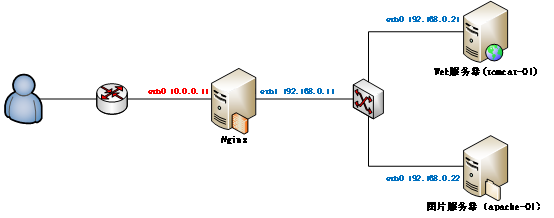
1:Nginx的相关概念知识: 1.1:反向代理: 反向代理(Reverse Proxy)方式是指以代理服务器来接受internet上的连接请求,然后将请求转发给内部网络上的服务器,并将从服务器上得到的结果返回给internet上请求连接的客户端,此时代理服务器对外就表现为一个服务器。 1.2:负载均衡: 负载均衡,英文名称为Load Balance,是指建立在现有网络结构之上,并提供了一种廉价有效透明的方法扩展网络设备和服务器的带宽、增加吞吐量、加强网络数据处理能力、提高网络的灵活性和可用性。其原理就是数据流量分摊到多个服务器上执行,减轻每台服务器的压力,多台服务器共同完成工作任务,从而提高了数据的吞吐量。 2:Nginx的安装操作: Nginx的官网:http://nginx.org/ 2.1:将下载好的Nginx上传到虚拟机上面,然后进行解压缩操作,上传过程省略,请自行脑补: [root@master package]# tar -zxvf nginx-1.8.1.tar.gz -C /home/hadoop/ 2.2:编译Ngnix源码目录: 进入Ngnix源码目录:[root@master hadoop]# cd /home/hadoop/nginx-1.8.1/ 检查安装环境,并指定将来要安装的路径: #缺包报错 checking for OS+ Linux 2.6.32-696.10.1.el6.i686 i686checking for C compiler ... found+ using GNU C compiler+ gcc version: 4.4.7 20120313 (Red Hat 4.4.7-18) (GCC) checking for gcc -pipe switch ... foundchecking for gcc builtin atomic operations ... foundchecking for C99 variadic macros ... foundchecking for gcc variadic macros ... foundchecking for unistd.h ... foundchecking for inttypes.h ... foundchecking for limits.h ... foundchecking for sys/filio.h ... not foundchecking for sys/param.h ... foundchecking for sys/mount.h ... foundchecking for sys/statvfs.h ... foundchecking for crypt.h ... foundchecking for Linux specific featureschecking for epoll ... foundchecking for EPOLLRDHUP ... foundchecking for O_PATH ... not foundchecking for sendfile() ... foundchecking for sendfile64() ... foundchecking for sys/prctl.h ... foundchecking for prctl(PR_SET_DUMPABLE) ... foundchecking for sched_setaffinity() ... foundchecking for crypt_r() ... foundchecking for sys/vfs.h ... foundchecking for nobody group ... foundchecking for poll() ... foundchecking for /dev/poll ... not foundchecking for kqueue ... not foundchecking for crypt() ... not foundchecking for crypt() in libcrypt ... foundchecking for F_READAHEAD ... not foundchecking for posix_fadvise() ... foundchecking for O_DIRECT ... foundchecking for F_NOCACHE ... not foundchecking for directio() ... not foundchecking for statfs() ... foundchecking for statvfs() ... foundchecking for dlopen() ... not foundchecking for dlopen() in libdl ... foundchecking for sched_yield() ... foundchecking for SO_SETFIB ... not foundchecking for SO_ACCEPTFILTER ... not foundchecking for TCP_DEFER_ACCEPT ... foundchecking for TCP_KEEPIDLE ... foundchecking for TCP_FASTOPEN ... not foundchecking for TCP_INFO ... foundchecking for accept4() ... foundchecking for eventfd() ... foundchecking for int size ... 4 byteschecking for long size ... 4 byteschecking for long long size ... 8 byteschecking for void * size ... 4 byteschecking for uint64_t ... foundchecking for sig_atomic_t ... foundchecking for sig_atomic_t size ... 4 byteschecking for socklen_t ... foundchecking for in_addr_t ... foundchecking for in_port_t ... foundchecking for rlim_t ... foundchecking for uintptr_t ... uintptr_t foundchecking for system byte ordering ... little endianchecking for size_t size ... 4 byteschecking for off_t size ... 8 byteschecking for time_t size ... 4 byteschecking for setproctitle() ... not foundchecking for pread() ... foundchecking for pwrite() ... foundchecking for sys_nerr ... foundchecking for localtime_r() ... foundchecking for posix_memalign() ... foundchecking for memalign() ... foundchecking for mmap(MAP_ANON|MAP_SHARED) ... foundchecking for mmap("/dev/zero", MAP_SHARED) ... foundchecking for System V shared memory ... foundchecking for POSIX semaphores ... not foundchecking for POSIX semaphores in libpthread ... foundchecking for struct msghdr.msg_control ... foundchecking for ioctl(FIONBIO) ... foundchecking for struct tm.tm_gmtoff ... foundchecking for struct dirent.d_namlen ... not foundchecking for struct dirent.d_type ... foundchecking for sysconf(_SC_NPROCESSORS_ONLN) ... foundchecking for openat(), fstatat() ... foundchecking for getaddrinfo() ... foundchecking for PCRE library ... not foundchecking for PCRE library in /usr/local/ ... not foundchecking for PCRE library in /usr/include/pcre/ ... not foundchecking for PCRE library in /usr/pkg/ ... not foundchecking for PCRE library in /opt/local/ ... not found./configure: error: the HTTP rewrite module requires the PCRE library.You can either disable the module by using --without-http_rewrite_moduleoption, or install the PCRE library into the system, or build the PCRE librarystatically from the source with nginx by using --with-pcre=<path> option. 然后安装一下缺少的包: [root@master nginx-1.8.1]# yum -y install gcc pcre-devel openssl openssl-devel 解决完错误以后再次执行,检查安装环境,并指定将来要安装的路径: [root@master nginx-1.8.1]# ./configure --prefix=/home/hadoop/nginx [root@master nginx-1.8.1]# ./configure --prefix=/home/hadoop/nginxchecking for OS+ Linux 2.6.32-696.10.1.el6.i686 i686checking for C compiler ... found+ using GNU C compiler+ gcc version: 4.4.7 20120313 (Red Hat 4.4.7-18) (GCC) checking for gcc -pipe switch ... foundchecking for gcc builtin atomic operations ... foundchecking for C99 variadic macros ... foundchecking for gcc variadic macros ... foundchecking for unistd.h ... foundchecking for inttypes.h ... foundchecking for limits.h ... foundchecking for sys/filio.h ... not foundchecking for sys/param.h ... foundchecking for sys/mount.h ... foundchecking for sys/statvfs.h ... foundchecking for crypt.h ... foundchecking for Linux specific featureschecking for epoll ... foundchecking for EPOLLRDHUP ... foundchecking for O_PATH ... not foundchecking for sendfile() ... foundchecking for sendfile64() ... foundchecking for sys/prctl.h ... foundchecking for prctl(PR_SET_DUMPABLE) ... foundchecking for sched_setaffinity() ... foundchecking for crypt_r() ... foundchecking for sys/vfs.h ... foundchecking for nobody group ... foundchecking for poll() ... foundchecking for /dev/poll ... not foundchecking for kqueue ... not foundchecking for crypt() ... not foundchecking for crypt() in libcrypt ... foundchecking for F_READAHEAD ... not foundchecking for posix_fadvise() ... foundchecking for O_DIRECT ... foundchecking for F_NOCACHE ... not foundchecking for directio() ... not foundchecking for statfs() ... foundchecking for statvfs() ... foundchecking for dlopen() ... not foundchecking for dlopen() in libdl ... foundchecking for sched_yield() ... foundchecking for SO_SETFIB ... not foundchecking for SO_ACCEPTFILTER ... not foundchecking for TCP_DEFER_ACCEPT ... foundchecking for TCP_KEEPIDLE ... foundchecking for TCP_FASTOPEN ... not foundchecking for TCP_INFO ... foundchecking for accept4() ... foundchecking for eventfd() ... foundchecking for int size ... 4 byteschecking for long size ... 4 byteschecking for long long size ... 8 byteschecking for void * size ... 4 byteschecking for uint64_t ... foundchecking for sig_atomic_t ... foundchecking for sig_atomic_t size ... 4 byteschecking for socklen_t ... foundchecking for in_addr_t ... foundchecking for in_port_t ... foundchecking for rlim_t ... foundchecking for uintptr_t ... uintptr_t foundchecking for system byte ordering ... little endianchecking for size_t size ... 4 byteschecking for off_t size ... 8 byteschecking for time_t size ... 4 byteschecking for setproctitle() ... not foundchecking for pread() ... foundchecking for pwrite() ... foundchecking for sys_nerr ... foundchecking for localtime_r() ... foundchecking for posix_memalign() ... foundchecking for memalign() ... foundchecking for mmap(MAP_ANON|MAP_SHARED) ... foundchecking for mmap("/dev/zero", MAP_SHARED) ... foundchecking for System V shared memory ... foundchecking for POSIX semaphores ... not foundchecking for POSIX semaphores in libpthread ... foundchecking for struct msghdr.msg_control ... foundchecking for ioctl(FIONBIO) ... foundchecking for struct tm.tm_gmtoff ... foundchecking for struct dirent.d_namlen ... not foundchecking for struct dirent.d_type ... foundchecking for sysconf(_SC_NPROCESSORS_ONLN) ... foundchecking for openat(), fstatat() ... foundchecking for getaddrinfo() ... foundchecking for PCRE library ... foundchecking for PCRE JIT support ... not foundchecking for md5 in system md library ... not foundchecking for md5 in system md5 library ... not foundchecking for md5 in system OpenSSL crypto library ... foundchecking for sha1 in system md library ... not foundchecking for sha1 in system OpenSSL crypto library ... foundchecking for zlib library ... foundcreating objs/MakefileConfiguration summary + using system PCRE library + OpenSSL library is not used + md5: using system crypto library + sha1: using system crypto library + using system zlib library nginx path prefix: "/home/hadoop/nginx" nginx binary file: "/home/hadoop/nginx/sbin/nginx" nginx configuration prefix: "/home/hadoop/nginx/conf" nginx configuration file: "/home/hadoop/nginx/conf/nginx.conf" nginx pid file: "/home/hadoop/nginx/logs/nginx.pid" nginx error log file: "/home/hadoop/nginx/logs/error.log" nginx http access log file: "/home/hadoop/nginx/logs/access.log" nginx http client request body temporary files: "client_body_temp" nginx http proxy temporary files: "proxy_temp" nginx http fastcgi temporary files: "fastcgi_temp" nginx http uwsgi temporary files: "uwsgi_temp" nginx http scgi temporary files: "scgi_temp" 2.3:编译安装(make是编译,make install是安装): [root@master hadoop]# make && make install安装不是一帆风顺的,开始将make && make install写成了make && made install,肯定没有安装成功了,然后我再执行make && make install就出现下面的情况了,然后我重新./configure --prefix=/usr/local/nginx检查安装环境,并指定将来要安装的路径,最后再make && made install,貌似正常编译,安装了,虽然我也不是很清楚,这里贴一下吧先,安装好以后可以测试是否正常: [root@master hadoop]# make && make installmake: *** No targets specified and no makefile found. Stop.[root@master hadoop]# make installmake: *** No rule to make target `install'. Stop.[root@master hadoop]# make && make installmake: *** No targets specified and no makefile found. Stop.[root@master hadoop]# ./configure --prefix=/home/hadoop/nginxbash: ./configure: No such file or directory[root@master hadoop]# cd /home/hadoop/nginx-1.8.1/[root@master nginx-1.8.1]# lsauto CHANGES CHANGES.ru conf configure contrib html LICENSE Makefile man objs README src[root@master nginx-1.8.1]# ./configure --prefix=/home/hadoop/nginx 2.4:安装好以后测试是否正常: 安装好以后指定的目录会生成一些文件,如我的/home/hadoop/nginx目录下面: 启动Nginx的命令:[root@master sbin]# ./nginx 查看端口是否有ngnix进程监听:[root@master sbin]# netstat -ntlp | grep 80 3:配置Nginx: 3.1:配置反向代理: 修改Nginx配置文件: [root@master conf]# cd /home/hadoop/nginx/conf/ [root@master conf]# vim nginx.conf server { listen 80; server_name master; #nginx所在服务器的主机名称 #charset koi8-r; #access_log logs/host.access.log main; #反向代理的配置 location / { #拦截所有请求 root html; #index index.html index.htm; #这里是代理走向的目标服务器:tomcat proxy_pass http://192.168.199.130:8080; } 具体配置如下所示: 下面贴图这句话后面proxy_pass http://192.168.199.130:8080; 少了一个分号导致后面启动nginx的时候出现错误: 自己都操点心就可以了: [root@master sbin]# ./nginx nginx: [emerg] unexpected "}" in /home/hadoop/nginx/conf/nginx.conf:48 4:安装Tomcat,将下载好的tomcat安装包上传到虚拟机,过程省略,然后解压缩操作: [root@slaver1 package]# tar -zxvf apache-tomcat-7.0.68.tar.gz -C /home/hadoop/ 解压缩好以后启动Tomcat: 然后没启动起来,貌似说我的jdk没有配置啥的,现在配置一下,配置过程省略,大概如上传压缩包,解压缩,然后配置环境变量: vim /etc/profile配置好以后使其立即生效:source /etc/profile,最后检查一下是否安装成功:java/javac/java -version 然后启动tomcat,如下所示: 启动好,可以检查一下是否启动成功: 浏览器输入自己的http://192.168.199.131:8080/ 如果无法访问,可能是防火墙的原因:service iptables stop关闭防火墙;service iptables status查看防火墙是否关闭成功; 5:现在体现Nginx的功能了,我在master节点安装的Nginx,然后在slaver1节点安装的tomcat: 然后访问master节点,会跳转到slaver1的tomcat页面: http://192.168.199.130/自己的master节点的名称; 6:Nginx的动静分离: 动态资源 index.jsp location ~ .*\.(jsp|do|action)$ { proxy_pass http://ip地址:8080; } 静态资源: location ~ .*\.(html|js|css|gif|jpg|jpeg|png)$ { expires 3d; } 负载均衡: 在http这个节下面配置一个叫upstream的,后面的名字可以随意取,但是要和location下的proxy_pass http://后的保持一致。 http { 是在http里面的, 已有http, 不是在server里,在server外面 upstream tomcats{ server 192.168.199.130:8080 weight=1;#weight表示多少个 server 192.168.199.131:8080 weight=1; server 192.168.199.132:8080 weight=1; } #卸载server里 #~代表是大小写敏感,.代表是任何非回车字符,*代表多个。 location ~ .*\.(jsp|do|action) { proxy_pass http://tomcats;#tomcats是后面的tomcat服务器组的逻辑组号 } } 待续......

优秀的个人博客,低调大师

Spark RDD概念学习系列之RDD的容错机制(十七)

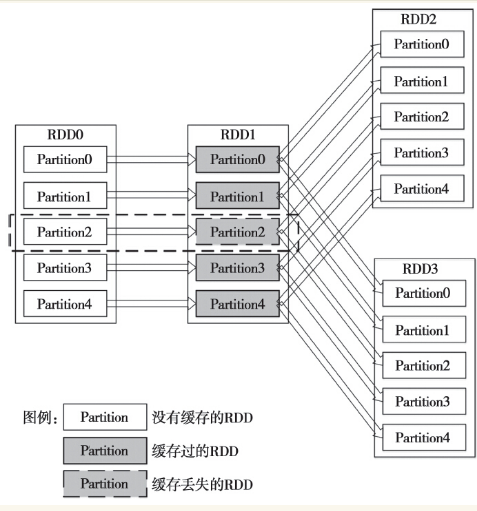
RDD的容错机制 RDD实现了基于Lineage的容错机制。RDD的转换关系,构成了compute chain,可以把这个compute chain认为是RDD之间演化的Lineage。在部分计算结果丢失时,只需要根据这个Lineage重算即可。 图1中,假如RDD2所在的计算作业先计算的话,那么计算完成后RDD1的结果就会被缓存起来。缓存起来的结果会被后续的计算使用。图中的示意是说RDD1的Partition2缓存丢失。如果现在计算RDD3所在的作业,那么它所依赖的Partition0、1、3和4的缓存都是可以使用的,无须再次计算。但是Partition2由于缓存丢失,需要从头开始计算,Spark会从RDD0的Partition2开始,重新开始计算。 内部实现上,DAG被Spark划分为不同的Stage,Stage之间的依赖关系可以认为就是Lineage。关于DAG的划分可以参阅第4章。 提到Lineage的容错机制,不得不提Tachyon。Tachyon包含两个维度的容错,一个是Tachyon集群的元数据的容错,它采用了类似于HDFS的Name Node的元数据容错机制,即将元数据保存到一个Image文件,并且保存了元数据变化的编辑日志(EditLog)。另外一个是Tachyon保存的数据的容错机制,这个机制类似于RDD的Lineage,Tachyon会保留生成文件数据的Lineage,在数据丢失时会通过这个Lineage来恢复数据。如果是Spark的数据,那么在数据丢失时Tachyon会启动Spark的Job来重算这部分内容。如果是Hadoop产生的数据,那么重新启动相应的Map Reduce Job就可以。现在Tachyon的容错机制的实现还处于开发阶段,并不推荐将这个机制应用于生产环境。不过,这并不影响Spark使用Tachyon。如果Spark保存到Tachyon的部分数据丢失,那么Spark会根据自有的容错机制来重算这部分数据。 图1 RDD的部分缓存丢失的逻辑图 本文转自大数据躺过的坑博客园博客,原文链接:http://www.cnblogs.com/zlslch/p/5888159.html,如需转载请自行联系原作者

优秀的个人博客,低调大师

一脸懵逼学习keepalived(对Nginx进行热备)

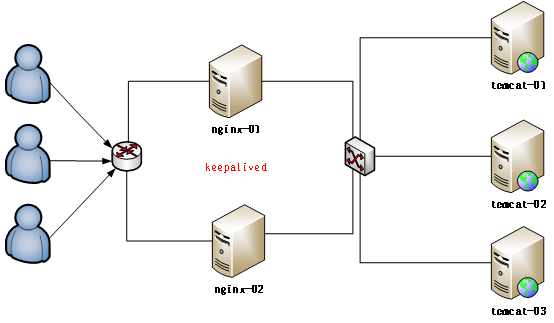
1:Keepalived的官方网址:http://www.keepalived.org/ 2:Keepalived:可以实现高可靠; 高可靠的概念: HA(High Available), 高可用性集群,是保证业务连续性的有效解决方案,一般有两个或两个以上的节点,且分为活动节点及备用节点。 3:高可靠软件:keepalived: keepalive是一款可以实现高可靠的软件,通常部署在2台服务器上,分为一主一备。Keepalived可以对本机上的进程进行检测,一旦Master检测出某个进程出现问题,将自己切换成Backup状态,然后通知另外一个节点切换成Master状态。 4:keepalived的安装操作: 4.1:下载keepalived官网:http://keepalived.org 首先在两台机器上面部署两个Nginx,具体操作见上篇部署一台,另一台的部署过程省略: 将keepalived上传到虚拟机以后进行解压缩操作: [root@master package]# tar -zxvf keepalived-1.2.19.tar.gz -C /home/hadoop/ 解压缩以后进入到解压缩的目录里面: [root@master package]# cd /home/hadoop/keepalived-1.2.19/ 检查安装环境,并指定将来要安装的路径: [root@master keepalived-1.2.19]# ./configure --prefix=/home/hadoop/keepalived最后编译和安装: [root@master keepalived-1.2.19]# make && make install 5:将Keepalived添加到系统服务中: 拷贝执行文件: [root@master keepalived-1.2.19]# cp /home/hadoop/keepalived/sbin/keepalived /usr/sbin/ 将init.d文件拷贝到etc下,加入开机启动项: [root@master keepalived-1.2.19]# cp /home/hadoop/keepalived/etc/rc.d/init.d/keepalived /etc/init.d/keepalived 将keepalived文件拷贝到etc下: [root@master keepalived-1.2.19]# cp /home/hadoop/keepalived/etc/sysconfig/keepalived /etc/sysconfig/ 创建keepalived文件夹: [root@master hadoop]# mkdir -p /etc/keepalived 将keepalived配置文件拷贝到etc下: [root@master hadoop]# cp /home/hadoop/keepalived/etc/keepalived/keepalived.conf /etc/keepalived/keepalived.conf 添加可执行权限: [root@master hadoop]# chmod +x /etc/init.d/keepalived 添加keepalived到开机启动: [root@master hadoop]# chkconfig --add keepalived [root@master hadoop]# chkconfig keepalived on 6:配置keepalived虚拟IP:修改配置文件: [root@master hadoop]# vim /etc/keepalived/keepalived.conf 这里配置虚拟Ip就开始分keepalived的master节点和keepalived的backup节点: #master节点 vrrp_instance VI_1 { state MASTER #指定A节点为主节点 备用节点上设置为BACKUP即可 interface eth0 #绑定虚拟IP的网络接口 virtual_router_id 51 #VRRP组名,两个节点的设置必须一样,以指明各个节点属于同一VRRP组 priority 100 #主节点的优先级(1-254之间),备用节点必须比主节点优先级低 advert_int 1 #组播信息发送间隔,两个节点设置必须一样 authentication { #设置验证信息,两个节点必须一致 auth_type PASS auth_pass 1111 } virtual_ipaddress { #指定虚拟IP, 两个节点设置必须一样, #如果两个nginx的ip分别是192.168.199.130,,...131,则此处的虚拟ip跟它俩同一个网段即可 192.168.199.141/24 }} 配置好master节点以后,可以配置BACKUP节点: vrrp_instance VI_1 { state BACKUP interface eth0 virtual_router_id 51 priority 99 advert_int 1 authentication { auth_type PASS auth_pass 1111 } virtual_ipaddress { 192.168.199.141/24 }} 7:分别启动两台机器上面的keepalived: 给一个虚拟机设置两个ip地址方法: ip addr add 192.168.199.150 dev eth0 [root@master hadoop]# service keepalived start 最后测试一下: 如果杀掉master上的keepalived 进程,你会发现,在slaver即另外一台配置keepalived的机器上的eth0网卡多了一个ip地址 查看ip地址的命令:ip addr 这里测试的时候出现问题了,因为我的电脑安装的虚拟机都是同一个,所以第一台机器的ip配置在eth0,而其他的竟然配置在了eth1,而这里需要修改一下,ip所在的位置: 解决方法: 1:编辑/etc/udev/rules.d/70-persistent-net.rules,找到与ifconfig -a得出的MAC相同的一行(NAME='eth1'这一行),把它改为"NAME=eth0 ",然后把上面一行(NAME='eth0')删除掉。 vim /etc/udev/rules.d/70-persistent-net.rules SUBSYSTEM=="net", ACTION=="add", DRIVERS=="?*", ATTR{address}=="00:0c:29:bb:41:2b", ATTR{type}=="1", KERNEL=="eth*", NAME="eth0" 2:编辑/etc/sysconfig/network-script/ifcfg-eth0,把MAC改为正确的,把UUID删掉。 3:编辑/etc/sysconf/network,把hostname也改一下。 4:重启生效! 8:配置keepalived心跳检查: 原理: Keepalived并不跟nginx耦合,它俩完全不是一家人 但是keepalived提供一个机制:让用户自定义一个shell脚本去检测用户自己的程序,返回状态给keepalived就可以了; master节点: vrrp_instance VI_1 { state MASTER #指定A节点为主节点 备用节点上设置为BACKUP即可 interface eth0 #绑定虚拟IP的网络接口 virtual_router_id 51 #VRRP组名,两个节点的设置必须一样,以指明各个节点属于同一VRRP组 priority 100 #主节点的优先级(1-254之间),备用节点必须比主节点优先级低 advert_int 1 #组播信息发送间隔,两个节点设置必须一样 authentication { #设置验证信息,两个节点必须一致 auth_type PASS auth_pass 1111 } track_script { #跟踪用户程序脚本 chk_health } virtual_ipaddress { #指定虚拟IP, 两个节点设置必须一样, #如果两个nginx的ip分别是192.168.199.130,,...131,则此处的虚拟ip跟它俩同一个网段即可 192.168.199.141/24 } notify_master "/home/hadoop/keepalived/sbin/notify.sh master" notify_backup "/home/hadoop/keepalived/sbin/notify.sh backup" notify_fault "/home/hadoop/keepalived/sbin/notify.sh fault"} 添加切换通知脚本: [root@master keepalived]# vim /home/hadoop/keepalived/sbin/notify.sh #!/bin/bashcase "$1" in master) /home/hadoop/nginx/sbin/nginx exit 0 ;;backup) /home/hadoop/nginx/sbin/nginx -s stop /home/hadoop/nginx/sbin/nginx exit 0 ;; fault) /home/hadoop/nginx/sbin/nginx -s stop exit 0 ;; *) echo 'Usage: notify.sh {master|backup|fault}' exit 1 ;;esac 添加执行权限: [root@master keepalived]# chmod +x /home/hadoop/keepalived/sbin/notify.sh 然后配置一下slaver即另一台keepalived: global_defs { } vrrp_script chk_health { script "[[ `ps -ef | grep nginx | grep -v grep | wc -l` -ge 2 ]] && exit 0 || exit 1" interval 1 weight -2} vrrp_instance VI_1 { state BACKUP interface eth0 virtual_router_id 1 priority 99 advert_int 1 authentication { auth_type PASS auth_pass 1111 } track_script { chk_health } virtual_ipaddress { 192.168.199.141/24 } notify_master "/home/hadoop/keepalived/sbin/notify.sh master" notify_backup "/home/hadoop/keepalived/sbin/notify.sh backup" notify_fault "/home/hadoop/keepalived/sbin/notify.sh fault" } 最后: 在第二台机器上添加notify.sh脚本 #分别在两台机器上启动keepalived service keepalived start chkconfig keepalived on

优秀的个人博客,低调大师

docker学习笔记(二)——本地私有仓库Registry的搭建与验证

Registry的部署 获取registry镜像 1 #dockerpullregistry:2.1.1 启动registry容器 1 2 3 4 5 6 7 8 9 #dockerrun-d-v/opt/registry:/var/lib/registry-p5000:5000--restart=always--nameregistryregistry:2.1.1 查看进程 #dockerps CONTAINERIDIMAGECOMMANDCREATEDSTATUSPORTSNAMES ac291ed888feregistry:2.1.1 "/bin/registry/et..." 27minutesagoUp27minutes0.0.0.0:5000->5000 /tcp registry 验证服务是否正常 #curlhttp://127.0.0.1:5000/v2/ {} 上传镜像 1 2 3 4 5 6 7 8 9 10 11 12 13 14 15 16 17 18 19 20 21 22 23 24 25 26 27 28 29 30 31 32 33 查看本地已有镜像 #dockerimages REPOSITORYTAGIMAGEIDCREATEDSIZE nginxv2570d531c994a4hoursago107MB nginxlatestb8efb18f159b3weeksago107MB centos6.80cd976dc0a9811monthsago195MB registry2.1.152bb991b482e22monthsago220MB 创建dockertag镜像 #dockertagnginx:v2127.0.0.1:5000/nginx:v2 即用ningx:v2创建127.0.0.1:5000 /nginx :v2的镜像 #dockerimages REPOSITORYTAGIMAGEIDCREATEDSIZE 127.0.0.1:5000 /nginx v2570d531c994a4hoursago107MB nginxv2570d531c994a4hoursago107MB nginxlatestb8efb18f159b3weeksago107MB centos6.80cd976dc0a9811monthsago195MB registry2.1.152bb991b482e22monthsago220MB push镜像到本地仓库 #dockerpush127.0.0.1:5000/nginx:v2 Thepushreferstoarepository[127.0.0.1:5000 /nginx ] 04a8761254c7:Pushed af5bd3938f60:Pushed 29f11c413898:Pushed eb78099fbf7f:Pushed v2:digest:sha256:9586184eb142f8c66decfd4fd7b3a2b54abfcb0f0a25541e69ba3725c61ba8b3size:8522 查看是否已经上传 #curlhttp://192.168.12.109:5000/v2/_catalog { "repositories" :[ "nginx" ]} 下载镜像 1 2 3 4 5 6 7 8 9 10 11 12 13 14 15 16 17 18 19 20 21 22 23 24 25 26 27 28 29 30 31 32 33 34 35 36 先删除已经有的镜像 [root@DockServeropt] #dockerimages REPOSITORYTAGIMAGEIDCREATEDSIZE 127.0.0.1:5000 /nginx v2570d531c994a4hoursago107MB nginxv2570d531c994a4hoursago107MB nginxlatestb8efb18f159b3weeksago107MB centos6.80cd976dc0a9811monthsago195MB registry2.1.152bb991b482e22monthsago220MB [root@DockServeropt] #dockerrmi-f570d531c994a Untagged:127.0.0.1:5000 /nginx :v2 Untagged:127.0.0.1:5000 /nginx @sha256:9586184eb142f8c66decfd4fd7b3a2b54abfcb0f0a25541e69ba3725c61ba8b3 Untagged:nginx:v2 Deleted:sha256:570d531c994a495b7cba536ac12f9d640141cbbaecd9ae8a114816681a8ca750 Deleted:sha256:f4a3f9102faadf3e941a05724ffe69e3aa3dc1fee5de3762c374ee337a27d60b [root@DockServeropt] #dockerimages REPOSITORYTAGIMAGEIDCREATEDSIZE nginxlatestb8efb18f159b3weeksago107MB centos6.80cd976dc0a9811monthsago195MB registry2.1.152bb991b482e22monthsago220MB 确定已经删除后,我们下载 [root@DockServeropt] #dockerpull127.0.0.1:5000/nginx:v2 v2:Pullingfromnginx 94ed0c431eb5:Alreadyexists 9406c100a1c3:Alreadyexists aa74daafd50c:Alreadyexists 79afb5d63c06:Pullcomplete Digest:sha256:9586184eb142f8c66decfd4fd7b3a2b54abfcb0f0a25541e69ba3725c61ba8b3 Status:Downloadednewerimage for 127.0.0.1:5000 /nginx :v2 [root@DockServeropt] #dockerimages REPOSITORYTAGIMAGEIDCREATEDSIZE 127.0.0.1:5000 /nginx v2d296335af0a94hoursago107MB nginxlatestb8efb18f159b3weeksago107MB centos6.80cd976dc0a9811monthsago195MB registry2.1.152bb991b482e22monthsago220MB 可以看到已经本地仓库 可以成功上传 下载镜像了 本文转自 jackjiaxiong 51CTO博客,原文链接:http://blog.51cto.com/xiangcun168/1957392

优秀的个人博客,低调大师

学习dubbo(7):基于dubbo的分布式系统架构介绍

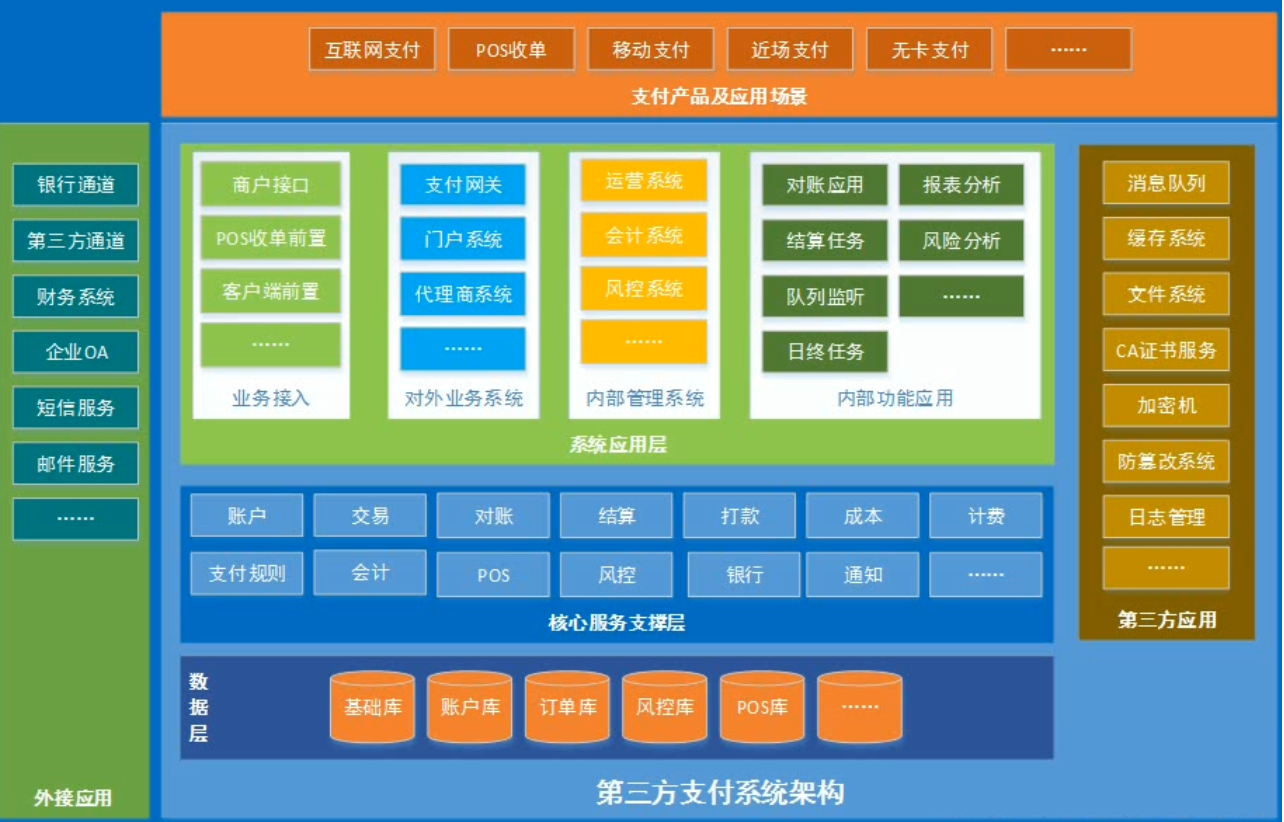
基于Dubbo的分布式系统架构规划--以第三方支付系统为例 一、应用架构 结合业务场景,对系统的应用类型进行划分: (1)、服务子系统 ----- 账户、交易、对账、结算、打款、风控... (2)、内部管理应用 ---- 运营、风控、会计…… (3)、对外业务应用 ---- 门户、代理商系统…… (4)、对外接入应用 ---- 网关、前置、交易接口…… (5)、定时任务应用 ---- 结算、日终、统计分析…… (6)、其它应用 -------- 对账、消息队列处理…… 服务子系统:Dubbo服务提供者 其它类型的应用:Dubbo服务消费者 二、系统架构 基于Dubbo的分布式系统架构规划 结合应用架构,实现分布式系统架构所需的第三方应用和中间件: (1) 消息队列 ----------- ActiveMQ (2) 分布式缓存 --------- Redis (3) 分布式文件系统 ---- FastDFS (4) 反向代理服务器 ---- Nginx、Apache (5) 集群与负载均衡 ---- Keepalived、HAproxy、LVS (6) 应用服务器 -------- JBoss、Tomcat (7) 数据库 ------------- MySQL、Oracle、DB2 (8) 数据库分布式处理系统(集群、分库、分表) ---- Cobar (9) 容器引擎 ----------- Docker (10) 系统日志管理 ------ Logstash (11) 分布式系统监控 ---- Zabbix (12) 其它 --------------- CA证书、密码键盘、防篡改系统…… 本文转自我爱大金子博客51CTO博客,原文链接http://blog.51cto.com/1754966750/1913119如需转载请自行联系原作者 我爱大金子

优秀的个人博客,低调大师

开源中国iOS客户端学习——(一)Prefix.pch文件

当我们新建一个工程的时候,在Supporting FIles文件下会看到一个以 -Prefix.pch结尾文件的文件,pch全称是“precompiled header”,也就是预编译头文件,该文件里存放的工程中一些不常被修改的代码,比如常用的框架头文件,这样做的目的提高编译器编译速度。我们知道当我们修改一个工程中某个文件代码时候,编译器并不是重新编译所有所有文件,而是编译改动过文件的,假如pch中某个文件修改了,那么pch整个文件里包含的的其他文件也会重新编译一次,这样就会消耗大量时间,所以它里面添加的文件最好是是很少变动或不变动的头文件或者是预编译的代码片段; 在新建一个工程时,pch后缀文件里代码是 #import <Availability.h> #ifndef __IPHONE_4_0 #warning "This project uses features only available in iOS SDK 4.0 and later." #endif #ifdef __OBJC__ #import <UIKit/UIKit.h> #import <Foundation/Foundation.h> #endif 或许你会觉得这预编译代码很少,但是你可以查看一下UIKit.h的定义文件中 // // UIKit.h // UIKit // // Copyright (c) 2005-2011, Apple Inc. All rights reserved. // #import <UIKit/UIKitDefines.h> #import <UIKit/UIAccelerometer.h> #import <UIKit/UIAccessibility.h> #import <UIKit/UIActivityIndicatorView.h> #import <UIKit/UIAlert.h> #import <UIKit/UIApplication.h> #import <UIKit/UIBarButtonItem.h> #import <UIKit/UIBarItem.h> #import <UIKit/UIBezierPath.h> #import <UIKit/UIButton.h> #import <UIKit/UIColor.h> #import <UIKit/UIControl.h> #import <UIKit/UIDataDetectors.h> #import <UIKit/UIDatePicker.h> #import <UIKit/UIDevice.h> #import <UIKit/UIDocument.h> #import <UIKit/UIDocumentInteractionController.h> #import <UIKit/UIEvent.h> #import <UIKit/UIFont.h> #import <UIKit/UIGeometry.h> #import <UIKit/UIGestureRecognizer.h> #import <UIKit/UIGraphics.h> #import <UIKit/UIImage.h> #import <UIKit/UIImagePickerController.h> #import <UIKit/UIImageView.h> #import <UIKit/UIInterface.h> #import <UIKit/UILabel.h> #import <UIKit/UILocalNotification.h> #import <UIKit/UILocalizedIndexedCollation.h> #import <UIKit/UILongPressGestureRecognizer.h> #import <UIKit/UIManagedDocument.h> #import <UIKit/UIMenuController.h> #import <UIKit/UINavigationBar.h> #import <UIKit/UINavigationController.h> #import <UIKit/UINib.h> #import <UIKit/UINibDeclarations.h> #import <UIKit/UINibLoading.h> #import <UIKit/UIPageControl.h> #import <UIKit/UIPageViewController.h> #import <UIKit/UIPanGestureRecognizer.h> #import <UIKit/UIPasteboard.h> #import <UIKit/UIPickerView.h> #import <UIKit/UIPinchGestureRecognizer.h> #import <UIKit/UIPopoverController.h> #import <UIKit/UIPopoverBackgroundView.h> #import <UIKit/UIPrintError.h> #import <UIKit/UIPrintFormatter.h> #import <UIKit/UIPrintInfo.h> #import <UIKit/UIPrintInteractionController.h> #import <UIKit/UIPrintPageRenderer.h> #import <UIKit/UIPrintPaper.h> #import <UIKit/UIProgressView.h> #import <UIKit/UIReferenceLibraryViewController.h> #import <UIKit/UIResponder.h> #import <UIKit/UIRotationGestureRecognizer.h> #import <UIKit/UIScreen.h> #import <UIKit/UIScreenMode.h> #import <UIKit/UIScrollView.h> #import <UIKit/UISearchBar.h> #import <UIKit/UISearchDisplayController.h> #import <UIKit/UISegmentedControl.h> #import <UIKit/UISlider.h> #import <UIKit/UISplitViewController.h> #import <UIKit/UIStepper.h> #import <UIKit/UIStoryboard.h> #import <UIKit/UIStoryboardPopoverSegue.h> #import <UIKit/UIStoryboardSegue.h> #import <UIKit/UIStringDrawing.h> #import <UIKit/UISwipeGestureRecognizer.h> #import <UIKit/UISwitch.h> #import <UIKit/UITabBar.h> #import <UIKit/UITabBarController.h> #import <UIKit/UITabBarItem.h> #import <UIKit/UITableView.h> #import <UIKit/UITableViewCell.h> #import <UIKit/UITableViewController.h> #import <UIKit/UITapGestureRecognizer.h> #import <UIKit/UITextField.h> #import <UIKit/UITextInput.h> #import <UIKit/UITextInputTraits.h> #import <UIKit/UITextView.h> #import <UIKit/UIToolbar.h> #import <UIKit/UITouch.h> #import <UIKit/UIVideoEditorController.h> #import <UIKit/UIView.h> #import <UIKit/UIViewController.h> #import <UIKit/UIWebView.h> #import <UIKit/UIWindow.h> 这些不少了吧,工程每次运行都编译是不是很费时间,这些是苹果公司内部定义的标准头文件,我们不能也没有权限修改这些头文件定义内容,所以,当放到pch文件中会加速编译过程; 再来看看我们开源中国iOS客户端pch文件 // // Prefix header for all source files of the 'oschina' target in the 'oschina' project // #import <Availability.h> #ifndef __IPHONE_4_0 #warning "This project uses features only available in iOS SDK 4.0 and later." #endif #ifdef __OBJC__ #import <UIKit/UIKit.h> #import <Foundation/Foundation.h> #import <CoreData/CoreData.h> #import <QuartzCore/QuartzCore.h> //添加的预编译 #import "ASIHTTPRequest.h" #import "ASIFormDataRequest.h" #import "ASIHTTPRequestDelegate.h" #import "ASIHTTPRequestConfig.h" #import "TBXML.h" #import "TBXML+HTTP.h" #import "TBXML+Compression.h" #import "Config.h" #import "EGORefreshTableHeaderView.h" #import "DataSingleton.h" #import "ImgRecord.h" #import "IconDownloader.h" #import "MBProgressHUD.h" #import "GCDiscreetNotificationView.h" #import "NdUncaughtExceptionHandler.h" #import "JSNotifier.h" #import "AFOSCClient.h" #import "AFHTTPRequestOperation.h" #import "AFXMLRequestOperation.h" //api定义 #define api_news_list @"http://www.oschina.net/action/api/news_list" #define api_news_detail @"http://www.oschina.net/action/api/news_detail" #define api_post_list @"http://www.oschina.net/action/api/post_list" #define api_post_detail @"http://www.oschina.net/action/api/post_detail" #define api_post_pub @"http://www.oschina.net/action/api/post_pub" #define api_tweet_list @"http://www.oschina.net/action/api/tweet_list" #define api_tweet_detail @"http://www.oschina.net/action/api/tweet_detail" #define api_tweet_delete @"http://www.oschina.net/action/api/tweet_delete" #define api_tweet_pub @"http://www.oschina.net/action/api/tweet_pub" #define api_active_list @"http://www.oschina.net/action/api/active_list" #define api_message_list @"http://www.oschina.net/action/api/message_list" #define api_message_delete @"http://www.oschina.net/action/api/message_delete" #define api_message_pub @"http://www.oschina.net/action/api/message_pub" #define api_comment_list @"http://www.oschina.net/action/api/comment_list" #define api_comment_pub @"http://www.oschina.net/action/api/comment_pub" #define api_comment_reply @"http://www.oschina.net/action/api/comment_reply" #define api_comment_delete @"http://www.oschina.net/action/api/comment_delete" #define api_login_validate @"https://www.oschina.net/action/api/login_validate" #define api_user_info @"http://www.oschina.net/action/api/user_info" #define api_user_information @"http://www.oschina.net/action/api/user_information" #define api_user_updaterelation @"http://www.oschina.net/action/api/user_updaterelation" #define api_notice_clear @"http://www.oschina.net/action/api/notice_clear" #define api_software_detail @"http://www.oschina.net/action/api/software_detail" #define api_blog_detail @"http://www.oschina.net/action/api/blog_detail" #define api_favorite_list @"http://www.oschina.net/action/api/favorite_list" #define api_favorite_add @"http://www.oschina.net/action/api/favorite_add" #define api_favorite_delete @"http://www.oschina.net/action/api/favorite_delete" #define api_user_notice @"http://www.oschina.net/action/api/user_notice" #define api_search_list @"http://www.oschina.net/action/api/search_list" #define api_friends_list @"http://www.oschina.net/action/api/friends_list" #define api_softwarecatalog_list @"http://www.oschina.net/action/api/softwarecatalog_list" #define api_software_list @"http://www.oschina.net/action/api/software_list" #define api_softwaretag_list @"http://www.oschina.net/action/api/softwaretag_list" #define api_blogcomment_list @"http://www.oschina.net/action/api/blogcomment_list" #define api_blogcomment_pub @"http://www.oschina.net/action/api/blogcomment_pub" #define api_my_information @"http://www.oschina.net/action/api/my_information" #define api_blogcomment_delete @"http://www.oschina.net/action/api/blogcomment_delete" #define api_userblog_delete @"http://www.oschina.net/action/api/userblog_delete" #define api_userblog_list @"http://www.oschina.net/action/api/userblog_list" #define api_blog_list @"http://www.oschina.net/action/api/blog_list" #define api_userinfo_update @"http://www.oschina.net/action/api/portrait_update" //宏定义 新闻 #define TweetCellIdentifier @"TweetCellIdentifier" #define loadMoreIdentifier @"loadMoreIdentifier" #define NewsCellIdentifier @"NewsCellIdentifier" #define PostCellIdentifier @"PostCellIdentifier" #define MsgCellIdentifier @"MsgCellIdentifier" #define MsgUnitCellIdentifier @"MsgUnitCellIdentifier" #define ActiveCellIdentifier @"ActiveCellIdentifier" #define UserActiveCellIdentifier @"UserActiveCellIdentifier" #define ColorActiveCellIdentifier @"ColorActiveCellIdentifier" #define RTActiveCellIdentifier @"RTActiveCellIdentifier" #define ColorUserActiveCellIdentifier @"ColorUserActiveCellIdentifier" #define ProfielCellIdentifier @"ProfielCellIdentifier" #define CommentCellIdentifier @"CommentCellIdentifier" #define NormalCellIdentifier @"NormalCellIdentifier" #define FavoriteCellIdentifier @"FavoriteCellIdentifier" #define FriendCellIdentifier @"FriendCellIdentifier" #define SoftwareCellIdentifier @"SoftwareCellIdentifier" #define SoftwareCatalogIdentifier @"SoftwareCatalogIdentifier" #define SettingTableIdentifier @"SettingTableIdentifier" #define MyInfoCellIdentifier @"MyInfoCellIdentifier" #define MyPortraitCellIdentifier @"MyPortraitCellIdentifier" #define loadNext20Tip @"下面 20 项 . . ." #define loadingTip @"正在加载 . . ." #define networkError @"网络无连接" #define noNetworkTip @"网络无连接" //消息通知固定字符串 #define Notification_DetailCommentCount @"Notification_DetailCommentCount" #define Notification_NoticeUpdate @"Notification_NoticeUpdate" #define Notification_TabClick @"Notification_TabClick" //html头部 #define HTML_Style @"<style>#oschina_title {color: #000000; margin-bottom: 6px; font-weight:bold;}#oschina_title img{vertical-align:middle;margin-right:6px;}#oschina_title a{color:#0D6DA8;}#oschina_outline {color: #707070; font-size: 12px;}#oschina_outline a{color:#0D6DA8;}#oschina_software{color:#808080;font-size:12px}#oschina_body img {max-width: 300px;}#oschina_body {font-size:16px;max-width:300px;line-height:24px;} #oschina_body table{max-width:300px;}#oschina_body pre { font-size:9pt;font-family:Courier New,Arial;border:1px solid #ddd;border-left:5px solid #6CE26C;background:#f6f6f6;padding:5px;}</style>" #define HTML_Bottom @"<div style='margin-bottom:60px'/>" #define USERAGENT @"OSChina.NET/iOS/5.0" #define AppVersion @"1.6.1" #ifdef DEBUG #define debugLog(...) NSLog(__VA_ARGS__) #define debugMethod() NSLog(@"%s", __func__) #else #define debugLog(...) #define debugMethod() #endif #endif 我们看到有这样些文件也被添加到里面,可能会想难道这些头文件变化不大吗? //添加的预编译 #import "ASIHTTPRequest.h" #import "ASIFormDataRequest.h" #import "ASIHTTPRequestDelegate.h" #import "ASIHTTPRequestConfig.h" #import "TBXML.h" #import "TBXML+HTTP.h" #import "TBXML+Compression.h" #import "Config.h" #import "EGORefreshTableHeaderView.h" #import "DataSingleton.h" #import "ImgRecord.h" #import "IconDownloader.h" #import "MBProgressHUD.h" #import "GCDiscreetNotificationView.h" #import "NdUncaughtExceptionHandler.h" #import "JSNotifier.h" #import "AFOSCClient.h" #import "AFHTTPRequestOperation.h" #import "AFXMLRequestOperation.h" 其实,这些文件特殊之处在于他们都是第三方类库的头文件,第三方类库将一些对象进行高度封装,留下接口,然后我们根据类库接口直接调用就可以,这些第三方类库一般都比iOS原生自带的更加简单易用,比如TBXML解析库,比iOS自带的NSXMLPaser解析器速度功能上都会好一些; 还有一些宏定义都是比较常用方式的宏定义,比如定义的开源中国社区的api接口,这些接口变得当然很少了; 然后就剩下最后面的 #ifdef DEBUG #define debugLog(...) NSLog(__VA_ARGS__) #define debugMethod() NSLog(@"%s", __func__) #else #define debugLog(...) #define debugMethod() #endif 工程有Debug Version和Release Version,Debug Version是程序开发过程中版本,它包含了所有调试信息,一些常用的NSLog打印日志,在程序调试过程工根据我们设置的调试信息可以看出什么地方出错,我们在运行运行一个小程序的时候,会不会首先就想到进行断点调试呢,应该是首先想着NSLog一下,看看哪个函数方法没执行,看看是不是哪个数组的值没取出来。Release Version是发布版本,不打印NSLog可以加快程序运行速度,减少内存使用。 但是到一个大工程中,会有很多很多这样的NSLog,在我们工程完美运行的时候,发布Release 版本的时候,难道我们去一行行的注释调NSLog吗?假如工程现在原来基础上发布一个version 1.2版本的,我们在修改程序的时候岂不是还把原来注释给取消,那就很麻烦很麻烦了。 所以,此处用到了宏指令 上段代码的意思就是 用宏指令做一个判断,如果DEBUG为真,则编译#ifdef到#endif宏定义,否则编译器就不编译; 这个DEBUG在哪设置呢, 在 "Target > Build Settings > Preprocessor Macros > Debug" 里有一个"DEBUG=1"。 现在我们来做一个测试: 取一个宏指令放到OSAppDelegate.m的application:didFinishLaunchingWithOptions:方法中,并用同一个NSLog做一个对比; NSLog(@"%s", __func__); debugMethod(); 首先设置为Debug模式下,Product-->Edit Scheme 跳转到这个界面 当我设置Build Configuration成Debug时,打印效果图 当我设置Build Configuration成Release的,打印时效果图 当Run Test Profile Analyze Archive的时候,都可以根据需要设置Debug和Release两个模式运行; 所以我们完全可以用一个宏指令来设置是否打印调试信息; 欢迎转载分享,请注明出处http://blog.csdn.net/duxinfeng2010 本文转自新风作浪 51CTO博客,原文链接:http://blog.51cto.com/duxinfeng/1208696,如需转载请自行联系原作者

资源下载

更多资源
优质分享App

优质分享App

近一个月的开发和优化,本站点的第一个app全新上线。该app采用极致压缩,本体才4.36MB。系统里面做了大量数据访问、缓存优化。方便用户在手机上查看文章。后续会推出HarmonyOS的适配版本。

Mario

Mario

马里奥是站在游戏界顶峰的超人气多面角色。马里奥靠吃蘑菇成长,特征是大鼻子、头戴帽子、身穿背带裤,还留着胡子。与他的双胞胎兄弟路易基一起,长年担任任天堂的招牌角色。

Nacos

Nacos

Nacos /nɑ:kəʊs/ 是 Dynamic Naming and Configuration Service 的首字母简称,一个易于构建 AI Agent 应用的动态服务发现、配置管理和AI智能体管理平台。Nacos 致力于帮助您发现、配置和管理微服务及AI智能体应用。Nacos 提供了一组简单易用的特性集,帮助您快速实现动态服务发现、服务配置、服务元数据、流量管理。Nacos 帮助您更敏捷和容易地构建、交付和管理微服务平台。

Rocky Linux

Rocky Linux

Rocky Linux(中文名:洛基)是由Gregory Kurtzer于2020年12月发起的企业级Linux发行版,作为CentOS稳定版停止维护后与RHEL(Red Hat Enterprise Linux)完全兼容的开源替代方案,由社区拥有并管理,支持x86_64、aarch64等架构。其通过重新编译RHEL源代码提供长期稳定性,采用模块化包装和SELinux安全架构,默认包含GNOME桌面环境及XFS文件系统,支持十年生命周期更新。

用户登录
用户注册