首页 文章 精选 留言 我的

精选列表

搜索[修改],共10000篇文章
优秀的个人博客,低调大师

JavaScript 引擎 V8 年度回顾:新编译器、修改基础架构、改进 GC……

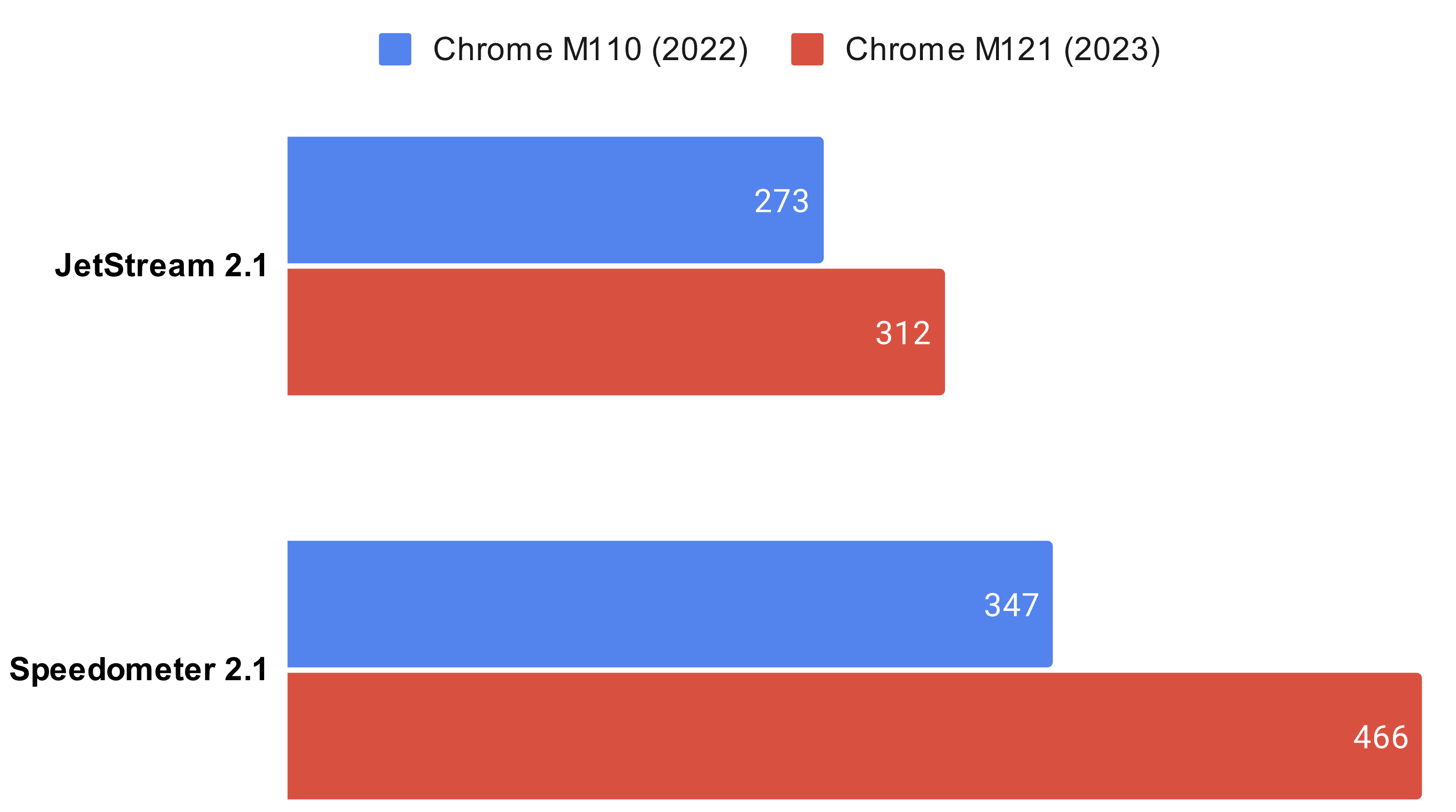
V8 官方博客回顾了 2023 年的重要变化:通过创新的性能优化,V8 不断突破 Web 领域的可能性界限。比如引入新的中间层编译器,对顶层编译器基础架构、运行时和垃圾回收进行多项改进,从而全面提升速度。 除了性能改进之外,V8 团队还为 JavaScript 和 WebAssembly 添加了许多新功能。比如通过 WasmGC 将支持垃圾回收的编程语言用于 Web 开发(Chrome 支持运行 Kotlin、Java 等 GC 编程语言)。 此外还改进了沙箱基础设施,并为 V8 引入了控制流完整性 (CFI),为用户提供了更安全的环境。 V8 2023 重磅新特性回顾 新的中间层编译器 Maglev:Maglev 是 V8 引擎的新中间层编译器,它的推出使得代码的优化速度大大提高。相比于现有的编译器,Maglev 的编译速度快了 10 到 100 倍,并且在 JetStream 和 Speedometer 等性能测试中取得了 8.2% 和 6% 的性能提升。 新的顶层优化编译器架构 Turboshaft:V8 引擎还引入了 Turboshaft,这是一个用于顶层优化编译器的新内部架构。使用 Turboshaft 后,编译速度提高了一倍,这有助于节约能源并为未来的性能提升奠定基础。 更快的 HTML 解析器:V8 团队对 HTML 解析器进行了优化,这导致 Speedometer 测试分数提高了 3.4%。这些变化也被 WebKit 项目采纳,从而对 Chrome 浏览器的性能产生了积极影响。 更快的 DOM 分配:V8 团队还对 DOM 对象的内存分配策略进行了优化,这使得 DOM 对象的分配速度提高了 3 倍,并在 DOM 密集型测试中取得了显著的改进。 新的 JavaScript 特性:V8 引擎还推出了一系列新的 JavaScript 特性,包括可调整大小的 ArrayBuffers、ArrayBuffer 传输、String isWellFormed 和 toWellFormed 等。 WebAssembly 更新:V8 引擎为 WebAssembly 引入了多个新特性和性能优化,包括对多内存的支持、尾调用、放松的 SIMD 等。 WebAssembly 垃圾回收:V8 引擎最终实现了 WebAssembly 垃圾回收(WasmGC),这使得可以将使用 Java、Kotlin、Dart 等垃圾回收语言编写的应用程序编译为 WebAssembly,从而提高了其运行速度。 安全增强:V8 引擎还在安全方面进行了改进,包括改进了沙箱基础设施、引入了控制流完整性(CFI)等。 原文:https://v8.dev/blog

优秀的个人博客,低调大师

CentOS下编译安装Nginx服务器并修改Nginx服务器访问根目录

一、 nginx安装环境 yum install -y gcc-c++ pcre pcre-devel zlib zlib-devel openssl openssl-devel 该命令等效于下面4句: 1、 gcc 安装 安装nginx需要先将官网下载的源码进行编译,编译依赖gcc环境,如果没有gcc环境,需要安装gcc: yum install gcc-c++ 2、 PCRE pcre-devel 安装 PCRE(PerlCompatible Regular Expressions)是一个Perl库,包括 perl 兼容的正则表达式库。nginx的http模块使用pcre来解析正则表达式,所以需要在linux上安装pcre库。 yum install -y pcre pcre-devel 3、 zlib 安装 zlib库提供了很多种压缩和解压缩的方式,nginx使用zlib对http包的内容进行gzip,所以需要在linux上安装zlib库。 yum install -y zlib zlib-devel 4、OpenSSL 安装 OpenSSL是一个强大的安全套接字层密码库,囊括主要的密码算法、常用的密钥和证书封装管理功能及SSL协议,并提供丰富的应用程序供测试或其它目的使用。nginx不仅支持http协议,还支持https(即在ssl协议上传输http),所以需要在linux安装openssl库。 yum install -y openssl openssl-devel 二、下载nginx 1.直接下载.tar.gz安装包,地址:https://nginx.org/en/download.html 2.使用wget命令下载1.10.1版本(推荐)。 wget -c https://nginx.org/download/nginx-1.10.1.tar.gz 三、安装 1、解压 tar -zxvf nginx-1.10.1.tar.gz cd nginx-1.10.1 2、配置 其实在 nginx-1.10.1 版本中你就不需要去配置相关东西,默认就可以了。当然,如果你要自己配置目录也是可以的。 1.使用默认配置 ./configure 输出: nginx path prefix: "/usr/local/nginx" nginx binary file: "/usr/local/nginx/sbin/nginx" nginx modules path: "/usr/local/nginx/modules" nginx configuration prefix: "/usr/local/nginx/conf" nginx configuration file: "/usr/local/nginx/conf/nginx.conf" nginx pid file: "/usr/local/nginx/logs/nginx.pid" nginx error log file: "/usr/local/nginx/logs/error.log" nginx http access log file: "/usr/local/nginx/logs/access.log" nginx http client request body temporary files: "client_body_temp" nginx http proxy temporary files: "proxy_temp" nginx http fastcgi temporary files: "fastcgi_temp" nginx http uwsgi temporary files: "uwsgi_temp" nginx http scgi temporary files: "scgi_temp" 3、编译安装 make make install 查找安装路径:"/usr/local/nginx 四、开放80端口、开放http服务,重启防火墙 firewall-cmd --zone=public --add-port=80/tcp --permanent firewall-cmd --permanent --zone=public --add-service=http firewall-cmd --reload firewall-cmd --list-all #查看开放服务、端口中是否有http服务和80端口。 五、更改nginx访问根目录 安装完nginx服务器后发现nginx的根目录在 安装目录的/html/下(/usr/local/nginx/html/),但是对于部署文件来说,在该目录下是不太习惯的,我就尝试着更改nginx访问的根目录 1、更改nginx配置文件 vi /usr/local/nginx/conf/nginx.conf 更改如下: server { listen 80; server_name localhost; location / { root /home/ftpuser/wwwRoot; #新的根目录 index index.html index.htm index.jpg;#添加一张图片,测试用。 } 2、nginx根目录权限设置: chmod -R 755 /home/ftpuser/wwwRoot/ 3、重启nginx务器 service nginx restart 4、测试 拷贝一直张jpg格式图片到:/home/ftpuser/wwwRoot/目录下,改名为:index.jpg 。 chmod 744 /home/ftpuser/wwwRoot/index.jpg #设置所有人可读。 访问http://localhost/,图片即在网页中显示出来。 设置完成后此时访问http://localhost/XXX 即为/home/www/XXX 六、使用nginx 1 启动nginx /usr/local/nginx/sbin/nginx 注意:执行/usr/local/nginx/sbin/nginx,这里可以-c指定加载的nginx配置文件,如下: /usr/local/nginx/sbin/nginx -c /xxxxx 如果不指定-c,nginx在启动时默认加载/usr/local/nginx/conf/nginx.conf文件。 2 停止nginx /usr/local/nginx/sbin/nginx -s quit 此方式停止步骤是待nginx进程处理任务完毕进行停止。 3 重启nginx:先停止再启动 /usr/local/nginx/sbin/nginx -s quit /usr/local/nginx/sbin/nginx

优秀的个人博客,低调大师

Oracle存储过程迁移ODPS-02(专有云):循环逻辑修改一例(构造代码表)

总有同学提问,说我原来在oracle的存储过程中的循环现在maxcompute支持了,我的程序怎么迁移。这个问题其实非常难以回答,一般来说99%的oracle的代码都可以通过maxcompute的SQL和函数来替代,这个也包括一般的循环语句要解的问题。 下面这个例子就是一个例子,原来的存储过程使用循环来为多级组织机构代码构建一个新的代码表,因为有多层级,所以使用了循环。 下面是原来存储过程的代码: -----------------------使用循环进行更新,需要增加v_pid与v_id两个辅助字段---------------------------- update ZZJG_DM a set v_pid=pid; update ZZJG_DM a set v_id=id; update ZZJG_DM a set JBDM=null; update ZZJG_DM a set JCDM=1; set row_count = -1; while row_count != 0 do update ZZJG_DM a, ZZJG_DM b, (select id,pid,to_char(row_number() over (partition by pid order by id)) rn, row_number() over (partition by id order by pid) rm from ZZJG_DM) c set a.JBDM = concat(lpad(c.rn,4,'0'), nvl(a.JBDM,'')), a.JCDM = a.JCDM+1, a.v_id=a.v_pid, a.v_pid=b.pid where a.v_pid = b.id and a.v_id = c.id and c.rm=1; set row_count=row_count(); end while; update ZZJG_DM set jbdm = '0000' where id = '00000000000'; 乍一看挺复杂,好多年没写过存储过程的我看着有点难过。但是当我们对齐一下需求和表数据,就会发现这个问题求解,其实并不会太难。maxcompute一定可以实现。 -------------------------------组织机构代码表(ZZJG_DM)数据---------------------------------- id(编码) pid(上级编码)jcdm(级次代码) jbdm(级别代码) 00000000000 1 0000 00000000010 00000000000 2 0001 00000000011 00000000000 2 0002 00000000012 00000000000 2 0003 00000100000 00000000000 2 0004 17900000000 00000000000 2 0005 17900000001 17900000000 3 0005 0001 17900000002 17900000000 3 0005 0002 17900000003 17900000001 4 0005 0001 0001 17900000004 17900000001 4 0005 0001 0002 17900000005 17900000001 4 0005 0001 0003 17900000006 17900000002 4 0005 0002 0001 17900000007 17900000002 4 0005 0002 0002 17900000008 17900000004 5 0005 0001 0002 0001 17900000009 17900000004 5 0005 0001 0002 0002 17900000011 17900000009 6 0005 0001 0002 0002 0001 17900000012 17900000009 6 0005 0001 0002 0002 0002 17900000013 17900000012 7 0005 0001 0002 0002 0002 0001 17900000014 17900000012 7 0005 0001 0002 0002 0002 0002 17900000015 17900000012 7 0005 0001 0002 0002 0002 0003 17900000016 17900000012 7 0005 0001 0002 0002 0002 0004 ----------------------------------需求------------------------------------------- 根据id 与 pid 上下级关系,逐层更新jcdm 与 jbdm。 jcdm:级别代码,节点所在层级。 jbdm:按pid分组的组内排序序号(不足4位补齐4位) 左边拼接上级的jbdm。 组织机构代码表分7级,原来有一套代码,现在这个程序需要重新构造一个代码结构。而且,需要生成一个表示代码所在层级的列。需求就是jcdm/jbdm这两列。我先从原来存储过程所在的数据库平台,了解数据需求和求解结果。理解了这个代码的输入输出,接下来就是求解。 jcdm就是代码所在的级别。因为原来代码表结构是(级别代码-上级代码)结构,所以,我只要把代码表自关联7次,能关联到第几级代码就是第几个级别。 jbdm是新构造的代码表,我查看明细结果数据后发现其实就是一个按照上级代码分组,按照机构代码排序的序号值,标准化到了4位长度。所以,按照上级代码分组再排序的序号最后拼接在一起,就是我新构造的代码表了。 前后大概折腾了2个小时,代码基本完成。 select id ,pid ,new_jcdm as jcdm ,nrank ,nrank2 ,nrank3 ,nrank4 ,nrank5 ,nrank6 ,nrank7 ,case when new_jcdm=1 then '0000' when new_jcdm=2 then nrank when new_jcdm=3 then concat(nrank2,nrank) when new_jcdm=4 then concat(nrank3,nrank2,nrank) when new_jcdm=5 then concat(nrank4,nrank3,nrank2,nrank) when new_jcdm=6 then concat(nrank5,nrank4,nrank3,nrank2,nrank) when new_jcdm=7 then concat(nrank6,nrank5,nrank4,nrank3,nrank2,nrank) end as jbdm from( SELECT id,pid ,substr(concat('0000',to_char(nrank )),length(to_char(nrank ))+1,4) as nrank ,substr(concat('0000',to_char(nrank2)),length(to_char(nrank2))+1,4) as nrank2 ,substr(concat('0000',to_char(nrank3)),length(to_char(nrank3))+1,4) as nrank3 ,substr(concat('0000',to_char(nrank4)),length(to_char(nrank4))+1,4) as nrank4 ,substr(concat('0000',to_char(nrank5)),length(to_char(nrank5))+1,4) as nrank5 ,substr(concat('0000',to_char(nrank6)),length(to_char(nrank6))+1,4) as nrank6 ,substr(concat('0000',to_char(nrank7)),length(to_char(nrank7))+1,4) as nrank7 ,new_jcdm from( SELECT /*+ mapjoin(t2,t3,t4,t5,t6,t7)*/ t1.id ,t1.pid ,row_number() over(partition by t1.pid order by t1.id) as nrank ,t2.nrank as nrank2 ,t3.nrank as nrank3 ,t4.nrank as nrank4 ,t5.nrank as nrank5 ,t6.nrank as nrank6 ,t7.nrank as nrank7 ,t2.id as id2 ,t3.id as id3 ,t4.id as id4 ,t5.id as id5 ,t6.id as id6 ,t7.id as id7 ,case when t7.id is not null then 7 when t6.id is not null then 6 when t5.id is not null then 5 when t4.id is not null then 4 when t3.id is not null then 3 when t2.id is not null then 2 else 1 end as new_jcdm FROM ZZJG_DM t1 left outer join(select id,pid,row_number() over(partition by pid order by id) as nrank from ZZJG_DM where yfq='201812') t2 on t1.pid=t2.id left outer join(select id,pid,row_number() over(partition by pid order by id) as nrank from ZZJG_DM where yfq='201812') t3 on t2.pid=t3.id left outer join(select id,pid,row_number() over(partition by pid order by id) as nrank from ZZJG_DM where yfq='201812') t4 on t3.pid=t4.id left outer join(select id,pid,row_number() over(partition by pid order by id) as nrank from ZZJG_DM where yfq='201812') t5 on t4.pid=t5.id left outer join(select id,pid,row_number() over(partition by pid order by id) as nrank from ZZJG_DM where yfq='201812') t6 on t5.pid=t6.id left outer join(select id,pid,row_number() over(partition by pid order by id) as nrank from ZZJG_DM where yfq='201812') t7 on t6.pid=t7.id where t1.yfq='201812' )t )tt order by id; 结果就如上,其实就是普通的代码表处理方法,有几级就JOIN几次就可以了。因为一般机构代码的层次不会随便更新,所以,这个方法是可以在实际中使用的。循环可以适配级别的变化,但是在解决这个问题时实际上是没必要非写出循环的。 迁移程序时,遇到问题,一定不要把问题限制在这个方法不支持,我就不会做了。而是要看具体是什么问题,一般一个需求是有多种解法的。 -- 暮角 15901445705 update at 20181224

资源下载

更多资源
优质分享App

优质分享App

近一个月的开发和优化,本站点的第一个app全新上线。该app采用极致压缩,本体才4.36MB。系统里面做了大量数据访问、缓存优化。方便用户在手机上查看文章。后续会推出HarmonyOS的适配版本。

Mario

Mario

马里奥是站在游戏界顶峰的超人气多面角色。马里奥靠吃蘑菇成长,特征是大鼻子、头戴帽子、身穿背带裤,还留着胡子。与他的双胞胎兄弟路易基一起,长年担任任天堂的招牌角色。

Nacos

Nacos

Nacos /nɑ:kəʊs/ 是 Dynamic Naming and Configuration Service 的首字母简称,一个易于构建 AI Agent 应用的动态服务发现、配置管理和AI智能体管理平台。Nacos 致力于帮助您发现、配置和管理微服务及AI智能体应用。Nacos 提供了一组简单易用的特性集,帮助您快速实现动态服务发现、服务配置、服务元数据、流量管理。Nacos 帮助您更敏捷和容易地构建、交付和管理微服务平台。

Spring

Spring

Spring框架(Spring Framework)是由Rod Johnson于2002年提出的开源Java企业级应用框架,旨在通过使用JavaBean替代传统EJB实现方式降低企业级编程开发的复杂性。该框架基于简单性、可测试性和松耦合性设计理念,提供核心容器、应用上下文、数据访问集成等模块,支持整合Hibernate、Struts等第三方框架,其适用范围不仅限于服务器端开发,绝大多数Java应用均可从中受益。

用户登录
用户注册