首页 文章 精选 留言 我的

精选列表

搜索[python],共10000篇文章
优秀的个人博客,低调大师

Python3 批量修改JPG图片尺寸

功能 批量修改当前文件夹下的jpg图片到设置的尺寸 将修改后的图片移动到 new_img 这个文件夹下 导入库 from PIL import Image # 处理图片模块 import os import shutil # 移动文件模块 如果没有请提前安装相应的库. 定义一个函数用来处理图片尺寸 def smaller_img(x, y, path): # x,y用来传入尺寸,path用来传入路径 old_img = Image.open(path) img_deal = old_img.resize((x, y), Image.ANTIALIAS) # 转换图片 img_deal = img_deal.convert('RGB') # 保存为jpg格式才需要 img_deal.save('新的文件名') 遍历当前文件夹下的文件路径 now_path = os.getcwd() new_path = os.mkdir(now_path + '\\' + 'new_img') # 创建一个名为new_img的文件夹 for file_name in os.listdir(now_path): files_path = now_path + '\\' + file_name print(files_path) # 输出当前目录下所有的文件的绝对路径 将修改后的图片移动到创建的新文件夹 我使用笨办法,用字符串判断的方式,来确定是否是修改后的图片文件.shutil 模块参考链接 for move_name in os.listdir(now_path): move_path = now_path + '\\' + move_name if 'switch' in move_path: shutil.move(move_path,new_dir) # shutil.move(文件/目录 , 目录) else: print(move_path, '无须移动') 把这些功能整合起来 from PIL import Image import os import shutil x = input('请输入需要修改的尺寸,长:') x = int(x) y = input('请输入需要修改的尺寸,高:') y = int(y) now_path = os.getcwd() new_path = os.mkdir(now_path + '\\' + 'new_img') new_dir = now_path + '\\' + 'new_img' # 修改图片大小 def smaller_img(x, y, path): path = str(path) old_img = Image.open(path) img_deal = old_img.resize((x, y), Image.ANTIALIAS) img_deal = img_deal.convert('RGB') img_deal.save('switch_' + file_name) # 遍历文件夹下的文件,并判断是否是JPG文件 for file_name in os.listdir(now_path): files_path = now_path + '\\' + file_name if 'jpg' in files_path: smaller_img(x, y, files_path) # 遍历文件来判断是否是转换后的jpg文件 for move_name in os.listdir(now_path): move_path = now_path + '\\' + move_name if 'switch' in move_path: shutil.move(move_path,new_dir) else: print(move_path, '无须移动') print(file_name, 'switch success') else: print(file_name, 'is not img') 结束语 有错误的地方请指出,请大家多多批评

优秀的个人博客,低调大师

python实现多线程软件分发(局域网)

程序说明:1、适用于局域网C类地址,如要适用CIDR,则需要改造程序;2、多并发下发软件,但没有进行安装;3、需要有远程PC的管理员帐号密码,比较适合域控环境;4、比较适合企业IT管理员使用。 #-*- coding:cp936 -*- #import sys #reload(sys) #sys.setdefaultencoding('utf8') import subprocess import threading import os print '开启软件分发程序' print '-----------------------------------' ipstart=raw_input('请键入你的起始IP地址 :') ipend=raw_input('请键入你的结束IP地址 :') user=raw_input('请输入客户端的管理员用户 :') password=raw_input('请输入客户端管理员密码 :') print '-----------------------------------' print '\n' ipstart='x.x.x.x' ipend='x.x.xx' user='xxx' password='xxx' ipstartlist=ipstart.split('.') ipendlist=ipend.split('.') a=ipstartlist[0] b=ipstartlist[1] c=ipstartlist[2] start=int(ipstartlist[3]) end=int(ipendlist[3]) cmd="cmd.exe" f=open(r'c:\cmd.txt','a') h=1 n=1 #线程数 ep=(end-start+1)/n remain=(end-start+1)%n def deploy(start1,end1): global h while start1 <= end1: p=subprocess.Popen(cmd,shell=True,stdout=subprocess.PIPE, stdin=subprocess.PIPE, stderr=subprocess.PIPE) #ping 进程 pp=subprocess.Popen(cmd,shell=True,stdout=subprocess.PIPE, stdin=subprocess.PIPE, stderr=subprocess.PIPE) #net use进程 ppp=subprocess.Popen(cmd,shell=True,stdout=subprocess.PIPE, stdin=subprocess.PIPE, stderr=subprocess.PIPE) #copy进程 ipk=a,b,c,str(start1) ip='.'.join(ipk) cmd1=r'net use \\%s\ipc$ "%s" /user:"%s"'%(ip,password,user)+"\n" cmd2=r'cmd /k xcopy /i /s /e /y D:\winxp\*.* \\"%s"\c$\winxp'%ip+"\n" p.stdin.write("ping %s"%ip+"\n") p.stdin.close() #pp.wait() print p.stdout.read() pout=p.communicate()[0] if pout.find('Reply from')>=0: print '(%s)&&&&&&&&&&&&&&&&&&&&&&&&&&&&&&&&&&&&&&&&&&&&&&&'%h print '* %s 客户端在线!!!'%ip pp.stdin.write(cmd1) pp.stdin.close() #p.wait() ppout=pp.stdout.read() if ppout[143:145]=='命': print "* 成功连接客户端: %s"%ip print '\n' f.write('%s %s 成功连接客户端'%(h,ip)+'\n') f.write('\n') ppp.stdin.write(cmd2) ppp.stdin.close() #ppp.wait() pppout=ppp.stdout.read() if pppout.find('11')==468: f.write('%s %s 成功复制所有文件'%(h,ip)+'\n') print "&&&&&&&&&&&&&&&&&&&&&&&&&&&&&&&&&&&&&&&&&&&&&&&&&&&" print '\n' else: print "文件复制失败" f.write('%s 文件复制失败'%ip) print "&&&&&&&&&&&&&&&&&&&&&&&&&&&&&&&&&&&&&&&&&&&&&&&&&&&" print '\n' else: print "* 客户端:%s连接失败"%ip print '\n' f.write('%s %s 客户端连接失败'%(h,ip)+'\n') f.write('\n') else: print '\n\n' print '(%s)##################################################'%h print '* %s 客户端不在线'%ip print '####################################################' print '\n' f.write('%s %s 客户端不在线'%(h,ip)+'\n') start1=start1+1 h=h+1 if __name__=='__main__': threads=[] if ep >=1: if remain == 0: for i in xrange(0,n): d=start+i*ep endd=start+ep*(i+1)-1 threads.append(threading.Thread(None,target=deploy,args=(d,endd))) else: for i in xrange(0,n): d=start+i*ep endd=start+ep*(i+1)-1 threads.append(threading.Thread(None,target=deploy,args=(d,endd))) threads.append(threading.Thread(None,target=deploy,args=(start+n*ep,end))) else: threading.Thread(None,target=deploy,args=(start,end)) for t in threads: t.start() for t in threads: t.join()

优秀的个人博客,低调大师

Python 分析天气,告诉你中秋应该去哪里

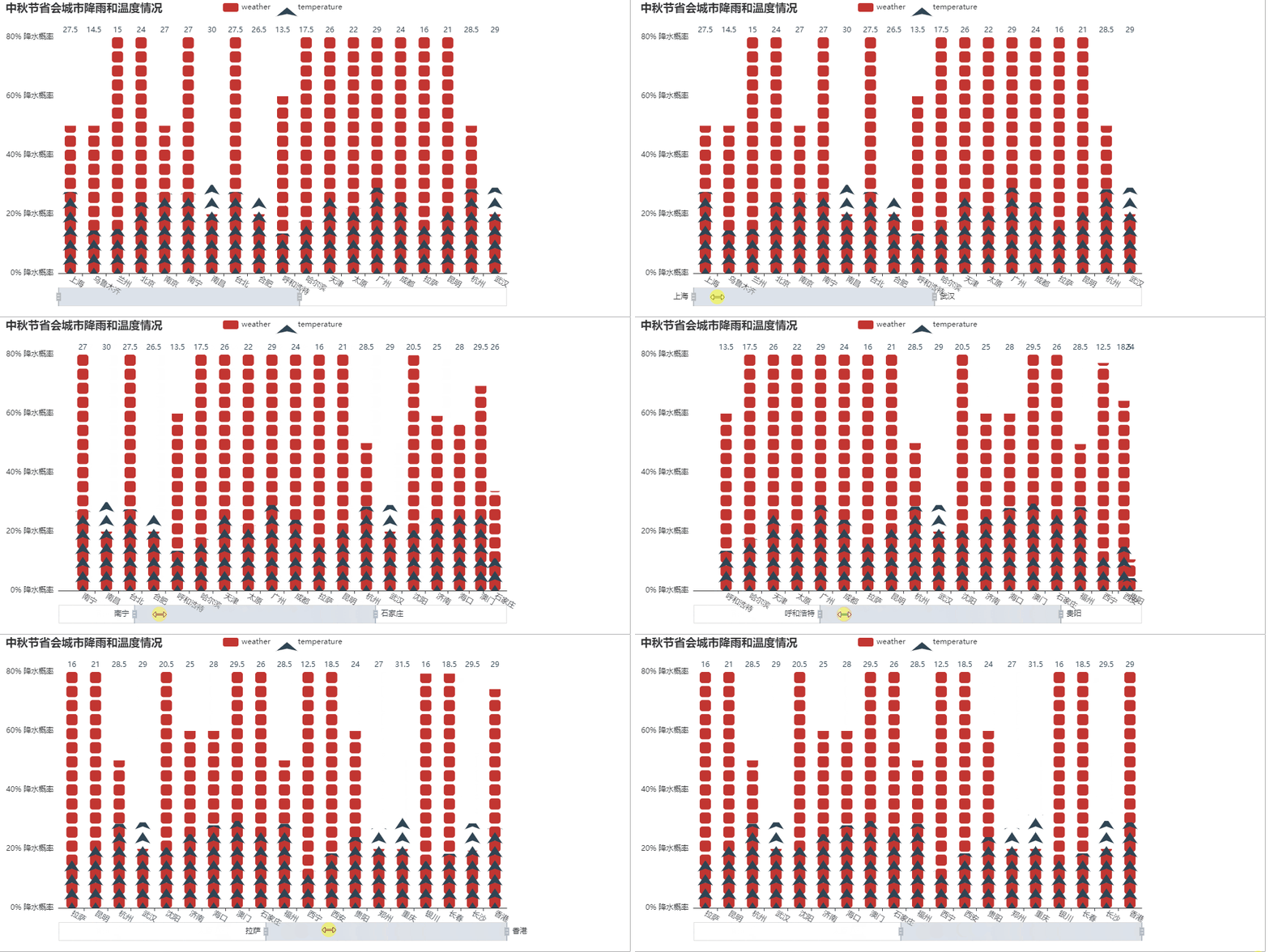
中秋佳节以到,不知道各位小伙伴儿有没有想好去哪里玩呢。不过说实在的,每到节假日,到处都是人山人海,那句“我动也不能动”,还不时的出现在我的耳畔呢。 但是又说回来,假期出游,除了人的因素外,天气的因素是不是也要考虑下呢,今天,我们就带大家来看看,中秋小长假,哪些地方适宜出游。 获取数据 数据的获取,就从中国天气网站上直接抓取,网络上的一些 API,有的信息不是很全,只能获取最近3天的数据,有的又需要付费,还不如自己抓来的痛快。 http://www.weather.com.cn/weather15d/10124020102A.shtml 网站也没有做什么限制,我们抓数据的时候,只需要控制好访问频率,不要影响人家的正常运行就可以。 同时还需要准备四个数据文件 省会城市列表,provincial_capital 全国城市 id 信息表,china-city-list.csv 著名景点名称列表,attractions 全国景点 id 信息表,china-scenic-list.txt 抓取的过程不再详细说明了,直接给出完整代码 # coding = utf-8 """ @author: zhou @time:2019/9/5 14:36 @File: main.py """ import requests from bs4 import BeautifulSoup import time import os def get_data(name, city, code): print("正在下载城市%s的数据" % city) url = 'http://www.weather.com.cn/weather15d/%s.shtml' % code[2:] res = requests.get(url).content.decode() content = BeautifulSoup(res, "html.parser") weather_list = content.find('ul', attrs={'class': 't clearfix'}).find_all('li') items = map(parse_item, weather_list) save_to_csv(name, city, items) time.sleep(1) def parse_item(item): time = item.find('span', attrs={'class': 'time'}).text wea = item.find('span', attrs={'class': 'wea'}).text tem = item.find('span', attrs={'class': 'tem'}).text wind = item.find('span', attrs={'class': 'wind'}).text wind_level = item.find('span', attrs={'class': 'wind1'}).text result = { "time": time, "wea": wea, "tem": tem, "wind": wind, "wind_level": wind_level } return result def save_to_csv(name, city, data): if not os.path.exists('%s_data.csv' % name): with open('%s_data.csv' % name, 'a+', encoding='utf-8') as f: f.write('city,time,wea,tem,wind,wind_level\n') for d in data: try: row = '{},{},{},{},{},{}'.format(city, d['time'], d['wea'], d['tem'], d['wind'], d['wind_level']) f.write(row) f.write('\n') except: continue else: with open('%s_data.csv' % name, 'a+', encoding='utf-8') as f: for d in data: try: row = '{},{},{},{},{},{}'.format(city, d['time'], d['wea'], d['tem'], d['wind'], d['wind_level']) f.write(row) f.write('\n') except: continue if __name__ == '__main__': import pandas as pd provincial = pd.read_csv('provincial_capital') china_city_code = pd.read_csv('china-city-list.csv') china_scenic_code = pd.read_csv('china-scenic-list.txt', sep='\t') china_scenic_code.columns = ['ID', 'name', 'area', 'provincial'] attraction = pd.read_csv('attractions') provincial_data = pd.DataFrame() attraction_data = pd.DataFrame() # 省会抓取 for i in provincial['city'].values.tolist(): for j in china_city_code['City_CN'].values.tolist(): if j == i: provincial_data = pd.concat([china_city_code[china_city_code['City_CN'] == j], provincial_data]) for city in provincial_data['City_CN'].values.tolist(): city_id = provincial_data[provincial_data['City_CN'] == city]['City_ID'].values.tolist()[0] get_data('weather', city, city_id) # 景点抓取 for a in attraction['attractions'].values.tolist(): for c in china_scenic_code['name'].values.tolist(): if c == a: attraction_data = pd.concat([china_scenic_code[china_scenic_code['name'] == c], attraction_data]) for attrac in attraction_data['name'].values.tolist(): city_id = attraction_data[attraction_data['name'] == attrac]['ID'].values.tolist()[0] get_data('attraction', attrac, city_id) 省会天气分析 我们首先来看看省会天气,毕竟省会城市是每个省份的中心,也是旅游的重点城市。 降水和温度 对于降水的概率,我采取的是如果预报是有雨,则设置降水概率为80,如果是预报是晴,则降水概率为20. weather_dict = { "snow": 100, "rain": 80, "cloud": 50, "overcast": 60, "sun": 20 } 在中秋节这一天,各个省会城市的降水和温度 能够看出,大部分城市在这一天都是天公不作美的,降水的概率都非常的大。而温度的话,大概率降水的城市,温度都不是很高,早晚出行,可能还会很凉哦。温度最高的应该就是南昌了,还能达到30°C,一个艳阳高照的日子,是不是去看看革命圣地? 接下来我们再通过一个双轴图来更加直观的查看下降水和温度的情况 看来在进入9月之后,全国普遍的温度都在慢慢回落了,温度适宜出行,但是就是会伴随着绵绵的细雨呀。 再来看下几大城市在中秋前后一周的天气情况 北京 北京的气温还是比较平稳的,没有太大的波动,可能早晚一件薄外套就能hold的住,不过这几天,应该都会是阴蒙蒙的,不会有太好的阳光。 上海 上海的降水概率要比北京大一些,不过温度倒是相差不多。 杭州 杭州的平均温度还是要高一些,降水的概率也较高,毕竟典型的东南沿海城市嘛,雨天的西湖,你期待不? 成都 成都基本天天下雨了,那还出门看大熊猫嘛,这是个问题啊! 著名景区天气 下面我们再来看看一些著名景区的天气情况,我大好河山,景区太多了,只能简单列举一些最著名的地方来看看了。 降水情况 在我选取的这些景区当中,大部分都是会有降水的,不过也会有阳光明媚的地方。 比如说黄山和八达岭长城,预计会是晴天,去爬爬长城和黄山,是不错的选择。而美丽的九寨沟和西湖等,虽说会下雨,但是在雨天漫步,也不失为一种情趣吧。 降水和温度 我们再来看看各地的温度情况 不知道为啥承德的温度会那么低,感觉去避暑已经不太合适了,而长白山已经只有7°C了,慌不慌? 降水与温度分布 降水 进入9月,东南沿海降水明显增多,京津地区也是阴雨连绵,这是一场秋雨一场寒的节奏吗! 温度 东南半壁,温度还是比较适宜的,现在的天气下,不冷不热,正是出游好温度。 好了,今天的分析就到这里了,那么,你中秋节最终的选择是哪里呢? 源码地址 https://github.com/zhouwei713/data_analysis/tree/master/weather

资源下载

更多资源
Mario

Mario

马里奥是站在游戏界顶峰的超人气多面角色。马里奥靠吃蘑菇成长,特征是大鼻子、头戴帽子、身穿背带裤,还留着胡子。与他的双胞胎兄弟路易基一起,长年担任任天堂的招牌角色。

腾讯云软件源

腾讯云软件源

为解决软件依赖安装时官方源访问速度慢的问题,腾讯云为一些软件搭建了缓存服务。您可以通过使用腾讯云软件源站来提升依赖包的安装速度。为了方便用户自由搭建服务架构,目前腾讯云软件源站支持公网访问和内网访问。

Rocky Linux

Rocky Linux

Rocky Linux(中文名:洛基)是由Gregory Kurtzer于2020年12月发起的企业级Linux发行版,作为CentOS稳定版停止维护后与RHEL(Red Hat Enterprise Linux)完全兼容的开源替代方案,由社区拥有并管理,支持x86_64、aarch64等架构。其通过重新编译RHEL源代码提供长期稳定性,采用模块化包装和SELinux安全架构,默认包含GNOME桌面环境及XFS文件系统,支持十年生命周期更新。

WebStorm

WebStorm

WebStorm 是jetbrains公司旗下一款JavaScript 开发工具。目前已经被广大中国JS开发者誉为“Web前端开发神器”、“最强大的HTML5编辑器”、“最智能的JavaScript IDE”等。与IntelliJ IDEA同源,继承了IntelliJ IDEA强大的JS部分的功能。

用户登录
用户注册