资源编排配合实例自定义数据,实现RDS自动创建与恢复
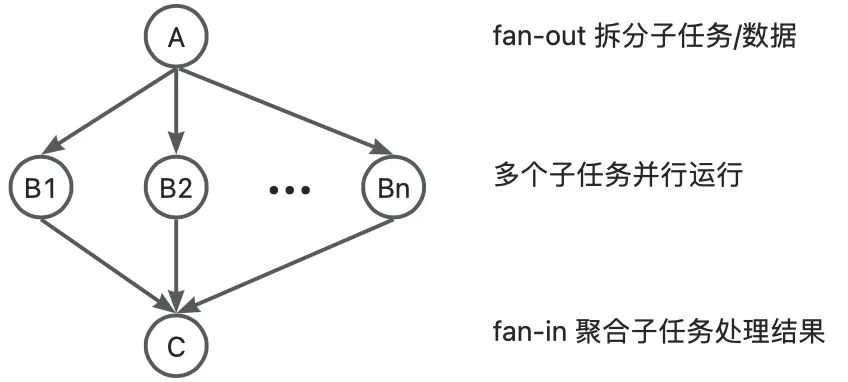
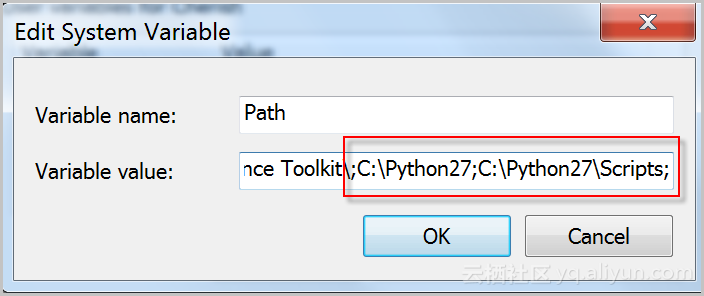
背景:不少客户需要批量部署系统,他们希望ROS不仅能帮助他们自动部署底层PAAS与IAAS资源,还能够省去安装软件,链接数据库,导入数据库文件的动作。而ROS能完美结合ECS的自定义数据,自定义镜像,RDS Web API,最大化减少人肉工作。 前提条件 a.拥有可用的OSS空间(Bucket),且与创建的RDS同一个Region b.RDS具有访问OSS的权限(也可通过ROS授权) c.了解ROS,可通过ROS控制台创建模板和资源 步骤概览: a.创建ECS自定义镜像,镜像内包含自己的应用软件 b.将需要备份恢复的数据库.bak(本文以SQLServer为例)文件上传到OSS空间 c.编写ROS的模板,自动创建所需资源,创建顺序如下VPC>Vswitch>SecurityGroup>RDS>ECS,ECS创建成功后会自动执行ROS模板里面编写的自定义数据,连接数据库,并且将OSS中的备份文件恢复到RDS里面。 步骤详解: 1.创建自定义镜像 1.1创建一个ECS实例,部署好所需的软件,除了安装客户业务所需要的软件之外,为了实现自动的备份,减少配置工作,也需要安装一些阿里云SDK 1.1.1安装python 请根据Python官网的引导安装合适的Python版本,推荐安装2.7.10。 1.1.2安装完毕后,查看Python版本。 如果你是Windows操作系统: 执行C:\>c:\Python27\python.exe -V查看Python版本,如果输出内容为:Python 2.7.10表明您已成功安装了Python 2.7.10版本。 如果提示不是内部或外部命令, 请检查配置Path环境变量,增加Python的安装路径和pip命令的目录,如下图所示: 如果你是Mac/Linux/Unix操作系统: 执行$ python -V查看Python版本,如果输出内容为:Python 2.7.10表明您已成功安装了Python 2.7.10版本。 1.1.3安装SDK依赖包 使用pip安装或者git clone源码安装,任选其一。 Pip安装 pip install aliyun-python-sdk-rds pip install oss2 源码安装 # git 克隆openapi git clone https://github.com/aliyun/aliyun-openapi-python-sdk.git # 安装阿里云 SDK 核心库 cd aliyun-python-sdk-core python setup.py install # 安装阿里云 RDS SDK cd aliyun-python-sdk-rds python setup.py install # git 克隆OSS SDK git clone https://github.com/aliyun/aliyun-oss-python-sdk.git cd aliyun-oss-python-sdk # 安装OSS2 python setup.py install 1.1.4 下载备份恢复的.py执行脚本 下载实例级别迁移上云脚本RDSSQLCreateMigrateTasksBatchly.py,下载地址:单击下载。保存在目录中,本次假设保存在C盘。 1.2控制台中将上一步骤设置好的ECS生成自定义镜像,详细参考创建自定义镜像。 注意:自定义镜像属于Region,不能跨Region直接读取,如果需要跨账号或跨Region使用,请参考共享镜像。 1.2.1 记录自定义镜像的ID与所在的Region 2.将备份文件,即数据库.bak文件上传到对应的OSS Bucket上(本次以SQLServer为例),并且记录下对应的OSSd的Endpoint和url地址 3.编写ROS的模板 3.1前两个步骤已经将基本的环境准备好,现在就需要编写ROS模板,让ROS自动创建所需资源,然后通过ROS给ECS指派的自定义数据,自动运行.py的备份脚本, 3.2在执行RDSSQLCreateMigrateTasksBatchly.py文件时,需要了解使用说明,如下 ~/Downloads/RDSSQLCreateMigrateTasksBatchly.py -k <access_key_id> -s <access_key_secret> -i <rds_instance_id> -e <oss_endpoint> -b <oss_bucket> -d <directory> 参数说明: 参数 说明 access_key_id 阿里云账号对应的access key id access_key_secret 阿里云账号对应的access key secret rds_instance_id RDS SQL Server目标实例ID oss_endpoint 备份文件所在的OSS Bucket endpoint地址,获取方法请参见OSS Endpoint错误中截图 oss_bucket 备份文件所在的OSS Bucket名字 directory OSS Bucket中,备份文件所在的目录,如果是根目录,请传入“/”。 因此,在ROS中,除了oss_bucket和directory是指定的,其他参数均可通过ROS的Fn::GetAtt函数获得, 因此,对应的ECS的自定义数据Userdata如下 "UserData": { "Fn::Join": [ "", [ "[powershell]", "\n", "$keyid=", { "Fn::GetAtt": [ "RamAK", "AccessKeyId" ] }, "\n", "$keysec=", { "Fn::GetAtt": [ "RamAK", "AccessKeySecret" ] }, "\n", "$rdsid=", { "Fn::GetAtt": [ "LYDatabase", "DBInstanceId" ] }, "\n", "python C:\\RDSSQLCreateMigrateTasksBatchly.py -k '$keyid -s '$keysec -i '$rdsid -e oss_endpoint -b oss_bucket -d directory" ] ] }如下为userdata最终执行的示例: python ~/Downloads/RDSSQLCreateMigrateTasksBatchly.py -k LTAIQazXKPRwwErT -s BMkIUhroubQOLpOMqfA09IKlqp4G2k -i rm-2zesz5774ud8s71i5 -e oss-cn-beijing.aliyuncs.com -b atp-test-on-ecs -d Migration/OPENAPIDemo 注意:上面执行所需要的Accesskey ID和Accesskey Secret均为RAM账号,无法使用主账号,所以如果您在阿里云的主账号下运行,请先创建一个RAM账号,并赋予RDS的完整管理权限,创建RAM账号与赋予RDS权限语句如下 { "ROSTemplateFormatVersion": "2015-09-01", "Description": "", "Parameters": { "UserName": { "AllowedPattern": "^[a-zA-Z0-9.@-_]+$", "ConstraintDescription": "[1, 64]. Consist of lowercase letter, number, '@', '.', '_' or '-'", "Default":"lionel", "Description": "The name of sub account", "Type": "String" }, "Password": { "ConstraintDescription": "[8, 30] Consist of uppercase letter, lowercase letter and number.", "Description": "The login password of sub account", "MaxLength": 32, "MinLength": 8, "Default":"lionelpassword", "Confirm": true, "Type": "String" } }, "Mappings": {}, "Conditions": {}, "Resources": { "RamAK": { "Properties": { "UserName": { "Fn::GetAtt": [ "RamUser", "UserName" ] } }, "Type": "ALIYUN::RAM::AccessKey" }, "RamUser": { "Properties": { "LoginProfile": { "Password": { "Ref": "Password" }, "PasswordResetRequired": false }, "UserName": { "Ref": "UserName" } }, "Type": "ALIYUN::RAM::User" }, "RDSfullaccessPolicy": { "Type": "ALIYUN::RAM::ManagedPolicy", "Properties": { "Description": "Description", "PolicyName":"AliyunRDSfullacessPolicy", "PolicyDocument": { "Version": "1", "Statement":[{ "Action": [ "rds:*"] , "Resource": ["*"], "Effect": "Allow" }, { "Action": ["dms:*LoginDatabase"] , "Resource": ["acs:rds:*:*:*"], "Effect": "Allow" } ] }, "Users": [ { "Ref": "RamUser" } ] } } 3.3若要RDS能读取OSS里面的.bak备份文件,则需要给RDS授权读取OSS,可以通过在控制台手动赋予权限,亦可以通过ROS自动化实现,实现Json语言如下 "Policy": { "Type": "ALIYUN::RAM::ManagedPolicy", "Properties": { "Description": "Description", "PolicyName": "AliyunRDSImportPolicy", "PolicyDocument": { "Version": "1", "Statement": [ { "Action": [ "oss:GetObject", "oss:GetBucketLocation" ], "Resource": [ "*" ], "Effect": "Allow" } ] }, "Roles": [ { "Ref": "ImportRole" } ] } }, "ImportRole": { "Type": "ALIYUN::RAM::Role", "Properties": { "RoleName": "AliyunRDSImportRole", "Description": "RDS import", "AssumeRolePolicyDocument": { "Version": "1", "Statement": [ { "Action": "sts:AssumeRole", "Effect": "Allow", "Principal": { "Service": [ "rds.aliyuncs.com" ] } } ] } } } 3.4因为ECS里面的.py脚本需要在RDS彻底创建成功后才能执行,所以要通过ROS DependsOn参数,让ECS在RDS生成后创建 "Server": { "Type": "ALIYUN::ECS::Instance", "DependsOn": [ "LYDatabase" ], "Properties": { "IoOptimized": "optimized", "ZoneId": "cn-shenzhen-b", "SystemDiskSize": "100", "InstanceChargeType": "PostPaid", "SecurityGroupId": { "Ref": "ServerSecurityGroup" }, "VSwitchId": { "Ref": "ServerSwitch" }, "Period": 1, "SystemDiskCategory": "cloud_efficiency", "InternetChargeType": "PayByTraffic", "InternetMaxBandwidthOut": 1, "VpcId": { "Ref": "ALIYUN-ECS-VPC1" }, "InternetMaxBandwidthIn": 200, "ImageId": "m-bp19l9u9broshpsresc9", "InstanceType": "ecs.sn1ne.xlarge", "AllocatePublicIP": true, "HostName": "lyServer", "Password": "lypass!@#", "UserData": {} 4.总结:通过如上的过程即可实现数据库的自动部署和自动备份恢复,完成的ROS代码参考如下。 { "ROSTemplateFormatVersion": "2015-09-01", "Description": "", "Parameters": { "UserName": { "AllowedPattern": "^[a-zA-Z0-9.@-_]+$", "ConstraintDescription": "[1, 64]. Consist of lowercase letter, number, '@', '.', '_' or '-'", "Default":"lionel", "Description": "The name of sub account", "Type": "String" }, "Password": { "ConstraintDescription": "[8, 30] Consist of uppercase letter, lowercase letter and number.", "Description": "The login password of sub account", "MaxLength": 32, "MinLength": 8, "Default":"lionelpassword", "Confirm": true, "Type": "String" } }, "Mappings": {}, "Conditions": {}, "Resources": { "RamAK": { "Properties": { "UserName": { "Fn::GetAtt": [ "RamUser", "UserName" ] } }, "Type": "ALIYUN::RAM::AccessKey" }, "RamUser": { "Properties": { "LoginProfile": { "Password": { "Ref": "Password" }, "PasswordResetRequired": false }, "UserName": { "Ref": "UserName" } }, "Type": "ALIYUN::RAM::User" }, "ImportRole": { "Type": "ALIYUN::RAM::Role", "Properties": { "RoleName": "AliyunRDSImportRole", "Description": "RDS import", "AssumeRolePolicyDocument":{ "Version": "1", "Statement": [{ "Effect": "Allow", "Principal": { "Service": [ "rds.aliyuncs.com"] }, "Action": "sts:AssumeRole" }] } } }, "Policy": { "Type": "ALIYUN::RAM::ManagedPolicy", "Properties": { "Description": "Description", "PolicyName":"AliyunRDSImportPolicy", "PolicyDocument": { "Version": "1", "Statement":[{ "Action": [ "oss:GetObject", "oss:GetBucketLocation" ], "Resource": ["*"], "Effect": "Allow" }] }, "Roles": [ { "Ref": "ImportRole" } ] } }, "RDSfullaccessPolicy": { "Type": "ALIYUN::RAM::ManagedPolicy", "Properties": { "Description": "Description", "PolicyName":"AliyunRDSfullacessPolicy", "PolicyDocument": { "Version": "1", "Statement":[{ "Action": [ "rds:*"] , "Resource": ["*"], "Effect": "Allow" }, { "Action": ["dms:*LoginDatabase"] , "Resource": ["acs:rds:*:*:*"], "Effect": "Allow" } ] }, "Users": [ { "Ref": "RamUser" } ] } }, "ALIYUN-ECS-VPC1": { "Metadata": { "GraphicId": "RosGraphicElement-1" }, "Type": "ALIYUN::ECS::VPC", "Properties": { "CidrBlock": "172.16.0.0/12" } }, "ServerSecurityGroup": { "Type": "ALIYUN::ECS::SecurityGroup", "Properties": { "VpcId": { "Ref": "ALIYUN-ECS-VPC1" }, "SecurityGroupIngress": [ { "SourceGroupOwnerId": "", "SourceCidrIp": "0.0.0.0/0", "PortRange": "80/80", "SecurityGroupId": "mySecurityGroup", "NicType": "internet", "SourceGroupOwnerAccount": "", "Priority": 1, "SourceGroupId": "", "Policy": "accept", "IpProtocol": "tcp" }, { "SourceGroupOwnerId": "", "SourceCidrIp": "0.0.0.0/0", "PortRange": "3389/3389", "SecurityGroupId": "mySecurityGroup", "NicType": "internet", "SourceGroupOwnerAccount": "", "Priority": 1, "SourceGroupId": "", "Policy": "accept", "IpProtocol": "tcp" }, { "SourceGroupOwnerId": "", "SourceCidrIp": "0.0.0.0/0", "PortRange": "443/443", "SecurityGroupId": "mySecurityGroup", "NicType": "internet", "SourceGroupOwnerAccount": "", "Priority": 1, "SourceGroupId": "", "Policy": "accept", "IpProtocol": "tcp" } ] } }, "ServerSwitch": { "Type": "ALIYUN::ECS::VSwitch", "Properties": { "VpcId": { "Ref": "ALIYUN-ECS-VPC1" }, "CidrBlock": "172.16.1.0/24", "ZoneId": "cn-shenzhen-a" } }, "LYDatabase": { "Type": "ALIYUN::RDS::DBInstance", "Properties": { "MasterUsername": "lyadmin", "MasterUserPassword": "lypasswrd", "Engine": "SQLServer", "EngineVersion": "2016_web", "MasterUserType":"Super", "VpcId": { "Ref": "ALIYUN-ECS-VPC1" }, "ZoneId": "cn-shenzhen-a", "DBInstanceNetType": "Intranet", "DBInstanceClass": "mssql.x2.medium.w1", "SecurityIPList": "0.0.0.0/0", "DBInstanceStorage": "20", "VSwitchId": { "Ref": "ServerSwitch" }, "ConnectionMode": "Performance", "PreferredBackupTime": "00:00Z-01:00Z", "BackupRetentionPeriod": 7, "PreferredBackupPeriod": [ "Sunday" ] } }, "Server": { "Type": "ALIYUN::ECS::Instance", "DependsOn": [ "LYDatabase" ], "Properties": { "SystemDiskCategory": "cloud_efficiency", "IoOptimized": "optimized", "InternetChargeType": "PayByTraffic", "VpcId": { "Ref": "ALIYUN-ECS-VPC1" }, "HostName": "Server", "ImageId": "win2016_64_dtc_1607_zh-cn_40G_alibase_20170915.vhd", "InstanceChargeType": "PostPaid", "VSwitchId": { "Ref": "ServerSwitch" }, "Password": "Ly1pass!@#", "InstanceType": "ecs.n4.large", "SystemDiskSize": "40", "ZoneId": "cn-shenzhen-a", "InternetMaxBandwidthOut": 1, "InternetMaxBandwidthIn": 200, "UserData": { "Fn::Join": [ "", [ "[powershell]", "\n", "$keyid=", { "Fn::GetAtt": [ "RamAK", "AccessKeyId" ] }, "\n", "$keysec=", { "Fn::GetAtt": [ "RamAK", "AccessKeySecret" ] }, "\n", "$rdsid=", { "Fn::GetAtt": [ "LYDatabase", "DBInstanceId" ] }, "\n", "python C:\\RDSSQLCreateMigrateTasksBatchly.py -k '$keyid -s '$keysec -i '$rdsid -e oss_endpoint -b oss_bucket -d directory" ] ] }, "SecurityGroupId": { "Ref": "ServerSecurityGroup" }, "Period": 1, "AllocatePublicIP": true } } }, "Outputs": {} }








)