首页 文章 精选 留言 我的

精选列表

搜索[安装制作],共10000篇文章
优秀的个人博客,低调大师

jenkins安装

一、下载docker镜像 To use the latest LTS: docker pull jenkins/jenkins:lts To use the latest weekly: docker pull jenkins/jenkins 二、运行docker镜像 docker run -d -u 0 -p 8080:8080 -p 50000:50000 -v /data/jenkins_home:/var/jenkins_home jenkins/jenkins:lts 三、系统初始化密码文件 /data/jenkins_home/secrets/initialAdminPassword 四、python jenkins pip install python-jenkins 使用文档:http://python-jenkins.readthedocs.io/en/latest/examples.html#example-1-get-version-of-jenkins 创建任务 import jenkins server = jenkins.Jenkins('http://localhost:8080', username='admin', password='passwd') job_xml = """<?xml version='1.0' encoding='UTF-8'?> <flow-definition plugin='workflow-job@2.17'> <actions/> <description>pipeline测试</description> <keepDependencies>false</keepDependencies> <properties/> <definition class='org.jenkinsci.plugins.workflow.cps.CpsFlowDefinition' plugin='workflow-cps@2.45'> <script>node { stage('get clone'){ echo 'git clone ......' } stage('mvn test'){ echo 'mvn test ......' } stage('mvn build'){ echo 'mvn clean install ......' } stage('deploy'){ echo 'deploy ......' } }</script> <sandbox>true</sandbox> </definition> <triggers/> <disabled>false</disabled> </flow-definition>""" server.create_job('pipeline测试', job_xml) 五、xml转yaml pip install jenkins-job-wreckerhttps://github.com/ktdreyer/jenkins-job-wreckerjjwrecker -f path/to/my-job/config.xml -n 'my-job' 文件会生成到当前路径的:"output"文件夹中 本文转自 aaron428 51CTO博客,原文链接:http://blog.51cto.com/aaronsa/2082869

优秀的个人博客,低调大师

ELK安装

wget https://download.elastic.co/elasticsearch/release/org/elasticsearch/distribution/tar/elasticsearch/2.4.0/elasticsearch-2.4.0.tar.gz wget https://download.elastic.co/logstash/logstash/logstash-2.4.0.tar.gz wget https://download.elastic.co/kibana/kibana/kibana-4.6.0-linux-x86_64.tar.gz tar zxvf elasticsearch-2.4.0.tar.gz tar zxvf kibana-4.6.0-linux-x86_64.tar.gz tar zxvf logstash-2.4.0.tar.gz mv elasticsearch-2.4.0 elasticsearch mv kibana-4.6.0-linux-x86_64 kibana mv logstash-2.4.0 logstash groupadd elasticsearch useradd -g elasticsearch -d /usr/local/elasticsearch elasticsearch mv elasticsearch/* /usr/local/elasticsearch chown -R elasticsearch.elasticsearch /usr/local/elasticsearch chown -R elasticsearch.elasticsearch /data/elasticsearch ./bin/plugin install mobz/elasticsearch-head vi config/elasticsearch.yml cluster.name: niudingfeng node.name: node-1 path.data: /data/elasticsearch/data path.logs: /data/elasticsearch/logs network.host: 10.10.16.193 http.port: 9200 启动:./bin/elasticsearch & 查看地址:http://10.10.16.194:9200/_plugin/head/ http://10.10.16.194:9200/ vim config/kibana.yml server.port: 5601 server.host: "10.10.16.194" elasticsearch.url: "http://10.10.16.194:9200" kibana.index: ".kibana" 启动:./bin/kibana & 查看: http://10.10.16.194:5601/ nohup /root/logstash/bin/logstash agent -f /root/logstash_agent.conf & input { file { type => "logtest" path => ["/root/access_log"] } } output { elasticsearch { action => "index" hosts => "10.10.16.194:9200" index => "applog" } } 本文转自aaron428 51CTO博客,原文链接:http://blog.51cto.com/aaronsa/1846947,如需转载请自行联系原作者

优秀的个人博客,低调大师

安装Kylin

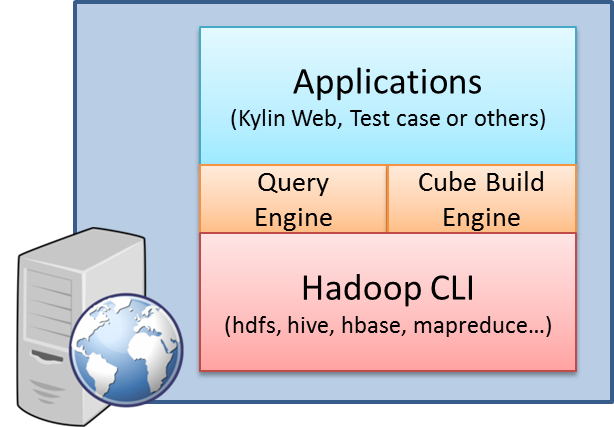
Environment Kylin requires a properly setup Hadoop environment to run. Following are the minimal request to run Kylin, for more detial, please check Hadoop Environment. It is most common to install Kylin on a Hadoop client machine, from which Kylin can talk with the Hadoop cluster via command lines including hive, hbase, hadoop, etc. The scenario is depicted as: For normal use cases, the application in the above picture means Kylin Web, which contains a web interface for cube building, querying and all sorts of management. Kylin Web launches a query engine for querying and a cube build engine for building cubes. These two engines interact with the Hadoop components, like hive and hbase. Except for some prerequisite software installations, the core of Kylin installation is accomplished by running a single script. After running the script, you will be able to build sample cube and query the tables behind the cubes via a unified web interface. Install Kylin Download latest Kylin binaries at http://kylin.apache.org/download Export KYLIN_HOME pointing to the extracted Kylin folder Make sure the user has the privilege to run hadoop, hive and hbase cmd in shell. If you are not so sure, you can run bin/check-env.sh, it will print out the detail information if you have some environment issues. To start Kylin, run bin/kylin.sh start, after the server starts, you can watch logs/kylin.log for runtime logs; To stop Kylin, run bin/kylin.sh stop


优秀的个人博客,低调大师

怎么制作清晰的架构图?产品、开发人员必备

架构图是一种用于可视化展示软件、系统、应用程序、网络等体系结构的图表或图形。它通过图形化的方式,形象地展示体系结构中各个组成部分以及它们之间的关系,为系统提供了直观、全面的视图。可以帮助不同角色(如开发者、运维人员、产品经理等)从不同角度(如业务、技术、功能、数据等)理解和分析系统。

优秀的个人博客,低调大师

零成本制作怪谈游戏,源头竟是日常 AI 唠嗑

几个月前的闲暇午后,我迷上了和AI进行文字角色扮演。我将大模型当作专属的“云端游戏服务器”,依托文字交互形式,沉浸式体验地牢探险、古堡探秘、诡异公寓生存等玩法,复刻了经典《地下城堡》的文字生存探索乐趣。全程无需复杂操作,仅凭文字互动,就能解锁丰富的冒险体验,成为我日常解压的绝佳方式。

资源下载

更多资源
Mario

Mario

马里奥是站在游戏界顶峰的超人气多面角色。马里奥靠吃蘑菇成长,特征是大鼻子、头戴帽子、身穿背带裤,还留着胡子。与他的双胞胎兄弟路易基一起,长年担任任天堂的招牌角色。

腾讯云软件源

腾讯云软件源

为解决软件依赖安装时官方源访问速度慢的问题,腾讯云为一些软件搭建了缓存服务。您可以通过使用腾讯云软件源站来提升依赖包的安装速度。为了方便用户自由搭建服务架构,目前腾讯云软件源站支持公网访问和内网访问。

Nacos

Nacos

Nacos /nɑ:kəʊs/ 是 Dynamic Naming and Configuration Service 的首字母简称,一个易于构建 AI Agent 应用的动态服务发现、配置管理和AI智能体管理平台。Nacos 致力于帮助您发现、配置和管理微服务及AI智能体应用。Nacos 提供了一组简单易用的特性集,帮助您快速实现动态服务发现、服务配置、服务元数据、流量管理。Nacos 帮助您更敏捷和容易地构建、交付和管理微服务平台。

Sublime Text

Sublime Text

Sublime Text具有漂亮的用户界面和强大的功能,例如代码缩略图,Python的插件,代码段等。还可自定义键绑定,菜单和工具栏。Sublime Text 的主要功能包括:拼写检查,书签,完整的 Python API , Goto 功能,即时项目切换,多选择,多窗口等等。Sublime Text 是一个跨平台的编辑器,同时支持Windows、Linux、Mac OS X等操作系统。

用户登录
用户注册