首页 文章 精选 留言 我的

精选列表

搜索[学习],共10000篇文章
优秀的个人博客,低调大师

iOS学习——iOS网络通信http之NSURLConnection(八)

移动互联网时代,网络通信已是手机终端必不可少的功能。我们的应用中也必不可少的使用了网络通信,增强客户端与服务器交互。这一篇提供了使用NSURLConnection实现http通信的方式。 NSURLConnection提供了异步请求、同步请求两种通信方式。 1、异步请求 iOS5.0 SDK NSURLConnection类新增的sendAsynchronousRequest:queue:completionHandler:方法,从而使iOS5支持两种异步请求方式。我们先从新增类开始。 1)sendAsynchronousRequest iOS5.0开始支持sendAsynchronousReques方法,方法使用如下: - (void)httpAsynchronousRequest{ NSURL *url = [NSURL URLWithString:@"http://url"]; NSString *post=@"postData"; NSData *postData = [post dataUsingEncoding:NSASCIIStringEncoding allowLossyConversion:YES]; NSMutableURLRequest *request = [NSMutableURLRequest requestWithURL:url]; [request setHTTPMethod:@"POST"]; [request setHTTPBody:postData]; [request setTimeoutInterval:10.0]; NSOperationQueue *queue = [[NSOperationQueue alloc]init]; [NSURLConnection sendAsynchronousRequest:request queue:queue completionHandler:^(NSURLResponse *response, NSData *data, NSError *error){ if (error) { NSLog(@"Httperror:%@%d", error.localizedDescription,error.code); }else{ NSInteger responseCode = [(NSHTTPURLResponse *)response statusCode]; NSString *responseString = [[NSString alloc] initWithData:data encoding:NSUTF8StringEncoding]; NSLog(@"HttpResponseCode:%d", responseCode); NSLog(@"HttpResponseBody %@",responseString); } }]; } sendAsynchronousReques可以很容易地使用NSURLRequest接收回调,完成http通信。 2)connectionWithRequest iOS2.0就开始支持connectionWithRequest方法,使用如下: - (void)httpConnectionWithRequest{ NSString *URLPath = [NSString stringWithFormat:@"http://url"]; NSURL *URL = [NSURL URLWithString:URLPath]; NSMutableURLRequest *request = [NSMutableURLRequest requestWithURL:URL]; [NSURLConnection connectionWithRequest:request delegate:self]; } - (void)connection:(NSURLConnection *)theConnection didReceiveResponse:(NSURLResponse *)response { NSInteger responseCode = [(NSHTTPURLResponse *)response statusCode]; NSLog(@"response length=%lld statecode%d", [response expectedContentLength],responseCode); } // A delegate method called by the NSURLConnection as data arrives. The // response data for a POST is only for useful for debugging purposes, // so we just drop it on the floor. - (void)connection:(NSURLConnection *)theConnection didReceiveData:(NSData *)data { if (mData == nil) { mData = [[NSMutableData alloc] initWithData:data]; } else { [mData appendData:data]; } NSLog(@"response connection"); } // A delegate method called by the NSURLConnection if the connection fails. // We shut down the connection and display the failure. Production quality code // would either display or log the actual error. - (void)connection:(NSURLConnection *)theConnection didFailWithError:(NSError *)error { NSLog(@"response error%@", [error localizedFailureReason]); } // A delegate method called by the NSURLConnection when the connection has been // done successfully. We shut down the connection with a nil status, which // causes the image to be displayed. - (void)connectionDidFinishLoading:(NSURLConnection *)theConnection { NSString *responseString = [[NSString alloc] initWithData:mData encoding:NSUTF8StringEncoding]; NSLog(@"response body%@", responseString); } connectionWithRequest需要delegate参数,通过一个delegate来做数据的下载以及Request的接受以及连接状态,此处delegate:self,所以需要本类实现一些方法,并且定义mData做数据的接受。 需要实现的方法: 1、获取返回状态、包头信息。 - (void)connection:(NSURLConnection *)connection didReceiveResponse:(NSURLResponse *)response; 2、连接失败,包含失败。 - (void)connection:(NSURLConnection *)connection didFailWithError:(NSError *)error; 3、接收数据 - (void)connection:(NSURLConnection *)connection didReceiveData:(NSData *)data; 4、数据接收完毕 - (void)connectionDidFinishLoading:(NSURLConnection*)connection; connectionWithRequest使用起来比较繁琐,而iOS5.0之前用不支持sendAsynchronousRequest。有网友提出了AEURLConnection解决方案。 AEURLConnection is a simple reimplementation of the API for use on iOS 4. Used properly, it is also guaranteed to be safe against The Deallocation Problem, a thorny threading issue that affects most other networking libraries. 2、同步请求 同步请求数据方法如下: - (void)httpSynchronousRequest{ NSURLRequest * urlRequest = [NSURLRequest requestWithURL:[NSURL URLWithString:@"http://google.com"]]; NSURLResponse * response = nil; NSError * error = nil; NSData * data = [NSURLConnection sendSynchronousRequest:urlRequest returningResponse:&response error:&error]; if (error == nil) { // 处理数据 } } 同步请求数据会造成主线程阻塞,通常在请求大数据或网络不畅时不建议使用。 从上面的代码可以看出,不管同步请求还是异步请求,建立通信的步骤基本是一样的: 1、创建NSURL 2、创建Request对象 3、创建NSURLConnection连接。 NSURLConnection创建成功后,就创建了一个http连接。异步请求和同步请求的区别是:创建了异步请求,用户可以做其他的操作,请求会在另一个线程执行,通信结果及过程会在回调函数中执行。同步请求则不同,需要请求结束用户才能做其他的操作。 /** * @author 张兴业 * http://blog.csdn.net/xyz_lmn * iOS入门群:83702688 * android开发进阶群:241395671 * 我的新浪微博:@张兴业TBOW */ 参考: http://developer.apple.com/library/ios/#documentation/Cocoa/Conceptual/URLLoadingSystem/Tasks/UsingNSURLConnection.html#//apple_ref/doc/uid/20001836-BAJEAIEE http://codewithchris.com/tutorial-how-to-use-ios-nsurlconnection-by-example/ http://kelp.phate.org/2011/06/ios-stringwithcontentsofurlnsurlconnect.html 本文转自xyz_lmn51CTO博客,原文链接: http://blog.51cto.com/xyzlmn/1230731 ,如需转载请自行联系原作者


优秀的个人博客,低调大师

JMS学习(六)-ActiveMQ的高可用性实现

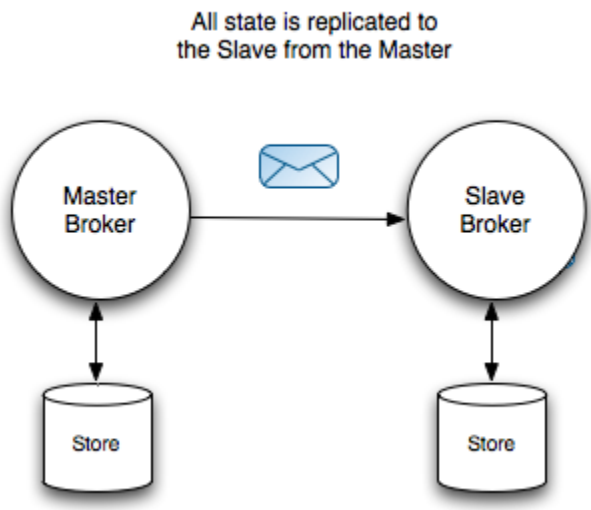
原文地址:http://www.cnblogs.com/hapjin/p/5663024.html 一,ActiveMQ高可用性的架构 ActiveMQ的高可用性架构是基于Master/Slave 模型的。ActiveMQ总共提供了四种配置方案来配置HA,其中Shared Nothing Master/Slave 在5.8版本之后不再使用了,并在ActiveMQ5.9版本中引入了基于Zookeeper的Replicated LevelDB Store HA方案。 二,Master/Slave架构的配置解释 ①Shared Nothing Master/Slave 该架构最大的特点是: 1)Master 和 Slave各自都单独存储持久化的消息,它们不共享数据。 2)Master收到持久化消息时,需要先同步(sync)给Slave之后,才向Producer发送ACK确认。 3)只有Master负责Client的请求,Slave不接收Client请求。Slave连接到Master,负责备份消息。 4)Master出现故障,Slave有两种处理方式:自己成为Master;关闭(停服务)---根据具体配置而定。 5)Master 与 Slave之间可能会出现“Split Brain”现象。比如:Master本身是正常的,但是Master与Slave之间的网络出现故障,网络故障导致Slave认为Master已经宕机,因为它自己会成为Master(根据配置:shutdownOnMasterFailure)。此时,对Client而言,就会存在两个Master。 6)Slave 只能同步它连接到Master之后的消息。在Slave连接到Master之前Producer向Master发送的消息将不会同步给Slave,这可以通过配置(waitForSlave)参数,只有当Slave也启动之后,Master才开始初始化TransportConnector接受Client的请求(Producer的请求) 7)如果Master 或者 Slave其中之一宕机,它们之间不同步的消息 无法 自动进行同步,此时只能手动恢复不同步的消息了。也就是说:“ActiveMQ没有提供任何有效的手段,能够让master与slave在故障恢复期间,自动进行数据同步” 8)对于非持久化消息,并不会同步给Slave。因此,Master宕机,非持久化消息会丢失。 关于ShareNothing 高可用配置的一点理解: 由上面的第2)步可知:Producer向Master发消息之后,Master需要将消息同步给Slave之后,才向Producer返回确认ACK。因此,对Producer的响应有一定的延时。 如果为了保证快速响应,即Producer给Master发消息之后,Master收到了消息立即给Producer回复,然后再在后台把消息同步给Slave。这又会造成数据不一致性问题。 因为,如果Master收到了消息立即给Producer回复之后,Master还未来得及向Slave同步就宕机了,如果此条消息还在Master内存中,则Master宕机后消息就丢失了。如果Master收到Producer的消息,先写入磁盘,然后再向Producer返回确认ACK,然后再在后台与Slave同步,那么Master就需要标记每条消息是否已经成功同步到了Slave,若消息还未同步到Slave,则Master重启恢复后,需要立即同步Slave。只有当Slave成功同步了所有的Master上的消息之后,才能上线。这也无法实现 automatic failover。 关于一个很好的高可靠性解决方案:可参考 Hadoop HA中的QJM机制。其核心就是:1)采用集群,能容忍不超过大多数机器的失效;2)数据只写大多数机器就返回确认,保证Client快速的响应能力;3)数据在后台在异步同步到集群所有的机器,从而保证高可用。 这里的Master--Slave机制中,只有一台Slave,并不是Slave集群(见上面结构图)。Master宕机,或者Slave宕机后,都会给整个服务造成极大的风险,并没有像Hadoop HA中的那样能够容忍“不超过大多数机器失效”的保证,即没有做到真正的高可用性。 还可能出现“双主”问题。即上面提到的“Split Brian”现象。 ②Shared Database Master/Slave 这是很常用的一种架构。“共享存储”,意味着Master与Slave之间的数据是共享的。 那如何避免冲突呢?通过争夺数据库表的排他锁,只有Master有锁,未获得锁的自动成为Slave。 ActiveMQ Message Broker uses a relational database, it grabs an exclusive lock on a table ensuring that no other ActiveMQ broker can access the database at the same time 对于“共享存储”而言,只会“共享”持久化消息。对于非持久化消息,它们是在内存中保存的。可以通过配置(forcePersistencyModeBrokerPluginpersistenceFlag)属性强制所有的消息都持久化。 当Master宕机后,Slave可自动接管服务成为Master。由于数据是共享的,因此Master和Slave之间不需要进行数据的复制与同步。Slave之间通过竞争锁来决定谁是Master。 ③Shared File system Master/Slave 这种方式和共享数据库存储原理基本一样,(文件系统也有文件锁),故不详细介绍。 ④最近的Replicated LevelDB Store 1)这种方式使用Zookeeper选举Master。要进行选举,则需要多数派的“参与者”。因为Replicated LevelDB Store中有多个Broker,从多个Broker中选举出一个成为Master,其他的则成为Slave。只有Master接收Client的连接,Slave负责连接到Master,并 接收( 同步方式、异步方式)Master上的数据。 The elected master broker node starts and accepts client connections. The other nodes go into slave mode and connect the the master and synchronize their persistent state /w it. 以上也表明:每个Broker都是单独存储数据的。因为Master要把新的数据复制到Slave上。从这个角度看:称这种方式为“Share Storage”有点不合适。 2)Quorum机制的又一应用 假设有3个Broker,那么选举时至少需要两个Broker同意(大多数)之后,才能选出Master。此外,只需要当新消息复制到大多数Broker上时,就可以给Producer返回ACK。其他少数Broker则可以在后台以异步方式复制新的消息。 All messaging operations which require a sync to disk will wait for the update to be replicated to a quorum of the nodes before completing. So if you configure the store with replicas="3" then the quorum size is (3/2+1)=2. The master will store the update locally and wait for 1 other slave to store the update before reporting success. 比如说:一共有3个Broker,一个Master,二个Slave。当新消息到达Master时,Master需要将消息同步到其中一台Slave之后,才能向Producer发送ACK确认此次消息成功发送。 而剩下的另一台Slave,则可以在后台以异步方式复制这个新消息。此外,还能容忍一台Slave宕机。(能容忍不超过大多数的Broker宕机) 这种设计要求,可以保证集群中消息的可靠性,只有当(replicas/2 + 1)个节点物理故障,才会有丢失消息的风险。另外,也提高了一定的响应性,因为它不需要将消息同步到所有的Slave上,而只需要同步到大多数Broker上。 3)以何种标准判断谁是Master,谁是Slave呢? 【选举将会根据“消息日志的版本戳”、“权重"的大小决定,即“版本戳”越大(数据最新)、权重越高的broker优先成为master,其他broker作为slave并跟随master。】 三,参考资料 分布式系统理论之Quorum机制 https://activemq.apache.org/artemis/docs/1.0.0/ha.html Replicated LevelDB Store HA官方文档 ActiveMQ与HA架构(master/slave) 本文转自hapjin博客园博客,原文链接:http://www.cnblogs.com/hapjin/p/5663024.html,如需转载请自行联系原作者

优秀的个人博客,低调大师

ios开发学习-指示器(HUD)效果源码分享

Spring LoadedView 介绍:实现特殊动画效果的Loading HUD (加载等待提示)。这种Loading HUD在最近比较火的 App LetterPress(一款拼字游戏)中用到。http://ios.itmdc.com/forum.php?mod=viewthread&tid=192&fromuid=15SGInfoAlert 介绍:显示一些信息然后自动消失的HUD,在不需要用户点击确定或者取消来关闭弹出对话框的时候,可以用于代替UIAlertView。http://ios.itmdc.com/forum.php?mod=viewthread&tid=193&fromuid=15DejalActivityView 介绍:实现多种HUD效果。多用于程序正在执行耗时较长命令,需要用户等待。除了显示等待的HUD,还可以显示命令执行成功或者失败的HUD。http://ios.itmdc.com/forum.php?mod=viewthread&tid=194&fromuid=15SVProgressHUD 介绍:实现多种HUD效果。多用于程序正在执行耗时较长命令,需要用户等待。除了显示等待的HUD,还可以显示命令执行成功或者失败的HUD。只支持ARC。http://ios.itmdc.com/forum.php?mod=viewthread&tid=195&fromuid=15Status HUD 介绍:实现多种HUD效果,但是只实现硬件或者其他重要的状态指示的HUD。比如锁定方向、静音、声音调整、网络状态等等。 http://ios.itmdc.com/forum.php?mod=viewthread&tid=196&fromuid=15Customized Progress HUD 介绍:实现各种HUD效果,包括在HUD上加文字,加进度条,加图片,HUD自动消失等等效果http://ios.itmdc.com/forum.php?mod=viewthread&tid=197&fromuid=15Progress HUD 介绍:实现多种HUD效果。实现多种正在加载(loading)、命令正在执行、等待任务完成等指示效果。http://ios.itmdc.com/forum.php?mod=viewthread&tid=198&fromuid=15 本文转自qianqianlianmeng博客园博客,原文链接:http://www.cnblogs.com/aimeng/archive/2012/11/25/2787303.html ,如需转载请自行联系原作者

优秀的个人博客,低调大师

【swift学习笔记】五.使用枚举优雅的管理Segue

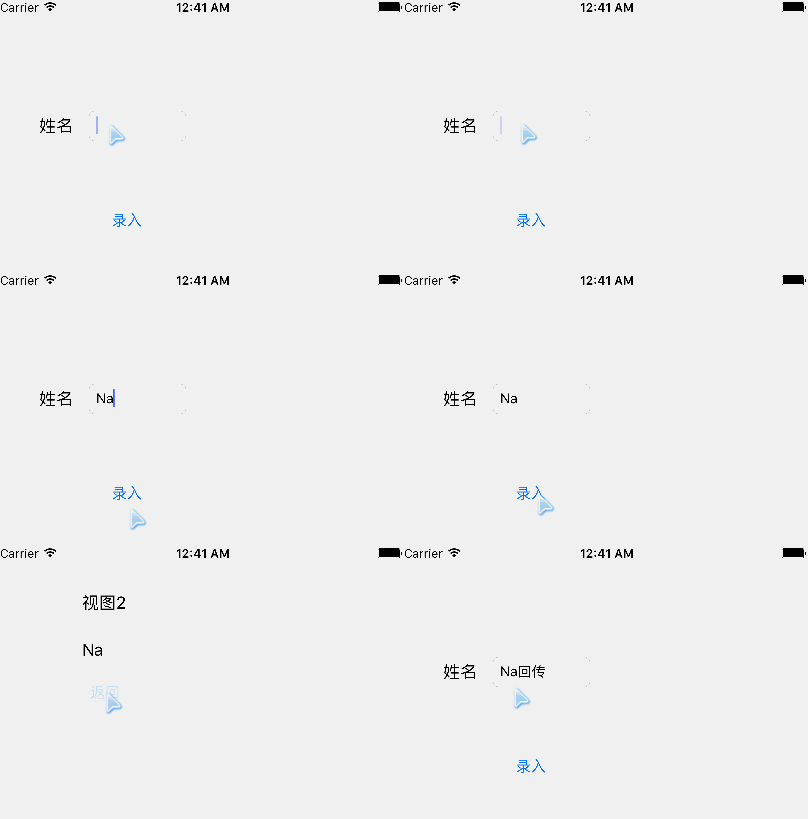
在做页面转跳的时候,我们要给Segue命名,如果Segue多了,管理他们就是一个恶梦。我们可以枚举更优雅的管理这些Segue。 1.我们先来建立一个protocol,他的功能就是让实现类实现一个SegueIdentifier别名,这个SegueIdentifier必需为RawRepresentable类型,在后边我们就会用 protocol SegueHandlerType { associatedtype SegueIdentifier: RawRepresentable } 2.我们要对上边的protocol扩展,并且实现protocol必须为UIViewControl,SegueIdentifier的原值要为String类型 这个扩展有两个方法一个是用要实现的别名来调用执行Segue方法performSegueWithIdentifier。另一个方法segueIdentifierForSegue通过Segue的identifier来得到SegueIdentifier. extension SegueHandlerType where Self: UIViewController, SegueIdentifier.RawValue == String { func performSegueWithIdentifier(segueIdentifier: SegueIdentifier, sender: AnyObject) { performSegueWithIdentifier(segueIdentifier.rawValue, sender: sender) } func segueIdentifierForSegue(segue: UIStoryboardSegue) -> SegueIdentifier { guard let identifier = segue.identifier, segueIdentifier = SegueIdentifier(rawValue: identifier) else { fatalError("invalid segue identifier \(segue.identifier)") } return segueIdentifier } } 3.用ViewController实现SegueHandlerType。再用一个枚举来实现SegueIdentifier并且为String,里面有两个case这两个就要我们要打开的新窗体的名称。 下边有两个按钮Action是用SegueIdentifier枚举来打开相应的窗体。 class ViewController: UIViewController, SegueHandlerType { enum SegueIdentifier: String { case ShowView1 case ShowView2 } override func viewDidLoad() { super.viewDidLoad() // Do any additional setup after loading the view, typically from a nib. } override func didReceiveMemoryWarning() { super.didReceiveMemoryWarning() // Dispose of any resources that can be recreated. } @IBAction func openView1(sender: AnyObject) { performSegueWithIdentifier(.ShowView1, sender: self) } @IBAction func openView2(sender: AnyObject) { performSegueWithIdentifier(.ShowView2, sender: self) } } 4.新建两个新窗体,分别用Segue联接这两个窗体。这两个Segue分别命名为我们的枚举类型的两个值:“ShowView1” “ShowView2”。再来两个Button连接后台的两个窗体的Action 源代码:segueTypeDemo.zip 本文转自lpxxn博客园博客,原文链接:http://www.cnblogs.com/li-peng/p/5561149.html,如需转载请自行联系原作者

资源下载

更多资源
优质分享App

优质分享App

近一个月的开发和优化,本站点的第一个app全新上线。该app采用极致压缩,本体才4.36MB。系统里面做了大量数据访问、缓存优化。方便用户在手机上查看文章。后续会推出HarmonyOS的适配版本。

腾讯云软件源

腾讯云软件源

为解决软件依赖安装时官方源访问速度慢的问题,腾讯云为一些软件搭建了缓存服务。您可以通过使用腾讯云软件源站来提升依赖包的安装速度。为了方便用户自由搭建服务架构,目前腾讯云软件源站支持公网访问和内网访问。

Rocky Linux

Rocky Linux

Rocky Linux(中文名:洛基)是由Gregory Kurtzer于2020年12月发起的企业级Linux发行版,作为CentOS稳定版停止维护后与RHEL(Red Hat Enterprise Linux)完全兼容的开源替代方案,由社区拥有并管理,支持x86_64、aarch64等架构。其通过重新编译RHEL源代码提供长期稳定性,采用模块化包装和SELinux安全架构,默认包含GNOME桌面环境及XFS文件系统,支持十年生命周期更新。

Sublime Text

Sublime Text

Sublime Text具有漂亮的用户界面和强大的功能,例如代码缩略图,Python的插件,代码段等。还可自定义键绑定,菜单和工具栏。Sublime Text 的主要功能包括:拼写检查,书签,完整的 Python API , Goto 功能,即时项目切换,多选择,多窗口等等。Sublime Text 是一个跨平台的编辑器,同时支持Windows、Linux、Mac OS X等操作系统。

用户登录
用户注册