首页 文章 精选 留言 我的

精选列表

搜索[API速率],共10000篇文章
优秀的个人博客,低调大师

Android 中文 API (17) —— TextSwitcher

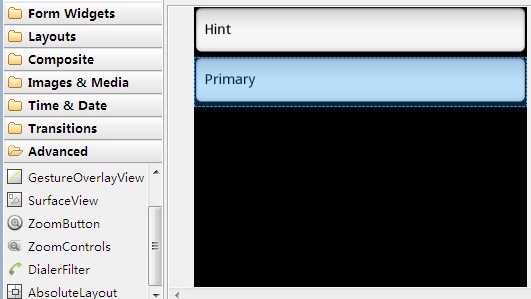
正文 一、结构 public classTextSwitcherextendsViewSwitcher java.lang.Object android.view.View android.view.ViewGroup android.widget.FrameLayout android.widget.ViewAnimator android.widget.ViewSwitcher android.widget.TextSwitcher 二、类概述 ViewSwitcher仅仅包含子类型TextView。TextSwitcher被用来使屏幕上的label产生动画效果。每当setText(CharSequence)被调用时,TextSwitcher使用动画方式将当前的文字内容消失并显示新的文字内容。(译者注:改变文字时增加一些动画效果) 三、构造函数 public TextSwitcher (Context context) 创建一个新的空TextSwitcher 参数 context应用程序上下文 public TextSwitcher (Context context, AttributeSet attrs) 使用提供的context和attributes来创建一个空的TextSwitcher 参数 context应用程序环境 attrs属性集合 四、公共方法 public void addView (View child, int index, ViewGroup.LayoutParams params) 根据指定的布局参数新增一个子视图 参数 child新增的子视图 index新增子视图的位置 params新增子视图的布局参数 抛出异常 IllegalArgumentException当子视图不是一个TextView实例时 public void setCurrentText (CharSequence text) 设置当前显示的文本视图的文字内容。非动画方式显示。 参数 text需要显示的新文本内容 public void setText (CharSequence text) 设置下一视图的文本内容并切换到下一视图。可以动画的退出当前文本内容,显示下一文本内容。 参数 text需要显示的新文本内容 五、代码示例 5.1 摘自APIDemos->View->TextSwitcher 5.1.1 Java public class TextSwitcher1 extends Activity implements ViewSwitcher.ViewFactory, View.OnClickListener{ private TextSwitchermSwitcher; private int mCounter = 0 ; @Override protected void onCreate(BundlesavedInstanceState){ super .onCreate(savedInstanceState); setContentView(R.layout.text_switcher_1); mSwitcher = (TextSwitcher)findViewById(R.id.switcher); mSwitcher.setFactory( this ); Animationin = AnimationUtils.loadAnimation( this , android.R.anim.fade_in); Animationout = AnimationUtils.loadAnimation( this , android.R.anim.fade_out); mSwitcher.setInAnimation(in); mSwitcher.setOutAnimation(out); ButtonnextButton = (Button)findViewById(R.id.next); nextButton.setOnClickListener( this ); updateCounter(); } public void onClick(Viewv){ mCounter ++ ; updateCounter(); } private void updateCounter(){ mSwitcher.setText(String.valueOf(mCounter)); } public ViewmakeView(){ TextViewt = new TextView( this ); t.setGravity(Gravity.TOP | Gravity.CENTER_HORIZONTAL); t.setTextSize( 36 ); return t; } } 5.1.2 XML <? xmlversion="1.0"encoding="utf-8" ?> < LinearLayout xmlns:android ="http://schemas.android.com/apk/res/android" android:layout_width ="match_parent" android:layout_height ="match_parent" android:orientation ="vertical" > < Button android:id ="@+id/next" android:layout_width ="wrap_content" android:layout_height ="wrap_content" android:text ="@string/text_switcher_1_next_text" /> < TextSwitcher android:id ="@+id/switcher" android:layout_width ="match_parent" android:layout_height ="wrap_content" /> </ LinearLayout > 本文转自over140 51CTO博客,原文链接:http://blog.51cto.com/over140/582684,如需转载请自行联系原作者

资源下载

更多资源
优质分享App

优质分享App

近一个月的开发和优化,本站点的第一个app全新上线。该app采用极致压缩,本体才4.36MB。系统里面做了大量数据访问、缓存优化。方便用户在手机上查看文章。后续会推出HarmonyOS的适配版本。

Mario

Mario

马里奥是站在游戏界顶峰的超人气多面角色。马里奥靠吃蘑菇成长,特征是大鼻子、头戴帽子、身穿背带裤,还留着胡子。与他的双胞胎兄弟路易基一起,长年担任任天堂的招牌角色。

腾讯云软件源

腾讯云软件源

为解决软件依赖安装时官方源访问速度慢的问题,腾讯云为一些软件搭建了缓存服务。您可以通过使用腾讯云软件源站来提升依赖包的安装速度。为了方便用户自由搭建服务架构,目前腾讯云软件源站支持公网访问和内网访问。

Spring

Spring

Spring框架(Spring Framework)是由Rod Johnson于2002年提出的开源Java企业级应用框架,旨在通过使用JavaBean替代传统EJB实现方式降低企业级编程开发的复杂性。该框架基于简单性、可测试性和松耦合性设计理念,提供核心容器、应用上下文、数据访问集成等模块,支持整合Hibernate、Struts等第三方框架,其适用范围不仅限于服务器端开发,绝大多数Java应用均可从中受益。


用户登录
用户注册
修改密码
忘记密码