首页 文章 精选 留言 我的

精选列表

搜索[多租户],共10000篇文章
优秀的个人博客,低调大师

java B2B2C Springcloud多租户电子商城系统-断路器聚合监控

一、Hystrix Turbine简介 看单个的Hystrix Dashboard的数据并没有什么多大的价值,要想看这个系统的Hystrix Dashboard数据就需要用到Hystrix Turbine。Hystrix Turbine将每个服务Hystrix Dashboard数据进行了整合。Hystrix Turbine的使用非常简单,只需要引入相应的依赖和加上注解和配置就可以了。 二、准备工作 本文使用的工程为上一篇文章的工程,在此基础上进行改造。因为我们需要多个服务的Dashboard,所以需要再建一个服务,取名为service-lucy,它的基本配置同service-hi,具体见源码,在这里就不详细说明。 三、创建service-turbine 引入相应的依赖: <dependencies> <dependency> <groupId>org.springframework.cloud</groupId> <artifactId>spring-cloud-starter-netflix-eureka-client</artifactId> </dependency> <dependency> <groupId>org.springframework.boot</groupId> <artifactId>spring-boot-starter-web</artifactId> </dependency> <dependency> <groupId>org.springframework.boot</groupId> <artifactId>spring-boot-starter-actuator</artifactId> </dependency> <dependency> <groupId>org.springframework.cloud</groupId> <artifactId>spring-cloud-starter-netflix-hystrix</artifactId> </dependency> <dependency> <groupId>org.springframework.cloud</groupId> <artifactId>spring-cloud-starter-netflix-hystrix-dashboard</artifactId> </dependency> <dependency> <groupId>org.springframework.cloud</groupId> <artifactId>spring-cloud-starter-netflix-turbine</artifactId> </dependency> </dependencies> 在其入口类ServiceTurbineApplication加上注解@EnableTurbine,开启turbine,@EnableTurbine注解包含了@EnableDiscoveryClient注解,即开启了注册服务。 @SpringBootApplication @EnableEurekaClient @EnableDiscoveryClient @RestController @EnableHystrix @EnableHystrixDashboard @EnableCircuitBreaker @EnableTurbine public class ServiceTurbineApplication { /** * http://localhost:8764/turbine.stream */ public static void main(String[] args) { SpringApplication.run( ServiceTurbineApplication.class, args ); } } 配置文件application.yml: spring: application.name: service-turbine server: port: 8769 security.basic.enabled: false turbine: aggregator: clusterConfig: default # 指定聚合哪些集群,多个使用","分割,默认为default。可使用http://.../turbine.stream?cluster={clusterConfig之一}访问 appConfig: service-hi,service-la ### 配置Eureka中的serviceId列表,表明监控哪些服务 clusterNameExpression: new String("default") # 1. clusterNameExpression指定集群名称,默认表达式appName;此时:turbine.aggregator.clusterConfig需要配置想要监控的应用名称 # 2. 当clusterNameExpression: default时,turbine.aggregator.clusterConfig可以不写,因为默认就是default # 3. 当clusterNameExpression: metadata['cluster']时,假设想要监控的应用配置了eureka.instance.metadata-map.cluster: ABC,则需要配置,同时turbine.aggregator.clusterConfig: ABC eureka: client: serviceUrl: defaultZone: http://localhost:8761/eureka/ Turbine演示 依次开启server、service-hi、service-la、service-turbine工程。 打开浏览器输入:http://localhost:8769/turbine.stream, 依次请求: http://localhost:8762/hi?name=whhttp://localhost:8763/hi?name=wh 打开:http://localhost:8763/hystrix,输入监控流http://localhost:8769/turbine.stream,点击monitor stream,可以看到这个页面聚合了2个service的hystrix dashbord数据。 java B2B2C springmvc mybatis电子商务平台源码

优秀的个人博客,低调大师

java B2B2C springmvc mybatis多租户电子商城系统--Zuul的高可用

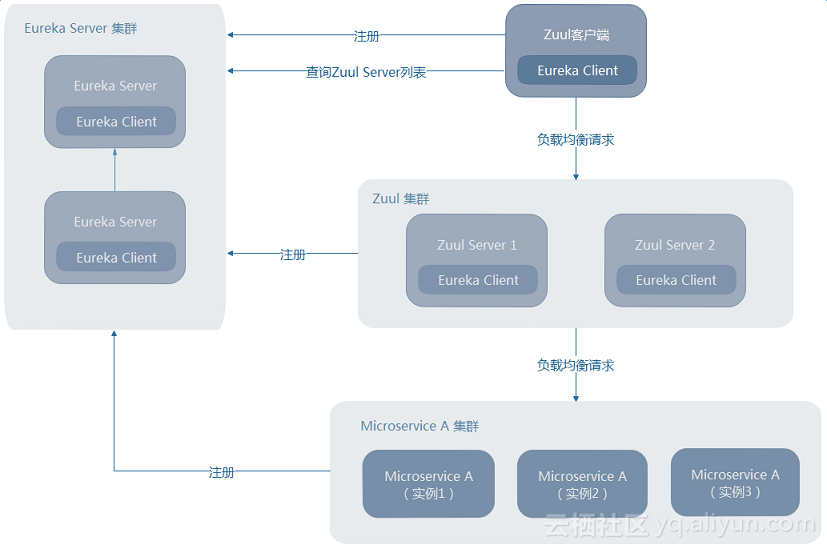
Zuul的高可用非常关键,因为外部请求到后端服务的流量都会经过Zuul。故而在生产环境下一般都需要部署高可用的Zuul以避免单点故障。愿意了解源码的朋友直接求求交流分享技术:二一四七七七五六三三一Zuul客户端也注册到EurekaServer上这种情况下,Zuul的高可用非常简单,只须将多个Zuul节点注册到EurekaServer上,就可实现Zuul的高可用。此时Zuul的高可用与其他微服务的高可用没什么区别。如下图,当Zuul客户端也注册到EurekaServer上时,只须部署多个Zuul节点即可实现其高可用。Zuul客户端会自动从EurekaServer中查询ZuulServer的列表,并使用Ribbon负责均衡地请求Zuul集群。 二Zuul客户端未注册到EurekaServer上现实中,这种场景更多,例如,Zuul客户端是一个手机APP——不可能让所有的手机终端都注册到EurekaServer上。这种情况下,可借助一个额外的负载均衡器来实现Zuul的高可用,例如Nginx、HAProxy、F5等。如下图,Zuul客户端请求发送到负载均衡器,负载均衡器将请求转发到其代理的其中一个Zuul节点。这样,就可以实现Zuul的高可用。 整体代码结构如下:资料和源码来源

优秀的个人博客,低调大师

java B2B2C 源码 springmvc mybatis多租户电子商城系统- Stream重新入队(RabbitMQ)

本文将介绍RabbitMQ的binder提供的重试功能:重新入队 准备一个会消费失败的例子,可以直接沿用前文的工程,也可以新建一个,然后创建如下代码的逻辑: @EnableBinding(TestApplication.TestTopic.class) @SpringBootApplication public class TestApplication { public static void main(String[] args) { SpringApplication.run(TestApplication.class, args); } @RestController static class TestController { @Autowired private TestTopic testTopic; /** * 消息生产接口 * * @param message * @return */ @GetMapping("/sendMessage") public String messageWithMQ(@RequestParam String message) { testTopic.output().send(MessageBuilder.withPayload(message).build()); return "ok"; } } /** * 消息消费逻辑 */ @Slf4j @Component static class TestListener { private int count = 1; @StreamListener(TestTopic.INPUT) public void receive(String payload) { log.info("Received payload : " + payload + ", " + count); throw new RuntimeException("Message consumer failed!"); } } interface TestTopic { String OUTPUT = "example-topic-output"; String INPUT = "example-topic-input"; @Output(OUTPUT) MessageChannel output(); @Input(INPUT) SubscribableChannel input(); } } 内容很简单,既包含了消息的生产,也包含了消息消费。消息消费的时候主动抛出了一个异常来模拟消息的消费失败。 在启动应用之前,还要记得配置一下输入输出通道对应的物理目标(exchange或topic名)、并设置一下分组,比如: spring.cloud.stream.bindings.example-topic-input.destination=test-topic spring.cloud.stream.bindings.example-topic-input.group=stream-exception-handler spring.cloud.stream.bindings.example-topic-input.consumer.max-attempts=1 spring.cloud.stream.rabbit.bindings.example-topic-input.consumer.requeue-rejected=true spring.cloud.stream.bindings.example-topic-output.destination=test-topic 完成了上面配置之后,启动应用并访问localhost:8080/sendMessage?message=hello接口来发送一个消息到MQ中了,此时可以看到程序不断的抛出了消息消费异常。这是由于这里我们多加了一个配置:spring.cloud.stream.rabbit.bindings.example-topic-input.consumer.requeue-rejected=true。在该配置作用之下,消息消费失败之后,并不会将该消息抛弃,而是将消息重新放入队列,所以消息的消费逻辑会被重复执行,直到这条消息消费成功为止。

资源下载

更多资源
Nacos

Nacos

Nacos /nɑ:kəʊs/ 是 Dynamic Naming and Configuration Service 的首字母简称,一个易于构建 AI Agent 应用的动态服务发现、配置管理和AI智能体管理平台。Nacos 致力于帮助您发现、配置和管理微服务及AI智能体应用。Nacos 提供了一组简单易用的特性集,帮助您快速实现动态服务发现、服务配置、服务元数据、流量管理。Nacos 帮助您更敏捷和容易地构建、交付和管理微服务平台。

Rocky Linux

Rocky Linux

Rocky Linux(中文名:洛基)是由Gregory Kurtzer于2020年12月发起的企业级Linux发行版,作为CentOS稳定版停止维护后与RHEL(Red Hat Enterprise Linux)完全兼容的开源替代方案,由社区拥有并管理,支持x86_64、aarch64等架构。其通过重新编译RHEL源代码提供长期稳定性,采用模块化包装和SELinux安全架构,默认包含GNOME桌面环境及XFS文件系统,支持十年生命周期更新。

Sublime Text

Sublime Text

Sublime Text具有漂亮的用户界面和强大的功能,例如代码缩略图,Python的插件,代码段等。还可自定义键绑定,菜单和工具栏。Sublime Text 的主要功能包括:拼写检查,书签,完整的 Python API , Goto 功能,即时项目切换,多选择,多窗口等等。Sublime Text 是一个跨平台的编辑器,同时支持Windows、Linux、Mac OS X等操作系统。

WebStorm

WebStorm

WebStorm 是jetbrains公司旗下一款JavaScript 开发工具。目前已经被广大中国JS开发者誉为“Web前端开发神器”、“最强大的HTML5编辑器”、“最智能的JavaScript IDE”等。与IntelliJ IDEA同源,继承了IntelliJ IDEA强大的JS部分的功能。


用户登录
用户注册