首页 文章 精选 留言 我的

精选列表

搜索[安全研究],共10009篇文章
优秀的个人博客,低调大师

Appium滑动问题研究

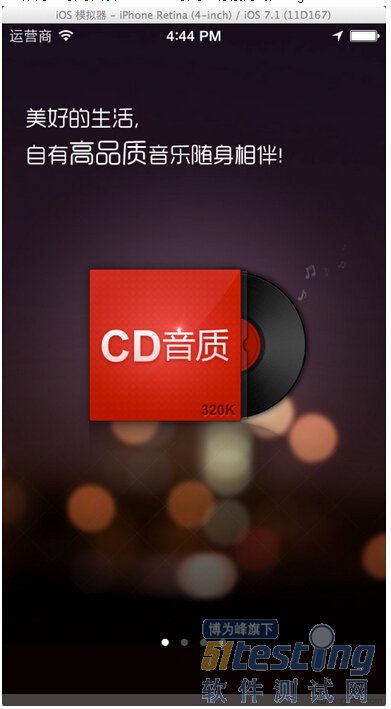
一、Appium中,经常会遇到会遇到滑动操作,但往往用各种手势操作后还是滑动不了,今天主要讲下如何正确使用appium的手势操作。系统环境为最新的iOS 7.1+ Xcode 5.1 首先讲下滑动操作的几个基本方法。 1.swipe操作,主要用于缓慢拖动,代码示例 JavascriptExecutor js = (JavascriptExecutor) driver; HashMap<String, Double> swipeObject = new HashMap<String, Double>(); swipeObject.put("startX", startX); swipeObject.put("startY", startY); swipeObject.put("endX", endX); swipebject.put("endY", endY); swipeObject.put("duration", duration); swipeObject.put("element", Double.valueOf(((RemoteWebElement) element).getId())); js.executeScript("mobile: swipe", swipeObject); ①X,Y可为coordinator,也可以是percent,duration单位为秒 ②可以指定的element,也可以不指定 ③appium mac端有swipe的按钮可以试下 2.flick操作,类似swipe,但没有duration,用于快速滑动,如ViewController的切换,代码示例 JavascriptExecutor js = (JavascriptExecutor) driver; HashMap<String, Double> flickObject = new HashMap<String, Double>(); flickObject.put("startX", 0.8); flickObject.put("startY", 0.5); flickObject.put("endX", 0.2); flickObject.put("endY", 0.5); flickObject.put("element", Double.valueOf(((RemoteWebElement) element).getId())); js.executeScript("mobile: flick", flickObject);); 3.scroll操作,专为iOS 7.x而生,官方的解释如下 An unfortunate bug exists in the iOS 7.x Simulator where ScrollViews don't recognize gestures initiated by UIAutomation (which Appium uses under the hood for iOS). To work around this, we have provided access to a different function, scroll, which in many cases allows you to do what you wanted to do with a ScrollView, namely, scroll it! 简而言之,iOS 7的系统ScrollView无法识别手势操作,使用scroll方法可完美替代,代码见例子 二、接下来以三个不同app的引导图为例,分别为看游戏,云阅读和云音乐,演示下不同方法实现的滑动操作 1.看游戏,引导图以ScrollView引导,只需要使用srcoll方法即可 JavascriptExecutor js = (JavascriptExecutor) driver; HashMap<String, String> scrollObject = new HashMap<String, String>(); scrollObject.put("direction", "right"); js.executeScript("mobile: scroll", scrollObject 2.云音乐,引导图以ScrollView引导,分别为4张image Inspector中显示如下: 如上所示,如果使用swipe或flick方法是不可以滑动引导图的,而用Scroll的方向模式也不行,这里采用如下方法 JavascriptExecutor js = (JavascriptExecutor) driver; WebElement element = driver.findElementByXPath("4张image的xpath路径"); HashMap<String, String> scrollObject = new HashMap<String, String>(); scrollObject.put("element", ((RemoteWebElement) element).getId()); js.executeScript("mobile: scroll", scrollObject); 3.云阅读,云阅读的引导图并不是存在于ScrollView中,而是专门有一个UIAElement存放,那就只需要用swipe拖动这个UIAElement就好了,如图所示。 代码见swipe方法。 最新内容请见作者的GitHub页:http://qaseven.github.io/

优秀的个人博客,低调大师

elasticsearch 拼音检索能力研究

gitchennan/elasticsearch-analysis-lc-pinyin 配置参数少,功能满足需求。 对应版本 elasticsearch2.3.2 对应 elasticsearch-analysis-lc-pinyin 分支 2.4.2.1 或者 tag 2.2.2.1 创建一个类型 elasticsearch-analysis-lc-pinyin 的 README 是根据 elasticsearch5.0 编写的,给出的创建一个类型的语法如下 curl -XPOST http://localhost:9200/index/_mapping/brand -d' { "brand": { "properties": { "name": { "type": "text", "analyzer": "lc_index", "search_analyzer": "lc_search", "term_vector": "with_positions_offsets" } } } }' type=text 是 elasticsearch5.0 之后的类型,所以无法创建成功,稍作修改 type=text,使用如下语法创建一个类型 curl -XPOST http://localhost:9200/index/_mapping/brand -d' { "brand": { "properties": { "name": { "type": "string", "analyzer": "lc_index", "search_analyzer": "lc_search", "term_vector": "with_positions_offsets" } } } }' index 索引结构如下 { "index": { "aliases": {}, "mappings": { "brand": { "properties": { "name": { "type": "string", "term_vector": "with_positions_offsets", "analyzer": "lc_index", "search_analyzer": "lc_search" } } } }, "settings": { "index": { "creation_date": "1490152096129", "number_of_shards": "5", "number_of_replicas": "1", "uuid": "Lp1sSHGhQZyZ57LKO5KwRQ", "version": { "created": "2030299" } } }, "warmers": {} } } 存入几条数据 curl -XPOST http://localhost:9200/index/brand/1 -d'{"name":"百度"}' curl -XPOST http://localhost:9200/index/brand/8 -d'{"name":"百度糯米"}' curl -XPOST http://localhost:9200/index/brand/2 -d'{"name":"阿里巴巴"}' curl -XPOST http://localhost:9200/index/brand/3 -d'{"name":"腾讯科技"}' curl -XPOST http://localhost:9200/index/brand/4 -d'{"name":"网易游戏"}' curl -XPOST http://localhost:9200/index/brand/9 -d'{"name":"大众点评"}' curl -XPOST http://localhost:9200/index/brand/10 -d'{"name":"携程旅行网"}' 查出目前的所有数据 http://localhost:9200/index/_search { "took": 70, "timed_out": false, "_shards": { "total": 5, "successful": 5, "failed": 0 }, "hits": { "total": 7, "max_score": 1, "hits": [ { "_index": "index", "_type": "brand", "_id": "8", "_score": 1, "_source": { "name": "百度糯米" } }, { "_index": "index", "_type": "brand", "_id": "9", "_score": 1, "_source": { "name": "大众点评" } }, { "_index": "index", "_type": "brand", "_id": "10", "_score": 1, "_source": { "name": "携程旅行网" } }, { "_index": "index", "_type": "brand", "_id": "2", "_score": 1, "_source": { "name": "阿里巴巴" } }, { "_index": "index", "_type": "brand", "_id": "4", "_score": 1, "_source": { "name": "网易游戏" } }, { "_index": "index", "_type": "brand", "_id": "1", "_score": 1, "_source": { "name": "百度" } }, { "_index": "index", "_type": "brand", "_id": "3", "_score": 1, "_source": { "name": "腾讯科技" } } ] } } 插件自带分词器 lc_index 原文:lc_index : 该分词器用于索引数据时指定,将中文转换为全拼和首字,同时保留中文 分词器分词效果 curl -X POST -d '{ "analyzer" : "lc_index", "text" : ["刘德华"] }' "http://localhost:9200/lc/_analyze" { "tokens": [ { "token": "刘", "start_offset": 0, "end_offset": 1, "type": "word", "position": 0 }, { "token": "liu", "start_offset": 0, "end_offset": 1, "type": "word", "position": 0 }, { "token": "l", "start_offset": 0, "end_offset": 1, "type": "word", "position": 0 }, { "token": "德", "start_offset": 1, "end_offset": 2, "type": "word", "position": 1 }, { "token": "de", "start_offset": 1, "end_offset": 2, "type": "word", "position": 1 }, { "token": "d", "start_offset": 1, "end_offset": 2, "type": "word", "position": 1 }, { "token": "华", "start_offset": 2, "end_offset": 3, "type": "word", "position": 2 }, { "token": "hua", "start_offset": 2, "end_offset": 3, "type": "word", "position": 2 }, { "token": "h", "start_offset": 2, "end_offset": 3, "type": "word", "position": 2 } ] } 插件自带分词器 lc_search 原文:lc_search: 该分词器用于拼音搜索时指定,按最小拼音分词个数拆分拼音,优先拆分全拼 curl -X POST -d '{ "analyzer" : "lc_search", "text" : ["刘德华"] }' "http://localhost:9200/index/_analyze" { "tokens": [ { "token": "刘", "start_offset": 0, "end_offset": 1, "type": "word", "position": 0 }, { "token": "德", "start_offset": 1, "end_offset": 2, "type": "word", "position": 1 }, { "token": "华", "start_offset": 2, "end_offset": 3, "type": "word", "position": 2 } ] } 拼音全拼 搜索 baidu,结果正确 curl -X POST -d '{ "query": { "match": { "name": { "query": "baidu", "analyzer": "lc_search", "type": "phrase" } } }, "highlight" : { "pre_tags" : ["<tag1>"], "post_tags" : ["</tag1>"], "fields" : { "name" : {} } } }' "http://localhost:9200/index/brand/_search" { "took": 4, "timed_out": false, "_shards": { "total": 5, "successful": 5, "failed": 0 }, "hits": { "total": 2, "max_score": 1.4054651, "hits": [ { "_index": "index", "_type": "brand", "_id": "8", "_score": 1.4054651, "_source": { "name": "百度糯米" }, "highlight": { "name": [ "<tag1>百度</tag1>糯米" ] } }, { "_index": "index", "_type": "brand", "_id": "1", "_score": 0.38356602, "_source": { "name": "百度" }, "highlight": { "name": [ "<tag1>百度</tag1>" ] } } ] } } 单字拼音全拼与中文混合 搜索 xie程lu行,结果正确 { "took": 11, "timed_out": false, "_shards": { "total": 5, "successful": 5, "failed": 0 }, "hits": { "total": 1, "max_score": 2.459564, "hits": [ { "_index": "index", "_type": "brand", "_id": "10", "_score": 2.459564, "_source": { "name": "携程旅行网" }, "highlight": { "name": [ "<tag1>携程旅行</tag1>网" ] } } ] } } 单字拼音首字母与中文混合 搜索 携cl行,结果正确 curl -X POST -d '{ "query": { "match": { "name": { "query": "携cl行", "analyzer": "lc_search", "type": "phrase" } } }, "highlight" : { "pre_tags" : ["<tag1>"], "post_tags" : ["</tag1>"], "fields" : { "name" : {} } } }' "http://localhost:9200/index/brand/_search" { "took": 6, "timed_out": false, "_shards": { "total": 5, "successful": 5, "failed": 0 }, "hits": { "total": 1, "max_score": 2.459564, "hits": [ { "_index": "index", "_type": "brand", "_id": "10", "_score": 2.459564, "_source": { "name": "携程旅行网" }, "highlight": { "name": [ "<tag1>携程旅行</tag1>网" ] } } ] } } 拼音首字母 搜索 albb,结果正确 curl -X POST -d '{ "query": { "match": { "name": { "query": "albb", "analyzer": "lc_search", "type": "phrase" } } }, "highlight" : { "pre_tags" : ["<tag1>"], "post_tags" : ["</tag1>"], "fields" : { "name" : {} } } }' "http://localhost:9200/index/brand/_search" { "took": 4, "timed_out": false, "_shards": { "total": 5, "successful": 5, "failed": 0 }, "hits": { "total": 1, "max_score": 2.828427, "hits": [ { "_index": "index", "_type": "brand", "_id": "2", "_score": 2.828427, "_source": { "name": "阿里巴巴" }, "highlight": { "name": [ "<tag1>阿里巴巴</tag1>" ] } } ] } } 结论 elasticsearch-analysis-lc-pinyin 按照全拼、首字母,拼音中文混合搜索 elasticsearch-analysis-pinyin v1.7.2 github 项目 elasticsearch-analysis-pinyin v1.7.2 完全是为 elasticsearch 2.3.2 服务 first_letter 改变 first_letter=prefix padding_char=" " curl -X POST -d '{ "mappings": { "folk": { "properties": { "text": { "type": "string", "analyzer": "pinyin_analyzer" } } } }, "settings": { "index" : { "analysis" : { "analyzer" : { "pinyin_analyzer" : { "tokenizer" : "my_pinyin", "filter" : ["word_delimiter"] } }, "tokenizer" : { "my_pinyin" : { "type" : "pinyin", "first_letter" : "prefix", "padding_char" : " " } } } } } }' "http://localhost:9200/medcl" 拼音效果如下 curl -X POST -d '{ "analyzer" : "pinyin_analyzer", "text" : ["刘德华"] }' "http://localhost:9200/medcl/_analyze" { "tokens": [ { "token": "ldh", "start_offset": 0, "end_offset": 3, "type": "word", "position": 0 }, { "token": "liu", "start_offset": 0, "end_offset": 3, "type": "word", "position": 1 }, { "token": "de", "start_offset": 0, "end_offset": 3, "type": "word", "position": 2 }, { "token": "hua", "start_offset": 0, "end_offset": 3, "type": "word", "position": 3 } ] } first_letter=append padding_char=" " curl -X POST -d '{ "mappings": { "folk": { "properties": { "text": { "type": "string", "analyzer": "pinyin_analyzer" } } } }, "settings": { "index" : { "analysis" : { "analyzer" : { "pinyin_analyzer" : { "tokenizer" : "my_pinyin", "filter" : ["word_delimiter"] } }, "tokenizer" : { "my_pinyin" : { "type" : "pinyin", "first_letter" : "append", "padding_char" : " " } } } } } }' "http://localhost:9200/medcl2" 拼音效果如下 curl -X POST -d '{ "analyzer" : "pinyin_analyzer", "text" : ["刘德华"] }' "http://localhost:9200/medcl2/_analyze" { "tokens": [ { "token": "liu", "start_offset": 0, "end_offset": 3, "type": "word", "position": 0 }, { "token": "de", "start_offset": 0, "end_offset": 3, "type": "word", "position": 1 }, { "token": "hua", "start_offset": 0, "end_offset": 3, "type": "word", "position": 2 }, { "token": "ldh", "start_offset": 0, "end_offset": 3, "type": "word", "position": 3 } ] } first_letter=only padding_char=" " curl -X POST -d '{ "mappings": { "folk": { "properties": { "text": { "type": "string", "analyzer": "pinyin_analyzer" } } } }, "settings": { "index" : { "analysis" : { "analyzer" : { "pinyin_analyzer" : { "tokenizer" : "my_pinyin", "filter" : ["word_delimiter"] } }, "tokenizer" : { "my_pinyin" : { "type" : "pinyin", "first_letter" : "only", "padding_char" : " " } } } } } }' "http://localhost:9200/medcl3" 拼音效果如下 curl -X POST -H "Cache-Control: no-cache" -H "Postman-Token: 67015c0d-cd07-961b-4c46-da90f7d558d8" -d '{ "analyzer" : "pinyin_analyzer", "text" : ["刘德华"] }' "http://localhost:9200/medcl3/_analyze" { "tokens": [ { "token": "ldh", "start_offset": 0, "end_offset": 3, "type": "word", "position": 0 } ] } first_letter=none padding_char=" " curl -X POST -d '{ "mappings": { "folk": { "properties": { "text": { "type": "string", "analyzer": "pinyin_analyzer" } } } }, "settings": { "index" : { "analysis" : { "analyzer" : { "pinyin_analyzer" : { "tokenizer" : "my_pinyin", "filter" : ["word_delimiter"] } }, "tokenizer" : { "my_pinyin" : { "type" : "pinyin", "first_letter" : "none", "padding_char" : " " } } } } } }' "http://localhost:9200/medcl4" 拼音效果如下 curl -X POST -d '{ "analyzer" : "pinyin_analyzer", "text" : ["刘德华"] }' "http://localhost:9200/medcl4/_analyze" { "tokens": [ { "token": "liu", "start_offset": 0, "end_offset": 3, "type": "word", "position": 0 }, { "token": "de", "start_offset": 0, "end_offset": 3, "type": "word", "position": 1 }, { "token": "hua", "start_offset": 0, "end_offset": 3, "type": "word", "position": 2 } ] } padding_char 改变 first_letter=prefix padding_char="" curl -X POST -d '{ "mappings": { "folk": { "properties": { "text": { "type": "string", "analyzer": "pinyin_analyzer" } } } }, "settings": { "index" : { "analysis" : { "analyzer" : { "pinyin_analyzer" : { "tokenizer" : "my_pinyin", "filter" : ["word_delimiter"] } }, "tokenizer" : { "my_pinyin" : { "type" : "pinyin", "first_letter" : "prefix", "padding_char" : "" } } } } } }' "http://localhost:9200/medcl5" 拼音效果如下 curl -X POST -d '{ "analyzer" : "pinyin_analyzer", "text" : ["刘德华"] }' "http://localhost:9200/medcl5/_analyze" { "tokens": [ { "token": "ldhliudehua", "start_offset": 0, "end_offset": 3, "type": "word", "position": 0 } ] } first_letter=append padding_char="" curl -X PUT -d '{ "mappings": { "folk": { "properties": { "text": { "type": "string", "analyzer": "pinyin_analyzer" } } } }, "settings": { "index" : { "analysis" : { "analyzer" : { "pinyin_analyzer" : { "tokenizer" : "my_pinyin", "filter" : ["word_delimiter"] } }, "tokenizer" : { "my_pinyin" : { "type" : "pinyin", "first_letter" : "append", "padding_char" : "" } } } } } }' "http://localhost:9200/medcl7" 拼音效果如下 curl -X POST -d '{ "analyzer" : "pinyin_analyzer", "text" : ["刘德华"] }' "http://localhost:9200/medcl7/_analyze" { "tokens": [ { "token": "liudehualdh", "start_offset": 0, "end_offset": 3, "type": "word", "position": 0 } ] } first_letter=only padding_char="" curl -X PUT -d '{ "mappings": { "folk": { "properties": { "text": { "type": "string", "analyzer": "pinyin_analyzer" } } } }, "settings": { "index" : { "analysis" : { "analyzer" : { "pinyin_analyzer" : { "tokenizer" : "my_pinyin", "filter" : ["word_delimiter"] } }, "tokenizer" : { "my_pinyin" : { "type" : "pinyin", "first_letter" : "only", "padding_char" : "" } } } } } }' "http://localhost:9200/medcl8" 拼音效果如下 curl -X POST -d '{ "analyzer" : "pinyin_analyzer", "text" : ["刘德华"] }' "http://localhost:9200/medcl8/_analyze" { "tokens": [ { "token": "ldh", "start_offset": 0, "end_offset": 3, "type": "word", "position": 0 } ] } first_letter=none padding_char="" curl -X PUT -d '{ "mappings": { "folk": { "properties": { "text": { "type": "string", "analyzer": "pinyin_analyzer" } } } }, "settings": { "index" : { "analysis" : { "analyzer" : { "pinyin_analyzer" : { "tokenizer" : "my_pinyin", "filter" : ["word_delimiter"] } }, "tokenizer" : { "my_pinyin" : { "type" : "pinyin", "first_letter" : "none", "padding_char" : "" } } } } } }' "http://localhost:9200/medcl9" 拼音效果如下 curl -X POST -d '{ "analyzer" : "pinyin_analyzer", "text" : ["刘德华"] }' "http://localhost:9200/medcl9/_analyze" { "tokens": [ { "token": "liudehua", "start_offset": 0, "end_offset": 3, "type": "word", "position": 0 } ] } 结论 elasticsearch 2.3.2 对应 elasticsearch-analysis-pinyin 1.7.2,pinyin 1.7.2 可配置参数有:first_letter 和 padding_char。 padding_char 的作用是将字符串按照什么字符分隔,比如 padding_char = " ",那么 刘德华 将先被分隔为 刘,德,华;如果 padding_char = "",那么 刘德华 将不会被分隔 first_letter 取值:prefix,append,only,none。 padding_char 与 first_letter 的组合会影响拼音输出的结果 elasticsearch-analysis-pinyin 2.x 分支 github 项目 elasticsearch-analysis-pinyin 2.x 分支 是为 elasticsearch 2.x 服务,经过测试 elasticsearch 2.3.2 也可以使用该插件。 官方文档中的说明 remove_duplicated_term when this option enabled, duplicated term will be removed to save index, eg: de的>de, default: false, NOTE: position related query maybe influenced keep_first_letter when this option enabled, eg: 刘德华>ldh, default: true keep_separate_first_letter when this option enabled, will keep first letters separately, eg: 刘德华>l,d,h, default: false, NOTE: query result maybe too fuzziness due to term too frequency limit_first_letter_length set max length of the first_letter result, default: 16 keep_full_pinyin when this option enabled, eg: 刘德华> [liu,de,hua], default: true keep_joined_full_pinyin when this option enabled, eg: 刘德华> [liudehua], default: false keep_none_chinese keep non chinese letter or number in result, default: true keep_none_chinese_together keep non chinese letter together, default: true, eg: DJ音乐家 -> DJ,yin,yue,jia, when set to false, eg: DJ音乐家 -> D,J,yin,yue,jia, NOTE: keep_none_chinese should be enabled first keep_none_chinese_in_first_letter keep non Chinese letters in first letter, eg: 刘德华AT2016->ldhat2016, default: true none_chinese_pinyin_tokenize break non chinese letters into separate pinyin term if they are pinyin, default: true, eg: liudehuaalibaba13zhuanghan -> liu,de,hua,a,li,ba,ba,13,zhuang,han, NOTE: keep_none_chinese and keep_none_chinese_together should be enabled first keep_original when this option enabled, will keep original input as well, default: false lowercase lowercase non Chinese letters, default: true trim_whitespace default: true 基准配置 基准配置参数 "keep_joined_full_pinyin": "false", "lowercase": "true", "keep_original": "false", "keep_none_chinese_together": "true", "remove_duplicated_term": "false", "keep_first_letter": "true", "keep_separate_first_letter": "false", "trim_whitespace": "true", "keep_none_chinese": "true", "limit_first_letter_length": "16", "keep_full_pinyin": "true" 创建索引与分词器 curl -X POST -d '{ "mappings": { "folk": { "properties": { "text": { "type": "string", "analyzer": "pinyin_analyzer" } } } }, "settings": { "index" : { "analysis" : { "analyzer" : { "pinyin_analyzer" : { "tokenizer" : "my_pinyin" } }, "tokenizer" : { "my_pinyin" : { "type" : "pinyin", "remove_duplicated_term" : false, "keep_joined_full_pinyin" : false, "keep_separate_first_letter" : false, "keep_first_letter" : true, "limit_first_letter_length" : 16, "keep_full_pinyin" : true, "keep_original" : true, "keep_none_chinese" : true, "keep_none_chinese_together" : true, "lowercase" : true, "trim_whitespace" : true } } } } } }' "http://localhost:9200/medcl20" 生成索引结构 curl -X GET "http://localhost:9200/medcl20" { "medcl20": { "aliases": {}, "mappings": { "folk": { "properties": { "text": { "type": "string", "analyzer": "pinyin_analyzer" } } } }, "settings": { "index": { "creation_date": "1490170676090", "analysis": { "analyzer": { "pinyin_analyzer": { "tokenizer": "my_pinyin" } }, "tokenizer": { "my_pinyin": { "keep_joined_full_pinyin": "false", "lowercase": "true", "keep_original": "true", "keep_none_chinese_together": "true", "remove_duplicated_term": "false", "keep_first_letter": "true", "keep_separate_first_letter": "false", "trim_whitespace": "true", "type": "pinyin", "keep_none_chinese": "true", "limit_first_letter_length": "16", "keep_full_pinyin": "true" } } }, "number_of_shards": "5", "number_of_replicas": "1", "uuid": "31Y9PizQQ2KQn_Fl6bpPNw", "version": { "created": "2030299" } } }, "warmers": {} } } 分词器分词效果 curl -X POST -d '{ "analyzer" : "pinyin_analyzer", "text" : ["刘德华"] }' "http://localhost:9200/medcl20/_analyze" { "tokens": [ { "token": "liu", "start_offset": 0, "end_offset": 1, "type": "word", "position": 0 }, { "token": "de", "start_offset": 1, "end_offset": 2, "type": "word", "position": 1 }, { "token": "hua", "start_offset": 2, "end_offset": 3, "type": "word", "position": 2 }, { "token": "刘德华", "start_offset": 0, "end_offset": 3, "type": "word", "position": 3 }, { "token": "ldh", "start_offset": 0, "end_offset": 3, "type": "word", "position": 4 } ] } keep_original keep_original = true curl -X POST -d '{ "analyzer" : "pinyin_analyzer", "text" : ["刘德华"] }' "http://localhost:9200/medcl20/_analyze" { "tokens": [ { "token": "liu", "start_offset": 0, "end_offset": 1, "type": "word", "position": 0 }, { "token": "de", "start_offset": 1, "end_offset": 2, "type": "word", "position": 1 }, { "token": "hua", "start_offset": 2, "end_offset": 3, "type": "word", "position": 2 }, { "token": "刘德华", "start_offset": 0, "end_offset": 3, "type": "word", "position": 3 }, { "token": "ldh", "start_offset": 0, "end_offset": 3, "type": "word", "position": 4 } ] } keep_original = false curl -X POST -d '{ "analyzer" : "pinyin_analyzer", "text" : ["刘德华"] }' "http://localhost:9200/medcl20/_analyze" { "tokens": [ { "token": "liu", "start_offset": 0, "end_offset": 1, "type": "word", "position": 0 }, { "token": "de", "start_offset": 1, "end_offset": 2, "type": "word", "position": 1 }, { "token": "hua", "start_offset": 2, "end_offset": 3, "type": "word", "position": 2 }, { "token": "ldh", "start_offset": 0, "end_offset": 3, "type": "word", "position": 3 } ] } keep_original 功能 keep_original=true 将保留原字符串,比如存入索引的数据为 刘德华 那么 刘德华 将也会被保存到索引中。keep_original=false 则不保存原字符串到索引 trim_whitespace trim_whitespace=true curl -X POST -d '{ "analyzer" : "pinyin_analyzer", "text" : [" 最爱 刘德华 的帅气帅气的 "] }' "http://localhost:9200/medcl20/_analyze" { "tokens": [ { "token": "zui", "start_offset": 3, "end_offset": 4, "type": "word", "position": 0 }, { "token": "ai", "start_offset": 4, "end_offset": 5, "type": "word", "position": 1 }, { "token": "liu", "start_offset": 8, "end_offset": 9, "type": "word", "position": 2 }, { "token": "de", "start_offset": 9, "end_offset": 10, "type": "word", "position": 3 }, { "token": "hua", "start_offset": 10, "end_offset": 11, "type": "word", "position": 4 }, { "token": "de", "start_offset": 14, "end_offset": 15, "type": "word", "position": 5 }, { "token": "shuai", "start_offset": 15, "end_offset": 16, "type": "word", "position": 6 }, { "token": "qi", "start_offset": 16, "end_offset": 17, "type": "word", "position": 7 }, { "token": "shuai", "start_offset": 17, "end_offset": 18, "type": "word", "position": 8 }, { "token": "qi", "start_offset": 18, "end_offset": 19, "type": "word", "position": 9 }, { "token": "de", "start_offset": 19, "end_offset": 20, "type": "word", "position": 10 }, { "token": "最爱 刘德华 的帅气帅气的", "start_offset": 0, "end_offset": 23, "type": "word", "position": 11 }, { "token": "zaldhdsqsqd", "start_offset": 0, "end_offset": 11, "type": "word", "position": 12 } ] } trim_whitespace=false curl -X POST -d '{ "analyzer" : "pinyin_analyzer", "text" : [" 最爱 刘德华 的帅气帅气的 "] }' "http://localhost:9200/medcl20/_analyze" { "tokens": [ { "token": "zui", "start_offset": 3, "end_offset": 4, "type": "word", "position": 0 }, { "token": "ai", "start_offset": 4, "end_offset": 5, "type": "word", "position": 1 }, { "token": "liu", "start_offset": 8, "end_offset": 9, "type": "word", "position": 2 }, { "token": "de", "start_offset": 9, "end_offset": 10, "type": "word", "position": 3 }, { "token": "hua", "start_offset": 10, "end_offset": 11, "type": "word", "position": 4 }, { "token": "de", "start_offset": 14, "end_offset": 15, "type": "word", "position": 5 }, { "token": "shuai", "start_offset": 15, "end_offset": 16, "type": "word", "position": 6 }, { "token": "qi", "start_offset": 16, "end_offset": 17, "type": "word", "position": 7 }, { "token": "shuai", "start_offset": 17, "end_offset": 18, "type": "word", "position": 8 }, { "token": "qi", "start_offset": 18, "end_offset": 19, "type": "word", "position": 9 }, { "token": "de", "start_offset": 19, "end_offset": 20, "type": "word", "position": 10 }, { "token": " 最爱 刘德华 的帅气帅气的 ", "start_offset": 0, "end_offset": 23, "type": "word", "position": 11 }, { "token": "zaldhdsqsqd", "start_offset": 0, "end_offset": 11, "type": "word", "position": 12 } ] } trim_whitespace 功能 去除字符串首尾空格字符,不去除字符串中间的空格。这个参数只有当 keep_original=true 时才能够看到效果。 例如当字符串为:最爱 刘德华 的帅气帅气的,trim_whitespace=true 则原字符串将被保存为 最爱 刘德华 的帅气帅气的,如果 trim_whitespace=false 则原字符串将被保存为 最爱 刘德华 的帅气帅气的。如果 keep_original=false,那么原字符串没有被保存,也将看不到效果。 keep_joined_full_pinyin keep_joined_full_pinyin = false curl -X POST -d '{ "analyzer" : "pinyin_analyzer", "text" : ["刘德华"] }' "http://localhost:9200/medcl21/_analyze" { "tokens": [ { "token": "liu", "start_offset": 0, "end_offset": 1, "type": "word", "position": 0 }, { "token": "de", "start_offset": 1, "end_offset": 2, "type": "word", "position": 1 }, { "token": "hua", "start_offset": 2, "end_offset": 3, "type": "word", "position": 2 }, { "token": "刘德华", "start_offset": 0, "end_offset": 3, "type": "word", "position": 3 }, { "token": "ldh", "start_offset": 0, "end_offset": 3, "type": "word", "position": 4 } ] } keep_joined_full_pinyin = true curl -X POST -d '{ "analyzer" : "pinyin_analyzer", "text" : ["刘德华"] }' "http://localhost:9200/medcl22/_analyze" { "tokens": [ { "token": "liu", "start_offset": 0, "end_offset": 1, "type": "word", "position": 0 }, { "token": "de", "start_offset": 1, "end_offset": 2, "type": "word", "position": 1 }, { "token": "hua", "start_offset": 2, "end_offset": 3, "type": "word", "position": 2 }, { "token": "刘德华", "start_offset": 0, "end_offset": 3, "type": "word", "position": 3 }, { "token": "liudehua", "start_offset": 0, "end_offset": 8, "type": "word", "position": 4 }, { "token": "ldh", "start_offset": 0, "end_offset": 3, "type": "word", "position": 5 } ] } keep_joined_full_pinyin 功能 keep_joined_full_pinyin=true 将保存字符串拼音全拼,false 则不保存。例如,当 kepp_joined_full_pinyin=true 时,文本 刘德华 的拼音全拼 liudehua 将会被保留;当 keep_joined_full_pinyin=false 则 全拼liudehua remove_duplicated_term remove_duplicated_term = false curl -X POST -d '{ "analyzer" : "pinyin_analyzer", "text" : ["刘德华刘德华帅帅帅,帅帅帅"] }' "http://localhost:9200/medcl20/_analyze" { "tokens": [ { "token": "liu", "start_offset": 0, "end_offset": 1, "type": "word", "position": 0 }, { "token": "de", "start_offset": 1, "end_offset": 2, "type": "word", "position": 1 }, { "token": "hua", "start_offset": 2, "end_offset": 3, "type": "word", "position": 2 }, { "token": "liu", "start_offset": 3, "end_offset": 4, "type": "word", "position": 3 }, { "token": "de", "start_offset": 4, "end_offset": 5, "type": "word", "position": 4 }, { "token": "hua", "start_offset": 5, "end_offset": 6, "type": "word", "position": 5 }, { "token": "shuai", "start_offset": 6, "end_offset": 7, "type": "word", "position": 6 }, { "token": "shuai", "start_offset": 7, "end_offset": 8, "type": "word", "position": 7 }, { "token": "shuai", "start_offset": 8, "end_offset": 9, "type": "word", "position": 8 }, { "token": "shuai", "start_offset": 10, "end_offset": 11, "type": "word", "position": 9 }, { "token": "shuai", "start_offset": 11, "end_offset": 12, "type": "word", "position": 10 }, { "token": "shuai", "start_offset": 12, "end_offset": 13, "type": "word", "position": 11 }, { "token": "刘德华刘德华帅帅帅,帅帅帅", "start_offset": 0, "end_offset": 13, "type": "word", "position": 12 }, { "token": "ldhldhssssss", "start_offset": 0, "end_offset": 12, "type": "word", "position": 13 } ] } remove_duplicated_term = true curl -X POST -d '{ "analyzer" : "pinyin_analyzer", "text" : ["刘德华刘德华帅帅帅,帅帅帅"] }' "http://localhost:9200/medcl26/_analyze" { "tokens": [ { "token": "liu", "start_offset": 0, "end_offset": 1, "type": "word", "position": 0 }, { "token": "de", "start_offset": 1, "end_offset": 2, "type": "word", "position": 1 }, { "token": "hua", "start_offset": 2, "end_offset": 3, "type": "word", "position": 2 }, { "token": "shuai", "start_offset": 6, "end_offset": 7, "type": "word", "position": 3 }, { "token": "刘德华刘德华帅帅帅,帅帅帅", "start_offset": 0, "end_offset": 13, "type": "word", "position": 4 }, { "token": "ldhldhssssss", "start_offset": 0, "end_offset": 12, "type": "word", "position": 5 } ] } remove_duplicated_term 功能 remove_duplicated_term=true 则会将文本中相同的拼音只保存一份,比如 刘德华刘德华 只会保留一份拼音 liu,de,hua;相对的 remove_duplicated_term=false 则会保留两份 liu,de,hua。注意:remove_duplicated_term 并不会影响文本首字母的文本,刘德华刘德华 生成的首字母拼音始终都为 ldhldh remove_duplicated_term = true 并且 keep_joined_full_pinyin = true curl -X POST -d '{ "analyzer" : "pinyin_analyzer", "text" : ["刘德华刘德华帅帅帅,帅帅帅"] }' "http://localhost:9200/medcl27/_analyze" { "tokens": [ { "token": "liu", "start_offset": 0, "end_offset": 1, "type": "word", "position": 0 }, { "token": "de", "start_offset": 1, "end_offset": 2, "type": "word", "position": 1 }, { "token": "hua", "start_offset": 2, "end_offset": 3, "type": "word", "position": 2 }, { "token": "shuai", "start_offset": 6, "end_offset": 7, "type": "word", "position": 3 }, { "token": "刘德华刘德华帅帅帅,帅帅帅", "start_offset": 0, "end_offset": 13, "type": "word", "position": 4 }, { "token": "liudehualiudehuashuaishuaishuaishuaishuaishuai", "start_offset": 0, "end_offset": 46, "type": "word", "position": 5 }, { "token": "ldhldhssssss", "start_offset": 0, "end_offset": 12, "type": "word", "position": 6 } ] } remove_duplicated_term 功能 remove_duplicated_term = true 会过滤相同的拼音,但是不影响全拼,刘德华刘德华 生成的字符串全拼为 liudehualiudehua keep_none_chinese keep_none_chinese = true POST /medcl20/_analyze HTTP/1.1 Host: localhost:9200 { "analyzer" : "pinyin_analyzer", "text" : ["刘*20*德b华DJ"] } { "tokens": [ { "token": "liu", "start_offset": 0, "end_offset": 1, "type": "word", "position": 0 }, { "token": "20", "start_offset": 3, "end_offset": 5, "type": "word", "position": 1 }, { "token": "de", "start_offset": 5, "end_offset": 6, "type": "word", "position": 2 }, { "token": "b", "start_offset": 6, "end_offset": 7, "type": "word", "position": 3 }, { "token": "hua", "start_offset": 7, "end_offset": 8, "type": "word", "position": 4 }, { "token": "d", "start_offset": 7, "end_offset": 9, "type": "word", "position": 5 }, { "token": "j", "start_offset": 7, "end_offset": 9, "type": "word", "position": 6 }, { "token": "刘*20*德b华dj", "start_offset": 0, "end_offset": 10, "type": "word", "position": 7 }, { "token": "l20dbhdj", "start_offset": 0, "end_offset": 8, "type": "word", "position": 8 } ] } keep_none_chinese = false POST /medcl28/_analyze HTTP/1.1 Host: localhost:9200 { "analyzer" : "pinyin_analyzer", "text" : ["刘*20*德b华DJ"] } { "tokens": [ { "token": "liu", "start_offset": 0, "end_offset": 1, "type": "word", "position": 0 }, { "token": "de", "start_offset": 5, "end_offset": 6, "type": "word", "position": 1 }, { "token": "hua", "start_offset": 7, "end_offset": 8, "type": "word", "position": 2 }, { "token": "刘*20*德b华dj", "start_offset": 0, "end_offset": 10, "type": "word", "position": 3 }, { "token": "l20dbhdj", "start_offset": 0, "end_offset": 8, "type": "word", "position": 4 } ] } keep_none_chinese 功能 keep_none_chinese = true 则非中文字母以及数字将会被保留,但是要确定所有的特别字符都是无法被保留下来的。例如,文本 刘*20*德b华dj 中的数字 20,字母 b 与 dj 将会被保留,而特殊字符 * 是不会保留的;当 keep_none_chinese=false 则非中文字母以及数字将不会被保留,上述文本中的数字 20,字母 b 与 dj 将不会被保留。注意:参数 keep_none_chinese 是不会影响首字母以及所有字符组成全拼的拼音,上述文本生成的首字母拼音为 l20dbhdj,所有字符组成的全拼为:liu20debhuadj,特别字符始终是被过滤去除的。 欢迎转载,请注明本文链接,谢谢你。 2017.4.12 20:44
优秀的个人博客,低调大师

Apache Beam研究报告

概述 本文不是一篇Beam的入门文档,不会介绍Beam的基本概念;而会主要探讨Beam的表达力,Beam的性能,以及Beam目前在业内的使用情况。面向的读者是那些想使用Beam作为自己公司操作大数据的统一API,但是还有所顾虑的人们。 表达力 离线 Beam里面有两个核心原语: ParDo: 来处理通用的基于单条数据的计算: 每条需要处理的数据会被喂给用户提供的指定的一个函数(Beam里面的@ProcessElement), 然后输出0个或者多个输出。 我们平常熟悉的Filter, AppendColumn等等都可以通过ParDo来实现。 ParDo的语义涵盖了Hadoop中Map-Shuffle-Reduce的Map,Reduce GroupByKey: 用来做Grouping的操作。 我们平常熟悉的Count, Sum, Min等等都可以通过G

优秀的个人博客,低调大师

Java技术专题-JVM研究系列(12)字符串常量池的研究分析

字符串冗余问题 从平均情况来看,应用程序中的String对象会消耗大量的内存。这里面有一部分是冗余的——同样的字符串会存在多个不同的实例(a != b, 但a.equals(b))。在实践中,有许多字符串会出于不同的原因造成冗余。 最初JDK提供了一个String.intern() 方法来解决字符串冗余的问题。这个方法的缺点在于你必须得去找出哪些字符串需要进行驻留(interned)。通常都需要具备冗余字符串查找功能的堆分析的工具才行,比如Youkit profiler。如果使用得当的话,字符串驻留会是一个非常有效的节省内存的工具——它让你可以重用整个字符串对象(每个字符串对象在底层char[]的基础上会增加24字节的额外开销)。 Java 7 update 6开始,每个String对象都有一个自己专属的私有char[] 。这样JVM才可以自动进行优化——既然底层的char[]没有暴露给外部的客户端的话,那么JVM就能去判断两个字符串的内容是否是一致的,进而将一个字符串底层的char[]替换成另一个字符串的底层char[]数组。 字符串去重这个特性就是用来做这个的,它在Java 8 update 20中被引入。下面是它的工作原理: 1.你得使用G1垃圾回收器并启用这一特性: -XX:+UseG1GC -XX:+UseStringDeduplication这一特性作为G1垃圾回收器的一个可选的步骤来实现的,如果你用的是别的回收器是无法使用这一特性的。 2.这个特性会在G1回收器的minor GC阶段中执行。根据我的观察来看,它是否会执行取决于有多少空闲的CPU周期。因此,你不要指望它会在一个处理本地数据的数据分析器中会被执行,也就是说,WEB服务器中倒是很可能会执行这个优化。 3.字符串去重会去查找那些未被处理的字符串,计算它们的hash值(如果它没在应用的代码中被计算过的话),然后再看是否有别的字符串的hash值和底层的char[]都是一样的。如果找到的话——它会用一个新字符串的char[]来替换掉现有的这个char[]。 4.字符串去重只会去处理那些历经数次GC仍然存活的那些字符串。这样能确保大多数的那些短生命周期的字符串不会被处理。字符串的这个最小的存活年龄可以通过 -XX:StringDeduplicationAgeThreshold=3 的JVM参数来指定(3是这个参数的默认值)。 下面是这个实现的一些重要的结论: 没错,如果你想享受字符串去重特性的这份免费午餐的话,你得使用G1回收器。 使用parellel GC的话是无法使用它的,而对那些对吞吐量要求比延迟时期高的应用而言,parellel GC应该是个更好的选择。 字符串去重是无法在一个已加载完的系统中运行的。要想知道它是否被执行了,可以通过 -XX:+PrintStringDeduplicationStatistics参数来运行JVM,并查看控制台的输出。 如果你希望节省内存的话,你可以在应用程序中将字符串进行驻留(interned)——那么放手去做吧,不要依赖于字符串去重的功能。 你需要时刻注意的是字符串去重是要处理你所有的字符串的(至少是大部分吧)——也就是说尽管你知道某个指定的字符串的内容是唯一的(比如说GUID),但JVM并不知道这些,它还是会尝试将这个字符串和其它的字符串进行匹配。这样的结果就是,字符串去重所产生的CPU开销既取决于堆中字符串的数量(将新的字符串和别的字符串进行比较),也取决于你在字符串去重的间隔中所创建的字符串的数量(这些字符串会和堆中的字符串进行比较)。 在一个拥有好几个G的堆的JVM上,可以通过- XX:+PrintStringDeduplicationStatistics选项来看下这个特性所产生的影响究竟有多大。 另一方面,它基本是以一种非阻塞的方式来完成的,如果你的服务器有足够多的空闲CPU的话,那为什么不用呢? 最后,请记住,String.intern可以让你只针对你的应用程序中指定的某一部分已知会产生冗余的字符串。通常来说,它只需要比较一个较小的驻留字符串的池就可以了,也就是说你可以更高效地使用你的CPU。不仅如此,你还可以将整个字符串对象进行驻留,这样每个字符串你还多节省了24个字节。 这里是我用来试验这一特性的一个测试类。这三个测试都会一直运行到JVM抛出OOM为止,因此你得分别去单独地运行它们。 第一个测试会创建内容一样的字符串,如果你想知道当堆中字符串很多的时候,字符串去重会花掉多少时间的话,这个测试就变得非常有用了。尽量给第一个测试分配尽可能多的内存——它创建的字符串越多,优化的效果就越好。 第二三个测试会比较去重(第二个测试)及驻留(interning, 第三个测试)间的差别。你得用一个相同的Xmx设置来运行它们。在程序中我把这个常量设置成了Xmx256M,但是当然了,你可以分配得多点。然而,你会发现,和interning测试相比,去重测试会更早地挂掉。这是为什么?因为我们在这组测试中只有100个不同的字符串,因此对它们进行驻留就意味着你用到的内存就只是存储这些字符串所需要的空间。而字符串去重的话,会产生不同的字符串对象,它仅会共享底层的char[]数组。 /** * String deduplication vs interning test */ public class StringDedupTest { private static final int MAX_EXPECTED_ITERS = 300; private static final int FULL_ITER_SIZE = 100 * 1000; //30M entries = 120M RAM (for 300 iters) private static List<String> LIST = new ArrayList<>( MAX_EXPECTED_ITERS * FULL_ITER_SIZE ); public static void main(String[] args) throws InterruptedException { //24+24 bytes per String (24 String shallow, 24 char[]) //136M left for Strings //Unique, dedup //136M / 2.9M strings = 48 bytes (exactly String size) //Non unique, dedup //4.9M Strings, 100 char[] //136M / 4.9M strings = 27.75 bytes (close to 24 bytes per String + small overhead //Non unique, intern //We use 120M (+small overhead for 100 strings) until very late, but can't extend ArrayList 3 times - we don't have 360M /* Run it with: -XX:+UseG1GC -XX:+UseStringDeduplication -XX:+PrintStringDeduplicationStatistics Give as much Xmx as you can on your box. This test will show you how long does it take to run a single deduplication and if it is run at all. To test when deduplication is run, try changing a parameter of Thread.sleep or comment it out. You may want to print garbage collection information using -XX:+PrintGCDetails -XX:+PrintGCTimestamps */ //Xmx256M - 29 iterations fillUnique(); /* This couple of tests compare string deduplication (first test) with string interning. Both tests should be run with the identical Xmx setting. I have tuned the constants in the program for Xmx256M, but any higher value is also good enough. The point of this tests is to show that string deduplication still leaves you with distinct String objects, each of those requiring 24 bytes. Interning, on the other hand, return you existing String objects, so the only memory you spend is for the LIST object. */ //Xmx256M - 49 iterations (100 unique strings) //fillNonUnique( false ); //Xmx256M - 299 iterations (100 unique strings) //fillNonUnique( true ); } private static void fillUnique() throws InterruptedException { int iters = 0; final UniqueStringGenerator gen = new UniqueStringGenerator(); while ( true ) { for ( int i = 0; i < FULL_ITER_SIZE; ++i ) LIST.add( gen.nextUnique() ); Thread.sleep( 300 ); System.out.println( "Iteration " + (iters++) + " finished" ); } } private static void fillNonUnique( final boolean intern ) throws InterruptedException { int iters = 0; final UniqueStringGenerator gen = new UniqueStringGenerator(); while ( true ) { for ( int i = 0; i < FULL_ITER_SIZE; ++i ) LIST.add( intern ? gen.nextNonUnique().intern() : gen.nextNonUnique() ); Thread.sleep( 300 ); System.out.println( "Iteration " + (iters++) + " finished" ); } } private static class UniqueStringGenerator { private char upper = 0; private char lower = 0; public String nextUnique() { final String res = String.valueOf( upper ) + lower; if ( lower < Character.MAX_VALUE ) lower++; else { upper++; lower = 0; } return res; } public String nextNonUnique() { final String res = "a" + lower; if ( lower < 100 ) lower++; else lower = 0; return res; } } } Java 8 update 20中添加了字符串去重的特性。它是G1垃圾回收器的一部分,因此你必须使用G1回收器才能启用它:-XX:+UseG1GC -XX:+UseStringDeduplication 字符串去重是G1的一个可选的阶段。它取决于当前的系统负载。 字符串去重会查询内容相同那些字符串,并将它们底层存储字符的char[]数组进行统一。使用这一特性你不需要写任何代码,不过这意味着最后你得到的是不同的字符串对象,每个对象会占用24个字节。有的时候显式地调用String.intern进行驻留还是有必要的。 字符串去重不会对年轻的字符串进行处理。字符串处理的最小年龄是通过-XX:StringDeduplicationAgeThreshold=3的JVM参数来进行管理的(3是这个参数的默认值)

优秀的个人博客,低调大师

Hadoop 序列化的研究

Hadoop和java自带的序列化机制不同,它自己提供了一组序列化体系接口和类。 对于基本数据类型,Writable接口就代表了可以被序列化的数据,这个接口定义了2个方法,其中write方法可以吧这个数据序列化到参数给出的DataOutput的字节数组中,而readField方法则可以从DatInput中读取被序列化后的字节数组,并且反序列化为Hadoop数据: publicinterfaceWritable{ /** *Serializethefieldsofthisobjectto<code>out</code>. * *@paramout<code>DataOuput</code>toserializethisobjectinto. *@throwsIOException */ voidwrite(DataOutputout)throwsIOException; /** *Deserializethefieldsofthisobjectfrom<code>in</code>. * *<p>Forefficiency,implementationsshouldattempttore-usestorageinthe *existingobjectwherepossible.</p> * *@paramin<code>DataInput</code>todeseriablizethisobjectfrom. *@throwsIOException */ voidreadFields(DataInputin)throwsIOException; } 但是在Hadoop中,序列化过程一般用于Map-Reduce,我们看不到序列化的中间产物。为了捕捉到序列化的轨迹,我们自己写了一个工具方法,让其序列化到字节数组中,这样我们可以把字节数组的内容打印出来得到序列化后的产物: /* */ packagecom.charles.hadoop.serial; importjava.io.ByteArrayOutputStream; importjava.io.DataOutputStream; importjava.io.IOException; importorg.apache.hadoop.io.Writable; /** * *Description:这个类提供了工具方法来记录序列化的轨迹 *因为,在hadoop中序列化和反序列化都是在Writable接口中进行的,Writable是被序列化的Hadoop对象 *所以我们把序列化的产物存到字节数组中从而可以捕捉到内容 * *@authorcharles.wang *@createdJun2,20129:32:41AM * */ publicclassHadoopSerializationUtil{ //这个方法可以把Hadoop的对象(Writable表示这个是可以序列化的)序列化到字节数组中, //然后把字节数组中的内容返回出来 //入参,被序列化的数值对象 //返回值:序列化后的字节数组 publicstaticbyte[]serialize(Writablewritable)throwsIOException{ //创建一个字节数组 ByteArrayOutputStreamout=newByteArrayOutputStream(); //创建一个DataOutputStream,并且包装字节数组,用于存放序列化后的字节流 DataOutputStreamdataout=newDataOutputStream(out); //让Hadoop对象序列化到字节数组对应的字节流中 writable.write(dataout); dataout.close(); //返回序列化后的字节流 returnout.toByteArray(); } } 为了显示序列化前的Hadoop基本数据值和序列化后的字节数组,我们写了另一个工具类,这个工具类可以在包装序列化前后的信息到字符串对象中: /* */ packagecom.charles.hadoop.serial; importorg.apache.hadoop.io.BooleanWritable; importorg.apache.hadoop.io.ByteWritable; importorg.apache.hadoop.io.DoubleWritable; importorg.apache.hadoop.io.FloatWritable; importorg.apache.hadoop.io.IntWritable; importorg.apache.hadoop.io.LongWritable; importorg.apache.hadoop.io.Writable; importorg.apache.hadoop.util.StringUtils; /** * *Description:这个工具类用于帮助我们做实验, *它可以在封装序列化前的基本数据类型值和序列化后的字节数组的内容到字符串对象中 * *@authorcharles.wang *@createdJun2,20129:58:44AM * */ publicclassHadoopExperimentUtil{ publicstaticStringdisplaySerializationExperimentResult(Writablewritable)throwsException{ StringtypeInfo=null; StringprimaryValueInfo=null; byte[]serializedHadoopValue=null; StringlengthInfo=null; StringserializeValueInfo=null; //获取参数对象的类名 StringclassName=writable.getClass().getName(); if(className.equals("org.apache.hadoop.io.BooleanWritable")){ typeInfo="被测试的Hadoop类型为:"+"org.apache.hadoop.io.BooleanWritable"+"\n"; primaryValueInfo="初始值为:"+((BooleanWritable)writable).get()+"\n"; } elseif(className.equals("org.apache.hadoop.io.ByteWritable")){ typeInfo="被测试的Hadoop类型为:"+"org.apache.hadoop.io.ByteWritable"+"\n"; primaryValueInfo="初始值为:"+((ByteWritable)writable).get()+"\n"; } elseif(className.equals("org.apache.hadoop.io.IntWritable")){ typeInfo="被测试的Hadoop类型为:"+"org.apache.hadoop.io.IntWritable"+"\n"; primaryValueInfo="初始值为:"+((IntWritable)writable).get()+"\n"; } elseif(className.equals("org.apache.hadoop.io.FloatWritable")){ typeInfo="被测试的Hadoop类型为:"+"org.apache.hadoop.io.FloatWritable"+"\n"; primaryValueInfo="初始值为:"+((FloatWritable)writable).get()+"\n"; } elseif(className.equals("org.apache.hadoop.io.LongWritable")){ typeInfo="被测试的Hadoop类型为:"+"org.apache.hadoop.io.LongWritable"+"\n"; primaryValueInfo="初始值为:"+((LongWritable)writable).get()+"\n"; } elseif(className.equals("org.apache.hadoop.io.DoubleWritable")){ typeInfo="被测试的Hadoop类型为:"+"org.apache.hadoop.io.DoubleWritable"+"\n"; primaryValueInfo="初始值为:"+((DoubleWritable)writable).get()+"\n"; } //使用我们自定义的工具类方法,这个方法最终会调用Writable接口的write方法执行序列化动作 serializedHadoopValue=HadoopSerializationUtil.serialize(writable); //获取序列化后的自己数组的长度信息 lengthInfo="序列化后的字节数组长度为:"+serializedHadoopValue.length+"\n"; //使用hadoop的StringUtils工具类来读取以16进制显示的字节数组的值 serializeValueInfo="序列化后的值为:"+StringUtils.byteToHexString(serializedHadoopValue)+"\n"; //返回全部信息 return"\n"+typeInfo+primaryValueInfo+lengthInfo+serializeValueInfo+"\n"; } } 最终,我们还需要一个实验类,我们传入各种Hadoop数据对象(都要是Writable的),然后我们依次调用实验工具类的方法,最终把这些序列化过程前后的信息打印在控制台上: /* */ packagecom.charles.hadoop.serial; importorg.apache.hadoop.io.BooleanWritable; importorg.apache.hadoop.io.ByteWritable; importorg.apache.hadoop.io.DoubleWritable; importorg.apache.hadoop.io.FloatWritable; importorg.apache.hadoop.io.IntWritable; importorg.apache.hadoop.io.LongWritable; /** * *Description:这里做实验 * *@authorcharles.wang *@createdJun2,20129:43:57AM * */ publicclassHadoopSerializationMain{ /** *@paramargs */ publicstaticvoidmain(String[]args)throwsException{ BooleanWritablehadoopBooleanValue=newBooleanWritable(false); System.out.println(HadoopExperimentUtil.displaySerializationExperimentResult(hadoopBooleanValue)); byteb=3&0x0f; ByteWritablehadoopByteValue=newByteWritable(b); System.out.println(HadoopExperimentUtil.displaySerializationExperimentResult(hadoopByteValue)); IntWritablehadoopIntValue=newIntWritable(100); System.out.println(HadoopExperimentUtil.displaySerializationExperimentResult(hadoopIntValue)); FloatWritablehadoopFloatValue=newFloatWritable(73.54f); System.out.println(HadoopExperimentUtil.displaySerializationExperimentResult(hadoopFloatValue)); LongWritablehadoopLongValue=newLongWritable(82l); System.out.println(HadoopExperimentUtil.displaySerializationExperimentResult(hadoopLongValue)); DoubleWritablehadoopDoubleValue=newDoubleWritable(100.302d); System.out.println(HadoopExperimentUtil.displaySerializationExperimentResult(hadoopDoubleValue)); } } 最终控制台显示如下: 被测试的Hadoop类型为:org.apache.hadoop.io.BooleanWritable 初始值为:false 序列化后的字节数组长度为:1 序列化后的值为:00 被测试的Hadoop类型为:org.apache.hadoop.io.ByteWritable 初始值为:3 序列化后的字节数组长度为:1 序列化后的值为:03 被测试的Hadoop类型为:org.apache.hadoop.io.IntWritable 初始值为:100 序列化后的字节数组长度为:4 序列化后的值为:00000064 被测试的Hadoop类型为:org.apache.hadoop.io.FloatWritable 初始值为:73.54 序列化后的字节数组长度为:4 序列化后的值为:4293147b 被测试的Hadoop类型为:org.apache.hadoop.io.LongWritable 初始值为:82 序列化后的字节数组长度为:8 序列化后的值为:0000000000000052 被测试的Hadoop类型为:org.apache.hadoop.io.DoubleWritable 初始值为:100.302 序列化后的字节数组长度为:8 序列化后的值为:40591353f7ced917 我们从实验结果不难看出,Hadoop的序列化后的字节数组的长度和Java基本类型本身占用的字节数是完全匹配的。 本文转自 charles_wang888 51CTO博客,原文链接:http://blog.51cto.com/supercharles888/885400,如需转载请自行联系原作者

优秀的个人博客,低调大师

JPDA 架构研究2 - JVMTI代理

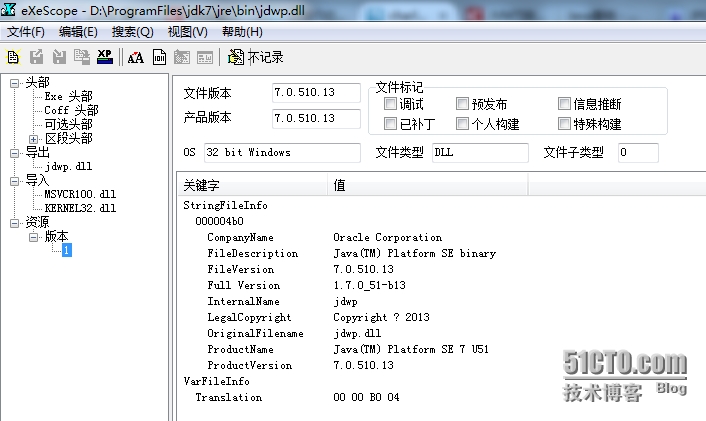
引入: 我们先从JVMTI讲起。JVMTI的主要作用是提供一组接口来检测VM的状态和控制VM中运行的JAVA程序。JVMTI是个双向接口: JVMTI的客户端叫Agent,它会在VM发生变化时通过事件机制被通知到变化。 JVMTI的服务端是许多函数,它们会和VM实际打交道并把结果告知Agent. 实践: 我们这里先来看下Agent. Agent的方法定义在哪里呢?它们定义在$JAVA_HOME/include/jvmti.h文件中。 1 2 3 4 5 JNIEXPORTjintJNICALL Agent_OnLoad(JavaVM*vm, char *options, void *reserved); JNIEXPORT void JNICAL。 Agent_OnUnload(JavaVM*vm); Agent_OnLoad方法: 当代理被VM加载时,会由VM调用Agent_Onload方法。此时VM有如下能力: (1)VM的System Property已经被设置完毕。 (2)VM的Capabilities已经被设置完毕。 (3)任何字节码都没被执行。 (4)任何类都没有被加载。 (5)任何对象都没有被创建。 Agent_OnLoad实现过程中,最重要的事情之一就是调用GetEnv方法来获取JVMTI环境的指针。 1 jintGetEnv(JavaVM*vm, void **env,jintversion); 这样,这个代理就可以知道被代理的环境的全部信息。 Agent_OnUnload方法: 当代理被VM卸载时,会由VM调用Agent_OnUnload方法。一般发生在终止VM的时候,它一般可以用来清理在Agent_OnLoad阶段创建的资源。 因为我们在远程调试时候启动JVM时候加了代理参数: java -agentlib:<agentLibName> ,而agentLibName我们配置的是jdwp, 所以它就对应上jdwp.dll. 也就是远程调试时候自动会在启动target VM时候启用jdwp这个代理库. 当明白了代理的作用后,我们来找其的实现。在Sun的JDK中,我们找到了jdwp.dll (Linux环境则是jdwp.so) . 它位于 $JAVA_HOME/jre/bin目录下。我们用exeScope软件打开查看内容: 显然,它是Oracle的Sun的JDK提供的Agent ,它提供了2个方法,一个是_Agent_OnLoad(),一个是_Agent_OnUnload() 和我们设想的一致。 总结: 从上过程我们似乎可以总结一些结论: 1. Agent 是在虚拟机启动之时加载的,这个加载处于虚拟机初始化的早期.在这个时间点上: 所有的 Java 类都未被初始化;所有的对象实例都未被创建; 因而,没有任何 Java 代码被执行; (从这点上说,最明显的好处就是它能完成早期调试中用System.out.println()无法解决的问题,因为System.out.println()前提是代码行所在的类已经被初始化过了) 2.但在这个时候,我们已经可以: 操作 JVMTI 的 Capability 参数; 使用系统参数; 动态库被加载之后,虚拟机会先寻找一个 Agent 入口函数. 本文转自 charles_wang888 51CTO博客,原文链接:http://blog.51cto.com/supercharles888/1587548,如需转载请自行联系原作者

优秀的个人博客,低调大师

JPDA 架构研究17 - JDI概览

引入: 前面用了很多篇幅来讨论JVMTI和JDWP部分,现在终于来看最靠近用户端部分了,JDI。 分析: a. JDI的基础知识 和JVMTI和JDWP不一样的是,JDI提供了一组接口,这些接口是纯JAVA编写的。他们主要是给开发环境IDE用的,虽然调试器的实现可以直接利用JDWP或者JVMTI,但是多了这一层则可以从用户的代码级别来定义要发送的请求和获取的信息。 本质上,Eclipse的调试器与目标VM之间的双向通信如下: 调试器将用户的操作转化为调试命令,命令通过链接被发送到前端运行目标程序的虚拟机上;然后,目标虚拟机根据接受的命令做出相应的操作,将调试的结果发回给后端的调试器;最后,调试器可视化数据信息反馈给用户。 JDI接口定义在$JAVA_HOME/lib/tools.jar中,从宏观上看,它分为5个大包。 包名 描述 com.sun.jdi 这是JDI的核心包,它提供了镜像机制将目标虚拟机上的所有数据、类型、域、方法、事件、状态和资源,以及调试器发向目标虚拟机的事件请求等都映射成 Mirror 对象 com.sun.jdi.connect 该包用于定义JDI到目标虚拟机的连接 com.sun.jdi.connect.spi 该包用于定义开发TransportService(也就是前面我在JDWP层讨论很深的传输器服务)所需要的必要的类和接口。 com.sun.jdi.event 该包定义了JDI事件和事件处理 com.sun.jdi.request 该包用于发送JDI事件然后在一定条件下发送。 b.JDI的具体实现 以Eclipse为例: org.eclipse.jdt.debug 是 JDI 的一个完整实现,而org.eclipse.jdt.debug.ui 是 Eclipse 调试工具界面的实现。从包名上看,我们大体上把JDI 分成三个部分: (1)数据模块。它负责调试器(Debugger)和目标虚拟机上(Target VM)的数据建模。 (2)链接模块。它建立调试器(Debugger)与目标虚拟机(Target VM)的沟通渠道。 (3)事件请求与处理模块。它提供调试器(Debugger)与目标虚拟机(VM)之间的交互方式。 我们会在接下来的几篇文章中从Eclipse的代码级别来分析这些模块。 本文转自 charles_wang888 51CTO博客,原文链接:http://blog.51cto.com/supercharles888/1587958,如需转载请自行联系原作者

优秀的个人博客,低调大师

Android 中 OnTouch事件的研究

在Android中当一个ViewGroup 中包含一个组件,当点击这个组件同时监听其onTouch事件,那么到底是父组件响应还是子组件响应呢?傻蛋在网上找到了一篇相关的帖子,照着例子测试了一番,发现网上的那篇有点问题,先把测试结果总结如下. 在触发OnTouch事件的时候Android的GroupView会调用如下三个函数: public boolean dispatchTouchEvent(MotionEvent ev) 用于事件的分发 public boolean onInterceptTouchEvent(MotionEvent ev) 用于事件的拦截 public boolean onTouchEvent(MotionEvent ev) 处理事件 当然我们可以在容器类中如继承自LinearLayout的类中重写这三个方法。而继承View类的子类只能重写dispatch和onTouchEvent两个方法。当点击后这三个方法相继执行。 自己写了一个TextView子类MyTextView和LinearLayout子类MyLinearLayout,TextView包含在LinearLayout中。 当点击MyTextView时,程序会先进入到LinearLayout的dispatchTouchEvent中,这个类必须调用super.dispatchTouchEvent(ev); 否在后面的两个方法无法触发,所以傻蛋发现这个方法根本没有必要重写,因为框架是在super.dispatchTouchEvent(ev);中来调用onInterceptTouchEvent和onTouchEvent方法的,所以手动的设置dispatchTouchEvent的返回值是无效的,除非你不想让框架触发这两个方法。 当执行完dispathTouchEvent后会执行onInterception方法,如果返回为true,这表示MyLinearLayout把这个Touch事件拦截了,就会执行自己的Ontouch方法。如果为false则表示不拦截,此事件会分发到把事件传递给它的子控件MyTextView中。 当事件传递到MyTextView后,会执行dispatchTouchEvent,然后会执行onTouchEvent。挡在MyTextView中的onTouchEvent返回为false的话,当执行完onTouchEvent中的事件后,事件会再分发给MyLinearLaytout,执行LinearLayout的onTouchEvent。 主要代码如下 ?[Copy to clipboard] Downloadzuiniuwang.java /** *MyLinearLayout.java *com.androidtest.touch.test * *Function:TODO * *verdateauthor *────────────────────────────────── *2011-5-24Leon * *Copyright(c)2011,TNTAllRightsReserved. */ packagecom.androidtest.touch.test; importandroid.content.Context; importandroid.util.AttributeSet; importandroid.util.Log; importandroid.view.MotionEvent; importandroid.widget.LinearLayout; /** *ClassName:MyLinearLayoutFunction:TODOADDFUNCTIONReason:TODOADDREASON * *@authorLeon *@version *@sinceVer1.1 *@Date2011-5-24 */ publicclassMyLinearLayoutextendsLinearLayout{ privatefinalstaticStringTAG=MyLinearLayout.class.getSimpleName(); publicMyLinearLayout(Contextcontext,AttributeSetattrs){ super(context,attrs); //TODOAuto-generatedconstructorstub Log.v(TAG,TAG); } @Override publicbooleandispatchTouchEvent(MotionEventev){ intaction=ev.getAction(); switch(action){ caseMotionEvent.ACTION_DOWN: Log.d(TAG,"dispatchTouchEventaction:ACTION_DOWN"); break; caseMotionEvent.ACTION_MOVE: Log.d(TAG,"dispatchTouchEventaction:ACTION_MOVE"); break; caseMotionEvent.ACTION_UP: Log.d(TAG,"dispatchTouchEventaction:ACTION_UP"); break; caseMotionEvent.ACTION_CANCEL: Log.d(TAG,"dispatchTouchEventaction:ACTION_CANCEL"); break; } //Log.v(TAG,"dispatchTouchEvent"+super.dispatchTouchEvent(ev)); super.dispatchTouchEvent(ev); Log.v(TAG,"dispatchTouchEvent"+"test................."); returntrue; } @Override publicbooleanonInterceptTouchEvent(MotionEventev){ intaction=ev.getAction(); switch(action){ caseMotionEvent.ACTION_DOWN: Log.d(TAG,"onInterceptTouchEventaction:ACTION_DOWN"); break; caseMotionEvent.ACTION_MOVE: Log.d(TAG,"onInterceptTouchEventaction:ACTION_MOVE"); break; caseMotionEvent.ACTION_UP: Log.d(TAG,"onInterceptTouchEventaction:ACTION_UP"); break; caseMotionEvent.ACTION_CANCEL: Log.d(TAG,"onInterceptTouchEventaction:ACTION_CANCEL"); break; } returnfalse; } @Override publicbooleanonTouchEvent(MotionEventev){ intaction=ev.getAction(); switch(action){ caseMotionEvent.ACTION_DOWN: Log.d(TAG,"---onTouchEventaction:ACTION_DOWN"); break; caseMotionEvent.ACTION_MOVE: Log.d(TAG,"---onTouchEventaction:ACTION_MOVE"); break; caseMotionEvent.ACTION_UP: Log.d(TAG,"---onTouchEventaction:ACTION_UP"); break; caseMotionEvent.ACTION_CANCEL: Log.d(TAG,"---onTouchEventaction:ACTION_CANCEL"); break; } returntrue; } } /** *MyTestView.java *com.androidtest.touch.test * *Function:TODO * *verdateauthor *────────────────────────────────── *2011-5-24Leon * *Copyright(c)2011,TNTAllRightsReserved. */ packagecom.androidtest.touch.test; importandroid.content.Context; importandroid.util.AttributeSet; importandroid.util.Log; importandroid.view.MotionEvent; importandroid.widget.TextView; /** *ClassName:MyTestViewFunction:TODOADDFUNCTIONReason:TODOADDREASON * *@authorLeon *@version *@sinceVer1.1 *@Date2011-5-24 */ publicclassMyTestViewextendsTextView{ publicstaticfinalStringTAG=MyTestView.class.getSimpleName(); publicMyTestView(Contextcontext,AttributeSetattrs){ super(context,attrs); //TODOAuto-generatedconstructorstub Log.v(TAG,TAG); } @Override publicbooleandispatchTouchEvent(MotionEventev){ intaction=ev.getAction(); switch(action){ caseMotionEvent.ACTION_DOWN: Log.d(TAG,"dispatchTouchEventaction:ACTION_DOWN"); break; caseMotionEvent.ACTION_MOVE: Log.d(TAG,"dispatchTouchEventaction:ACTION_MOVE"); break; caseMotionEvent.ACTION_UP: Log.d(TAG,"dispatchTouchEventaction:ACTION_UP"); break; caseMotionEvent.ACTION_CANCEL: Log.d(TAG,"onTouchEventaction:ACTION_CANCEL"); break; } returnsuper.dispatchTouchEvent(ev); } @Override publicbooleanonTouchEvent(MotionEventev){ intaction=ev.getAction(); switch(action){ caseMotionEvent.ACTION_DOWN: Log.d(TAG,"---onTouchEventaction:ACTION_DOWN"); break; caseMotionEvent.ACTION_MOVE: Log.d(TAG,"---onTouchEventaction:ACTION_MOVE"); break; caseMotionEvent.ACTION_UP: Log.d(TAG,"---onTouchEventaction:ACTION_UP"); break; caseMotionEvent.ACTION_CANCEL: Log.d(TAG,"---onTouchEventaction:ACTION_CANCEL"); break; } returnfalse; } } /** *TestTouchEvent.java *com.androidtest.touch.test * *Function:TODO * *verdateauthor *────────────────────────────────── *2011-5-24Leon * *Copyright(c)2011,TNTAllRightsReserved. */ packagecom.androidtest.touch.test; importcom.androidtest.R; importandroid.app.Activity; importandroid.os.Bundle; /** *ClassName:TestTouchEvent *Function:TODOADDFUNCTION *Reason:TODOADDREASON * *@authorLeon *@version *@sinceVer1.1 *@Date2011-5-24 */ publicclassTestTouchEventextendsActivity{ @Override protectedvoidonCreate(BundlesavedInstanceState){ //TODOAuto-generatedmethodstub super.onCreate(savedInstanceState); this.setContentView(R.layout.test_touch_event); } } ?[Copy to clipboard] Downloadzuiniuwang.xml <?xmlversion="1.0"encoding="utf-8"?> <com.androidtest.touch.test.mylinearlayoutandroid:gravity="center"android:layout_height="fill_parent"android:layout_width="fill_parent"android:orientation="vertical"xmlns:android="http://schemas.android.com/apk/res/android"> <com.androidtest.touch.test.mytestviewandroid:background="#FFFFFF"android:id="@+id/tv"android:layout_height="200px"android:layout_width="200px"android:text="leon"android:textcolor="#0000FF"android:textsize="40sp"android:textstyle="bold"> </com.androidtest.touch.test.mytestview></com.androidtest.touch.test.mylinearlayout> 本文转自 最牛傻蛋 51CTO博客,原文链接:http://blog.51cto.com/zuiniuwang/718315,如需转载请自行联系原作者

优秀的个人博客,低调大师

Android着色器Tint研究

Tint 这个东西 主要用来减少apk体积的,比如说我现在有一个textview,他的背景图 有两种,一种是当获得焦点时显示的a图,另一种是 失去焦点时显示的b图。 相信大家开发的时候 这种需求做过很多次了,我们一般都会发现 这种a图和b图 除了颜色不一样,其他都是一样的,但是我们做的时候呢,通常是找ui要了两张图。 如果要适配分辨率的话 很有可能图片会更多,而且在切换的时候 因为是重新加载一次bitmap 效率也会下降很多。所以谷歌就给了一套解决方案 这个就是tint了。 他的目的就是当你发现有这种需求的时候,只需要 放一张图 在apk里即可,当你需要改变背景图的颜色的时候 就用Tint即可! 下面就来简单说一下,tint的使用 以及需要注意的地方。 首先 我们定义一个简单的布局文件: 我们发现这2个imageview 都是引用的同样一个drawable资源,并且 在studio这个xml编辑界面里面 我们很明显的 能看出来 这个图片的颜色是黑色的 对吧! 那 现在 我们想改一下,想把iv1 这个imageview的 背景色 改成绿色的! 我们想当然的 当然会这么写: iv1=(ImageView)this.findViewById(R.id.iv1); iv2=(ImageView)this.findViewById(R.id.iv2); finalDrawableoriginBitmapDrawable=getResources().getDrawable(R.drawable.ic_account_circle_black_18dp); iv1.setImageDrawable(tintDrawable(originBitmapDrawable,ColorStateList.valueOf(Color.GREEN))); 应该很好理解对吧,代码就不解释了。但是我们运行以后发现: 卧槽 怎么2个都变绿色了! 回顾一下 我们的代码 我们应该能明白 2个imageview 都是引用的同样的一个drawable,要知道 既然是一个drawable,那系统肯定为了优化资源 把这2个drawable 在内存里的拷贝弄成了一份! 还记得 我们以前讲的bitmap优化那篇么?http://www.cnblogs.com/punkisnotdead/p/4881771.html 和这个里面的inBitmap 属性有异曲同工之妙,如果还不理解 你看下面的图就理解了: 所以才会造成上面的情况。你修改了共同变量,所以2个图就都被影响了。 解决方法 其实也很简单: finalDrawableoriginBitmapDrawable=getResources().getDrawable(R.drawable. ic_account_circle_black_18dp).mutate(); 修改以后 我们再看: 你看这么做就一切正常了。 那有人就要问了,卧槽 你这么做 不是把谷歌给我们做好的图片内存优化方案给损坏了么,其实这种担心是多余的,这个http://android-developers.blogspot.hk/2009/05/drawable-mutations.html 这个地址会告诉你 其实我们做 只是把单独的受到影响的那部分 内存给单独拿出来了,其他没受到影响的还是共享的数据!换句话说 我们内存里 会另外存放的就是一些纯的标志位 之类的 类似于状态值这种东西。 大部分的内存还是公用的! 然后接着来,我们看下一个例子 关于editext的。 你看这个edittext 的颜色是这样的。那现在我们来修改一下 这个edittext的背景色 et1=(EditText)this.findViewById(R.id.et); finalDrawableoriginBitmapDrawable=et1.getBackground(); et1.setBackgroundDrawable(tintDrawable(originBitmapDrawable,ColorStateList.valueOf(Color.GREEN))); 背景色是修改成功了 但是这个光标的颜色 还没变 非常不协调, 有人又要说了 我们可以用: 这个xml 属性来修改呀,当然了这个方法确实是可以的 但是你想 你这么做的话 又要增加资源文件了,不是与我们的tint 背道而驰了么? 所以 这个地方 我们就要想办法 突破一下。其实很多人都能想到方法了,对于android 没有 提供给我们的api 比如那些private 函数, 我们通常都是通过反射的方法 去调用的。 这里也是一样,稍微想一下 我们就能明白, 这个地方 我们就先通过反射来获取到这个cursorDrawable 然后给他着色,然后在反射调用方法 给他set进去不就行了么? 首先我们都知道 editext 实际上就是textview,所以我们看一下textview 的源码 找找看 这个属性到底叫啥名字。经过一番努力发现 在这: //Althoughthesefieldsarespecifictoeditabletext,theyarenotaddedtoEditorbecause //theyaredefinedbytheTextView'sstyleandaretheme-dependent. intmCursorDrawableRes; 并且我们要看下editor的源码 这是和edittext息息相关的: /** *EditTextspecificdata,createdondemandwhenoneoftheEditorfieldsisused. *See{<ahref="http://www.jobbole.com/members/57845349">@link</a>#createEditorIfNeeded()}. */ privateEditormEditor; //注意这段代码属于editor finalDrawable[]mCursorDrawable=newDrawable[2]; 有了这段代码 我们就知道 剩下反射的代码怎么写了。 //参数就是要反射修改光标的edittext对象 privatevoidinvokeEditTextCallCursorDrawable(EditTextet){ try{ FieldfCursorDrawableRes=TextView.class.getDeclaredField("mCursorDrawableRes"); //看源码知道这个变量不是public的所以要设置下这个可访问属性 fCursorDrawableRes.setAccessible(true); //取得editext对象里的mCursorDrawableRes属性的值看源码知道这是一个int值 intmCursorDrawableRes=fCursorDrawableRes.getInt(et); //下面的代码是通过获取mEditor对象然后再通过拿到的mEditor对象来获取最终我们的mCursorDrawable这个光标的drawable FieldfEditor=TextView.class.getDeclaredField("mEditor"); fEditor.setAccessible(true); Objecteditor=fEditor.get(et); Class<?>clazz=editor.getClass(); FieldfCursorDrawable=clazz.getDeclaredField("mCursorDrawable"); fCursorDrawable.setAccessible(true); if(mCursorDrawableRes<=0){ return; } //到这里我们终于拿到了默认主题下edittext的光标的那个小图标的drawable DrawablecursorDrawable=et.getContext().getResources().getDrawable(mCursorDrawableRes); if(cursorDrawable==null){ return; } //既然都拿到了这个drawble那就修改他。 DrawabletintDrawable=tintDrawable(cursorDrawable,ColorStateList.valueOf(Color.GREEN)); //前面贴出的mCursorDrawable源码可以知道这是一个二维数组。所以我们要构造出一个全新的二维数组 Drawable[]drawables=newDrawable[]{tintDrawable,tintDrawable}; //然后再通过反射把这个二维数组的值放到editor里面即可! fCursorDrawable.set(editor,drawables); }catch(NoSuchFieldExceptione){ e.printStackTrace(); }catch(IllegalAccessExceptione){ e.printStackTrace(); } } 最后调用这个方法以后看一下效果: 很完美 对吧~~ 最后tintDrawable这个方法是用来向下兼容用的。你如果不考虑向下兼容的问题 用系统自带的方法 就可以了,这里就不做过多介绍了。 publicstaticDrawabletintDrawable(Drawabledrawable,ColorStateListcolors){ finalDrawablewrappedDrawable=DrawableCompat.wrap(drawable); DrawableCompat.setTintList(wrappedDrawable,colors); returnwrappedDrawable; } 当然你也可以用http://andraskindler.com/blog/2015/tinting_drawables/ 这个文章里的方法来做向下兼容:publicfinalclassTintedBitmapDrawableextendsBitmapDrawable{ privateinttint; privateintalpha; publicTintedBitmapDrawable(finalResourcesres,finalBitmapbitmap,finalinttint){ super(res,bitmap); this.tint=tint; this.alpha=Color.alpha(tint); } publicTintedBitmapDrawable(finalResourcesres,finalintresId,finalinttint){ super(res,BitmapFactory.decodeResource(res,resId)); this.tint=tint; this.alpha=Color.alpha(tint); } publicvoidsetTint(finalinttint){ this.tint=tint; this.alpha=Color.alpha(tint); } @Overridepublicvoiddraw(finalCanvascanvas){ finalPaintpaint=getPaint(); if(paint.getColorFilter()==null){ paint.setColorFilter(newLightingColorFilter(tint,0)); paint.setAlpha(alpha); } super.draw(canvas); } } 本文作者:佚名 来源:51CTO

资源下载

更多资源
Mario

Mario

马里奥是站在游戏界顶峰的超人气多面角色。马里奥靠吃蘑菇成长,特征是大鼻子、头戴帽子、身穿背带裤,还留着胡子。与他的双胞胎兄弟路易基一起,长年担任任天堂的招牌角色。

Nacos

Nacos

Nacos /nɑ:kəʊs/ 是 Dynamic Naming and Configuration Service 的首字母简称,一个易于构建 AI Agent 应用的动态服务发现、配置管理和AI智能体管理平台。Nacos 致力于帮助您发现、配置和管理微服务及AI智能体应用。Nacos 提供了一组简单易用的特性集,帮助您快速实现动态服务发现、服务配置、服务元数据、流量管理。Nacos 帮助您更敏捷和容易地构建、交付和管理微服务平台。

Spring

Spring

Spring框架(Spring Framework)是由Rod Johnson于2002年提出的开源Java企业级应用框架,旨在通过使用JavaBean替代传统EJB实现方式降低企业级编程开发的复杂性。该框架基于简单性、可测试性和松耦合性设计理念,提供核心容器、应用上下文、数据访问集成等模块,支持整合Hibernate、Struts等第三方框架,其适用范围不仅限于服务器端开发,绝大多数Java应用均可从中受益。

Sublime Text

Sublime Text

Sublime Text具有漂亮的用户界面和强大的功能,例如代码缩略图,Python的插件,代码段等。还可自定义键绑定,菜单和工具栏。Sublime Text 的主要功能包括:拼写检查,书签,完整的 Python API , Goto 功能,即时项目切换,多选择,多窗口等等。Sublime Text 是一个跨平台的编辑器,同时支持Windows、Linux、Mac OS X等操作系统。

用户登录
用户注册