Windows10 VS2017 C++使用crypto++库加密解密(AES)
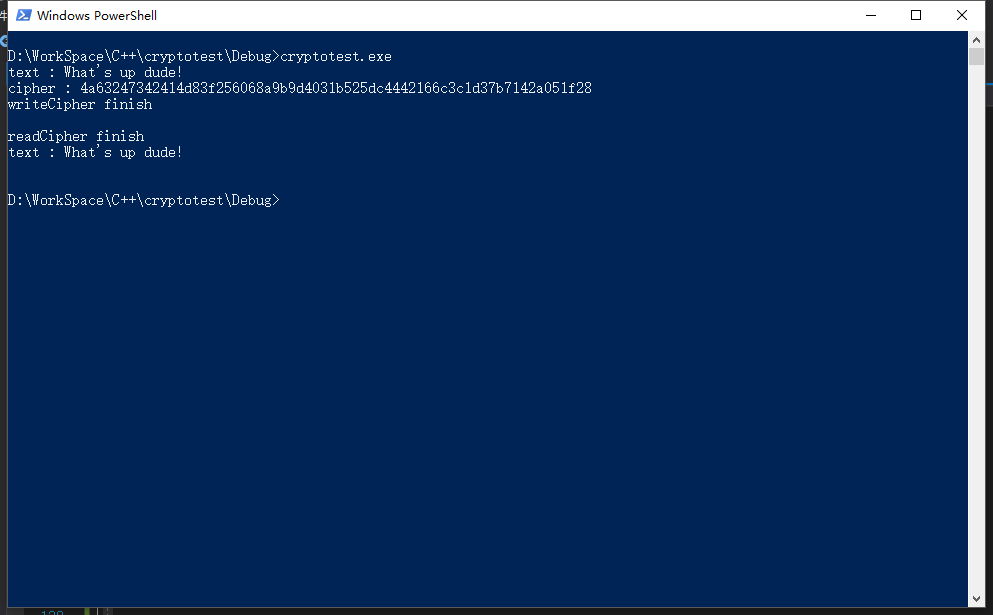
版权声明:本文可能为博主原创文章,若标明出处可随便转载。 https://blog.csdn.net/Jailman/article/details/85262234 参考文章:https://blog.csdn.net/tangcaijun/article/details/42110319 首先下载库:https://www.cryptopp.com/#download 使用vs2017打开cryptest.sln文件,解决方案选择“重订解决方案目标”,升级sdk。 编译库和dll文件 将生成的cryptopp.lib和cryptopp.dll放到项目文件夹,如果单独运行需要将dll文件拷贝到debug文件夹和生成的exe文件放在一起使用。 新建win32 c++控制台程序,工程->配置属性->vc++目录->包含目录,填写cryptopp的目录,需要使用其中的头文件. 编码: #include "pch.h" #include <iostream> #include <fstream> #include <aes.h> #include <filters.h> #include <modes.h> #include <Windows.h> #pragma comment(lib, "cryptopp.lib") using namespace std; byte key[CryptoPP::AES::DEFAULT_KEYLENGTH], iv[CryptoPP::AES::BLOCKSIZE]; void initKV() { memset(key, 0x00, CryptoPP::AES::DEFAULT_KEYLENGTH); memset(iv, 0x00, CryptoPP::AES::BLOCKSIZE); // 或者也可以 /* char tmpK[] = "1234567890123456"; char tmpIV[] = "1234567890123456"; for (int j = 0; j < CryptoPP::AES::DEFAULT_KEYLENGTH; ++j) { key[j] = tmpK[j]; } for (int i = 0; i < CryptoPP::AES::BLOCKSIZE; ++i) { iv[i] = tmpIV[i]; } */ } string encrypt(string plainText) { string cipherText; // CryptoPP::AES::Encryption aesEncryption(key, CryptoPP::AES::DEFAULT_KEYLENGTH); CryptoPP::CBC_Mode_ExternalCipher::Encryption cbcEncryption(aesEncryption, iv); CryptoPP::StreamTransformationFilter stfEncryptor(cbcEncryption, new CryptoPP::StringSink(cipherText)); stfEncryptor.Put(reinterpret_cast<const unsigned char*>(plainText.c_str()), plainText.length() + 1); stfEncryptor.MessageEnd(); string cipherTextHex; for (int i = 0; i < cipherText.size(); i++) { char ch[3] = { 0 }; sprintf_s(ch, "%02x", static_cast<byte>(cipherText[i])); cipherTextHex += ch; } return cipherTextHex; } void writeCipher(string output) { ofstream out("cipher.data"); out.write(output.c_str(), output.length()); out.close(); cout << "writeCipher finish " << endl << endl; } string decrypt(string cipherTextHex) { string cipherText; string decryptedText; int i = 0; while (true) { char c; int x; stringstream ss; ss << hex << cipherTextHex.substr(i, 2).c_str(); ss >> x; c = (char)x; cipherText += c; if (i >= cipherTextHex.length() - 2)break; i += 2; } // CryptoPP::AES::Decryption aesDecryption(key, CryptoPP::AES::DEFAULT_KEYLENGTH); CryptoPP::CBC_Mode_ExternalCipher::Decryption cbcDecryption(aesDecryption, iv); CryptoPP::StreamTransformationFilter stfDecryptor(cbcDecryption, new CryptoPP::StringSink(decryptedText)); stfDecryptor.Put(reinterpret_cast<const unsigned char*>(cipherText.c_str()), cipherText.size()); stfDecryptor.MessageEnd(); return decryptedText; } string readCipher() { ifstream in("cipher.data"); string line; string decryptedText; while (getline(in, line)) { if (line.length() > 1) { decryptedText += decrypt(line) + "\n"; } line.clear(); } cout << "readCipher finish " << endl; in.close(); return decryptedText; } int main() { string text = "What's up dude!"; cout << "text : " << text << endl; initKV(); string cipherHex = encrypt(text); cout << "cipher : " << cipherHex << endl; writeCipher(cipherHex); string decrpt_text = readCipher(); cout << "text : " << decrpt_text << endl; return 0; } 运行结果: