首页 文章 精选 留言 我的

精选列表

搜索[自动化运维],共10001篇文章
优秀的个人博客,低调大师

自动化运维之PSSH

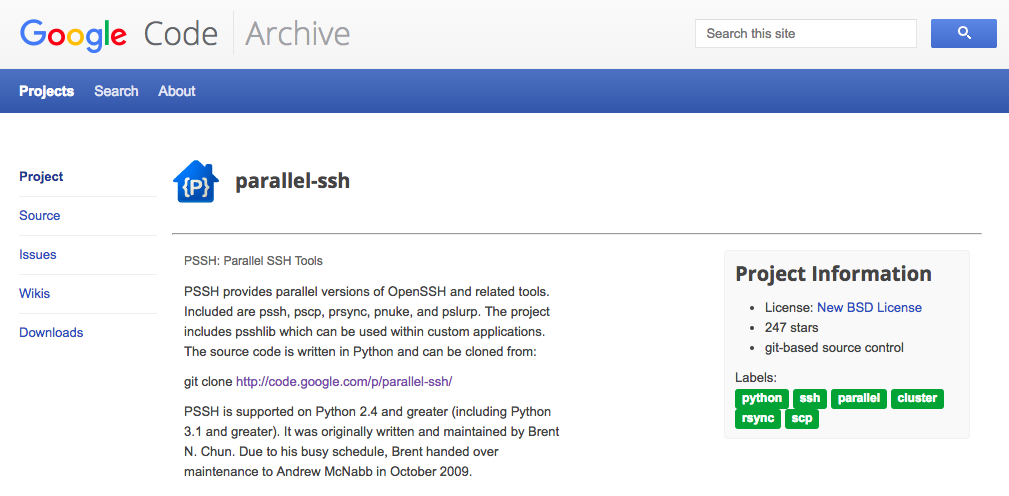
1.PSSH简介 PSSH提供OpenSSH和相关工具的并行版本。包括pssh,pscp,prsync,pnuke和pslurp。该项目包括psshlib,可以在自定义应用程序中使用。 pssh是python写的可以并发在多台机器上批量执行命令的工具,它的用法可以媲美ansible的一些简单用法,执行起来速度比ansible快它支持文件并行复制,远程命令执行,杀掉远程主机上的进程等等。杀手锏是文件并行复制,,当进行再远程主机批量上传下载的时候,最好使用它。 项目地址: https://code.google.com/archive/p/parallel-ssh/ 2.PSSH使用 2.1 安装PSSH 前提条件:注意需要安装 python 2.4 或以上版本 wget https://clsn.io/files/pssh/pssh-2.3.1.tar.gz tar zxf pssh-2.3.1.tar.gz cd pssh-2.3.1 python setup.py install 安装过程 [root@clsn.io /opt/pssh-2.3.1] #python setup.py install running install running build running build_py creating build creating build/lib creating build/lib/psshlib copying psshlib/task.py -> build/lib/psshlib copying psshlib/askpass_server.py -> build/lib/psshlib copying psshlib/__init__.py -> build/lib/psshlib copying psshlib/cli.py -> build/lib/psshlib copying psshlib/psshutil.py -> build/lib/psshlib copying psshlib/manager.py -> build/lib/psshlib copying psshlib/askpass_client.py -> build/lib/psshlib copying psshlib/version.py -> build/lib/psshlib copying psshlib/color.py -> build/lib/psshlib running build_scripts creating build/scripts-2.6 copying and adjusting bin/pssh -> build/scripts-2.6 copying and adjusting bin/pnuke -> build/scripts-2.6 copying and adjusting bin/prsync -> build/scripts-2.6 copying and adjusting bin/pslurp -> build/scripts-2.6 copying and adjusting bin/pscp -> build/scripts-2.6 copying and adjusting bin/pssh-askpass -> build/scripts-2.6 changing mode of build/scripts-2.6/pssh from 644 to 755 changing mode of build/scripts-2.6/pnuke from 644 to 755 changing mode of build/scripts-2.6/prsync from 644 to 755 changing mode of build/scripts-2.6/pslurp from 644 to 755 changing mode of build/scripts-2.6/pscp from 644 to 755 changing mode of build/scripts-2.6/pssh-askpass from 644 to 755 running install_lib creating /usr/lib/python2.6/site-packages/psshlib copying build/lib/psshlib/task.py -> /usr/lib/python2.6/site-packages/psshlib copying build/lib/psshlib/askpass_server.py -> /usr/lib/python2.6/site-packages/psshlib copying build/lib/psshlib/__init__.py -> /usr/lib/python2.6/site-packages/psshlib copying build/lib/psshlib/cli.py -> /usr/lib/python2.6/site-packages/psshlib copying build/lib/psshlib/psshutil.py -> /usr/lib/python2.6/site-packages/psshlib copying build/lib/psshlib/manager.py -> /usr/lib/python2.6/site-packages/psshlib copying build/lib/psshlib/askpass_client.py -> /usr/lib/python2.6/site-packages/psshlib copying build/lib/psshlib/version.py -> /usr/lib/python2.6/site-packages/psshlib copying build/lib/psshlib/color.py -> /usr/lib/python2.6/site-packages/psshlib byte-compiling /usr/lib/python2.6/site-packages/psshlib/task.py to task.pyc byte-compiling /usr/lib/python2.6/site-packages/psshlib/askpass_server.py to askpass_server.pyc byte-compiling /usr/lib/python2.6/site-packages/psshlib/__init__.py to __init__.pyc byte-compiling /usr/lib/python2.6/site-packages/psshlib/cli.py to cli.pyc byte-compiling /usr/lib/python2.6/site-packages/psshlib/psshutil.py to psshutil.pyc byte-compiling /usr/lib/python2.6/site-packages/psshlib/manager.py to manager.pyc byte-compiling /usr/lib/python2.6/site-packages/psshlib/askpass_client.py to askpass_client.pyc byte-compiling /usr/lib/python2.6/site-packages/psshlib/version.py to version.pyc byte-compiling /usr/lib/python2.6/site-packages/psshlib/color.py to color.pyc running install_scripts copying build/scripts-2.6/pscp -> /usr/bin copying build/scripts-2.6/prsync -> /usr/bin copying build/scripts-2.6/pnuke -> /usr/bin copying build/scripts-2.6/pssh -> /usr/bin copying build/scripts-2.6/pssh-askpass -> /usr/bin copying build/scripts-2.6/pslurp -> /usr/bin changing mode of /usr/bin/pscp to 755 changing mode of /usr/bin/prsync to 755 changing mode of /usr/bin/pnuke to 755 changing mode of /usr/bin/pssh to 755 changing mode of /usr/bin/pssh-askpass to 755 changing mode of /usr/bin/pslurp to 755 running install_data creating /usr/man creating /usr/man/man1 copying man/man1/pssh.1 -> /usr/man/man1 copying man/man1/pscp.1 -> /usr/man/man1 copying man/man1/prsync.1 -> /usr/man/man1 copying man/man1/pslurp.1 -> /usr/man/man1 copying man/man1/pnuke.1 -> /usr/man/man1 running install_egg_info Writing /usr/lib/python2.6/site-packages/pssh-2.3.1-py2.6.egg-info 2.2 安装完成 使用yum安装后,只能使用pssh,但是编译安装后会包括其他命令也安装了(pscp prsync pnuke pslurp) pssh:在远程多台主机上并行运行命令 Example: pssh -h hosts.txt -l irb2 -o /tmp/foo uptime pscp :把文件并行复制到多台远程主机上 Example: pscp -h hosts.txt -l irb2 foo.txt /home/irb2/foo.txt prsync:使用rsync协议本地文件同步到远程多台主机上。 Example: prsync -r -h hosts.txt -l irb2 foo /home/irb2/foo pnuke:在远程多台主机上并行killall某一进程 Example: pnuke -h hosts.txt -l irb2 java pslurp:把文件从远程多台主机上复制到本地主机上 Example: pslurp -h hosts.txt -L /tmp/outdir -l irb2 /home/irb2/foo.txt foo.txt 2.3 pssh参数说明 -h HOST_FILE 后边跟远程主机列表(ip) -H HOST_STRING 后边跟远程主机名或者ip地址 -l USER 指定远程主机的用户名-p PAR 指定pssh最大的并行线程数。 -o 将输出的内容重定向到一个指定的文件中 -O 指定ssh参数的具体配置 -e 将执行错误重定向到一个指定的文件中 -t 设定命令执行超时时间 -x 传递ssh命令的一些参数 -i 在远程主机上执行命令完成后显示标准输出和标准错误 -P 在执行远程命令时,输出执行结果 2.4 其他常用的方法 pssh使用帮助 pssh --help pssh查看所有服务器的uptime -h list 指定了执行命令的机器列表 -A表示提示输入密码(如果机器都是ssh key打通的则无需加-A) pssh -i -A -h list 'uptime' 使用pscp向一堆机器分发文件 pscp -h list localfile remote_dir 从一堆机器中拷贝文件到中心机器 pslurp -h list /etc/hosts local_dir 2.5 常见问题 如果你遇到这样的错误: IOError: [Errno 4] Interrupted system call 建议升级python版本到python2.7 3.附录 3.1 pssh CLSN站点镜像地址 本站将pssh软件包镜像到本地,以防丢失,有需求的可以执行下载,下载后注意校验MD5值。 File Summary + Labels Uploaded Size pssh-2.3.1.tar.gz PSSH 2.3.1 Source Feb 3, 2012 22.88KB pssh-2.3.tar.gz PSSH 2.3 Source Jan 25, 2012 21.62KB pssh-2.2.2.tar.gz PSSH 2.2.2 Source Feb 3, 2011 20.94KB pssh-2.2.1.tar.gz PSSH 2.2.1 Source Jan 27, 2011 20.88KB pssh-2.2.tar.gz PSSH 2.2 Source Jan 27, 2011 20.84KB pssh-2.1.1.tar.gz PSSH 2.1.1 Source Mar 5, 2010 17.94KB pssh-2.1.tar.gz PSSH 2.1 Source Feb 26, 2010 17.65KB pssh-2.0.tar.gz PSSH 2.0 Source Oct 21, 2009 15.03KB 3.2 pssh GOOGLE源 File Summary + Labels Uploaded Size pssh-2.3.1.tar.gz​ PSSH 2.3.1 Source Feb 3, 2012 22.88KB ​pssh-2.3.tar.gz​ PSSH 2.3 Source Jan 25, 2012 21.62KB ​pssh-2.2.2.tar.gz​ PSSH 2.2.2 Source Feb 3, 2011 20.94KB ​pssh-2.2.1.tar.gz​ PSSH 2.2.1 Source Jan 27, 2011 20.88KB ​pssh-2.2.tar.gz​ PSSH 2.2 Source Jan 27, 2011 20.84KB ​pssh-2.1.1.tar.gz​ PSSH 2.1.1 Source Mar 5, 2010 17.94KB ​pssh-2.1.tar.gz​ PSSH 2.1 Source Feb 26, 2010 17.65KB ​pssh-2.0.tar.gz​ PSSH 2.0 Source Oct 21, 2009 15.03KB 3.3 文件包MD5值 下载完成后务必校验MD5值 MD5值 文件名 dbdbfda5681b82d4c64abdb3668e88bc pssh-2.3.tar.gz 53e70d53064f658bf8f44880340e8e5c pssh-2.3.1.tar.gz 689207677b260a7e4178174295b1389e pssh-2.2.tar.gz 865305ae39647884bc54a42e9f9554bb pssh-2.2.2.tar.gz f7583259976ef64bf3cae957a0b66e41 pssh-2.2.1.tar.gz 725f902bb7e128cc7aa1322551f7ca37 pssh-2.1.tar.gz 4b355966da91850ac530f035f7404cd5 pssh-2.1.1.tar.gz 07474f9f9dbefedc809e997f04e1dee5 pssh-2.0.tar.gz 4.参考文献 https://code.google.com/archive/p/parallel-ssh/http://opstool.com/article/266https://www.cnblogs.com/Dicky-Zhang/p/5988415.htmlhttps://help.aliyun.com/knowledge_detail/38835.html 作者: 惨绿少年 出处: http://clsn.io 本文版权归作者所有,欢迎转载,但未经作者同意必须保留此段声明,且在文章页面明显位置给出原文连接,否则保留追究法律责任的权利。

优秀的个人博客,低调大师

Python自动化运维之异常处理

1、异常异常就是非正常状态,在Python中使用异常对象来表示异常。若程序在编译或运行过程中发生错误,程序的执行过程就会发生改变,抛出异常对象,程序流进入异常处理。如果异常对象没有被处理或捕捉,程序就会执行回溯(Traceback)来终止程序。2、异常类型通用异常类型表 异常 描述 BaseException 所有异常的基类 SystemExit 解释器请求退出 KeyboardInterrupt 用户中断执行(通常是输入^C) Exception 常规错误的基类 StopIteration 迭代器没有更多的值 GeneratorExit 生成器(generator)发生异常来通知退出 StandardError 所有的内建标准异常的基类 ArithmeticError 所有数值计算错误的基类 FloatingPointError 浮点计算错误 OverflowError 数值运算超出最大限制 ZeroDivisionError 除(或取模)零 (所有数据类型) AssertionError 断言语句失败 AttributeError 对象没有这个属性 EOFError 没有内建输入,到达EOF 标记 EnvironmentError 操作系统错误的基类 IOError 输入/输出操作失败 OSError 操作系统错误 WindowsError 系统调用失败 ImportError 导入模块/对象失败 LookupError 无效数据查询的基类 IndexError 序列中没有此索引(index) KeyError 映射中没有这个键 MemoryError 内存溢出错误(对于Python 解释器不是致命的) NameError 未声明/初始化对象 (没有属性) UnboundLocalError 访问未初始化的本地变量 ReferenceError 弱引用(Weak reference)试图访问已经垃圾回收了的对象 RuntimeError 一般的运行时错误 NotImplementedError 尚未实现的方法 SyntaxError Python 语法错误 IndentationError 缩进错误 TabError Tab 和空格混用 SystemError 一般的解释器系统错误 TypeError 对类型无效的操作 ValueError 传入无效的参数 UnicodeError Unicode 相关的错误 UnicodeDecodeError Unicode 解码时的错误 UnicodeEncodeError Unicode 编码时错误 UnicodeTranslateError Unicode 转换时错误 Warning 警告的基类 DeprecationWarning 关于被弃用的特征的警告 FutureWarning 关于构造将来语义会有改变的警告 OverflowWarning 旧的关于自动提升为长整型(long)的警告 PendingDeprecationWarning 关于特性将会被废弃的警告 RuntimeWarning 可疑的运行时行为(runtime behavior)的警告 SyntaxWarning 可疑的语法的警告 UserWarning 用户代码生成的警告 Exception类:是通用异常基类下列异常类均继承于Exception类,python解析器会自动将通用异常类型名称放在内建命名空间中,所以当使用通用异常类型时,不需要import exceptions模块。3、异常处理3.1 触发异常raiseraise关键字:手动抛出一个通用的异常类型(Exception),类似Java中的throw语句。raise关键字后跟异常的名称,异常名称能够标识出异常类的对象。执行raise语句时,python会创建指定异常类的对象,还能够指定对异常对象进行初始化的参数,参数也可以为由若干参数组成的元组。 注意:一旦执行raise语句,程序就会被终止。 格式:raise [exceptionType[,argument][,traceback]] deftestRaise(number): ifnumber<1: raiseValueError('Invalidvalue')#或者raiseValueError,'Invalidvalue' testRaise(0) traceback:这个参数用于追踪异常对象,一般很少使用。 这样就可以触发一个异常,并且接收异常信息。3.2 传递异常当你捕获到异常之后又希望再次的触发异常只需要使用不带任何参数的raise关键字。 importos try: openFile=open('notExistsFile.txt','r') fileContent=openFile.readlines() exceptIOError: print('FilenotExists' ifnotos.path.exists('notExistsFile.txt'): raise except: print('processexception' 异常会在捕获之后再次触发同一个异常。3.3 assert语句触发异常assert语句根据后面的表达式的真假来控制程序流。若为True,则往下执行。若为False,则中断程序并调用默认的异常处理器,同时输出指定的提示信息。 格式:assertexpression,'information' 例如: deftestAssert(x): assertx<1,'Invalidvalue' testAssert(1) print('Validvalue' 执行结果: AssertionError:Invaildvalue 3.4 捕获异常try..except..else注意:except子句的数量没有限制,但使用多个except子句捕获异常时,如果异常类之间具有继承关系,则子类应该写在前面,否则父类将会直接截获子类异常。放在后面的子类异常也就不会执行。 格式: try: 可能触发异常的语句块 except[exceptionType]: 捕获可能触发的异常[可以指定处理的异常类型] except[exceptionType][,date]: 捕获异常并获取附加数据 except: 没有指定异常类型,捕获任意异常 else: 没有触发异常时,执行的语句块 4、try的工作原理执行一个try语句时,python解析器会在当前程序流的上下文中作标记,当出现异常后,程序流能够根据上下文的标记回到标记位,从而避免终止程序。 1. 如果try语句执行时发生异常,程序流跳回标记位,并向下匹配执行第一个与该异常匹配的except子句,异常处理完后,程序流就通过整个try语句(除非在处理异常时又引发新的异常)。 2. 如果没有找到与异常匹配的except子句(也可以不指定异常类型或指定同样异常类型Exception,来捕获所有异常),异常被递交到上层的try(若有try嵌套时),甚至会逐层向上提交异常给程序(逐层上升直到能找到匹配的except子句。实在没有找到时,将结束程序,并打印缺省的错误信息)。 3. 如果在try子句执行时没有发生异常,python将执行else语句后的语句(可选),然后控制流通过整个try语句。 try: openFile=open('notExistsFile.txt','r') fileContent=openFile.readlines() exceptIOError: print('FilenotExists')#执行 except: print('processexception')#不执行 else: print('Readingthefile')#不执行 执行结果: In[157]:%runtestError.py FilenotExists 嵌套try: try: try: openFile=open('notExistsFile.txt','r') fileContent=openFile.readlines() exceptIOError: print('FilenotExists')#执行 except: print('processexception')#不执行 else: print('Readingthefile')#执行 执行结果: In[159]:%runtestError.py FilenotExists Readingthefile 5、捕捉多个异常方法一:指定一个通用异常,可以捕获多个不同的包含在Exception类中的异常类。 try: 语句块 exceptException: 语句块 方法二:在一个except子句后将多个异常作为元组元素列出。 try: 语句块 except(IOError,ValueError): 语句块 方法三:except子句后不带任何异常名称,捕获所有异常 try: 语句块 except: 语句块 6、try..finally语句无论try语句块中是否触发异常,都会执行finally子句中的语句块,因此一般用于关闭文件或关闭因系统错误而无法正常释放的资源。比如文件关闭,释放锁,把数据库连接返还给连接池等。 importos defwrite_test(fileName,content_iterable): try: pwd=open(fileName,'w') forkey,valueincontent_iterable.items(): pwd.write(key+'\t'+value+'\n')#传入String类型参数同时加入换行符 finally: pwd.close() if__name__=='__main__': fileName='/usr/local/src/pyScript/fileOperation.txt' dic={'name':'Jmilk','age':'23','city':'BJ'} ifos.path.exists(fileName): write_test(fileName,dic) else:print('Filenotexist!') 注意:try..finally与try..except 是可以同时使用的。 In[3]:try: ...:raise ...:exceptException: ...:print('error') ...:raise ...:finally: ...:print('success') ...: error success --------------------------------------------------------------------------- TypeErrorTraceback(mostrecentcalllast) <ipython-input-3-530db52949e7>in<module>() 1try: ---->2raise 3exceptException: 4print('error' 5raise TypeError:exceptionsmustbeold-styleclassesorderivedfromBaseException,notNoneType NOTE:try…finally 的意义在于,就是我们在 try 代码块中执行了 return 语句,但是仍然会继续执行在 finally 中的代码块,所以我们一般用作处理资源的释放。7、自定义异常通过(直接或简介)继承Exception类来创建一个自定义异常类,自定义的异常类只能通过raise关键字来手动触发。 classtestError(Exception):#直接集成Exception类 def__init__(self,arg): self.args=arg try: raisetestError('Justtest') excepttestError,info: printinfo.args 执行结果: In[52]:%runtest.py ('J','u','s','t','','t','e','s','t') with..as触发异常自动关闭资源在使用类文件的流对象时,都需要单独的调用close()来关闭资源。with..as语句能够实现在with语句块执行完后,自动的关闭文件。如果with语句块中触发异常,会调用默认的异常处理器处理,而且文件仍然能够正常关闭。 importos deftestWith(fileName): try: withopen(fileName,'r+')aspwd: pwd.readlines() print2/0 exceptException: print('Fileclosed:',pwd.closed#判断文件是否关闭 if__name__=='__main__': ifos.path.exists('/usr/local/src/pyScript/fileOperation.txt'): testWith('/usr/local/src/pyScript/fileOperation.txt') print('continue') 执行结果: In[17]:%runtest.py Fileclosed:True#没有callclose()函数,文件仍然自动关闭。 continue 7、as获取异常信息每个异常都会有一定的描述信息,可以通过as关键字来获取。但是这种异常信息并不适合一般用户阅读,所以会使用自定义的异常信息。但是仍然会将原有的异常信息保留起来,用于后期的异常分析。 try: try: openFile=open('notExistsFile.txt','r') fileContent=openFile.readlines() except(IOError,ValueError)asinfo:#或者except(IOError,ValueError),info: printinfo except: print('processexception') else: print('Readingthefile') 执行结果: In[164]:%runtestError.py [Errno2]Nosuchfileordirectory:'notExistsFile.txt' 异常参数也可以使用异常参数作为输出的异常信息参数,来获取异常信息。并且异常参数中包含有异常信息、错误数字、错误位置等属性。 try: try: openFile=open('notExistsFile.txt','r') fileContent=openFile.readlines() except(IOError,ValueError),info: printdir(info) printinfo.args except: print('processexception') else: print('Readingthefile') 执行结果: In[44]:%runtest.py ['__class__','__delattr__','__dict__', '__doc__','__format__','__getattribute__','__getitem__', '__getslice__','__hash__','__init__','__new__','__reduce__', '__reduce_ex__','__repr__','__setattr__','__setstate__', '__sizeof__','__str__','__subclasshook__','__unicode__','args', 'errno','filename','message','strerror'] (2,'Nosuchfileordirectory') Readingthefile 8、traceback追踪异常使用traceback追踪异常的时候,需要import traceback模块。traceback模块可以有效的帮助查看异常的详细信息。 注意:若希望获取异常的详细信息,却又不会终止程序的执行,可以在except子句中使用 tarceback.print_exc()函数。 tarceback.print_exc(): print_exc(limit=None,file=None) Shorthandfor‘print_exception(sys.exc_type,sys.exc_value,sys.exc_traceback,limit,file)’. (Infact,itusessys.exc_info()toretrievethesameinformationinathread-safeway.) 输出sys.exc_type, sys.exc_value, sys.exc_traceback, limit, file等异常信息,实际上是以线程安全的方式去使用sys.exc_info()函数来获取相同的信息。 importtraceback try: openFile=open('notExistsFile.txt','r') fileContent=openFile.readlines() exceptIOErrorasinfo: print('FilenotExists') print(info) traceback.print_exc() print('continue') except: print('processexception') else: print('Readingthefile') 执行结果: In[38]:%runtest.py FilenotExists [Errno2]Nosuchfileordirectory:'notExistsFile.txt' Traceback(mostrecentcalllast): File"/usr/local/src/pyScript/test.py",line5,in<module> openFile=open('notExistsFile.txt','r') IOError:[Errno2]Nosuchfileordirectory:'notExistsFile.txt' continue 异常信息的重定向:如果希望将异常的信息保存在一个指定的文件中,以供后期分析。可以使用下面的方法: importtraceback try: withopen('notExistsFile.txt','r')asopenFile: fileContent=openFile.readlines() exceptIOError: withopen('errorLog','w+')aserrorInfo: traceback.print_exc(file=errorInfo) print('continue') except: print('processexception') else: print('Readingthefile') 执行结果: In[61]:%runtest.py continue In[62]:caterrorLog Traceback(mostrecentcalllast): File"/usr/local/src/pyScript/test.py",line5,in<module> withopen('notExistsFile.txt','r')asopenFile: IOError:[Errno2]Nosuchfileordirectory:'notExistsFile.txt' sys.exc_info()获取异常信息traceback.print_exc()函数实际上是call sys.exc_info() importsys try: a=b b=c except: info=sys.exc_info() print(info[0],":",info[1]) 执行结果: In[65]:%runtest.py <type'exceptions.NameError'>:name'b'isnotdefined 异常处理用于处理程序错误之外,还有许多应用的地方。如关闭资源、平台兼容、模块导入等。


优秀的个人博客,低调大师

Python自动化运维之高级函数

一、协程1.1协程的概念协程,又称微线程,纤程。英文名Coroutine。一句话说明什么是线程:协程是一种用户态的轻量级线程。(其实并没有说明白~)那么这么来理解协程比较容易: 线程是系统级别的,它们是由操作系统调度;协程是程序级别的,由程序员根据需要自己调度。我们把一个线程中的一个个函数叫做子程序,那么子程序在执行过程中可以中断去执行别的子程序;别的子程序也可以中断回来继续执行之前的子程序,这就是协程。也就是说同一线程下的一段代码执行着执行着就可以中断,然后跳去执行另一段代码,当再次回来执行代码块的时候,接着从之前中断的地方开始执行。比较专业的理解是: 协程拥有自己的寄存器上下文和栈。协程调度切换时,将寄存器上下文和栈保存到其他地方,在切回来的时候,恢复先前保存的寄存器上下文和栈。因此:协程能保留上一次调用时的状态(即所有局部状态的一个特定组合),每次过程重入时,就相当于进入上一次调用的状态,换种说法:进入上一次离开时所处逻辑流的位置。1.2 协程的优缺点协程的优点: (1)无需线程上下文切换的开销,协程避免了无意义的调度,由此可以提高性能(但也因此,程序员必须自己承担调度的责任,同时,协程也失去了标准线程使用多CPU的能力) (2)无需原子操作锁定及同步的开销 (3)方便切换控制流,简化编程模型 (4)高并发+高扩展性+低成本:一个CPU支持上万的协程都不是问题。所以很适合用于高并发处理。协程的缺点: (1)无法利用多核资源:协程的本质是个单线程,它不能同时将 单个CPU 的多个核用上,协程需要和进程配合才能运行在多CPU上.当然我们日常所编写的绝大部分应用都没有这个必要,除非是cpu密集型应用。 (2)进行阻塞(Blocking)操作(如IO时)会阻塞掉整个程序2、Python中如何实现协程2.1 yield实现协程 前文所述“子程序(函数)在执行过程中可以中断去执行别的子程序;别的子程序也可以中断回来继续执行之前的子程序”,那么很容易想到Python的yield,显然yield是可以实现这种切换的。 defeater(name): print("%seatfood"%name) whileTrue: food=yield print("done") g=eater("gangdan") print(g) 执行结果: <generatorobjecteaterat0x0000000002140FC0> 由执行结果可以证明g现在就是生成器函数 2.2 协程函数赋值过程用的是yield的表达式形式,要先运行next(),让函数初始化并停在yield,然后再send() ,send会在触发下一次代码的执行时,给yield赋值next()和send() 都是让函数在上次暂停的位置继续运行, defcreater(name): print('%sstarttoeatfood'%name) food_list=[] whileTrue: food=yieldfood_list print('%sget%s,tostarteat'%(name,food)) food_list.append(food) #获取生成器 builder=creater('tom') #现在是运行函数,让函数初始化 next(builder) print(builder.send('包子')) print(builder.send('骨头')) print(builder.send('菜汤')) 执行结果: tomstarttoeatfood tomget包子,tostarteat ['包子'] tomget骨头,tostarteat ['包子','骨头'] tomget菜汤,tostarteat ['包子','骨头','菜汤'] 需要注意的是每次都需要先运行next()函数,让程序停留在yield位置。如果有多个这样的函数都需要执行next()函数,让程序停留在yield位置。为了防止忘记初始化next操作,需要用到装饰器来解决此问题 definit(func): defwrapper(*args,**kwargs): builder=func(*args,**kwargs) next(builder)#这个地方是关键可以使用builder.send("None"),第一次必须传入None。 returnbuilder returnwrapper @init defcreater(name): print('%sstarttoeatfood'%name) food_list=[] whileTrue: food=yieldfood_list print('%sget%s,tostarteat'%(name,food)) food_list.append(food) #获取生成器 builder=creater("tom") #现在是直接运行函数,无须再函数初始化 print(builder.send('包子')) print(builder.send('骨头')) print(builder.send('菜汤')) 执行结果: tomstarttoeatfood tomget包子,tostarteat ['包子'] tomget骨头,tostarteat ['包子','骨头'] tomget菜汤,tostarteat ['包子','骨头','菜汤'] 2.3协程函数简单应用 请给Tom投喂食物 definit(func): defwrapper(*args,**kwargs): builder=func(*args,**kwargs) next(builder) returnbuilder returnwrapper @init defcreater(name): print('%sstarttoeatfood'%name) food_list=[] whileTrue: food=yieldfood_list print('%sget%s,tostarteat'%(name,food)) food_list.append(food) deffood(): builder=creater("Tom") whileTrue: food=input("请给Tom投喂食物:").strip() iffood=="q": print("投喂结束") return0 else: builder.send(food) if__name__=='__main__': food() 执行结果: Tomstarttoeatfood 请给Tom投喂食物:骨头 Tomget骨头,tostarteat 请给Tom投喂食物:菜汤 Tomget菜汤,tostarteat 请给Tom投喂食物:q 投喂结束 2.4 协程函数的应用实现linux中"grep -rl error <目录>"命令,过滤一个文件下的子文件、字文件夹的内容中的相应的内容的功能程序首先了解一个OS模块中的walk方法,能够把参数中的路径下的文件夹打开并返回一个元组 >>>importos#导入模块 >>>os.walk(r"E:\Python\script")#使用r是让字符串中的符号没有特殊意义,针对的是转义 <generatorobjectwalkat0x00000000035D3F10> >>>g=os.walk(r"E:\Python\script") >>>next(g) ('E:\\Python\\script',['.idea','函数'],[]) 返回的是一个元组,第一个元素是文件的路径,第二个是文件夹,第三个是该路径下的文件这里需要用到一个写程序的思想:面向过程编程二、面向过程编程面向过程:核心是过程二字,过程及即解决问题的步骤,基于面向过程设计程序就是一条工业流水线,是一种机械式的思维方式。流水线式的编程思想,在设计程序时,需要把整个流程设计出来优点:1:体系结构更加清晰2:简化程序的复杂度缺点:可扩展性极其的差,所以说面向过程的应用场景是:不需要经常变化的软件,如:linux内核,httpd,git等软件下面就根据面向过程的思想完成协程函数应用中的功能目录结构: test ├──aa │├──bb1 ││└──file2.txt │└──bb2 │└──file3.txt └─file1.txt 文件内容: file1.txt:error123 file2.txt:123 file3.txt:123error 程序流程 第一阶段:找到所有文件的绝对路径 第二阶段:打开文件 第三阶段:循环读取每一行 第四阶段:过滤“error” 第五阶段:打印该行属于的文件名第一阶段:找到所有文件的绝对路径g是一个生成器,就能够用next()执行,每次next就是运行一次,这里的运行结果是依次打开文件的路径 >>>importos >>>g=os.walk(r"E:\Python\script\函数\test") >>>next(g) ('E:\\Python\\script\\函数\\test',['aa'],[]) >>>next(g) ('E:\\Python\\script\\函数\\test\\aa',['bb1','bb2'],['file1.txt']) >>>next(g) ('E:\\Python\\script\\函数\\test\\aa\\bb1',[],['file2.txt']) >>>next(g) ('E:\\Python\\script\\函数\\test\\aa\\bb2',[],['file3.txt']) >>>next(g) Traceback(mostrecentcalllast): File"<input>",line1,in<module> StopIteration 我们在打开文件的时候需要找到文件的绝对路径,现在可以通过字符串拼接的方法把第一部分和第三部分进行拼接用循环打开: importos dir_g=os.walk(r"E:\Python\script\函数\test") fordir_pathindir_g: print(dir_path) 结果: ('E:\\Python\\script\\函数\\test',['aa'],[]) ('E:\\Python\\script\\函数\\test\\aa',['bb1','bb2'],['file1.txt']) ('E:\\Python\\script\\函数\\test\\aa\\bb1',[],['file2.txt']) ('E:\\Python\\script\\函数\\test\\aa\\bb2',[],['file3.txt']) 将查询出来的文件和路径进行拼接,拼接成绝对路径 importos dir_g=os.walk(r"E:\Python\script\函数\test") fordir_pathindir_g: forfileindir_path[2]: file="%s\\%s"%(dir_path[0],file) print(file) 执行结果: E:\Python\script\函数\test\aa\file1.txt E:\Python\script\函数\test\aa\bb1\file2.txt E:\Python\script\函数\test\aa\bb2\file3.txt 用函数实现: importos defsearch(): whileTrue: dir_name=yield dir_g=os.walk(dir_name) fordir_pathindir_g: forfileindir_path[2]: file="%s\\%s"%(dir_path[0],file) print(file) g=search() next(g) g.send(r"E:\Python\script\函数\test") 为了把结果返回给下一流程 @init#初始化生成器 defsearch(target): whileTrue: dir_name=yield dir_g=os.walk(dir_name) forpardir,_,filesindir_g: forfileinfiles: abspath=r"%s\%s"%(pardir,file) target.send(abspath) 第二阶段:打开文件 @init defopener(target): whileTrue: abspath=yield withopen(abspath,'rb')asf: target.send((abspath,f)) 第三阶段:循环读出每一行内容 @init defcat(target): whileTrue: abspath,f=yield#(abspath,f) forlineinf: res=target.send((abspath,line)) ifres:break 第四阶段:过滤 @init defgrep(pattern,target): tag=False whileTrue: abspath,line=yieldtag tag=False ifpatterninline: target.send(abspath) tag=True 第五阶段:打印该行属于的文件名 @init defprinter(): whileTrue: abspath=yield print(abspath) g=search(opener(cat(grep('error'.encode('utf-8'),printer())))) g.send(r'E:\Python\script\函数\test') 执行结果: E:\Python\script\函数\test\aa\file1.txt E:\Python\script\函数\test\aa\bb2\file3.txt

资源下载

更多资源
腾讯云软件源

腾讯云软件源

为解决软件依赖安装时官方源访问速度慢的问题,腾讯云为一些软件搭建了缓存服务。您可以通过使用腾讯云软件源站来提升依赖包的安装速度。为了方便用户自由搭建服务架构,目前腾讯云软件源站支持公网访问和内网访问。

Nacos

Nacos

Nacos /nɑ:kəʊs/ 是 Dynamic Naming and Configuration Service 的首字母简称,一个易于构建 AI Agent 应用的动态服务发现、配置管理和AI智能体管理平台。Nacos 致力于帮助您发现、配置和管理微服务及AI智能体应用。Nacos 提供了一组简单易用的特性集,帮助您快速实现动态服务发现、服务配置、服务元数据、流量管理。Nacos 帮助您更敏捷和容易地构建、交付和管理微服务平台。

Spring

Spring

Spring框架(Spring Framework)是由Rod Johnson于2002年提出的开源Java企业级应用框架,旨在通过使用JavaBean替代传统EJB实现方式降低企业级编程开发的复杂性。该框架基于简单性、可测试性和松耦合性设计理念,提供核心容器、应用上下文、数据访问集成等模块,支持整合Hibernate、Struts等第三方框架,其适用范围不仅限于服务器端开发,绝大多数Java应用均可从中受益。

Rocky Linux

Rocky Linux

Rocky Linux(中文名:洛基)是由Gregory Kurtzer于2020年12月发起的企业级Linux发行版,作为CentOS稳定版停止维护后与RHEL(Red Hat Enterprise Linux)完全兼容的开源替代方案,由社区拥有并管理,支持x86_64、aarch64等架构。其通过重新编译RHEL源代码提供长期稳定性,采用模块化包装和SELinux安全架构,默认包含GNOME桌面环境及XFS文件系统,支持十年生命周期更新。

用户登录
用户注册