首页 文章 精选 留言 我的

精选列表

搜索[签署图层],共2964篇文章
优秀的个人博客,低调大师

图层混合

//mix.cpp:图像mix // #include"stdafx.h" #include<iostream> #include"opencv2/core/core.hpp" #include"opencv2/highgui/highgui.hpp" #include"opencv2/imgproc/imgproc.hpp" usingnamespacestd; usingnamespacecv; //Multiply正片叠底 voidMultiply(Mat&src1,Mat&src2,Mat&dst) { for(intindex_row=0;index_row<src1.rows;index_row++) { for(intindex_col=0;index_col<src1.cols;index_col++) { for(intindex_c=0;index_c<3;index_c++) dst.at<Vec3f>(index_row,index_col)[index_c]= src1.at<Vec3f>(index_row,index_col)[index_c]* src2.at<Vec3f>(index_row,index_col)[index_c]; } } } //Color_Burn颜色加深 voidColor_Burn(Mat&src1,Mat&src2,Mat&dst) { for(intindex_row=0;index_row<src1.rows;index_row++) { for(intindex_col=0;index_col<src1.cols;index_col++) { for(intindex_c=0;index_c<3;index_c++) dst.at<Vec3f>(index_row,index_col)[index_c]=1- (1-src1.at<Vec3f>(index_row,index_col)[index_c])/ src2.at<Vec3f>(index_row,index_col)[index_c]; } } } //线性增强 voidLinear_Burn(Mat&src1,Mat&src2,Mat&dst) { for(intindex_row=0;index_row<src1.rows;index_row++) { for(intindex_col=0;index_col<src1.cols;index_col++) { for(intindex_c=0;index_c<3;index_c++) dst.at<Vec3f>(index_row,index_col)[index_c]=max( src1.at<Vec3f>(index_row,index_col)[index_c]+ src2.at<Vec3f>(index_row,index_col)[index_c]-1,(float)0.0); } } } int_tmain(intargc,_TCHAR*argv[]) { //首先做灰度的mix Matsrc=imread("1.jpg"); Matmask=imread("mask2.jpg"); MatmaskF(src.size(),CV_32FC3); MatsrcF(src.size(),CV_32FC3); MatdstF(src.size(),CV_32FC3); src.convertTo(srcF,CV_32FC3); mask.convertTo(maskF,CV_32FC3); srcF=srcF/255; maskF=maskF/255; Matdst(srcF); //正片叠底 Multiply(srcF,maskF,dstF); dstF=dstF*255; dstF.convertTo(dst,CV_8UC3); imwrite("正片叠底.jpg",dst); //Color_Burn颜色加深 Color_Burn(srcF,maskF,dstF); dstF=dstF*255; dstF.convertTo(dst,CV_8UC3); imwrite("颜色加深.jpg",dst); //线性增强 Linear_Burn(srcF,maskF,dstF); dstF=dstF*255; dstF.convertTo(dst,CV_8UC3); imwrite("线性增强.jpg",dst); waitKey(); return0; } 来自为知笔记(Wiz) 目前方向:图像拼接融合、图像识别 联系方式:jsxyhelu@foxmail.com

优秀的个人博客,低调大师

iOS 视图层次管理 sendSubviewToBack、bringSubviewToFront

(void)viewDidLoad { [super viewDidLoad]; // Do any additional setup after loading the view, typically from a nib. UIView *view1 = [[UIView alloc] initWithFrame:CGRectMake(10, 50, 100, 50)]; view1.backgroundColor = [UIColor blueColor]; [self.view addSubview:view1]; UIView *view2 = [[UIView alloc] initWithFrame:CGRectMake(15, 55, 100, 50)]; view2.backgroundColor = [UIColor grayColor]; [self.view addSubview:view2]; //如果将下面两行代码都注释掉 view1 会在下面 view2会在上面 // 下面这行代码能够将view2 调整到父视图的最下面 // [self.view sendSubviewToBack:view2]; //将view调整到父视图的最上面 [self.view bringSubviewToFront:view1]; }

优秀的个人博客,低调大师

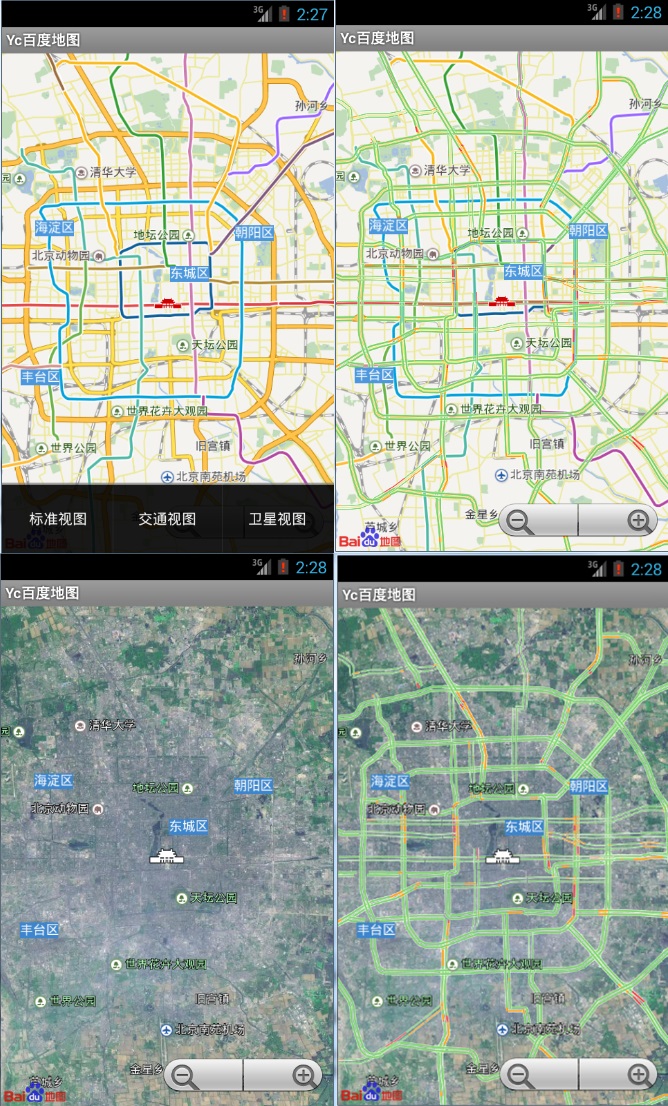
【Android 百度地图实战】2.几种地图图层的显示

具体代码官网API已提供,地址在这。 效果图如下: 主要代码: // 创建选项菜单 @Override public boolean onCreateOptionsMenu(Menu menu) { menu.add(1, 1, 1, "标准视图"); menu.add(1, 2, 2, "交通视图"); menu.add(1, 3, 3, "卫星视图"); return true; } //菜单点击事件 @Override public boolean onMenuItemSelected(int featureId, MenuItem item) { switch (item.getItemId()) { case 1: mMapView.setTraffic(false); mMapView.setSatellite(false); break; case 2: mMapView.setTraffic(true); // 在地图中显示实时交通信息 break; case 3: mMapView.setSatellite(true); // 在地图中显示卫星图 break; default: mMapView.setTraffic(false); mMapView.setSatellite(false); break; } return super.onMenuItemSelected(featureId, item); } 本文转自叶超Luka博客园博客,原文链接:http://www.cnblogs.com/yc-755909659/p/3552727.html,如需转载请自行联系原作者

资源下载

更多资源
Mario

Mario

马里奥是站在游戏界顶峰的超人气多面角色。马里奥靠吃蘑菇成长,特征是大鼻子、头戴帽子、身穿背带裤,还留着胡子。与他的双胞胎兄弟路易基一起,长年担任任天堂的招牌角色。

Nacos

Nacos

Nacos /nɑ:kəʊs/ 是 Dynamic Naming and Configuration Service 的首字母简称,一个易于构建 AI Agent 应用的动态服务发现、配置管理和AI智能体管理平台。Nacos 致力于帮助您发现、配置和管理微服务及AI智能体应用。Nacos 提供了一组简单易用的特性集,帮助您快速实现动态服务发现、服务配置、服务元数据、流量管理。Nacos 帮助您更敏捷和容易地构建、交付和管理微服务平台。

Spring

Spring

Spring框架(Spring Framework)是由Rod Johnson于2002年提出的开源Java企业级应用框架,旨在通过使用JavaBean替代传统EJB实现方式降低企业级编程开发的复杂性。该框架基于简单性、可测试性和松耦合性设计理念,提供核心容器、应用上下文、数据访问集成等模块,支持整合Hibernate、Struts等第三方框架,其适用范围不仅限于服务器端开发,绝大多数Java应用均可从中受益。

Rocky Linux

Rocky Linux

Rocky Linux(中文名:洛基)是由Gregory Kurtzer于2020年12月发起的企业级Linux发行版,作为CentOS稳定版停止维护后与RHEL(Red Hat Enterprise Linux)完全兼容的开源替代方案,由社区拥有并管理,支持x86_64、aarch64等架构。其通过重新编译RHEL源代码提供长期稳定性,采用模块化包装和SELinux安全架构,默认包含GNOME桌面环境及XFS文件系统,支持十年生命周期更新。

用户登录
用户注册