首页 文章 精选 留言 我的

精选列表

搜索[整合],共10003篇文章
优秀的个人博客,低调大师

SpringBoot2整合Redis,开启缓存,提高访问速度

前言 什么是Redis Redis是一个开源(BSD许可),内存存储的数据结构服务器,可用作数据库,高速缓存和消息队列代理。它支持字符串、哈希表、列表、集合、有序集合,位图,hyperloglogs等数据类型。内置复制、Lua脚本、LRU收回、事务以及不同级别磁盘持久化功能,同时通过Redis Sentinel提供高可用,通过Redis Cluster提供自动分区。 参考文档:https://www.redis.net.cn 为什么选择Redis 这个问题一般人会拿Redis和Memcache来做比较,但是个人认为这两者对比并不合适,因为Memcache仅仅作为缓存,而Redis是一个NoSQ...

优秀的个人博客,低调大师

SpringBoot2整合Thymeleaf,官方推荐html解决方案

前言 什么是Thymeleaf Thymeleaf是适用于Web和独立环境的现代服务器端Java模板引擎。 Thymeleaf的主要目标是为您的开发工作流程带来优雅的自然模板 -HTML可以在浏览器中正确显示,也可以作为静态原型工作,从而可以在开发团队中加强协作。 Thymeleaf拥有适用于Spring Framework的模块,与您喜欢的工具的大量集成以及插入您自己的功能的能力,对于现代HTML5 JVM Web开发而言,Thymeleaf是理想的选择-尽管它还有很多工作要做。 Thymeleaf和Freemarker对比 Thymeleaf优点: 静态html嵌入标签属性,浏览器可以直接...

优秀的个人博客,低调大师

springoot整合WebSocket

## Websocket ![1.png](https://s2.51cto.com/images/20210609/1623201311292085.png?x-oss-process=image/watermark,size_14,text_QDUxQ1RP5Y2a5a6i,color_FFFFFF,t_100,g_se,x_10,y_10,shadow_20,type_ZmFuZ3poZW5naGVpdGk=) 如果不使用WebSocket的情况下,最常用的方法是方法是 通过Http询问服务端进行轮巡请求,如果有的话就返回一个有的展示页面,如果没有就返回一个没有的展示页面,虽然这样也可以实现,但是中间有一些性能的延迟或者通信的延迟等!第二种常用的方法是常轮询的方法,它和前面的方式差不多,只不过在服务端hold5秒,然后传给客户端,这种方式的优点是及时性得到了解决,不管硬件什么时候传来,都会传给客户端,但是这也不是最优的方案。这个时候WebSocket就横空出世了,客户端发送一个请求进行连接,服务器端同意后,就创建上了双工通讯。这样就可以进行通讯会话了。 ![2.png](https://s2.51cto.com/images/20210609/1623201321283122.png?x-oss-process=image/watermark,size_14,text_QDUxQ1RP5Y2a5a6i,color_FFFFFF,t_100,g_se,x_10,y_10,shadow_20,type_ZmFuZ3poZW5naGVpdGk=) ## 为什么需要 WebSocket? 初次接触 WebSocket 的人,都会问同样的问题:我们已经有了 HTTP 协议,为什么还需要另一个协议?它能带来什么好处? - 答案很简单,因为 HTTP 协议有一个缺陷:***通信只能由客户端发起***,HTTP 协议做不到服务器主动向客户端推送信息。 ![7.png](https://s2.51cto.com/images/20210609/1623201330726422.png?x-oss-process=image/watermark,size_14,text_QDUxQ1RP5Y2a5a6i,color_FFFFFF,t_100,g_se,x_10,y_10,shadow_20,type_ZmFuZ3poZW5naGVpdGk=) 举例来说,我们想要查询当前的排队情况,只能是页面轮询向服务器发出请求,服务器返回查询结果。轮询的效率低,非常浪费资源(因为必须不停连接,或者 HTTP 连接始终打开)。因此WebSocket 就是这样发明的。 ## maven依赖 SpringBoot2.0对WebSocket的支持简直太棒了,直接就有包可以引入 ```pom 4.0.0 org.springframework.boot spring-boot-starter-parent 2.5.0 com.yueyue.websocket chat 0.0.1-SNAPSHOT chat Demo project for Spring Boot 1.8 org.springframework.boot spring-boot-starter-web org.springframework.boot spring-boot-starter-websocket org.springframework.boot spring-boot-devtools true true com.alibaba fastjson 1.1.41 commons-lang commons-lang 2.5 cn.hutool hutool-all 5.6.6 org.springframework.boot spring-boot-maven-plugin ``` ## WebSocketConfig 启用WebSocket的支持也是很简单,几句代码搞定 ```java import org.springframework.context.annotation.Bean; import org.springframework.context.annotation.Configuration; import org.springframework.web.socket.server.standard.ServerEndpointExporter; /** * 开启WebSocket支持 * @author zhengkai.blog.csdn.net */ @Configuration public class WebSocketConfig { @Bean public ServerEndpointExporter serverEndpointExporter() { return new ServerEndpointExporter(); } } ``` ## WebSocketServer 这就是重点了,核心都在这里。 1. 因为WebSocket是类似客户端服务端的形式(采用ws协议),那么这里的WebSocketServer其实就相当于一个ws协议的Controller 2. 直接@ServerEndpoint("/imserver/{userId}") 、@Component启用即可,然后在里面实现@OnOpen开启连接,@onClose关闭连接,@onMessage接收消息等方法。 3. 新建一个ConcurrentHashMap webSocketMap 用于接收当前userId的WebSocket,方便IM之间对userId进行推送消息。单机版实现到这里就可以。 4. 集群版(多个ws节点)还需要借助mysql或者redis等进行处理,改造对应的sendMessage方法即可。 ```java import java.io.IOException; import java.util.concurrent.ConcurrentHashMap; import javax.websocket.OnClose; import javax.websocket.OnError; import javax.websocket.OnMessage; import javax.websocket.OnOpen; import javax.websocket.Session; import javax.websocket.server.PathParam; import javax.websocket.server.ServerEndpoint; import com.alibaba.fastjson.JSON; import com.alibaba.fastjson.JSONObject; import org.apache.commons.lang.StringUtils; import org.springframework.stereotype.Component; import cn.hutool.log.Log; import cn.hutool.log.LogFactory; /** * @author zhengkai.blog.csdn.net */ @ServerEndpoint("/imserver/{userId}") @Component public class WebSocketServer { static Log log=LogFactory.get(WebSocketServer.class); /**静态变量,用来记录当前在线连接数。应该把它设计成线程安全的。*/ private static int onlineCount = 0; /**concurrent包的线程安全Set,用来存放每个客户端对应的MyWebSocket对象。*/ private static ConcurrentHashMap webSocketMap = new ConcurrentHashMap<>(); /**与某个客户端的连接会话,需要通过它来给客户端发送数据*/ private Session session; /**接收userId*/ private String userId=""; /** * 连接建立成功调用的方法 */ @OnOpen public void onOpen(Session session,@PathParam("userId") String userId) { this.session = session; this.userId=userId; if(webSocketMap.containsKey(userId)){ webSocketMap.remove(userId); webSocketMap.put(userId,this); //加入set中 }else{ webSocketMap.put(userId,this); //加入set中 addOnlineCount(); //在线数加1 } log.info("用户连接:"+userId+",当前在线人数为:" + getOnlineCount()); try { sendMessage("连接成功"); } catch (IOException e) { log.error("用户:"+userId+",网络异常!!!!!!"); } } /** * 连接关闭调用的方法 */ @OnClose public void onClose() { if(webSocketMap.containsKey(userId)){ webSocketMap.remove(userId); //从set中删除 subOnlineCount(); } log.info("用户退出:"+userId+",当前在线人数为:" + getOnlineCount()); } /** * 收到客户端消息后调用的方法 * * @param message 客户端发送过来的消息*/ @OnMessage public void onMessage(String message, Session session) { log.info("用户消息:"+userId+",报文:"+message); //可以群发消息 //消息保存到数据库、redis if(StringUtils.isNotBlank(message)){ try { //解析发送的报文 JSONObject jsonObject = JSON.parseObject(message); //追加发送人(防止串改) jsonObject.put("fromUserId",this.userId); String toUserId=jsonObject.getString("toUserId"); //传送给对应toUserId用户的websocket if(StringUtils.isNotBlank(toUserId)&&webSocketMap.containsKey(toUserId)){ webSocketMap.get(toUserId).sendMessage(jsonObject.toJSONString()); }else{ log.error("请求的userId:"+toUserId+"不在该服务器上"); //否则不在这个服务器上,发送到mysql或者redis } }catch (Exception e){ e.printStackTrace(); } } } /** * * @param session * @param error */ @OnError public void onError(Session session, Throwable error) { log.error("用户错误:"+this.userId+",原因:"+error.getMessage()); error.printStackTrace(); } /** * 实现服务器主动推送 */ public void sendMessage(String message) throws IOException { this.session.getBasicRemote().sendText(message); } /** * 发送自定义消息 * */ public static void sendInfo(String message,@PathParam("userId") String userId) throws IOException { log.info("发送消息到:"+userId+",报文:"+message); if(StringUtils.isNotBlank(userId)&&webSocketMap.containsKey(userId)){ webSocketMap.get(userId).sendMessage(message); }else{ log.error("用户"+userId+",不在线!"); } } public static synchronized int getOnlineCount() { return onlineCount; } public static synchronized void addOnlineCount() { WebSocketServer.onlineCount++; } public static synchronized void subOnlineCount() { WebSocketServer.onlineCount--; } } ``` ## 消息推送 至于推送新信息,可以再自己的Controller写个方法调用WebSocketServer.sendInfo();即可 ```java import com.yueyue.websocket.chat.config.WebSocketServer; import org.springframework.http.ResponseEntity; import org.springframework.web.bind.annotation.GetMapping; import org.springframework.web.bind.annotation.PathVariable; import org.springframework.web.bind.annotation.RequestMapping; import org.springframework.web.bind.annotation.RestController; import org.springframework.web.servlet.ModelAndView; import java.io.IOException; /** * WebSocketController * @author zhengkai.blog.csdn.net */ @RestController public class DemoController { @GetMapping("index") public ResponseEntity index(){ return ResponseEntity.ok("请求成功"); } @GetMapping("page") public ModelAndView page(){ return new ModelAndView("websocket"); } @RequestMapping("/push/{toUserId}") public ResponseEntity pushToWeb(String message, @PathVariable String toUserId) throws IOException { WebSocketServer.sendInfo(message,toUserId); return ResponseEntity.ok("MSG SEND SUCCESS"); } } ``` ## 页面发起 页面用js代码`调用websocket`,当然,太古老的浏览器是不行的,一般新的浏览器或者谷歌浏览器是没问题的。还有一点,记得协议是`ws`的,如果使用了一些路径类,可以replace(“http”,“ws”)来替换协议。 ```html websocket通讯 【userId】: 【toUserId】: 【toUserId】: 【操作】: 开启socket 【操作】: 发送消息 ```

优秀的个人博客,低调大师

JFinal整合WebSocket

说明以tomcat容器为例,tomcat7以上版本开始支持websocket,JFinal集成的jetty服务器不支持websocket 一、包依赖,tomcat7或是javaee包都行,两者二选一,容器中已提供所以只作为提供者 org.apache.tomcattomcat-websocket-api7.0.47provided javaxjavaee-api7.0provided 二、JFinal的配置,需要一个Handler拦截websocket请求,WebSocketHandler实现如下 package com.nmtx.manager.handler; import java.util.regex.Pattern; import javax.servlet.http.HttpServletRequest; import javax.servlet.http.HttpServletResponse; import com.jfinal.handler.Handler; import com.jfinal.kit.StrKit; public class WebSocketHandler extends Handler{ private Pattern filterUrlRegxPattern; public WebSocketHandler(String filterUrlRegx) { if (StrKit.isBlank(filterUrlRegx)) throw new IllegalArgumentException("The para filterUrlRegx can not be blank."); filterUrlRegxPattern = Pattern.compile(filterUrlRegx); } @Override public void handle(String target, HttpServletRequest request, HttpServletResponse response, boolean[] isHandled) { if (filterUrlRegxPattern.matcher(target).find()) return ; else next.handle(target, request, response, isHandled); } } JFinalConfig中配置 /** * 接收处理跳转 */ @Override public void configHandler(Handlers me) { me.add(new WebSocketHandler("^/websocket")); } 配置WebSocket处理类 package com.nmtx.manager.controller.websocket; import java.io.IOException; import javax.websocket.OnClose; import javax.websocket.OnMessage; import javax.websocket.OnOpen; import javax.websocket.Session; import javax.websocket.server.ServerEndpoint; import com.jfinal.kit.JsonKit; import com.jfinal.plugin.redis.Redis; import com.nmtx.common.ErrorCode; import com.nmtx.common.MessageResp; import com.nmtx.manager.common.base.LoggerManager; import com.nmtx.manager.model.message.Message; import com.nmtx.manager.model.permission.User; import com.nmtx.manager.utils.WebSocketSessionUtils; import com.nmtx.plugins.auth.AuthUser; import com.nmtx.utils.ModelUtils; @ServerEndpoint("/websocket") public class WebSocketController { @OnOpen public void onOpen(Session session) { } @OnClose public void onClose(Session session) { } @OnMessage public void onMessage(String requestJson, Session session) { session.getBasicRemote().sendText(requestJson); } } 三,html5端请求 <!DOCTYPE html> <html> <head> <meta charset="UTF-8"> <!-- for HTML5 --> <title>Java后端WebSocket的Tomcat实现</title> </head> <body> Welcome<br/><input id="text" type="text"/> <button onclick="send()">发送消息</button> <hr/> <button onclick="closeWebSocket()">关闭WebSocket连接</button> <hr/> <div id="message"></div> </body> <script type="text/javascript"> var websocket = null; //判断当前浏览器是否支持WebSocket if ('WebSocket' in window) { websocket = new WebSocket("ws://localhost:8080/websocket"); } else { alert('当前浏览器 Not support websocket') } //连接发生错误的回调方法 websocket.onerror = function () { setMessageInnerHTML("WebSocket连接发生错误"); }; //连接成功建立的回调方法 websocket.onopen = function () { setMessageInnerHTML("WebSocket连接成功"); } //接收到消息的回调方法 websocket.onmessage = function (event) { setMessageInnerHTML(event.data); } //连接关闭的回调方法 websocket.onclose = function () { setMessageInnerHTML("WebSocket连接关闭"); } //监听窗口关闭事件,当窗口关闭时,主动去关闭websocket连接,防止连接还没断开就关闭窗口,server端会抛异常。 window.onbeforeunload = function () { closeWebSocket(); } //将消息显示在网页上 function setMessageInnerHTML(innerHTML) { document.getElementById('message').innerHTML += innerHTML + '<br/>'; } //关闭WebSocket连接 function closeWebSocket() { websocket.close(); } //发送消息 function send() { var message = document.getElementById('text').value; websocket.send(message); } </script> </html> 打包搞定

优秀的个人博客,低调大师

Prometheus 整合 AlertManager

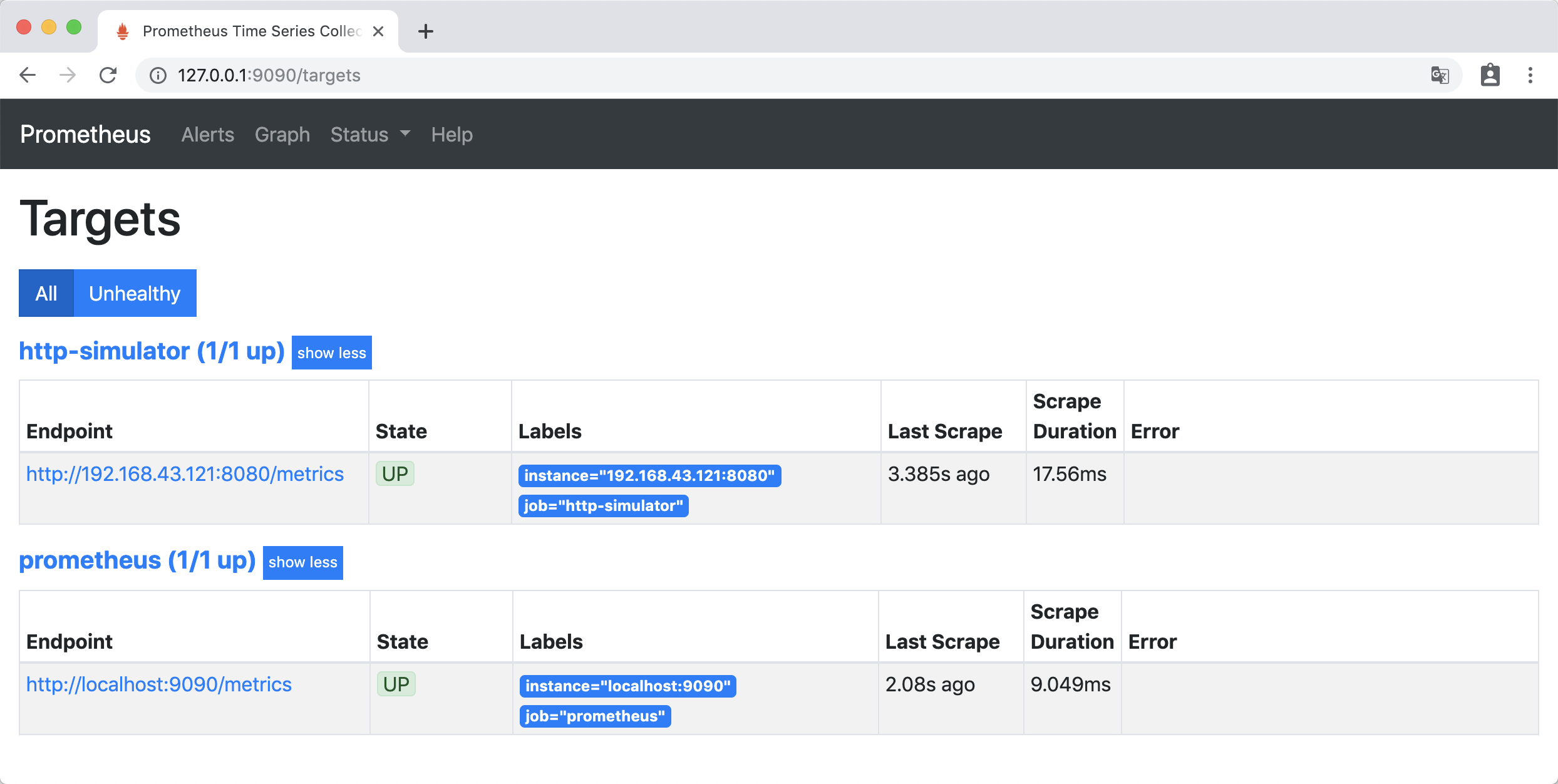
文章首发于公众号《程序员果果》 简介 Alertmanager 主要用于接收 Prometheus 发送的告警信息,它很容易做到告警信息的去重,降噪,分组,策略路由,是一款前卫的告警通知系统。它支持丰富的告警通知渠道,可以将告警信息转发到邮箱、企业微信、钉钉等。这一节讲解利用AlertManager,把接受到的告警信息,转发到邮箱。 实验 准备 启动 http-simulator 度量模拟器: docker run --name http-simulator -d -p 8080:8080 pierrevincent/prom-http-simulator:0.1 启动 Prometheus,为了方便更新配置,使用挂载配置文件的方式: docker run --name prometheus -d -p 9090:9090 -v /Users/huanchu/Documents/prometheus-data:/prometheus-data \ prom/prometheus --web.enable-lifecycle --config.file=/prometheus-data/prometheus.yml 启动添加了参数 --web.enable-lifecycle,让Prometheus支持通过web端点动态更新配置。 访问http://127.0.0.1:9090/targets ,Prometheus 自身的 metrics 和 http-simulator 的 metrics 处于up 状态 ,那么准备工作就做好了。 实验 实验1 告警配置 在prometheus-data文件夹下,创建告警配置文件 simulator_alert_rules.yml: groups: - name: simulator-alert-rule rules: - alert: HttpSimulatorDown expr: sum(up{job="http-simulator"}) == 0 for: 1m labels: severity: critical 配置文件的意思是 http-simulator 服务up状态为 0 ,并且持续1分钟时,产生告警 ,级别为 “严重的”。 修改prometheus.yml,引用simulator_alert_rules.yml文件,prometheus.yml 内容如下: global: scrape_interval: 5s evaluation_interval: 5s scrape_timeout: 5s rule_files: - "simulator_alert_rules.yml" scrape_configs: - job_name: 'prometheus' static_configs: - targets: ['localhost:9090'] - job_name: 'http-simulator' metrics_path: /metrics static_configs: - targets: ['192.168.43.121:8080'] 更新Prometheus配置: curl -X POST http://localhost:9090/-/reload 访问http://127.0.0.1:9090/config,可以看到已经为更新了配置: 访问http://127.0.0.1:9090/rules,Rules 下出现了新添加的告警规则: 验证 访问http://127.0.0.1:9090/alerts ,Alerts 下 HttpSimulatorDown 为绿色,处于INACTIVE 状态,表示什么都没有发生。 关闭 http-simulator 服务: docker stop http-simulator 访问http://127.0.0.1:9090/alerts,HttpSimulatorDown 变成黄色,处于 PENDING 状态,表示报警即将被激活。 一分钟后,HttpSimulatorDown 变成红色,处于 FIRING 状态,表示报警已经被激活了。 实验2 告警配置 在simulator_alert_rules.yml文件中增加告警配置: - alert: ErrorRateHigh expr: sum(rate(http_requests_total{job="http-simulator", status="500"}[5m])) / sum(rate(http_requests_total{job="http-simulator"}[5m])) > 0.02 for: 1m labels: severity: major annotations: summary: "High Error Rate detected" description: "Error Rate is above 2% (current value is: {{ $value }}" 配置文件的意思是 http-simulator 请求的错误率对2% ,并且持续1分钟时,产生告警 ,级别为 “非常严重的” 更新Prometheus配置: curl -X POST http://localhost:9090/-/reload 验证 访问http://127.0.0.1:9090/alerts,ErrorRateHigh 为绿色的 INACTIVE 状态。 把 http-simulator 的错误率调到 10% curl -H 'Content-Type: application/json' -X PUT -d '{"error_rate": 10}' http://localhost:8080/error_rate 稍等一会后,访问http://127.0.0.1:9090/alerts, 可以看到错误率已经大2%,ErrorRateHigh 为红色的 FIRING 状态,报警已经被激活了。 安装和配置AlertManager 通过docker 挂载文件的方式安装AlertManager,在本地创建文件夹 alertmanager-data 文件夹,在其中创建 alertmanager.yml,内容如下: global: smtp_smarthost: 'smtp.163.com:25' smtp_from: 'xxxxx@163.com' smtp_auth_username: 'xxxxx@163.com' smtp_auth_password: 'xxxxx' route: group_interval: 1m #当第一个报警发送后,等待'group_interval'时间来发送新的一组报警信息 repeat_interval: 1m # 如果一个报警信息已经发送成功了,等待'repeat_interval'时间来重新发送他们 receiver: 'mail-receiver' receivers: - name: 'mail-receiver' email_configs: - to: 'xxxxxx@163.com' 启动 AlertManager: docker run --name alertmanager -d -p 9093:9093 -v /Users/huanchu/Documents/alertmanager-data:/alertmanager-data \ prom/alertmanager --config.file=/alertmanager-data/alertmanager.yml 在Prometheus目录下,修改prometheus.yml配置Alertmanager地址: # Alertmanager configuration alerting: alertmanagers: - static_configs: - targets: - 192.168.43.121:9093 更新Prometheus配置: curl -X POST http://localhost:9090/-/reload 访问http://127.0.0.1:9093,访问Alertmanager UI界面,可以看到接收到ErrorRateHigh告警: 邮箱会收到告警信息:

优秀的个人博客,低调大师

spring session整合

花了大半天时间,解决了springMVC项目增加spring-session共享session报了异常 java.lang.ClassNotFoundException:com.lambdaworks.redis.AbstractRedisClient java.lang.ClassNotFoundException:com.lambdaworks.redis.RedisException 前情 项目做了前后端分离,springMVC项目部署在三台tomcat上,前端部署在另三台tomcat上,然后HA做了分发处理,使一个用户访问后,后面的访问都会是其中的某一台tomcat... 理想是美好的,现实中,会出现登录前后会有连接是访问了不同的tomcat,我没有运维权限,也不想接这个坑,所以就从代码上处理吧。代码上怎么处理呢,我觉得很简单,session共享不就行了,使用spring-session超简单,几行代码就搞定了。注意:这里的超简单是在spring-boot中使用才超简单。spring-boot中使用redis共享session配置:1、pom.xml加依赖 <dependency> <groupId>org.springframework.session</groupId> <artifactId>spring-session</artifactId> </dependency> <dependency> <groupId>org.springframework.session</groupId> <artifactId>spring-session-data-redis</artifactId> </dependency> 2、application.properties加配置: spring.session.store-type=redis 搞定但是,我的项目不是spring-boot项目,所以参考官网说的配吧。我的部署环境jdk是1.7、tomcat7,所以sprint-session 2.0.x是肯定不能支持了,所以还是使用1.3.3吧,官网手册很简单,有web.xml,所以配置分2步:1、 在spring-context.xml中加上配置: <context:annotation-config/> <bean class="org.springframework.session.data.redis.config.annotation.web.http.RedisHttpSessionConfiguration"/> <bean class="org.springframework.data.redis.connection.lettuce.LettuceConnectionFactory"/> 2、在web.xml加上 <context-param> <param-name>contextConfigLocation</param-name> <param-value> /WEB-INF/spring/*.xml </param-value> </context-param> <listener> <listener-class> org.springframework.web.context.ContextLoaderListener </listener-class> </listener> 当然,要在pom.xml上加上依赖包 <dependency> <groupId>org.springframework.session</groupId> <artifactId>spring-session</artifactId> <version>1.3.0.RELEASE</version> </dependency> <dependency> <groupId>org.springframework.session</groupId> <artifactId>spring-session-data-redis</artifactId> <version>1.3.0.RELEASE</version> </dependency> 然后...就是报了异常 java.lang.ClassNotFoundException:com.lambdaworks.redis.AbstractRedisClient 或 java.lang.ClassNotFoundException:com.lambdaworks.redis.RedisException 我知道是会有版本兼容的问题,所以不断切换版本试试看,然后就试了大半天,结果再一仔细看配置:知道com.lambdaworks是哪个包不:io.lettuce。所以的,其实是因为我使用的是jedis包,所以根本不需要这一行代码 <bean class="org.springframework.data.redis.connection.lettuce.LettuceConnectionFactory"/> 解决 因为我使用的是jedis包,而不是也不需要用到io.lettuce包,所以在spring-context.xml中配置应该是这样的: <!-- Redis 线程池配置 --> <bean id="jedisPoolConfig" class="redis.clients.jedis.JedisPoolConfig"> <property name="maxTotal" value="${redis.pool.maxActive}" /> <property name="maxIdle" value="${redis.pool.maxIdle}" /> <property name="maxWaitMillis" value="${redis.pool.maxWaitMillis}" /> <property name="testOnBorrow" value="${redis.pool.testOnBorrow}" /> </bean> <bean id="jedisConnFactory" class="org.springframework.data.redis.connection.jedis.JedisConnectionFactory"> <property name="hostName" value="${redis.hostname}" /> <property name="password" value="${redis.password}" /> <property name="port" value="${redis.port}" /> <property name="usePool" value="${redis.usePool}" /> <property name="poolConfig" ref="jedisPoolConfig" /> </bean> <!-- spring-session共享支持 --> <context:annotation-config/> <bean class="org.springframework.session.data.redis.config.annotation.web.http.RedisHttpSessionConfiguration" />

优秀的个人博客,低调大师

资源整合

一、5 个值得在 2018 年关注的库 Web 领域:Sanic 这个库和 Flask 类似,但是比它快很多,速度能在测试中达到每秒 36000 次请求。在2017年的 Star 增长数几乎是翻了一倍。Gotta go faster! 环境与包管理:Pipenv 这个库相当于是环境管理和包管理二合一,由 Kenneth Reitz (Requests 的作者 )编写,现在移交给 Python 官方来维护,提供比 pip 体验更好的开发包管理。它的 Slogon 是Python Development Workflow for Humans,用来解决各种环境不一致、安装包的问题。 爬虫:Requestium 现在反爬虫技术越来越厉害,常见的请求 + 解析爬虫随着频率变大和前端开发的复杂化变得并不是那么奏效。Requestium 的好处是,结合了 Chrome 59 以后的 headless 无头特性(代替了 phantomjs)。虽然效率稍微低一点,但是稳,前端渲染的网页也可以爬取解析。是 Requests, Selenium 和 Parsel 的结合体。 深度学习:Caffe2 文本处理:FlashText 这个库的开发者在 medium 上发了一篇文章,标题是:Regex was taking 5 days to run. So I built a tool that did it in 15 minutes. (正则要花5天时间才能完成,所以我做了个工具在15分钟内搞定)。这个库可以快速进行大规模语料库的文本搜索与替换。当关键词数量>500 的时候,FlashText 的搜索速度开始超过正则。 作者:麻瓜编程 链接:https://www.zhihu.com/question/24590883/answer/286407918 来源:知乎 著作权归作者所有。商业转载请联系作者获得授权,非商业转载请注明出处。 二、Awesome Python中文版来啦! 引自:Python 资源大全 (本文由 伯乐在线 - 艾凌风 翻译 英文出处:vinta/awesome-python) 三、python 之网络和邮件 作者:赖明星 链接:https://www.zhihu.com/question/24590883/answer/134253100 1. yagmail 果使用 yagmail,发送一个带附件的邮件,只需要2行代码: import yagmail yag = yagmail.SMTP(user='joy_lmx@163.com', password='nicai?', host='smtp.163.com', port='25') yag.send(user, subject = "I now can send an attachment", attachments=['a.txt', 'b.jpg']) 2. requests >>> r = requests.get('https://api.github.com/user', auth=('user', 'pass')) >>> r.status_code 200 >>> r.headers['content-type'] 'application/json; charset=utf8' >>> r.encoding 'utf-8' >>> r.text u'{"type":"User"...' >>> r.json() {u'private_gists': 419, u'total_private_repos': 77, ...} 3. psutil psutil 是用来获取操作系统监控以及进程管理的,如果你正在写一个监控系统(或脚本),赶紧去试试。这么说吧,我曾经使用psutil把网易内部的一个监控模块,从 \(1000+\) 行重构到了\(100+\) 行。 我这里推荐的几个库,可能 yagmail对最多人有用。而 psutil,对专业的人士最有用。如果你要写一个监控系统,不使用 psutil的话,只能直接去 /proc 目录下读取想用的文件进行计算,或者执行 iostat、vmstat、df 等 linux 命令获取命令输出,不管哪一种方法,都要处理很多繁琐的细节。有了 psutil 以后,就轻松多了。贴段代码大家感受一下: def get_network_info(self): """ psutil.net_io_counters() snetio(bytes_sent=12541464, bytes_recv=21459989, packets_sent=80164, packets_recv=88134, errin=0, errout=0, dropin=0, dropout=0) """ return psutil.net_io_counters() def get_memory_used(self): """ psutil.virtual_memory() svmem(total=4159041536, available=3723980800, percent=10.5, used=1599082496, free=2559959040, active=587403264, inactive=897105920, buffers=95989760, cached=1068032000) """ memory_info = psutil.virtual_memory() memory_used = ( memory_info.total * memory_info.percent / 100 ) / 1024 / 1024 return memory_used 此外,使用越来越广泛的监控工具 glances(如果没用过,要不现在就是试试?),就是用 psutil 收集相关数据的。 4. BeautifulSoup 如果你写爬虫,还在用 XPath 解析 HTML,那赶紧用用 BeautifulSoup,比 XPath 好用一百倍;如果你还在用正则表达式从 HTML 中获取内容,BeautifulSoup 能让你好用到哭。(补充:评论里大家都说 XPath 更好用,难道是我思维方式和大家不一样?)BeautifulSoup 是用来解析 HTML 的,特点就是好用,有人吐槽 BeautifulSoup 慢?我不在乎 BeautifulSoup 比 XPath 慢多少,我只知道,我的时间比机器的更宝贵。 例如,要找到页面中所有的 links,如下所示: 来源:知乎 著作权归作者所有。商业转载请联系作者获得授权,非商业转载请注明出处。 from bs4 import BeautifulSoup import requests url = 'https://www.biaodianfu.com' r = requests.get(url, timeout=20) soup = BeautifulSoup(r.content, 'html.parser') print(type(soup)) <class 'bs4.BeautifulSoup'> for link in soup.find_all('a'): print(link.get('href')) https://www.biaodianfu.com/category/product-design https://www.biaodianfu.com/category/share-discovery https://www.biaodianfu.com/category/bigdata https://www.biaodianfu.com/category/programming https://www.biaodianfu.com/category/management https://www.biaodianfu.com/category/architecture https://www.biaodianfu.com/category/marketing https://www.biaodianfu.com http://www.biaodianfu.com/ https://www.biaodianfu.com/about https://www.biaodianfu.com/archives ..... 有了BeautifulSoup以后,爬虫操作就变得特别简单了。脏活累活别人都帮忙做好了。 更多参考:Python数据解析工具:Beautiful Soup 5. utils 除了开源的库以外,还有些开源项目的 DataStruct.py helper.py utils.py 文件,也值得看一看。里面很多好东西,都是可以直接拿过来用的。 四、怎么样才算是精通 Python? 五、你写论文时发现了哪些神网站? 六、LaTeX笔记|基本功能(一) 七 完全云端运行:使用谷歌CoLaboratory训练神经网络 八、谷歌发布 TensorFlow 1.5,全面支持动态图机制和 TensorFlow Lite 探寻有趣之事!

优秀的个人博客,低调大师

elasticsearch spring 整合

项目清单 elasticsearch服务下载包括其中插件和分词 http://download.csdn.net/detail/u014201191/8809619 项目源码 资源文件 app.properties [html] view plain copy elasticsearch.esNodes=localhost:9300 elasticsearch.cluster.name=heroscluster app.xml [html] view plain copy <?xmlversion="1.0"encoding="UTF-8"?> <beansxmlns="http://www.springframework.org/schema/beans" xmlns:xsi="http://www.w3.org/2001/XMLSchema-instance"xmlns:util="http://www.springframework.org/schema/util" xmlns:context="http://www.springframework.org/schema/context" xmlns:elasticsearch="http://www.pilato.fr/schema/elasticsearch" xsi:schemaLocation="http://www.springframework.org/schema/beanshttp://www.springframework.org/schema/beans/spring-beans-3.0.xsd http://www.springframework.org/schema/utilhttp://www.springframework.org/schema/util/spring-util-3.0.xsd http://www.pilato.fr/schema/elasticsearchhttp://www.pilato.fr/schema/elasticsearch/elasticsearch-0.3.xsd http://www.springframework.org/schema/contexthttp://www.springframework.org/schema/context/spring-context-3.1.xsd"> <context:annotation-config/> <!--自动扫描所有注解该路径--> <!--<context:component-scanbase-package="com.sf.heros.mq.*"/>--> <context:property-placeholderlocation="classpath:/app.properties"/> <importresource="elasticseach.xml"/> </beans> elasticseach.xml [html] view plain copy <?xmlversion="1.0"encoding="UTF-8"?> <beansxmlns="http://www.springframework.org/schema/beans" xmlns:xsi="http://www.w3.org/2001/XMLSchema-instance"xmlns:util="http://www.springframework.org/schema/util" xmlns:context="http://www.springframework.org/schema/context" xmlns:elasticsearch="http://www.pilato.fr/schema/elasticsearch" xsi:schemaLocation="http://www.springframework.org/schema/beanshttp://www.springframework.org/schema/beans/spring-beans-3.0.xsd http://www.springframework.org/schema/utilhttp://www.springframework.org/schema/util/spring-util-3.0.xsd http://www.pilato.fr/schema/elasticsearchhttp://www.pilato.fr/schema/elasticsearch/elasticsearch-0.3.xsd http://www.springframework.org/schema/contexthttp://www.springframework.org/schema/context/spring-context-3.1.xsd"> <util:mapid="esproperties"> <entrykey="cluster.name"value="${elasticsearch.cluster.name}"/> </util:map> <elasticsearch:clientid="client"properties="esproperties" esNodes="${elasticsearch.esNodes}"/> <beanname="elasticsearchTemplate" class="org.springframework.data.elasticsearch.core.ElasticsearchTemplate"> <constructor-argname="client"ref="client"/> </bean> <beanname="elasticsearchService"class="com.sf.heros.mq.consumer.service.ElasticsearchService" init-method="init"/> <beanname="es"class="com.sf.daidongxi.web.service.ElasticsearchService"></bean> </beans> log4j.properties [html] view plain copy ###\u8bbe\u7f6eLogger\u8f93\u51fa\u7ea7\u522b\u548c\u8f93\u51fa\u76ee\u7684\u5730### log4j.rootLogger=info,logfile log4j.appender.console=org.apache.log4j.ConsoleAppender log4j.appender.console.Threshold=info log4j.appender.console.layout=org.apache.log4j.PatternLayout log4j.appender.console.layout.ConversionPattern=[%-5p]%d{yyyy-MM-ddHH:mm:ss,SSS}-%m%n log4j.appender.logfile=org.apache.log4j.DailyRollingFileAppender log4j.appender.logfile.File=/app/logs/mq_consumer.log log4j.appender.logfile.datePattern='.'yyyy-MM-dd'.' log4j.appender.logfile.append=true log4j.appender.logfile.Threshold=debug log4j.appender.logfile.layout=org.apache.log4j.PatternLayout log4j.appender.logfile.layout.ConversionPattern=[%-5p]%d{yyyy-MM-ddHH:mm:ss,SSS}-%m%n maven管理 [html] view plain copy <projectxmlns="http://maven.apache.org/POM/4.0.0"xmlns:xsi="http://www.w3.org/2001/XMLSchema-instance" xsi:schemaLocation="http://maven.apache.org/POM/4.0.0http://maven.apache.org/maven-v4_0_0.xsd"> <modelVersion>4.0.0</modelVersion> <groupId>com.elasticsearch</groupId> <artifactId>elasticsearch</artifactId> <packaging>war</packaging> <version>0.0.1-SNAPSHOT</version> <name>elasticsearchMavenWebapp</name> <url>http://maven.apache.org</url> <properties> <spring.version>3.1.1.RELEASE</spring.version> <findbugs.annotations>2.0.0</findbugs.annotations> <checkstyle.maven.plugin>2.11</checkstyle.maven.plugin> <pmd.maven.plugin>3.0</pmd.maven.plugin> <findbugs.maven.plugin>2.5.3</findbugs.maven.plugin> <java.version>1.7</java.version> </properties> <dependencies> <dependency> <groupId>junit</groupId> <artifactId>junit</artifactId> <version>3.8.1</version> <scope>test</scope> </dependency> <!--springbegin--> <dependency> <groupId>org.springframework</groupId> <artifactId>spring-context</artifactId> <version>${spring.version}</version> </dependency> <dependency> <groupId>org.springframework</groupId> <artifactId>spring-context-support</artifactId> <version>${spring.version}</version> </dependency> <dependency> <groupId>org.springframework</groupId> <artifactId>spring-aop</artifactId> <version>${spring.version}</version> </dependency> <dependency> <groupId>org.springframework</groupId> <artifactId>spring-core</artifactId> <version>${spring.version}</version> </dependency> <dependency> <groupId>org.springframework</groupId> <artifactId>spring-jdbc</artifactId> <version>${spring.version}</version> </dependency> <!--springend--> <!--elasticsearchpackage--> <dependency> <groupId>fr.pilato.spring</groupId> <artifactId>spring-elasticsearch</artifactId> <version>1.0.0</version> </dependency> <dependency> <groupId>org.elasticsearch</groupId> <artifactId>elasticsearch</artifactId> <version>1.0.0</version> </dependency> <dependency> <groupId>org.springframework.data</groupId> <artifactId>spring-data-elasticsearch</artifactId> <version>1.0.0.RELEASE</version> </dependency> <dependency> <groupId>com.alibaba</groupId> <artifactId>druid</artifactId> <version>1.0.5</version> </dependency> <!--json-lib--> <dependency> <groupId>net.sf.json-lib</groupId> <artifactId>json-lib</artifactId> <version>2.4</version> <classifier>jdk15</classifier> </dependency> <!--quartzjob--> <dependency> <groupId>org.quartz-scheduler</groupId> <artifactId>quartz</artifactId> <version>2.2.1</version> </dependency> <!--log4j--> <dependency> <groupId>org.slf4j</groupId> <artifactId>slf4j-log4j12</artifactId> <version>1.7.5</version> </dependency> </dependencies> <build> <finalName>elasticsearch</finalName> </build> </project> Java.class Bean配置 [html] view plain copy packagecom.sf.heros.mq.consumer.vo; importorg.springframework.data.annotation.Id; importorg.springframework.data.elasticsearch.annotations.Document; importorg.springframework.data.elasticsearch.annotations.Field; importorg.springframework.data.elasticsearch.annotations.FieldIndex; importorg.springframework.data.elasticsearch.annotations.FieldType; importcom.sf.heros.mq.consumer.utils.APP; //@Document(indexName=APP.ESProp.INDEX_NAME,type=APP.ESProp.TYPE_TASK_INFO,indexStoreType=APP.ESProp.INDEX_STORE_TYPE,shards=APP.ESProp.SHARDS,replicas=APP.ESProp.REPLICAS,refreshInterval=APP.ESProp.REFRESH_INTERVAL) @Document(indexName=APP.ESProp.INDEX_NAME,type=APP.ESProp.TYPE_TASK_INFO) publicclassTaskInfo{ @Id @Field(index=FieldIndex.not_analyzed,store=true) privateStringtaskId; @Field(type=FieldType.Integer,index=FieldIndex.not_analyzed,store=true) privateIntegeruserId; @Field(type=FieldType.String,indexAnalyzer="ik",searchAnalyzer="ik",store=true) privateStringtaskContent; @Field(type=FieldType.String,indexAnalyzer="ik",searchAnalyzer="ik",store=true) privateStringtaskArea; @Field(type=FieldType.String,indexAnalyzer="ik",searchAnalyzer="ik",store=true) privateStringtaskTags; @Field(type=FieldType.Integer,index=FieldIndex.not_analyzed,store=true) privateIntegertaskState; @Field(type=FieldType.String,index=FieldIndex.not_analyzed,store=true) privateStringupdateTime; @Field(type=FieldType.String,indexAnalyzer="ik",searchAnalyzer="ik",store=true) privateStringuserNickName; publicStringgetTaskId(){ returntaskId; } publicvoidsetTaskId(StringtaskId){ this.taskId=taskId; } publicIntegergetUserId(){ returnuserId; } publicvoidsetUserId(IntegeruserId){ this.userId=userId; } publicStringgetTaskContent(){ returntaskContent; } publicvoidsetTaskContent(StringtaskContent){ this.taskContent=taskContent; } publicStringgetTaskArea(){ returntaskArea; } publicvoidsetTaskArea(StringtaskArea){ this.taskArea=taskArea; } publicStringgetTaskTags(){ returntaskTags; } publicvoidsetTaskTags(StringtaskTags){ this.taskTags=taskTags; } publicIntegergetTaskState(){ returntaskState; } publicvoidsetTaskState(IntegertaskState){ this.taskState=taskState; } publicStringgetUpdateTime(){ returnupdateTime; } publicvoidsetUpdateTime(StringupdateTime){ this.updateTime=updateTime; } publicStringgetUserNickName(){ returnuserNickName; } publicvoidsetUserNickName(StringuserNickName){ this.userNickName=userNickName; } @Override publicStringtoString(){ return"TaskInfo[taskId="+taskId+",userId="+userId +",taskContent="+taskContent+",taskArea="+taskArea +",taskState="+taskState +",updateTime="+updateTime+",userNickName=" +userNickName+"]"; } publicTaskInfo(StringtaskId,IntegeruserId,StringtaskContent, StringtaskArea,StringtaskTags,IntegertaskState, StringupdateTime,StringuserNickName){ this.taskId=taskId; this.userId=userId; this.taskContent=taskContent; this.taskArea=taskArea; this.taskTags=taskTags; this.taskState=taskState; this.updateTime=updateTime; this.userNickName=userNickName; } publicTaskInfo(){ //TODOAuto-generatedconstructorstub } } 其余的类在源码中下载,此处不列出了... 常量管理 [html] view plain copy packagecom.sf.heros.mq.consumer.utils; importjava.util.HashMap; importjava.util.Map; publicinterfaceAPP{ publicstaticfinalMap<String,String>map=newHashMap<String,String>(); publicstaticfinalStringCLOSED_MSG="#################closed####################"; publicstaticfinallongDELIVERIED_TAG=-1; classESProp{ publicstaticfinalStringINDEX_NAME="heros"; publicstaticfinalStringDAIDONGXI_INDEX_NAME="daidongxi"; publicstaticfinalStringTYPE_NEWS_INFO="news_info"; publicstaticfinalStringTYPE_PRODUCT_INFO="product_info"; publicstaticfinalStringTYPE_STORY_INFO="story_info"; publicstaticfinalStringTYPE_TASK_INFO="task_info"; publicstaticfinalStringTYPE_USER_INFO="user_info"; publicstaticfinalStringTYPE_BRANDCASE_INFO="brandcase_info"; publicstaticfinalStringINDEX_STORE_TYPE="memory"; publicstaticfinalintSHARDS=2; publicstaticfinalintREPLICAS=1; publicstaticfinalStringREFRESH_INTERVAL="-1"; } } 增删改类 [html] view plain copy /** *@Pr锛歨eros *@Date:2014-5-4涓婂崍9:21:27 *@Author:seaphy *@Copyright:漏2012sf-express.comInc.Allrightsreserved *娉ㄦ剰锛氭湰鍐呭浠呴檺浜庨『涓伴�熻繍鍏徃鍐呴儴浼犻槄锛岀姝㈠娉勪互鍙婄敤浜庡叾浠栫殑鍟嗕笟鐩殑 */ packagecom.sf.heros.mq.consumer.service; importjava.util.ArrayList; importjava.util.List; importorg.apache.log4j.Logger; importorg.elasticsearch.action.ActionFuture; importorg.elasticsearch.action.admin.cluster.health.ClusterHealthRequest; importorg.elasticsearch.action.admin.cluster.health.ClusterHealthResponse; importorg.elasticsearch.action.admin.cluster.health.ClusterHealthStatus; importorg.elasticsearch.client.Client; importorg.springframework.beans.factory.annotation.Autowired; importorg.springframework.data.elasticsearch.core.ElasticsearchTemplate; importorg.springframework.data.elasticsearch.core.query.IndexQuery; importorg.springframework.data.elasticsearch.core.query.IndexQueryBuilder; importcom.sf.heros.mq.consumer.utils.APP; importcom.sf.heros.mq.consumer.vo.BrandCaseInfo; importcom.sf.heros.mq.consumer.vo.NewsInfo; importcom.sf.heros.mq.consumer.vo.TaskInfo; importcom.sf.heros.mq.consumer.vo.UserInfo; /** *@authorseaphy *@date2014-5-4 */ publicclassElasticsearchService{ privatestaticfinalLoggerlogger=Logger.getLogger(ElasticsearchService.class); @Autowired privateElasticsearchTemplateelasticsearchTemplate; @Autowired privateClientesClient; publicvoidinit(){ if(!elasticsearchTemplate.indexExists(APP.ESProp.INDEX_NAME)){ elasticsearchTemplate.createIndex(APP.ESProp.INDEX_NAME); } elasticsearchTemplate.putMapping(TaskInfo.class); elasticsearchTemplate.putMapping(NewsInfo.class); } publicbooleanupdate(List<TaskInfo>taskInfoList){ List<IndexQuery>queries=newArrayList<IndexQuery>(); for(TaskInfotaskInfo:taskInfoList){ IndexQueryindexQuery=newIndexQueryBuilder().withId(taskInfo.getTaskId()).withObject(taskInfo).build(); queries.add(indexQuery); } elasticsearchTemplate.bulkIndex(queries); returntrue; } publicbooleaninsertOrUpdateTaskInfo(List<TaskInfo>taskInfoList){ List<IndexQuery>queries=newArrayList<IndexQuery>(); for(TaskInfotaskInfo:taskInfoList){ IndexQueryindexQuery=newIndexQueryBuilder().withId(taskInfo.getTaskId()).withObject(taskInfo).build(); queries.add(indexQuery); } elasticsearchTemplate.bulkIndex(queries); returntrue; } publicbooleaninsertOrUpdateNewsInfo(List<NewsInfo>newsInfos){ List<IndexQuery>queries=newArrayList<IndexQuery>(); for(NewsInfonewsInfo:newsInfos){ IndexQueryindexQuery=newIndexQueryBuilder().withId(newsInfo.getNewsId()).withObject(newsInfo).build(); queries.add(indexQuery); } elasticsearchTemplate.bulkIndex(queries); returntrue; } publicbooleaninsertOrUpdateNewsInfo(NewsInfonewsInfo){ try{ IndexQueryindexQuery=newIndexQueryBuilder().withId(newsInfo.getNewsId()).withObject(newsInfo).build(); elasticsearchTemplate.index(indexQuery); returntrue; }catch(Exceptione){ logger.error("insertorupdatenewsinfoerror.",e); returnfalse; } } publicbooleaninsertOrUpdateTaskInfo(TaskInfotaskInfo){ try{ IndexQueryindexQuery=newIndexQueryBuilder().withId(taskInfo.getTaskId()).withObject(taskInfo).build(); elasticsearchTemplate.index(indexQuery); returntrue; }catch(Exceptione){ logger.error("insertorupdatetaskinfoerror.",e); returnfalse; } } publicbooleaninsertOrUpdateUserInfo(UserInfouserInfo){ try{ IndexQueryindexQuery=newIndexQueryBuilder().withId(userInfo.getUserId()).withObject(userInfo).build(); elasticsearchTemplate.index(indexQuery); returntrue; }catch(Exceptione){ logger.error("insertorupdateuserinfoerror.",e); returnfalse; } } public<T>booleandeleteById(Stringid,Class<T>clzz){ try{ elasticsearchTemplate.delete(clzz,id); returntrue; }catch(Exceptione){ logger.error("delete"+clzz+"byid"+id+"error.",e); returnfalse; } } /** *检查健康状态 *@author高国藩 *@date2015年6月15日下午6:59:47 *@return */ publicbooleanping(){ try{ ActionFuture<ClusterHealthResponse>health=esClient.admin().cluster().health(newClusterHealthRequest()); ClusterHealthStatusstatus=health.actionGet().getStatus(); if(status.value()==ClusterHealthStatus.RED.value()){ thrownewRuntimeException("elasticsearchclusterhealthstatusisred."); } returntrue; }catch(Exceptione){ logger.error("pingelasticsearcherror.",e); returnfalse; } } publicbooleaninsertOrUpdateBrandCaseInfo(BrandCaseInfobrandCaseInfo){ try{ IndexQueryindexQuery=newIndexQueryBuilder() .withId(brandCaseInfo.getId()).withObject(brandCaseInfo).build(); elasticsearchTemplate.index(indexQuery); returntrue; }catch(Exceptione){ logger.error("insertorupdatebrandcaseinfoerror.",e); returnfalse; } } } 查询类 [html] view plain copy packagecom.sf.daidongxi.web.service; importjava.util.ArrayList; importjava.util.Collection; importjava.util.List; importjava.util.Map; importorg.apache.commons.lang.StringUtils; importorg.apache.log4j.Logger; importorg.apache.lucene.queries.TermFilter; importorg.apache.lucene.queryparser.xml.builders.FilteredQueryBuilder; importorg.elasticsearch.action.search.SearchRequestBuilder; importorg.elasticsearch.action.search.SearchResponse; importorg.elasticsearch.action.search.SearchType; importorg.elasticsearch.client.Client; importorg.elasticsearch.index.query.BoolFilterBuilder; importorg.elasticsearch.index.query.FilterBuilder; importorg.elasticsearch.index.query.FilterBuilders; importorg.elasticsearch.index.query.MatchQueryBuilder; importorg.elasticsearch.index.query.QueryBuilder; importorg.elasticsearch.index.query.QueryBuilders; importorg.elasticsearch.index.query.QueryStringQueryBuilder; importorg.elasticsearch.index.query.RangeFilterBuilder; importorg.elasticsearch.index.query.TermsQueryBuilder; importorg.elasticsearch.search.SearchHit; importorg.elasticsearch.search.sort.SortOrder; importorg.springframework.beans.factory.InitializingBean; importorg.springframework.beans.factory.annotation.Autowired; importorg.springframework.data.elasticsearch.core.ElasticsearchTemplate; importsun.misc.Contended; publicclassElasticsearchServiceimplementsInitializingBean{ privatestaticfinalLoggerlogger=Logger .getLogger(ElasticsearchService.class); @Autowired privateClientclient; privateStringesIndexName="heros"; @Autowired privateElasticsearchTemplateelasticsearchTemplate; @Autowired privateClientesClient; /**查询id*/ publicList<String>queryId(Stringtype,String[]fields,Stringcontent, StringsortField,SortOrderorder,intfrom,intsize){ SearchRequestBuilderreqBuilder=client.prepareSearch(esIndexName) .setTypes(type).setSearchType(SearchType.DEFAULT) .setExplain(true); QueryStringQueryBuilderqueryString=QueryBuilders.queryString("\"" +content+"\""); for(Stringk:fields){ queryString.field(k); } queryString.minimumShouldMatch("10"); reqBuilder.setQuery(QueryBuilders.boolQuery().should(queryString)) .setExplain(true); if(StringUtils.isNotEmpty(sortField)&&order!=null){ reqBuilder.addSort(sortField,order); } if(from>=0&&size>0){ reqBuilder.setFrom(from).setSize(size); } SearchResponseresp=reqBuilder.execute().actionGet(); SearchHit[]hits=resp.getHits().getHits(); ArrayList<String>results=newArrayList<String>(); for(SearchHithit:hits){ results.add(hit.getId()); } returnresults; } /** *查询得到结果为Map集合 * *@author高国藩 *@date2015年6月15日下午8:46:13 *@paramtype *表 *@paramfields *字段索引 *@paramcontent *查询的值 *@paramsortField *排序的字段 *@paramorder *排序的規則 *@paramfrom *分頁 *@paramsize *@return */ publicList<Map<String,Object>>queryForObject(Stringtype, String[]fields,Stringcontent,StringsortField,SortOrderorder, intfrom,intsize){ SearchRequestBuilderreqBuilder=client.prepareSearch(esIndexName) .setTypes(type).setSearchType(SearchType.DEFAULT) .setExplain(true); QueryStringQueryBuilderqueryString=QueryBuilders.queryString("\"" +content+"\""); for(Stringk:fields){ queryString.field(k); } queryString.minimumShouldMatch("10"); reqBuilder.setQuery(QueryBuilders.boolQuery().should(queryString)) .setExplain(true); if(StringUtils.isNotEmpty(sortField)&&order!=null){ reqBuilder.addSort(sortField,order); } if(from>=0&&size>0){ reqBuilder.setFrom(from).setSize(size); } SearchResponseresp=reqBuilder.execute().actionGet(); SearchHit[]hits=resp.getHits().getHits(); List<Map<String,Object>>results=newArrayList<Map<String,Object>>(); for(SearchHithit:hits){ results.add(hit.getSource()); } returnresults; } /** *QueryBuilders所有查询入口 */ publicList<Map<String,Object>>queryForObjectEq(Stringtype, String[]fields,Stringcontent,StringsortField,SortOrderorder, intfrom,intsize){ SearchRequestBuilderreqBuilder=client.prepareSearch(esIndexName) .setTypes(type).setSearchType(SearchType.DEFAULT) .setExplain(true); QueryStringQueryBuilderqueryString=QueryBuilders.queryString("\"" +content+"\""); for(Stringk:fields){ queryString.field(k); } queryString.minimumShouldMatch("10"); reqBuilder.setQuery(QueryBuilders.boolQuery().must(queryString)) .setExplain(true); if(StringUtils.isNotEmpty(sortField)&&order!=null){ reqBuilder.addSort(sortField,order); } if(from>=0&&size>0){ reqBuilder.setFrom(from).setSize(size); } SearchResponseresp=reqBuilder.execute().actionGet(); SearchHit[]hits=resp.getHits().getHits(); List<Map<String,Object>>results=newArrayList<Map<String,Object>>(); for(SearchHithit:hits){ results.add(hit.getSource()); } returnresults; } /** *多个文字记不清是那些字,然后放进去查询 * *@author高国藩 *@date2015年6月16日上午9:56:08 *@paramtype *@paramfield *@paramcountents *@paramsortField *@paramorder *@paramfrom *@paramsize *@return */ publicList<Map<String,Object>>queryForObjectNotEq(Stringtype, Stringfield,Collection<String>countents,StringsortField, SortOrderorder,intfrom,intsize){ SearchRequestBuilderreqBuilder=client.prepareSearch(esIndexName) .setTypes(type).setSearchType(SearchType.DEFAULT) .setExplain(true); List<String>contents=newArrayList<String>(); for(Stringcontent:countents){ contents.add("\""+content+"\""); } TermsQueryBuilderinQuery=QueryBuilders.inQuery(field,contents); inQuery.minimumShouldMatch("10"); reqBuilder.setQuery(QueryBuilders.boolQuery().mustNot(inQuery)) .setExplain(true); if(StringUtils.isNotEmpty(sortField)&&order!=null){ reqBuilder.addSort(sortField,order); } if(from>=0&&size>0){ reqBuilder.setFrom(from).setSize(size); } SearchResponseresp=reqBuilder.execute().actionGet(); SearchHit[]hits=resp.getHits().getHits(); List<Map<String,Object>>results=newArrayList<Map<String,Object>>(); for(SearchHithit:hits){ results.add(hit.getSource()); } returnresults; } /** *Filters查询方式 * *1.1)QueryBuilders.queryString获得基本查询 *2)FilteredQueryBuilderquery=QueryBuilders.filteredQuery(queryString,FilterBuilder) *3)通过上面封装成为查询,将这个query插入到reqBuilder中;完成操作 * *2.在reqBuilder.setQuery(query); * *3.介绍在2)中的FilterBuilder各种构造方式-参数都可以传String类型即可 *FilterBuilders.rangeFilter("taskState").lt(20)小于、lte(20)小于等于 *FilterBuilders.rangeFilter("taskState").gt(20))大于、gte(20)大于等于 *FilterBuilders.rangeFilter("taskState").from(start).to(end))范围,也可以指定日期,用字符串就ok了 *@author高国藩 *@date2015年6月15日下午10:06:05 *@paramtype *@paramfield *@paramcountents *@paramsortField *@paramorder *@paramfrom *@paramsize *@return */ publicList<Map<String,Object>>queryForObjectForElasticSerch(Stringtype, Stringfield,Stringcontent,intstart,intend){ SearchRequestBuilderreqBuilder=client.prepareSearch(esIndexName) .setTypes(type).setSearchType(SearchType.DEFAULT) .setExplain(true); QueryStringQueryBuilderqueryString=QueryBuilders.queryString("\"" +content+"\""); queryString.field(field); queryString.minimumShouldMatch("10"); reqBuilder.setQuery(QueryBuilders.filteredQuery(queryString,FilterBuilders.rangeFilter("taskState").from(start).to(end))) .setExplain(true); SearchResponseresp=reqBuilder.execute().actionGet(); SearchHit[]hits=resp.getHits().getHits(); List<Map<String,Object>>results=newArrayList<Map<String,Object>>(); for(SearchHithit:hits){ results.add(hit.getSource()); } returnresults; } publicvoidafterPropertiesSet()throwsException{ System.out.println("init..."); } } 测试 [html] view plain copy packagecom.sf.heros.mq.consumer; importjava.util.ArrayList; importjava.util.Collection; importjava.util.HashSet; importjava.util.List; importjava.util.Map; importorg.apache.log4j.Logger; importorg.elasticsearch.search.sort.SortOrder; importorg.junit.Test; importorg.springframework.context.support.ClassPathXmlApplicationContext; importcom.sf.heros.mq.consumer.service.ElasticsearchService; importcom.sf.heros.mq.consumer.utils.APP; importcom.sf.heros.mq.consumer.vo.TaskInfo; publicclassAppMain{ privatestaticfinalLoggerlogger=Logger.getLogger(AppMain.class); publicvoidstart(){ ClassPathXmlApplicationContextcontext=null; try{ context=newClassPathXmlApplicationContext("classpath:app.xml"); }catch(Exceptione){ logger.error("Anerroroccurred,applicationContextwillclose.",e); if(context!=null){ context.close(); } context=null; logger.error(APP.CLOSED_MSG); } } /** *插入 *@author高国藩 *@date2015年6月16日上午10:14:21 */ @Test publicvoidinsertNo(){ ClassPathXmlApplicationContextcontext=newClassPathXmlApplicationContext( "classpath:app.xml"); ElasticsearchServiceservice=context .getBean(ElasticsearchService.class); List<TaskInfo>taskInfoList=newArrayList<TaskInfo>(); for(inti=0;i<20;i++){ taskInfoList.add(newTaskInfo(String.valueOf((i+5)),i+5,"高国藩" +i,"taskArea","taskTags",i+5,"1996-02-03","霍华德")); } service.insertOrUpdateTaskInfo(taskInfoList); } /** *查询 *@author高国藩 *@date2015年6月16日上午10:14:21 */ @Test publicvoidserchNo(){ ClassPathXmlApplicationContextcontext=newClassPathXmlApplicationContext( "classpath:app.xml"); com.sf.daidongxi.web.service.ElasticsearchServiceservice=(com.sf.daidongxi.web.service.ElasticsearchService)context .getBean("es"); List<Map<String,Object>>al=service.queryForObject("task_info", newString[]{"taskContent","taskArea"},"高国藩","taskArea",SortOrder.DESC, 0,2); for(inti=0;i<al.size();i++){ System.out.println(al.get(i)); } } /** *filter查询 *@author高国藩 *@date2015年6月16日上午10:14:21 */ @Test publicvoidserchFilter(){ ClassPathXmlApplicationContextcontext=newClassPathXmlApplicationContext( "classpath:app.xml"); com.sf.daidongxi.web.service.ElasticsearchServiceservice=(com.sf.daidongxi.web.service.ElasticsearchService)context .getBean("es"); List<Map<String,Object>>al=service.queryForObjectForElasticSerch("task_info","taskContent","高",19,20); for(inti=0;i<al.size();i++){ System.out.println(al.get(i)); } } }


优秀的个人博客,低调大师

Apache ftpserver整合springboot

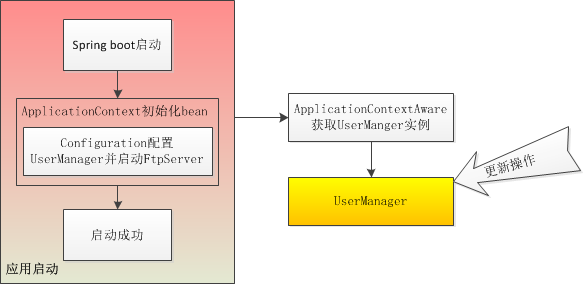
Apache ftpserver集成 Apache ftpserver由Java语言开发的Ftp服务器,集成到其它程序,正常运行需要: mina-core, 2.0-M3 or later slf4j-api A SLF4J implementation of your choice, for example slf4j-simple-1.5.3.jar ftplet-api ftpserver-core <dependency> <groupId>org.slf4j</groupId> <artifactId>slf4j-log4j12</artifactId> <version>1.7.25 </version> </dependency> <dependency> <groupId>org.apache.ftpserver</groupId> <artifactId>ftpserver-core</artifactId> <version>1.1.1</version> </dependency> <dependency> <groupId>org.apache.ftpserver</groupId> <artifactId>ftplet-api</artifactId> <version>1.1.1</version> </dependency> <dependency> <groupId>org.apache.mina</groupId> <artifactId>mina-core</artifactId> <version>2.0.16</version> </dependency> Springboot应用集成 Apache ftpserver 代码 @Configuration public class FtpConfig { private final Logger logger = LoggerFactory.getLogger(FtpConfig.class); @Bean public UserManager getUserManger() throws FtpException { FtpServerFactory serverFactory = new FtpServerFactory(); // ftp服务监听的端口号 ListenerFactory factory = new ListenerFactory(); factory.setPort(2221); serverFactory.addListener("default", factory.createListener()); // 创建用户 BaseUser user = new BaseUser(); user.setName("admin"); user.setPassword("123456"); user.setHomeDirectory("E:\\FTPServerPath"); List<Authority> authorities = new ArrayList<Authority>(); authorities.add(new WritePermission()); user.setAuthorities(authorities); UserManager userManager = serverFactory.getUserManager(); userManager.save(user); serverFactory.setUserManager(userManager); FtpServer server = serverFactory.createServer(); server.start(); logger.info("ftp已经启动!"); return userManager; } } @Component public class SpringUtil implements ApplicationContextAware { private static ApplicationContext applicationContext; @Override public void setApplicationContext(ApplicationContext applicationContext) throws BeansException { if(SpringUtil.applicationContext == null) { SpringUtil.applicationContext = applicationContext; } } //SpringUtils.getApplicationContext()获取applicationContext对象 public static ApplicationContext getApplicationContext() { return applicationContext; } public static Object getBean(String name){ return getApplicationContext().getBean(name); } public static <T> T getBean(Class<T> clazz){ return getApplicationContext().getBean(clazz); } public static <T> T getBean(String name,Class<T> clazz){ return getApplicationContext().getBean(name, clazz); } }

优秀的个人博客,低调大师

Spring Boot 整合 Quartz

配置 pom Spring Boot 使用的是2.1.6.RELEASE,依赖中增加如下配置 <dependency> <groupId>org.springframework.boot</groupId> <artifactId>spring-boot-starter-quartz</artifactId> </dependency> application.properties 调度器可以和springboot公用数据源 #使用数据库固化调度信息 spring.quartz.job-store-type=jdbc #调度器名称 spring.quartz.scheduler-name=MyScheduler #不重新创建数据表 spring.quartz.jdbc.initialize-schema=never #线程数量 spring.quartz.properties.org.quartz.threadPool.threadCount = 50 #持久化实现 spring.quartz.properties.org.quartz.jobStore.class=org.quartz.impl.jdbcjobstore.JobStoreTX #数据库方言StdJDBCDelegate spring.quartz.properties.org.quartz.jobStore.driverDelegateClass=org.quartz.impl.jdbcjobstore.StdJDBCDelegate java代码 任务:实现Job接口即可 public interface Job { //context中包含当前任务关联的信息 //JobExecutionException 当任务执行失败时可以通过配置来控制是否继续执行等操作 void execute(JobExecutionContext context) throws JobExecutionException; } 调度器:在service中注入Scheduler即可,Scheduler是调度器整体管理包括暂停任务,更新任务,恢复任务等 需求以及解决方法 每个任务使用相同上下文即JobData继承Job的java类上增加@PersistJobDataAfterExecution,@DisallowConcurrentExecution注解,通常这两个注解配合使用 @PersistJobDataAfterExecution:在任务执行后固化JobData至数据库 @DisallowConcurrentExecution:避免同一个组的同一个任务并发执行以免JobData混乱 更新JobData至当前任务 //jobDetail 任务信息 JobDetail jobDetail = scheduler.getJobDetail(JobKey.jobKey(job.getName(), job.getGroup())); jobDetail.getJobDataMap().put("aaa", "bbb"); CronTrigger trigger = (CronTrigger) scheduler.getTrigger(TriggerKey.triggerKey(job.getName(), job.getGroup())); Set<Trigger> triggers = new HashSet<>(); triggers.add(trigger); //true 就是替换数据库中JobDataMap scheduler.scheduleJob(jobDetail,triggers,true); 任务控制 暂停任务:scheduler.pauseJob(jobKey) 恢复任务:scheduler.resumeJob(jobKey) 立即执行任务:scheduler.triggerJob(jobKey) 执行中的任务: List<JobExecutionContext> executingJobs = scheduler.getCurrentlyExecutingJobs() //获取具体任务信息 JobDetail jobDetail = executingJob.getJobDetail(); 查询任务 //依据分组查询,如需其他查找查看api中实现了org.quartz.Matcher接口的类即可 GroupMatcher<JobKey> matcher = GroupMatcher.groupContains(groupKeyword); Set<JobKey> jobKeys = scheduler.getJobKeys(matcher); //通过JobKey获取调度器中具体任务以及相关信息 scheduler.getJobDetail(jobKey); 参考资料 https://eelve.com/archives/springbootstarterquartzs http://www.quartz-scheduler.org/ https://www.w3cschool.cn/quartz_doc/

资源下载

更多资源
Apache Tomcat

Apache Tomcat

Tomcat是Apache 软件基金会(Apache Software Foundation)的Jakarta 项目中的一个核心项目,由Apache、Sun 和其他一些公司及个人共同开发而成。因为Tomcat 技术先进、性能稳定,而且免费,因而深受Java 爱好者的喜爱并得到了部分软件开发商的认可,成为目前比较流行的Web 应用服务器。

Eclipse

Eclipse

Eclipse 是一个开放源代码的、基于Java的可扩展开发平台。就其本身而言,它只是一个框架和一组服务,用于通过插件组件构建开发环境。幸运的是,Eclipse 附带了一个标准的插件集,包括Java开发工具(Java Development Kit,JDK)。

JDK

JDK

JDK是 Java 语言的软件开发工具包,主要用于移动设备、嵌入式设备上的java应用程序。JDK是整个java开发的核心,它包含了JAVA的运行环境(JVM+Java系统类库)和JAVA工具。

Sublime Text

Sublime Text

Sublime Text具有漂亮的用户界面和强大的功能,例如代码缩略图,Python的插件,代码段等。还可自定义键绑定,菜单和工具栏。Sublime Text 的主要功能包括:拼写检查,书签,完整的 Python API , Goto 功能,即时项目切换,多选择,多窗口等等。Sublime Text 是一个跨平台的编辑器,同时支持Windows、Linux、Mac OS X等操作系统。