正文
一、需求
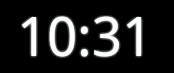
修改时间输出格式为仅显示小时和分钟。
二、效果图
![]()
三、说明
通过看源码可知,只需修改以下两行代码其他全部复制过来即可:
private
final
static
String m12
=
"
h:mm:ss aa
"
;
private
final
static
String m24
=
"
k:mm:ss
"
;
如果想做得更好更通用的话可以把设置日期格式的方法暴露出来,或者为其增加一个xml属性。
四、完整代码
package
com.test;
import
java.util.Calendar;
import
android.content.Context;
import
android.content.res.Resources;
import
android.database.ContentObserver;
import
android.os.Handler;
import
android.os.SystemClock;
import
android.provider.Settings;
import
android.text.format.DateFormat;
import
android.util.AttributeSet;
/**
* 自定义DigitalClock输出格式
*
@author
农民伯伯
*
*/
public
class
DigitalClock
extends
android.widget.DigitalClock {
Calendar mCalendar;
private
final
static
String m12
=
"
h:mm aa
"
;
//
h:mm:ss aa
private
final
static
String m24
=
"
k:mm
"
;
//
k:mm:ss
private
FormatChangeObserver mFormatChangeObserver;
private
Runnable mTicker;
private
Handler mHandler;
private
boolean
mTickerStopped
=
false
;
String mFormat;
public
DigitalClock(Context context) {
super
(context);
initClock(context);
}
public
DigitalClock(Context context, AttributeSet attrs) {
super
(context, attrs);
initClock(context);
}
private
void
initClock(Context context) {
Resources r
=
context.getResources();
if
(mCalendar
==
null
) {
mCalendar
=
Calendar.getInstance();
}
mFormatChangeObserver
=
new
FormatChangeObserver();
getContext().getContentResolver().registerContentObserver(
Settings.System.CONTENT_URI,
true
, mFormatChangeObserver);
setFormat();
}
@Override
protected
void
onAttachedToWindow() {
mTickerStopped
=
false
;
super
.onAttachedToWindow();
mHandler
=
new
Handler();
/**
* requests a tick on the next hard-second boundary
*/
mTicker
=
new
Runnable() {
public
void
run() {
if
(mTickerStopped)
return
;
mCalendar.setTimeInMillis(System.currentTimeMillis());
setText(DateFormat.format(mFormat, mCalendar));
invalidate();
long
now
=
SystemClock.uptimeMillis();
long
next
=
now
+
(
1000
-
now
%
1000
);
mHandler.postAtTime(mTicker, next);
}
};
mTicker.run();
}
@Override
protected
void
onDetachedFromWindow() {
super
.onDetachedFromWindow();
mTickerStopped
=
true
;
}
/**
* Pulls 12/24 mode from system settings
*/
private
boolean
get24HourMode() {
return
android.text.format.DateFormat.is24HourFormat(getContext());
}
private
void
setFormat() {
if
(get24HourMode()) {
mFormat
=
m24;
}
else
{
mFormat
=
m12;
}
}
private
class
FormatChangeObserver
extends
ContentObserver {
public
FormatChangeObserver() {
super
(
new
Handler());
}
@Override
public
void
onChange(
boolean
selfChange) {
setFormat();
}
}
}
五、使用方法
<
com.test.DigitalClock android:layout_x
=
"
15dp
"
android:layout_y
=
"
30dp
"
android:layout_width
=
"
wrap_content
"
android:layout_height
=
"
wrap_content
"
android:textColor
=
"
@android:color/white
"
android:textSize
=
"
55sp
"
android:shadowColor
=
"
@android:color/white
"
android:shadowRadius
=
"
2.0
"
>
</
com.test.DigitalClock
>
代码说明:
关于android:shadowColor可以参见我的中文API文档翻译。
本文转自over140 51CTO博客,原文链接:http://blog.51cto.com/over140/582230,如需转载请自行联系原作者