本文转自lzwxx 51CTO博客,原文链接:http://blog.51cto.com/13064681/1943485
1.代码
<?xml version="1.0" encoding="utf-8"?><LinearLayout xmlns:android="http://schemas.android.com/apk/res/android"
    xmlns:app="http://schemas.android.com/apk/res-auto"
    xmlns:tools="http://schemas.android.com/tools"
    android:layout_width="match_parent"
    android:layout_height="match_parent"
    android:orientation="vertical"
    tools:context="com.market.circleimage.MainActivity">
    <LinearLayout        android:layout_width="match_parent"
        android:layout_height="wrap_content"
        android:orientation="horizontal">
        <com.makeramen.roundedimageview.RoundedImageView            xmlns:app="http://schemas.android.com/apk/res-auto"
            android:scaleType="fitCenter"
            app:riv_corner_radius="50dip"
            app:riv_border_width="4dip"
            app:riv_border_color="#ff0000"
            app:riv_mutate_background="true"
            android:src="@drawable/x1"
            app:riv_oval="true"
            android:layout_width="100dp"
            android:layout_height="100dp" />
        <com.makeramen.roundedimageview.RoundedImageView            xmlns:app="http://schemas.android.com/apk/res-auto"
            android:scaleType="fitXY"
            app:riv_corner_radius="50dip"
            app:riv_border_width="4dip"
            app:riv_border_color="#ff0000"
            app:riv_mutate_background="true"
            android:src="@drawable/x1"
            app:riv_oval="true"
            android:layout_width="100dp"
            android:layout_height="100dp" />


        <com.makeramen.roundedimageview.RoundedImageView            android:scaleType="fitEnd"
            app:riv_corner_radius="50dip"
            app:riv_border_width="4dip"
            app:riv_border_color="#ff0000"
            app:riv_mutate_background="true"
            android:src="@drawable/x1"
            app:riv_oval="true"
            android:layout_width="100dp"
            android:layout_height="100dp"
            android:id="@+id/roundedImageView" />

    </LinearLayout>
    <LinearLayout        android:layout_width="match_parent"
        android:layout_height="wrap_content"
        android:orientation="horizontal">
        <com.makeramen.roundedimageview.RoundedImageView            xmlns:app="http://schemas.android.com/apk/res-auto"
            android:scaleType="fitStart"
            app:riv_corner_radius="50dip"
            app:riv_border_width="4dip"
            app:riv_border_color="#ff0000"
            app:riv_mutate_background="true"
            android:src="@drawable/x1"
            app:riv_oval="true"
            android:layout_width="100dp"
            android:layout_height="100dp" />
        <com.makeramen.roundedimageview.RoundedImageView            xmlns:app="http://schemas.android.com/apk/res-auto"
            android:scaleType="center"
            app:riv_corner_radius="50dip"
            app:riv_border_width="4dip"
            app:riv_border_color="#ff0000"
            app:riv_mutate_background="true"
            android:src="@drawable/x1"
            app:riv_oval="true"
            android:layout_width="100dp"
            android:layout_height="100dp" />


        <com.makeramen.roundedimageview.RoundedImageView            android:scaleType="centerCrop"
            app:riv_corner_radius="50dip"
            app:riv_border_width="4dip"
            app:riv_border_color="#ff0000"
            app:riv_mutate_background="true"
            android:src="@drawable/x1"
            app:riv_oval="true"
            android:layout_width="100dp"
            android:layout_height="100dp" />

    </LinearLayout>
    <com.makeramen.roundedimageview.RoundedImageView        android:scaleType="centerInside"
        app:riv_corner_radius="50dip"
        app:riv_border_width="4dip"
        app:riv_border_color="#ff0000"
        app:riv_mutate_background="true"
        android:src="@drawable/x1"
        app:riv_oval="true"
        android:layout_width="100dp"
        android:layout_height="100dp" />
    <com.makeramen.roundedimageview.RoundedImageView        android:scaleType="matrix"
        app:riv_corner_radius="50dip"
        app:riv_border_width="4dip"
        app:riv_border_color="#ff0000"
        app:riv_mutate_background="true"
        android:src="@drawable/x1"
        app:riv_oval="true"
        android:layout_width="200dp"
        android:layout_height="200dp" /></LinearLayout>
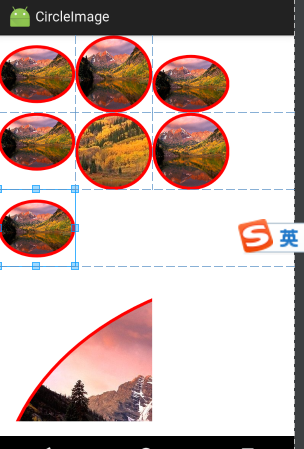
2.效果
![]()