对于提供 HTTP 服务的系统来说,取得来源 IP 方式有两种:
此方案是直接读取封包的来源 IP,但由于容器和外界沟通不像传统 Linux 主机有实体网卡对接,而是通过一系列的 NAT 规则置换包头后才传进容器内 (Understand container communication),导致取得错误的使用者 IP。
此方案则是利用 PROXY Protocol,此方案是让 Proxy Server 将 IP 附加在 HTTP 标头 X-Forwarded-For 内,因此该标头内的第一个地址即是用户的真实 IP。
X-Forwarded-For:[61.219.125.41, 10.140.0.2]
下面会介绍在 GKE (Google Container Engine) 上透过 L7 HTTP Load Balancer 取得使用者真实 IP。
架构说明
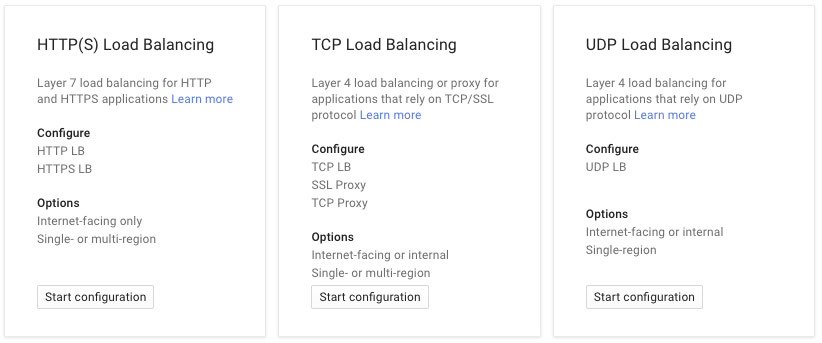
下图为目前 Google 支持三种 LB
![]()
在 GKE 上新增 spec.type=LoadBalancer 的 Service,Kubernetes 会协助建立一组拥有独立 IP 地址的 L4 TCP Load Balancer,因此无法支持 L7 应用层的 PROXY Protocol。
![]()
为此我们必须建立 Layer 7 的 HTTP Load Balancer,将其先连接到 NGINX instance group 再导向后方的 Kubernetes 集群内。由于 HTTP 请求会先经过 NGINX reverse proxy,此时用户 IP 会被纪录在 X-Forwarded-For 内。
![]()
在 GCP 上建立 HTTP Load Balancer 的方式请参考 Setting Up HTTP(S) Load Balancing。
下面附上 NGINX 配置文件以及应用端取得 IP 的程序。
NGINX 设定
## /etc/nginx/nginx.conf

worker_processes  1;

error_log  /var/log/nginx/error.log warn;
pid        /var/run/nginx.pid;


events {
    worker_connections  1024;
}


http {
    include       /etc/nginx/mime.types;
    default_type  application/octet-stream;

    log_format  main  '$remote_addr - $remote_user [$time_local] "$request" '
                      '$status $body_bytes_sent "$http_referer" '
                      '"$http_user_agent" "$http_x_forwarded_for"';

    sendfile        on;
    tcp_nopush      on;
    tcp_nodelay     on;

    keepalive_timeout  65;

    gzip  on;
    client_max_body_size 5M;
    include /etc/nginx/conf.d/*.conf;

    #additional config
    include /etc/nginx/extra-conf.d/*;
}
## /etc/nginx/conf.d/realip.conf

upstream realip {
  server server <k8s service LB ip>;
}

server {
  server_name _;
  listen 80;

  location / {
    proxy_set_header           Host $host;
    proxy_set_header           X-Real-IP $remote_addr;
    proxy_set_header           X-Forwarded-For $proxy_add_x_forwarded_for;
    proxy_set_header           X-Forwarded-Proto $scheme;
    proxy_pass                 http://realip;
    proxy_connect_timeout      10;
    proxy_send_timeout         10;
    proxy_read_timeout         10;
    proxy_buffer_size          4k;
    proxy_buffers              4 32k;
    proxy_busy_buffers_size    64k;
    proxy_temp_file_write_size 64k;
    access_log on;
  }
}
应用端
package main

import (
    "fmt"
    "net/http"
    "os"

    "github.com/tomasen/realip"
)

func main() {
    http.HandleFunc("/", func(w http.ResponseWriter, r *http.Request) {
        host := os.Getenv("HOSTNAME")
        reply := fmt.Sprintf("Hostname:\n%s\n\nUser-Agent:\n%v\n\nHeader:\n%v\n\nIP:\n%v", host, r.UserAgent(), r.Header, realip.RealIP(r))
        w.WriteHeader(http.StatusOK)
        w.Write([]byte(reply))
    })
    http.ListenAndServe(":80", nil)
}
本文转自kubernetes中文社区-在 Kubernetes 内取得使用者 IP – HTTP Loadbalancer