新浪微博OAuth认证
1、资源的授权
•在互联网行业,比如腾讯、新浪,那用户人群是非常巨大的
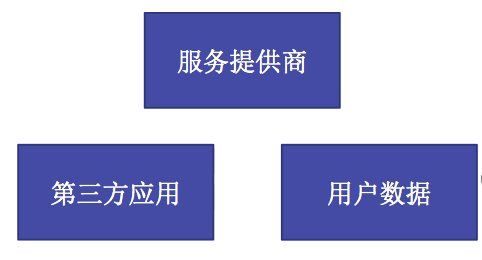
•有时候要把某些用户资源共享出去,比如第三方想访问用户的QQ数据、第三方想访问用户的新浪微博数据
•要想把用户资源共享出去,就必须取得用户的同意,那么这里就有个资源授权的问题
•资源授权的方式有很多种,关键是要安全
•常用的有OAuth授权
2、什么是OAuth?
•OAuth是一种协议,OAuth协议为用户资源的授权提供了一个安全的、开放而又简易的标准
•任何服务提供商只要想把自己的用户资源共享出去,都可以实现自身的OAuth认证服务。比如腾讯可以实现自己的OAuth认证服务,把用户的QQ数据共享出去
•第三方若想访问用户资源,就必须遵守服务提供商实现的OAuth协议
3、OAuth认证的方式截图
4、OAuth优点
•OAUTH协议为用户资源的授权提供了一个安全的、开放而又简易的标准
•OAUTH的授权不会使第三方触及到用户的帐号信息(如用户名与密码),即第三方无需使用用户的用户名与密码就可以申请获得该用户资源的授权,因此OAUTH是安全的
5、OAuth授权的步骤
.第三方想访问其他服务器提供商的用户资源时,需要先进行OAuth授权
.授权步骤总结就3点:
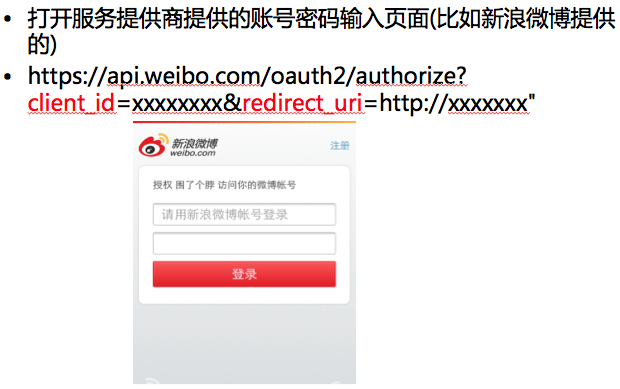
1>获取未授权的Request Token
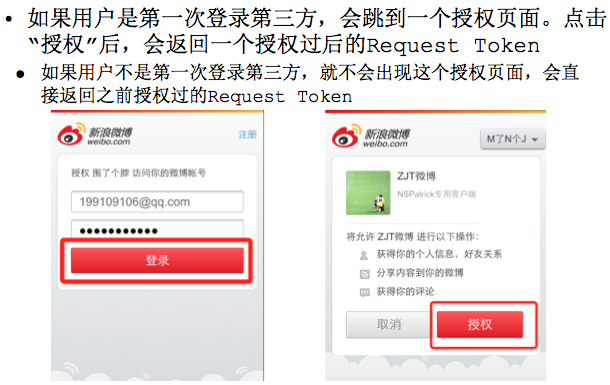
2>获取用户授权的Request Token
3>用授权的Request Token换取Access Token(得到这个Access Token就相当于得到一个"令牌",通过此"令牌"请求,就可以去拥有资源的网站抓取任意有权限可以被抓取的资源)
即具体步骤截图如下:
OAuth的授权步骤1----------获取未授权的Request Token
OAuth的授权步骤2----------获取用户授权的Request Token
OAuth的授权步骤3-----------用授权的Request Token换取Access Token
6、新浪开发者证明
•要想使用新浪提供的OAuth授权服务,还必须申请为新浪微博开发者,创建自己的应用,获取AppKey和AppSecret
•AppKey和AppSecret在授权过程中作为请求参数使用
•创建移动应用的地址:
http://open.weibo.com/apps/new?sort=mobile
•创建完应用后,就可以在自己的应用界面查询到AppKey和AppSecret
新浪微博登陆的部分API文档如下:获取Request Token、Access Token
https://api.weibo.com/oauth2/authorize
https://api.weibo.com/oauth2/access_token
https://api.weibo.com/oauth2/authorize
HTTP请求方式
GET/POST
请求参数
| 必选 | 类型及范围 | 说明 | |
|---|---|---|---|
| client_id | true | string | 申请应用时分配的AppKey。 |
| redirect_uri | true | string | 授权回调地址,站外应用需与设置的回调地址一致,站内应用需填写canvas page的地址。 |
| scope | false | string | 申请scope权限所需参数,可一次申请多个scope权限,用逗号分隔。使用文档 |
| state | false | string | 用于保持请求和回调的状态,在回调时,会在Query Parameter中回传该参数。开发者可以用这个参数验证请求有效性,也可以记录用户请求授权页前的位置。这个参数可用于防止跨站请求伪造(CSRF)攻击 |
| display | false | string | 授权页面的终端类型,取值见下面的说明。 |
| forcelogin | false | boolean | 是否强制用户重新登录,true:是,false:否。默认false。 |
| language | false | string | 授权页语言,缺省为中文简体版,en为英文版。英文版测试中,开发者任何意见可反馈至 @微博API |
- display说明:
| 参数取值 | 类型说明 |
|---|---|
| default | 默认的授权页面,适用于web浏览器。 |
| mobile | 移动终端的授权页面,适用于支持html5的手机。注:使用此版授权页请用 https://open.weibo.cn/oauth2/authorize 授权接口 |
| wap | wap版授权页面,适用于非智能手机。 |
| client | 客户端版本授权页面,适用于PC桌面应用。 |
| apponweibo | 默认的站内应用授权页,授权后不返回access_token,只刷新站内应用父框架。 |
返回数据
| 返回值字段 | 字段类型 | 字段说明 |
|---|---|---|
| code | string | 用于调用access_token,接口获取授权后的access token。 |
| state | string | 如果传递参数,会回传该参数。 |
示例
//请求
https://api.weibo.com/oauth2/authorize?client_id=123050457758183&redirect_uri=http://www.example.com/response&response_type=code

//同意授权后会重定向
http://www.example.com/response&code=CODE
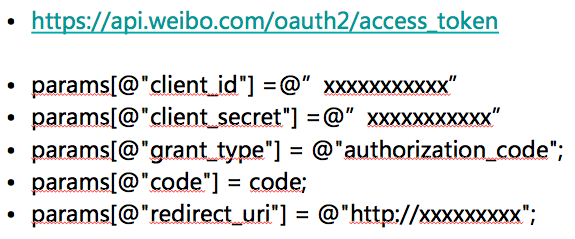
https://api.weibo.com/oauth2/access_token
HTTP请求方式
POST
请求参数
| 必选 | 类型及范围 | 说明 | |
|---|---|---|---|
| client_id | true | string | 申请应用时分配的AppKey。 |
| client_secret | true | string | 申请应用时分配的AppSecret。 |
| grant_type | true | string | 请求的类型,填写authorization_code |
- grant_type为authorization_code时
| 必选 | 类型及范围 | 说明 | |
|---|---|---|---|
| code | true | string | 调用authorize获得的code值。 |
| redirect_uri | true | string | 回调地址,需需与注册应用里的回调地址一致。 |
返回数据
 {
       "access_token": "ACCESS_TOKEN",
       "expires_in": 1234,
       "remind_in":"798114",
       "uid":"12341234"
 }
| 返回值字段 | 字段类型 | 字段说明 |
|---|---|---|
| access_token | string | 用于调用access_token,接口获取授权后的access token。 |
| expires_in | string | access_token的生命周期,单位是秒数。 |
| remind_in | string | access_token的生命周期(该参数即将废弃,开发者请使用expires_in)。 |
| uid | string | 当前授权用户的UID。 |
具体的举例如下:
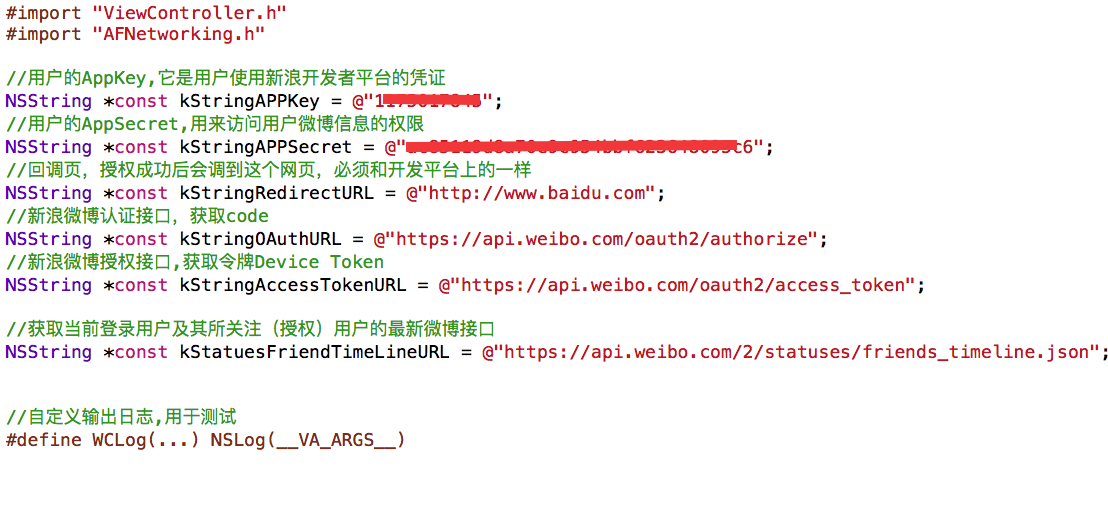
<1>宏定义一些链接和接口
<2>创建网页视图,发送登录认证请求

@interface ViewController ()<UIWebViewDelegate>
@property (strong,nonatomic)UIWebView *webView;
@end

@implementation ViewController

- (void)viewDidLoad {
    [super viewDidLoad];

    //创建网页视图
    self.webView = [[UIWebView alloc]initWithFrame:self.view.bounds];
    self.webView.delegate = self;
    [self.view addSubview:self.webView];


    //发送网络请求,在webView中打开OAuth认证的网址
    NSString *strURL = [NSString stringWithFormat:@"%@?client_id=%@&redirect_uri=%@",kStringOAuthURL,kStringAPPKey,kStringRedirectURL];
    NSURL *URL = [NSURL URLWithString:strURL];
    NSURLRequest *request = [NSURLRequest requestWithURL:URL cachePolicy:0 timeoutInterval:-1];
    [self.webView loadRequest:request];
}
<3>通过代理方法拦截,获取Code
#pragma mark - 网页视图代理方法
#pragma mark 通过网页视图的代理监听拦截接口网址,获取code
- (BOOL)webView:(UIWebView *)webView shouldStartLoadWithRequest:(NSURLRequest *)request navigationType:(UIWebViewNavigationType)navigationType{

    NSString *absoluteURL = request.URL.absoluteString;

    WCLog(@"%@",absoluteURL);

    //http://www.baidu.com/?code=b6a6e3ba80aac6f5a0b639716c168053

    /*

     //请求
     https://api.weibo.com/oauth2/authorize?client_id=123050457758183&redirect_uri=http://www.example.com/response&response_type=code

    */

    if ([absoluteURL hasPrefix:@"http://www.baidu.com"]) {

        //截取code
        NSRange range = [absoluteURL rangeOfString:@"code="];
        NSUInteger location = range.location + range.length;
        NSString *code = [absoluteURL substringFromIndex:location];

        //进行授权请求
        if ([code length]) {

            [self startAccessLoginOAuth:(NSString *)code];
        }
    }
    return YES;
}
<3>拿到Code后再次发送授权请求,获取令牌access Token,通过它可以获取用户的微博信息
#pragma mark - 进行登录授权请求,授权期内不用再进行授权
-(void)startAccessLoginOAuth:(NSString *)code{

    AFHTTPRequestOperationManager *manager = [AFHTTPRequestOperationManager manager];
    manager.responseSerializer = [[AFJSONResponseSerializer alloc]init];
    /*

     //同意授权后会重定向
     http://www.example.com/response&code=CODE

     POST
     请求参数
     必选    类型及范围    说明
     client_id    true    string    申请应用时分配的AppKey。
     client_secret    true    string    申请应用时分配的AppSecret。
     grant_type    true    string    请求的类型,填写authorization_code

     grant_type为authorization_code时
     必选    类型及范围    说明
     code    true    string    调用authorize获得的code值。
     redirect_uri    true    string    回调地址,需需与注册应用里的回调地址一致。
    */

    //设置POST参数
    NSDictionary *parameters =
                        @{
                            @"client_id":kStringAPPKey,
                            @"client_secret":kStringAPPSecret,
                            @"grant_type":@"authorization_code",
                            @"code":code,
                            @"redirect_uri":@"http://www.baidu.com"
                        };

    ////获取access_token
    [manager POST:kStringAccessTokenURL parameters:parameters success:^(AFHTTPRequestOperation *operation, NSDictionary *responseObject) {

        //WCLog(@"%@---%@",operation,responseObject);

        /*
         下面返回的这些信息用来做账户管理,可以创建一个账户和一个账户管理类,以便用来控制用户的登录:
         如果access_token令牌未超期,可以直接登录;
         如果access_token令牌超期,需要重新授权登录。

         账户信息:
         responseObject:
           {
             "access_token" = "2.00HMevMDjoPWRBc1b0d128a3DxHy8D";
             "expires_in" = 157679999;
             "remind_in" = 157679999;
             uid = 2939453735;
           }
        */

       //1.创建当前账户实例并初始化
       //2.创建账户管理实例的单例
       //3.保存帐户
       //4.设为当前帐户
       //5.设置主窗口为rootViewController,直接进入用户主页

        /**
         获取当前用的微博信息
        */
       [self getUserStatuesInfo:responseObject[@"access_token"]];

    } failure:^(AFHTTPRequestOperation *operation, NSError *error) {

        WCLog(@"授权失败:%@",error);
    }];
}
<4>获取用户的微博信息
//获取当前用的微博信息
-(void)getUserStatuesInfo:(NSString *)access_token{

    AFHTTPRequestOperationManager *manager = [AFHTTPRequestOperationManager manager];
    manager.responseSerializer = [[AFJSONResponseSerializer alloc]init];

    //设置GET参数
    NSDictionary *parameters =
                            @{
                              @"client_id":kStringAPPKey,
                              @"client_secret":kStringAPPSecret,
                              @"access_token":access_token,
                            };
    [manager GET:kStatuesFriendTimeLineURL parameters:parameters success:^(AFHTTPRequestOperation *operation, NSDictionary *responseObject) {

        NSArray *statues = responseObject[@"statuses"];
        [statues enumerateObjectsUsingBlock:^(id  _Nonnull obj, NSUInteger idx, BOOL * _Nonnull stop) {

            WCLog(@"%@",obj);
        }];

    } failure:^(AFHTTPRequestOperation *operation, NSError *error) {

        WCLog(@"%@",error);
    }];

}
@end
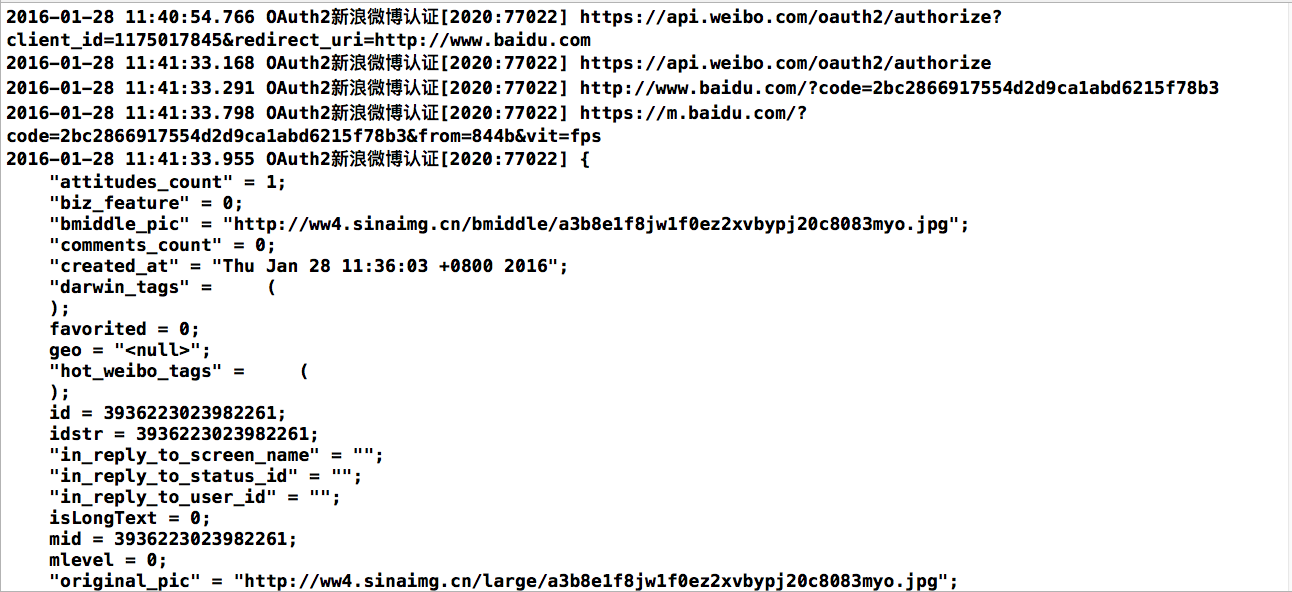
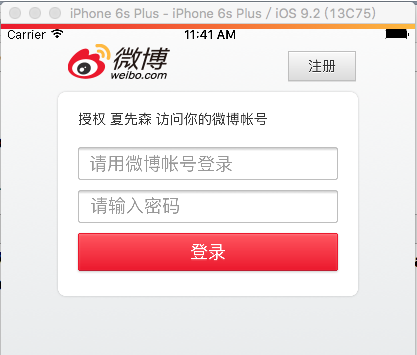
登录授权截图:
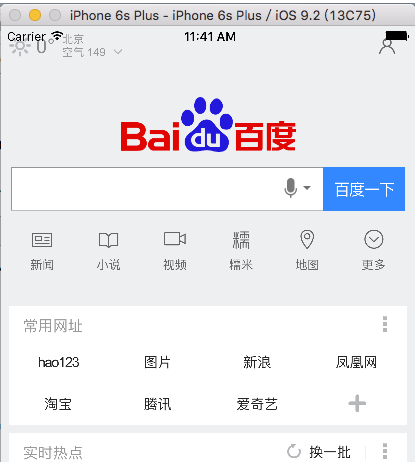
输入账号和密码,授权成功后,进入回调页截图(因为之前已经授权过,授权期限有效,所有免于授权,直接登录成功):
打印获取到用户的部分微博信息截图如下: