常用模块与正则表达式
1、常用模块
2、正则表达式
一、常用模块
当我们在程序开发时代码变的庞大时,使我们对代码的维护越来越困难。
我们把庞大的代码分成几个文件,这样一个文件中的代码就相对来说少点维护起来也容易点,
在python中一个.py文件就是一个模块(Module)。
模块分为三个模块:
几种模块导入的方式
- import time
- import time as X
- from a import func
- from a import func as b
其中import的导入方法就是建立一个到该模块应用,我们不能够直接使用该模块里面的方法,必须加上该模块名。
如:time模块中的time()方法,我们调用的方法是time.time()才行
而from time import func该方法是把time模块中的func()方法直接导入到该文件中,我们可以直接使用func调用该函数。如果该文件中有相同的函数名时,我们调用该函数时,需要看我们倒入该函数是在本文件中定义该函数名前还是定义该函数后。因为该方法导入的函数就是把别的模块中的函数中的摸个方法写到该文件中所以那个在后面我们在最后调用的时候那个函数起效果。一般我们导入都是在文件的开头所以一般起效果的函数使我们自定的的函数。我们可以这让认为我们调用该函数时在有相同函数名时那个离我们近,调用的就是那个函数。(自上而下)。
1、time和datetime模块
time
时间相关的操作,有三种表示方式:
python中时间日期格式化符号:
- %y 两位数的年份表示(00-99)
- %Y 四位数的年份表示(000-9999)
- %m 月份(01-12)
- %d 月内中的一天(0-31)
- %H 24小时制小时数(0-23)
- %I 12小时制小时数(01-12)
- %M 分钟数(00=59)
- %S 秒(00-59)
- %a 本地简化星期名称
- %A 本地完整星期名称
- %b 本地简化的月份名称
- %B 本地完整的月份名称
- %c 本地相应的日期表示和时间表示
- %j 年内的一天(001-366)
- %p 本地A.M.或P.M.的等价符
- %U 一年中的星期数(00-53)星期天为星期的开始
- %w 星期(0-6),星期天为星期的开始
- %W 一年中的星期数(00-53)星期一为星期的开始
- %x 本地相应的日期表示
- %X 本地相应的时间表示
- %Z 当前时区的名称
- %% %号本身
2、random模块
该模块是随机数模块
|
1
2
3
4
5
6
7
8
9
10
11
12
13
14
15
16
17
|
import
random
print
(random.random())
print
(random.randint(
0
,
6
))
print
(random.randrange(
10
))
随机生成
4
位验证码(里面有数字和字母)
sec
=
""
for
i
in
range
(
4
):
j
=
random.randint(
0
,
9
)
if
j
=
=
i:
tmp
=
random.randint(
0
,
9
)
else
:
tmp
=
chr
(random.randint(
65
,
90
))
sec
+
=
str
(tmp)
print
(sec)
|
3、os模块
os模块负责程序与操作系统的交互,提供了访问操作系统底层的接口
|
1
2
3
4
5
6
7
8
9
10
11
12
13
14
15
16
17
18
19
20
21
22
23
24
25
26
27
28
29
30
31
32
|
|
4、sys模块
sys模块负责程序与python解释器的交互,提供一些列的函数和变量,用于操控python的运行时的环境
|
1
2
3
4
5
6
7
8
9
10
11
12
13
14
15
16
17
18
|
|
5、shutil模块
shutil模块用于高级的文件、文件夹、压缩包处理模块
shutil.copyfileobj(fsrc,fdst[,length])
将文件内容拷贝到另一个文件中,可以使部分内容
|
1
2
3
4
5
6
|
import
shutil
f
=
open
(
'zhetian.txt'
)
f2
=
open
(
'xiao.txt'
,
"w"
)
shutil.copyfileobj(f,f2)
|
shutil其他方法
|
1
2
3
4
5
6
7
8
9
10
11
12
13
14
15
16
17
18
19
20
21
22
23
24
25
26
27
28
29
|
shutil.copyfile(src,dst)
shutil.copymode(src,dst)
shutil.,copystat(src,dst)
shutil.copy(src,dst)
shutil.copy2(src,dst)
shutil.copytree(src, dst, symlinks
=
False
, ignore
=
None
)
shutil.rmtree(path[, ignore_errors[, onerror]])
shutil.move(src, dst)
shutil.make_archive(base_name,
format
,...)
base_name: 压缩包的文件名,也可以是压缩包的路径。只是文件名时,则保存至当前目录,否则保存至指定路径,
如:wwww
=
>保存至当前路径
如:F:\python\test\wwww
=
>保存至F:\python\test\
format
: 压缩包种类,“
zip
”, “tar”, “bztar”,“gztar”
root_dir: 要压缩的文件夹路径(默认当前目录)
owner: 用户,默认当前用户
group: 组,默认当前组
logger: 用于记录日志,通常是logging.Logger对象
实列
import
shutil
shutil.make_archive(
'wwww'
,
'gztar'
,
'F:\python\day1'
)
|
其他的压缩和解压缩
|
1
2
3
4
5
6
7
8
9
10
11
12
13
14
15
16
17
18
19
20
21
22
23
24
25
26
27
28
29
30
|
zipfile
import
zipfile
压缩
z
=
zipfile.ZipFile(
'test.zip'
,
'w'
)
z.write(
'login'
)
z.write(
'test1'
)
z.close()
解压缩
z
=
zipfile.ZipFile(
'test.zip'
,
'r'
)
z.extractall()
z.close()
tarfile
import
tarfile
tar
=
tarfile.
open
(
'test.tar'
,
'w'
)
tar.add(
'F:\python\day1'
, arcname
=
'day1.zip'
)
tar.add(
'F:\python\day2'
, arcname
=
'day2.zip'
)
tar.close()
tar
=
tarfile.
open
(
'test.tar'
,
'r'
)
tar.extractall()
tar.close()
|
6、shelve模块
shelve模块是一个简单的key,value将内存数据通过文件持久化的模块。
shelve模块可以持久化任何pickle可支持的python数据格式
shelve就是pickle模块的封装
shelve模块可以多次dump和load
|
1
2
3
4
5
6
7
8
9
10
11
12
13
14
15
16
17
18
19
20
21
22
23
24
25
|
数据持久化:
import
shelve,datetime
bbs
=
{
'name'
:
'bob'
,
'age'
:
12
}
lis
=
[
'name'
,
'age'
,
'hobby'
]
t
=
datetime.datetime.now()
with shelve.
open
(
'shelve.txt'
) as f:
f[
'bbs'
]
=
bbs
f[
'lis'
]
=
lis
f[
'time'
]
=
t
会生成shelve.txt.bak、shelve.txt.dat、shelve.txt.
dir
这三个文件
数据的读取
import
shelve
with shelve.
open
(
'shelve.txt'
) as f:
b
=
f.get(
'bbs'
)
l
=
f.get(
'lis'
)
t
=
f.get(
'time'
)
print
(b)
print
(l)
print
(t)
|
7、hashlib模块
hashlib是一个提供了一些流行的hash算法的Python标准库,其中主要提供SHA1,SHA256,SHA384,SHA512,MD5.
|
1
2
3
4
5
6
|
import
hashlib
m
=
hashlib.md5()
m.update(
"hello"
.encode())
print
(m.hexdigest())
m.update(
"你好呀"
.encode(
'utf-8'
))
print
(m.hexdigest())
|
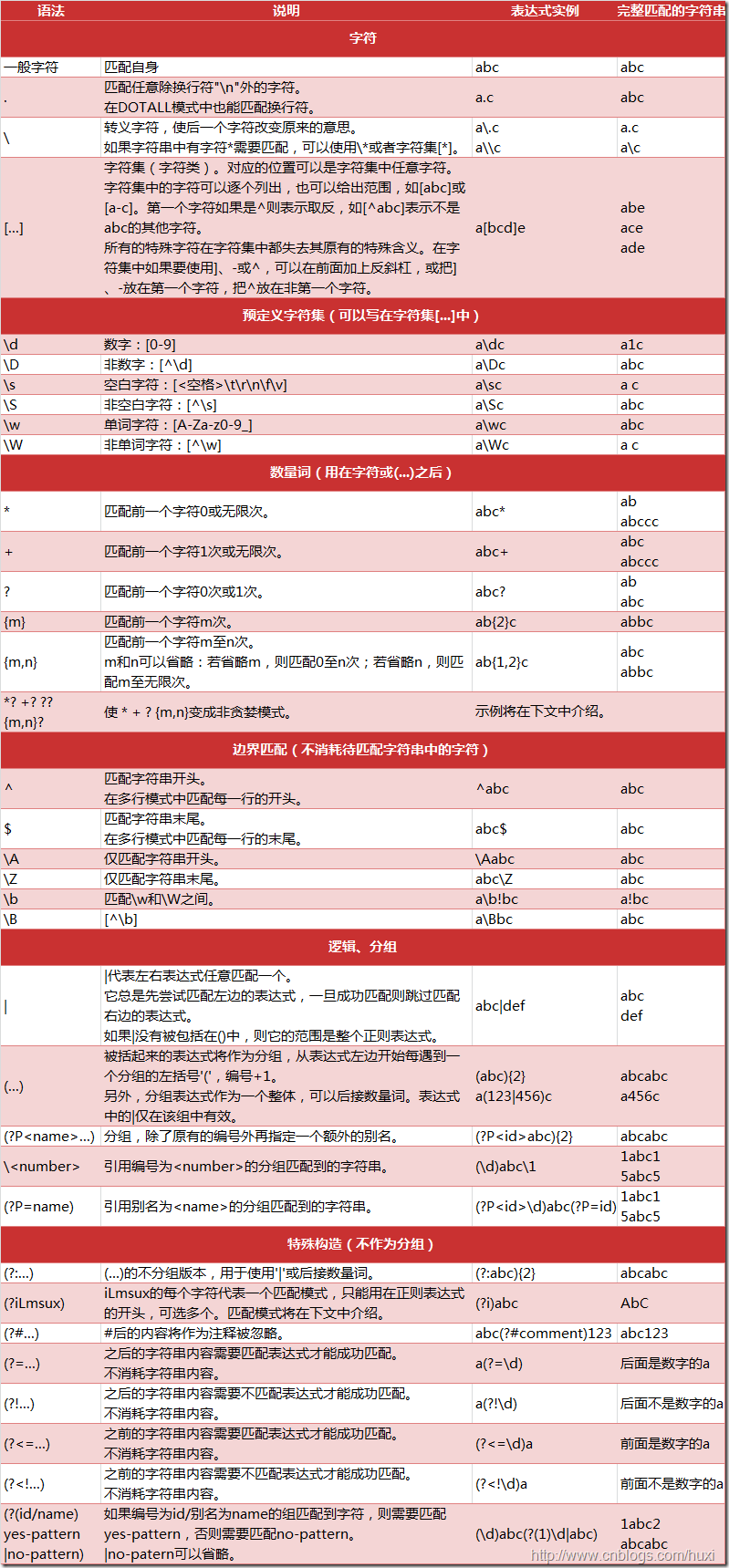
二、re正则表达式
常用的正则表达式符号。
这个图是从一个不知道的大神那拷贝过来的
![]()
常用的匹配模式
- re.match(pattern,string,flags=0) 从字符串的起始位置匹配,第一个没匹配上就返回空
- re.findall(pattern,string,flags=0) 每匹配到一次当做一个元素放到列表中并返回
- re.search(pattern,string,flags=0) 扫描整个字符串,并返回第一个成功匹配
- re.finditer(pattern, string, flags=0) 找到RE匹配的所有字符串,并把他们作为一个迭代器返回
- re.split(pattern, string, maxsplit=0, flags=0) 把匹配到的字符当做分隔符,把字符串分隔开当做元素放到列表中 #re.split('[0-9]','aab2bbb4dbb') >>['aab','bbb','dbb']
- re.sub(pattern, repl, string, count=0, flags=0) 把匹配到的字符替换掉
函数参数说明:
pattern:匹配的正则表达式
string:要匹配的字符串
flags:标记为,用于控制正则表达式的匹配方式,如:是否区分大小写,多行匹配等等。
repl:替换的字符串,也可作为一个函数
count:模式匹配后替换的最大次数,默认0表示替换所有匹配
maxsplit:指定最大的分割次数,这里指的是最大匹配到几次已匹配到的字符左右分割。
上面的flags是可选的,可选值为:
re.I(re.IGNORECASE): 忽略大小写

re.M(MULTILINE): 多行模式,改变'^'和'$'的行为

re.S(DOTALL): 使.匹配包括换行在内的所有字符模式,改变'.'的行为

re.L(LOCALE): 使预定字符类 \w \W \b \B \s \S 取决于当前区域设定

re.U(UNICODE): 使预定字符类 \w \W \b \B \s \S \d \D 取决于unicode定义的字符属性

re.X(VERBOSE): 详细模式。这个模式下正则表达式可以是多行,忽略空白字符,并可以加入注释。以下两个正则表达式是等价的:
贪婪模式与非贪婪模式匹配
Python3默认的是贪婪模式也就是说我们'.*'这个就是匹配出换行符以外的所有字符有多少个匹配多少个如'abbbc'匹配'ab*'那么匹配到的是'abbb'
但是费贪婪模'ab*?'就是在后面多一个问号(?)匹配到的是'a',这就是非贪婪模式尽量匹配到少的。
compile()
我们有时候重复匹配同一个表达式时,那么我们可以把这个重复的正则字符串编译成正则表达式对象。也就是compile()方法
|
1
2
3
4
5
|
import
re
patt
=
re.
compile
(
'abc'
)
print
(re.search(patt,
'abcdddabckabc'
))
|
match()
match()方法会尝试从字符串的起始位置匹配正则表达式,如果匹配,就返回匹配成功的结果,如果不匹配,那就返回None。
|
1
2
3
4
5
6
7
8
9
10
|
import
re
print
(re.match(
'abc'
,
'abc hello abc'
))
print
(re.match(
'abc'
,
'hello abc'
))
<_sre.SRE_Match
object
; span
=
(
0
,
3
), match
=
'abc'
>
None
|
search()
re.search()扫描整个字符串,并返回第一个匹配成功。
这个这个方法还有group(),groups()等函数
|
1
2
3
4
5
6
7
8
9
10
11
12
13
14
15
|
import
re
res
=
re.search(
'are'
,
'How are you?,how are you'
)
print
(res.group())
res2
=
re.search(
'(if).+(me)'
,r
"I'll be the one, if you want me to"
)
print
(res2.group(
1
))
print
(res2.groups())
print
(res2.group(
1
))
print
(res2.group(
1
,
2
))
|
findall()
re.findall()扫描整个字符串每匹配到一个就把这个当做一个元素放到列表中。
|
1
2
3
4
|
import
re
print
(re.findall(
'o.?'
,r
"I'll be the one, if you want me to"
))
|
finditer()
re.finditer()通过正则表达式把所有匹配到的字符串,并把它们作为迭代器返回
|
1
2
3
4
5
6
7
8
9
10
11
12
13
14
|
import
re
res
=
re.finditer(
'o.?'
,r
"I'll be the one, if you want me to"
)
print
(res)
for
i
in
res:
print
(i.group())
|
split()
re.split()扫描整个字符串吧匹配到的正则表达式作为分隔符把字符分割
并把分割的函数存储到列表中
|
1
2
3
4
5
6
7
8
9
10
11
|
import
re
res
=
re.split(r
'\s '
,r
"I'll be the one, if you want me to"
)
print
(res)
res2
=
re.split(r
'(\s)'
,r
"I'll be the one, if you want me to"
)
print
(res2)
|
sub()
re.sub()是扫描整个字符串吧匹配到的字符替换掉
|
1
2
3
4
5
|
import
re
res
=
re.sub(
'you'
,
'my'
,
"I'll be the one, if you want me to"
)
print
(res)
|
from:https://www.cnblogs.com/yang-China/p/8056695.html