感觉有必要把iOS开发中的手势识别做一个小小的总结。在上一篇iOS开发之自定义表情键盘(组件封装与自动布局)博客中用到了一个轻击手势,就是在轻击TextView时从表情键盘回到系统键盘,在TextView中的手是用storyboard添加的。下面会先给出如何用storyboard给相应的控件添加手势,然后在用纯代码的方式给我们的控件添加手势,手势的用法比较简单。和button的用法类似,也是目标动作回调,话不多说,切入今天的正题。总共有六种手势识别:轻击手势(TapGestureRecognizer),轻扫手势(SwipeGestureRecognizer), 长按手势(LongPressGestureRecognizer), 拖动手势(PanGestureRecognizer), 捏合手势(PinchGestureRecognizer),旋转手势(RotationGestureRecognizer);
其实这些手势用touche事件完全可以实现,
苹果就是把常用的触摸事件封装成手势,来提供给用户。读者完全可以用TouchesMoved来写拖动手势等
一,用storyboard给控件添加手势识别,当然啦用storyboard得截张图啦
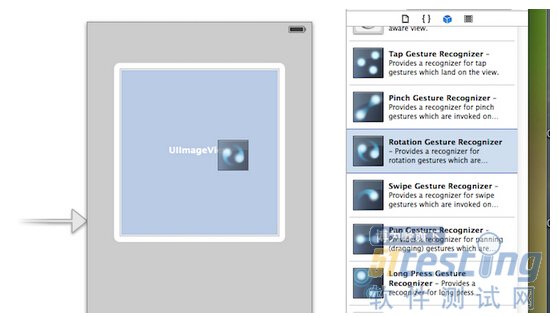
1.用storyboard添加手势识别,和添加一个Button的步骤一样,首先我们得找到相应的手势,把手势识别的控件拖到我们要添加手势的控件中,截图如下:
2.给我们拖出的手势添加回调事件,和给Button回调事件没啥区别的,在回调方法中添加要实现的业务逻辑即可,截图如下:
二,纯代码添加手势识别
用storyboard可以大大简化我们的操作,不过纯代码的方式还是要会的,就像要Dreamwear编辑网页一样(当然啦,storyboard的拖拽功能要比Dreamwear的拖拽强大的多),用纯代码敲出来的更为灵活,更加便于维护。不过用storyboard可以减少我们的
工作量,这两个要配合着使用才能大大的提高我们的开发效率。个人感觉用storyboard把框架搭起来(Controller间的关系),一下小的东西还是用纯代码敲出来更好一些。下面就给出如何给我们的控件用纯代码的方式来添加手势识别。
1.轻击手势(TapGestureRecognizer)的添加
初始化代码TapGestureRecongnizer的代码如下:
1 //新建tap手势
2 UITapGestureRecognizer *tapGesture = [[UITapGestureRecognizer alloc] initWithTarget:self action:@selector(tapGesture:)];
3 //设置点击次数和点击手指数
4 tapGesture.numberOfTapsRequired = 1; //点击次数
5 tapGesture.numberOfTouchesRequired = 1; //点击手指数
6 [self.view addGestureRecognizer:tapGesture];
在回调方法中添加相应的业务逻辑:
1 //轻击手势触发方法
2 -(void)tapGesture:(id)sender
3 {
4 //轻击后要做的事情
5 }
2.长按手势(LongPressGestureRecognizer)
初始化代码:
1 //添加长摁手势
2 UILongPressGestureRecognizer *longPressGesture = [[UILongPressGestureRecognizer alloc] initWithTarget:self action:@selector(longPressGesture:)];
3 //设置长按时间
4 longPressGesture.minimumPressDuration = 0.5; //(2秒)
5 [self.view addGestureRecognizer:longPressGesture];
在对应的回调方法中添加相应的方法(当手势开始时执行):
|
1 //常摁手势触发方法
2 -(void)longPressGesture:(id)sender
3 {
4 UILongPressGestureRecognizer *longPress = sender;
5 if (longPress.state == UIGestureRecognizerStateBegan)
6 {
7 UIAlertView *alter = [[UIAlertView alloc] initWithTitle:@"提示" message:@"长按触发" delegate:nil cancelButtonTitle:@"取消" otherButtonTitles: nil];
8 [alter show];
9 }
10 }
|
代码说明:手势的常用状态如下
开始:UIGestureRecognizerStateBegan
改变:UIGestureRecognizerStateChanged
结束:UIGestureRecognizerStateEnded
取消:UIGestureRecognizerStateCancelled
失败:UIGestureRecognizerStateFailed
3.轻扫手势(SwipeGestureRecognizer)
在初始化轻扫手势的时候得指定轻扫的方向,上下左右。 如果要要添加多个轻扫方向,就得添加多个轻扫手势,不过回调的是同一个方法。
添加轻扫手势,一个向左一个向右,代码如下:
1 //添加轻扫手势
2 UISwipeGestureRecognizer *swipeGesture = [[UISwipeGestureRecognizer alloc] initWithTarget:self action:@selector(swipeGesture:)];
3 //设置轻扫的方向
4 swipeGesture.direction = UISwipeGestureRecognizerDirectionRight; //默认向右
5 [self.view addGestureRecognizer:swipeGesture];
6
7 //添加轻扫手势
8 UISwipeGestureRecognizer *swipeGestureLeft = [[UISwipeGestureRecognizer alloc] initWithTarget:self action:@selector(swipeGesture:)];
9 //设置轻扫的方向
10 swipeGestureLeft.direction = UISwipeGestureRecognizerDirectionLeft; //默认向右
11 [self.view addGestureRecognizer:swipeGestureLeft];
回调方法如下:
|
1 //轻扫手势触发方法
2 -(void)swipeGesture:(id)sender
3 {
4 UISwipeGestureRecognizer *swipe = sender;
5 if (swipe.direction == UISwipeGestureRecognizerDirectionLeft)
6 {
7 //向左轻扫做的事情
8 }
9 if (swipe.direction == UISwipeGestureRecognizerDirectionRight)
10 {
11 //向右轻扫做的事情
12 }
13 }
14
|
4.捏合手势(PinchGestureRecognizer)
捏合手势初始化
1 //添加捏合手势
2 UIPinchGestureRecognizer *pinchGesture = [[UIPinchGestureRecognizer alloc] initWithTarget:self action:@selector(pinchGesture:)];
3 [self.view addGestureRecognizer:pinchGesture];
捏合手势要触发的方法(放大或者缩小图片):
|
1 ////捏合手势触发方法
2 -(void) pinchGesture:(id)sender
3 {
4 UIPinchGestureRecognizer *gesture = sender;
5
6 //手势改变时
7 if (gesture.state == UIGestureRecognizerStateChanged)
8 {
9 //捏合手势中scale属性记录的缩放比例
10 _imageView.transform = CGAffineTransformMakeScale(gesture.scale, gesture.scale);
11 }
12
13 //结束后恢复
14 if(gesture.state==UIGestureRecognizerStateEnded)
15 {
16 [UIView animateWithDuration:0.5 animations:^{
17 _imageView.transform = CGAffineTransformIdentity;//取消一切形变
18 }];
19 }
20 }
|
5.拖动手势(PanGestureRecognizer)
拖动手势的初始化
1 //添加拖动手势
2 UIPanGestureRecognizer *panGesture = [[UIPanGestureRecognizer alloc] initWithTarget:self action:@selector(panGesture:)];
3 [self.view addGestureRecognizer:panGesture];
拖动手势要做的方法(通过translationInView获取移动的点,和TouchesMoved方法类似)
1 //拖动手势
2 -(void) panGesture:(id)sender
3 {
4 UIPanGestureRecognizer *panGesture = sender;
5
6 CGPoint movePoint = [panGesture translationInView:self.view];
7
8 //做你想做的事儿
9 }
6.旋转手势(RotationGestureRecognizer)
旋转手势的初始化
1 //添加旋转手势
2 UIRotationGestureRecognizer *rotationGesture = [[UIRotationGestureRecognizer alloc] initWithTarget:self action:@selector(rotationGesture:)];
3 [self.view addGestureRecognizer:rotationGesture];
旋转手势调用的方法:
|
1 //旋转手势
2 -(void)rotationGesture:(id)sender
3 {
4
5 UIRotationGestureRecognizer *gesture = sender;
6
7 if (gesture.state==UIGestureRecognizerStateChanged)
8 {
9 _imageView.transform=CGAffineTransformMakeRotation(gesture.rotation);
10 }
11
12 if(gesture.state==UIGestureRecognizerStateEnded)
13 {
14
15 [UIView animateWithDuration:1 animations:^{
16 _imageView.transform=CGAffineTransformIdentity;//取消形变
17 }];
18 }
19
20 }
|
上面的东西没有多高深的技术,就是对iOS开发中的手势做了一下小小的总结,温故一下基础知识。
最新内容请见作者的GitHub页:http://qaseven.github.io/