优雅:免费又方便
在某年某月某日(2021年1月22号),在 umi 交流12群中,有朋友聊到,将网站部署在 vercel 上,不太稳定,经常被墙或者访问很慢。
这个问题在 alita 的群里,也有朋友曾经提到过,那时候我就想掏钱买个服务器或者 CDN 来处理这个问题。
但是,由于一直以来所有的文档都是使用 dumi 加上 vercel 上 ci 自动构建部署的,众所周知,用户的懒惰习惯一旦养成,将很难被改变。主要是访客太少了,alita 做了一年多了,才 100 多的 star。这里求个好人点亮小星星 [1] 。
咳咳,圆规正转。
因为我也存在这样的问题,所以群里说到的这个问题,我就特别关注。这时候某俊同学(不知道对外如何称呼)的回答,吸引了我。
“其实直接 CI/CD Action 部署到 gh-page 分支也是可以的,build 的时候加上 jsdelivr 作为CDN,国内 jsdelivr.com CDN 还是很快的,run build 的时候把 public path 换成 jsdeliver 上对应的 github 地址就好了,相当于静态资源就走 jsdeliver 咯,只是 index.html 访问的 github page。”
超大 [2] 也给了个链接:提高博客页面性能 [3]
本文中的实践,很大部分来自上述文章,再次感谢。
怎么自动化发布代码到 GitHub 仓库?大体分为这几步:
构建脚本提交代码到 GitHub,推荐使用 gh-pages
本着 umi 系功能的添加习惯,所有的功能和需求,增加配置就行。用户无需理会太多技术细节和注意事项。我修改提交了 umi-plugin-gh-pages [4] 。
在 umi 项目中,只要安装 umi-plugin-gh-pages,然后在配置中添加 useCDN: true,:
{true ,当你执行编译的时候,脚本会帮你完成剩下的所有事情。是不是有点简单了。
当然了,这是本地部署的方式,但是正如文章开头所述,更多的时候,我们的部署流程都会放在云端完成。比如,我们使用 vercel [5] ,免费又方便(优雅)。
这里需要注意的点是,我们也需要用 vercel 来验证我们开发环境的分支或者修改是否会正确构建页面。因此,我们还应该特别区分,生产环境和开发环境,我们只希望在生产环境中使用 CDN。
因此我们将配置修改为
{'gh-pages' ,true ,`https://${process.env.GH_TOKEN} @github.com/alitajs/alita-docs.git` ,
silent 是 gh-pages 脚本的配置项,因为我们的 repo 里,带有 GH_TOKEN,因此我们希望当脚本出错时,不要将我们的 token 打印在页面上。所以将 silent 设置为 true。
"gh-pages 要在 vercel 服务器上发布代码到 GitHub 仓库还需要有相应的 token,到 https://github.com/settings/tokens 生成一个,勾选 repo 权限即可。"
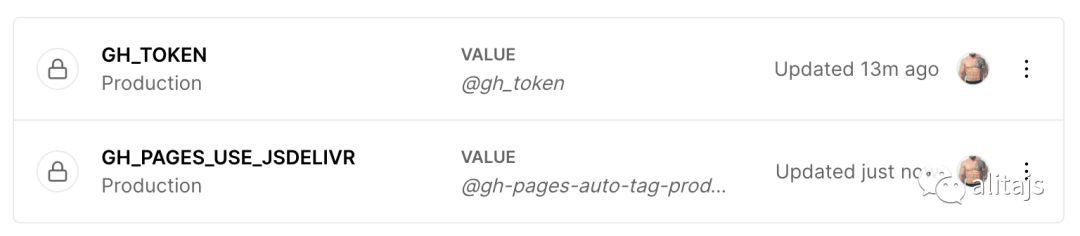
然后在 vercel 的后台配置环境变量 [6] ,并选择只在生产环境中生效。
image
如果你拥有你自己的 CDN ,不需要使用 jsdeliver,那你可以使用 getCDNUrl 完成自定义。它是一个函数,会接收当前 repo 的一些数据。默认方法为:
// 当前项目的数据 const gitInfo = {type : "github" ,domain : "github.com" ,user : "alitajs" ,project : "alita" ,tag : "1.0.0" const defaultGetCDNUrl = (gitInfo: any ) => {return `https://cdn.jsdelivr.net/gh/${gitInfo?.user} /${gitInfo?.project} @${gitInfo?.tag} /` 好了,至此,你已经了解了如何优雅的使用 CDN 优化你的博客了。如果你对其中的技术细节感兴趣,那你可以随意的阅读以下的文章。
首先我们通过配置或者环境变量中获取是否开启使用 CDN 的配置
const useCDN = api.userConfig?.ghPages?.useCDN || process.env.GH_PAGES_USE_CDN === 'true' ;如果是开启使用 CDN 的情况,那将会自动修改项目中的 publicPath 配置。
{publicPath : getCDNUrl(gitInfo),通过 github 的 api 获取项目 tags 。然后使用 semver.inc(latestTag, 'patch') 得到一个最新的 tag。这样保证每次发布之后的 CDN 都能是最新的。
const getGitInfo = async () => {const { version, repository } = api.pkg;if (!repository) {`Please set the repository in package.json` );1 );// git 要先提交 const gitStatus = execa.sync('git' , ['status' , '--porcelain' ]).stdout;if (gitStatus.length) {'publish' );`Your git status is not clean. Aborting.` );1 );// { type: "github", domain: "github.com", user: "npm", project: "hosted-git-info" } const gitInfo = hostedGitInfo.fromUrl(repository?.url || repository);const { body } = await api.utils.got.get(`https://api.github.com/repos/${gitInfo?.user} /${gitInfo?.project} /tags` );const data = JSON .parse(body);const versions = data.sort(function (v1: any, v2: any ) return semver.compare(v2.name, v1.name);// 该仓库从未设置 tag const latestTag = versions[0 ]?.name || '0.0.1' ;let newTag = latestTag;if (semver.lt(latestTag, version)) {else {'patch' )return { ...gitInfo, tag : newTag };自动使用 gh-pages 发布项目,并打上最新的 tag。
ghpages.publish(dir || paths.absOutputPath, {if (err) {'publish' );// 如果发生错误,执行中断 1 );'publish' );'Published to Github pages' );其实这里有两个事情是同步的。github 上的 repo 打上分支之后,jsdelivr 上的 CDN 才会有效。就是说,构建的时候 publicPath 是不存在的。所以必须在以上两个事情都正确执行时,项目才可访问。
如果你也遇到同样的问题,不妨试试 umi-plugin-gh-pages [7] 。
值得注意是,它和 dumi 更配哦。
参考资料 [1] 点亮小星星: https://github.com/alitajs/alita
[2] 超大: https://github.com/devrsi0n/
[3] 提高博客页面性能: https://devrsi0n.com/articles/improve-blog-page-performance
[4] umi-plugin-gh-pages: https://github.com/umijs/umi-plugin-gh-pages
[5] vercel: https://vercel.com/
[6] 配置环境变量: https://vercel.com/docs/environment-variables
[7] umi-plugin-gh-pages: https://github.com/umijs/umi-plugin-gh-pages