很久之前其实就关注过这个技术,记得当时还是React刚刚崭露头角的时期吧。总之那时候,GraphQL感觉还只是概念完备阶段,除了FB自己内部大量使用外,好像社区并不是很健全,不过大家应该都在疯狂的讨论和跟进吧。过了2年,如今再回过头来看,已经涌现出各种开源或商用服务专注于这个领域,各种语言的框架和工具也都很完备了,感觉是时候重新接触GraphQL了。如果你的项目正处于技术选型,你正在犹豫选择一种接口风格的时刻,不妨了解一下这个神奇而强大的玩意儿~~
本文打算翻译一篇感觉很解惑的文章,主要围绕着GraphQL的server端实现,因为相比client端,server端包含了更多的内容。后面如果有机会,也会尝试提供关于client端相关的内容,不过前端同学可以先看一下这里:howtographql [1] ,这里有各种最佳实践,应该总会找到和你正在使用相关的前端框架的整合方案,好像有个对应的中文版 [2] ~
关于GraphQL概念的内容,这篇文章并没有涉及太多,不过假如你用搜索引擎去搜的话,相信有非常多的相关文章供你学习,这里就不再重复了~
原文在这里 [3] ,怀疑我翻译能力的同学可以去看原位哦~
相信读完整个文章,对于GraphQL Server会有一个完整的了解。我们开始吧~
GraphiQL,一个Graphql领域的postman
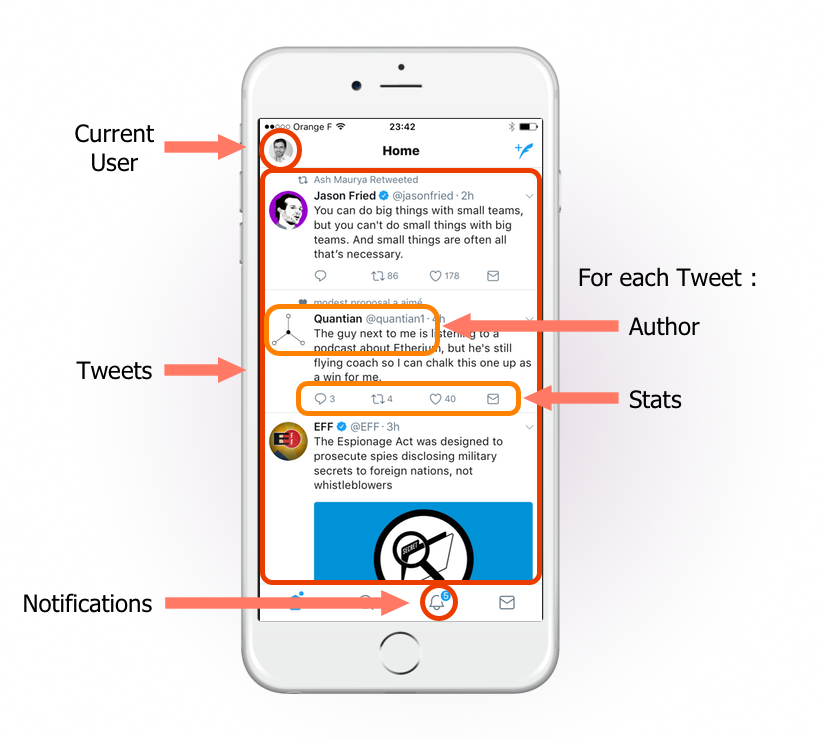
我们的目标是针对一个移动app端界面显示所需要的数据,提供支撑,可以实现单一请求次数下就可以获取足够的数据。我们将会用Nodejs来完成这个任务,因为这个语言我们已经在marmelab用了4年了。但你也可以用任何你想用的语言,例如Ruby,Go,甚至PHP,JAVA或C#。
为了显示这个页面,服务端必须能提供下面的响应数据结构:
{"data" : {"Tweets" : ["id" : 752 ,"body" : "consectetur adipisicing elit" ,"date" : "2017-07-15T13:17:42.772Z" ,"Author" : {"username" : "alang" ,"full_name" : "Adrian Lang" ,"avatar_url" : "http://avatar.acme.com/02ac660cdda7a52556faf332e80de6d8" "id" : 123 ,"body" : "Lorem Ipsum dolor sit amet" ,"date" : "2017-07-14T12:44:17.449Z" ,"Author" : {"username" : "creilly17" ,"full_name" : "Carole Reilly" ,"avatar_url" : "http://avatar.acme.com/5be5ce9aba93c62ea7dcdc8abdd0b26b" "User" : {"full_name" : "John Doe" "NotificationsMeta" : {"count" : 12 我们需要模块化和可维护的代码,需要做单元测试,听起来这很难?你会发现借助于GraphQL工具链,这并不比开发Rest客户端难多少。
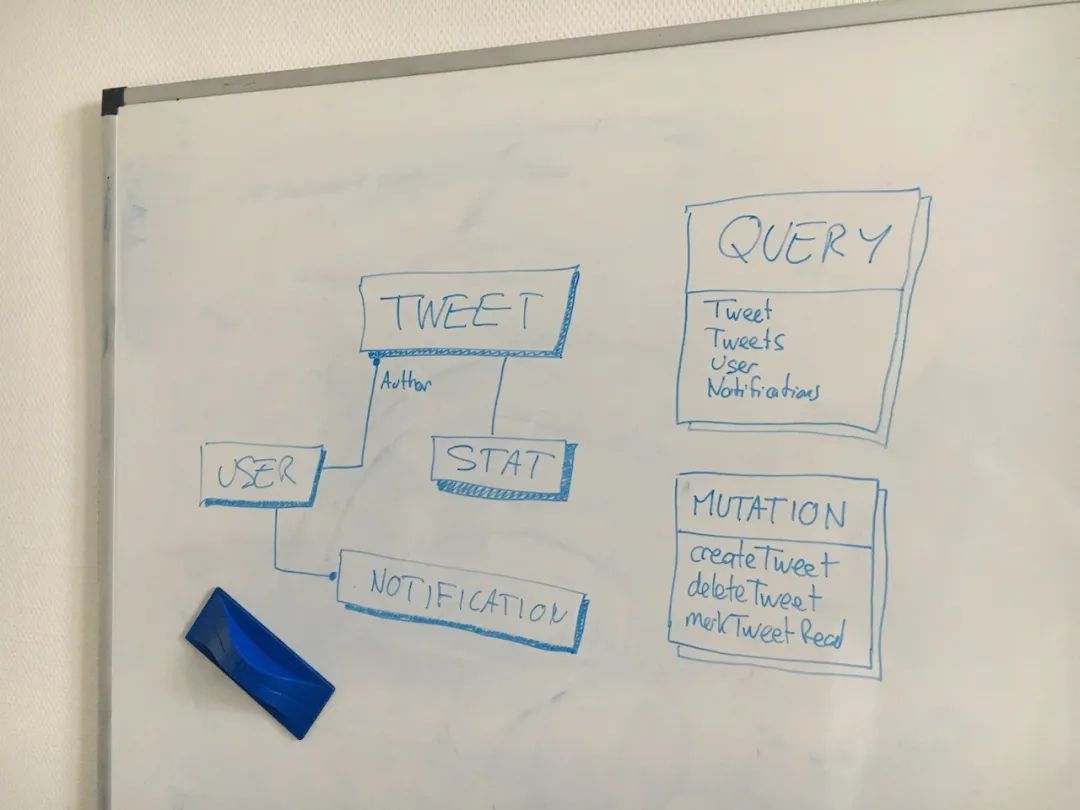
当我开发一个GraphQL服务时,我总会从在白板上设计模型开始,而不是上来就写代码。我会和产品和前端开发团队一起来讨论需要提供哪些数据类型,查询或更新操作。如果你了解领域驱动设计方法 [4] ,你会很熟悉这个流程。前端开发团队在拿到服务端返回的数据结构之前是没有办法开始编码的。所以我们需要先对API达成一致。
Tip 命名很重要!不要觉得把时间花在为变量起名字上很浪费。特别是当这些名称会长期使用的时候 - 记住,GraphQL API并没有版本号这回事儿,所以,尽可能让你的Schema具有自解释特性,因为这是其他开发人员了解项目的入口。
下面是我为这个项目提供的GraphQL Schema:
type Tweet {我在这个系列的前一篇文章中简短的介绍了Schema的语法。你只需要知道,这里的type类似REST里的resources概念。你可以用它来定义拥有唯一id键的实体(如Tweet和User)。你也可以用它来定义值对象,这种类型嵌套在实体内部,因此不需要唯一键(例如Stat)。
Tip 尽可能保证Type足够轻巧,然后利用组合。举个例子,尽管stats数据现在看来和tweet数据关系很近,但是请分开定义它们。因为它们表达的领域不同。这样当有天将stats数据换其它底层架构来维护,你就会庆幸今天做出的这个决定。
Query和Mutation关键字有特别的含义,它们用来定义API的入口。所以你不能声明一个自定义类型用这两个关键字 - 它们是GraphQL预留关键字。你可能会对Query下定义的字段有个困扰,它们总是和实体类型名字一样 - 但这只是个习惯约定。我就决定把获取Tweet类型数据的属性名称定义成getTweet - 记住,GraphQL是一种RPC(译者注:有别于RESTful的资源概念)。
官方GraphQL提供的schema文档 [5] 提供了所有细节,花十分钟来了解一下对你定义自己的schema会很有帮助。
Tip 你可能看过有些GraphQL教程使用代码风格来定义schema,例如GraphQLObjectType。别这么做 [6] ,这种风格显得非常的啰嗦,也不够清晰。
用Nodejs实现一个HTTP服务端最快的方式是使用express microframework [7] 。稍后我们会在http://localhost:4000/graphql [8] 下接入一个GraphQL服务。
> npm install express express-graphql graphql-tools graphql --saveexpress-graphql库会基于我们定义的schema和resolver函数来创建一个graphQL服务。graphql-tools库提供了schema的解析和校验的独立包。这两个库前者是来自于Facebook,后者源于Apollo。
// in src/index.js const fs = require ('fs' );const path = require ('path' );const express = require ('express' );const graphqlHTTP = require ('express-graphql' );const { makeExecutableSchema } = require ('graphql-tools' );const schemaFile = path.join(__dirname, 'schema.graphql' );const typeDefs = fs.readFileSync(schemaFile, 'utf8' );const schema = makeExecutableSchema({ typeDefs });var app = express();'/graphql' , graphqlHTTP({schema : schema,graphiql : true ,4000 );console .log('Running a GraphQL API server at localhost:4000/graphql' );执行下面命令来让我们的服务端跑起来:
> node src/index.js我们可以使用curl来简单请求一下我们的graphQL服务:
> curl 'http://localhost:4000/graphql' \正常!
Graphql服务根据我们提供的schema定义,在执行请求携带的查询语句之前进行了必要的校验,如果我们的查询语句中包含了一个没有声明过的字段,我们会得到一个错误提醒:
> curl 'http://localhost:4000/graphql' \
Tipexpress-graphql包生成的GraphQL服务端同时支持GET和POST请求。
Tip 世界上还有一个不错的库可以让我们基于express,koa,HAPI或Restify来建立GraphQL服务:apollo-server [9] 。使用的方法和我们用的这个没有太多差异,所以这个教程同样适用。
curl并不是一个很好用的工具来测试我们的GraphQL服务。我们使用GraphiQL [10] 来做可视化工具。可以把它想象成是Postman(译:用于测试Rest服务的工具,chrome app)。
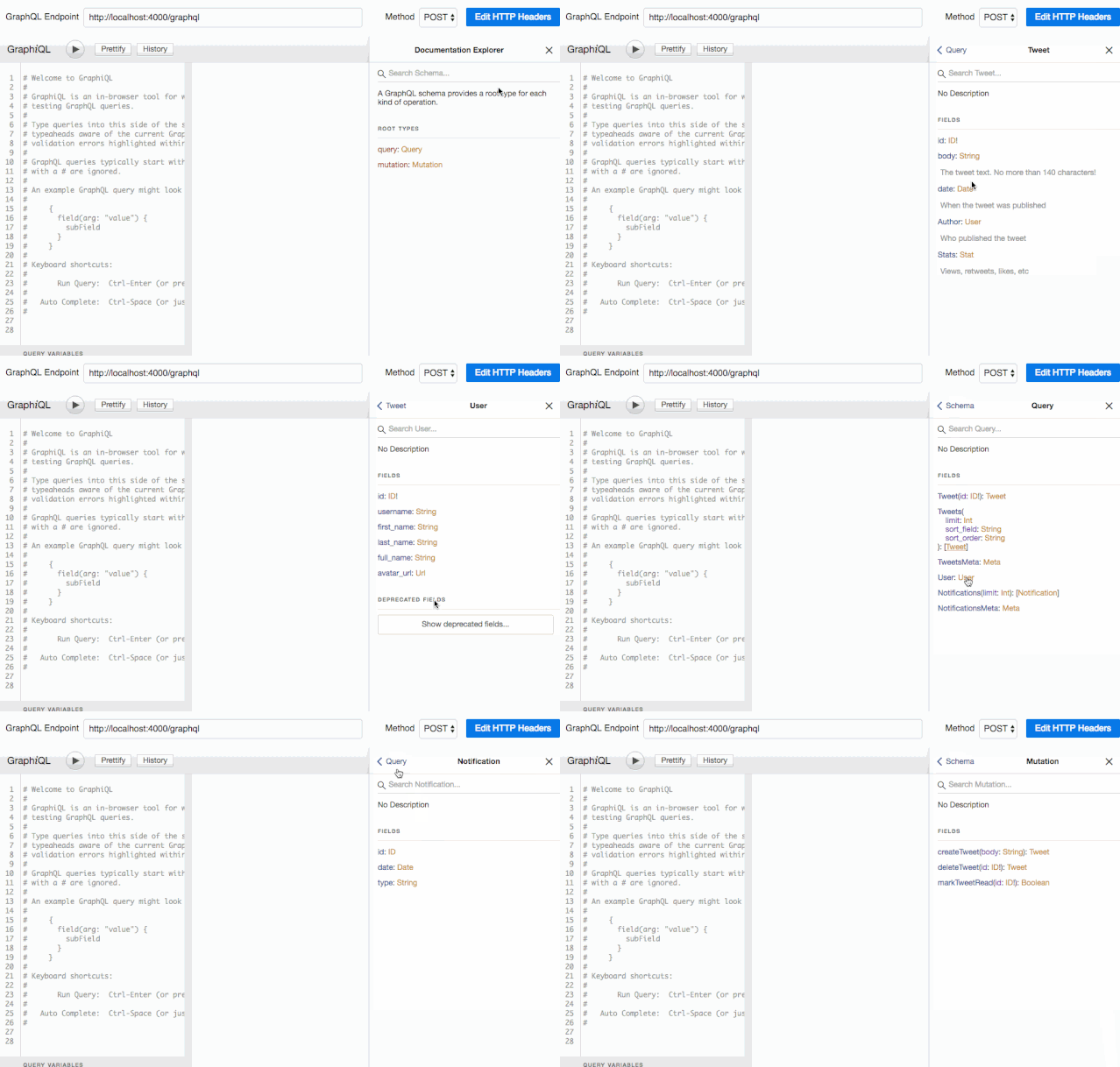
因为我们在使用graphqlHTTP中间件时声明了graphiql参数,GraphiQL已经启动了。我们可以在浏览器访问http://localhost:4000/graphql [11] 就能看到Web界面了。它会从我们的服务中拿到完整的schema结构,并创建一个可视化的文档。可以点击页面右上角的Docs链接来查看:
有了它,我们的服务端就相当于有了自动化API文档生成功能,这就意味着我们不再需要Swagger [12] 啦~
Tip 文档中每个类型和字段的解释来自于schema中的注释(以#为首的行)。尽可能提供注释,其它开发者会痛哭流涕的。
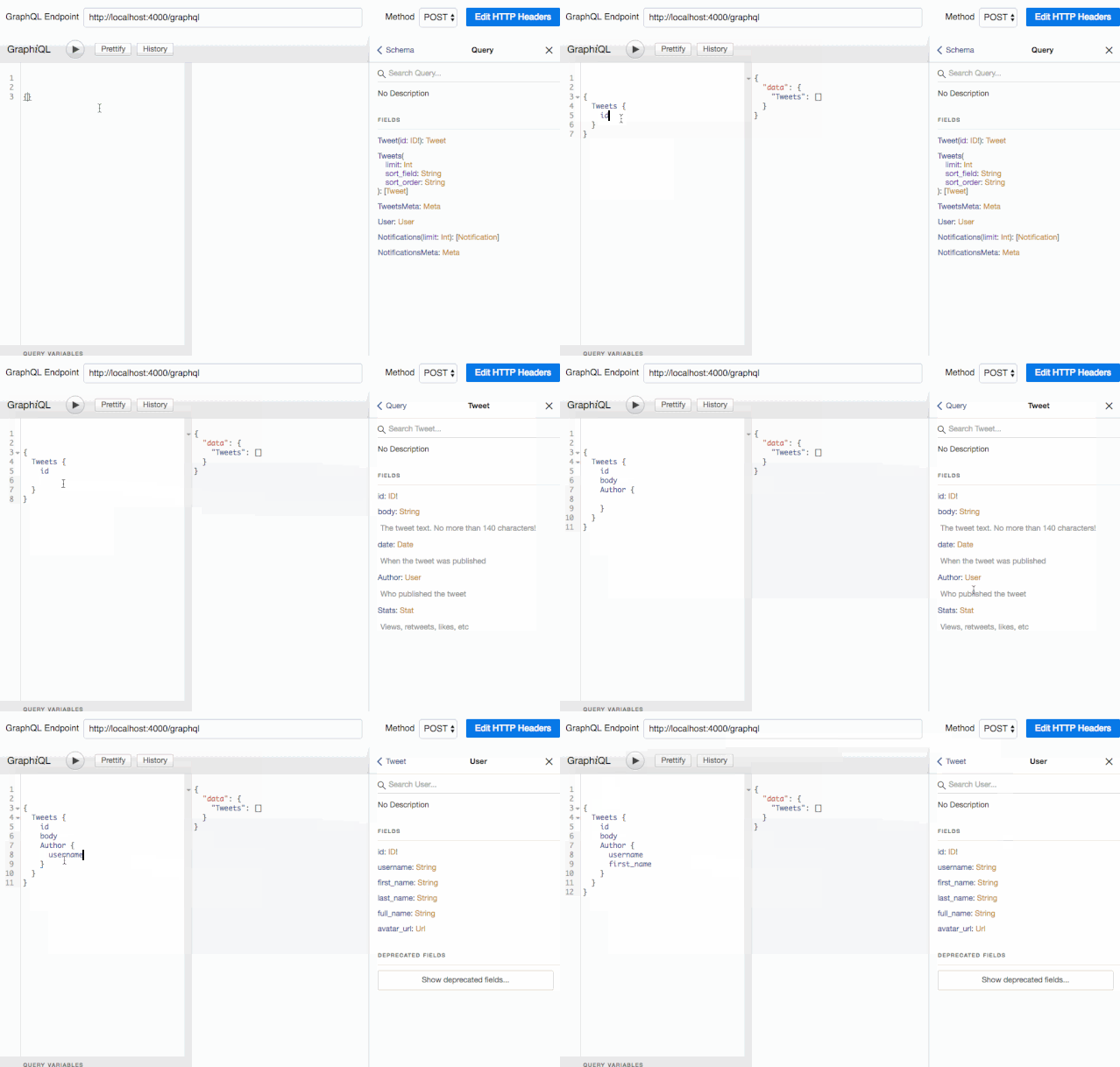
这还不是全部:使用schema,GraphiQL还提供了自动补全功能:
这种杀手级应用,每个Graphql开发者都值得拥有。对了,不要忘记在产品环境关闭掉它哟~
Tip 你可以独立安装graphiQL工具,它基于Electron。跨平台的哦,下载链接 [13]
到目前为止,我们的服务也只能返回空结果。我们这里会添加resolver定义来让它返回一些数据。我们先简单使用一些直接定义在代码里的静态数据来演示一下:
const tweets = [id : 1 , body : 'Lorem Ipsum' , date : new Date (), author_id : 10 },id : 2 , body : 'Sic dolor amet' , date : new Date (), author_id : 11 }const authors = [id : 10 , username : 'johndoe' , first_name : 'John' , last_name : 'Doe' , avatar_url : 'acme.com/avatars/10' },id : 11 , username : 'janedoe' , first_name : 'Jane' , last_name : 'Doe' , avatar_url : 'acme.com/avatars/11' },const stats = [tweet_id : 1 , views : 123 , likes : 4 , retweets : 1 , responses : 0 },tweet_id : 2 , views : 567 , likes : 45 , retweets : 63 , responses : 6 }然后我们来告诉服务如何使用这些数据来处理Tweet和Tweets查询请求。下面列出了resover映射关系,这个对象按照schema的结构,为每个字段提供了一个函数:
const resolvers = {Query : {Tweets : () =>Tweet : (_, { id } ) => tweets.find(tweet =>Tweet : {id : tweet =>body : tweet =>// pass the resolver map as second argument const schema = makeExecutableSchema({ typeDefs, resolvers });// proceed with the express app setup
Tip 官方express-graphql文档建议使用rootValue选项来代替使用makeExecutableSchema()。我不推荐这么做!
这里resolver的函数签名是(previousValue, parameters) => data。目前已经足够我们的服务来完成基础查询了:
// query { Tweets { id body } }内部工作流程是这样的:服务会由外向内依次处理查询块,为每个查询块执行对应的resolver函数,并传递外层调用是的返回结果为第一个参数。所以,{ Tweet(id: 2) { id body } }这个查询的处理步骤为:
最外层为
Tweet,对应的
resolver为
(Query.Tweet)。因为是最外层,所以调用
resolver函数时第一个参数为null。第二个参数传递的是查询携带的参数
{ id: 2 }。根据
schema的定义,该
resolver函数会返回满足条件的
Tweet类型对象。
针对每个
Tweet对象,服务会执行对应的
(Tweet.id)和
(Tweet.body)resolver函数。此时第一个参数为第一步得到的
Tweet对象。
目前我们的Tweet.id和Tweet.bodyresolver函数非常的简单,事实上我根本不需要声明它们。GraphQL有一个简单的默认resolver来处理缺少对应定义的字段。
Mutation resolver的实现并不会难多少,如下:
const resolvers = {// ... createTweet : (_, { body } ) => {const nextTweetId = tweets.reduce((id, tweet ) => {return Math .max(id, tweet.id);-1 ) + 1 ;const newTweet = {id : nextTweetId,date : new Date (),author_id : currentUserId, // <= you'll have to deal with that return newTweet;
Tip 保持resolver函数的简洁。GraphQL通常扮演系统的API网关角色,对后端领域服务提供了一层薄薄封装。resolver应该只包含解析请求参数并生成返回数据要求的结构的功能 - 就好像MVC框架中的controller层。其它逻辑应该拆分到对应的层,这样我们就能保持GraphQL非侵入业务。
你可以在Apollo官网找到关于resolvers的完整文档 [14] 。
接下来,最有意思的部分要开始了。如何让我们的服务能支持复杂的聚合查询呢?如下:
{如果是在SQL语言,这可能需要对其它两个表的joins操作(User和Stat),其背后SQL执行器要运行复杂的逻辑来处理查询。在GraphQL中,我们只需要为Tweet类型添加合适的resolver函数即可:
const resolvers = {Query : {Tweets : () =>Tweet : (_, { id } ) => tweets.find(tweet =>Tweet : {Author : (tweet ) => authors.find(author =>Stats : (tweet ) => stats.find(stat =>User : {full_name : (author ) => `${author.first_name} ${author.last_name} ` // pass the resolver map as second argument const schema = makeExecutableSchema({ typeDefs, resolvers });有了上面的resolvers,我们的服务就可以处理前面的查询并拿到期望的结果:
{1 ,"Lorem Ipsum" ,"johndoe" ,"John Doe" 123 2 ,"Sic dolor amet" ,"janedoe" ,"Jane Doe" 567 看到这个结果我不知道大家什么反映,反正我第一次被震到了,这简直是黑科技。凭什么这么简单的resolver函数就能让服务支持这么复杂的查询?
我们再来看一下执行流程:
{
对于最外层的
Tweets查询块,GraphQL执行
Query.Tweetsresolver,第一个参数为null。resolver函数返回
Tweets数组。
针对数组中的每个
Tweet,GraphQL并发的执行
Tweet.id、
Tweet.body、
Tweet.Author和
Tweet.Statsresolver函数。
注意这次我并没有提供关于
Tweet.id和
Tweet.body的resolver函数,GraphQL使用默认的resolver。对于
Tweet.Authorresolver函数,会返回一个
User类型的对象,这是
schema中定义好的。
针对
User类型数据,查询会并发的执行
User.username和
User.full_nameresolver,并传递上一步得到的
Author对象作为第一个参数。
State处理同样会使用默认的resolver来解决。
所以,这就是GraphQL的核心,非常的酷炫。它可以处理复杂的多层嵌套查询。这就是为啥成它为Graph的原因吧,此刻你应该顿悟了吧?!啊哈~
你可以在graphql.org网站找到关于GraphQL执行机制的描述 [15] 。
在真实项目中,resolver需要和数据库或其它API打交道来获取数据。这和我们上面做的事儿没有本质不同,除了需要返回一个promises外。假如tweets和authors数据存储在PostgreSQL数据库,而Stats存储在MongoDB数据库,我们的resolver只要调整一下即可:
const { Client } = require ('pg' );const MongoClient = require ('mongodb' ).MongoClient;const resolvers = {Query : {Tweets : (_, __, context ) => context.pgClient'SELECT * from tweets' )res =>Tweet : (_, { id }, context ) => context.pgClient'SELECT * from tweets WHERE id = $1' , [id])res =>User : (_, { id }, context ) => context.pgClient'SELECT * from users WHERE id = $1' , [id])res =>Tweet : {Author : (tweet, _, context ) => context.pgClient'SELECT * from users WHERE id = $1' , [tweet.author_id])res =>Stats : (tweet, _, context ) => context.mongoClient'stats' )'tweet_id' : tweet.id })'SELECT * from stats WHERE tweet_id = $1' , [tweet.id])User : {full_name : (author ) => `${author.first_name} ${author.last_name} ` const schema = makeExecutableSchema({ typeDefs, resolvers });const start = async () => {// make database connections const pgClient = new Client('postgresql://localhost:3211/foo' );await pgClient.connect();const mongoClient = await MongoClient.connect('mongodb://localhost:27017/bar' );var app = express();'/graphql' , graphqlHTTP({schema : schema,graphiql : true ,context : { pgClient, mongoClient }),4000 );注意,由于我们的数据库操作只支持异步操作,所以我们需要改成promise写法。我把数据库链接句柄对象保存在GraphQL的context中,context会作为第三个参数传递给所有的resolver函数。tontext非常适合用来处理需要在多个resolver中共享的资源,有点类似其它框架中的注册表实例。
如你所见,我们很容易就做到从不同的数据源中聚合数据,客户端根本不知道数据来自于哪里 - 这一切都隐藏在resolver中。
迭代查询语句块来调用对应的resolver函数确实聪明,但性能可能不太好。在我们的例子中,Tweet.Authorresolver被调用了多次,针对每个从Query.Tweetsresolve中得到的Tweet。所以我们请求了1次Tweets,结果产生了N次Tweet.Author查询。
为了解决这个问题,我使用了另外一个库:Dataloader [16] ,它也是Facebook提供的。
npm install --save dataloaderDataLoader是一个数据批量获取和缓存的工具库。首先我们会创建一个获取所有条目并返回promise的函数,然后我们为每个条目创建一个dataloader:
const DataLoader = require ('dataloader' );const getUsersById = (ids ) => pgClient`SELECT * from users WHERE id = ANY($1::int[])` , [ids])res =>const dataloaders = () =>userById : new DataLoader(getUsersById),userById.load(id)函数会收集多个单独的item调用,然后批量的获取一次。
Tip 如果你不太熟悉PostgreSQL,WHERE id = ANY($1::int[])的语法就类似于WHERE id IN($1,$2,$3)。
我们把dataloader也保存在context中:
app.use('/graphql' , graphqlHTTP(req =>schema : schema,graphiql : true ,context : { pgClient, mongoClient, dataloaders : dataloaders() },现在我们只需要稍微修改一下Tweet.Authorresolver即可:
const resolvers = {// ... Author : (tweet, _, context ) => // ... 大功搞成!现在{ Tweets { Author { username } }查询只会执行2次查询请求:一次用来获取Tweets数据,一次用来获取所有需要的Tweet.Author数据!
你需要注意一个细节:在graphqlHTTP配置时,我传递进去的是一个函数(graphqlHTTP(req => ({ ... }))),而非之前的对象(graphqlHTTP({ ... }))。这是因为Dataloader实例还提供缓存功能,所以我需要确保所有请求使用的是同一个Dataloader对象。
但这次变动会导致前面的代码报错,因为pgClient在getUsersById函数的上下文中就不存在了。为了传递数据库链接句柄到dataloader中,这有点绕,看下面的代码:
const DataLoader = require ('dataloader' );const getUsersById = pgClient =>ids =>`SELECT * from users WHERE id = ANY($1::int[])` , [ids])res =>const dataloaders = pgClient =>userById : new DataLoader(getUsersById(pgClient)),// ... '/graphql' , graphqlHTTP(req =>schema : schema,graphiql : true ,context : { pgClient, mongoClient, dataloaders : dataloaders(pgClient) },实际开发中,你可能不得不在所有的resolver函数中都使用dataloader,不管是否会查询数据库。这是产品环境下的必备啊,千万别错过它!
你可能注意到了我到现在为止都没有获取tweet.date数据,那是因为我在schema中定义了自定义的scalar类型:
type Tweet {不管你信不信,反正graphQL规范中并没有定义Date scalar类型,需要开发者自行实现。这算是个好的机会我们来演示一下创建自定义scalar类型,用来校验和类型转换数据。
和其他类型一样,scalar类型也需要resolver。但它的resolver函数必须支持将数据从其它resolver函数中转换为响应所需的格式,反之亦然:
const { GraphQLScalarType, GraphQLError } = require('graphql');正是因为咱们有schema,所有错误的查询请求都会被服务端捕获,并返回一个错误提醒:
// query { Tweets { id body foo } }这让调试变得易如反掌。客户端用户可以看到到底发生了什么事儿。
但这种在响应中显示错误信息的简单处理,并没有在服务端记录错误日志。为了帮助开发者跟踪异常,我在makeExecutableSchema中配置了logger参数,它必须传递一个拥有log方法的对象:
const schema = makeExecutableSchema({logger : { log : e =>console .log(e) },如果你打算在响应中隐藏错误信息,可以使用graphql-errors包 [17] 。
除了数据和错误外,graphQL的响应中还可以包含extensions类信息,你可以在其中放你想要的任何数据。我们用它来显示服务的耗时信息再好不过了。
为了添加扩展信息,我们需要在graphqlHTTP配置中添加extension函数,它返回一个支持json序列化的对象。
下面我添加了一个timing到响应中:
app.use('/graphql' , graphqlHTTP(req =>const startTime = Date .now();return {// ... ({ document , variables, operationName, result } ) => ({timing : Date .now() - startTime,现在我们所有的graphQL响应中都会包含请求的耗时信息:
// query { Tweets { id body } }你可以按你的设想为你的resolver函数提供更细颗粒度的耗时信息。在产品环境下,监听每个后端响应耗时非常有意义。你可以参考apollo-tracing-js [18] :
{"data" : <>,"errors" : <>,"extensions" : {"tracing" : {"version" : 1 ,"startTime" : <>,"endTime" : <>,"duration" : <>,"execution" : {"resolvers" : ["path" : [<>, ...],"parentType" : <>,"fieldName" : <>,"returnType" : <>,"startOffset" : <>,"duration" : <>,Apollo公司还提供一个叫Optics [19] 的GraphQL监控服务,不妨试试看。
GraphQL规范中并没有包含认证授权相关的内容。这意味着你不得不自己来做,可以使用express对应的中间件库(你可能需要passport.js [20] )。
一些教程推荐使用graphQL的Mutation来实现注册和登录功能 [21] ,并且在resolver函数中实现认证逻辑。但我的观点是,这在多数场景中都显得过火了。
请记住,GraphQL只是一个API网关,它不应该处理太多的业务需求。(译:但很多成熟API网关服务都提供认证授权服务吧?!但不知为何我挺支持原作者的观点)
resolver是简单函数,所以单元测试非常简单。在这篇教程里,我们会使用同样是Facebook提供的Jest [22] ,因为它基本上开箱即用:
> npm install jest --save-dev让我们开始为之前写的resolver函数User.full_name来写个测试用例。为了能测试它,我们需要先把它单独拆分到自己的文件中:
// in src/user/resolvers.js full_name : (author ) => `${author.first_name} ${author.last_name} ` ,// in src/index.js const User = require ('./resolvers/User' );const resolvers = {// ... const schema = makeExecutableSchema({ typeDefs, resolvers });// ... 现在就可以对它写测试用例了:
// in src/user/resolvers.spec.js const { User } = require ('./resolvers' );'User.full_name' , () => {'concatenates first and last name' , () => {const user = { first_name : 'John' , last_name : 'Doe' };'John Doe' )运行./node_modules/.bin/jest,然后就可以看到终端显示的测试结果了。
那些和数据库打交道的resolver测试起来可能稍微麻烦一些。不过因为context会被当做参数,我们利用它来传入测试数据集也没什么难的。如下:
// in src/tweet/resolvers.js Tweets : (_, _, context ) => context.pgClient'SELECT * from tweets' )res =>// in src/tweet/resolvers.spec.js const { Query } = require ('./resolvers' );'Query.Tweets' , () => {'returns all tweets' , () => {const queryStub = q =>if (q == 'SELECT * from tweets' ) {return Promise .resolve({ rows : [id : 1 , body : 'hello' },id : 2 , body : 'world' },const context = { pgClient : { query : queryStub } };return Query.Tweets(null , null , context).then(results =>id : 1 , body : 'hello' }id : 2 , body : 'world' }注意这里依然需要返回一个promise,并且将断言语句放在then()回调中。这样Jest会知道是异步测试。我们刚才是手动编写测试数据的,在真实产品中,你可能需要一个专业的类库来帮忙:Sinon.js [23] 。
如你所见,测试resolver就是这么小菜一碟。把resolver定位为一个纯函数,是GraphQL设计者们的另一个明智之举。
那么,如何来测试数据依赖,类型和聚合逻辑呢?这是另一种类型的测试,一般叫集成测试,需要在查询引擎上跑。
这需要我们运行一个http server来进行继承测试么?然而并不是。你可以单独对查询引擎进行测试而不需要跑一个服务,使用graphql工具即可。
在集成测试之前,我们需要调整一下代码结构:
// in src/schema.js const fs = require ('fs' );const path = require ('path' );const { makeExecutableSchema } = require ('graphql-tools' );const resolvers = require ('../resolvers' ); // extracted from the express app const schemaFile = path.join(__dirname, './schema.graphql' );const typeDefs = fs.readFileSync(schemaFile, 'utf8' );module .exports = makeExecutableSchema({ typeDefs, resolvers });// in src/index.js const express = require ('express' );const graphqlHTTP = require ('express-graphql' );const schema = require ('./schema' );var app = express();'/graphql' , graphqlHTTP({graphiql : true ,4000 );console .log('Running a GraphQL API server at localhost:4000/graphql' );现在我就可以单独的测试schema:
// in src/schema.spec.js这个独立的graphql查询引擎的api方法签名是(schema, query, rootValue, context) => Promise,(文档 [24] )。很简单对吧?顺便说一句,graphqlHTTP内部就是调用它来工作的。
另一种Apollo公司比较推荐的测试手段是使用来自graphql-tools中的mockServer来测试。基于文本化的schema,它会创建一个内存数据源,并填充伪造的数据。你可以在这个教程 [25] 中看到详细步骤。然而我并不推荐这种方式 - 它更像是一个前端开发者的工具,用来模拟GraphQL服务,而不是用来测试resolver。
为了能测试resolver和查询引擎,我们不得不把代码拆分到多个独立的文件中。从开发者角度来看这是一个值得的工作 - 它提供了模块化和可维护性。让我们完成所有resolver的模块化拆分。
// in src/tweet/resolvers.js export const Query = {Tweets : (_, _, context ) => context.pgClient'SELECT * from tweets' )res =>Tweet : (_, { id }, context ) => context.pgClient'SELECT * from tweets WHERE id = $1' , [id])res =>export const Mutation = {createTweet : (_, { body }, context ) => context.pgClient'INSERT INTO tweets (date, author_id, body) VALUES ($1, $2, $3) RETURNING *' , [new Date (), currentUserId, body])res =>0 ])export const Tweet = {Author : (tweet, _, context ) => context.dataloaders.userById.load(tweet.author_id),Stats : (tweet, _, context ) => context.dataloaders.statForTweet.load(tweet.id),// in src/user/resolvers.js export const Query = {User : (_, { id }, context ) => context.pgClient'SELECT * from users WHERE id = $1' , [id])res =>export const User = {full_name : (author ) => `${author.first_name} ${author.last_name} ` ,然后我们需要在一个地方合并所有的resolver:
// in src/resolvers const {Query : TweetQuery,Mutation : TweetMutation,require ('./tweet/resolvers' );const { Query : UserQuery, User } = require ('./user/resolvers' );module .exports = {Query : Object .assign({}, TweetQuery, UserQuery),Mutation : Object .assign({}, TweetMutation),就是这样!现在,模块化拆分后的代码结构,更适合理解和测试。
Resolvers现在已经结构化了,但是schema呢?把所有定义都放在一个文件中一听就不是个好设计。尤其是对一些大项目,这会导致根本无法维护。就像resolver那样,我也会把schema拆分到多个独立的文件中。下面是我推荐的项目文件结构,靠模块思想来搭建:
src/base.js文件中包含了schema的基础类型,和空的query和mutation类型声明 - 其它片段schema文件会增加对应的字段到其中。
// in src/base.js const Base = ` ;module .exports = () =>由于GraphQL不支持空的类型,所以我们不得不声明一个看起来毫无意义的query和mutation。注意,文件最后导出的是一个数组而非字符串。后面你就会知道是为啥了。
现在,在User schema声明文件中,我们如何添加字段到已经存在的query类型中?使用graphql关键字extend:
// in src/user/schema.js const Base = require ('../base' );const User = ` ;module .exports = () =>正如你看到的,代码最后并没有只是导出User,也导出了它所以来的Base。我就是靠这种方法来确保makeExecutableSchema能拿到所有的类型定义。这就是为啥我总是导出数组的原因,快夸我。
Stat类型也没有什么特殊的:
// in src/stat/schema.js const Stat = ` ;module .exports = () =>Tweet类型依赖多个其它类型,所以我们要导入所有依赖的类型定义,并最终全部导出:
// in src/tweet/schema.js const User = require ('../user/schema' );const Stat = require ('../stat/schema' );const Base = require ('../base' );const Tweet = ` ;module .exports = () =>最后,确保所有类型都在主schema.js文件中,我简单的传递一个typeDefs数组:
// in schema.js const Base = require ('./base.graphql' );const Tweet = require ('./tweet/schema' );const User = require ('../user/schema' );const Stat = require ('../stat/schema' );const resolvers = require ('./resolvers' );module .exports = makeExecutableSchema({typeDefs : [不需要担心类型重叠问题。每个类型makeExecutableSchema只会接受一次。
Tip 子schema导出一个函数而不是一个数组,是因为它要确保不会发生环形依赖问题。makeExecutableSchema函数支持传递数组和函数参数。
我们的服务端现在已经搞出来了,并且也进行了测试。是时候放松一下了!你可以从Github [26] 上下载这个教程的完整代码。欢迎使用它来作为你新项目的脚手架。
其实还有一些我没有提到的关于服务端GraphQL开发的细节:
安全:客户端可以随意的创建复杂查询,这就增加了服务风险,例如被DoS攻击。可以看一下这篇文章:
HowToGraphQL: GraphQL Security
[27]
订阅:很多教程使用
WebSocket,可以阅读
HowToGraphQL: Subscriptions
[28] 或
Apollo: Server-Side Subscriptions
[29] 来了解更多细节
输入类型:对于mutations,GraphQL支持有限的输入类型。可以从
Apollo: GraphQL Input Types And Client Caching
[30] 了解更多细节
Persisted Queries:这个主题会在后续的文章中涉及。
注意:这篇教程中提到的大多数js库都源自Facebook或Apollo。那么,Apollo到底是哪位?它是来自于Meteor团队的一个项目。这些家伙为GraphQL贡献了很多的高质量代码。顶他们!但他们同时也靠售卖GraphQL相关服务来盈利,所以在盲目遵从他们提供的教程之前,你最好能有个备选方案。
开发一个GraphQL服务端需要比REST服务端更多的工作,但同样你也会得到加倍的回报。如果你在读这篇教程的时候被太多名词给吓到失禁,先别慌着擦,你回忆一下当初你学RESTful的时候(URIs,HTTP return code,JSON Schema,HATEOAS),但现在你已经是一个REST开发者了。我觉得多花一两天你也就掌握GraphQL了。这是非常值得投资的。
警告:这个技术依然很年轻,并没有什么权威的最佳时间。我这里分享的只是我个人的积累。在我学习的过程中我看过大量的过时的教程,因为这门技术在不停的发展和进化。我希望这篇教程不会那么快就过时!
参考资料
[1] howtographql: https://www.howtographql.com/
[2] 中文版: http://graphql.cn/
[3] 这里: https://marmelab.com/blog/2017/09/06/dive-into-graphql-part-iii-building-a-graphql-server-with-nodejs.html#show-last-Point
[4] 领域驱动设计方法: https://en.wikipedia.org/wiki/Domain-driven_design
[5] schema文档: http://graphql.org/learn/schema/
[6] 别这么做: https://medium.com/@justin_mandzik/graphql-server-whats-after-hello-world-20adb81f1057#ccbb
[7] express microframework: http://expressjs.com/fr/
[8] http://localhost:4000/graphql: http://localhost:4000/graphql
[9] apollo-server: https://github.com/apollographql/apollo-server
[10] GraphiQL: https://github.com/graphql/graphiql
[11] http://localhost:4000/graphql: http://localhost:4000/graphql
[12] Swagger: https://swagger.io/
[13] 下载链接: https://github.com/skevy/graphiql-app/releases
[14] resolvers的完整文档: http://dev.apollodata.com/tools/graphql-tools/resolvers.html
[15] GraphQL执行机制的描述: http://graphql.org/learn/execution/
[16] Dataloader: https://github.com/facebook/dataloader
[17] graphql-errors包: https://github.com/kadirahq/graphql-errors
[18] apollo-tracing-js: https://github.com/apollographql/apollo-tracing-js
[19] Optics: https://www.apollodata.com/optics/
[20] passport.js: http://passportjs.org/
[21] 使用graphQL的Mutation来实现注册和登录功能: https://www.howtographql.com/graphql-js/5-authentication/
[22] Jest: https://facebook.github.io/jest/
[23] Sinon.js: http://sinonjs.org/
[24] 文档: http://graphql.org/graphql-js/graphql/#graphql
[25] 这个教程: http://graphql.org/blog/mocking-with-graphql/
[26] Github: https://github.com/marmelab/GraphQL-example/tree/master/server
[27] HowToGraphQL: GraphQL Security: https://www.howtographql.com/advanced/4-security/
[28] HowToGraphQL: Subscriptions: https://www.howtographql.com/graphql-js/9-subscriptions/
[29] Apollo: Server-Side Subscriptions: https://dev-blog.apollodata.com/tutorial-graphql-subscriptions-server-side-e51c32dc2951
[30] Apollo: GraphQL Input Types And Client Caching: https://dev-blog.apollodata.com/tutorial-graphql-input-types-and-client-caching-f11fa0421cfd