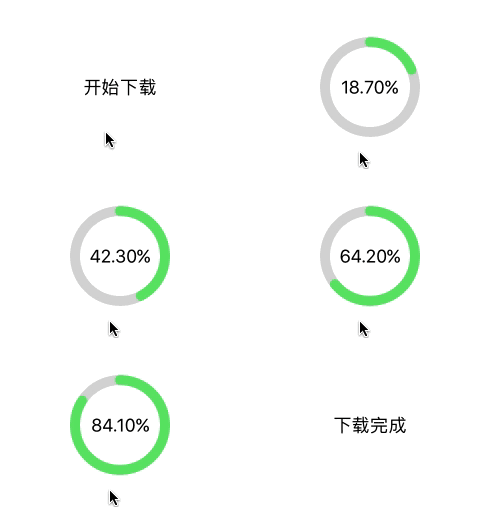
QProgressButton.m
    @interface QProgressButton ()

    /// 进度条的线宽
    @property (nonatomic, assign) CGFloat lineWidth;

    /// 进度条线的颜色
    @property (nonatomic, strong) UIColor *lineColor;

    /// 按钮的背景颜色
    @property (nonatomic, strong) UIColor *backColor;

    /// 按钮是否显示为圆形
    @property (nonatomic, assign, getter=isRound) BOOL round;

    @end

    @implementation QProgressButton

    /// 创建带进度条的按钮
    + (instancetype)q_progressButtonWithFrame:(CGRect)frame
                                        title:(NSString *)title
                                    lineWidth:(CGFloat)lineWidth
                                    lineColor:(nullable UIColor *)lineColor
                                    textColor:(nullable UIColor *)textColor
                                    backColor:(nullable UIColor *)backColor
                                      isRound:(BOOL)isRound {

        QProgressButton *progressButton = [[self alloc] init];

        progressButton.lineWidth = lineWidth ? : 2;
        progressButton.lineColor = lineColor ? : [UIColor colorWithRed:76/255.0 green:217/255.0 blue:100/255.0 alpha:1.0];
        progressButton.backColor = backColor ? : [UIColor clearColor];
        progressButton.round = isRound;

        // 设置按钮的实际 frame
        if (isRound) {
            CGRect tmpFrame = frame;
            tmpFrame.origin.y = frame.origin.y - (frame.size.width - frame.size.height) * 0.5;
            tmpFrame.size.height = frame.size.width;
            progressButton.frame = tmpFrame;
        } else {
            progressButton.frame = frame;
        }

        // 设置显示的标题和颜色
        [progressButton setTitle:title forState:UIControlStateNormal];
        [progressButton setTitleColor:(textColor ? : [UIColor blackColor]) forState:UIControlStateNormal];

        return progressButton;
    }

    /// 绘制进度条
    - (void)drawRect:(CGRect)rect {

        // 设置按钮圆角
        self.layer.masksToBounds = YES;
        self.layer.cornerRadius = rect.size.height * 0.5;

        // 绘制按钮的背景颜色
        UIBezierPath *path = [UIBezierPath bezierPathWithRect:rect];
        [self.backColor set];
        [path fill];

        // 设置进度终止时显示的内容
        if (self.stopTitle) {

            // 设置下载完成后的标题
            [self setTitle:self.stopTitle forState:UIControlStateNormal];
            return;
        }

        if (self.progress <= 0) {
            return;
        }

        // 清除按钮背景图片
        [self setBackgroundImage:nil forState:UIControlStateNormal];

        // 设置进度值
        [self setTitle:[NSString stringWithFormat:@"%.2f%%", self.progress * 100] forState:UIControlStateNormal];

        if (self.isRound) {

            CGPoint center = CGPointMake(rect.size.height * 0.5, rect.size.height * 0.5);
            CGFloat radius = (rect.size.height - self.lineWidth) * 0.5;
            CGFloat startA = - M_PI_2;
            CGFloat endA = startA + self.progress * 2 * M_PI;

            // 绘制进度条背景
            path = [UIBezierPath bezierPathWithArcCenter:center
                                                  radius:radius
                                              startAngle:0
                                                endAngle:2 * M_PI
                                               clockwise:YES];
            [[[UIColor lightGrayColor] colorWithAlphaComponent:0.5] set];
            path.lineWidth = self.lineWidth;
            [path stroke];

            // 绘制进度条
            path = [UIBezierPath bezierPathWithArcCenter:center
                                                  radius:radius
                                              startAngle:startA
                                                endAngle:endA
                                               clockwise:YES];
            path.lineWidth = self.lineWidth;
            path.lineCapStyle = kCGLineCapRound;
            [self.lineColor set];
            [path stroke];

        } else {

            CGFloat w = self.progress * rect.size.width;
            CGFloat h = rect.size.height;

            // 绘制进度条背景
            path = [UIBezierPath bezierPathWithRect:CGRectMake(0, 0, rect.size.width, rect.size.height)];
            [[[UIColor lightGrayColor] colorWithAlphaComponent:0.5] set];
            [path fill];

            // 绘制进度条
            path = [UIBezierPath bezierPathWithRect:CGRectMake(0, 0, w, h)];
            [self.lineColor set];
            [path fill];
        }
    }

    /// 设置进度值
    - (void)setProgress:(CGFloat)progress {

        _progress = progress;

        [self setNeedsDisplay];
    }

    /// 设置进度终止状态标题
    - (void)setStopTitle:(NSString *)stopTitle {

        _stopTitle = stopTitle;

        [self setNeedsDisplay];
    }

    @end