Objective-C
    // 设置 button 类型
    /*
        UIButtonTypeCustom = 0,         // 定制按钮,不带图标(常加载图片),默认文字颜色为白色,无触摸时的高亮效果
        UIButtonTypeSystem              // 不带图标,默认文字颜色为蓝色,有触摸时的高亮效果
        UIButtonTypeDetailDisclosure,   // “!” 图标按钮,默认文字颜色为蓝色,有触摸时的高亮效果
        UIButtonTypeInfoLight,          // “!” 图标按钮,默认文字颜色为蓝色,有触摸时的高亮效果
        UIButtonTypeInfoDark,           // “!” 图标按钮,默认文字颜色为蓝色,有触摸时的高亮效果
        UIButtonTypeContactAdd,         // “+” 图标按钮,默认文字颜色为蓝色,有触摸时的高亮效果
        UIButtonTypeRoundedRect = UIButtonTypeSystem,

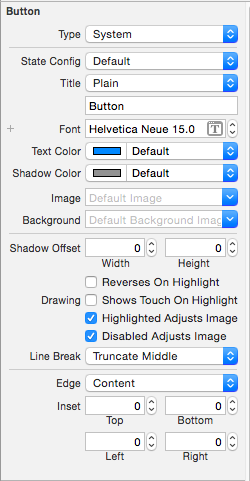
        [[UIButton alloc] init] 方式创建的 button 为 UIButtonTypeCustom 类型。
        StoryBoard 创建的 button 默认为 UIButtonTypeSystem 类型。
    */
    UIButton *button = [UIButton buttonWithType:UIButtonTypeCustom];

    // 设置 frame
    button.frame = CGRectMake(10, 100, 110, 50);

    // 设置内边距大小
    /*
        设置的内边距范围内不会显示内容
    */

        // 内容内边距(标题文字和图片)
        button.contentEdgeInsets = UIEdgeInsetsMake(20, 20, 10, 10);

        // 标题文字内边距
        button.titleEdgeInsets = UIEdgeInsetsMake(40, 20, 10, 10);

        // 图片内边距
        button.imageEdgeInsets = UIEdgeInsetsMake(20, 10, 10, 10);

    // 背景颜色
    /*
        默认为透明色(clearColor)
    */
    button.backgroundColor = [UIColor grayColor];

    // 设置按钮的文字
    /*
        UIControlStateNormal       = 0,           // 未选中状态,常规状态
        UIControlStateHighlighted  = 1 << 0,      // 高亮状态,点击状态
        UIControlStateDisabled     = 1 << 1,      // 禁用状态
        UIControlStateSelected     = 1 << 2,      // flag usable by app (see below),选中状态
        UIControlStateFocused NS_ENUM_AVAILABLE_IOS(9_0) = 1 << 3,
                                                  // Applicable only when the screen supports focus
        UIControlStateApplication  = 0x00FF0000,  // additional flags available for application use
        UIControlStateReserved     = 0xFF000000   // flags reserved for internal framework use
    */
    [button setTitle:@"普通状态" forState:UIControlStateNormal];

    // 设置文字颜色
    [button setTitleColor:[UIColor blackColor] forState:UIControlStateNormal];

    // 设置文字阴影颜色
    [button setTitleShadowColor:[UIColor yellowColor] forState:UIControlStateNormal];

    // 修改文字字体
    button.titleLabel.font = [UIFont systemFontOfSize:30];               // 普通
    button.titleLabel.font = [UIFont boldSystemFontOfSize:30];           // 加粗
    button.titleLabel.font = [UIFont italicSystemFontOfSize:30];         // 斜体(对中文无效)
    button.titleLabel.font = [UIFont fontWithName:@"Zapfino" size:15];   // 设置为指定字体类型的文字

    // 修改文字水平对齐方式
    /*
        UIControlContentHorizontalAlignmentCenter = 0,    // 居中
        UIControlContentHorizontalAlignmentLeft   = 1,    // 左对齐
        UIControlContentHorizontalAlignmentRight  = 2,    // 右对齐
        UIControlContentHorizontalAlignmentFill   = 3,    // 分散对齐
    */
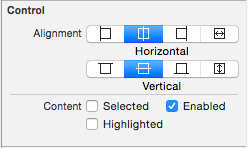
    button.contentHorizontalAlignment = UIControlContentHorizontalAlignmentCenter;

    // 修改文字垂直对齐方式
    /*
        UIControlContentVerticalAlignmentCenter  = 0,     // 居中
        UIControlContentVerticalAlignmentTop     = 1,     // 上对齐
        UIControlContentVerticalAlignmentBottom  = 2,     // 下对齐
        UIControlContentVerticalAlignmentFill    = 3,     // 分散对齐
    */
    button.contentVerticalAlignment = UIControlContentVerticalAlignmentCenter;

    // 设置内部的小图片
    /*
        图片将会以原始比例显示,button 上的图片和文字可以同时添加
    */
    [button setImage:[UIImage imageNamed:@"hehe.png"] forState:UIControlStateNormal];

    // 设置背景图片
    /*
        图片将会填充整个背景
        为了保证高亮状态下的图片正常显示,必须设置按钮的 type 为 custom
    */
    [button setBackgroundImage:[UIImage imageNamed:@"pic1.png"] forState:UIControlStateNormal];

    // 设置图片不变暗
    /*
        在未设置触摸状态图片时,触摸状态或禁用状态下图片会变暗
    */

        // 触摸状态时图标不变暗
        button.adjustsImageWhenHighlighted = NO;

        // 禁用状态时图标不变暗
        button.adjustsImageWhenDisabled = YES;

    // 设置 button 的激活与失效状态
    /*
        YES 激活状态,默认状态,NO 失效状态(不可点击)
    */
    button.enabled = YES;

    // 设置 butotn 的隐藏与显示状态
    /*
        YES 隐藏状态,NO 显示状态,默认状态
    */
    button.hidden = YES;

    // 设置 butotn 的选中状态
    /*
        YES 选中,NO 未选中
    */
    button.selected = YES;

    // 获取 butotn 当前的选中状态
    BOOL selected = button.selected;

    // readonly 只读属性

        NSString *title = button.currentTitle;                                 // 获取按钮当前的标题
        NSAttributedString *attributedTitle = button.currentAttributedTitle;   // 获取按钮当前的标题属性
        UIColor *titleColor = button.currentTitleColor;                        // 获取按钮当前的标题颜色
        UIColor *shadowColor = button.currentTitleShadowColor;                 // 获取按钮当前的标题阴影颜色
        UIImage *currentImage = button.currentImage;                           // 获取按钮当前的图片
        UIImage *backgroundImage = button.currentBackgroundImage;              // 获取按钮当前的背景图片
        NSString *title1 = [button titleForState:UIControlStateNormal];        // 获取按钮指定状态的文字

        // 获取按钮指定状态的标题属性
        NSAttributedString *attributedTitle1 = [button attributedTitleForState:UIControlStateNormal];

        // 获取按钮指定状态的标题颜色
        UIColor *titleColor1 = [button titleColorForState:UIControlStateNormal];

        // 获取按钮指定状态的标题阴影颜色
        UIColor *shadowColor1 = [button titleShadowColorForState:UIControlStateNormal];

        // 获取按钮指定状态的图片
        UIImage *currentImage1 = [button imageForState:UIControlStateNormal];

        // 获取按钮指定状态的背景图片
        UIImage *backgroundImage1 = [button backgroundImageForState:UIControlStateNormal];

    // 设置 button 点击触发事件
    /*
        UIControlEventTouchDown           = 1 <<  0,  // on all touch downs
        UIControlEventTouchDownRepeat     = 1 <<  1,  // on multiple touchdowns (tap count > 1)
        UIControlEventTouchDragInside     = 1 <<  2,
        UIControlEventTouchDragOutside    = 1 <<  3,
        UIControlEventTouchDragEnter      = 1 <<  4,
        UIControlEventTouchDragExit       = 1 <<  5,
        UIControlEventTouchUpInside       = 1 <<  6,
        UIControlEventTouchUpOutside      = 1 <<  7,
        UIControlEventTouchCancel         = 1 <<  8,

        UIControlEventValueChanged        = 1 << 12,  // sliders, etc.
        UIControlEventPrimaryActionTriggered NS_ENUM_AVAILABLE_IOS(9_0) = 1 << 13,
                                          // semantic action: for buttons, etc.

        UIControlEventEditingDidBegin     = 1 << 16,  // UITextField
        UIControlEventEditingChanged      = 1 << 17,
        UIControlEventEditingDidEnd       = 1 << 18,
        UIControlEventEditingDidEndOnExit = 1 << 19,  // 'return key' ending editing

        UIControlEventAllTouchEvents      = 0x00000FFF,  // for touch events
        UIControlEventAllEditingEvents    = 0x000F0000,  // for UITextField
        UIControlEventApplicationReserved = 0x0F000000,  // range available for application use
        UIControlEventSystemReserved      = 0xF0000000,  // range reserved for internal framework use
        UIControlEventAllEvents           = 0xFFFFFFFF
    */
    [button addTarget:self action:@selector(buttonClick:) forControlEvents:UIControlEventTouchUpInside];
Swift
    // 设置 button 类型
    /*
        case Custom             // 定制按钮,不带图标(常加载图片),默认文字颜色为白色,无触摸时的高亮效果
        case System             // 不带图标,默认文字颜色为蓝色,有触摸时的高亮效果

        case DetailDisclosure   // “!” 图标按钮,默认文字颜色为蓝色,有触摸时的高亮效果
        case InfoLight          // “!” 图标按钮,默认文字颜色为蓝色,有触摸时的高亮效果
        case InfoDark           // “!” 图标按钮,默认文字颜色为蓝色,有触摸时的高亮效果
        case ContactAdd         // “+” 图标按钮,默认文字颜色为蓝色,有触摸时的高亮效果

        UIButton() 方式创建的 button 为 Custom 类型。
        StoryBoard 创建的 button 默认为 System 类型。
    */
    let button:UIButton = UIButton(type: .Custom)

    // 设置 frame
    button.frame = CGRectMake(10, 100, 110, 50)

    // 设置内边距大小
    /*
        设置的内边距范围内不会显示内容
    */

        // 内容内边距(标题文字和图片)
        button.contentEdgeInsets = UIEdgeInsetsMake(20, 20, 10, 10)

        // 标题文字内边距
        button.titleEdgeInsets = UIEdgeInsetsMake(40, 20, 10, 10)

        // 图片内边距
        button.imageEdgeInsets = UIEdgeInsetsMake(20, 10, 10, 10)

    // 背景颜色
    /*
        默认为透明色(clearColor)
    */
    button.backgroundColor = UIColor.grayColor()

    // 设置按钮的文字
    /*
        Normal         // 普通状态,未选中状态
        Highlighted    // used when UIControl isHighlighted is set,高亮状态,点击状态
        Disabled       // 禁用状态
        Selected       // flag usable by app (see below),选中状态

        @available(iOS 9.0, *)
        Focused        // Applicable only when the screen supports focus
        Application    // additional flags available for application use
        Reserved       // flags reserved for internal framework use
    */
    button.setTitle("普通状态", forState: .Normal)

    // 设置文字颜色
    button.setTitleColor(UIColor.blackColor(), forState: .Normal)

    // 设置文字阴影颜色
    button.setTitleShadowColor(UIColor.yellowColor(), forState: .Normal)

    // 修改文字字体
    button.titleLabel?.font = UIFont.systemFontOfSize(30)           // 普通
    button.titleLabel?.font = UIFont.boldSystemFontOfSize(30)       // 加粗
    button.titleLabel?.font = UIFont.italicSystemFontOfSize(30)     // 斜体(对中文无效)
    button.titleLabel?.font = UIFont(name: "Zapfino", size: 15)     // 设置为指定字体类型的文字

    // 修改文字水平对齐方式
    /*
        case Center      // 居中
        case Left        // 左对齐
        case Right       // 右对齐
        case Fill        // 分散对齐
    */
    button.contentHorizontalAlignment = .Center

    // 修改文字垂直对齐方式
    /*
        case Center      // 居中
        case Top         // 上对齐
        case Bottom      // 下对齐
        case Fill        // 分散对齐
    */
    button.contentVerticalAlignment = .Center

    // 设置内部的小图片
    /*
        图片将会以原始比例显示,button 上的图片和文字可以同时添加
    */
    button.setImage(UIImage(named: "hehe.png"), forState: .Normal)

    // 设置背景图片
    /*
        图片将会填充整个背景
        为了保证高亮状态下的图片正常显示,必须设置按钮的 type 为 custom
    */
    button.setBackgroundImage(UIImage(named: "pic1.png"), forState: .Normal)

    // 设置图片不变暗
    /*
        在未设置触摸状态图片时,触摸状态或禁用状态下图片会变暗
    */

        // 触摸状态时图标不变暗
        button.adjustsImageWhenHighlighted = false

        // 禁用状态时图标不变暗
        button.adjustsImageWhenDisabled = false

    // 设置 button 的激活与失效状态
    /*
        true 激活状态,默认状态,false 失效状态(不可点击)
    */
    button.enabled = true

    // 设置 butotn 的隐藏与显示状态
    /*
        true 隐藏状态,false 显示状态,默认状态
    */
    button.hidden = true

    // 设置 butotn 的选中状态
    /*
        true 选中,false 未选中
    */
    button.selected = true

    // 获取 butotn 当前的选中状态
    let selected:Bool = button.selected

    // readonly 只读属性

        let title:String? = button.currentTitle                                   // 获取按钮当前的标题
        let attributedTitle:NSAttributedString? = button.currentAttributedTitle   // 获取按钮当前的标题属性
        let titleColor:UIColor = button.currentTitleColor                         // 获取按钮当前的标题颜色
        let shadowColor:UIColor? = button.currentTitleShadowColor                 // 获取按钮当前的标题阴影颜色
        let currentImage:UIImage? = button.currentImage                           // 获取按钮当前的图片
        let backgroundImage:UIImage? = button.currentBackgroundImage              // 获取按钮当前的背景图片

        // 获取按钮指定状态的文字
        let title1:String? = button.titleForState(.Normal)

        // 获取按钮指定状态的标题属性
        let attributedTitle1:NSAttributedString? = button.attributedTitleForState(.Normal)

        // 获取按钮指定状态的标题颜色
        let titleColor1:UIColor? = button.titleColorForState(.Normal)

        // 获取按钮指定状态的标题阴影颜色
        let shadowColor1:UIColor? = button.titleShadowColorForState(.Normal)

        // 获取按钮指定状态的图片
        let currentImage1:UIImage? = button.imageForState(.Normal)

        // 获取按钮指定状态的背景图片
        let backgroundImage1:UIImage? = button.backgroundImageForState(.Normal)

    // 设置 button 点击触发事件
    /*
        TouchDown                  // on all touch downs
        TouchDownRepeat            // on multiple touchdowns (tap count > 1)
        TouchDragInside
        TouchDragOutside
        TouchDragEnter
        TouchDragExit
        TouchUpInside
        TouchUpOutside
        TouchCancel

        ValueChanged              // sliders, etc.

        @available(iOS 9.0, *)
        PrimaryActionTriggered    // semantic action: for buttons, etc.

        EditingDidBegin           // UITextField
        EditingChanged
        EditingDidEnd
        EditingDidEndOnExit       // 'return key' ending editing

        AllTouchEvents            // for touch events
        AllEditingEvents          // for UITextField
        ApplicationReserved       // range available for application use
        SystemReserved            // range reserved for internal framework use
        AllEvents
    */
    button.addTarget(self, action: #selector(UiButton.buttonClick(_:)), forControlEvents: .TouchUpInside)