首页 文章 精选 留言 我的

精选列表

搜索[部署],共10000篇文章
优秀的个人博客,低调大师

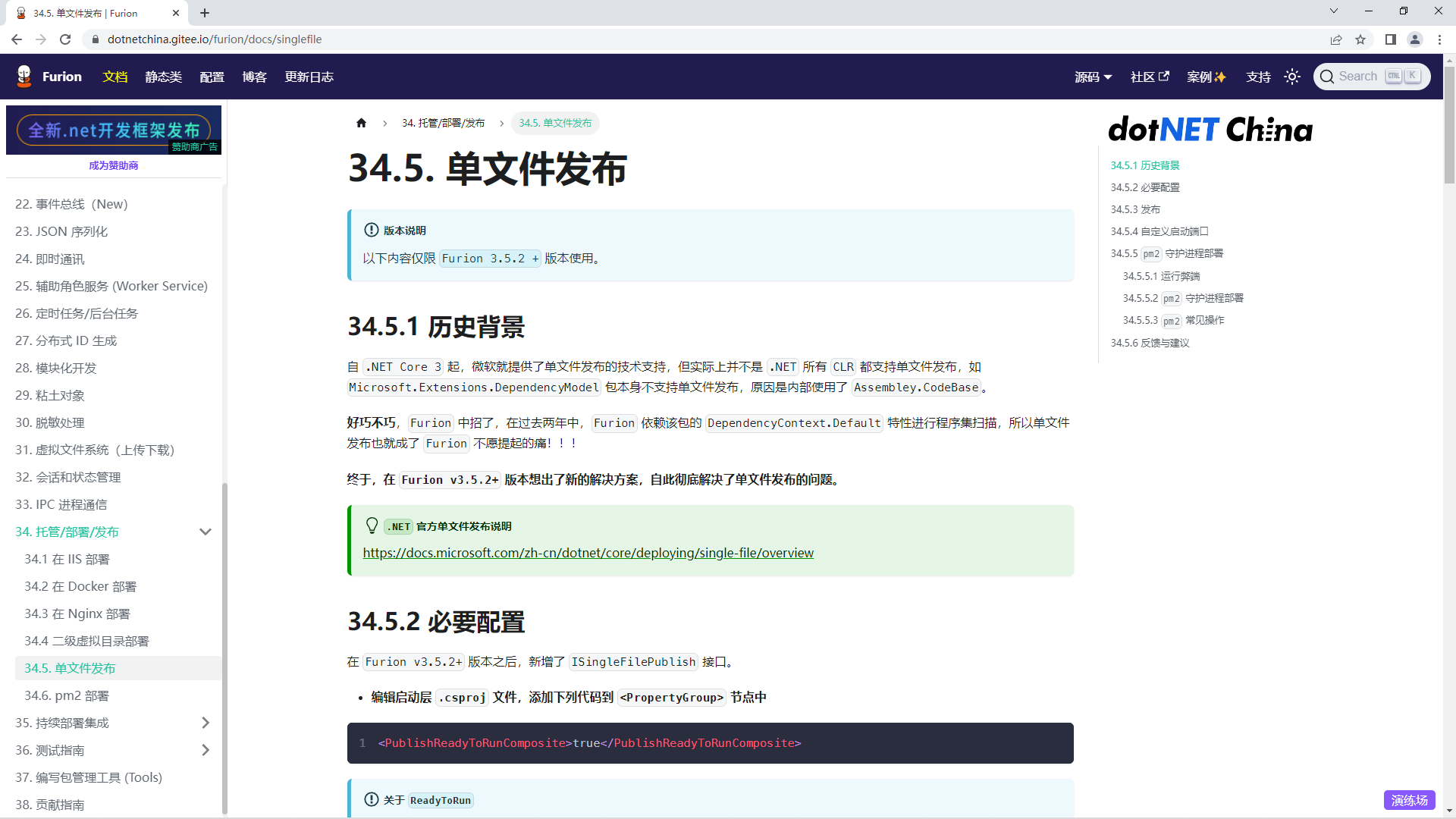
Furion v3.5.5 发布,新增不依赖环境单文件独立部署方式

历史背景 自.NET Core 3起,微软就提供了单文件发布的技术支持,但实际上并不是.NET所有CLR都支持单文件发布,如Microsoft.Extensions.DependencyModel包本身不支持单文件发布,原因是内部使用了Assembley.CodeBase。 好巧不巧,Furion中招了,在过去两年中,Furion依赖该包的DependencyContext.Default特性进行程序集扫描,所以单文件发布也就成了Furion不愿提起的痛!!! 终于,在Furion v3.5.2+版本想出了新的解决方案,自此彻底解决了单文件发布的问题。 .NET官方单文件发布说明 https://docs.microsoft.com/zh-cn/dotnet/core/deploying/single-file/overvie 本期更新 新特性 [新增]sql转实体支持多种命名策略(纯大写,纯小写,带下划线分割等等),如Oracle数据库a90e245 [新增]FS.InitalContentTypeProvider()拓展方法,获取系统内所有支持的Content-Type文件提供器6099900 [新增]TP.Wrapper(...)拓展方法,主要用来生成规范化的日志模板427999a 突破性变化 [解决]彻底解决了Furion不能单文件发布的问题7e8e0b7 问题修复 [修复]框架规范化文档Swagger不支持Controller派生类api路由问题,原生ASP.NET是支持的29e47bc [修复]基于Schema多租户配置无效问题6f820ce [修复]指定实体[Table(schema:"dbo")]特性后Schema无效问题6f820ce [修复]数据库视图不支持Schema配置问题6f820ce [修复]规范化结果极端情况下出现空异常问题c9b0ef 其他更改 [调整]对象映射默认支持忽略大小写!486 文档 [新增]Furion单文件发布文档 [新增]Furion + SqlSugar脚手架文档 [新增]TP全局静态类文档 [更新]事件总线文档、选项文档、即时通讯文档、.NET5升级.NET6文档、依赖注入文档、跨域文档、数据加解密文档 本期文档 ​​​​​​​

优秀的个人博客,低调大师

阿里云 Centos7 部署Java web [jar/war/nginx+域名服务]

(一)第一部分:最基本的jar包运行(无需配置tomcat) [http://60.205.183.114:8081/] 1、配置阿里云(Esc学生服务器、镜像Centos7.7),并远程连接进入终端。 2、安装并配置JDK(参考https://www.jianshu.com/p/093413f2a04f) a)安装jdk。b)寻找jdk路径配置环境变量。c)简单的Java hello world测试确保安装成功。 3、安装并配置mysql(mariadb)(参考https://blog.csdn.net/DaSo_CSDN/article/details/54754936) a)安装mysql、mariadb server。b)systemctl 开启服务。c) 打开端口。(阿里云要在控制台打开,参考https://yq.aliyun.com/articles/701181)d) 更改mysql 的root密码,对应于项目配置文件中的密码。 4、利用scp进行文件传输(参考https://www.cnblogs.com/tugenhua0707/p/8278772.html) a)传输spring maven 的快照版本用于测试。b)传输数据库sql文件。 5、导入数据库 a)创建sql文件对应的数据库。b)利用文件重定向运行sql文件。c)检查数据库是否导入成功 6、运行jar文件,控制台获取公网IP,本机输入IP:8081测试。 7、设置后台运行(已设置:http://60.205.183.114:8081/) a)contrl+c中止。b)然后通过nohup 和 & 来后台运行。c)ps通过pid来停止后台运行进程。 运行结果整体过程: [root@iZ2ze4r3b4xcztbcsey08cZ ~]# history 1 MAKRER=SHOW_LOCALE;printf $MAKRER""; locale; MAKRER=SHOW_LOCALE;printf $MAKRER""; 2 yum install -y mysql 3 yum install -y mariadb-server mariadb 4 systemctl start mariadb 5 systemctl enable mariadb 6 yum install -y mysql-devel 7 firewall-cmd --zone=public --add-port=3306/tcp --permanent 8 CHECK_TYPE=SHELL; echo "INFO=${CHECK_TYPE} PID=$$ PPID=$PPID TTY=$(tty) SHELL=$0 HOME=$HOME PWD=$PWD| CHECK_SHELL_END" 9 ls 10 ifconfig 11 ls 12 yum list 13 java -version 14 ls 15 yum search java-1.8 16 yum -y install java-1.8.0-openjdk-devel.x86_64 17 java -version 18 cd /usr/lib/jvm/java-1.8.0-openjdk-1.8.0.252.b09-2.el7_8.x86_64/ 19 pwd 20 vim /etc/profile 21 . /etc/profile 22 vim Demo.java 23 javac Demo.java 24 java Demo 25 su 26 MAKRER=SHOW_LOCALE;printf $MAKRER""; locale; MAKRER=SHOW_LOCALE;printf $MAKRER""; 27 CHECK_TYPE=SHELL; echo "INFO=${CHECK_TYPE} PID=$$ PPID=$PPID TTY=$(tty) SHELL=$0 HOME=$HOME PWD=$PWD| CHECK_SHELL_END" 28 mysql -u root 29 ls 30 pwd 31 ifconfig 32 ls 33 mysql 34 mysql -u root jpetstore < jpetstore.sql 35 mariadb 36 mysql 37 java -jar mypetstore-0.0.3-SNAPSHOT.jar 38 nohup java -jar mypetstore-0.0.3-SNAPSHOT.jar & 39 ps 40 history [root@iZ2ze4r3b4xcztbcsey08cZ ~]# 控制台开端口 利用scp传文件 运行mysql 文件 [root@iZ2ze4r3b4xcztbcsey08cZ ~]# mysql Welcome to the MariaDB monitor. Commands end with ; or \g. Your MariaDB connection id is 3 Server version: 5.5.65-MariaDB MariaDB Server Copyright (c) 2000, 2018, Oracle, MariaDB Corporation Ab and others. Type 'help;' or '\h' for help. Type '\c' to clear the current input statement. MariaDB [(none)]> create database jpetstore; Query OK, 1 row affected (0.00 sec) MariaDB [(none)]> quit Bye [root@iZ2ze4r3b4xcztbcsey08cZ ~]# mysql -u root jpetstore < jpetstore.sql [root@iZ2ze4r3b4xcztbcsey08cZ ~]# mariadb -bash: mariadb: command not found [root@iZ2ze4r3b4xcztbcsey08cZ ~]# mysql Welcome to the MariaDB monitor. Commands end with ; or \g. Your MariaDB connection id is 5 Server version: 5.5.65-MariaDB MariaDB Server Copyright (c) 2000, 2018, Oracle, MariaDB Corporation Ab and others. Type 'help;' or '\h' for help. Type '\c' to clear the current input statement. MariaDB [(none)]> show databases; +--------------------+ | Database | +--------------------+ | information_schema | | jpetstore | | mysql | | performance_schema | | test | +--------------------+ 5 rows in set (0.00 sec) MariaDB [(none)]> use jpetstore; Reading table information for completion of table and column names You can turn off this feature to get a quicker startup with -A Database changed MariaDB [jpetstore]> show tables; +---------------------+ | Tables_in_jpetstore | +---------------------+ | account | | addlog | | bannerdata | | browselog | | cart | | cartitem | | category | | inventory | | item | | lineitem | | orders | | orderstatus | | product | | profile | | sequence | | signon | | supplier | +---------------------+ 17 rows in set (0.00 sec) 访问http://60.205.183.114:8081/ (二)第二部分:利用Tomcat容器对war包进行处理(需要Tomcat) [http://60.205.183.114:8080/myJPetStore_war/index.jsp] 1、安装Tomcat(参考https://www.digitalocean.com/community/tutorials/how-to-install-apache-tomcat-8-on-centos-7) a)本地下载tomcat,然后利用scp文件传输b)设置访问权限c)设置服务配置d)输入IP:8080测试是否已经开启服务 2、数据库/端口配置 a)数据库root 密码 和服务器对应b)端口配置,在上面已经开启了8080端口 3、利用scp传输war包,放到webapp里边(直接会解析出文件) 4、重启tomcat服务 a)bin下的shutdown.shb)bin下的startup.sh 5、本机测试访问 a)注意要添加访问的资源的路径/myJPetStore_war/index.jsp,然后tomcat容器会自动到webapp下去寻找b) 已设置tomcat容器:http://60.205.183.114:8080/myJPetStore_war/index.jsp 运行结果整体过程 52 ls 53 sudo mkdir /opt/tomcat 54 sudo tar xvf apache-tomcat-8*tar.gz -C /opt/tomcat --strip-components=1 55 cd /opt/tomcat 56 sudo chgrp -R tomcat /opt/tomcat 57 sudo chmod -R g+r conf 58 sudo chmod g+x conf 59 sudo chown -R tomcat webapps/ work/ temp/ logs/ 60 sudo vi /etc/systemd/system/tomcat.service 61 sudo systemctl daemon-reload 62 sudo systemctl start tomcat 63 sudo systemctl status tomcat 64 sudo systemctl enable tomcat 65 ls 66 cd webapps/ 67 pwd 68 ls 69 sudo systemctl restart tomcat 70 cd ../bin/ 71 ls 72 sh shutdown.sh 73 sh startup.sh 74 history [root@iZ2ze4r3b4xcztbcsey08cZ bin]# 利用systemctl查看tomcat的状态 验证是否开启tomcat服务 将war包直接传入webapp中 然后webapp会自动解析war包(即myJPetStore_war) [root@iZ2ze4r3b4xcztbcsey08cZ webapps]# pwd /opt/tomcat/webapps [root@iZ2ze4r3b4xcztbcsey08cZ webapps]# ls docs examples host-manager manager myJPetStore_war myJPetStore_war.war ROOT 访问http://60.205.183.114:8080/myJPetStore_war/index.jsp (三)第三部分:指定域名进行访问 [http://crf.codes/] 1、配置virmach vps,达到可以通过IP进行访问 a)过程同第一步,最后设置为后台运行。b) 已配置:http://198.12.120.212:8081/ 2、服务器安装web server (安装nginx,参考http://blog.kenyang.net/2019/02/26/upgrade-nginx-to-latest-version-on-centos) 3、在域名提供商 name(或者cloudflare)进行DNS域名解析,进行请求中转。a)ping 域名(ping crf.codes)查看是否绑定成功。 4、修改nginx 配置文件 a)Web server 设定域名b)Location 配置index界面c)开放Linux系统防火墙d)访问crf.code http://crf.codes/ 运行结果域名提供商(name)配置dns 验证dns是否配置成功ping crf.codes,可以看到 修改nginx配置文件 server { listen 80; server_name crf.codes; #charset koi8-r; access_log /var/log/nginx/host.access.log main; location / { # root /usr/share/nginx/html; index index.html index.htm; proxy_pass http://127.0.0.1:8081/; # proxy_set_header X-Forwarded-For $proxy_add_x_forwarded_for; } #error_page 404 /404.html; # redirect server error pages to the static page /50x.html # error_page 500 502 503 504 /50x.html; location = /50x.html { root /usr/share/nginx/html; } # proxy the PHP scripts to Apache listening on 127.0.0.1:80 # #location ~ \.php$ { # proxy_pass http://127.0.0.1; #} # pass the PHP scripts to FastCGI server listening on 127.0.0.1:9000 # #location ~ \.php$ { # root html; # fastcgi_pass 127.0.0.1:9000; # fastcgi_index index.php; # fastcgi_param SCRIPT_FILENAME /scripts$fastcgi_script_name; # include fastcgi_params; #} # deny access to .htaccess files, if Apache's document root # concurs with nginx's one # #location ~ /\.ht { # deny all; #} } 访问crf.codes

资源下载

更多资源
Mario

Mario

马里奥是站在游戏界顶峰的超人气多面角色。马里奥靠吃蘑菇成长,特征是大鼻子、头戴帽子、身穿背带裤,还留着胡子。与他的双胞胎兄弟路易基一起,长年担任任天堂的招牌角色。

腾讯云软件源

腾讯云软件源

为解决软件依赖安装时官方源访问速度慢的问题,腾讯云为一些软件搭建了缓存服务。您可以通过使用腾讯云软件源站来提升依赖包的安装速度。为了方便用户自由搭建服务架构,目前腾讯云软件源站支持公网访问和内网访问。

Rocky Linux

Rocky Linux

Rocky Linux(中文名:洛基)是由Gregory Kurtzer于2020年12月发起的企业级Linux发行版,作为CentOS稳定版停止维护后与RHEL(Red Hat Enterprise Linux)完全兼容的开源替代方案,由社区拥有并管理,支持x86_64、aarch64等架构。其通过重新编译RHEL源代码提供长期稳定性,采用模块化包装和SELinux安全架构,默认包含GNOME桌面环境及XFS文件系统,支持十年生命周期更新。

Sublime Text

Sublime Text

Sublime Text具有漂亮的用户界面和强大的功能,例如代码缩略图,Python的插件,代码段等。还可自定义键绑定,菜单和工具栏。Sublime Text 的主要功能包括:拼写检查,书签,完整的 Python API , Goto 功能,即时项目切换,多选择,多窗口等等。Sublime Text 是一个跨平台的编辑器,同时支持Windows、Linux、Mac OS X等操作系统。

用户登录
用户注册