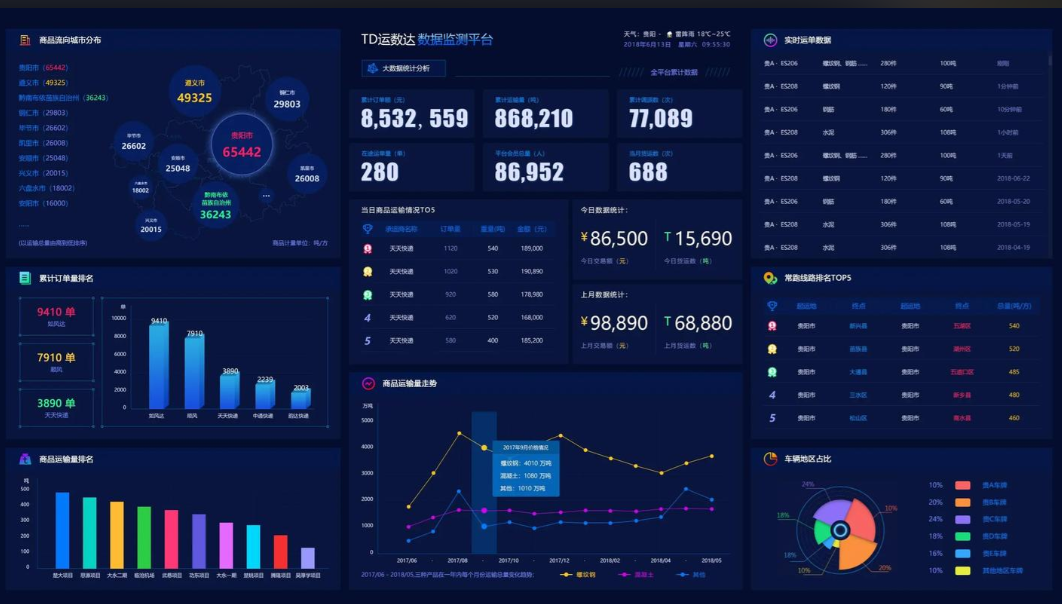
Spark-zeppelin-大数据可视化分析
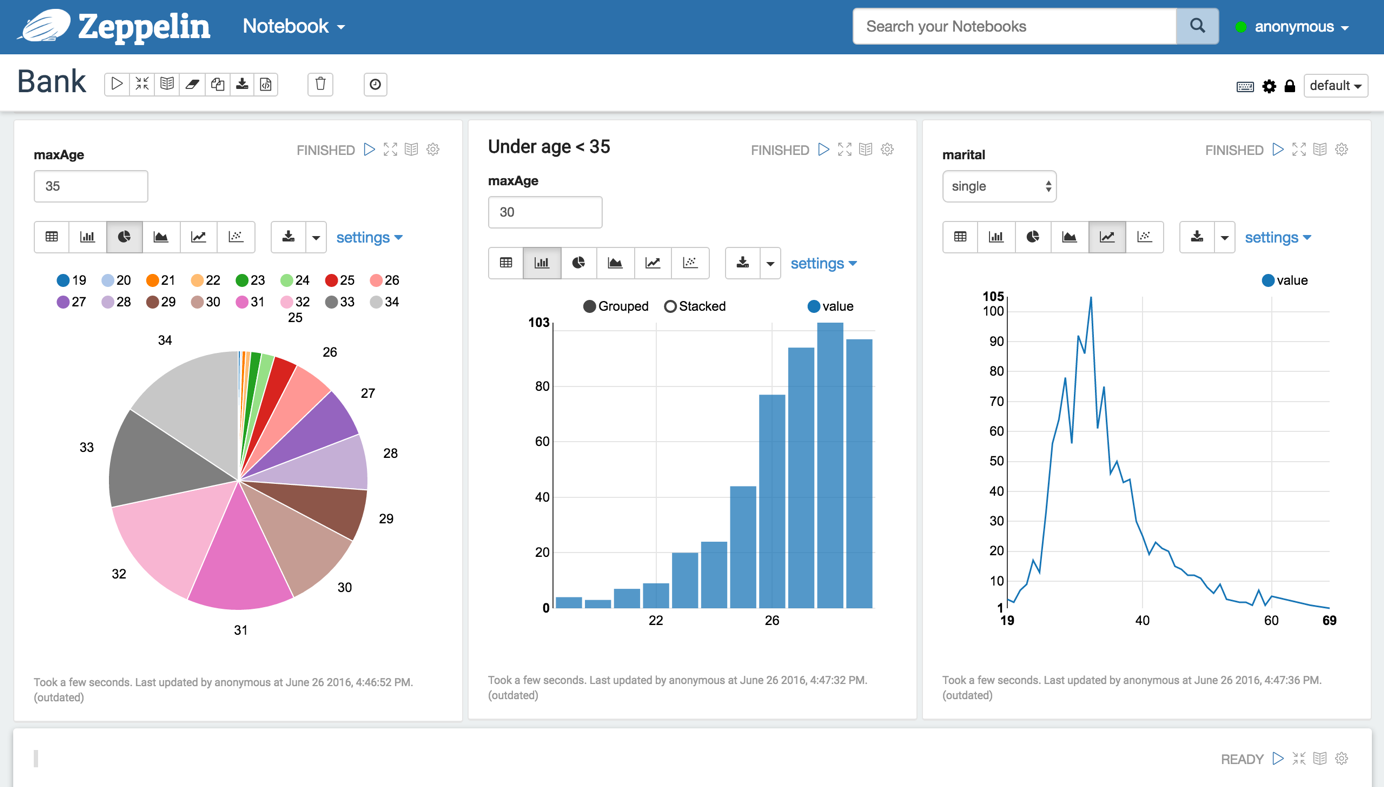
官网介绍 Multi-purpose Notebook The Notebook is the place for all your needs Data Ingestion Data Discovery Data Analytics Data Visualization & Collaboration Multiple language backend Zeppelin interpreter concept allows any language/data-processing-backend to be plugged into Zeppelin.Currently Zeppelin supports many interpreters such as Scala(with Apache Spark), Python(with Apache Spark), SparkSQL, Hive, Markdown and Shell. Adding new language-backend is really simple. Learn how to write a zeppelin interpreter. Apache Spark integration Zeppelin provides built-in Apache Spark integration. You don't need to build a separate module, plugin or library for it. Zeppelin's Spark integration provides Automatic SparkContext and SQLContext injection Runtime jar dependency loading from local filesystem or maven repository. Learn more aboutdependency loader. Canceling job and displaying its progress Data visualization Some basic charts are already included in Zeppelin. Visualizations are not limited to SparkSQL's query, any output from any language backend can be recognized and visualized. Pivot chart With simple drag and drop Zeppelin aggeregates the values and display them in pivot chart. You can easily create chart with multiple aggregated values including sum, count, average, min, max. Learn more about Zeppelin's Display system. ( text, html, table, angular ) Dynamic forms Zeppelin can dynamically create some input forms into your notebook. Learn more about Dynamic Forms. Collaboration Notebook URL can be shared among collaborators. Zeppelin can then broadcast any changes in realtime, just like the collaboration in Google docs. Publish Zeppelin provides an URL to display the result only, that page does not include Zeppelin's menu and buttons.This way, you can easily embed it as an iframe inside of your website. 100% Opensource Apache Zeppelin (incubating) is Apache2 Licensed software. Please check out thesource repository andHow to contribute Zeppelin has a very active development community.Join the Mailing list and report issues on our Issue tracker. Undergoing Incubation Apache Zeppelin is an effort undergoing incubation at The Apache Software Foundation (ASF), sponsored by the Incubator. Incubation is required of all newly accepted projects until a further review indicates that the infrastructure, communications, and decision making process have stabilized in a manner consistent with other successful ASF projects. While incubation status is not necessarily a reflection of the completeness or stability of the code, it does indicate that the project has yet to be fully endorsed by the ASF. 安装 From binary package Download latest binary package from Download. Build from source Check instructions in README to build from source. Configure Configuration can be done by both environment variable(conf/zeppelin-env.sh) and java properties(conf/zeppelin-site.xml). If both defined, environment vaiable is used. zepplin-env.sh zepplin-site.xml Default value Description ZEPPELIN_PORT zeppelin.server.port 8080 Zeppelin server port. ZEPPELIN_MEM N/A -Xmx1024m -XX:MaxPermSize=512m JVM mem options ZEPPELIN_INTP_MEM N/A ZEPPELIN_MEM JVM mem options for interpreter process ZEPPELIN_JAVA_OPTS N/A JVM Options ZEPPELIN_ALLOWED_ORIGINS zeppelin.server.allowed.origins * Allows a way to specify a ',' separated list of allowed origins for rest and websockets. i.e. http://localhost:8080 ZEPPELIN_SERVER_CONTEXT_PATH zeppelin.server.context.path / Context Path of the Web Application ZEPPELIN_SSL zeppelin.ssl false ZEPPELIN_SSL_CLIENT_AUTH zeppelin.ssl.client.auth false ZEPPELIN_SSL_KEYSTORE_PATH zeppelin.ssl.keystore.path keystore ZEPPELIN_SSL_KEYSTORE_TYPE zeppelin.ssl.keystore.type JKS ZEPPELIN_SSL_KEYSTORE_PASSWORD zeppelin.ssl.keystore.password ZEPPELIN_SSL_KEY_MANAGER_PASSWORD zeppelin.ssl.key.manager.password ZEPPELIN_SSL_TRUSTSTORE_PATH zeppelin.ssl.truststore.path ZEPPELIN_SSL_TRUSTSTORE_TYPE zeppelin.ssl.truststore.type ZEPPELIN_SSL_TRUSTSTORE_PASSWORD zeppelin.ssl.truststore.password ZEPPELIN_NOTEBOOK_HOMESCREEN zeppelin.notebook.homescreen Id of notebook to be displayed in homescreen ex) 2A94M5J1Z ZEPPELIN_NOTEBOOK_HOMESCREEN_HIDE zeppelin.notebook.homescreen.hide false hide homescreen notebook from list when this value set to "true" ZEPPELIN_WAR_TEMPDIR zeppelin.war.tempdir webapps The location of jetty temporary directory. ZEPPELIN_NOTEBOOK_DIR zeppelin.notebook.dir notebook Where notebook file is saved ZEPPELIN_NOTEBOOK_S3_BUCKET zeppelin.notebook.s3.bucket zeppelin Bucket where notebook saved ZEPPELIN_NOTEBOOK_S3_USER zeppelin.notebook.s3.user user User in bucket where notebook saved. For example bucket/user/notebook/2A94M5J1Z/note.json ZEPPELIN_NOTEBOOK_STORAGE zeppelin.notebook.storage org.apache.zeppelin.notebook.repo.VFSNotebookRepo Comma separated list of notebook storage ZEPPELIN_INTERPRETERS zeppelin.interpreters org.apache.zeppelin.spark.SparkInterpreter, org.apache.zeppelin.spark.PySparkInterpreter, org.apache.zeppelin.spark.SparkSqlInterpreter, org.apache.zeppelin.spark.DepInterpreter, org.apache.zeppelin.markdown.Markdown, org.apache.zeppelin.shell.ShellInterpreter, org.apache.zeppelin.hive.HiveInterpreter ... Comma separated interpreter configurations [Class]. First interpreter become a default ZEPPELIN_INTERPRETER_DIR zeppelin.interpreter.dir interpreter Zeppelin interpreter directory You'll also need to configure individual interpreter. Information can be found in 'Interpreter' section in this documentation. For example Spark. Start/Stop Start Zeppelin bin/zeppelin-daemon.sh start After successful start, visit http://localhost:8080 with your web browser. Stop Zeppelin bin/zeppelin-daemon.sh stop 实践例子: Zeppelin Tutorial We will assume you have Zeppelin installed already. If that's not the case, seeInstall. Zeppelin's current main backend processing engine is Apache Spark. If you're new to the system, you might want to start by getting an idea of how it processes data to get the most out of Zeppelin. Tutorial with Local File Data Refine Before you start Zeppelin tutorial, you will need to download bank.zip. First, to transform data from csv format into RDD of Bank objects, run following script. This will also remove header usingfilter function. val bankText = sc.textFile("yourPath/bank/bank-full.csv") case class Bank(age:Integer, job:String, marital : String, education : String, balance : Integer) // split each line, filter out header (starts with "age"), and map it into Bank case class val bank = bankText.map(s=>s.split(";")).filter(s=>s(0)!="\"age\"").map( s=>Bank(s(0).toInt, s(1).replaceAll("\"", ""), s(2).replaceAll("\"", ""), s(3).replaceAll("\"", ""), s(5).replaceAll("\"", "").toInt ) ) // convert to DataFrame and create temporal table bank.toDF().registerTempTable("bank") Data Retrieval Suppose we want to see age distribution from bank. To do this, run: %sql select age, count(1) from bank where age < 30 group by age order by age You can make input box for setting age condition by replacing 30 with${maxAge=30}. %sql select age, count(1) from bank where age < ${maxAge=30} group by age order by age Now we want to see age distribution with certain marital status and add combo box to select marital status. Run: %sql select age, count(1) from bank where marital="${marital=single,single|divorced|married}" group by age order by age Tutorial with Streaming Data Data Refine Since this tutorial is based on Twitter's sample tweet stream, you must configure authentication with a Twitter account. To do this, take a look atTwitter Credential Setup. After you get API keys, you should fill out credential related values(apiKey,apiSecret, accessToken, accessTokenSecret) with your API keys on following script. This will create a RDD of Tweet objects and register these stream data as a table: import org.apache.spark.streaming._ import org.apache.spark.streaming.twitter._ import org.apache.spark.storage.StorageLevel import scala.io.Source import scala.collection.mutable.HashMap import java.io.File import org.apache.log4j.Logger import org.apache.log4j.Level import sys.process.stringSeqToProcess /** Configures the Oauth Credentials for accessing Twitter */ def configureTwitterCredentials(apiKey: String, apiSecret: String, accessToken: String, accessTokenSecret: String) { val configs = new HashMap[String, String] ++= Seq( "apiKey" -> apiKey, "apiSecret" -> apiSecret, "accessToken" -> accessToken, "accessTokenSecret" -> accessTokenSecret) println("Configuring Twitter OAuth") configs.foreach{ case(key, value) => if (value.trim.isEmpty) { throw new Exception("Error setting authentication - value for " + key + " not set") } val fullKey = "twitter4j.oauth." + key.replace("api", "consumer") System.setProperty(fullKey, value.trim) println("\tProperty " + fullKey + " set as [" + value.trim + "]") } println() } // Configure Twitter credentials val apiKey = "xxxxxxxxxxxxxxxxxxxxxxxxx" val apiSecret = "xxxxxxxxxxxxxxxxxxxxxxxxxxxxxxxxxxxxxxxxxxxxxxxxxx" val accessToken = "xxxxxxxxxxxxxxxxxxxxxxxxxxxxxxxxxxxxxxxxxxxxxxxxxx" val accessTokenSecret = "xxxxxxxxxxxxxxxxxxxxxxxxxxxxxxxxxxxxxxxxxxxxx" configureTwitterCredentials(apiKey, apiSecret, accessToken, accessTokenSecret) import org.apache.spark.streaming.twitter._ val ssc = new StreamingContext(sc, Seconds(2)) val tweets = TwitterUtils.createStream(ssc, None) val twt = tweets.window(Seconds(60)) case class Tweet(createdAt:Long, text:String) twt.map(status=> Tweet(status.getCreatedAt().getTime()/1000, status.getText()) ).foreachRDD(rdd=> // Below line works only in spark 1.3.0. // For spark 1.1.x and spark 1.2.x, // use rdd.registerTempTable("tweets") instead. rdd.toDF().registerAsTable("tweets") ) twt.print ssc.start() Data Retrieval For each following script, every time you click run button you will see different result since it is based on real-time data. Let's begin by extracting maximum 10 tweets which contain the word "girl". %sql select * from tweets where text like '%girl%' limit 10 This time suppose we want to see how many tweets have been created per sec during last 60 sec. To do this, run: %sql select createdAt, count(1) from tweets group by createdAt order by createdAt You can make user-defined function and use it in Spark SQL. Let's try it by making function namedsentiment. This function will return one of the three attitudes(positive, negative, neutral) towards the parameter. def sentiment(s:String) : String = { val positive = Array("like", "love", "good", "great", "happy", "cool", "the", "one", "that") val negative = Array("hate", "bad", "stupid", "is") var st = 0; val words = s.split(" ") positive.foreach(p => words.foreach(w => if(p==w) st = st+1 ) ) negative.foreach(p=> words.foreach(w=> if(p==w) st = st-1 ) ) if(st>0) "positivie" else if(st<0) "negative" else "neutral" } // Below line works only in spark 1.3.0. // For spark 1.1.x and spark 1.2.x, // use sqlc.registerFunction("sentiment", sentiment _) instead. sqlc.udf.register("sentiment", sentiment _) To check how people think about girls using sentiment function we've made above, run this: %sql select sentiment(text), count(1) from tweets where text like '%girl%' group by sentiment(text)