首页 文章 精选 留言 我的

精选列表

搜索[JavaScript库],共10000篇文章
优秀的个人博客,低调大师

hadoop开发库webhdfs使用介绍

Hadoop1.0版本已经提供了对Web方式访问的全面支持,包括读写和文件管理,用户可以使用curl模拟Http消息进行测试,下面是WebHDFS提供的操作列表功能清单: HTTP GET• OPEN (see FileSystem.open)• GETFILESTATUS (see FileSystem.getFileStatus)• LISTSTATUS (see FileSystem.listStatus)• GETCONTENTSUMMARY (see FileSystem.getContentSummary)• GETFILECHECKSUM (see FileSystem.getFileChecksum)• GETHOMEDIRECTORY (see FileSystem.getHomeDirectory)• GETDELEGATIONTOKEN (see FileSystem.getDelegationToken)• HTTP PUT• CREATE (see FileSystem.create)• MKDIRS (see FileSystem.mkdirs)• RENAME (see FileSystem.rename)• SETREPLICATION (see FileSystem.setReplication)• SETOWNER (see FileSystem.setOwner)• SETPERMISSION (see FileSystem.setPermission)• SETTIMES (see FileSystem.setTimes)• RENEWDELEGATIONTOKEN (see DistributedFileSystem.renewDelegationToken)• CANCELDELEGATIONTOKEN (see DistributedFileSystem.cancelDelegationToken)• HTTP POST• APPEND (see FileSystem.append) 这里需要特别注意的是hadoop配置参数中界定了是否支持身份认证,并设定了默认的用户名webuser,用户可以自行修改是否启用和更改默认的用户,如果不作处理,有时候会出现,用户权限不够,无法执行某些操作的问题。 作者:张子良 出处:http://www.cnblogs.com/hadoopdev 本文版权归作者所有,欢迎转载,但未经作者同意必须保留此段声明,且在文章页面明显位置给出原文连接,否则保留追究法律责任的权利。

优秀的个人博客,低调大师

JavaScript 中 Date 对象的时区陷阱:从一次线上活动时间错乱说起

运营同学在后台配置了一个秒杀活动,开始时间选择的是 2025-06-01 00:00:00,结果到了 6 月 1 日凌晨,前端页面依然显示活动未开始,而部分用户却能正常下单。排查后发现,服务器返回的是 UTC 时间字符串,浏览器 `new Date('2025-06-01T00:00:00Z')` 解析没问题,但运营后台直接用了 `new Date('2025-06-01 00:00:00')` 这种非标准格式,在 Safari 和 Chrome 上行为不一致,Safari 直接返回 Invalid Date。更隐蔽的是,把 Date 对象用 `toISOString()` 转回字符串时,它总是输出 UTC,导致本地时间看起来“少了一天”。这类问题在跨时区、跨浏览器、以及和后端联调时反复出现。本文会拆解 Date 的解析规则、时区偏移、序列化差异,并给出几个在真实项目里减少这类错误的写法。 ## 为什么 `new Date('2025-06-01 00:00:00')` 不可靠 ECMAScript 规范里,Date 构造函数接受两种字符串:一种符合 ISO 8601 格式,另一种是实现自定义的格式。`'2025-06-01 00:00:00'` 这种用空格分隔日期和时间的写法,并不在标准要求必须解析的范围内。Chrome 和 Node.js 会把它当作本地时间解析,Safari 和旧版 Firefox 可能直接返回 `Invalid Date`。 ```js // 在 Chrome / Node 中 new Date('2025-06-01 00:00:00').toString() // 'Sun Jun 01 2025 00:00:00 GMT+0800 (中国标准时间)' // 在 Safari 中 new Date('2025-06-01 00:00:00').toString() // 'Invalid Date' ``` 如果字符串里带 `T`,比如 `'2025-06-01T00:00:00'`,规范规定没有时区偏移时按本地时间解析,兼容性就好很多。再带上 `Z` 或 `+08:00`,就是明确的绝对时间点。 ```js new Date('2025-06-01T00:00:00') // 本地时间,各浏览器表现一致 new Date('2025-06-01T00:00:00Z') // UTC 时间 new Date('2025-06-01T00:00:00+08:00') // 东八区时间 ``` 后端接口返回时间时,最好统一用 ISO 8601 带时区偏移的格式,前端不要自己拼字符串。 ## `toISOString()` 不等于“我看到的本地时间” `toISOString()` 永远返回 UTC 时间,格式固定为 `YYYY-MM-DDTHH:mm:ss.sssZ`。很多人用它来做格式化,结果发现比本地时间少了 8 小时。 ```js const d = new Date('2025-06-01T00:00:00+08:00') console.log(d.toISOString()) // '2025-05-31T16:00:00.000Z' console.log(d.toString()) // 'Sun Jun 01 2025 00:00:00 GMT+0800' ``` 如果只是用于传输或存储,`toISOString()` 是合适的。但用于展示,就得配合 `Intl.DateTimeFormat` 或者自己按本地时区拼。 ```js function formatLocal(date) { const y = date.getFullYear() const m = String(date.getMonth() + 1).padStart(2, '0') const d = String(date.getDate()).padStart(2, '0') const hh = String(date.getHours()).padStart(2, '0') const mm = String(date.getMinutes()).padStart(2, '0') const ss = String(date.getSeconds()).padStart(2, '0') return `${y}-${m}-${d} ${hh}:${mm}:${ss}` } ``` 注意 `getMonth()` 返回 0-11,`getDate()` 才是几号,这两个方法名很容易写错。 ## 时区偏移:`getTimezoneOffset()` 的符号反直觉 `getTimezoneOffset()` 返回的是 UTC 与本地时间的分钟差,但符号是反的:东八区返回 -480,西五区返回 300。 ```js // 在东八区 new Date().getTimezoneOffset() // -480 ``` 如果要做“把本地时间转成另一个时区显示”,最稳的是用 `Intl.DateTimeFormat` 指定 `timeZone`。 ```js const date = new Date('2025-06-01T00:00:00Z') new Intl.DateTimeFormat('zh-CN', { timeZone: 'Asia/Shanghai', dateStyle: 'full', timeStyle: 'long' }).format(date) // '2025年6月1日星期日 08:00:00 GMT+8' new Intl.DateTimeFormat('en-US', { timeZone: 'America/New_York', dateStyle: 'full', timeStyle: 'long' }).format(date) // 'Saturday, May 31, 2025 at 8:00:00 PM EDT' ``` `Intl` 在现代浏览器和 Node.js 中已经足够可用。如果要做倒计时或者跨时区活动,不要手动加减小时数,夏令时会让固定偏移出错。 ## 一个真实的活动时间处理片段 假设后端返回 `{ startTime: '2025-06-01T00:00:00+08:00', endTime: '2025-06-01T02:00:00+08:00' }`,前端需要判断当前是否在活动时间内,并显示本地时间。 ```js function isActivityActive(activity) { const now = Date.now() const start = new Date(activity.startTime).getTime() const end = new Date(activity.endTime).getTime() return now >= start && now 推荐查看天气:https://www.0dtq.com/xinlin/15tian.html 推荐查看天气:https://www.0dtq.com/xinlin/40tian.html 推荐查看天气:https://www.0dtq.com/huzhong/ 推荐查看天气:https://www.0dtq.com/huzhong/zuotian.html 推荐查看天气:https://www.0dtq.com/huzhong/7tian.html 推荐查看天气:https://www.0dtq.com/huzhong/10tian.html 推荐查看天气:https://www.0dtq.com/huzhong/15tian.html 推荐查看天气:https://www.0dtq.com/huzhong/40tian.html 推荐查看天气:https://www.0dtq.com/huma/ 推荐查看天气:https://www.0dtq.com/huma/zuotian.html 推荐查看天气:https://www.0dtq.com/huma/7tian.html 推荐查看天气:https://www.0dtq.com/huma/10tian.html 推荐查看天气:https://www.0dtq.com/huma/15tian.html 推荐查看天气:https://www.0dtq.com/huma/40tian.html 推荐查看天气:https://www.0dtq.com/tahe/ 推荐查看天气:https://www.0dtq.com/tahe/zuotian.html 推荐查看天气:https://www.0dtq.com/tahe/7tian.html 推荐查看天气:https://www.0dtq.com/tahe/10tian.html 推荐查看天气:https://www.0dtq.com/tahe/15tian.html 推荐查看天气:https://www.0dtq.com/tahe/40tian.html 推荐查看天气:https://www.0dtq.com/mohe/ 推荐查看天气:https://www.0dtq.com/mohe/zuotian.html 推荐查看天气:https://www.0dtq.com/mohe/7tian.html 推荐查看天气:https://www.0dtq.com/mohe/10tian.html 推荐查看天气:https://www.0dtq.com/mohe/15tian.html 推荐查看天气:https://www.0dtq.com/mohe/40tian.html 推荐查看天气:https://www.0dtq.com/shanghai/ 推荐查看天气:https://www.0dtq.com/shanghai/zuotian.html 推荐查看天气:https://www.0dtq.com/shanghai/7tian.html 推荐查看天气:https://www.0dtq.com/shanghai/10tian.html 推荐查看天气:https://www.0dtq.com/shanghai/15tian.html 推荐查看天气:https://www.0dtq.com/shanghai/40tian.html 推荐查看天气:https://www.0dtq.com/xuhui/ 推荐查看天气:https://www.0dtq.com/xuhui/zuotian.html 推荐查看天气:https://www.0dtq.com/xuhui/7tian.html 推荐查看天气:https://www.0dtq.com/xuhui/10tian.html 推荐查看天气:https://www.0dtq.com/xuhui/15tian.html 推荐查看天气:https://www.0dtq.com/xuhui/40tian.html 推荐查看天气:https://www.0dtq.com/hongkou/ 推荐查看天气:https://www.0dtq.com/hongkou/zuotian.html 推荐查看天气:https://www.0dtq.com/hongkou/7tian.html 推荐查看天气:https://www.0dtq.com/hongkou/10tian.html 推荐查看天气:https://www.0dtq.com/hongkou/15tian.html 推荐查看天气:https://www.0dtq.com/hongkou/40tian.html 推荐查看天气:https://www.0dtq.com/yangpu/ 推荐查看天气:https://www.0dtq.com/yangpu/zuotian.html 推荐查看天气:https://www.0dtq.com/yangpu/7tian.html 推荐查看天气:https://www.0dtq.com/yangpu/10tian.html 推荐查看天气:https://www.0dtq.com/yangpu/15tian.html 推荐查看天气:https://www.0dtq.com/yangpu/40tian.html 推荐查看天气:https://www.0dtq.com/minxing/ 推荐查看天气:https://www.0dtq.com/minxing/zuotian.html 推荐查看天气:https://www.0dtq.com/minxing/7tian.html 推荐查看天气:https://www.0dtq.com/minxing/10tian.html 推荐查看天气:https://www.0dtq.com/minxing/15tian.html 推荐查看天气:https://www.0dtq.com/minxing/40tian.html 推荐查看天气:https://www.0dtq.com/baoshanqu/ 推荐查看天气:https://www.0dtq.com/baoshanqu/zuotian.html 推荐查看天气:https://www.0dtq.com/baoshanqu/7tian.html 推荐查看天气:https://www.0dtq.com/baoshanqu/10tian.html 推荐查看天气:https://www.0dtq.com/baoshanqu/15tian.html 推荐查看天气:https://www.0dtq.com/baoshanqu/40tian.html 推荐查看天气:https://www.0dtq.com/jiading/ 推荐查看天气:https://www.0dtq.com/jiading/zuotian.html 推荐查看天气:https://www.0dtq.com/jiading/7tian.html 推荐查看天气:https://www.0dtq.com/jiading/10tian.html 推荐查看天气:https://www.0dtq.com/jiading/15tian.html 推荐查看天气:https://www.0dtq.com/jiading/40tian.html 推荐查看天气:https://www.0dtq.com/pudong/ 推荐查看天气:https://www.0dtq.com/pudong/zuotian.html 推荐查看天气:https://www.0dtq.com/pudong/7tian.html 推荐查看天气:https://www.0dtq.com/pudong/10tian.html 推荐查看天气:https://www.0dtq.com/pudong/15tian.html 推荐查看天气:https://www.0dtq.com/pudong/40tian.html 推荐查看天气:https://www.0dtq.com/jinshan/ 推荐查看天气:https://www.0dtq.com/jinshan/zuotian.html 推荐查看天气:https://www.0dtq.com/jinshan/7tian.html 推荐查看天气:https://www.0dtq.com/jinshan/10tian.html 推荐查看天气:https://www.0dtq.com/jinshan/15tian.html 推荐查看天气:https://www.0dtq.com/jinshan/40tian.html 推荐查看天气:https://www.0dtq.com/songjiang/ 推荐查看天气:https://www.0dtq.com/songjiang/zuotian.html 推荐查看天气:https://www.0dtq.com/songjiang/7tian.html 推荐查看天气:https://www.0dtq.com/songjiang/10tian.html 推荐查看天气:https://www.0dtq.com/songjiang/15tian.html 推荐查看天气:https://www.0dtq.com/songjiang/40tian.html 推荐查看天气:https://www.0dtq.com/shanghaiqingpu/ 推荐查看天气:https://www.0dtq.com/shanghaiqingpu/zuotian.html 推荐查看天气:https://www.0dtq.com/shanghaiqingpu/7tian.html 推荐查看天气:https://www.0dtq.com/shanghaiqingpu/10tian.html 推荐查看天气:https://www.0dtq.com/shanghaiqingpu/15tian.html 推荐查看天气:https://www.0dtq.com/shanghaiqingpu/40tian.html 推荐查看天气:https://www.0dtq.com/shanghaifengxian/ 推荐查看天气:https://www.0dtq.com/shanghaifengxian/zuotian.html 推荐查看天气:https://www.0dtq.com/shanghaifengxian/7tian.html 推荐查看天气:https://www.0dtq.com/shanghaifengxian/10tian.html 推荐查看天气:https://www.0dtq.com/shanghaifengxian/15tian.html 推荐查看天气:https://www.0dtq.com/shanghaifengxian/40tian.html 推荐查看天气:https://www.0dtq.com/chongming/ 推荐查看天气:https://www.0dtq.com/chongming/zuotian.html 推荐查看天气:https://www.0dtq.com/chongming/7tian.html 推荐查看天气:https://www.0dtq.com/chongming/10tian.html 推荐查看天气:https://www.0dtq.com/chongming/15tian.html 推荐查看天气:https://www.0dtq.com/chongming/40tian.html 推荐查看天气:https://www.0dtq.com/nanjing/ 推荐查看天气:https://www.0dtq.com/nanjing/zuotian.html 推荐查看天气:https://www.0dtq.com/nanjing/7tian.html 推荐查看天气:https://www.0dtq.com/nanjing/10tian.html 推荐查看天气:https://www.0dtq.com/nanjing/15tian.html 推荐查看天气:https://www.0dtq.com/nanjing/40tian.html 推荐查看天气:https://www.0dtq.com/xuanwu/ 推荐查看天气:https://www.0dtq.com/xuanwu/zuotian.html 推荐查看天气:https://www.0dtq.com/xuanwu/7tian.html 推荐查看天气:https://www.0dtq.com/xuanwu/10tian.html 推荐查看天气:https://www.0dtq.com/xuanwu/15tian.html 推荐查看天气:https://www.0dtq.com/xuanwu/40tian.html 推荐查看天气:https://www.0dtq.com/qinhuai/ 推荐查看天气:https://www.0dtq.com/qinhuai/zuotian.html 推荐查看天气:https://www.0dtq.com/qinhuai/7tian.html 推荐查看天气:https://www.0dtq.com/qinhuai/10tian.html 推荐查看天气:https://www.0dtq.com/qinhuai/15tian.html 推荐查看天气:https://www.0dtq.com/qinhuai/40tian.html 推荐查看天气:https://www.0dtq.com/jianye/ 推荐查看天气:https://www.0dtq.com/jianye/zuotian.html 推荐查看天气:https://www.0dtq.com/jianye/7tian.html 推荐查看天气:https://www.0dtq.com/jianye/10tian.html 推荐查看天气:https://www.0dtq.com/jianye/15tian.html 推荐查看天气:https://www.0dtq.com/jianye/40tian.html 推荐查看天气:https://www.0dtq.com/pukou/ 推荐查看天气:https://www.0dtq.com/pukou/zuotian.html 推荐查看天气:https://www.0dtq.com/pukou/7tian.html 推荐查看天气:https://www.0dtq.com/pukou/10tian.html 推荐查看天气:https://www.0dtq.com/pukou/15tian.html 推荐查看天气:https://www.0dtq.com/pukou/40tian.html 推荐查看天气:https://www.0dtq.com/yuhuatai/ 推荐查看天气:https://www.0dtq.com/yuhuatai/zuotian.html 推荐查看天气:https://www.0dtq.com/yuhuatai/7tian.html 推荐查看天气:https://www.0dtq.com/yuhuatai/10tian.html 推荐查看天气:https://www.0dtq.com/yuhuatai/15tian.html 推荐查看天气:https://www.0dtq.com/yuhuatai/40tian.html 推荐查看天气:https://www.0dtq.com/jiangning/ 推荐查看天气:https://www.0dtq.com/jiangning/zuotian.html 推荐查看天气:https://www.0dtq.com/jiangning/7tian.html 推荐查看天气:https://www.0dtq.com/jiangning/10tian.html 推荐查看天气:https://www.0dtq.com/jiangning/15tian.html 推荐查看天气:https://www.0dtq.com/jiangning/40tian.html 推荐查看天气:https://www.0dtq.com/liuhe/ 推荐查看天气:https://www.0dtq.com/liuhe/zuotian.html 推荐查看天气:https://www.0dtq.com/liuhe/7tian.html 推荐查看天气:https://www.0dtq.com/liuhe/10tian.html 推荐查看天气:https://www.0dtq.com/liuhe/15tian.html 推荐查看天气:https://www.0dtq.com/liuhe/40tian.html 推荐查看天气:https://www.0dtq.com/nanjinglishui/ 推荐查看天气:https://www.0dtq.com/nanjinglishui/zuotian.html 推荐查看天气:https://www.0dtq.com/nanjinglishui/7tian.html 推荐查看天气:https://www.0dtq.com/nanjinglishui/10tian.html 推荐查看天气:https://www.0dtq.com/nanjinglishui/15tian.html 推荐查看天气:https://www.0dtq.com/nanjinglishui/40tian.html 推荐查看天气:https://www.0dtq.com/gaochun/ 推荐查看天气:https://www.0dtq.com/gaochun/zuotian.html 推荐查看天气:https://www.0dtq.com/gaochun/7tian.html 推荐查看天气:https://www.0dtq.com/gaochun/10tian.html 推荐查看天气:https://www.0dtq.com/gaochun/15tian.html 推荐查看天气:https://www.0dtq.com/gaochun/40tian.html 推荐查看天气:https://www.0dtq.com/wuxi/ 推荐查看天气:https://www.0dtq.com/wuxi/zuotian.html 推荐查看天气:https://www.0dtq.com/wuxi/7tian.html 推荐查看天气:https://www.0dtq.com/wuxi/10tian.html 推荐查看天气:https://www.0dtq.com/wuxi/15tian.html 推荐查看天气:https://www.0dtq.com/wuxi/40tian.html 推荐查看天气:https://www.0dtq.com/wuxixishan/ 推荐查看天气:https://www.0dtq.com/wuxixishan/zuotian.html 推荐查看天气:https://www.0dtq.com/wuxixishan/7tian.html 推荐查看天气:https://www.0dtq.com/wuxixishan/10tian.html 推荐查看天气:https://www.0dtq.com/wuxixishan/15tian.html 推荐查看天气:https://www.0dtq.com/wuxixishan/40tian.html 推荐查看天气:https://www.0dtq.com/huishan/ 推荐查看天气:https://www.0dtq.com/huishan/zuotian.html 推荐查看天气:https://www.0dtq.com/huishan/7tian.html 推荐查看天气:https://www.0dtq.com/huishan/10tian.html 推荐查看天气:https://www.0dtq.com/huishan/15tian.html 推荐查看天气:https://www.0dtq.com/huishan/40tian.html 推荐查看天气:https://www.0dtq.com/binhu/ 推荐查看天气:https://www.0dtq.com/binhu/zuotian.html 推荐查看天气:https://www.0dtq.com/binhu/7tian.html 推荐查看天气:https://www.0dtq.com/binhu/10tian.html 推荐查看天气:https://www.0dtq.com/binhu/15tian.html 推荐查看天气:https://www.0dtq.com/binhu/40tian.html 推荐查看天气:https://www.0dtq.com/jiangyin/ 推荐查看天气:https://www.0dtq.com/jiangyin/zuotian.html 推荐查看天气:https://www.0dtq.com/jiangyin/7tian.html 推荐查看天气:https://www.0dtq.com/jiangyin/10tian.html 推荐查看天气:https://www.0dtq.com/jiangyin/15tian.html 推荐查看天气:https://www.0dtq.com/jiangyin/40tian.html 推荐查看天气:https://www.0dtq.com/yixing/ 推荐查看天气:https://www.0dtq.com/yixing/zuotian.html 推荐查看天气:https://www.0dtq.com/yixing/7tian.html 推荐查看天气:https://www.0dtq.com/yixing/10tian.html 推荐查看天气:https://www.0dtq.com/yixing/15tian.html 推荐查看天气:https://www.0dtq.com/yixing/40tian.html

优秀的个人博客,低调大师

(鸡汤文)这一次我终于搞懂了 JavaScript 定时器的 this 指向!

开篇语 忽然有一种感觉,每次学习一个知识点就像是谈一场恋爱:从初次邂逅,到彼此了解,一切都那么的符合恋爱的过程! 如果这个知识点再有点”调皮“的话,那简直是让人欲仙欲死而又不可自拔!因为你永远不知道它还有多少面纱等着你揭开,当你自以为对它已经足够了解的时候,冷不防就是一个盲点迎面砸来。 它简直就像一个”宝藏女孩“,你要时刻做好迎接”惊喜“的准备! 可能正是因为这种新鲜感,我才能一直保持一种类似亢奋的状态吧。当然,这只是针对知识而言,对待情感我还是很保守很专一的<( ̄︶ ̄)> 这两天,我就在和定时器谈恋爱,哦不,是在学习定时器( ̄▽ ̄)~*,可没想到,又给陷进去了…… 这不,上一篇文章写完定时器的返回值后,刚觉得自己对它已经了解的清清楚楚明明白白了,够我炫耀一阵子了,谁成想,喘口气的功夫,它又给我整出了幺蛾子。 惑起 写完上篇文章后,我就琢磨着里面的实现代码还可以优化一下,于是给改成了下面这个样子: <form action="" class="example-form"> <div> <label for="name"> 名称 </label> <input class="input-ele" type="text" name="name" id="name" placeholder="please input your name" autocomplete="off"> </div> <div style="margin-top:50px;"> <label for="res"> 输入 </label> <textarea class="input-ele" type="multipart" name="res" id="res" readonly placeholder="这里是每一次输入的结果"></textarea> </div> </form> <script> window.onload = function () { const resEle = document.querySelector("#res"); function changeOutputVal() { resEle.value += `\n${ this.value }`; } function throttle(fun, delay) { let last, deferTimer return function () { let now = Date.now(); if (last && now < last + delay) { clearTimeout(deferTimer); deferTimer = setTimeout(function () { last = now; fun.apply(this); }, delay) } else { last = now; fun.apply(this); } } } const inputEle = document.querySelector("#name"); inputEle.addEventListener("input", throttle(changeOutputVal, 1000)); } </script> 我的修改依据是: throttle 方法返回的是一个匿名函数,这个函数正好充当 input 事件的回调函数 input 事件回调函数中的 this 指向的是 inputEle 匿名函数中将 this 绑定给了 fun 参数,而实际使用中传入的是 changeOutputVal 方法 所以 changeOutputVal 方法中的 this 指的就是 inputEle,所以在它里面可以通过 this.value 获取到 inputEle 的值 看,这逻辑多严谨,简直头头是道啊 \( ̄︶ ̄)/ 按理说,是没问题的吧,结果却出问题了。欲知详情,请看大屏幕: 这个 undefined 是什么鬼?!从哪冒出来的?难道我的延时器没用对? 解惑 面对我的质疑,setTimeout 理直气壮地说:人家回调函数中的 this 本来就是指向 window 对象的嘛,你也没早问啊! 那么,问题来了:为什么延时器中的 this 指向的是 window 呢?setTimeout 自己也解释不清楚了。 得,看来前人诚不我欺也——自己动手,丰衣足食! 凡事不决找 MDN,绝对靠谱!我们来看看 MDN 怎么说: 由setTimeout()调用的代码运行在与所在函数完全分离的执行环境上。这会导致,这些代码中包含的 this 关键字在非严格模式会指向 window (或全局)对象,严格模式下为 undefined,这和所期望的this的值是不一样的。 看到这个解释,我才明白:this 指向 window 对象,原来是因为执行环境的不同导致的。 在上面的代码中,因为 window 对象没有 value 这个属性,所以 window.value = undefined。 感觉自己在专业的方向上又迈进了一小步,容我小小地嘚瑟一下! 改错 既然知道问题出在哪,那就好办了,我们只需要将 setTimeout 回到函数内部的 this 指向改变一下就好,这里有以下方案。 使用变量引用外部 this 关键代码如下: window.onload = function () { // some code here const that = this; deferTimer = setTimeout(function () { last = now; fun.apply(that); }, delay) // some code here } 使用箭头函数 利用箭头函数不会改变 this 的指向的特性,改造如下: window.onload = function () { // some code here deferTimer = setTimeout(() => { last = now; fun.apply(this); }, delay) // some code here } 结束语 知错能改,善莫大焉! 写到这里,我居然体会到了古人那种”朝闻道,夕死可矣“的满足感。 在编程这条路上,可能遍布荆棘,但只要我们勤耕不辍,总能开辟出属于自己的康庄大道! 这鸡汤太美味,我先干为敬,你们随意!b( ̄▽ ̄)d ~ ~ ~ 本文完,感谢阅读! ~ 学习有趣的知识,结识有趣的朋友,塑造有趣的灵魂! 我是〖编程三昧〗的作者 隐逸王,我的公众号是『编程三昧』,欢迎关注,希望大家多多指教! 你来,怀揣期望,我有墨香相迎! 你归,无论得失,唯以余韵相赠! 知识与技能并重,内力和外功兼修,理论和实践两手都要抓、两手都要硬!

优秀的个人博客,低调大师

WebStorm 2020.2 Beta 2 发布:支持 Nuxt.js、为 JavaScript 和 TypeScript 增加的新意图

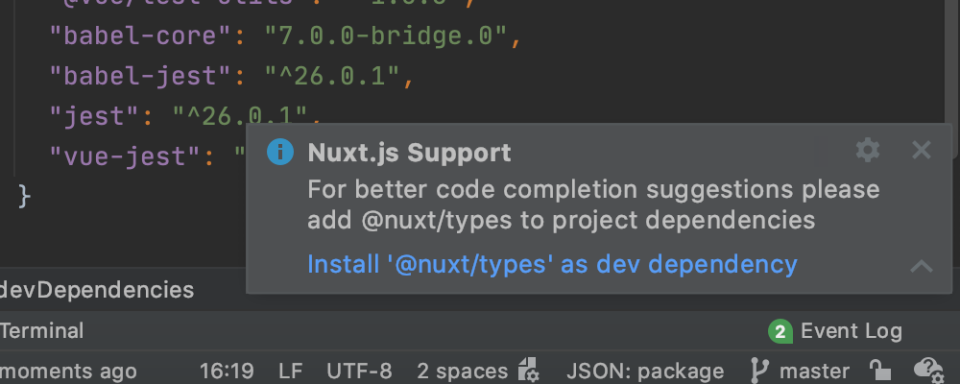
WebStorm 2020.2 Beta 2 已发布,此版本的部分更新亮点包括: 支持Nuxt.js 此版本增加了对Nuxt.js的支持,Nuxt.js是一个基于 Vue 构建的流行框架。如果使用的Nuxt.js 版本高于2.9.0并且没有安装@nuxt/types软件包,则 WebStorm 会进行警告并建议将其安装为 dev 依赖项。如果希望 IDE 具有更好的代码补全功能,建议参考下面的操作: 当使用nuxt.config.js文件时,现在会得到正确的代码补全建议。在悬停时,还会看到弹出的文档,并显示文件中使用的Nuxt选项的类型信息。 现在还支持 Nuxt 特有的 webpack 设置。从 Nuxt.js 2.12.0 开始,WebStorm 会自动找到 webpack 配置文件,并使用其中的模块解析规则进行编码辅助。对于早于 2.12.0 的版本,可以从这里复制脚本,并将 WebStorm 指向它,以达到同样的效果。 除此之外,WebStorm 现在支持所有核心的 Nuxt.js 组件,可提供代码补全建议和相关的文档(在鼠标悬停时触发)。IDE 还能识别对 Vuex store 的引用,并进行正确解析和自动完成。 最后,所有放入静态目录并在 Vue 模板中以 <img src="/logo.png"/> 格式引用的 assets资源也将会在 Nuxt.js 项目中得到正确解析。 围绕 Optional Chaining 和 null 判断合并(Nullish Coalescing)的新意图 除了最近增加的将代码转换为 Optional Chaining 和/或 nullish coalescing 的意图之外,WebStorm 2020.2还带来了一个新的意图,它的作用正好相反。比方说,我们改变了主意,想把初始代码找回来添加一个额外的条件。有了新的意图,此操作可以轻松完成!在希望转换的表达式上放上逗号,按下 Alt+Enter 键,然后选择展开 Optional Chaining 和 Nullish Coalescing。 这并不是增加唯一的新意图。现在,我们可以在 if/else 条件语句中快速将代码转换为 Optional Chaining 和 Nullish Coalescing。这将适用于此类语句中使用的逻辑运算符,也适用于嵌套的 if 语句。在要转换的表达式上按 Alt+Enter 键,然后选择相应的意图。 详情查看发布公告。

优秀的个人博客,低调大师

【JavaScript】通过封装自己的JSONP解决浏览器的跨域问题(Ajax跨域)

版权声明:本文为博主原创文章,未经博主允许不得转载。更多学习资料请访问我爱科技论坛:www.52tech.tech https://blog.csdn.net/m0_37981569/article/details/82701029 问题引出:要发送Ajax请求,就必须使用HTTP请求?什么是跨域问题? 什么是跨域问题:如果两个页面中的协议、域名、端口、子域名任意有一项不同,两者之间所进行的访问行动就是跨域的,而浏览器为了安全问题一般都限制了跨域访问,也就是不允许跨域请求资源。 如何解决呢? 1. 使用创建DOM元素的方式创建img对象, audio, video, link 这几个对象都支持跨域请求,。 var img = new Image(); img.src = 'http://192.168.1.105:8080?name=zhangsan&age=18'; 类似于上面的这种呢?还有其他一些类似的标签,实际上是可以向服务器发送请求的,但是不能拿到返回值 2. 使用link标签, 但是也不能拿到服务器的请求, 然后再试试script这个标签来试试看??? <link rel="stylesheet" href=""> link标签只能支持css的格式,其他格式的内容浏览器是显示不出来的 3.使用script标签来实现跨域, 也能满足发送数据的要求, 接受数据呢?来测试一下。 var script = document.createElement('script'); script.src = 'http://192.168.1.105:8080?name=zhangsan&age=18'; document.body.appendChild(script); // 开始正式发送请求 经测试,还是真可以的,而且在客户端也成功接受到了数据,这说明我们终于找对了路! 4.解决没有加载完成就输出的问题( 这样就会等待到script标签加载完成之后执行) // 在返回数据到客户端之前,先进行字符串拼接 let json = JSON.stringify({ id: 1, name: 'zhangsan', age: 18, gender: 'Male' }); let jsonStr = 'var data = ' + json; 上面的是我们服务器的数据, 我们直接通过字符串拼接json,然后发给浏览器。 console.log(data) 直接输出,我们发现报错了,找不到这个变量??? 原因是因为,浏览器自上而下执行代码,如果DOM元素没有加载完毕就输出,坑定会报错的 5.解决没有加载完成就输出的问题( 这样就会等待到script标签加载完成之后执行) script.addEventListener('load', function () { console.log(data); }); 直接绑定个事件不就行了,测试以后还真是可以。 但是,缺点是: 这种方式需要服务器端定义一个全局变量, 从而会污染全局变量, 不太推荐………… 6. 上面的思路逻辑和代码优化, 由于脚本执行过后才可以拿到数据, 上面的代码可以优化吗? var script = document.createElement('script'); script.src = 'http://192.168.1.105:8080?name=zhangsan&age=18'; document.body.appendChild(script); function callback(data) { console.log(data) } 实现原理: 服务器端实际上是返回了一个callback函数的调用, 类似于callback(jsondata), 因此当且仅当服务器断点数据返回来以后, 下面的这个函数就相当于是自动调用了, 就会直接得到服务器端传回来的数据信息, 从而打印输出数据。 服务器端就是这样的: let jsonFunc = `callback(${json})`; 7.代码的继续优化, 可以直接在请求中, 我要自己定义一个函数呢?函数名我要自己指定的方法, 可以直接写在url请求中。 var script1 = document.createElement('script'); var url = 'http://192.168.1.105:8080?name=zhangsan&age=19&callback=callback1'; script1.src = url; document.body.appendChild(script1); function callback1(data) { console.log(data); } 服务器端进行参数解析,换成用户自己定义的函数名字不就行了? let callback = urlObj.query.callback; let jsonFunc = ''+callback+'' + '('+ json + ')'; 到此,浏览器的跨域问题已经基本全部解决。

优秀的个人博客,低调大师

【JavaScript框架封装】实现一个类似于JQuery的CSS样式框架的封装

版权声明:本文为博主原创文章,未经博主允许不得转载。更多学习资料请访问我爱科技论坛:www.52tech.tech https://blog.csdn.net/m0_37981569/article/details/81123779 // CSS 样式框架 (function (xframe) { // 需要参与链式访问的(必须使用prototype的方式来给对象扩充方法)【只要是需要使用到this获取到的元素集合这个变量的时候,这里就是需要进行链式访问的】 xframe.extend({ /** * 给DOM元素设置/取值CSS样式 * @return {*} */ css: function () { // 分为两种情况,一种是取值模式,一种是设置模式 var arg = arguments, len = arg.length, j = this.length - 1; if (len === 0) { // 没有参数的话,就直接返回这个DOM集合 return this; } else if (len === 1) { // 取值模式 if (typeof arg[0] === 'string') { if (this[0].currentStyle) { // w3c return this[0].currentStyle[arg[0]]; } else { // 其他IE return getComputedStyle(this[0], false)[arg[0]]; } } else if (typeof arg[0] === 'object') { // 如果要获取一系列对象的属性信息, 如果传过来的一个参数是一个json对象的话,这里也采用这种方式 // {name : xiugang, age : 18} for (var item in arg[0]) { // 从后向前开始遍历,设置模式 for (; j >= 0; j--) { // 由于CSS在设置值的时候的取值模式和设置模式的不同,这里需要先使用驼峰表示法进行处理一下 // 先把item转换为:backgroundcolor --> backgroundColor item = $.camelCase(item) this[j].style[item] = arg[0][item]; } } } } else if (len === 2) { // 设置模式 for (; j >= 0; j--) { // 第一个参数是我们需要设置的值 this[j].style[$.camelCase(arg[0])] = arg[1]; } } return this; }, /** * 隐藏一个元素 * @return {hide} */ hide: function () { var j = this.length - 1; for (; j >= 0; j--) { this[j].style.display = 'none'; } return this; // 方法二:使用之前封装好的框架进行遍历 this.each(function () { this.style.display = 'none'; }) }, /** * 显示元素 * @return {show} */ show: function () { this.each(function () { this.style.display = 'block'; }) return this; }, /** * 获取元素的宽度 * @return {*} */ width: function () { return this[0].clientWidth; }, /** * 获取元素的高度 * @return {*} */ height: function () { return this[0].clientHeight; }, /** * //当元素出现滚动条时候,这里的高度有两种:可视区域的高度 实际高度(可视高度+不可见的高度) * 获取元素的滚动宽度 * @return {*} */ scrollWidth: function () { return this[0].scrollWidth; }, /** * 获取元素的滚动高度 * @return {*} */ scrollHeight: function () { return this[0].scrollHeight; }, /** * 元素滚动的时候 如果出现滚动条 相对于左上角的偏移量 * @return {*} */ scrollTop: function () { return this[0].scrollTop; }, /** * 元素滚动的时候相对于左上角的距离 * @return {*} */ scrollLeft: function () { return this[0].scrollLeft; }, }); // 不需要参与链式访问的 xframe.extend(xframe, { getThis: function () { console.log(xframe, typeof this); // function, 这里的this指向的实际上是一个函数function (selector, context) }, /** * 获取屏幕的高度 * @return {number} */ screenHeight: function () { return window.screen.height; }, /** * 虎丘屏幕的款U盾 * @return {number} */ screenWidth: function () { return window.screen.width; }, /** * 获取浏览器窗口文档显示区域的宽度,不包括滚动条 * @return {number} */ wWidth: function () { return document.documentElement.clientWidth; }, /** * 获取浏览器窗口文档显示区域的高度,不包括滚动条 * @return {number} */ wHeight: function () { return document.documentElement.clientHeight; }, /** * 文档滚动区域的整体的高 * @return {number} */ wScrollHeight: function () { return document.body.scrollHeight; }, /** * 文档滚动区域的整体的宽度 * @return {number} */ wScrollWidth: function () { return document.body.scrollWidth; }, /** * 获取滚动条相对于其顶部的偏移 * @return {number} */ wScrollTop: function () { var scrollTop = window.pageYOffset || document.documentElement.scrollTop || document.body.scrollTop; return scrollTop; }, /** * 获取整个文档窗口的距离整个窗口的宽度和高度(滚动条相对于顶部和左边的距离) * @return {number} */ wScrollLeft: function () { var scrollLeft = window.pageXOffset || document.documentElement.scrollLeft || document.body.scrollLeft; return scrollLeft; } }); })(xframe);

优秀的个人博客,低调大师

【JavaScript框架封装】实现一个类似于JQuery的动画框架的封装

版权声明:本文为博主原创文章,未经博主允许不得转载。更多学习资料请访问我爱科技论坛:www.52tech.tech https://blog.csdn.net/m0_37981569/article/details/81123854 // 动画框架 (function (xframe) { // 需要参与链式访问的(必须使用prototype的方式来给对象扩充方法) xframe.extend({}); // 不需要参与链式访问的 xframe.extend(xframe, {}); // 实现动画框架的封装 xframe.Animate = (function (xframe) { // 1. 定义需要的API接口(API内部用于放置属性) var api = { timer: null,// 这是一个动画循环句柄 queen: [] // 多个对象同时运行的一个数组队列 }; // 运行部门------------------------------------------------- /** * 在把需要的运行参数都准备好了之后(多个对象),就开始执行这个运行函数 */ api.run = function () { // 定义一个定时器,用于不断地执行我自己定义的动画函数信息 api.timer = setInterval(function () { // 由于所有的参数都已经准备好了,因此这里只需要直接进行循环操作即可 api.loop(); }, 16); // 这里循环的周期设置的是16mm } /** * 执行动画循环操作 */ api.loop = function () { // obj里面存储了obj = {id, now, pass, tween, duration, style} api.queen.forEach(function (obj) { // 遍历队列中的每一项参数,开始执行移动操作 api.move(obj); }); } /** * 实现物体的移动 */ api.move = function (obj) { // 1. 计算当前的时间 obj.pass = +new Date(); // 2. 获取动画时间进程(这里的动画样式默认是一个弹簧的显示样式) var tween = api.getTween(obj.now, obj.pass, obj.duration, 'easeOutBounce'); // 注意我们再每一次移动这个物体对象之前需要把这个物体对象的动画时间进程更新一下,这样到了后面的修改对象的属性的时候这个参数的数值才会动态改变 obj.tween = tween; //console.log(tween); // 3. 设置属性信息 if (tween >= 1) { // 如果动画时间进程结束了(百分比信息) api.stop(); } else { // 4. 通过设置对象的属性信息来移动每一个对象 api.setManyProperty(obj); } } // 添加部门------------------------------------------------- /** * @param 获取用户输入的参数,开始对参数进行解析,开始添加参数,然后实现动画的开始运行 */ api.add = function () { var args = arguments, id = args[0], json = args[1], duration = args[2]; // 获取输入的参数,然后开始使用适配器解析数据 try { // 1. 调用适配器准备参数 api.adapterMany(id, json, duration); // 2. 开始运行动画 api.run(); } catch (e) { console.error(e.message); } } /** * 这是一个适配器,用于解析一个对象的参数信息(只能处理一个对象) * @param id * @param json * @param duration */ api.adapterOne = function (id, json, duration) { var obj = {} // 这里的OBj就是一个字面量格式, 用于存储需要的参数信息 obj.id = id // ID编号 obj.now = +new Date() // 开始时间 obj.pass = 0 // 当前时间 obj.tween = 0 // 动画时间进程 obj.duration = duration // 动画的持续时间 obj.styles = [] // 用于存放所有的样式信息 // 根据用户输入的参数信息选择不同的动画速度 if ($.isString(duration)) { switch (duration) { case 'slow': case '慢': duration = 8000; break; case 'normal': case '普通': duration = 4000; break; case 'fast': case '快': duration = 1000; break; } } // 设置样式信息 obj.styles = api.getStyles(id, json); return obj; } /** * 这个适配器针对的是处理多个对象的动画信息 * @param id * @param json * @param data */ api.adapterMany = function (id, json, data) { // 处理多个对象的参数信息(同样的参数,但是需要处理不同的信息,针对的是多个对象的参数) var obj = this.adapterOne(id, json, data); // 开始向我已有的队列中添加数据信息(此时queen队列里面就是存放了我所有的数据信息) api.queen.push(obj); } /** * 获取样式信息 * @param id * @param json */ api.getStyles = function (id, json) { // animate('#sun', {left: 200, top : 500}, 7000); // 把用户传递过来的参数信息转换我需要的格式 var styles = []; // 开始解析json数据信息 for (var item in json) { var style = {}; // 这里的item就是下面的:left, top style.name = item; // 获取物体开始的位置 style.start = parseFloat($(id).css(item).toString()); // 计算物体的偏移量(移动的距离) style.length = parseFloat(json[item]) - style.start; styles.push(style); } return styles; } /** * 用于获取一个动画时间进程 * @param now 开始时间 * @param pass 当前时间 * @param all 持续时间 * @param ease 动画效果 */ api.getTween = function (now, pass, all, ease) { // 1.定义常见的动画效果 var eases = { //线性匀速 linear: function (t, b, c, d) { return (c - b) * (t / d); }, //弹性运动 easeOutBounce: function (t, b, c, d) { if ((t /= d) < (1 / 2.75)) { return c * (7.5625 * t * t) + b; } else if (t < (2 / 2.75)) { return c * (7.5625 * (t -= (1.5 / 2.75)) * t + .75) + b; } else if (t < (2.5 / 2.75)) { return c * (7.5625 * (t -= (2.25 / 2.75)) * t + .9375) + b; } else { return c * (7.5625 * (t -= (2.625 / 2.75)) * t + .984375) + b; } }, //其他 swing: function (t, b, c, d) { return this.easeOutQuad(t, b, c, d); }, easeInQuad: function (t, b, c, d) { return c * (t /= d) * t + b; }, easeOutQuad: function (t, b, c, d) { return -c * (t /= d) * (t - 2) + b; }, easeInOutQuad: function (t, b, c, d) { if ((t /= d / 2) < 1) return c / 2 * t * t + b; return -c / 2 * ((--t) * (t - 2) - 1) + b; }, easeInCubic: function (t, b, c, d) { return c * (t /= d) * t * t + b; }, easeOutCubic: function (t, b, c, d) { return c * ((t = t / d - 1) * t * t + 1) + b; }, easeInOutCubic: function (t, b, c, d) { if ((t /= d / 2) < 1) return c / 2 * t * t * t + b; return c / 2 * ((t -= 2) * t * t + 2) + b; }, easeInQuart: function (t, b, c, d) { return c * (t /= d) * t * t * t + b; }, easeOutQuart: function (t, b, c, d) { return -c * ((t = t / d - 1) * t * t * t - 1) + b; }, easeInOutQuart: function (t, b, c, d) { if ((t /= d / 2) < 1) return c / 2 * t * t * t * t + b; return -c / 2 * ((t -= 2) * t * t * t - 2) + b; }, easeInQuint: function (t, b, c, d) { return c * (t /= d) * t * t * t * t + b; }, easeOutQuint: function (t, b, c, d) { return c * ((t = t / d - 1) * t * t * t * t + 1) + b; }, easeInOutQuint: function (t, b, c, d) { if ((t /= d / 2) < 1) return c / 2 * t * t * t * t * t + b; return c / 2 * ((t -= 2) * t * t * t * t + 2) + b; }, easeInSine: function (t, b, c, d) { return -c * Math.cos(t / d * (Math.PI / 2)) + c + b; }, easeOutSine: function (t, b, c, d) { return c * Math.sin(t / d * (Math.PI / 2)) + b; }, easeInOutSine: function (t, b, c, d) { return -c / 2 * (Math.cos(Math.PI * t / d) - 1) + b; }, easeInExpo: function (t, b, c, d) { return (t == 0) ? b : c * Math.pow(2, 10 * (t / d - 1)) + b; }, easeOutExpo: function (t, b, c, d) { return (t == d) ? b + c : c * (-Math.pow(2, -10 * t / d) + 1) + b; }, easeInOutExpo: function (t, b, c, d) { if (t == 0) return b; if (t == d) return b + c; if ((t /= d / 2) < 1) return c / 2 * Math.pow(2, 10 * (t - 1)) + b; return c / 2 * (-Math.pow(2, -10 * --t) + 2) + b; }, easeInCirc: function (t, b, c, d) { return -c * (Math.sqrt(1 - (t /= d) * t) - 1) + b; }, easeOutCirc: function (t, b, c, d) { return c * Math.sqrt(1 - (t = t / d - 1) * t) + b; }, easeInOutCirc: function (t, b, c, d) { if ((t /= d / 2) < 1) return -c / 2 * (Math.sqrt(1 - t * t) - 1) + b; return c / 2 * (Math.sqrt(1 - (t -= 2) * t) + 1) + b; }, easeInElastic: function (t, b, c, d) { var s = 1.70158; var p = 0; var a = c; if (t == 0) return b; if ((t /= d) == 1) return b + c; if (!p) p = d * .3; if (a < Math.abs(c)) { a = c; var s = p / 4; } else var s = p / (2 * Math.PI) * Math.asin(c / a); return -(a * Math.pow(2, 10 * (t -= 1)) * Math.sin((t * d - s) * (2 * Math.PI) / p)) + b; }, easeOutElastic: function (t, b, c, d) { var s = 1.70158; var p = 0; var a = c; if (t == 0) return b; if ((t /= d) == 1) return b + c; if (!p) p = d * .3; if (a < Math.abs(c)) { a = c; var s = p / 4; } else var s = p / (2 * Math.PI) * Math.asin(c / a); return a * Math.pow(2, -10 * t) * Math.sin((t * d - s) * (2 * Math.PI) / p) + c + b; }, easeInOutElastic: function (t, b, c, d) { var s = 1.70158; var p = 0; var a = c; if (t == 0) return b; if ((t /= d / 2) == 2) return b + c; if (!p) p = d * (.3 * 1.5); if (a < Math.abs(c)) { a = c; var s = p / 4; } else var s = p / (2 * Math.PI) * Math.asin(c / a); if (t < 1) return -.5 * (a * Math.pow(2, 10 * (t -= 1)) * Math.sin((t * d - s) * (2 * Math.PI) / p)) + b; return a * Math.pow(2, -10 * (t -= 1)) * Math.sin((t * d - s) * (2 * Math.PI) / p) * .5 + c + b; }, easeInBack: function (t, b, c, d, s) { if (s == undefined) s = 1.70158; return c * (t /= d) * t * ((s + 1) * t - s) + b; }, easeOutBack: function (t, b, c, d, s) { if (s == undefined) s = 1.70158; return c * ((t = t / d - 1) * t * ((s + 1) * t + s) + 1) + b; }, easeInOutBack: function (t, b, c, d, s) { if (s == undefined) s = 1.70158; if ((t /= d / 2) < 1) return c / 2 * (t * t * (((s *= (1.525)) + 1) * t - s)) + b; return c / 2 * ((t -= 2) * t * (((s *= (1.525)) + 1) * t + s) + 2) + b; }, easeInBounce: function (t, b, c, d) { return c - this.easeOutBounce(d - t, 0, c, d) + b; }, easeInOutBounce: function (t, b, c, d) { if (t < d / 2) return this.easeInBounce(t * 2, 0, c, d) * .5 + b; return this.easeOutBounce(t * 2 - d, 0, c, d) * .5 + c * .5 + b; } }; // 2. 计算每一次动画循环的小号时长 var yongshi = pass - now; // 3. 获取相应的动画效果 return eases[ease](yongshi, 0, 1, all); } /** * 通过设置一个对象的属性信息来实现物体的运动效果(如果只有一个属性信息的话) * @param obj */ api.setOneProperty = function (obj) { // 用于设置一个对象的属性信息(obj.id, obj.json) // 【注意点】:这里是动画实现的一个核心要点,通过修改对象的属性信息来移动物体 if (obj.name === 'opacity') { $(obj.id).css(obj.name, (obj.start + obj.length * obj.tween)); } else { // 对于设置对象的其他属性信息都是需要添加一个px,像素值信息 $(obj.id).css(obj.name, (obj.start + obj.length * obj.tween) + 'px'); } } /** * 用于设置一个对象的锁哥属性信息 obj.json = {width : '200px', height : '500px', 'opacity' : '0.1'} */ api.setManyProperty = function (obj) { // 由于obj.styles里面是一个数组 obj.styles.forEach(function (style) { // 遍历当前对象的所有样式属性信息 obj.name = style.name; obj.start = style.start; obj.length = style.length; api.setOneProperty(obj); console.log(obj.tween); }); // 由于styles里面只存储了style.name, style.start, style.length三个属性信息, 因此需要处理一下 } /** * 结束动画的执行 */ api.stop = function () { clearInterval(api.timer); } // 后勤部门---------------------------------------------------- api.destory = function () { } // 用户只需要把需要的参数添加进来们就可以执行一个动画 // 用户只需要传进来三个参数,id, json, duration就可以实现一个动画 xframe.animate = api.add; })(xframe); })(xframe);
资源下载

更多资源
腾讯云软件源

腾讯云软件源

为解决软件依赖安装时官方源访问速度慢的问题,腾讯云为一些软件搭建了缓存服务。您可以通过使用腾讯云软件源站来提升依赖包的安装速度。为了方便用户自由搭建服务架构,目前腾讯云软件源站支持公网访问和内网访问。

Nacos

Nacos

Nacos /nɑ:kəʊs/ 是 Dynamic Naming and Configuration Service 的首字母简称,一个易于构建 AI Agent 应用的动态服务发现、配置管理和AI智能体管理平台。Nacos 致力于帮助您发现、配置和管理微服务及AI智能体应用。Nacos 提供了一组简单易用的特性集,帮助您快速实现动态服务发现、服务配置、服务元数据、流量管理。Nacos 帮助您更敏捷和容易地构建、交付和管理微服务平台。

Rocky Linux

Rocky Linux

Rocky Linux(中文名:洛基)是由Gregory Kurtzer于2020年12月发起的企业级Linux发行版,作为CentOS稳定版停止维护后与RHEL(Red Hat Enterprise Linux)完全兼容的开源替代方案,由社区拥有并管理,支持x86_64、aarch64等架构。其通过重新编译RHEL源代码提供长期稳定性,采用模块化包装和SELinux安全架构,默认包含GNOME桌面环境及XFS文件系统,支持十年生命周期更新。

Sublime Text

Sublime Text

Sublime Text具有漂亮的用户界面和强大的功能,例如代码缩略图,Python的插件,代码段等。还可自定义键绑定,菜单和工具栏。Sublime Text 的主要功能包括:拼写检查,书签,完整的 Python API , Goto 功能,即时项目切换,多选择,多窗口等等。Sublime Text 是一个跨平台的编辑器,同时支持Windows、Linux、Mac OS X等操作系统。

用户登录
用户注册