使用Hive读写ElasticSearch中的数据(转载)
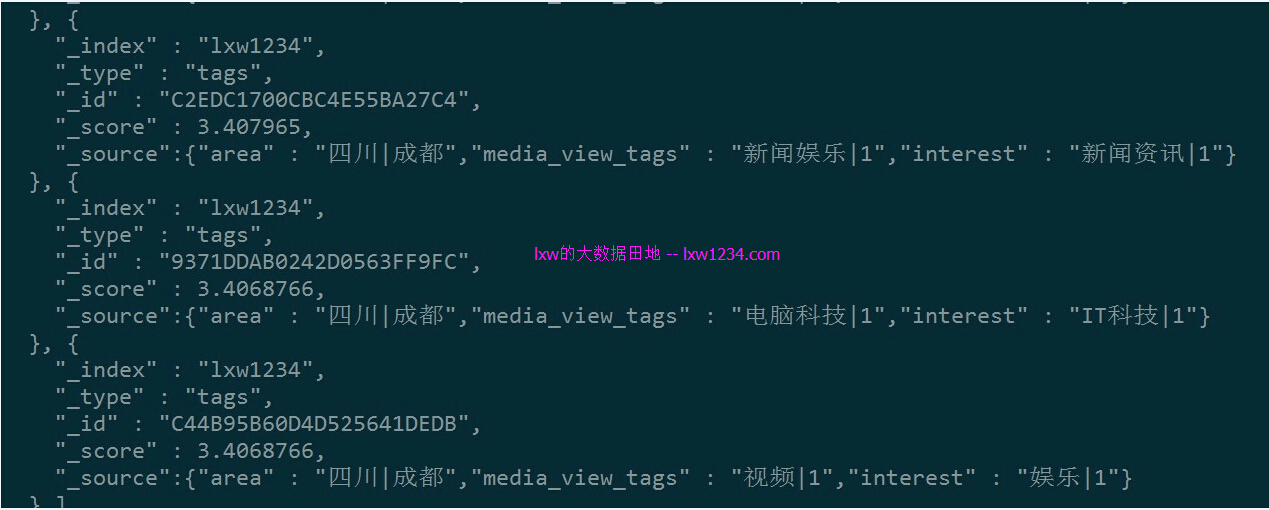
转自:http://lxw1234.com/archives/2015/12/585.htm 关键字:hive、elasticsearch、integration、整合 ElasticSearch已经可以与YARN、Hadoop、Hive、Pig、Spark、Flume等大数据技术框架整合起来使用,尤其是在添加数据的时候,可以使用分布式任务来添加索引数据,尤其是在数据平台上,很多数据存储在Hive中,使用Hive操作ElasticSearch中的数据,将极大的方便开发人员。这里记录一下Hive与ElasticSearch整合,查询和添加数据的配置使用过程。基于Hive0.13.1、Hadoop-cdh5.0、ElasticSearch 2.1.0。 通过Hive读取与统计分析ElasticSearch中的数据 ElasticSearch中已有的数据 _index:lxw1234 _type:tags _id:用户ID(cookieid) 字段:area、media_view_tags、interest Hive建表 由于我用的ElasticSearch版本为2.1.0,因此必须使用elasticsearch-hadoop-2.2.0才能支持,如果ES版本低于2.1.0,可以使用elasticsearch-hadoop-2.1.2. 下载地址:https://www.elastic.co/downloads/hadoop add jar file:///home/liuxiaowen/elasticsearch-hadoop-2.2.0-beta1/dist/elasticsearch-hadoop-hive-2.2.0-beta1.jar; CREATE EXTERNAL TABLE lxw1234_es_tags( cookieidstring, areastring, media_view_tagsstring, intereststring ) STORED BY'org.elasticsearch.hadoop.hive.EsStorageHandler' TBLPROPERTIES( 'es.nodes'='172.16.212.17:9200,172.16.212.102:9200', 'es.index.auto.create'='false', 'es.resource'='lxw1234/tags', 'es.read.metadata'='true', 'es.mapping.names'='cookieid:_metadata._id, area:area, media_view_tags:media_view_tags, interest:interest'); 注意:因为在ES中,lxw1234/tags的_id为cookieid,要想把_id映射到Hive表字段中,必须使用这种方式: ‘es.read.metadata’ = ‘true’, ‘es.mapping.names’ = ‘cookieid:_metadata._id,…’ 在Hive中查询数据 数据已经可以正常查询。 执行SELECT COUNT(1) FROM lxw1234_es_tags;Hive还是通过MapReduce来执行,每个分片使用一个Map任务: 可以通过在Hive外部表中指定search条件,只查询过滤后的数据。比如,下面的建表语句会从ES中搜索_id=98E5D2DE059F1D563D8565的记录: CREATE EXTERNAL TABLE lxw1234_es_tags_2( cookieidstring, areastring, media_view_tagsstring, intereststring ) STORED BY'org.elasticsearch.hadoop.hive.EsStorageHandler' TBLPROPERTIES( 'es.nodes'='172.16.212.17:9200,172.16.212.102:9200', 'es.index.auto.create'='false', 'es.resource'='lxw1234/tags', 'es.read.metadata'='true', 'es.mapping.names'='cookieid:_metadata._id, area:area, media_view_tags:media_view_tags, interest:interest', 'es.query'='?q=_id:98E5D2DE059F1D563D8565' ); hive>select*fromlxw1234_es_tags_2; OK 98E5D2DE059F1D563D8565四川|成都购物|1购物|1 Timetaken:0.096seconds,Fetched:1row(s) 如果数据量不大,可以使用Hive的Local模式来执行,这样不必提交到Hadoop集群: 在Hive中设置: sethive.exec.mode.local.auto.inputbytes.max=134217728; sethive.exec.mode.local.auto.tasks.max=10; sethive.exec.mode.local.auto=true; setfs.defaultFS=file:///; hive>selectarea,count(1)ascntfromlxw1234_es_tagsgroupbyarea orderbycnt desc limit20; Automaticallyselectinglocalonly modeforquery Totaljobs=2 LaunchingJob1outof2 ….. Executionlog at:/tmp/liuxiaowen/liuxiaowen_20151211133030_97b50138-d55d-4a39-bc8e-cbdf09e33ee6.log Jobrunningin-process(localHadoop) Hadoopjob informationfornull:number of mappers:0;number of reducers:0 2015-12-1113:30:59,648nullmap=100%,reduce=100% EndedJob=job_local1283765460_0001 Executioncompleted successfully MapredLocaltask succeeded OK 北京|北京10 四川|成都4 重庆|重庆3 山西|太原3 上海|上海3 广东|深圳3 湖北|武汉2 陕西|西安2 福建|厦门2 广东|中山2 福建|三明2 山东|济宁2 甘肃|兰州2 安徽|合肥2 湖南|长沙2 湖南|湘西2 河南|洛阳2 江苏|南京2 黑龙江|哈尔滨2 广西|南宁2 Timetaken:13.037seconds,Fetched:20row(s) hive> 很快完成了查询与统计。 通过Hive向ElasticSearch中写数据 Hive建表 add jar file:///home/liuxiaowen/elasticsearch-hadoop-2.2.0-beta1/dist/elasticsearch-hadoop-hive-2.2.0-beta1.jar; CREATE EXTERNAL TABLE lxw1234_es_user_tags( cookieidstring, areastring, gendercode STRING, birthday STRING, jobtitle STRING, familystatuscode STRING, haschildrencode STRING, media_view_tagsstring, order_click_tags STRING, search_egine_tags STRING, intereststring) STORED BY'org.elasticsearch.hadoop.hive.EsStorageHandler' TBLPROPERTIES( 'es.nodes'='172.16.212.17:9200,172.16.212.102:9200', 'es.index.auto.create'='true', 'es.resource'='lxw1234/user_tags', 'es.mapping.id'='cookieid', 'es.mapping.names'='area:area, gendercode:gendercode, birthday:birthday, jobtitle:jobtitle, familystatuscode:familystatuscode, haschildrencode:haschildrencode, media_view_tags:media_view_tags, order_click_tags:order_click_tags, search_egine_tags:search_egine_tags, interest:interest'); 这里要注意下:如果是往_id中插入数据,需要设置’es.mapping.id’ = ‘cookieid’参数,表示Hive中的cookieid字段对应到ES中的_id,而es.mapping.names中不需要再映射,这点和读取时候的配置不一样。 关闭Hive推测执行,执行INSERT: SET hive.mapred.reduce.tasks.speculative.execution=false; SET mapreduce.map.speculative=false; SET mapreduce.reduce.speculative=false; INSERT overwrite TABLE lxw1234_es_user_tags SELECT cookieid, area, gendercode, birthday, jobtitle, familystatuscode, haschildrencode, media_view_tags, order_click_tags, search_egine_tags, interest FROM source_table; 注意:如果ES集群规模小,而source_table数据量特别大、Map任务数太多的时候,会引发错误: Causedby:org.elasticsearch.hadoop.rest.EsHadoopInvalidRequest: FOUND unrecoverable error[172.16.212.17:9200]returnedTooManyRequests(429)-rejected execution of org.elasticsearch.action.support.replication.TransportReplicationAction$PrimaryPhase$1@b6fa90f ONEsThreadPoolExecutor[bulk,queue capacity=50, org.elasticsearch.common.util.concurrent.EsThreadPoolExecutor@22e73289[Running,pool size=32,active threads=32,queued tasks=52,completed tasks=12505]]; Bailingout.. 原因是Map任务数太多,并发发送至ES的请求数过多。 这个和ES集群规模以及bulk参数设置有关,目前还没弄明白。 减少source_table数据量(即减少Map任务数)之后,没有出现这个错误。 执行完成后,在ES中查询lxw1234/user_tags的数据: curl-XGET http://172.16.212.17:9200/lxw1234/user_tags/_search?pretty -d ' { "query":{ "match":{ "area":"成都" } } }' 数据已经写入到ElasticSearch中。 总结 使用Hive将数据添加到ElasticSearch中还是非常实用的,因为我们的数据都是在HDFS上,通过Hive可以查询的。 另外,通过Hive可以查询ES数据,并在其上做复杂的统计与分析,但性能一般,比不上使用ES原生API,亦或是还没有掌握使用技巧,后面继续研究。 相关阅读: ElasticSearch集群安装配置 ElasticSearch与Hive整合官方文档