首页 文章 精选 留言 我的

精选列表

搜索[socket编程],共10000篇文章
优秀的个人博客,低调大师

Hadoop MapReduce编程 API入门系列之wordcount版本2(六)

代码 1 package zhouls.bigdata.myMapReduce.wordcount4; 2 3 import java.io.IOException; 4 5 import org.apache.hadoop.io.IntWritable; 6 import org.apache.hadoop.io.LongWritable; 7 import org.apache.hadoop.io.Text; 8 import org.apache.hadoop.mapreduce.Mapper; 9 import org.apache.hadoop.util.StringUtils; 10 11 public class WordCountMapper extends Mapper<LongWritable, Text, Text, IntWritable>{ 12 13 //该方法循环调用,从文件的split中读取每行调用一次,把该行所在的下标为key,该行的内容为value 14 protected void map(LongWritable key, Text value, 15 Context context) 16 throws IOException, InterruptedException { 17 String[] words = StringUtils.split(value.toString(), ' '); 18 for(String w :words){ 19 context.write(new Text(w), new IntWritable(1)); 20 } 21 } 22 } 1 package zhouls.bigdata.myMapReduce.wordcount4; 2 3 import java.io.IOException; 4 5 import org.apache.hadoop.io.IntWritable; 6 import org.apache.hadoop.io.Text; 7 import org.apache.hadoop.mapreduce.Reducer; 8 9 public class WordCountReducer extends Reducer<Text, IntWritable, Text, IntWritable>{ 10 11 //每组调用一次,这一组数据特点:key相同,value可能有多个。 12 protected void reduce(Text arg0, Iterable<IntWritable> arg1, 13 Context arg2) 14 throws IOException, InterruptedException { 15 int sum =0; 16 for(IntWritable i: arg1){ 17 sum=sum+i.get(); 18 } 19 arg2.write(arg0, new IntWritable(sum)); 20 } 21 } //System.setProperty("HADOOP_USER_NAME", "root"); // //1、MR执行环境有两种:本地测试环境,服务器环境 // //本地测试环境(windows):(便于调试) // 在windows的hadoop目录bin目录有一个winutils.exe // 1、在windows下配置hadoop的环境变量 // 2、拷贝debug工具(winutils.exe)到HADOOP_HOME/bin // 3、修改hadoop的源码 ,注意:确保项目的lib需要真实安装的jdk的lib // // 4、MR调用的代码需要改变: // a、src不能有服务器的hadoop配置文件(因为,本地是调试,去服务器环境集群那边的) // b、再调用是使用: // Configuration config = new Configuration(); // config.set("fs.defaultFS", "hdfs://HadoopMaster:9000"); // config.set("yarn.resourcemanager.hostname", "HadoopMaster"); //服务器环境:(不便于调试),有两种方式。 //首先需要在src下放置服务器上的hadoop配置文件(都要这一步) //1、在本地直接调用,执行过程在服务器上(真正企业运行环境) // a、把MR程序打包(jar),直接放到本地 // b、修改hadoop的源码 ,注意:确保项目的lib需要真实安装的jdk的lib // c、增加一个属性: // config.set("mapred.jar", "C:\\Users\\Administrator\\Desktop\\wc.jar"); // d、本地执行main方法,servlet调用MR。 // // //2、直接在服务器上,使用命令的方式调用,执行过程也在服务器上 // a、把MR程序打包(jar),传送到服务器上 // b、通过: hadoop jar jar路径 类的全限定名 // // // // //a,1 b,1 //a,3 c,3 //a,2 d,2 // // //a,3 c,3 //a,2 d,2 //a,1 b,1 // 1 package zhouls.bigdata.myMapReduce.wordcount4; 2 3 4 import org.apache.hadoop.conf.Configuration; 5 import org.apache.hadoop.fs.FileSystem; 6 import org.apache.hadoop.fs.Path; 7 import org.apache.hadoop.io.IntWritable; 8 import org.apache.hadoop.io.Text; 9 import org.apache.hadoop.mapreduce.Job; 10 import org.apache.hadoop.mapreduce.lib.input.FileInputFormat; 11 import org.apache.hadoop.mapreduce.lib.output.FileOutputFormat; 12 13 public class RunJob { 14 15 public static void main(String[] args) { 16 Configuration config =new Configuration(); 17 config.set("fs.defaultFS", "hdfs://HadoopMaster:9000"); 18 config.set("yarn.resourcemanager.hostname", "HadoopMaster"); 19 // config.set("mapred.jar", "C:\\Users\\Administrator\\Desktop\\wc.jar");//先打包好wc.jar 20 try { 21 FileSystem fs =FileSystem.get(config); 22 23 Job job =Job.getInstance(config); 24 job.setJarByClass(RunJob.class); 25 26 job.setJobName("wc"); 27 28 job.setMapperClass(WordCountMapper.class); 29 job.setReducerClass(WordCountReducer.class); 30 31 job.setMapOutputKeyClass(Text.class); 32 job.setMapOutputValueClass(IntWritable.class); 33 34 FileInputFormat.addInputPath(job, new Path("/usr/input/wc/wc.txt"));//新建好输入路径,且数据源 35 36 Path outpath =new Path("/usr/output/wc"); 37 if(fs.exists(outpath)){ 38 fs.delete(outpath, true); 39 } 40 FileOutputFormat.setOutputPath(job, outpath); 41 42 boolean f= job.waitForCompletion(true); 43 if(f){ 44 System.out.println("job任务执行成功"); 45 } 46 } catch (Exception e) { 47 e.printStackTrace(); 48 } 49 } 50 } 本文转自大数据躺过的坑博客园博客,原文链接:http://www.cnblogs.com/zlslch/p/6163585.html,如需转载请自行联系原作者

优秀的个人博客,低调大师

Objective-C编程中的数字类型(NSInteger,NSUInteger,NSNumber)

在Objective-C中,我们可以使用c中的数字数据类型,int、float、long等。它们都是基本数据类型,而不是对象。也就是说,不能够向它们发送消息。然后,有些时候需要将这些值作为对象使用。 NSInteger、NSUInteger 当你不知道程序运行哪种处理器架构时,你最好使用NSInteger,因为在有可能int在32位系统中只是int类型,而在64位系统,int可能变是long型。除非不得不使用int/long型,否则推荐使用NSInteger。 从上面的定义可以看出NSInteger/NSUInteger是一种动态定义的类型,在不同的设备,不同的架构,有可能是int类型,有可能是long类型。NSUInteger是无符号的,即没有负数,NSInteger是有符号的。 NSNumber 有人说既然都有了NSInteger等这些基础类型了为什么还要有NSNumber?NSNumber可以将基本数据类型包装起来,形成一个对象,这样就可以给其发送消息,装入NSArray中等。 1 2 3 4 5 6 NSIntegerintVal=123; NSNumber*numberVal=[NSNumbernumberWithInteger:intVal]; NSMutableArray*array=[NSMutableArrayarray]; [arrayaddObject:intVal]; //错误,intVal不是一个对象类型 [arrayaddObject:numberVal]; //正确 Cocoa提供了NSNumber类来包装(即以对象形式实现)基本数据类型。 +(NSNumber*)numberWithChar:(char)value;+(NSNumber*)numberWithInt:(int)value;+(NSNumber*)numberWithDouble:(double)value;+(NSNumber*)numberWithFloat:(float)value;+(NSNumber*)numberWithBool:(BOOL)value;... 将基本类型数据封装到NSNumber中后,就可以通过下面的实例方法重新获取它: -(char)charValue;-(int)intValue;-(float)floatValue;-(double)doubleValue;-(BOOL)boolValue;... NSValue类 但是我们往往也会有这样的需求,例如需要将CGPoint 或是CGRect这样的结构存储在集合中.一个NSValue对象是用来存储一个C或者Objective-C数据的简单容器。它可以保存任意类型的数 据,比如int,float,char,当然也可以是指pointers, structures, and object ids。NSValue类的目标就是允许以上数据类型的数据结构能够被添加到集合里.这种结构转化为对象的方式,不就是java中的装箱(boxing) 吗?不过在Objective-C中称为包装(wraping),相反的,从对象中解出基本类型,称为展开(unwraping),在java中叫拆箱 (unboxing). NSNumber 继承自NSObject,可使用compare、isEqual等消息。 NSNumber是NSValue的子类。NSValue可包装任意类型值。 本文转自朱先忠老师51CTO博客,原文链接:http://blog.51cto.com/zhuxianzhong/1598644,如需转载请自行联系原作者

优秀的个人博客,低调大师

苹果新的编程语言 Swift 语言进阶(五)--控制流

Swift 语言支持C语言全部的控制语句。包含for 和while循环语句,if和switch条件语句,以及break和continue控制语句等。 Swift 语言除了支持以上语句,还添加了一个for-in循环语句。来更方面地遍历数组、词典、范围、字符串和其他序列等。 1、for-in循环 forindexin1...5{ println("\(index)times 5 is\(index*5)") } 以上for-in循环用来遍历一个闭合的的范围。 为了语句的简洁。以上语句中使用到的index能够从循环运行体中判断出是一个常量。因此该常量不须要在使用之前使用let keyword来声明。 假设想使用它作为变量。就必须对它进行声明。 在循环语句或条件语句中声明的常量或变量仅在循环运行体或循环运行体中有效。 假设不须要使用for-in范围的每个值,以上语句还能够採用例如以下形式: letbase=3 letpower=10 varanswer=1 for_in1...power{ answer*=base } 2 Switch语句 Swift 语言对switch语法进行了优化,功能做了增强。 优化后的switch 语法更加安全、语义更加清楚。 Swift 语言要求switch的每一个分支必须是全面的。即switch声明的每一个可能的值必须运行Case分支之中的一个。假设每一个Case分支已经全面覆盖了每种情况,default 分支语句就能够省去。 Swift 语言不同意带有空运行体的Case分支, 每一个Case运行体必须相应一个Case分支,但多个可能的值能够放到一个Case声明中,用于相应一个运行分支,一个Case分支的多个匹配值由逗号切割,相应一个Case分支的多个匹配值能够分成多个行显示。 Swift 语言不须要在每一个Case分支加入一个多余的break语句。Swift 语言运行完一个Case分支的运行体后,自己主动退出switch语句,这样能够避免C语言常常出现的因为缺少break语句引起的逻辑错误。 Swift 语言支持使用Fallthrough语句来明白说明在一个Case运行体运行完后不退出switch语句而是直接运行接着的Case运行体或者default运行体。 letsomeCharacter:Character="e" switchsomeCharacter{ case"a","e","i","o","u": println("\(someCharacter)is a vowel") case"b","c","d","f","g","h","j","k","l","m", "n","p","q","r","s","t","v","w","x","y","z": println("\(someCharacter)is a consonant") default: println("\(someCharacter)is not a vowel or a consonant") } 因为Swift 语言要求每一个Case分支必须包括一个至少一条语句的运行体。例如以下代码因为第一个case分支 缺少运行体将报一个编译错误,该优化也从语法上避免了一个case运行另外的case的情况,语法也更清晰。 letanotherCharacter:Character="a" switchanotherCharacter{ case"a": case"A": println("The letter A") default: println("Not the letter A") } Swift 语言 的switchCase 分支能够採用很多不同类型的匹配模式,包含范围、多元组。 例如以下是一个使用多元组匹配的样例。 letsomePoint= (1,1) switchsomePoint{ case(0,0): println("(0, 0) is at the origin") case(_,0): println("(\(somePoint.0), 0) is on the x-axis") case(0,_): println("(0,\(somePoint.1)) is on the y-axis") case(-2...2, -2...2): println("(\(somePoint.0),\(somePoint.1)) is inside the box") default: println("(\(somePoint.0),\(somePoint.1)) is outside of the box") } Swift 语言同意多个case 分支符合某个条件。在某个值匹配多个case 分支的情况下, Swift 语言规定总是使用第一个最先匹配的分支。 如以上样例尽管(0, 0)点匹配全部四个case 分支。但它仅仅运行首先匹配到的分支case (0,0)相应的运行体,其他匹配的分支将被忽略。 下面是一个使用范围进行匹配的样例。 letcount=3_000 varnaturalCount:String switchcount{ case0: naturalCount="no" case1...3: naturalCount="a few" case4...9: naturalCount="several" case10...99: naturalCount="tens of" case100...999: naturalCount="hundreds of" case1000...999_999: naturalCount="thousands of" default: naturalCount="millions and millions of" } 在Case分支中。匹配值还能被绑定到一个暂时常量或变量,以便在也仅仅能在Case的运行体中使用。 例如以下是一个使用值绑定的样例。 letanotherPoint= (2,0) switchanotherPoint{ case(letx,0): println("on the x-axis with an x value of\(x)") case(0,lety): println("on the y-axis with a y value of\(y)") caselet(x,y): println("somewhere else at (\(x),\(y))") } 每个Case分支还能使用where从句来检查额外的更加复杂的条件。例如以下所看到的: letyetAnotherPoint= (1, -1) switchyetAnotherPoint{ caselet(x,y)wherex==y: println("(\(x),\(y)) is on the line x == y") caselet(x,y)wherex== -y: println("(\(x),\(y)) is on the line x == -y") caselet(x,y): println("(\(x),\(y)) is just some arbitrary point") } 3、传输控制语句和标签语句 Swift 除了支持标准的continue、break、return传输控制语句外,还提供了一个以上提到的fallthrough传输控制语句。 Swift 也支持循环语句或switch语句的嵌套,另外Swift 还支持为一个循环语句或switch语句加入一个标签,然后能够使用传输控制语句continue、break跳转到该标签语句处运行。例如以下所看到的: label name:whilecondition{ switchcondition{ casevalue 1: statements 1 breaklabel name casevalue 2: statements 2 continuelabel name } } 版权全部。请转载时清楚注明链接和出处! 本文转自mfrbuaa博客园博客,原文链接:http://www.cnblogs.com/mfrbuaa/p/5132612.html,如需转载请自行联系原作者

优秀的个人博客,低调大师

Hadoop MapReduce编程 API入门系列之join(二十六)

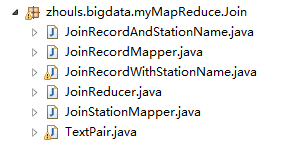
天气记录数据库 气象站数据库 气象站和天气记录合并之后的示意图如下所示。 011990-99999 SIHCCAJAVRI 195005150700 0 011990-99999 SIHCCAJAVRI 195005151200 22 011990-99999 SIHCCAJAVRI 195005151800 -11 012650-99999 TYNSET-HANSMOEN 194903241200 111 012650-99999 TYNSET-HANSMOEN 194903241800 78 连接操作的具体实现技术取决于数据集的规模及分区方式。如果一个数据集很大而另外一个集合很小,以至于可以分发到集群中的每一个节点之中, 则可以执行一个 MapReduce 作业,将各个气象站的天气记录放到一块,从而实现连接。mapper 或 reducer 根据各气象站 ID 从较小的数据集合中找到气象站元数据,从而完成气象站数据和天气记录数据的合并。 连接操作如果由 mapper 执行,则称为 “map 端连接” ;如果由 reducer 执行,则称为 “reduce 端连接”。 如果两个数据集的规模均很大,以至于没有哪个数据集可以被完全复制到集群的每个节点,我们仍然可以使用 MapReduce 来进行连接,至于到底采用 map 端连接还是 reduce 端连接,则取决于数据的组织方式。 map 端连接 在两个大规模输入数据集之间的 map 端连接会在数据达到 map 函数之前就执行连接操作。为达到该目的,各 map 的输入数据必须先分区并且以特定方式排序。 各个输入数据集被划分成相同数量的分区,并且均按相同的键(连接键)排序。同一键的所有记录均会放在同一分区之中。听起来似乎要求非常严格,但这的确合乎 MapReduce 作业的输出。 map 端连接操作可以连接多个作业的输出,只要这些作业的 reducer 数量相同、键相同并且输出文件是不可切分的(例如,小于一个 HDFS 块,或 gzip 压缩)。 在上面讲的天气例子中,如果气象站文件以气象站ID部分排序,记录文件也以气象站 ID 部分排序,而且 reducer 的数量相同,则就满足了执行 map 端连接的前提条件。 利用 org.apache.hadoop.mapreduce.join 包中的 CompositeInputFormat 类来运行一个 map 端连接。CompositeInputFormat 类的输入源和连接类型(内连接或外连接)可以通过一个连接表达式进行配置, 连接表达式的语法简单。详情与示例可参考包文档。此种方法不常用,了解即可,这里不再赘述。 reduce 端连接 由于 reduce 端连接并不要求输入数据集符合特定结构,因而 reduce端连接比 map 端连接更为常用。但是,由于两个数据集均需经过 MapReduce 的 shuffle 过程, 所以 reduce 端连接的效率往往要低一些。基本思路是 mapper 为各个记录标记源,并且使用连接键作为 map 输出键,使键相同的记录放在同一 reducer 中。 我们通过下面两种技术实现 reduce 端连接。 1、多输入 数据集的输入源往往有多种格式,因此可以使用 MultipleInputs 类来方便地解析和标注各个数据源。MultipleInputs 的用法,在输入格式课程已经详细介绍,这里就不再赘述。 2、二次排序 如前所述,reducer 将两个数据源中选出键相同的记录并不介意这些记录是否已排好序。此外,为了更好地执行连接操作,先将某一个数据源传输到 reducer 会非常重要。 还以上面的天气数据连接为例,当天气记录发送到 reducer 的时候,与这些记录有相同键的气象站信息最好也已经放在 reducer ,使得 reducer 能够将气象站名称填到天气记录之中就马上输出。 虽然也可以不指定数据传输次序,并将待处理的记录缓存在内存之中,但应该尽量避免这种情况,因为其中任何一组的记录数量可能非常庞大,远远超出 reducer 的可用内存容量。 因此我们用到二次排序技术,对 map 阶段输出的每个键的值进行排序,实现这一效果。 我们使用 TextPair 类构建组合键,包括气象站 ID 和 “标记”。在这里,“标记” 是一个虚拟的字段,其唯一目的是对记录排序,使气象站记录比天气记录先到达。一种简单的做法就是:对于气象站记录, “标记” 的值设为 0;对于天气记录,“标记” 的值设为1。 JoinStationMapper处理来自气象站数据,代码如下所示。 public class JoinStationMapper extends Mapper< LongWritable,Text,TextPair,Text>{ protected void map(LongWritable key,Text value,Context context) throws IOException,InterruptedException{ String line = value.toString(); String[] arr = line.split("\\s+");//解析气象站数据 int length = arr.length; if(length==2){//满足这种数据格式 //key=气象站id value=气象站名称 context.write(new TextPair(arr[0],"0"),new Text(arr[1])); } } } JoinRecordMapper处理来自天气记录数据,代码如下所示。 public class JoinRecordMapper extends Mapper< LongWritable,Text,TextPair,Text>{ protected void map(LongWritable key,Text value,Context context) throws IOException,InterruptedException{ String line = value.toString(); String[] arr = line.split("\\s+",2);//解析天气记录数据 int length = arr.length; if(length==2){ //key=气象站id value=天气记录数据 context.write(new TextPair(arr[0],"1"),new Text(arr[1])); } } } 由于 TextPair 经过了二次排序,所以 reducer 会先接收到气象站数据。因此从中抽取气象站名称,并将其作为后续每条输出记录的一部分写到输出文件。JoinReducer 的代码如下所示。 public class JoinReducer extends Reducer< TextPair,Text,Text,Text>{ protected void reduce(TextPair key, Iterable< Text> values,Context context) throws IOException,InterruptedException{ Iterator< Text> iter = values.iterator(); Text stationName = new Text(iter.next());//气象站名称 while(iter.hasNext()){ Text record = iter.next();//天气记录的每条数据 Text outValue = new Text(stationName.toString()+"\t"+record.toString()); context.write(key.getFirst(),outValue); } } } 上面 JoinReducer 里面的代码,假设天气记录的每个气象站 ID 恰巧与气象站数据集中的一条记录准确匹配。 如果该假设不成立,则需要泛化代码,使用另一个 TextPair 将标记放入值的对象中。reduce() 方法在处理天气记录之前,要能够区分哪些记录是气象站名称, 处理缺失或重复的记录。 下面我们定义作业的驱动类 JoinRecordWithStationName,在该类中,关键在于根据组合键的第一个字段(即气象站 ID)进行分区和分组,即使用一个自定义的 Partitioner 和 一个自定义的分组 comparator 作为TextPair 的嵌套类。JoinRecordWithStationName 类的代码如下所示。 public class JoinRecordWithStationName extends Configured implements Tool{ public static class KeyPartitioner extends Partitioner< TextPair,Text>{ @overwrite public int getPartition(TextPair key,Text value,int numPartitions){ return (key.getFirst().hashCode()&Integer.MAX_VALUE) % numPartitions; } } @overwrite public int run(String[] args) throws Exception{ Configuration conf = new Configuration();// 读取配置文件 Job job = Job.getInstance();// 新建一个任务 job.setJarByClass(JoinRecordWithStationName.class);// 主类 Path recordInputPath = new Path(args[0]);//天气记录数据源 Path stationInputPath = new Path(args[1]);//气象站数据源 Path outputPath = new Path(args[2]);//输出路径 MultipleInputs.addInputPath(job,recordInputPath,TextInputFormat.class,JoinRecordMapper.class);//读取天气记录Mapper MultipleInputs.addInputPath(job,stationInputPath,TextInputFormat.class,JoinStationMapper.class);//读取气象站Mapper FileOutputFormat.setOutputPath(job,outputPath); job.setPartitionerClass(KeyPartitioner.class);//自定义分区 job.setGroupingComparatorClass(TextPair.FirstComparator.class);//自定义分组 job.setMapOutputKeyClass(TextPair.class); job.setReducerClass(JoinReducer.class);// Reducer job.setOutputKeyClass(Text.class); return job.waitForCompletion(true)?0:1; } public static void main(String[] args) throws Exception{ int exitCode = ToolRunner.run(new JoinRecordWithStationName(),args); System.exit(exitCode); } } 该样本数据上运行程序,获得以下输出结果。 011990-99999 SIHCCAJAVRI 195005150700 0 011990-99999 SIHCCAJAVRI 195005151200 22 011990-99999 SIHCCAJAVRI 195005151800 -11 012650-99999 TYNSET-HANSMOEN 194903241200 111 012650-99999 TYNSET-HANSMOEN 194903241800 78 分布式缓存 当 MapReduce 处理大型数据集间的 join 操作时,此时如果一个数据集很大而另外一个集合很小,以至于可以分发到集群中的每个节点之中。 这种情况下,我们就用到了 Hadoop 的分布式缓存机制,它能够在任务运行过程中及时地将文件和存档复制到任务节点以供使用。为了节约网络宽带,在每一个作业中, 各个文件通常只需要复制到一个节点一次。 1、用法 Hadoop 命令行选项中,有三个命令可以实现文件复制分发到任务的各个节点。 1)用户可以使用 -files 选项指定待分发的文件,文件内包含以逗号隔开的 URL 列表。文件可以存放在本地文件系统、HDFS、或其它 Hadoop 可读文件系统之中。 如果尚未指定文件系统,则这些文件被默认是本地的。即使默认文件系统并非本地文件系统,这也是成立的。 2)用户可以使用 -archives 选项向自己的任务中复制存档文件,比如JAR 文件、ZIP 文件、tar 文件和 gzipped tar文件,这些文件会被解档到任务节点。 3)用户可以使用 -libjars 选项把 JAR 文件添加到 mapper 和 reducer 任务的类路径中。如果作业 JAR 文件并非包含很多库 JAR 文件,这点会很有用。 2、工作机制 当用户启动一个作业,Hadoop 会把由 -files、-archives、和 -libjars 等选项所指定的文件复制到分布式文件系统之中。接着,在任务运行之前, tasktracker 将文件从分布式文件系统复制到本地磁盘(缓存)使任务能够访问文件。此时,这些文件就被视为 “本地化” 了。从任务的角度来看, 这些文件就已经在那儿了,它并不关心这些文件是否来自 HDFS 。此外,有 -libjars 指定的文件会在任务启动前添加到任务的类路径(classpath)中。 3、分布式缓存 API 由于可以通过 Hadoop 命令行间接使用分布式缓存,大多数应用不需要使用分布式缓存 API。然而,一些应用程序需要用到分布式缓存的更高级的特性,这就需要直接使用 API 了。 API 包括两部分:将数据放到缓存中的方法,以及从缓存中读取数据的方法。 1)首先掌握数据放到缓存中的方法,以下列举 Job 中可将数据放入到缓存中的相关方法: public void addCacheFile(URI uri); public void addCacheArchive(URI uri);//以上两组方法将文件或存档添加到分布式缓存 public void setCacheFiles(URI[] files); public void setCacheArchives(URI[] archives);//以上两组方法将一次性向分布式缓存中添加一组文件或存档 public void addFileToClassPath(Path file); public void addArchiveToClassPath(Path archive);//以上两组方法将文件或存档添加到 MapReduce 任务的类路径 public void createSymlink(); 在缓存中可以存放两类对象:文件(files)和存档(achives)。文件被直接放置在任务节点上,而存档则会被解档之后再将具体文件放置在任务节点上。 2)其次掌握在 map 或者 reduce 任务中,使用 API 从缓存中读取数据。 public Path[] getLocalCacheFiles() throws IOException; public Path[] getLocalCacheArchives() throws IOException; public Path[] getFileClassPaths(); public Path[] getArchiveClassPaths(); 我们可以使用 getLocalCacheFiles()和getLocalCacheArchives()方法获取缓存中的文件或者存档的引用。 当处理存档时,将会返回一个包含解档文件的目的目录。相应的,用户可以通过 getFileClassPaths()和getArchivesClassPaths()方法获取被添加到任务的类路径下的文件和文档。 下面我们仍然以前面的气象站数据和天气记录数据为例,使用分布式缓存 API,完成两个数据集的连接操作。完整的 MapReduce 程序如下所示。 import java.io.BufferedReader; import java.io.FileNotFoundException; import java.io.IOException; import java.io.InputStreamReader; import java.net.URI; import java.util.Hashtable; import org.apache.hadoop.conf.Configuration; import org.apache.hadoop.conf.Configured; import org.apache.hadoop.fs.FSDataInputStream; import org.apache.hadoop.fs.FileSystem; import org.apache.hadoop.fs.Path; import org.apache.hadoop.io.LongWritable; import org.apache.hadoop.io.Text; import org.apache.hadoop.mapreduce.Job; import org.apache.hadoop.mapreduce.Mapper; import org.apache.hadoop.mapreduce.Reducer; import org.apache.hadoop.mapreduce.lib.input.FileInputFormat; import org.apache.hadoop.mapreduce.lib.output.FileOutputFormat; import org.apache.hadoop.util.Tool; import org.apache.hadoop.util.ToolRunner; public class JoinRecordWithStationName extends Configured implements Tool { public static class TemperatureMapper extends Mapper< LongWritable, Text, Text, Text> { public void map(LongWritable key, Text value, Context context) throws IOException, InterruptedException { String[] arr = value.toString().split("\t", 2); if (arr.length == 2) { context.write(new Text(arr[0]), value); } } } public static class TemperatureReducer extends Reducer< Text, Text, Text, Text> { private Hashtable< String, String> table = new Hashtable< String, String>();//定义Hashtable存放缓存数据 /** * 获取分布式缓存文件 */ protected void setup(Context context) throws IOException, InterruptedException { Path[] localPaths = (Path[]) context.getLocalCacheFiles();//返回本地文件路径 if (localPaths.length == 0) { throw new FileNotFoundException( "Distributed cache file not found."); } FileSystem fs = FileSystem.getLocal(context.getConfiguration());//获取本地 FileSystem 实例 FSDataInputStream in = null; in = fs.open(new Path(localPaths[0].toString()));// 打开输入流 BufferedReader br = new BufferedReader(new InputStreamReader(in));// 创建BufferedReader读取器 String infoAddr = null; while (null != (infoAddr = br.readLine())) {// 按行读取并解析气象站数据 String[] records = infoAddr.split("\t"); table.put(records[0], records[1]);//key为stationID,value为stationName } } public void reduce(Text key, Iterable< Text> values, Context context) throws IOException, InterruptedException { String stationName = table.get(key.toString());//天气记录根据stationId 获取stationName for (Text value : values) { context.write(new Text(stationName), value); } } } @Override public int run(String[] args) throws Exception { // TODO Auto-generated method stub Configuration conf = new Configuration(); FileSystem hdfs = FileSystem.get(new URI( "hdfs://single.hadoop.dajiangtai.com:9000"), conf); Path out = new Path(args[1]); if (hdfs.isDirectory(out)) { hdfs.delete(out, true); } Job job = Job.getInstance();//获取一个job实例 job.setJarByClass(JoinRecordWithStationName.class); FileInputFormat.addInputPath(job, new org.apache.hadoop.fs.Path(args[0])); FileOutputFormat.setOutputPath(job, new org.apache.hadoop.fs.Path( args[1])); //添加分布式缓存文件 station.txt job.addCacheFile(new URI("hdfs://HadoopMaster:9000/middle/temperature/station.txt")); job.setMapperClass(TemperatureMapper.class); job.setReducerClass(TemperatureReducer.class); job.setOutputKeyClass(Text.class);// 输出key类型 job.setOutputValueClass(Text.class);// 输出value类型 return job.waitForCompletion(true)?0:1; } public static void main(String[] args) throws Exception { String[] arg = { "hdfs://HadoopMaster:9000/middle/temperature/records.txt", "hdfs://HadoopMaster:9000/middle/temperature/out/" }; int ec = ToolRunner.run(new Configuration(), new JoinRecordWithStationName(), arg); System.exit(ec); } } 添加分布式缓存文件相对简单,只需使用job.addCacheFile(new URI(cacheFilePath))方法添加缓存文件即可。需要注意的是,在获取获取缓存文件时,文件将以 “本地的” Path 对象的形式返回。为了读取文件,用户需要首先使用 getLocal()方法获得一个 Hadoop 本地 FileSystem 实例。本程序中,我们在 Reduce 的 setup() 方法中获取缓存文件。 以下是示例数据集的输出结果,达到我们预期的效果。 SIHCCAJAVRI 011990-99999 195005151800 -11 SIHCCAJAVRI 011990-99999 195005151200 22 SIHCCAJAVRI 011990-99999 195005150700 0 TRNSET-HANSMOEN 012650-99999 194903241800 78 TRNSET-HANSMOEN 012650-99999 194903241200 111 得到结果 SIHCCAJAVRI 011990-99999 195005151800 -11 SIHCCAJAVRI 011990-99999 195005151200 22 SIHCCAJAVRI 011990-99999 195005150700 0 TRNSET-HANSMOEN 012650-99999 194903241800 78 TRNSET-HANSMOEN 012650-99999 194903241200 111 代码版本1 package zhouls.bigdata.myMapReduce.Join; import java.util.Set; import java.io.*; import org.apache.hadoop.io.Text; import org.apache.hadoop.io.WritableComparable; public class TextPair implements WritableComparable<TextPair> { private Text first; //Text 类型的实例变量first private Text second;//Text 类型的实例变量second public TextPair() //无参构造方法 { set(new Text(),new Text()); } public TextPair(String first,String second) // Sting类型参数的构造方法 { set(new Text(first),new Text(second)); } public TextPair(Text first,Text second) // Text类型参数的构造方法 { set(first,second); } public void set(Text first,Text second) //set方法 { this.first=first; this.second=second; } public Text getFirst() //getFirst方法 { return first; } public Text getSecond() //getSecond方法 { return second; } //将对象转换为字节流并写入到输出流out中 public void write(DataOutput out) throws IOException //write方法 { first.write(out); second.write(out); } //从输入流in中读取字节流反序列化为对象 public void readFields(DataInput in) throws IOException //readFields方法 { first.readFields(in); second.readFields(in); } @Override public int hashCode() //在mapreduce中,通过hashCode来选择reduce分区 { return first.hashCode() *163+second.hashCode(); } @Override public boolean equals(Object o) //equals方法,这里是两个对象的内容之间比较 { if (o instanceof TextPair) { TextPair tp=(TextPair) o; return first.equals(tp.first) && second.equals(tp.second); } return false; } @Override public String toString() //toString方法 { return first +"\t"+ second; } public int compareTo(TextPair o) { // TODO Auto-generated method stub if(!first.equals(o.first)) { return first.compareTo(o.first); } else if(!second.equals(o.second)) { return second.compareTo(o.second); } return 0; } } package zhouls.bigdata.myMapReduce.Join; import java.io.IOException; import org.apache.hadoop.io.LongWritable; import org.apache.hadoop.io.Text; import org.apache.hadoop.mapreduce.Mapper; import zhouls.bigdata.myMapReduce.Join.TextPair; public class JoinStationMapper extends Mapper<LongWritable,Text,TextPair,Text> { protected void map(LongWritable key,Text value,Context context) throws IOException,InterruptedException { String line = value.toString(); String[] arr = line.split("\\s+");//解析气象站数据 int length = arr.length; if(length==2) {//满足这种数据格式 //key=气象站id value=气象站名称 System.out.println("station="+arr[0]+"0"); context.write(new TextPair(arr[0],"0"),new Text(arr[1])); } } } package zhouls.bigdata.myMapReduce.Join; import java.io.IOException; import java.util.Iterator; import org.apache.hadoop.io.Text; import org.apache.hadoop.mapreduce.Reducer; public class JoinReducer extends Reducer< TextPair,Text,Text,Text> { protected void reduce(TextPair key, Iterable< Text> values,Context context) throws IOException,InterruptedException { Iterator< Text> iter = values.iterator(); Text stationName = new Text(iter.next());//气象站名称 while(iter.hasNext()){ Text record = iter.next();//天气记录的每条数据 Text outValue = new Text(stationName.toString()+"\t"+record.toString()); context.write(key.getFirst(),outValue); } } } package zhouls.bigdata.myMapReduce.Join; import java.io.IOException; import org.apache.hadoop.io.LongWritable; import org.apache.hadoop.io.Text; import org.apache.hadoop.mapreduce.Mapper; public class JoinRecordMapper extends Mapper< LongWritable,Text,TextPair,Text> { protected void map(LongWritable key,Text value,Context context) throws IOException,InterruptedException { String line = value.toString(); String[] arr = line.split("\\s+",2);//解析天气记录数据 int length = arr.length; if(length==2){ //key=气象站id value=天气记录数据 context.write(new TextPair(arr[0],"1"),new Text(arr[1])); } } } package zhouls.bigdata.myMapReduce.Join; import java.io.BufferedReader; import java.io.FileNotFoundException; import java.io.IOException; import java.io.InputStreamReader; import java.net.URI; import java.util.Hashtable; import org.apache.hadoop.conf.Configuration; import org.apache.hadoop.conf.Configured; import org.apache.hadoop.fs.FSDataInputStream; import org.apache.hadoop.fs.FileSystem; import org.apache.hadoop.fs.Path; import org.apache.hadoop.io.LongWritable; import org.apache.hadoop.io.Text; import org.apache.hadoop.mapreduce.Job; import org.apache.hadoop.mapreduce.Mapper; import org.apache.hadoop.mapreduce.Reducer; import org.apache.hadoop.mapreduce.lib.input.FileInputFormat; import org.apache.hadoop.mapreduce.lib.output.FileOutputFormat; import org.apache.hadoop.util.Tool; import org.apache.hadoop.util.ToolRunner; public class JoinRecordWithStationName extends Configured implements Tool { public static class TemperatureMapper extends Mapper< LongWritable, Text, Text, Text> { public void map(LongWritable key, Text value, Context context) throws IOException, InterruptedException { String[] arr = value.toString().split("\t", 2); if (arr.length == 2) { context.write(new Text(arr[0]), value); } } } public static class TemperatureReducer extends Reducer< Text, Text, Text, Text> { private Hashtable< String, String> table = new Hashtable< String, String>();//定义Hashtable存放缓存数据 /** * 获取分布式缓存文件 */ protected void setup(Context context) throws IOException, InterruptedException { Path[] localPaths = (Path[]) context.getLocalCacheFiles();//返回本地文件路径 if (localPaths.length == 0) { throw new FileNotFoundException("Distributed cache file not found."); } FileSystem fs = FileSystem.getLocal(context.getConfiguration());//获取本地 FileSystem 实例 FSDataInputStream in = null; in = fs.open(new Path(localPaths[0].toString()));// 打开输入流 BufferedReader br = new BufferedReader(new InputStreamReader(in));// 创建BufferedReader读取器 String infoAddr = null; while (null != (infoAddr = br.readLine())) {// 按行读取并解析气象站数据 String[] records = infoAddr.split("\t"); table.put(records[0], records[1]);//key为stationID,value为stationName } } public void reduce(Text key, Iterable< Text> values, Context context) throws IOException, InterruptedException { String stationName = table.get(key.toString());//天气记录根据stationId 获取stationName for (Text value : values) { context.write(new Text(stationName), value); } } } public int run(String[] args) throws Exception { // TODO Auto-generated method stub Configuration conf = new Configuration(); // FileSystem hdfs = FileSystem.get(new URI("hdfs://HadoopMaster:9000"), conf); // Path out = new Path(args[1]); // if (hdfs.isDirectory(out)) // { // hdfs.delete(out, true); // } Job job = Job.getInstance();//获取一个job实例 job.setJarByClass(JoinRecordWithStationName.class); // FileInputFormat.addInputPath(job, // new org.apache.hadoop.fs.Path(args[0])); // FileOutputFormat.setOutputPath(job, new org.apache.hadoop.fs.Path(args[1])); FileInputFormat.addInputPath(job, new org.apache.hadoop.fs.Path("./data/join/station.txt")); FileOutputFormat.setOutputPath(job, new org.apache.hadoop.fs.Path("./out/join/")); //添加分布式缓存文件 station.txt // job.addCacheFile(new URI("hdfs://HadoopMaster:9000/join/station.txt")); job.addCacheFile(new URI("./data/join/station.txt")); job.setMapperClass(TemperatureMapper.class); job.setReducerClass(TemperatureReducer.class); job.setOutputKeyClass(Text.class);// 输出key类型 job.setOutputValueClass(Text.class);// 输出value类型 return job.waitForCompletion(true)?0:1; } public static void main(String[] args) throws Exception { // String[] arg = { // "hdfs://HadoopMaster:9000/join/records.txt", // "hdfs://HadoopMaster:9000/join/out/" }; // String[] arg = { "./data/join/records.txt", "./out/join/" }; int ec = ToolRunner.run(new Configuration(),new JoinRecordWithStationName(), arg); System.exit(ec); } } package zhouls.bigdata.myMapReduce.Join; public class JoinRecordAndStationName { /** * @param args */ public static void main(String[] args) { // TODO Auto-generated method stub } } 代码版本2 package zhouls.bigdata.myMapReduce.Join; import java.util.Set; import java.io.*; import org.apache.hadoop.io.Text; import org.apache.hadoop.io.WritableComparable; public class TextPair implements WritableComparable<TextPair> { private Text first; //Text 类型的实例变量first private Text second;//Text 类型的实例变量second public TextPair() //无参构造方法 { set(new Text(),new Text()); } public TextPair(String first,String second) // Sting类型参数的构造方法 { set(new Text(first),new Text(second)); } public TextPair(Text first,Text second) // Text类型参数的构造方法 { set(first,second); } public void set(Text first,Text second) //set方法 { this.first=first; this.second=second; } public Text getFirst() //getFirst方法 { return first; } public Text getSecond() //getSecond方法 { return second; } //将对象转换为字节流并写入到输出流out中 public void write(DataOutput out) throws IOException //write方法 { first.write(out); second.write(out); } //从输入流in中读取字节流反序列化为对象 public void readFields(DataInput in) throws IOException //readFields方法 { first.readFields(in); second.readFields(in); } @Override public int hashCode() //在mapreduce中,通过hashCode来选择reduce分区 { return first.hashCode() *163+second.hashCode(); } @Override public boolean equals(Object o) //equals方法,这里是两个对象的内容之间比较 { if (o instanceof TextPair) { TextPair tp=(TextPair) o; return first.equals(tp.first) && second.equals(tp.second); } return false; } @Override public String toString() //toString方法 { return first +"\t"+ second; } public int compareTo(TextPair o) { // TODO Auto-generated method stub if(!first.equals(o.first)) { return first.compareTo(o.first); } else if(!second.equals(o.second)) { return second.compareTo(o.second); } return 0; } } package zhouls.bigdata.myMapReduce.Join; import java.io.IOException; import org.apache.hadoop.io.LongWritable; import org.apache.hadoop.io.Text; import org.apache.hadoop.mapreduce.Mapper; import zhouls.bigdata.myMapReduce.Join.TextPair; public class JoinStationMapper extends Mapper<LongWritable,Text,TextPair,Text> { protected void map(LongWritable key,Text value,Context context) throws IOException,InterruptedException { String line = value.toString(); String[] arr = line.split("\\s+");//解析气象站数据 int length = arr.length; if(length==2) {//满足这种数据格式 //key=气象站id value=气象站名称 System.out.println("station="+arr[0]+"0"); context.write(new TextPair(arr[0],"0"),new Text(arr[1])); } } } package zhouls.bigdata.myMapReduce.Join; import java.io.IOException; import java.util.Iterator; import org.apache.hadoop.io.Text; import org.apache.hadoop.mapreduce.Reducer; public class JoinReducer extends Reducer< TextPair,Text,Text,Text> { protected void reduce(TextPair key, Iterable< Text> values,Context context) throws IOException,InterruptedException { Iterator< Text> iter = values.iterator(); Text stationName = new Text(iter.next());//气象站名称 while(iter.hasNext()){ Text record = iter.next();//天气记录的每条数据 Text outValue = new Text(stationName.toString()+"\t"+record.toString()); context.write(key.getFirst(),outValue); } } } package zhouls.bigdata.myMapReduce.Join; import java.io.IOException; import org.apache.hadoop.io.LongWritable; import org.apache.hadoop.io.Text; import org.apache.hadoop.mapreduce.Mapper; public class JoinRecordMapper extends Mapper< LongWritable,Text,TextPair,Text> { protected void map(LongWritable key,Text value,Context context) throws IOException,InterruptedException { String line = value.toString(); String[] arr = line.split("\\s+",2);//解析天气记录数据 int length = arr.length; if(length==2){ //key=气象站id value=天气记录数据 context.write(new TextPair(arr[0],"1"),new Text(arr[1])); } } } //版本2 package zhouls.bigdata.myMapReduce.Join; import java.io.InputStream; import org.apache.hadoop.util.Tool; import java.io.OutputStream; import java.util.Set; import javax.lang.model.SourceVersion; import org.apache.hadoop.conf.Configuration; import org.apache.hadoop.conf.Configured; import org.apache.hadoop.fs.FileSystem; import org.apache.hadoop.fs.Path; import org.apache.hadoop.io.Text; import org.apache.hadoop.io.WritableComparable; import org.apache.hadoop.io.WritableComparator; import org.apache.hadoop.mapreduce.Job; import org.apache.hadoop.mapreduce.Partitioner; import org.apache.hadoop.mapreduce.lib.input.MultipleInputs; import org.apache.hadoop.mapreduce.lib.input.TextInputFormat; import org.apache.hadoop.mapreduce.lib.output.FileOutputFormat; import org.apache.hadoop.util.ToolRunner; public class JoinRecordWithStationName extends Configured implements Tool { public static class KeyPartitioner extends Partitioner< TextPair,Text> { public int getPartition(TextPair key,Text value,int numPartitions) { return (key.getFirst().hashCode()&Integer.MAX_VALUE) % numPartitions; } } public static class GroupingComparator extends WritableComparator { protected GroupingComparator() { super(TextPair.class,true); } @Override public int compare(WritableComparable w1,WritableComparable w2) { TextPair ip1=(TextPair) w1; TextPair ip2=(TextPair) w2; Text l=ip1.getFirst(); Text r=ip2.getFirst(); return l.compareTo(r); } } public int run(String[] args) throws Exception { Configuration conf = new Configuration();// 读取配置文件 Path mypath=new Path(args[2]); FileSystem hdfs=mypath.getFileSystem(conf); if (hdfs.isDirectory(mypath)) { hdfs.delete(mypath,true); } Job job = Job.getInstance(conf,"join");// 新建一个任务 job.setJarByClass(JoinRecordWithStationName.class);// 主类 Path recordInputPath = new Path(args[0]);//天气记录数据源,这里是牵扯到多路径输入和多路径输出的问题。默认是从args[0]开始 Path stationInputPath = new Path(args[1]);//气象站数据源 Path outputPath = new Path(args[2]);//输出路径 //若只有一个输入和一个输出,则输入是args[0],输出是args[1]。 //若有两个输入和一个输出,则输入是args[0]和args[1],输出是args[2] MultipleInputs.addInputPath(job,recordInputPath,TextInputFormat.class,JoinRecordMapper.class);//读取天气记录Mapper MultipleInputs.addInputPath(job,stationInputPath,TextInputFormat.class,JoinStationMapper.class);//读取气象站Mapper FileOutputFormat.setOutputPath(job,outputPath); job.setReducerClass(JoinReducer.class);// Reducer job.setNumReduceTasks(2); job.setPartitionerClass(KeyPartitioner.class);//自定义分区 job.setGroupingComparatorClass(GroupingComparator.class);//自定义分组 job.setMapOutputKeyClass(TextPair.class); job.setMapOutputValueClass(Text.class); job.setOutputKeyClass(Text.class); job.setOutputValueClass(Text.class); return job.waitForCompletion(true)?0:1; } public static void main(String[] args) throws Exception { String[] args0={"hdfs://HadoopMaster:9000/join/records.txt" ,"hdfs://HadoopMaster:9000/join/station.txt" ,"hdfs://HadoopMaster:9000/join/out" }; int exitCode=ToolRunner.run( new JoinRecordWithStationName(), args0); System.exit(exitCode); } } package zhouls.bigdata.myMapReduce.Join; public class JoinRecordAndStationName { /** * @param args */ public static void main(String[] args) { // TODO Auto-generated method stub } } 本文转自大数据躺过的坑博客园博客,原文链接:http://www.cnblogs.com/zlslch/p/6166343.html,如需转载请自行联系原作者

优秀的个人博客,低调大师

Hadoop MapReduce编程 API入门系列之最短路径(十五)

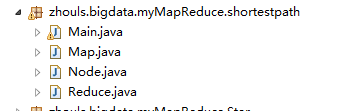
====================================== = Iteration: 1 = Input path: out/shortestpath/input.txt = Output path: out/shortestpath/1 ====================================== 2016-12-12 16:37:05,638 INFO [org.apache.hadoop.metrics.jvm.JvmMetrics] - Initializing JVM Metrics with processName=JobTracker, sessionId= 2016-12-12 16:37:06,231 WARN [org.apache.hadoop.mapreduce.JobSubmitter] - Hadoop command-line option parsing not performed. Implement the Tool interface and execute your application with ToolRunner to remedy this. 2016-12-12 16:37:06,236 WARN [org.apache.hadoop.mapreduce.JobSubmitter] - No job jar file set. User classes may not be found. See Job or Job#setJar(String). 2016-12-12 16:37:06,260 INFO [org.apache.hadoop.mapreduce.lib.input.FileInputFormat] - Total input paths to process : 1 2016-12-12 16:37:06,363 INFO [org.apache.hadoop.mapreduce.JobSubmitter] - number of splits:1 2016-12-12 16:37:06,831 INFO [org.apache.hadoop.mapreduce.JobSubmitter] - Submitting tokens for job: job_local535100118_0001 2016-12-12 16:37:07,524 INFO [org.apache.hadoop.mapreduce.Job] - The url to track the job: http://localhost:8080/ 2016-12-12 16:37:07,526 INFO [org.apache.hadoop.mapreduce.Job] - Running job: job_local535100118_0001 2016-12-12 16:37:07,534 INFO [org.apache.hadoop.mapred.LocalJobRunner] - OutputCommitter set in config null 2016-12-12 16:37:07,550 INFO [org.apache.hadoop.mapred.LocalJobRunner] - OutputCommitter is org.apache.hadoop.mapreduce.lib.output.FileOutputCommitter 2016-12-12 16:37:07,635 INFO [org.apache.hadoop.mapred.LocalJobRunner] - Waiting for map tasks 2016-12-12 16:37:07,638 INFO [org.apache.hadoop.mapred.LocalJobRunner] - Starting task: attempt_local535100118_0001_m_000000_0 2016-12-12 16:37:07,716 INFO [org.apache.hadoop.yarn.util.ProcfsBasedProcessTree] - ProcfsBasedProcessTree currently is supported only on Linux. 2016-12-12 16:37:07,759 INFO [org.apache.hadoop.mapred.Task] - Using ResourceCalculatorProcessTree : org.apache.hadoop.yarn.util.WindowsBasedProcessTree@27b70923 2016-12-12 16:37:07,767 INFO [org.apache.hadoop.mapred.MapTask] - Processing split: file:/D:/Code/MyEclipseJavaCode/myMapReduce/out/shortestpath/input.txt:0+149 2016-12-12 16:37:07,830 INFO [org.apache.hadoop.mapred.MapTask] - (EQUATOR) 0 kvi 26214396(104857584) 2016-12-12 16:37:07,830 INFO [org.apache.hadoop.mapred.MapTask] - mapreduce.task.io.sort.mb: 100 2016-12-12 16:37:07,830 INFO [org.apache.hadoop.mapred.MapTask] - soft limit at 83886080 2016-12-12 16:37:07,830 INFO [org.apache.hadoop.mapred.MapTask] - bufstart = 0; bufvoid = 104857600 2016-12-12 16:37:07,830 INFO [org.apache.hadoop.mapred.MapTask] - kvstart = 26214396; length = 6553600 2016-12-12 16:37:07,834 INFO [org.apache.hadoop.mapred.MapTask] - Map output collector class = org.apache.hadoop.mapred.MapTask$MapOutputBuffer input -> K[dee],V[0 null hadoop hello] output -> K[dee],V[0 hadoop hello] output -> K[hadoop],V[1 dee] output -> K[hello],V[1 dee] input -> K[hadoop],V[2147483647 null hive hello] output -> K[hadoop],V[2147483647 hive hello] input -> K[hello],V[2147483647 null dee hadoop hive joe] output -> K[hello],V[2147483647 dee hadoop hive joe] input -> K[hive],V[2147483647 null hadoop hello joe] output -> K[hive],V[2147483647 hadoop hello joe] input -> K[joe],V[2147483647 null hive hello] output -> K[joe],V[2147483647 hive hello] 2016-12-12 16:37:07,851 INFO [org.apache.hadoop.mapred.LocalJobRunner] - 2016-12-12 16:37:07,851 INFO [org.apache.hadoop.mapred.MapTask] - Starting flush of map output 2016-12-12 16:37:07,851 INFO [org.apache.hadoop.mapred.MapTask] - Spilling map output 2016-12-12 16:37:07,851 INFO [org.apache.hadoop.mapred.MapTask] - bufstart = 0; bufend = 174; bufvoid = 104857600 2016-12-12 16:37:07,852 INFO [org.apache.hadoop.mapred.MapTask] - kvstart = 26214396(104857584); kvend = 26214372(104857488); length = 25/6553600 2016-12-12 16:37:07,871 INFO [org.apache.hadoop.mapred.MapTask] - Finished spill 0 2016-12-12 16:37:07,877 INFO [org.apache.hadoop.mapred.Task] - Task:attempt_local535100118_0001_m_000000_0 is done. And is in the process of committing 2016-12-12 16:37:07,891 INFO [org.apache.hadoop.mapred.LocalJobRunner] - file:/D:/Code/MyEclipseJavaCode/myMapReduce/out/shortestpath/input.txt:0+149 2016-12-12 16:37:07,892 INFO [org.apache.hadoop.mapred.Task] - Task 'attempt_local535100118_0001_m_000000_0' done. 2016-12-12 16:37:07,892 INFO [org.apache.hadoop.mapred.LocalJobRunner] - Finishing task: attempt_local535100118_0001_m_000000_0 2016-12-12 16:37:07,892 INFO [org.apache.hadoop.mapred.LocalJobRunner] - map task executor complete. 2016-12-12 16:37:07,896 INFO [org.apache.hadoop.mapred.LocalJobRunner] - Waiting for reduce tasks 2016-12-12 16:37:07,896 INFO [org.apache.hadoop.mapred.LocalJobRunner] - Starting task: attempt_local535100118_0001_r_000000_0 2016-12-12 16:37:07,910 INFO [org.apache.hadoop.yarn.util.ProcfsBasedProcessTree] - ProcfsBasedProcessTree currently is supported only on Linux. 2016-12-12 16:37:07,942 INFO [org.apache.hadoop.mapred.Task] - Using ResourceCalculatorProcessTree : org.apache.hadoop.yarn.util.WindowsBasedProcessTree@5bf7b707 2016-12-12 16:37:07,948 INFO [org.apache.hadoop.mapred.ReduceTask] - Using ShuffleConsumerPlugin: org.apache.hadoop.mapreduce.task.reduce.Shuffle@969f4cd 2016-12-12 16:37:07,972 INFO [org.apache.hadoop.mapreduce.task.reduce.MergeManagerImpl] - MergerManager: memoryLimit=1327077760, maxSingleShuffleLimit=331769440, mergeThreshold=875871360, ioSortFactor=10, memToMemMergeOutputsThreshold=10 2016-12-12 16:37:07,975 INFO [org.apache.hadoop.mapreduce.task.reduce.EventFetcher] - attempt_local535100118_0001_r_000000_0 Thread started: EventFetcher for fetching Map Completion Events 2016-12-12 16:37:08,017 INFO [org.apache.hadoop.mapreduce.task.reduce.LocalFetcher] - localfetcher#1 about to shuffle output of map attempt_local535100118_0001_m_000000_0 decomp: 190 len: 194 to MEMORY 2016-12-12 16:37:08,023 INFO [org.apache.hadoop.mapreduce.task.reduce.InMemoryMapOutput] - Read 190 bytes from map-output for attempt_local535100118_0001_m_000000_0 2016-12-12 16:37:08,076 INFO [org.apache.hadoop.mapreduce.task.reduce.MergeManagerImpl] - closeInMemoryFile -> map-output of size: 190, inMemoryMapOutputs.size() -> 1, commitMemory -> 0, usedMemory ->190 2016-12-12 16:37:08,078 INFO [org.apache.hadoop.mapreduce.task.reduce.EventFetcher] - EventFetcher is interrupted.. Returning 2016-12-12 16:37:08,080 INFO [org.apache.hadoop.mapred.LocalJobRunner] - 1 / 1 copied. 2016-12-12 16:37:08,081 INFO [org.apache.hadoop.mapreduce.task.reduce.MergeManagerImpl] - finalMerge called with 1 in-memory map-outputs and 0 on-disk map-outputs 2016-12-12 16:37:08,110 INFO [org.apache.hadoop.mapred.Merger] - Merging 1 sorted segments 2016-12-12 16:37:08,111 INFO [org.apache.hadoop.mapred.Merger] - Down to the last merge-pass, with 1 segments left of total size: 184 bytes 2016-12-12 16:37:08,113 INFO [org.apache.hadoop.mapreduce.task.reduce.MergeManagerImpl] - Merged 1 segments, 190 bytes to disk to satisfy reduce memory limit 2016-12-12 16:37:08,114 INFO [org.apache.hadoop.mapreduce.task.reduce.MergeManagerImpl] - Merging 1 files, 194 bytes from disk 2016-12-12 16:37:08,115 INFO [org.apache.hadoop.mapreduce.task.reduce.MergeManagerImpl] - Merging 0 segments, 0 bytes from memory into reduce 2016-12-12 16:37:08,116 INFO [org.apache.hadoop.mapred.Merger] - Merging 1 sorted segments 2016-12-12 16:37:08,117 INFO [org.apache.hadoop.mapred.Merger] - Down to the last merge-pass, with 1 segments left of total size: 184 bytes 2016-12-12 16:37:08,118 INFO [org.apache.hadoop.mapred.LocalJobRunner] - 1 / 1 copied. 2016-12-12 16:37:08,141 INFO [org.apache.hadoop.conf.Configuration.deprecation] - mapred.skip.on is deprecated. Instead, use mapreduce.job.skiprecords input -> K[dee] input -> V[0 hadoop hello] output -> K[dee],V[0 null hadoop hello] input -> K[hadoop] input -> V[2147483647 hive hello] input -> V[1 dee] output -> K[hadoop],V[1 dee hive hello] input -> K[hello] input -> V[2147483647 dee hadoop hive joe] input -> V[1 dee] output -> K[hello],V[1 dee dee hadoop hive joe] input -> K[hive] input -> V[2147483647 hadoop hello joe] output -> K[hive],V[2147483647 null hadoop hello joe] input -> K[joe] input -> V[2147483647 hive hello] output -> K[joe],V[2147483647 null hive hello] 2016-12-12 16:37:08,154 INFO [org.apache.hadoop.mapred.Task] - Task:attempt_local535100118_0001_r_000000_0 is done. And is in the process of committing 2016-12-12 16:37:08,156 INFO [org.apache.hadoop.mapred.LocalJobRunner] - 1 / 1 copied. 2016-12-12 16:37:08,156 INFO [org.apache.hadoop.mapred.Task] - Task attempt_local535100118_0001_r_000000_0 is allowed to commit now 2016-12-12 16:37:08,162 INFO [org.apache.hadoop.mapreduce.lib.output.FileOutputCommitter] - Saved output of task 'attempt_local535100118_0001_r_000000_0' to file:/D:/Code/MyEclipseJavaCode/myMapReduce/out/shortestpath/1/_temporary/0/task_local535100118_0001_r_000000 2016-12-12 16:37:08,163 INFO [org.apache.hadoop.mapred.LocalJobRunner] - reduce > reduce 2016-12-12 16:37:08,164 INFO [org.apache.hadoop.mapred.Task] - Task 'attempt_local535100118_0001_r_000000_0' done. 2016-12-12 16:37:08,164 INFO [org.apache.hadoop.mapred.LocalJobRunner] - Finishing task: attempt_local535100118_0001_r_000000_0 2016-12-12 16:37:08,164 INFO [org.apache.hadoop.mapred.LocalJobRunner] - reduce task executor complete. 2016-12-12 16:37:08,535 INFO [org.apache.hadoop.mapreduce.Job] - Job job_local535100118_0001 running in uber mode : false 2016-12-12 16:37:08,539 INFO [org.apache.hadoop.mapreduce.Job] - map 100% reduce 100% 2016-12-12 16:37:08,544 INFO [org.apache.hadoop.mapreduce.Job] - Job job_local535100118_0001 completed successfully 2016-12-12 16:37:08,601 INFO [org.apache.hadoop.mapreduce.Job] - Counters: 33 File System Counters FILE: Number of bytes read=1340 FILE: Number of bytes written=387869 FILE: Number of read operations=0 FILE: Number of large read operations=0 FILE: Number of write operations=0 Map-Reduce Framework Map input records=5 Map output records=7 Map output bytes=174 Map output materialized bytes=194 Input split bytes=135 Combine input records=0 Combine output records=0 Reduce input groups=5 Reduce shuffle bytes=194 Reduce input records=7 Reduce output records=5 Spilled Records=14 Shuffled Maps =1 Failed Shuffles=0 Merged Map outputs=1 GC time elapsed (ms)=0 CPU time spent (ms)=0 Physical memory (bytes) snapshot=0 Virtual memory (bytes) snapshot=0 Total committed heap usage (bytes)=466616320 Shuffle Errors BAD_ID=0 CONNECTION=0 IO_ERROR=0 WRONG_LENGTH=0 WRONG_MAP=0 WRONG_REDUCE=0 File Input Format Counters Bytes Read=169 File Output Format Counters Bytes Written=161 ====================================== = Iteration: 2 = Input path: out/shortestpath/1 = Output path: out/shortestpath/2 ====================================== 2016-12-12 16:37:08,638 INFO [org.apache.hadoop.metrics.jvm.JvmMetrics] - Cannot initialize JVM Metrics with processName=JobTracker, sessionId= - already initialized 2016-12-12 16:37:08,649 WARN [org.apache.hadoop.mapreduce.JobSubmitter] - Hadoop command-line option parsing not performed. Implement the Tool interface and execute your application with ToolRunner to remedy this. 2016-12-12 16:37:08,653 WARN [org.apache.hadoop.mapreduce.JobSubmitter] - No job jar file set. User classes may not be found. See Job or Job#setJar(String). 2016-12-12 16:37:09,079 INFO [org.apache.hadoop.mapreduce.lib.input.FileInputFormat] - Total input paths to process : 1 2016-12-12 16:37:09,098 INFO [org.apache.hadoop.mapreduce.JobSubmitter] - number of splits:1 2016-12-12 16:37:09,183 INFO [org.apache.hadoop.mapreduce.JobSubmitter] - Submitting tokens for job: job_local447108750_0002 2016-12-12 16:37:09,525 INFO [org.apache.hadoop.mapreduce.Job] - The url to track the job: http://localhost:8080/ 2016-12-12 16:37:09,525 INFO [org.apache.hadoop.mapreduce.Job] - Running job: job_local447108750_0002 2016-12-12 16:37:09,527 INFO [org.apache.hadoop.mapred.LocalJobRunner] - OutputCommitter set in config null 2016-12-12 16:37:09,529 INFO [org.apache.hadoop.mapred.LocalJobRunner] - OutputCommitter is org.apache.hadoop.mapreduce.lib.output.FileOutputCommitter 2016-12-12 16:37:09,540 INFO [org.apache.hadoop.mapred.LocalJobRunner] - Waiting for map tasks 2016-12-12 16:37:09,540 INFO [org.apache.hadoop.mapred.LocalJobRunner] - Starting task: attempt_local447108750_0002_m_000000_0 2016-12-12 16:37:09,544 INFO [org.apache.hadoop.yarn.util.ProcfsBasedProcessTree] - ProcfsBasedProcessTree currently is supported only on Linux. 2016-12-12 16:37:09,591 INFO [org.apache.hadoop.mapred.Task] - Using ResourceCalculatorProcessTree : org.apache.hadoop.yarn.util.WindowsBasedProcessTree@25a02403 2016-12-12 16:37:09,597 INFO [org.apache.hadoop.mapred.MapTask] - Processing split: file:/D:/Code/MyEclipseJavaCode/myMapReduce/out/shortestpath/1/part-r-00000:0+149 2016-12-12 16:37:09,662 INFO [org.apache.hadoop.mapred.MapTask] - (EQUATOR) 0 kvi 26214396(104857584) 2016-12-12 16:37:09,663 INFO [org.apache.hadoop.mapred.MapTask] - mapreduce.task.io.sort.mb: 100 2016-12-12 16:37:09,663 INFO [org.apache.hadoop.mapred.MapTask] - soft limit at 83886080 2016-12-12 16:37:09,663 INFO [org.apache.hadoop.mapred.MapTask] - bufstart = 0; bufvoid = 104857600 2016-12-12 16:37:09,663 INFO [org.apache.hadoop.mapred.MapTask] - kvstart = 26214396; length = 6553600 2016-12-12 16:37:09,666 INFO [org.apache.hadoop.mapred.MapTask] - Map output collector class = org.apache.hadoop.mapred.MapTask$MapOutputBuffer input -> K[dee],V[0 null hadoop hello] output -> K[dee],V[0 null hadoop hello] output -> K[hadoop],V[1 null:dee] output -> K[hello],V[1 null:dee] input -> K[hadoop],V[1 dee hive hello] output -> K[hadoop],V[1 dee hive hello] output -> K[hive],V[2 dee:hadoop] output -> K[hello],V[2 dee:hadoop] input -> K[hello],V[1 dee dee hadoop hive joe] output -> K[hello],V[1 dee dee hadoop hive joe] output -> K[dee],V[2 dee:hello] output -> K[hadoop],V[2 dee:hello] output -> K[hive],V[2 dee:hello] output -> K[joe],V[2 dee:hello] input -> K[hive],V[2147483647 null hadoop hello joe] output -> K[hive],V[2147483647 null hadoop hello joe] input -> K[joe],V[2147483647 null hive hello] output -> K[joe],V[2147483647 null hive hello] 2016-12-12 16:37:09,675 INFO [org.apache.hadoop.mapred.LocalJobRunner] - 2016-12-12 16:37:09,675 INFO [org.apache.hadoop.mapred.MapTask] - Starting flush of map output 2016-12-12 16:37:09,675 INFO [org.apache.hadoop.mapred.MapTask] - Spilling map output 2016-12-12 16:37:09,675 INFO [org.apache.hadoop.mapred.MapTask] - bufstart = 0; bufend = 289; bufvoid = 104857600 2016-12-12 16:37:09,676 INFO [org.apache.hadoop.mapred.MapTask] - kvstart = 26214396(104857584); kvend = 26214348(104857392); length = 49/6553600 2016-12-12 16:37:09,691 INFO [org.apache.hadoop.mapred.MapTask] - Finished spill 0 2016-12-12 16:37:09,699 INFO [org.apache.hadoop.mapred.Task] - Task:attempt_local447108750_0002_m_000000_0 is done. And is in the process of committing 2016-12-12 16:37:09,704 INFO [org.apache.hadoop.mapred.LocalJobRunner] - file:/D:/Code/MyEclipseJavaCode/myMapReduce/out/shortestpath/1/part-r-00000:0+149 2016-12-12 16:37:09,705 INFO [org.apache.hadoop.mapred.Task] - Task 'attempt_local447108750_0002_m_000000_0' done. 2016-12-12 16:37:09,705 INFO [org.apache.hadoop.mapred.LocalJobRunner] - Finishing task: attempt_local447108750_0002_m_000000_0 2016-12-12 16:37:09,705 INFO [org.apache.hadoop.mapred.LocalJobRunner] - map task executor complete. 2016-12-12 16:37:09,707 INFO [org.apache.hadoop.mapred.LocalJobRunner] - Waiting for reduce tasks 2016-12-12 16:37:09,708 INFO [org.apache.hadoop.mapred.LocalJobRunner] - Starting task: attempt_local447108750_0002_r_000000_0 2016-12-12 16:37:09,714 INFO [org.apache.hadoop.yarn.util.ProcfsBasedProcessTree] - ProcfsBasedProcessTree currently is supported only on Linux. 2016-12-12 16:37:09,856 INFO [org.apache.hadoop.mapred.Task] - Using ResourceCalculatorProcessTree : org.apache.hadoop.yarn.util.WindowsBasedProcessTree@3f539d4b 2016-12-12 16:37:09,857 INFO [org.apache.hadoop.mapred.ReduceTask] - Using ShuffleConsumerPlugin: org.apache.hadoop.mapreduce.task.reduce.Shuffle@a7bc768 2016-12-12 16:37:09,862 INFO [org.apache.hadoop.mapreduce.task.reduce.MergeManagerImpl] - MergerManager: memoryLimit=1327077760, maxSingleShuffleLimit=331769440, mergeThreshold=875871360, ioSortFactor=10, memToMemMergeOutputsThreshold=10 2016-12-12 16:37:09,865 INFO [org.apache.hadoop.mapreduce.task.reduce.EventFetcher] - attempt_local447108750_0002_r_000000_0 Thread started: EventFetcher for fetching Map Completion Events 2016-12-12 16:37:09,871 INFO [org.apache.hadoop.mapreduce.task.reduce.LocalFetcher] - localfetcher#2 about to shuffle output of map attempt_local447108750_0002_m_000000_0 decomp: 317 len: 321 to MEMORY 2016-12-12 16:37:09,874 INFO [org.apache.hadoop.mapreduce.task.reduce.InMemoryMapOutput] - Read 317 bytes from map-output for attempt_local447108750_0002_m_000000_0 2016-12-12 16:37:09,876 INFO [org.apache.hadoop.mapreduce.task.reduce.MergeManagerImpl] - closeInMemoryFile -> map-output of size: 317, inMemoryMapOutputs.size() -> 1, commitMemory -> 0, usedMemory ->317 2016-12-12 16:37:09,877 INFO [org.apache.hadoop.mapreduce.task.reduce.EventFetcher] - EventFetcher is interrupted.. Returning 2016-12-12 16:37:09,879 INFO [org.apache.hadoop.mapred.LocalJobRunner] - 1 / 1 copied. 2016-12-12 16:37:09,879 INFO [org.apache.hadoop.mapreduce.task.reduce.MergeManagerImpl] - finalMerge called with 1 in-memory map-outputs and 0 on-disk map-outputs 2016-12-12 16:37:09,892 INFO [org.apache.hadoop.mapred.Merger] - Merging 1 sorted segments 2016-12-12 16:37:09,893 INFO [org.apache.hadoop.mapred.Merger] - Down to the last merge-pass, with 1 segments left of total size: 311 bytes 2016-12-12 16:37:09,896 INFO [org.apache.hadoop.mapreduce.task.reduce.MergeManagerImpl] - Merged 1 segments, 317 bytes to disk to satisfy reduce memory limit 2016-12-12 16:37:09,898 INFO [org.apache.hadoop.mapreduce.task.reduce.MergeManagerImpl] - Merging 1 files, 321 bytes from disk 2016-12-12 16:37:09,898 INFO [org.apache.hadoop.mapreduce.task.reduce.MergeManagerImpl] - Merging 0 segments, 0 bytes from memory into reduce 2016-12-12 16:37:09,898 INFO [org.apache.hadoop.mapred.Merger] - Merging 1 sorted segments 2016-12-12 16:37:09,901 INFO [org.apache.hadoop.mapred.Merger] - Down to the last merge-pass, with 1 segments left of total size: 311 bytes 2016-12-12 16:37:09,902 INFO [org.apache.hadoop.mapred.LocalJobRunner] - 1 / 1 copied. input -> K[dee] input -> V[2 dee:hello] input -> V[0 null hadoop hello] output -> K[dee],V[0 null hadoop hello] input -> K[hadoop] input -> V[1 null:dee] input -> V[1 dee hive hello] input -> V[2 dee:hello] output -> K[hadoop],V[1 null:dee hive hello] input -> K[hello] input -> V[1 dee dee hadoop hive joe] input -> V[2 dee:hadoop] input -> V[1 null:dee] output -> K[hello],V[1 dee dee hadoop hive joe] input -> K[hive] input -> V[2 dee:hadoop] input -> V[2 dee:hello] input -> V[2147483647 null hadoop hello joe] output -> K[hive],V[2 dee:hadoop hadoop hello joe] input -> K[joe] input -> V[2 dee:hello] input -> V[2147483647 null hive hello] output -> K[joe],V[2 dee:hello hive hello] 2016-12-12 16:37:09,929 INFO [org.apache.hadoop.mapred.Task] - Task:attempt_local447108750_0002_r_000000_0 is done. And is in the process of committing 2016-12-12 16:37:09,934 INFO [org.apache.hadoop.mapred.LocalJobRunner] - 1 / 1 copied. 2016-12-12 16:37:09,934 INFO [org.apache.hadoop.mapred.Task] - Task attempt_local447108750_0002_r_000000_0 is allowed to commit now 2016-12-12 16:37:09,944 INFO [org.apache.hadoop.mapreduce.lib.output.FileOutputCommitter] - Saved output of task 'attempt_local447108750_0002_r_000000_0' to file:/D:/Code/MyEclipseJavaCode/myMapReduce/out/shortestpath/2/_temporary/0/task_local447108750_0002_r_000000 2016-12-12 16:37:09,947 INFO [org.apache.hadoop.mapred.LocalJobRunner] - reduce > reduce 2016-12-12 16:37:09,948 INFO [org.apache.hadoop.mapred.Task] - Task 'attempt_local447108750_0002_r_000000_0' done. 2016-12-12 16:37:09,948 INFO [org.apache.hadoop.mapred.LocalJobRunner] - Finishing task: attempt_local447108750_0002_r_000000_0 2016-12-12 16:37:09,948 INFO [org.apache.hadoop.mapred.LocalJobRunner] - reduce task executor complete. 2016-12-12 16:37:10,526 INFO [org.apache.hadoop.mapreduce.Job] - Job job_local447108750_0002 running in uber mode : false 2016-12-12 16:37:10,526 INFO [org.apache.hadoop.mapreduce.Job] - map 100% reduce 100% 2016-12-12 16:37:10,527 INFO [org.apache.hadoop.mapreduce.Job] - Job job_local447108750_0002 completed successfully 2016-12-12 16:37:10,542 INFO [org.apache.hadoop.mapreduce.Job] - Counters: 35 File System Counters FILE: Number of bytes read=3162 FILE: Number of bytes written=776144 FILE: Number of read operations=0 FILE: Number of large read operations=0 FILE: Number of write operations=0 Map-Reduce Framework Map input records=5 Map output records=13 Map output bytes=289 Map output materialized bytes=321 Input split bytes=140 Combine input records=0 Combine output records=0 Reduce input groups=5 Reduce shuffle bytes=321 Reduce input records=13 Reduce output records=5 Spilled Records=26 Shuffled Maps =1 Failed Shuffles=0 Merged Map outputs=1 GC time elapsed (ms)=0 CPU time spent (ms)=0 Physical memory (bytes) snapshot=0 Virtual memory (bytes) snapshot=0 Total committed heap usage (bytes)=677380096 PATH dee:hello=1 Shuffle Errors BAD_ID=0 CONNECTION=0 IO_ERROR=0 WRONG_LENGTH=0 WRONG_MAP=0 WRONG_REDUCE=0 File Input Format Counters Bytes Read=169 File Output Format Counters Bytes Written=159 zhouls.bigdata.myMapReduce.shortestpath.Reduce$PathCounter TARGET_NODE_DISTANCE_COMPUTED=2 ========================================== = Shortest path found, details as follows. = = Start node: dee = End node: joe = Hops: 2 = Path: dee:hello ========================================== 代码 package zhouls.bigdata.myMapReduce.shortestpath; import org.apache.hadoop.io.Text; import org.apache.hadoop.mapreduce.Mapper; import java.io.IOException; public class Map extends Mapper<Text, Text, Text, Text> { private Text outKey = new Text(); private Text outValue = new Text(); @Override protected void map(Text key, Text value, Context context) throws IOException, InterruptedException { Node node = Node.fromMR(value.toString()); System.out.println("input -> K[" + key + "],V[" + node + "]"); // output this node's key/value pair again to preserve the information // System.out.println( " output -> K[" + key + "],V[" + value + "]"); context.write(key, value); // only output the neighbor details if we have an actual distance // from the source node // if (node.isDistanceSet()) { // our neighbors are just a hop away // // create the backpointer, which will append our own // node name to the list // String backpointer = node.constructBackpointer(key.toString()); // go through all the nodes and propagate the distance to them // for (int i = 0; i < node.getAdjacentNodeNames().length; i++) { String neighbor = node.getAdjacentNodeNames()[i]; int neighborDistance = node.getDistance() + 1; // output the neighbor with the propagated distance and backpointer // outKey.set(neighbor); Node adjacentNode = new Node() .setDistance(neighborDistance) .setBackpointer(backpointer); outValue.set(adjacentNode.toString()); System.out.println( " output -> K[" + outKey + "],V[" + outValue + "]"); context.write(outKey, outValue); } } } } package zhouls.bigdata.myMapReduce.shortestpath; import org.apache.hadoop.io.Text; import org.apache.hadoop.mapreduce.*; import java.io.IOException; public class Reduce extends Reducer<Text, Text, Text, Text> { public static enum PathCounter { TARGET_NODE_DISTANCE_COMPUTED, PATH } private Text outValue = new Text(); private String targetNode; protected void setup(Context context ) throws IOException, InterruptedException { targetNode = context.getConfiguration().get( Main.TARGET_NODE); } public void reduce(Text key, Iterable<Text> values, Context context) throws IOException, InterruptedException { int minDistance = Node.INFINITE; System.out.println("input -> K[" + key + "]"); Node shortestAdjacentNode = null; Node originalNode = null; for (Text textValue : values) { System.out.println(" input -> V[" + textValue + "]"); Node node = Node.fromMR(textValue.toString()); if(node.containsAdjacentNodes()) { // the original data // originalNode = node; } if(node.getDistance() < minDistance) { minDistance = node.getDistance(); shortestAdjacentNode = node; } } if(shortestAdjacentNode != null) { originalNode.setDistance(minDistance); originalNode.setBackpointer(shortestAdjacentNode.getBackpointer()); } outValue.set(originalNode.toString()); System.out.println( " output -> K[" + key + "],V[" + outValue + "]"); context.write(key, outValue); if (minDistance != Node.INFINITE && targetNode.equals(key.toString())) { Counter counter = context.getCounter( PathCounter.TARGET_NODE_DISTANCE_COMPUTED); counter.increment(minDistance); context.getCounter(PathCounter.PATH.toString(), shortestAdjacentNode.getBackpointer()).increment(1); } } } package zhouls.bigdata.myMapReduce.shortestpath; import org.apache.commons.lang.StringUtils; import java.io.IOException; import java.util.Arrays; public class Node { private int distance = INFINITE; private String backpointer; private String[] adjacentNodeNames; public static int INFINITE = Integer.MAX_VALUE; public static final char fieldSeparator = '\t'; public int getDistance() { return distance; } public Node setDistance(int distance) { this.distance = distance; return this; } public String getBackpointer() { return backpointer; } public Node setBackpointer(String backpointer) { this.backpointer = backpointer; return this; } public String constructBackpointer(String name) { StringBuilder backpointers = new StringBuilder(); if (StringUtils.trimToNull(getBackpointer()) != null) { backpointers.append(getBackpointer()).append(":"); } backpointers.append(name); return backpointers.toString(); } public String[] getAdjacentNodeNames() { return adjacentNodeNames; } public Node setAdjacentNodeNames(String[] adjacentNodeNames) { this.adjacentNodeNames = adjacentNodeNames; return this; } public boolean containsAdjacentNodes() { return adjacentNodeNames != null; } public boolean isDistanceSet() { return distance != INFINITE; } @Override public String toString() { StringBuilder sb = new StringBuilder(); sb.append(distance) .append(fieldSeparator) .append(backpointer); if (getAdjacentNodeNames() != null) { sb.append(fieldSeparator) .append(StringUtils .join(getAdjacentNodeNames(), fieldSeparator)); } return sb.toString(); } public static Node fromMR(String value) throws IOException { String[] parts = StringUtils.splitPreserveAllTokens( value, fieldSeparator); if (parts.length < 2) { throw new IOException( "Expected 2 or more parts but received " + parts.length); } Node node = new Node() .setDistance(Integer.valueOf(parts[0])) .setBackpointer(StringUtils.trimToNull(parts[1])); if (parts.length > 2) { node.setAdjacentNodeNames(Arrays.copyOfRange(parts, 2, parts.length)); } return node; } } package zhouls.bigdata.myMapReduce.shortestpath; import org.apache.commons.io.*; import org.apache.commons.lang.*; import org.apache.hadoop.conf.Configuration; import org.apache.hadoop.fs.FileSystem; import org.apache.hadoop.fs.*; import org.apache.hadoop.io.Text; import org.apache.hadoop.mapreduce.*; import org.apache.hadoop.mapreduce.lib.input.*; import org.apache.hadoop.mapreduce.lib.output.FileOutputFormat; import java.io.*; import java.util.Iterator; public final class Main { public static final String TARGET_NODE = "shortestpath.targetnode"; public static void main(String... args) throws Exception { String startNode = "dee"; String targetNode = "joe"; // String inputFile = "hdfs://HadoopMaster:9000/shortestpath/shortestpath.txt"; // String outputDir = "hdfs://HadoopMaster:9000/out/shortestpath"; String inputFile = "./data/shortestpath/shortestpath.txt"; String outputDir = "./out/shortestpath"; iterate(startNode, targetNode, inputFile, outputDir); } public static Configuration conf = new Configuration(); static{ // conf.set("fs.defaultFS", "hdfs://HadoopMaster:9000"); // conf.set("yarn.resourcemanager.hostname", "HadoopMaster"); } public static void iterate(String startNode, String targetNode, String input, String output) throws Exception { Path outputPath = new Path(output); outputPath.getFileSystem(conf).delete(outputPath, true); outputPath.getFileSystem(conf).mkdirs(outputPath); Path inputPath = new Path(outputPath, "input.txt"); createInputFile(new Path(input), inputPath, startNode); int iter = 1; while (true) { Path jobOutputPath = new Path(outputPath, String.valueOf(iter)); System.out.println("======================================"); System.out.println("= Iteration: " + iter); System.out.println("= Input path: " + inputPath); System.out.println("= Output path: " + jobOutputPath); System.out.println("======================================"); if(findShortestPath(inputPath, jobOutputPath, startNode, targetNode)) { break; } inputPath = jobOutputPath; iter++; } } public static void createInputFile(Path file, Path targetFile, String startNode) throws IOException { FileSystem fs = file.getFileSystem(conf); OutputStream os = fs.create(targetFile); LineIterator iter = org.apache.commons.io.IOUtils .lineIterator(fs.open(file), "UTF8"); while (iter.hasNext()) { String line = iter.nextLine(); String[] parts = StringUtils.split(line); int distance = Node.INFINITE; if (startNode.equals(parts[0])) { distance = 0; } IOUtils.write(parts[0] + '\t' + String.valueOf(distance) + "\t\t", os); IOUtils.write(StringUtils.join(parts, '\t', 1, parts.length), os); IOUtils.write("\n", os); } os.close(); } public static boolean findShortestPath(Path inputPath, Path outputPath, String startNode, String targetNode) throws Exception { conf.set(TARGET_NODE, targetNode); Job job = new Job(conf); job.setJarByClass(Main.class); job.setMapperClass(Map.class); job.setReducerClass(Reduce.class); job.setInputFormatClass(KeyValueTextInputFormat.class); job.setMapOutputKeyClass(Text.class); job.setMapOutputValueClass(Text.class); FileInputFormat.setInputPaths(job, inputPath); FileOutputFormat.setOutputPath(job, outputPath); if (!job.waitForCompletion(true)) { throw new Exception("Job failed"); } Counter counter = job.getCounters() .findCounter(Reduce.PathCounter.TARGET_NODE_DISTANCE_COMPUTED); if(counter != null && counter.getValue() > 0) { CounterGroup group = job.getCounters().getGroup(Reduce.PathCounter.PATH.toString()); Iterator<Counter> iter = group.iterator(); iter.hasNext(); String path = iter.next().getName(); System.out.println("=========================================="); System.out.println("= Shortest path found, details as follows."); System.out.println("= "); System.out.println("= Start node: " + startNode); System.out.println("= End node: " + targetNode); System.out.println("= Hops: " + counter.getValue()); System.out.println("= Path: " + path); System.out.println("=========================================="); return true; } return false; } // public static String getNeighbor(String str){ // return str.split(",")[0]; // } // public static int getNeighborDis(String str){ // return Integer.parseInt(str.split(",")[1]); // } } 本文转自大数据躺过的坑博客园博客,原文链接:http://www.cnblogs.com/zlslch/p/6165087.html,如需转载请自行联系原作者

优秀的个人博客,低调大师

Hadoop MapReduce编程 API入门系列之分区和合并(十四)

代码 1 package zhouls.bigdata.myMapReduce.Star; 2 3 4 import java.io.IOException; 5 import org.apache.hadoop.conf.Configuration; 6 import org.apache.hadoop.conf.Configured; 7 import org.apache.hadoop.fs.FileSystem; 8 import org.apache.hadoop.fs.Path; 9 import org.apache.hadoop.io.Text; 10 import org.apache.hadoop.mapreduce.Job; 11 import org.apache.hadoop.mapreduce.Mapper; 12 import org.apache.hadoop.mapreduce.Partitioner; 13 import org.apache.hadoop.mapreduce.Reducer; 14 import org.apache.hadoop.mapreduce.lib.input.FileInputFormat; 15 import org.apache.hadoop.mapreduce.lib.output.FileOutputFormat; 16 import org.apache.hadoop.util.Tool; 17 import org.apache.hadoop.util.ToolRunner; 18 /** 19 * 20 * @function 统计分别统计出男女明星最大搜索指数 21 * @author 小讲 22 */ 23 24 /* 25 姓名 性别 搜索指数 26 李易峰 male 32670 27 朴信惠 female 13309 28 林心如 female 5242 29 黄海波 male 5505 30 成龙 male 7757 31 刘亦菲 female 14830 32 angelababy female 55083 33 王宝强 male 9472 34 郑爽 female 9279 35 周杰伦 male 42020 36 莫小棋 female 13978 37 朱一龙 male 10524 38 宋智孝 female 12494 39 吴京 male 6684 40 赵丽颖 female 24174 41 尹恩惠 female 5985 42 李金铭 female 5925 43 关之琳 female 7668 44 邓超 male 11532 45 钟汉良 male 8289 46 周润发 male 4808 47 甄子丹 male 5479 48 林妙可 female 5306 49 柳岩 female 8221 50 蔡琳 female 7320 51 张佳宁 female 6628 52 裴涩琪 female 5658 53 李晨 male 9559 54 周星驰 male 11483 55 杨紫 female 11094 56 全智贤 female 5336 57 张柏芝 female 9337 58 孙俪 female 7295 59 鲍蕾 female 5375 60 杨幂 female 20238 61 刘德华 male 19786 62 柯震东 male 6398 63 张国荣 male 5013 64 王阳 male 5169 65 李小龙 male 6859 66 林志颖 male 4512 67 林正英 male 5832 68 吴秀波 male 5668 69 陈伟霆 male 12817 70 陈奕迅 male 10472 71 赵又廷 male 5190 72 张馨予 female 35062 73 陈晓 male 17901 74 赵韩樱子 female 7077 75 乔振宇 male 8877 76 宋慧乔 female 5708 77 韩艺瑟 female 5426 78 张翰 male 7012 79 谢霆锋 male 6654 80 刘晓庆 female 5553 81 陈翔 male 7999 82 陈学冬 male 8829 83 秋瓷炫 female 6504 84 王祖蓝 male 6662 85 吴亦凡 male 16472 86 陈妍希 female 32590 87 倪妮 female 9278 88 高梓淇 male 7101 89 赵奕欢 female 7197 90 赵本山 male 12655 91 高圆圆 female 13688 92 陈赫 male 6820 93 鹿晗 male 32492 94 贾玲 female 5304 95 宋佳 female 6202 96 郭碧婷 female 5295 97 唐嫣 female 12055 98 杨蓉 female 10512 99 李钟硕 male 26278 100 郑秀晶 female 10479 101 熊黛林 female 26732 102 金秀贤 male 11370 103 古天乐 male 4954 104 黄晓明 male 10964 105 李敏镐 male 10512 106 王丽坤 female 5501 107 谢依霖 female 7000 108 陈冠希 male 9135 109 范冰冰 female 13734 110 姚笛 female 6953 111 彭于晏 male 14136 112 张学友 male 4578 113 谢娜 female 6886 114 胡歌 male 8015 115 古力娜扎 female 8858 116 黄渤 male 7825 117 周韦彤 female 7677 118 刘诗诗 female 16548 119 郭德纲 male 10307 120 郑恺 male 21145 121 赵薇 female 5339 122 李连杰 male 4621 123 宋茜 female 11164 124 任重 male 8383 125 李若彤 female 9968 126 127 128 得到: 129 angelababy female 55083 130 周杰伦 male 42020 131 */ 132 public class Star extends Configured implements Tool{ 133 /** 134 * @function Mapper 解析明星数据 135 * @input key=偏移量 value=明星数据 136 * @output key=gender value=name+hotIndex 137 */ 138 public static class ActorMapper extends Mapper<Object,Text,Text,Text>{ 139 //在这个例子里,第一个参数Object是Hadoop根据默认值生成的,一般是文件块里的一行文字的行偏移数,这些偏移数不重要,在处理时候一般用不上 140 public void map(Object key,Text value,Context context) throws IOException,InterruptedException{ 141 //拿:周杰伦 male 42020 142 //value=name+gender+hotIndex 143 String[] tokens = value.toString().split("\t");//使用分隔符\t,将数据解析为数组 tokens 144 String gender = tokens[1].trim();//性别,trim()是去除两边空格的方法 145 //tokens[0] tokens[1] tokens[2] 146 //周杰伦 male 42020 147 String nameHotIndex = tokens[0] + "\t" + tokens[2];//名称和关注指数 148 //输出key=gender value=name+hotIndex 149 context.write(new Text(gender), new Text(nameHotIndex));//写入gender是k2,nameHotIndex是v2 150 // context.write(gender,nameHotIndex);等价 151 //将gender和nameHotIndex写入到context中 152 } 153 } 154 155 156 157 /** 158 * @function Partitioner 根据sex选择分区 159 */ 160 public static class ActorPartitioner extends Partitioner<Text, Text>{ 161 @Override 162 public int getPartition(Text key, Text value, int numReduceTasks){ 163 String sex = key.toString();//按性别分区 164 165 // 默认指定分区 0 166 if(numReduceTasks==0) 167 return 0; 168 169 //性别为male 选择分区0 170 if(sex.equals("male")) 171 return 0; 172 //性别为female 选择分区1 173 if(sex.equals("female")) 174 return 1 % numReduceTasks; 175 //其他性别 选择分区2 176 else 177 return 2 % numReduceTasks; 178 179 } 180 } 181 182 183 184 /** 185 * @function 定义Combiner 合并 Mapper 输出结果 186 */ 187 public static class ActorCombiner extends Reducer<Text, Text, Text, Text>{ 188 private Text text = new Text(); 189 @Override 190 public void reduce(Text key, Iterable<Text> values, Context context)throws IOException, InterruptedException{ 191 int maxHotIndex = Integer.MIN_VALUE; 192 int hotIndex = 0; 193 String name=""; 194 for (Text val : values){//星型for循环,即把values的值传给Text val 195 String[] valTokens = val.toString().split("\\t"); 196 hotIndex = Integer.parseInt(valTokens[1]); 197 if(hotIndex>maxHotIndex){ 198 name = valTokens[0]; 199 maxHotIndex = hotIndex; 200 } 201 } 202 text.set(name+"\t"+maxHotIndex); 203 context.write(key, text); 204 } 205 } 206 207 208 209 /** 210 * @function Reducer 统计男、女明星最高搜索指数 211 * @input key=gender value=name+hotIndex 212 * @output key=name value=gender+hotIndex(max) 213 */ 214 public static class ActorReducer extends Reducer<Text,Text,Text,Text>{ 215 @Override 216 public void reduce(Text key, Iterable<Text> values, Context context)throws IOException, InterruptedException{ 217 int maxHotIndex = Integer.MIN_VALUE; 218 219 String name = " "; 220 int hotIndex = 0; 221 // 根据key,迭代 values 集合,求出最高搜索指数 222 for (Text val : values){//星型for循环,即把values的值传给Text val 223 String[] valTokens = val.toString().split("\\t"); 224 hotIndex = Integer.parseInt(valTokens[1]); 225 if (hotIndex > maxHotIndex){ 226 name = valTokens[0]; 227 maxHotIndex = hotIndex; 228 } 229 } 230 context.write(new Text(name), new Text(key + "\t"+ maxHotIndex));//写入name是k3,key + "\t"+ maxHotIndex是v3 231 // context.write(name,key + "\t"+ maxHotIndex);//等价 232 } 233 } 234 235 /** 236 * @function 任务驱动方法 237 * @param args 238 * @return 239 * @throws Exception 240 */ 241 242 public int run(String[] args) throws Exception{ 243 // TODO Auto-generated method stub 244 245 Configuration conf = new Configuration();//读取配置文件,比如core-site.xml等等 246 Path mypath = new Path(args[1]);//Path对象mypath 247 FileSystem hdfs = mypath.getFileSystem(conf);//FileSystem对象hdfs 248 if (hdfs.isDirectory(mypath)){ 249 hdfs.delete(mypath, true); 250 } 251 252 Job job = new Job(conf, "star");//新建一个任务 253 job.setJarByClass(Star.class);//主类 254 255 job.setNumReduceTasks(2);//reduce的个数设置为2 256 job.setPartitionerClass(ActorPartitioner.class);//设置Partitioner类 257 258 job.setMapperClass(ActorMapper.class);//Mapper 259 job.setMapOutputKeyClass(Text.class);//map 输出key类型 260 job.setMapOutputValueClass(Text.class);//map 输出value类型 261 262 job.setCombinerClass(ActorCombiner.class);//设置Combiner类 263 264 job.setReducerClass(ActorReducer.class);//Reducer 265 job.setOutputKeyClass(Text.class);//输出结果 key类型 266 job.setOutputValueClass(Text.class);//输出结果 value类型 267 268 FileInputFormat.addInputPath(job, new Path(args[0]));// 输入路径 269 FileOutputFormat.setOutputPath(job, new Path(args[1]));// 输出路径 270 job.waitForCompletion(true);//提交任务 271 return 0; 272 } 273 274 275 /** 276 * @function main 方法 277 * @param args 278 * @throws Exception 279 */ 280 public static void main(String[] args) throws Exception{ 281 // String[] args0 = { "hdfs://HadoopMaster:9000/star/star.txt", 282 // "hdfs://HadoopMaster:9000/out/star/" }; 283 String[] args0 = { "./data/star/star.txt", 284 "./out/star" }; 285 286 int ec = ToolRunner.run(new Configuration(), new Star(), args0); 287 System.exit(ec); 288 } 289 } 本文转自大数据躺过的坑博客园博客,原文链接:http://www.cnblogs.com/zlslch/p/6165047.html,如需转载请自行联系原作者

优秀的个人博客,低调大师

HBase编程 API入门系列之modify(管理端而言)(10)

这里,我带领大家,学习更高级的,因为,在开发中,尽量不能去服务器上修改表。 所以,在管理端来修改HBase表。采用线程池的方式(也是生产开发里首推的) package zhouls.bigdata.HbaseProject.Pool; import java.io.IOException; import java.util.concurrent.ExecutorService; import java.util.concurrent.Executors; import org.apache.hadoop.conf.Configuration; import org.apache.hadoop.hbase.HBaseConfiguration; import org.apache.hadoop.hbase.client.HConnection; import org.apache.hadoop.hbase.client.HConnectionManager; public class TableConnection { private TableConnection(){ } private static HConnection connection = null; public static HConnection getConnection(){ if(connection == null){ ExecutorService pool = Executors.newFixedThreadPool(10);//建立一个固定大小的线程池 Configuration conf = HBaseConfiguration.create(); conf.set("hbase.zookeeper.quorum","HadoopMaster:2181,HadoopSlave1:2181,HadoopSlave2:2181"); try{ connection = HConnectionManager.createConnection(conf,pool);//创建连接时,拿到配置文件和线程池 }catch (IOException e){ } } return connection; } } 1、修改HBase表 暂时,有错误 package zhouls.bigdata.HbaseProject.Pool; import java.io.IOException; import zhouls.bigdata.HbaseProject.Pool.TableConnection; import javax.xml.transform.Result; import org.apache.hadoop.conf.Configuration; import org.apache.hadoop.hbase.Cell; import org.apache.hadoop.hbase.CellUtil; import org.apache.hadoop.hbase.HBaseConfiguration; import org.apache.hadoop.hbase.HColumnDescriptor; import org.apache.hadoop.hbase.HTableDescriptor; import org.apache.hadoop.hbase.MasterNotRunningException; import org.apache.hadoop.hbase.NamespaceDescriptor; import org.apache.hadoop.hbase.TableName; import org.apache.hadoop.hbase.ZooKeeperConnectionException; import org.apache.hadoop.hbase.client.Delete; import org.apache.hadoop.hbase.client.Get; import org.apache.hadoop.hbase.client.HBaseAdmin; import org.apache.hadoop.hbase.client.HTable; import org.apache.hadoop.hbase.client.HTableInterface; import org.apache.hadoop.hbase.client.Put; import org.apache.hadoop.hbase.client.ResultScanner; import org.apache.hadoop.hbase.client.Scan; import org.apache.hadoop.hbase.util.Bytes; public class HBaseTest { public static void main(String[] args) throws Exception { // HTable table = new HTable(getConfig(),TableName.valueOf("test_table"));//表名是test_table // Put put = new Put(Bytes.toBytes("row_04"));//行键是row_04 // put.add(Bytes.toBytes("f"),Bytes.toBytes("name"),Bytes.toBytes("Andy1"));//列簇是f,列修饰符是name,值是Andy0 // put.add(Bytes.toBytes("f2"),Bytes.toBytes("name"),Bytes.toBytes("Andy3"));//列簇是f2,列修饰符是name,值是Andy3 // table.put(put); // table.close(); // Get get = new Get(Bytes.toBytes("row_04")); // get.addColumn(Bytes.toBytes("f1"), Bytes.toBytes("age"));如现在这样,不指定,默认把所有的全拿出来 // org.apache.hadoop.hbase.client.Result rest = table.get(get); // System.out.println(rest.toString()); // table.close(); // Delete delete = new Delete(Bytes.toBytes("row_2")); // delete.deleteColumn(Bytes.toBytes("f1"), Bytes.toBytes("email")); // delete.deleteColumn(Bytes.toBytes("f1"), Bytes.toBytes("name")); // table.delete(delete); // table.close(); // Delete delete = new Delete(Bytes.toBytes("row_04")); //// delete.deleteColumn(Bytes.toBytes("f"), Bytes.toBytes("name"));//deleteColumn是删除某一个列簇里的最新时间戳版本。 // delete.deleteColumns(Bytes.toBytes("f"), Bytes.toBytes("name"));//delete.deleteColumns是删除某个列簇里的所有时间戳版本。 // table.delete(delete); // table.close(); // Scan scan = new Scan(); // scan.setStartRow(Bytes.toBytes("row_01"));//包含开始行键 // scan.setStopRow(Bytes.toBytes("row_03"));//不包含结束行键 // scan.addColumn(Bytes.toBytes("f"), Bytes.toBytes("name")); // ResultScanner rst = table.getScanner(scan);//整个循环 // System.out.println(rst.toString()); // for (org.apache.hadoop.hbase.client.Result next = rst.next();next !=null;next = rst.next() ) // { // for(Cell cell:next.rawCells()){//某个row key下的循坏 // System.out.println(next.toString()); // System.out.println("family:" + Bytes.toString(CellUtil.cloneFamily(cell))); // System.out.println("col:" + Bytes.toString(CellUtil.cloneQualifier(cell))); // System.out.println("value" + Bytes.toString(CellUtil.cloneValue(cell))); // } // } // table.close(); HBaseTest hbasetest =new HBaseTest(); // hbasetest.insertValue(); // hbasetest.getValue(); // hbasetest.delete(); // hbasetest.scanValue(); hbasetest.createTable("test_table3", "f");//先判断表是否存在,再来创建HBase表(生产开发首推) // hbasetest.deleteTable("test_table4");//先判断表是否存在,再来删除HBase表(生产开发首推) // hbasetest.modifyTable("test_table","row_02","f",'f:age'); } //生产开发中,建议这样用线程池做 // public void insertValue() throws Exception{ // HTableInterface table = TableConnection.getConnection().getTable(TableName.valueOf("test_table")); // Put put = new Put(Bytes.toBytes("row_01"));//行键是row_01 // put.add(Bytes.toBytes("f"),Bytes.toBytes("name"),Bytes.toBytes("Andy0")); // table.put(put); // table.close(); // } //生产开发中,建议这样用线程池做 // public void getValue() throws Exception{ // HTableInterface table = TableConnection.getConnection().getTable(TableName.valueOf("test_table")); // Get get = new Get(Bytes.toBytes("row_03")); // get.addColumn(Bytes.toBytes("f"), Bytes.toBytes("name")); // org.apache.hadoop.hbase.client.Result rest = table.get(get); // System.out.println(rest.toString()); // table.close(); // } // //生产开发中,建议这样用线程池做 // public void delete() throws Exception{ // HTableInterface table = TableConnection.getConnection().getTable(TableName.valueOf("test_table")); // Delete delete = new Delete(Bytes.toBytes("row_01")); // delete.deleteColumn(Bytes.toBytes("f"), Bytes.toBytes("name"));//deleteColumn是删除某一个列簇里的最新时间戳版本。 //// delete.deleteColumns(Bytes.toBytes("f"), Bytes.toBytes("name"));//delete.deleteColumns是删除某个列簇里的所有时间戳版本。 // table.delete(delete); // table.close(); // // } //生产开发中,建议这样用线程池做 // public void scanValue() throws Exception{ // HTableInterface table = TableConnection.getConnection().getTable(TableName.valueOf("test_table")); // Scan scan = new Scan(); // scan.setStartRow(Bytes.toBytes("row_02"));//包含开始行键 // scan.setStopRow(Bytes.toBytes("row_04"));//不包含结束行键 // scan.addColumn(Bytes.toBytes("f"), Bytes.toBytes("name")); // ResultScanner rst = table.getScanner(scan);//整个循环 // System.out.println(rst.toString()); // for (org.apache.hadoop.hbase.client.Result next = rst.next();next !=null;next = rst.next() ) // { // for(Cell cell:next.rawCells()){//某个row key下的循坏 // System.out.println(next.toString()); // System.out.println("family:" + Bytes.toString(CellUtil.cloneFamily(cell))); // System.out.println("col:" + Bytes.toString(CellUtil.cloneQualifier(cell))); // System.out.println("value" + Bytes.toString(CellUtil.cloneValue(cell))); // } // } // table.close(); // } // //生产开发中,建议这样用线程池做 public void createTable(String tableName,String family) throws MasterNotRunningException, ZooKeeperConnectionException, IOException{ Configuration conf = HBaseConfiguration.create(getConfig()); HBaseAdmin admin = new HBaseAdmin(conf); HTableDescriptor tableDesc = new HTableDescriptor(TableName.valueOf(tableName)); HColumnDescriptor hcd = new HColumnDescriptor(family); hcd.setMaxVersions(3); // hcd.set//很多的带创建操作,我这里只抛砖引玉的作用 tableDesc.addFamily(hcd); if (!admin.tableExists(tableName)){ admin.createTable(tableDesc); }else{ System.out.println(tableName + "exist"); } admin.close(); } public void modifyTable(String tableName,String rowkey,String family,HColumnDescriptor hColumnDescriptor) throws MasterNotRunningException, ZooKeeperConnectionException, IOException{ Configuration conf = HBaseConfiguration.create(getConfig()); HBaseAdmin admin = new HBaseAdmin(conf); // HTableDescriptor tableDesc = new HTableDescriptor(TableName.valueOf(tableName)); HColumnDescriptor hcd = new HColumnDescriptor(family); // NamespaceDescriptor nsd = admin.getNamespaceDescriptor(tableName); // nsd.setConfiguration("hbase.namespace.quota.maxregion", "10"); // nsd.setConfiguration("hbase.namespace.quota.maxtables", "10"); if (admin.tableExists(tableName)){ admin.modifyColumn(tableName, hcd); // admin.modifyTable(tableName, tableDesc); // admin.modifyNamespace(nsd); }else{ System.out.println(tableName + "not exist"); } admin.close(); } //生产开发中,建议这样用线程池做 // public void deleteTable(String tableName)throws MasterNotRunningException, ZooKeeperConnectionException, IOException{ // Configuration conf = HBaseConfiguration.create(getConfig()); // HBaseAdmin admin = new HBaseAdmin(conf); // if (admin.tableExists(tableName)){ // admin.disableTable(tableName); // admin.deleteTable(tableName); // }else{ // System.out.println(tableName + "not exist"); // } // admin.close(); // } public static Configuration getConfig(){ Configuration configuration = new Configuration(); // conf.set("hbase.rootdir","hdfs:HadoopMaster:9000/hbase"); configuration.set("hbase.zookeeper.quorum", "HadoopMaster:2181,HadoopSlave1:2181,HadoopSlave2:2181"); return configuration; } } 本文转自大数据躺过的坑博客园博客,原文链接:http://www.cnblogs.com/zlslch/p/6159995.html,如需转载请自行联系原作者

优秀的个人博客,低调大师

Hadoop HDFS编程 API入门系列之HDFS_HA(五)

代码 1 package zhouls.bigdata.myWholeHadoop.HDFS.hdfs3; 2 3 import java.io.FileInputStream; 4 import java.io.InputStream; 5 import java.io.OutputStream; 6 import java.net.URI; 7 8 import org.apache.hadoop.conf.Configuration; 9 import org.apache.hadoop.fs.FileSystem; 10 import org.apache.hadoop.fs.Path; 11 import org.apache.hadoop.io.IOUtils; 12 13 public class HDFS_HA { 14 15 16 public static void main(String[] args) throws Exception { 17 Configuration conf = new Configuration(); 18 conf.set("fs.defaultFS", "hdfs://ns1"); 19 conf.set("dfs.nameservices", "ns1"); 20 conf.set("dfs.ha.namenodes.ns1", "nn1,nn2"); 21 conf.set("dfs.namenode.rpc-address.ns1.nn1", "hadoop01:9000"); 22 conf.set("dfs.namenode.rpc-address.ns1.nn2", "hadoop02:9000"); 23 //conf.setBoolean(name, value); 24 conf.set("dfs.client.failover.proxy.provider.ns1", "org.apache.hadoop.hdfs.server.namenode.ha.ConfiguredFailoverProxyProvider"); 25 FileSystem fs = FileSystem.get(new URI("hdfs://ns1"), conf, "hadoop"); 26 InputStream in =new FileInputStream("D://eclipse.rar"); 27 OutputStream out = fs.create(new Path("/eclipse")); 28 IOUtils.copyBytes(in, out, 4096, true); 29 } 30 } 本文转自大数据躺过的坑博客园博客,原文链接:http://www.cnblogs.com/zlslch/p/6175601.html,如需转载请自行联系原作者

优秀的个人博客,低调大师

Hadoop MapReduce编程 API入门系列之wordcount版本3(七)

代码 1 package zhouls.bigdata.myMapReduce.wordcount3; 2 3 import java.io.IOException; 4 5 import org.apache.hadoop.io.IntWritable; 6 import org.apache.hadoop.io.LongWritable; 7 import org.apache.hadoop.io.Text; 8 import org.apache.hadoop.mapreduce.Mapper; 9 import org.apache.hadoop.util.StringUtils; 10 11 public class WordCountMapper extends Mapper<LongWritable, Text, Text, IntWritable>{ 12 13 //该方法循环调用,从文件的split中读取每行调用一次,把该行所在的下标为key,该行的内容为value 14 protected void map(LongWritable key, Text value, 15 Context context) 16 throws IOException, InterruptedException { 17 String[] words = StringUtils.split(value.toString(), ' '); 18 for(String w :words){ 19 context.write(new Text(w), new IntWritable(1)); 20 } 21 } 22 } 1 package zhouls.bigdata.myMapReduce.wordcount3; 2 3 import java.io.IOException; 4 5 import org.apache.hadoop.io.IntWritable; 6 import org.apache.hadoop.io.Text; 7 import org.apache.hadoop.mapreduce.Reducer; 8 9 public class WordCountReducer extends Reducer<Text, IntWritable, Text, IntWritable>{ 10 11 //每组调用一次,这一组数据特点:key相同,value可能有多个。 12 protected void reduce(Text arg0, Iterable<IntWritable> arg1, 13 Context arg2) 14 throws IOException, InterruptedException { 15 int sum =0; 16 for(IntWritable i: arg1){ 17 sum=sum+i.get(); 18 } 19 arg2.write(arg0, new IntWritable(sum)); 20 } 21 } 1 package zhouls.bigdata.myMapReduce.wordcount3; 2 3 4 import org.apache.hadoop.conf.Configuration; 5 import org.apache.hadoop.fs.FileSystem; 6 import org.apache.hadoop.fs.Path; 7 import org.apache.hadoop.io.IntWritable; 8 import org.apache.hadoop.io.Text; 9 import org.apache.hadoop.mapreduce.Job; 10 import org.apache.hadoop.mapreduce.lib.input.FileInputFormat; 11 import org.apache.hadoop.mapreduce.lib.output.FileOutputFormat; 12 13 public class RunJob { 14 15 public static void main(String[] args) { 16 Configuration config =new Configuration(); 17 18 try { 19 FileSystem fs =FileSystem.get(config); 20 21 Job job =Job.getInstance(config); 22 job.setJarByClass(RunJob.class); 23 24 job.setJobName("wc"); 25 26 job.setMapperClass(WordCountMapper.class); 27 job.setReducerClass(WordCountReducer.class); 28 29 job.setMapOutputKeyClass(Text.class); 30 job.setMapOutputValueClass(IntWritable.class); 31 32 FileInputFormat.addInputPath(job, new Path("./data/wc.txt")); 33 34 Path outpath =new Path("./out/WordCountout"); 35 if(fs.exists(outpath)){ 36 fs.delete(outpath, true); 37 } 38 FileOutputFormat.setOutputPath(job, outpath); 39 40 boolean f= job.waitForCompletion(true); 41 if(f){ 42 System.out.println("job任务执行成功"); 43 } 44 } catch (Exception e) { 45 e.printStackTrace(); 46 } 47 } 48 }

优秀的个人博客,低调大师

iOS CoCoa编程中视图控制器与视图类

UITabBarController类,选项卡类允许用户在多个视图控制器之间移动并在屏幕的底部可定制该栏。向不同的视图同时提供一次单击访问,向用户选择的屏幕和编辑底栏的屏幕同时提供More按钮。 选项卡类的方便之处就是不需要象导航栏那样以栈的方式推入和弹出视图的操作,而是组建一系列的控制器(它们各自可以是UIViewController、UINavigationController、UITableViewController或其他任何类型的视图控制器),并通过设置栏的viewControllers属性将其添加到选项卡栏,使每个选项卡对应一个试图控制器。 一、创建UITabBarController · 常见的在应用程序委托类的applicationDidFinishLaunching:方法中创建,这通常可为应用窗口提供根视图。 // 创建一个UITabBarController对象 UITabBarController *tabBarController = [[UITabBarController alloc] init]; // tabBarController.delegate = self; // 创建一系列要添加到每个具体Tab卡的视图控制器 MyViewController *vc1 = [[MyViewController alloc] init]; MyOtherViewController *vc2 = [[MyViewController alloc] init]; // 将创建好的这些视图控制器先添加到一个Array对象中,再将此数组分配给Tab Bar Controller的viewControllers属性 NSArray *controllers = [NSArray arrayWithObjects:vc1,vc2,nil]; tabBarControllers.viewControllers = controllers; /* 也或者 NSMutableArray *controllers =[[NSMutableArray alloc] initWithCapacity:2]; [controllers addObject:vc1]; [controllers addObject:vc2]; */ // 将TabBar控制器的当前视图添加到窗口 [window addSubview:tabBarController.view]; // 或者设置应用窗口的根视图管理器为TabBarController self.window.rootViewController = self.tabBarController; 当然在应用程序委托AppDelegate类中创建UITabBarController,相当于创建了一个基于Tab Bar的工程项目。不过,也可以视具体情况,我们直接在一个独立的视图控制器中创建UITabBarController实例对象,如自定义一个用于视图切换的控制器类ViewSwitcherViewController,就可在其中的viewDidLoad方法中创建所需要的TabBarController。 · 在实现UITabBarControllerDelegate委托的视图控制器中重写init方法来自定义UITabBarItem条目。 代码一是由initWithNibName:方法来加载具体的某个视图控制器并自定义该控制器中TabBarItem样式外观等。 - (id)init { if(self = [super initWithNibName:@"MyViewController" bundle:nil]) { self.title = @"My View Controller"; UIImage *anImage = [UIImage imageNamed:@"MyImage.png"]; UITabBarItem *theItem = [[UITabBarItem alloc] initWithTitle:@"Home" image:anImage tag:0]; self.tabBarItem = theItem; [theItem release]; } return self; } 代码二我们也可以直接在具体的视图控制器内部重写init方法。 - (id)init { if([super init] != nil) { UITabBarItem *item = [[UITabBarItem alloc] initWithTitle:@"Home" image:[UIImage imageNamed:@"MyImage.png"] tag:0]; self.tabBarItem = item; [item release]; } return self; } · 实现所需的委托方法,以让UITabBarController能够正常触发这些回调方法。 tabBarController:didSelectViewController: 是当用户选择一个新的选项卡时,控制器会发送这个消息。 - (void)tabBarController:(UITabBarController *)tabBarController didSelectViewController:(UIViewController *)viewController { // 捕捉selectedIndex,可确定当前所选选项卡 NSNumber *tabNumber = [NSNumber numberWithInt:[tabBarController selectedIndex]]; // 使用iPhone内置用户默认系统NSUserDefaults,利用setObject:forKey:为关键字设定值 [[NSUserDefaults standardUserDefaults] setObject:tabNumber forKey:@"selectedTab"]; [[NSUserDefaults standardUserDefaults] synchronize]; // 选项卡图标项右上角红色小红圈数字提示 viewController.tabBarItem.badgeValue = [NSString stringWithFormat:@"%d",80]; } 本文转自 wws5201985 51CTO博客,原文链接:http://blog.51cto.com/wws5201985/765698,如需转载请自行联系原作者

资源下载

更多资源
优质分享App

优质分享App

近一个月的开发和优化,本站点的第一个app全新上线。该app采用极致压缩,本体才4.36MB。系统里面做了大量数据访问、缓存优化。方便用户在手机上查看文章。后续会推出HarmonyOS的适配版本。

Nacos

Nacos

Nacos /nɑ:kəʊs/ 是 Dynamic Naming and Configuration Service 的首字母简称,一个易于构建 AI Agent 应用的动态服务发现、配置管理和AI智能体管理平台。Nacos 致力于帮助您发现、配置和管理微服务及AI智能体应用。Nacos 提供了一组简单易用的特性集,帮助您快速实现动态服务发现、服务配置、服务元数据、流量管理。Nacos 帮助您更敏捷和容易地构建、交付和管理微服务平台。

Rocky Linux

Rocky Linux

Rocky Linux(中文名:洛基)是由Gregory Kurtzer于2020年12月发起的企业级Linux发行版,作为CentOS稳定版停止维护后与RHEL(Red Hat Enterprise Linux)完全兼容的开源替代方案,由社区拥有并管理,支持x86_64、aarch64等架构。其通过重新编译RHEL源代码提供长期稳定性,采用模块化包装和SELinux安全架构,默认包含GNOME桌面环境及XFS文件系统,支持十年生命周期更新。

Sublime Text

Sublime Text

Sublime Text具有漂亮的用户界面和强大的功能,例如代码缩略图,Python的插件,代码段等。还可自定义键绑定,菜单和工具栏。Sublime Text 的主要功能包括:拼写检查,书签,完整的 Python API , Goto 功能,即时项目切换,多选择,多窗口等等。Sublime Text 是一个跨平台的编辑器,同时支持Windows、Linux、Mac OS X等操作系统。

用户登录
用户注册
修改密码
忘记密码