kodexplorer私有云本地部署,低成本内网穿透教程
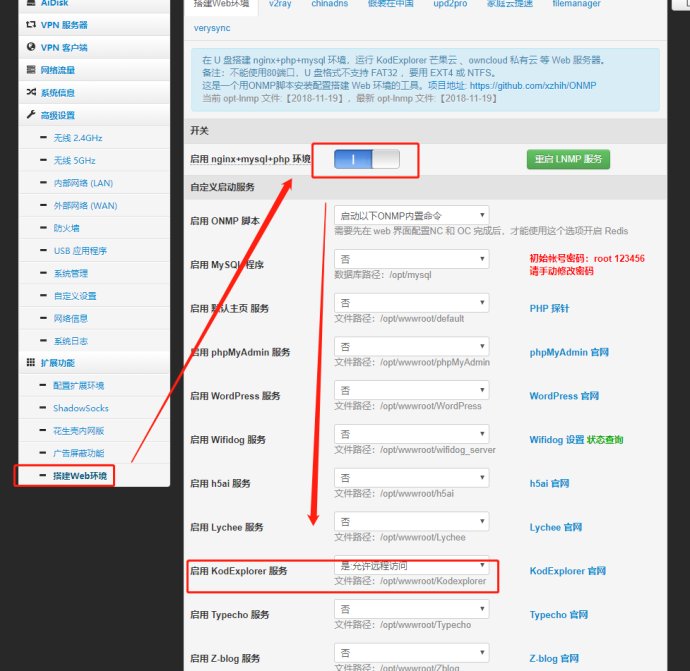
可搭建:网站或个人博客;类似于某云的网盘;远程路由器(等家电)控制,内网的服务穿透至外网;迅雷远程下载;家庭云存储中心等。准备工作: 1、 可以插U盘的路由器(推荐二手小米mini,40包邮不能再多了) 2、 将路由器刷为最新的老毛子固件(参见恩山无线论坛) 3、 掏钱买VPS或者寻找一个免费的FRPS服务器 搭建步骤简述: 1、 路由器,联网,插U盘(事先格式化为EXT4格式,可以用diskgenius免费版)。 2、 进入路由器,扩展环境,配置扩展环境,OPT安装至U盘,保存后,到搭建web环境,打开最上方开关LNMP服务。 本文打开了KodExplorer,该服务为可道云服务https://kodcloud.com;专门用来搭建私有云。 3、 打开上述开关后,查看路由器日志,约需要10分钟左右,web环境便可以搭建完成;如果失败,格式化U盘为EXT4重新插入即可。 可道云可以作为本地使用,地址为192.168.123.1:88 可道云界面如下: 4、 进入花生壳内网版选项;可以选择使用花生壳穿透,此处不推荐。直接选择,frp 5、 Frp启用内网穿透,启动frpc客户端,填写自定义客户端配置文件。Xx为自己填。 ==========客户端配置:========== [common] server_addr= freenat.bid server_port= 7000 privilege_token= frp888 log_file= frpc.log log_level= info log_max_days= 1 login_fail_exit= false protocol= kcp [http_xxxx] type =http local_ip= 192.168.123.1 local_port= 88 use_compression= true use_encryption= true custom_domains= xxxx. freenat.bid http_user= 账户(自己填) http_pwd=密码(自己填) 成功以后,便可以使用手机网访问xxxx. freenat.bid从而访问位于路由器上的可道云。 如需要远程控制路由器,将上述local_port = 88改为local_port = 80即可;或者在添加一个端口映射,即写一个[http_xxxx2]。 高级教程-自己的顶级域名绑定 1、 在阿里云或者腾讯云等购买自己的域名,目前xxxx.top 费用为1元/年。 2、 在阿里云控制台里边,设置自己的域名解析到freenat.bid,主机记录为*;记录内容为freenat.bid。注意,一定要将自己域名的泛解析,解析到frps服务器。 3、 修改frpc中配置信息;将xxxx.freenat.bid改为xxx.xxxx.top。之后便可以使用xxx.xxxx.top进行远程访问。 其他功能简介 1、 迅雷远程下载:配置扩展功能,迅雷远程下载,将生成的激活码,在迅雷远程下载管理界面绑定即可。 2、 广告过滤(过滤所有连接到路由器上设备的广告):如下图配置即可,不在赘述,记得将上方的开关打开。 3、 WiFi桥接:在WiFi2.4G设置中,设置为AP-Client+ap即可,下方AP-Client设为WAN。 暂时就记录这多吧