Android第三十八期 - 评价标签FlowLayout
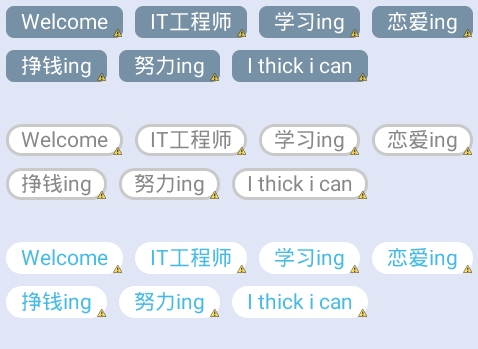
代码已经整理好,这里要说一下,因为手动和Json获取写法不一样。 手动直接xml设置: 1 2 3 4 5 6 7 8 9 10 11 12 13 14 15 16 17 18 19 20 21 22 23 24 25 26 27 28 29 30 31 32 33 34 35 36 37 38 39 40 41 42 43 44 45 46 47 48 49 50 51 52 53 54 55 56 57 58 59 60 61 62 63 64 65 66 67 68 69 70 71 72 73 74 75 76 77 78 79 80 81 82 83 84 85 86 87 88 89 90 91 92 93 94 95 96 97 98 99 100 101 102 103 104 105 106 107 108 109 110 111 112 113 114 115 116 117 118 119 120 121 122 123 124 125 126 127 128 129 130 131 132 133 134 135 136 137 138 <LinearLayoutxmlns:android= "http://schemas.android.com/apk/res/android" xmlns:tools= "http://schemas.android.com/tools" android:layout_width= "fill_parent" android:layout_height= "fill_parent" android:background= "#E1E6F6" android:orientation= "vertical" > <com.zhy.zhy_flowlayout02.FlowLayout android:layout_width= "fill_parent" android:layout_height= "wrap_content" > <TextView style= "@style/text_flag_01" android:text= "Welcome" /> <TextView style= "@style/text_flag_01" android:text= "IT工程师" /> <TextView style= "@style/text_flag_01" android:text= "学习ing" /> <TextView style= "@style/text_flag_01" android:text= "恋爱ing" /> <TextView style= "@style/text_flag_01" android:text= "挣钱ing" /> <TextView style= "@style/text_flag_01" android:text= "努力ing" /> <TextView style= "@style/text_flag_01" android:text= "Ithickican" /> </com.zhy.zhy_flowlayout02.FlowLayout> <com.zhy.zhy_flowlayout02.FlowLayout android:layout_width= "fill_parent" android:layout_height= "wrap_content" android:layout_marginTop= "20dp" > <TextView style= "@style/text_flag_01" android:background= "@drawable/flag_02" android:text= "Welcome" android:textColor= "#888888" /> <TextView style= "@style/text_flag_01" android:background= "@drawable/flag_02" android:text= "IT工程师" android:textColor= "#888888" /> <TextView style= "@style/text_flag_01" android:background= "@drawable/flag_02" android:text= "学习ing" android:textColor= "#888888" /> <TextView style= "@style/text_flag_01" android:background= "@drawable/flag_02" android:text= "恋爱ing" android:textColor= "#888888" /> <TextView style= "@style/text_flag_01" android:background= "@drawable/flag_02" android:text= "挣钱ing" android:textColor= "#888888" /> <TextView style= "@style/text_flag_01" android:background= "@drawable/flag_02" android:text= "努力ing" android:textColor= "#888888" /> <TextView style= "@style/text_flag_01" android:background= "@drawable/flag_02" android:text= "Ithickican" android:textColor= "#888888" /> </com.zhy.zhy_flowlayout02.FlowLayout> <com.zhy.zhy_flowlayout02.FlowLayout android:layout_width= "fill_parent" android:layout_height= "wrap_content" android:layout_marginTop= "20dp" > <TextView style= "@style/text_flag_01" android:background= "@drawable/flag_03" android:text= "Welcome" android:textColor= "#43BBE7" /> <TextView style= "@style/text_flag_01" android:background= "@drawable/flag_03" android:text= "IT工程师" android:textColor= "#43BBE7" /> <TextView style= "@style/text_flag_01" android:background= "@drawable/flag_03" android:text= "学习ing" android:textColor= "#43BBE7" /> <TextView style= "@style/text_flag_01" android:background= "@drawable/flag_03" android:text= "恋爱ing" android:textColor= "#43BBE7" /> <TextView style= "@style/text_flag_01" android:background= "@drawable/flag_03" android:text= "挣钱ing" android:textColor= "#43BBE7" /> <TextView style= "@style/text_flag_01" android:background= "@drawable/flag_03" android:text= "努力ing" android:textColor= "#43BBE7" /> <TextView style= "@style/text_flag_01" android:background= "@drawable/flag_03" android:text= "Ithickican" android:textColor= "#43BBE7" /> </com.zhy.zhy_flowlayout02.FlowLayout> </LinearLayout> 效果如下: Json获取: 1 2 3 4 5 6 7 8 9 10 11 12 13 14 15 16 17 18 19 20 21 22 23 24 25 26 27 28 29 30 31 32 33 34 35 36 37 38 39 40 41 42 43 44 45 46 47 48 49 50 51 52 53 54 55 56 57 58 59 60 61 62 63 64 65 66 67 68 69 70 71 72 73 74 75 76 77 78 79 80 if (message.what== 1 ){ //处理操作 pingjia=newArrayList<Pingjia>(); pingjia.addAll(JsonUtils.getBeanList(message.result, "Items" , Pingjia. class )); FlowLayoutlayout=(FlowLayout)findViewById(R.id.layou23); LinearLayout.LayoutParamsparams=newLinearLayout.LayoutParams( LinearLayout.LayoutParams.WRAP_CONTENT, LinearLayout.LayoutParams.WRAP_CONTENT); params.gravity=Gravity.CENTER_VERTICAL; //加载TextView for ( int i= 0 ;i<pingjia.size();i++){ Pingjiaping=pingjia.get(i); tvNav= new TextView( this ); tvNav.setTextSize( 13 .f); //tvNav.setWidth((int)Math.floor(Double.valueOf(a))); //tvNav.setHeight((int)Math.floor(Double.valueOf(b))); tvNav.setText(ping.getContent()); tvNav.setId(ping.getId()); tvNav.setBackgroundResource(R.anim.flag_022); tvNav.setTag( false ); tvNav.setTextColor(getResources().getColor(R.color.gray)); //tvNav.setPadding(30,10,30,10); //tvNav.setGravity(Gravity.CENTER_HORIZONTAL); tvNav.setOnClickListener(newTvClickListener(tvNav)); layout.addView(tvNav,params); } private TextViewtvNav; private Stringstr= "" ; private StringstrId= "" ; /** *标题栏textview点击事件 * *@authorfei * */ private final class TvClickListener implements View.OnClickListener{ //privateintindex; private TextViewtvNav; public TvClickListener(TextViewtvNav){ super (); //this.index=index; this .tvNav=tvNav; } @Override public void onClick(Viewv){ Booleanisclick=(Boolean)tvNav.getTag(); if (!isclick){ tvNav.setBackgroundResource(R.anim.flag_0444); tvNav.setTextColor(getResources().getColor(R.color.red)); tvNav.setTag( true ); //显示到上面 str=str+tvNav.getText().toString()+ "," ; ed_en.setText(str); //记录Id strId=strId+tvNav.getId()+ "," ; //strId=strId.substring(0,strId.length()-1); //MyLogUtil.v("传->strId",strId); } else { tvNav.setBackgroundResource(R.anim.flag_022); tvNav.setTextColor(getResources().getColor(R.color.gray)); tvNav.setTag( false ); //显示到上面 str=str.replace(tvNav.getText().toString()+ "," , "" ); ed_en.setText(str); //记录Id strId=strId.replace(tvNav.getId()+ "," , "" ); //strId=strId.substring(0,strId.length()-1); //MyLogUtil.v("Delete->strId",strId); } //ToastUtil.showToastLong(tvNav.getId()+"," //+tvNav.getText().toString()); } } xml设置: 1 2 3 4 5 6 7 8 9 10 11 12 13 14 15 16 17 18 19 20 21 22 23 24 25 26 <LinearLayout android:layout_width= "fill_parent" android:layout_height= "wrap_content" android:layout_marginBottom= "@dimen/dimens_10" android:layout_marginLeft= "@dimen/x10" android:layout_marginRight= "@dimen/x10" android:layout_marginTop= "@dimen/y20" android:orientation= "vertical" > <TextView android:layout_width= "wrap_content" android:layout_height= "wrap_content" android:drawableLeft= "@drawable/biaoqian1" android:drawablePadding= "@dimen/dimens_10" android:text= "@string/bq3" android:textColor= "@color/black" android:textSize= "15sp" /> <com.kangxin.patient.utils.FlowLayout android:id= "@+id/layou23" android:layout_width= "fill_parent" android:layout_height= "wrap_content" android:layout_marginTop= "@dimen/y10" android:orientation= "vertical" > </com.kangxin.patient.utils.FlowLayout> </LinearLayout> 效果如下: 最后是自定义layout类FlowLayout: 1 2 3 4 5 6 7 8 9 10 11 12 13 14 15 16 17 18 19 20 21 22 23 24 25 26 27 28 29 30 31 32 33 34 35 36 37 38 39 40 41 42 43 44 45 46 47 48 49 50 51 52 53 54 55 56 57 58 59 60 61 62 63 64 65 66 67 68 69 70 71 72 73 74 75 76 77 78 79 80 81 82 83 84 85 86 87 88 89 90 91 92 93 94 95 96 97 98 99 100 101 102 103 104 105 106 107 108 109 110 111 112 113 114 115 116 117 118 119 120 121 122 123 124 125 126 127 128 129 130 131 132 133 134 135 136 137 138 139 140 141 142 143 144 145 146 147 148 149 150 151 152 153 154 155 156 157 158 159 160 161 162 163 164 165 166 167 168 169 170 171 172 173 174 175 176 177 178 179 180 181 182 183 184 185 186 187 188 189 190 191 192 193 194 195 196 197 198 199 200 201 202 203 204 205 206 207 208 209 210 211 212 213 package com.zhy.zhy_flowlayout02; import java.util.ArrayList; import java.util.List; import android.content.Context; import android.util.AttributeSet; import android.util.Log; import android.view.View; import android.view.ViewGroup; public class FlowLayout extends ViewGroup { private static final StringTAG= "FlowLayout" ; public FlowLayout(Contextcontext,AttributeSetattrs) { super (context,attrs); } @Override protected ViewGroup.LayoutParamsgenerateLayoutParams( ViewGroup.LayoutParamsp) { return new MarginLayoutParams(p); } @Override public ViewGroup.LayoutParamsgenerateLayoutParams(AttributeSetattrs) { return new MarginLayoutParams(getContext(),attrs); } @Override protected ViewGroup.LayoutParamsgenerateDefaultLayoutParams() { return new MarginLayoutParams(LayoutParams.MATCH_PARENT, LayoutParams.MATCH_PARENT); } /** *负责设置子控件的测量模式和大小根据所有子控件设置自己的宽和高 */ @Override protected void onMeasure( int widthMeasureSpec, int heightMeasureSpec) { super .onMeasure(widthMeasureSpec,heightMeasureSpec); //获得它的父容器为它设置的测量模式和大小 int sizeWidth=MeasureSpec.getSize(widthMeasureSpec); int sizeHeight=MeasureSpec.getSize(heightMeasureSpec); int modeWidth=MeasureSpec.getMode(widthMeasureSpec); int modeHeight=MeasureSpec.getMode(heightMeasureSpec); Log.e(TAG,sizeWidth+ "," +sizeHeight); //如果是warp_content情况下,记录宽和高 int width= 0 ; int height= 0 ; /** *记录每一行的宽度,width不断取最大宽度 */ int lineWidth= 0 ; /** *每一行的高度,累加至height */ int lineHeight= 0 ; int cCount=getChildCount(); //遍历每个子元素 for ( int i= 0 ;i<cCount;i++) { Viewchild=getChildAt(i); //测量每一个child的宽和高 measureChild(child,widthMeasureSpec,heightMeasureSpec); //得到child的lp MarginLayoutParamslp=(MarginLayoutParams)child .getLayoutParams(); //当前子空间实际占据的宽度 int childWidth=child.getMeasuredWidth()+lp.leftMargin +lp.rightMargin; //当前子空间实际占据的高度 int childHeight=child.getMeasuredHeight()+lp.topMargin +lp.bottomMargin; /** *如果加入当前child,则超出最大宽度,则的到目前最大宽度给width,类加height然后开启新行 */ if (lineWidth+childWidth>sizeWidth) { width=Math.max(lineWidth,childWidth); //取最大的 lineWidth=childWidth; //重新开启新行,开始记录 //叠加当前高度, height+=lineHeight; //开启记录下一行的高度 lineHeight=childHeight; } else //否则累加值lineWidth,lineHeight取最大高度 { lineWidth+=childWidth; lineHeight=Math.max(lineHeight,childHeight); } //如果是最后一个,则将当前记录的最大宽度和当前lineWidth做比较 if (i==cCount- 1 ) { width=Math.max(width,lineWidth); height+=lineHeight; } } setMeasuredDimension((modeWidth==MeasureSpec.EXACTLY)?sizeWidth :width,(modeHeight==MeasureSpec.EXACTLY)?sizeHeight :height); } /** *存储所有的View,按行记录 */ private List<List<View>>mAllViews= new ArrayList<List<View>>(); /** *记录每一行的最大高度 */ private List<Integer>mLineHeight= new ArrayList<Integer>(); @Override protected void onLayout( boolean changed, int l, int t, int r, int b) { mAllViews.clear(); mLineHeight.clear(); int width=getWidth(); int lineWidth= 0 ; int lineHeight= 0 ; //存储每一行所有的childView List<View>lineViews= new ArrayList<View>(); int cCount=getChildCount(); //遍历所有的孩子 for ( int i= 0 ;i<cCount;i++) { Viewchild=getChildAt(i); MarginLayoutParamslp=(MarginLayoutParams)child .getLayoutParams(); int childWidth=child.getMeasuredWidth(); int childHeight=child.getMeasuredHeight(); //如果已经需要换行 if (childWidth+lp.leftMargin+lp.rightMargin+lineWidth>width) { //记录这一行所有的View以及最大高度 mLineHeight.add(lineHeight); //将当前行的childView保存,然后开启新的ArrayList保存下一行的childView mAllViews.add(lineViews); lineWidth= 0 ; //重置行宽 lineViews= new ArrayList<View>(); } /** *如果不需要换行,则累加 */ lineWidth+=childWidth+lp.leftMargin+lp.rightMargin; lineHeight=Math.max(lineHeight,childHeight+lp.topMargin +lp.bottomMargin); lineViews.add(child); } //记录最后一行 mLineHeight.add(lineHeight); mAllViews.add(lineViews); int left= 0 ; int top= 0 ; //得到总行数 int lineNums=mAllViews.size(); for ( int i= 0 ;i<lineNums;i++) { //每一行的所有的views lineViews=mAllViews.get(i); //当前行的最大高度 lineHeight=mLineHeight.get(i); Log.e(TAG, "第" +i+ "行:" +lineViews.size()+ "," +lineViews); Log.e(TAG, "第" +i+ "行,:" +lineHeight); //遍历当前行所有的View for ( int j= 0 ;j<lineViews.size();j++) { Viewchild=lineViews.get(j); if (child.getVisibility()==View.GONE) { continue ; } MarginLayoutParamslp=(MarginLayoutParams)child .getLayoutParams(); //计算childView的left,top,right,bottom int lc=left+lp.leftMargin; int tc=top+lp.topMargin; int rc=lc+child.getMeasuredWidth(); int bc=tc+child.getMeasuredHeight(); Log.e(TAG,child+ ",l=" +lc+ ",t=" +t+ ",r=" +rc+ ",b=" +bc); child.layout(lc,tc,rc,bc); left+=child.getMeasuredWidth()+lp.rightMargin +lp.leftMargin; } left= 0 ; top+=lineHeight; } } } 最后感谢hongyang大神~Loader大神~ 本文转自 吴雨声 51CTO博客,原文链接:http://blog.51cto.com/liangxiao/1663535,如需转载请自行联系原作者