Golang 基于chrome浏览器语音识别web演示系统WebHTK开发之 UI篇
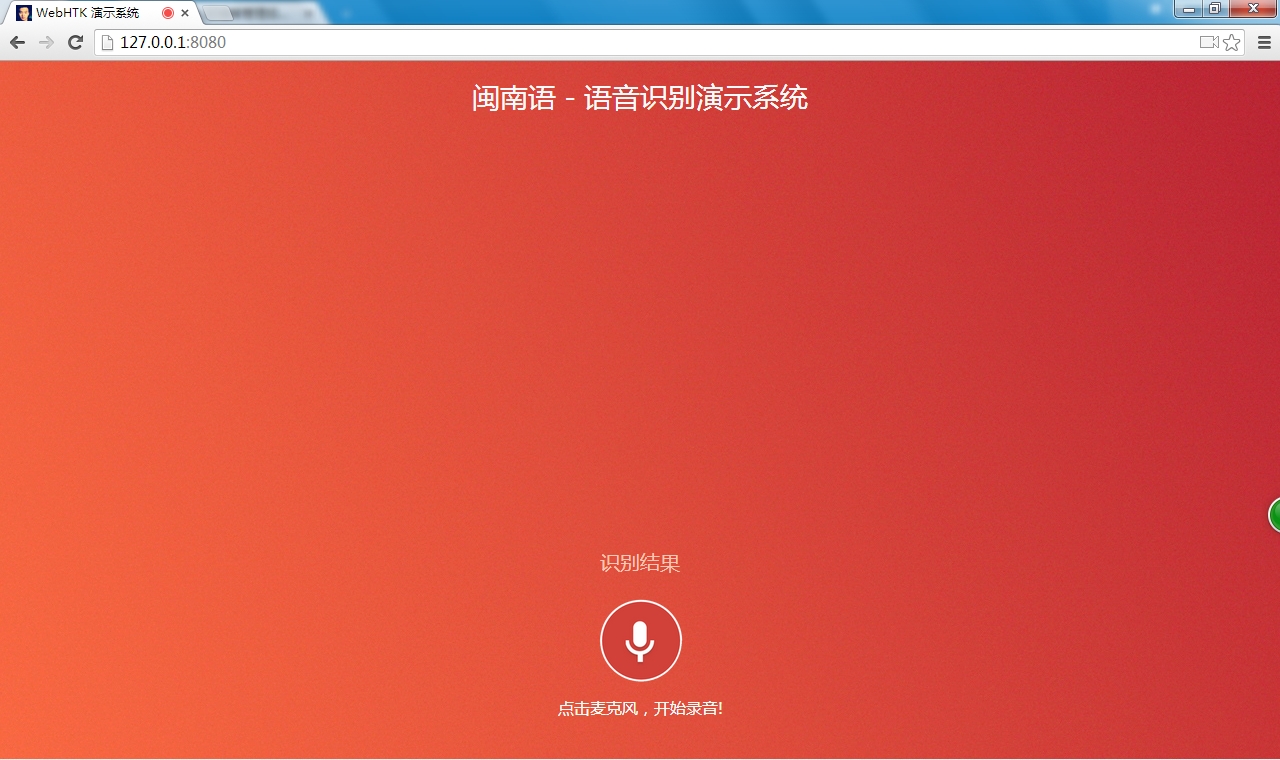
没啥好说的,直接上现阶段的HTML代码,后续修改,再更新该篇博客。 record.html: 1 2 3 4 5 6 7 8 9 10 11 12 13 14 15 16 17 18 19 20 21 22 23 24 25 26 27 28 29 30 31 32 33 34 35 36 37 38 39 40 41 42 43 44 45 46 47 48 49 50 51 52 53 54 55 56 57 58 59 60 61 62 63 64 65 66 67 68 69 70 71 72 73 74 75 76 77 78 79 80 81 82 83 84 85 86 87 88 89 90 91 92 93 94 95 96 <!DOCTYPE html> <html> <head> <meta charset= "utf-8" /> <meta http-equiv= "X-UA-Compatible" content= "IE=edge" /> <meta name= "viewport" content= "width=device-width, initial-scale=1.0, maximum-scale=1.0, user-scalable=no" /> <meta name= "keywords" content= "PONPON,HTK,Go语言" /> <meta name= "description" content= "基于Beego开发语音识别演示系统" /> <meta name= "generator" content= "PONPON" /> <link href= "/static/css/bootstrap.min.css" rel= "stylesheet" > <link href= "/static/css/docs.css" rel= "stylesheet" > <link href= "http://cdn.bootcss.com/highlight.js/7.3/styles/github.min.css" rel= "stylesheet" > <link rel= "shortcut icon" href= "/static/img/Logoicon.jpg" > <link rel= "stylesheet" href= "http://libs.baidu.com/fontawesome/4.0.3/css/font-awesome.min.css" /> <link rel= "alternate" type= "application/rss+xml" href= "/rss.xml" /> <script type= "text/javascript" src= "/static/lib/recorder.js" > </script> <script type= "text/javascript" src= "/static/lib/jquery-1.10.1.min.js" > </script> <script type= "text/javascript" src= "/static/lib/recController.js" > </script> <title>WebHTK 演示系统</title> </head> <body> <nav id= "header" > <div class= "container960 text-center" > <h3 id= "header-h" class= "center" >闽南语 - 语音识别演示系统</h3> <ul id= "resultbox" class= "center" style= "padding-top:425px;font-size:20px;text-align: center;color:#FFC8B6;font-family:'微软雅黑'" > <li >识别结果</li> </ul> <form style= "padding-top:20px;" > <a id= "img" href= "javascript://" > <img src= "/static/img/aa.png" style= "width:85px;height:85px;" alt= "" /> </a> </form> <div id= "message" style= "padding-top:10px;font-size:16px;color:#F5FFFA;text-align: center;font-family:'微软雅黑'" >点击麦克风,开始录音!</div> <script type= "text/javascript" > var recording = false ; function test() { if (!recording) { document.getElementById( "img" ).innerHTML= "<img src='/static/img/a1.png' style='width:85px;height:85px;'' alt=''/>" ; toRecord(); recording= true ; } else { document.getElementById( "img" ).innerHTML= "<img src='/static/img/aa.png' style='width:85px;height:85px;'' alt=''/>" ; toSend(); recording = false ; } }; function toRecord(){ rec.record(); var dd = ws.send( "start" ); $( "#message" ).text( "再次点击,结束录音!" ); intervalKey = setInterval( function () { rec.exportWAV( function (blob) { rec.clear(); ws.send(blob); }); }, 300); } function toSend(){ rec.stop(); if (intervalKey == null ) { $( "#message" ).text( "请先录音再发送!" ); return }; ws.send(sampleRate); ws.send(channels); ws.send( "stop" ); rec.clear(); clearInterval(intervalKey); intervalKey = null ; } </script> </div> </nav> <audio class= "hide" controls autoplay></audio> </body> </html> recorder.js: 1 2 3 4 5 6 7 8 9 10 11 12 13 14 15 16 17 18 19 20 21 22 23 24 25 26 27 28 29 30 31 32 33 34 35 36 37 38 39 40 41 42 43 44 45 46 47 48 49 50 51 52 53 54 55 56 57 58 59 60 61 62 63 64 65 66 67 68 69 70 71 72 73 74 75 76 77 78 79 80 81 82 ( function (window) { var WORKER_PATH = '/static/lib/recorderWorker.js' ; var Recorder = function (source, chan, cfg) { var config = cfg || {}; var channels = chan || 1; var bufferLen = config.bufferLen || 8192; this .context = source.context; this .node = this .context.createJavaScriptNode(bufferLen, channels, channels); var worker = new Worker(config.workerPath || WORKER_PATH); worker.postMessage({ command: 'init' , config: { sampleRate: this .context.sampleRate } }); var recording = false , currCallback; this .node.onaudioprocess = function (e) { if (!recording) return ; worker.postMessage({ command: 'record' , buffer: [ e.inputBuffer.getChannelData(0) ] }); } this .configure = function (cfg) { for ( var prop in cfg) { if (cfg.hasOwnProperty(prop)) { config[prop] = cfg[prop]; } } } this .record = function () { recording = true ; } this .stop = function () { recording = false ; } this .clear = function () { worker.postMessage({ command: 'clear' }); } this .getBuffer = function (cb) { currCallback = cb || config.callback; worker.postMessage({ command: 'getBuffer' }) } this .exportWAV = function (cb, type) { currCallback = cb || config.callback; type = type || config.type || 'audio/wav' ; if (!currCallback) throw new Error( 'Callback not set' ); worker.postMessage({ command: 'exportWAV' , type: type }); } worker.onmessage = function (e) { var blob = e.data; currCallback(blob); } source.connect( this .node); this .node.connect( this .context.destination); }; window.Recorder = Recorder; })(window); recorderWorker.js: 1 2 3 4 5 6 7 8 9 10 11 12 13 14 15 16 17 18 19 20 21 22 23 24 25 26 27 28 29 30 31 32 33 34 35 36 37 38 39 40 41 42 43 44 45 46 47 48 49 50 51 52 53 54 55 56 57 58 59 60 61 62 63 64 65 66 67 68 69 70 71 72 73 74 75 76 77 78 79 80 81 82 83 84 85 86 87 88 89 90 91 92 93 94 95 96 97 98 99 100 101 102 103 104 105 106 107 108 109 110 111 112 113 114 115 116 117 118 119 120 121 122 123 124 125 126 127 128 var recLength = 0, recBuffersL = [], sampleRate; this .onmessage = function (e) { switch (e.data.command) { case 'init' : init(e.data.config); break ; case 'record' : record(e.data.buffer); break ; case 'exportWAV' : exportWAV(e.data.type); break ; case 'getBuffer' : getBuffer(); break ; case 'clear' : clear(); break ; } }; function init(config) { sampleRate = config.sampleRate; } function record(inputBuffer) { recBuffersL.push(inputBuffer[0]); recLength += inputBuffer[0].length; } function exportWAV(type) { var bufferL = mergeBuffers(recBuffersL, recLength); var interleaved = interleave(bufferL); var dataview = encodeWAV(interleaved); var audioBlob = new Blob([dataview], { type: type }); this .postMessage(audioBlob); } function getBuffer() { var buffers = []; buffers.push(mergeBuffers(recBuffersL, recLength)); this .postMessage(buffers); } function clear(inputBuffer) { recLength = 0; recBuffersL = []; } function mergeBuffers(recBuffers, recLength) { var result = new Float32Array(recLength); var offset = 0; for ( var i = 0; i < recBuffers.length; i++) { result.set(recBuffers[i], offset); offset += recBuffers[i].length; } return result; } function interleave(inputL) { var length; var result; var index = 0, inputIndex = 0; if (sampleRate == 48000) { length = inputL.length / 6; result = new Float32Array(length); while (index < length) { result[index++] = (inputL[inputIndex++] + inputL[inputIndex++] + inputL[inputIndex++] + inputL[inputIndex++] + inputL[inputIndex++] + inputL[inputIndex++]) / 6; } } else if (sampleRate == 44100) { length = inputL.length / 6; result = new Float32Array(length); while (index < length) { if (inputIndex % 12 == 0) { result[index++] = (inputL[inputIndex] + inputL[inputIndex++] + inputL[inputIndex++] + inputL[inputIndex++] + inputL[inputIndex++] + inputL[inputIndex++] + inputL[inputIndex++]) / 7; } else { result[index++] = (inputL[inputIndex++] + inputL[inputIndex++] + inputL[inputIndex++] + inputL[inputIndex++] + inputL[inputIndex++] + inputL[inputIndex++]) / 6; }; } } else { length = inputL.length; result = new Float32Array(length); while (index < length) { result[index++] = inputL[inputIndex++]; } }; return result; } function floatTo16BitPCM(output, offset, input) { for ( var i = 0; i < input.length; i++, offset += 2) { var s = Math.max(-1, Math.min(1, input[i])); output.setInt16(offset, s < 0 ? s * 0x8000 : s * 0x7FFF, true ); } } function writeString(view, offset, string) { for ( var i = 0; i < string.length; i++) { view.setUint8(offset + i, string.charCodeAt(i)); } } function encodeWAV(samples) { var buffer = new ArrayBuffer(samples.length * 2); var view = new DataView(buffer); floatTo16BitPCM(view, 0, samples); return view; } recController.js: 1 2 3 4 5 6 7 8 9 10 11 12 13 14 15 16 17 18 19 20 21 22 23 24 25 26 27 28 29 30 31 32 33 34 35 36 37 38 39 40 41 42 43 44 45 46 47 48 49 50 51 52 var onFail = function (e) { console.log( 'Rejected!' , e); }; var onSuccess = function (s) { var context = new webkitAudioContext(); var mediaStreamSource = context.createMediaStreamSource(s); rec = new Recorder(mediaStreamSource, channels); sampleRate = 8000; } navigator.getUserMedia = navigator.getUserMedia || navigator.webkitGetUserMedia || navigator.mozGetUserMedia || navigator.msGetUserMedia; var rec; var intervalKey = null ; var audio = document.querySelector( '#audio' ); var sampleRate; var channels = 1; function startRecording() { if (navigator.getUserMedia) { navigator.getUserMedia({ audio: true }, onSuccess, onFail); } else { console.log( 'navigator.getUserMedia not present' ); } } startRecording(); //-------------------- var ws = new WebSocket( 'ws://' + window.location.host + '/join' ); ws.onopen = function () { console.log( "Openened connection to websocket" ); }; ws.onclose = function () { console.log( "Close connection to websocket" ); } ws.onerror = function () { console.log( "Cannot connection to websocket" ); } ws.onmessage = function (result) { var data = JSON.parse(result.data); console.log( '识别结果:' + data.Pinyin); var result = document.getElementById( "resultbox" ) result.getElementsByTagName( "li" )[0].innerHTML = data.Hanzi; document.getElementById( "message" ).innerHTML = "点击麦克风,开始录音!" ; } 进入页面: 正在录音: 识别结果,目前还为将拼音转换为汉字,下图为“点亮星光”的显示结果图: 本文转自 ponpon_ 51CTO博客,原文链接:http://blog.51cto.com/liuxp0827/1367846,如需转载请自行联系原作者