首页 文章 精选 留言 我的

精选列表

搜索[部署],共10000篇文章
优秀的个人博客,低调大师

Centos7.3 Docker安装部署学习记录1

一、Docker基础环境的安装 1. 环境说明 本机采用操作系统如下: CentOS-7.3-X86-64,内核3.10 x64位,docker 1.12.x版本。 建议采用CentOS7版本或ubuntu版本,本文采用CentOS7即CentOS-7-x86_64-DVD-1611.iso版本最小化安装。 Docker可以在虚拟机环境中运行进行使用测试。本文出自:http://koumm.blog.51cto.com/ 2. 主机网络 1)关闭firewalld防火墙和SELinux setenforce 0 sed -i 's#SELINUX=enforcing#SELINUX=disabled#g' /etc/sysconfig/selinux systemctl disable firewalld systemctl stop firewalld docker是必须要防火墙功能模块的,个人目前用iptables systemctl disable iptables.service systemctl stop iptables.service 注意最小化需要补充安装的软件包: yum install vim net-tools iptables-config 2)配置hosts文件(主机名称) echo "192.168.1.90 docker1" >> /etc/hosts 3. 安装Docker软件包 1)可以直接安装包yum源 # yum install -y docker 2)配置docker开机自启动以及启动服务 # systemctl start docker.service # systemctl enable docker.service 3)查看docker服务器,表示docker已安装成功 查看版本:docker version 帮助信息:docker --help 概要信息:docker info 镜像查看:docker images 进程查看:docker ps -a 搜索镜像:docker search centos #搜索可用docker镜像 示例: 表示docker已安装成功。 1 2 3 4 5 6 7 8 9 10 11 12 13 14 15 16 17 18 19 20 21 22 23 24 25 26 27 28 29 30 31 32 33 34 35 36 37 38 39 40 41 42 本文转自 koumm 51CTO博客,原文链接:http://blog.51cto.com/koumm/1936465 ,如需转载请自行联系原作者

优秀的个人博客,低调大师

openstack学习笔记六 多节点部署之keystone

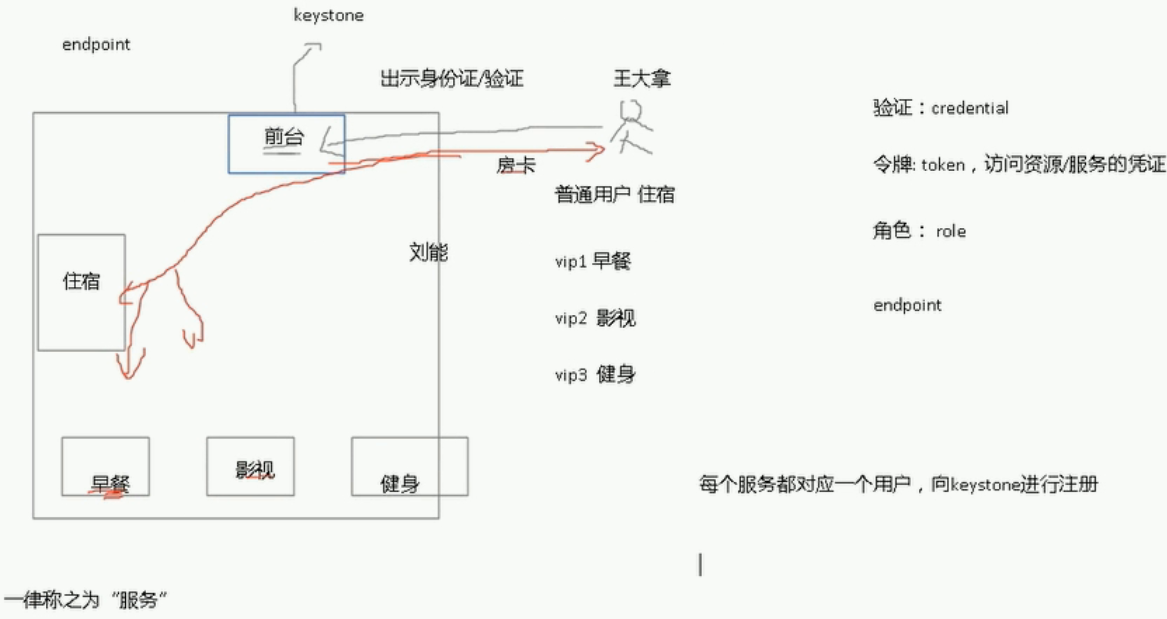
keystone 对用户进行验证,每个组件必须得实用一个用户向keystone进行注册,只有成功了,那么这个组件才能正常工作。所以当我们在创建其他组件的时候,也包括keystone本身,都得为这个组件创建一个用户名和密码 keystone也必须知道这些组件到底在什么地方,比如在那台主机上。 User 住宾馆的人 Credentials 开启房间的钥匙 Authentication 宾馆为了拒绝不必要的人进出宾馆,专门设置的机制,只有拥有钥匙的人才能进出 Token 也是一种钥匙,有点特别 Tenant 宾馆 Service 宾馆可以提供的服务类别,比如,饮食类,娱乐类 Endpoint 具体的一种服务,比如吃烧烤,打羽毛球 Role VIP 等级,VIP越高,享有越高的权限 1 2 3 4 5 6 7 8 9 10 11 12 13 14 15 16 17 [root@h1~] #sourcekeystonerc_admin [root@h1~(keystone_admin)] #keystoneendpoint-list +----------------------------------+-----------+-------------------------------------------------+-------------------------------------------------+--------------------------------------------+----------------------------------+ | id |region|publicurl|internalurl|adminurl|service_id| +----------------------------------+-----------+-------------------------------------------------+-------------------------------------------------+--------------------------------------------+----------------------------------+ |03bf88d48e2648149242a571684fbfce|RegionOne|http: //192 .168.1.201:9696|http: //192 .168.1.201:9696|http: //192 .168.1.201:9696|1100243c5a694bc5857218dd0543297b| |1b5ccdf306484fefadc63d1eeb20de5d|RegionOne|http: //127 .0.0.1:8774 /v3 |http: //127 .0.0.1:8774 /v3 |http: //127 .0.0.1:8774 /v3 |4bda82ded4db46f68428d4e00247c14c| |2408bc6cb5164053b86c0983fd39961a|RegionOne|http: //192 .168.1.201:8080 /v1/AUTH_ %(tenant_id)s|http: //192 .168.1.201:8080 /v1/AUTH_ %(tenant_id)s|http: //192 .168.1.201:8080|30c62c3c0797462a8bd4ff059a71296e| |432e655e85614a5eb69b7de5c5aacf34|RegionOne|http: //192 .168.1.201:8776 /v2/ %(tenant_id)s|http: //192 .168.1.201:8776 /v2/ %(tenant_id)s|http: //192 .168.1.201:8776 /v2/ %(tenant_id)s|5d60cb24769e403cb10bb70cb1077f2b| |4d5c1e505b30467c9966a5e5e93feef0|RegionOne|http: //192 .168.1.201:9292|http: //192 .168.1.201:9292|http: //192 .168.1.201:9292|87d30bb0dd8e44ccba00127f77831e9e| |8683d84884d74e7c8a73513260aec774|RegionOne|http: //192 .168.1.201:8080|http: //192 .168.1.201:8080|http: //192 .168.1.201:8080|e6ced100d94e4f3b86cccfc82e12b83a| |8fa0e177bac746f79e229f16954506fb|RegionOne|http: //192 .168.1.201:8776 /v1/ %(tenant_id)s|http: //192 .168.1.201:8776 /v1/ %(tenant_id)s|http: //192 .168.1.201:8776 /v1/ %(tenant_id)s|dc75a046272548db99e1cbbe93c2025c| |9006207b29a04700922ee55905a7f445|RegionOne|http: //192 .168.1.201:8774 /v2/ %(tenant_id)s|http: //192 .168.1.201:8774 /v2/ %(tenant_id)s|http: //192 .168.1.201:8774 /v2/ %(tenant_id)s|1c9e6e4d00824327bfe4e8e7175317e1| |a9ec253a705c4b3c9848b5bed32e9768|RegionOne|http: //192 .168.1.201:8773 /services/Cloud |http: //192 .168.1.201:8773 /services/Cloud |http: //192 .168.1.201:8773 /services/Admin |81bbcf83509a42e9a867914cde84e9d4| |bcab3bbc3281451494428315b24b0dba|RegionOne|http: //192 .168.1.201:8777|http: //192 .168.1.201:8777|http: //192 .168.1.201:8777|8f54fc4364de49efbeb72020bf2aa176| |e3d9a4fa64bd441ea3fe143b1d72b8a4|RegionOne|http: //192 .168.1.201:5000 /v2 .0|http: //192 .168.1.201:5000 /v2 .0|http: //192 .168.1.201:35357 /v2 .0|02ce8247c5924913a73422bcf5275c40| +----------------------------------+-----------+-------------------------------------------------+-------------------------------------------------+--------------------------------------------+----------------------------------+ 1 2 3 4 5 6 7 8 9 10 11 12 13 14 15 16 [root@h1~(keystone_admin)] #keystoneservice-list服务 +----------------------------------+------------+--------------+--------------------------------+ | id |name| type |description| +----------------------------------+------------+--------------+--------------------------------+ |8f54fc4364de49efbeb72020bf2aa176|ceilometer|metering|OpenstackMeteringService| |dc75a046272548db99e1cbbe93c2025c|cinder|volume|CinderService| |5d60cb24769e403cb10bb70cb1077f2b|cinderv2|volumev2|CinderServicev2| |87d30bb0dd8e44ccba00127f77831e9e|glance|image|OpenStackImageService| |02ce8247c5924913a73422bcf5275c40|keystone|identity|OpenStackIdentityService| |1100243c5a694bc5857218dd0543297b|neutron|network|NeutronNetworkingService| |1c9e6e4d00824327bfe4e8e7175317e1|nova|compute|OpenstackComputeService| |81bbcf83509a42e9a867914cde84e9d4|nova_ec2|ec2|EC2Service| |4bda82ded4db46f68428d4e00247c14c|novav3|computev3|OpenstackComputeServicev3| |30c62c3c0797462a8bd4ff059a71296e|swift|object-store|OpenstackObject-StoreService| |e6ced100d94e4f3b86cccfc82e12b83a|swift_s3|s3|OpenstackS3Service| +----------------------------------+------------+--------------+--------------------------------+ 1 2 3 4 5 6 7 8 9 [root@h1~(keystone_admin)] #keystonerole-list角色 +----------------------------------+---------------+ | id |name| +----------------------------------+---------------+ |7455105a501842e097e7825257eb5be4|ResellerAdmin| |5d2a5d2f80d442e09b9c3d514ded412e|SwiftOperator| |9fe2ff9ee4384b1894a90878d3e92bab|_member_| |794f590d02344bafb280f37ff29433ae|admin| +----------------------------------+---------------+ 1 2 3 4 5 6 7 8 [root@h1~(keystone_admin)] #keystonerole-create--nametest1 +----------+----------------------------------+ |Property|Value| +----------+----------------------------------+ | id |467d36315d9c4e529e9400c606f8d7a2| |name|test1| +----------+----------------------------------+ [root@h1~(keystone_admin)] #keystonerole-deletetest1 1 2 3 4 5 6 7 8 9 10 11 12 13 14 15 16 17 18 19 20 21 22 23 [root@h1~(keystone_admin)] #keystoneuser-list用户 +----------------------------------+------------+---------+----------------------+ | id |name|enabled|email| +----------------------------------+------------+---------+----------------------+ |1627cc3d61c04f9db9608e9703a01371|admin|True|root@localhost| |04247710cdf34914a7f5b315ab166731|ceilometer|True|ceilometer@localhost| |cb5e12e30a4a4c1dae57255c184b8b30|cinder|True|cinder@localhost| |632fb20205ea4c40988d7d65b2844ff6|glance|True|glance@localhost| |23c4fb48a5a247d68e50c6b74fb6f035|http|True|| |80069f5c8edc454b8038e7f116df4ff5|neutron|True|neutron@localhost| |adbcaaf58d09495988b57be8e82b4e6b|nova|True|nova@localhost| |4f488ff4859e4973afefea6e7872ed83|swift|True|swift@localhost| +----------------------------------+------------+---------+----------------------+ [root@h1~(keystone_admin)] #keystoneuser-create--namehequan--passhequan--emailhequan2011@sina.com +----------+----------------------------------+ |Property|Value| +----------+----------------------------------+ |email|hequan2011@sina.com| |enabled|True| | id |9d12907283b64b02a80f1e98074a9c84| |name|hequan| |username|hequan| +----------+----------------------------------+ 1 2 3 4 [root@h1~(keystone_admin)] #keystoneuser-gethequan##查看信息 [root@h1~(keystone_admin)] #keystoneuser-deletehequan [root@h1~(keystone_admin)] #keystoneuser-password-update--passhequan1hequan##密码更新 [root@h1~(keystone_admin)] #keystoneuser-role-add--userhequan--role_member_--tenant=http#划分角色和租户 1 2 3 4 5 6 7 8 [root@h1~(keystone_admin)] #keystonetenant-list租户 +----------------------------------+----------+---------+ | id |name|enabled| +----------------------------------+----------+---------+ |43986fb013804aa0a04ca277e4d0e69c|admin|True| |1af10fa8077e4b52b3427786bb15e968|http|True| |842da711a1b740ddbf006a9f0a7ee116|services|True| ##内置服务默认都属于services +----------------------------------+----------+---------+ 1 2 3 4 5 6 7 8 9 10 [root@h1~(keystone_admin)] #keystonetenant-create--name123###创建租户123 +-------------+----------------------------------+ |Property|Value| +-------------+----------------------------------+ |description|| |enabled|True| | id |c2a2e3aadf614bb08b1fc943157b668e| |name|123| +-------------+----------------------------------+ [root@h1~(keystone_admin)] #keystonetenant-delete123 配置安装keystone 首先创建数据库 使用token登陆keystone 创建服务 endpoint 创建用户 关闭token登陆,使用admin登陆 基本环境 1 2 3 4 5 6 7 192.168.1.204h4.hequan.comh4 ##keystone systemctlstopNetworkManager systemctldisableNetworkManager [root@h4~] #yuminstallcentos-release-openstack-liberty 1 2 3 4 5 6 7 8 9 [root@h4~] #yuminstallopenstack-keystoneopenstack-utilsopenstack-selinux-y [root@h4~] #openstack-db--init--servicekeystone--rootpw123456--passwordkeystone keystonedefaultDBisnotmysql.Wouldyouliketoresettomysqlnow?(y /n ):y mysql-serverisnotinstalled.Wouldyouliketo install itnow?(y /n ):y mysqldisnotrunning.Wouldyouliketostartitnow?(y /n ):y VerifiedconnectivitytoMySQL. Creating 'keystone' database. Initializingthekeystonedatabase,pleasewait... Complete! 1 2 3 4 5 6 7 8 9 10 11 12 13 14 15 16 17 18 19 20 [root@h4~] #mysql-uroot-p123456 MariaDB[(none)]>showdatabases; [root@h4keystone] #opensslrand-hex10 73fa731f6fa567630fdd [root@h4keystone] #pwd /etc/keystone [root@h4keystone] #vimkeystone.conf admin_token=73fa731f6fa567630fdd rabbit_host=localhost rabbit_port=5672 rabbit_hosts=$rabbit_host:$rabbit_port rabbit_use_ssl= false rabbit_userid=guest rabbit_password=guest rabbit_login_method=AMQPLAIN rabbit_virtual_host=/ connection=mysql: //keystone :keystone@192.168.1.204 /keystone ###用到上面写的用户名和密码 启动服务 1 2 3 4 5 6 [root@h4keystone] #systemctllist-unit-files|grepkeyston openstack-keystone.servicedisabled [root@h4keystone] #systemctlstartopenstack-keystone.service [root@h4keystone] #systemctlenableopenstack-keystone.service 现在没有用户,只有token 1 2 3 4 5 6 7 8 9 10 11 12 13 14 15 16 17 18 19 20 21 22 23 24 25 26 27 28 29 cat keystone_token ##创建文件 export SERVICE_TOKEN=73fa731f6fa567630fdd export SERVICE_ENDPOINT=http: //192 .168.1.204:35357/v2.0 export PS1= '[\u@\h\W(keystone_token)]\$' source keystone_token ps aux| grep keystone keystone33431.51.632184468704?Ss20:100:05 /usr/bin/python2 /usr/bin/keystone-all netstat -lntup| grep 35357 tcp000.0.0.0:353570.0.0.0:*LISTEN3343 /python2 keystoneservice-list [root@h4~] #keystoneservice-create--namekeystone--typeidentity--description="keystone" +-------------+----------------------------------+ |Property|Value| +-------------+----------------------------------+ |description|keystone| |enabled|True| | id |e0c6163cb7dd42098225f13a3fa4220e| |name|keystone| | type |identity| +-------------+----------------------------------+ 1 2 3 4 5 6 7 8 9 10 11 12 13 14 15 16 17 18 19 20 21 22 23 24 25 26 [root@h4~] #keystoneendpoint-create--service-ide0c6163cb7dd42098225f13a3fa4220e--publicurl''--internalurl''--adminurl'' 可以找一个模板去抄 [root@h1~(keystone_admin)] #keystoneendpoint-list +----------------------------------+-----------+-------------------------------------------------+-------------------------------------------------+--------------------------------------------+----------------------------------+ | id |region|publicurl|internalurl|adminurl|service_id| +----------------------------------+-----------+-------------------------------------------------+-------------------------------------------------+--------------------------------------------+----------------------------------+ |e3d9a4fa64bd441ea3fe143b1d72b8a4|RegionOne|http: //192 .168.1.201:5000 /v2 .0|http: //192 .168.1.201:5000 /v2 .0|http: //192 .168.1.201:35357 /v2 .0|02ce8247c5924913a73422bcf5275c40| [root@h1~(keystone_admin)] #keystoneservice-list |02ce8247c5924913a73422bcf5275c40|keystone|identity|OpenStackIdentityService| [root@h4~] #keystoneendpoint-create--service-ide0c6163cb7dd42098225f13a3fa4220e--publicurl'http://192.168.1.201:5000/v2.0'--internalurl''--adminurl''--publicurl'http://192.168.1.204:5000/v2.0'--internalurl'http://192.168.1.204:5000/v2.0'--adminurl'http://192.168.1.204:35357/v2.0' +-------------+----------------------------------+ |Property|Value| +-------------+----------------------------------+ |adminurl|http: //192 .168.1.204:35357 /v2 .0| | id |810e5faef22f44aebd17f55d1808e3c5| |internalurl|http: //192 .168.1.204:5000 /v2 .0| |publicurl|http: //192 .168.1.204:5000 /v2 .0| |region|regionOne| |service_id|e0c6163cb7dd42098225f13a3fa4220e| +-------------+----------------------------------+ 创建管理员 1 2 3 4 5 6 7 8 9 10 11 12 13 14 15 16 17 18 19 20 21 22 23 24 25 26 27 28 29 30 31 [root@h4~] #keystonetenant-create--nameadmin +-------------+----------------------------------+ |Property|Value| +-------------+----------------------------------+ |description|| |enabled|True| | id |3a331dd90062458b8fcc259ce84be0e5| |name|admin| +-------------+----------------------------------+ [root@h4~] #keystonerole-create--nameadmin +----------+----------------------------------+ |Property|Value| +----------+----------------------------------+ | id |c63ed09a433144108a23a592632e2e08| |name|admin| +----------+----------------------------------+ [root@h4~] #keystoneuser-create--nameadmin--pass123456 +----------+----------------------------------+ |Property|Value| +----------+----------------------------------+ |email|| |enabled|True| | id |172b6a61991e4fbeafe9039688eb2afc| |name|admin| |username|admin| +----------+----------------------------------+ [root@h4~] #keystoneuser-role-add--useradmin--tenantadmin--roleadmin 1 2 3 4 5 6 7 8 9 10 11 12 13 14 15 16 17 18 [root@h4~] #cpkeystone_tokenkeystone_token_admin [root@h4~(keystone_admin)] #catkeystone_token_admin unset SERVICE_TOKEN unset SERVICE_ENDPOINT export OS_TENANT_NAME=admin export OS_USERNAME=admin export OS_PASSWORD=123456 export OS_AUTH_URL=http: //192 .168.1.204:35357 /v2 .0 export PS1= '[\u@\h\W(keystone_admin)]\$' [root@h4~(keystone_admin)] #keystoneuser-list##可以看到就表示成功了 +----------------------------------+-------+---------+-------+ | id |name|enabled|email| +----------------------------------+-------+---------+-------+ |172b6a61991e4fbeafe9039688eb2afc|admin|True|| +----------------------------------+-------+---------+-------+ 关闭token验证 1 2 12 #admin_token=73fa731f6fa567630fdd 13 至此安装完成。 本文转自 295631788 51CTO博客,原文链接:http://blog.51cto.com/hequan/1796108,如需转载请自行联系原作者

资源下载

更多资源
Mario

Mario

马里奥是站在游戏界顶峰的超人气多面角色。马里奥靠吃蘑菇成长,特征是大鼻子、头戴帽子、身穿背带裤,还留着胡子。与他的双胞胎兄弟路易基一起,长年担任任天堂的招牌角色。

腾讯云软件源

腾讯云软件源

为解决软件依赖安装时官方源访问速度慢的问题,腾讯云为一些软件搭建了缓存服务。您可以通过使用腾讯云软件源站来提升依赖包的安装速度。为了方便用户自由搭建服务架构,目前腾讯云软件源站支持公网访问和内网访问。

Spring

Spring

Spring框架(Spring Framework)是由Rod Johnson于2002年提出的开源Java企业级应用框架,旨在通过使用JavaBean替代传统EJB实现方式降低企业级编程开发的复杂性。该框架基于简单性、可测试性和松耦合性设计理念,提供核心容器、应用上下文、数据访问集成等模块,支持整合Hibernate、Struts等第三方框架,其适用范围不仅限于服务器端开发,绝大多数Java应用均可从中受益。

Rocky Linux

Rocky Linux

Rocky Linux(中文名:洛基)是由Gregory Kurtzer于2020年12月发起的企业级Linux发行版,作为CentOS稳定版停止维护后与RHEL(Red Hat Enterprise Linux)完全兼容的开源替代方案,由社区拥有并管理,支持x86_64、aarch64等架构。其通过重新编译RHEL源代码提供长期稳定性,采用模块化包装和SELinux安全架构,默认包含GNOME桌面环境及XFS文件系统,支持十年生命周期更新。


用户登录
用户注册