分布式--ActiveMQ 消息中间件(一)
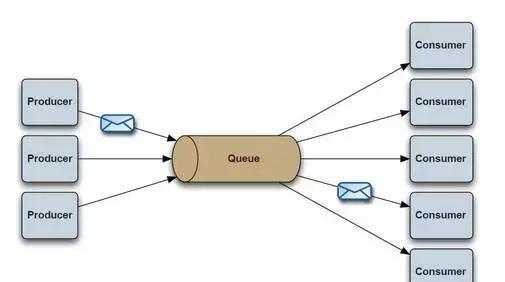
1. ActiveMQ 1). ActiveMQ ActiveMQ是Apache所提供的一个开源的消息系统,完全采用Java来实现,因此,它能很好地支持J2EE提出的JMS(Java Message Service,即Java消息服务)规范。JMS是一组Java应用程序接口,它提供消息的创建、发送、读取等一系列服务。JMS提供了一组公共应用程序接口和响应的语法,类似于Java数据库的统一访问接口JDBC,它是一种与厂商无关的API,使得Java程序能够与不同厂商的消息组件很好地进行通信。 2). Java Message Service(JMS) JMS支持两种消息发送和接收模型。 一种称为P2P(Ponit to Point)模型,即采用点对点的方式发送消息。P2P模型是基于队列的,消息生产者发送消息到队列,消息消费者从队列中接收消息,队列的存在使得消息的异步传输称为可能,P2P模型在点对点的情况下进行消息传递时采用。 图1.png 另一种称为Pub/Sub(Publish/Subscribe,即发布-订阅)模型,发布-订阅模型定义了如何向一个内容节点发布和订阅消息,这个内容节点称为topic(主题)。主题可以认为是消息传递的中介,消息发布这将消息发布到某个主题,而消息订阅者则从主题订阅消息。主题使得消息的订阅者与消息的发布者互相保持独立,不需要进行接触即可保证消息的传递,发布-订阅模型在消息的一对多广播时采用。 图2.png 3). JMS术语 Provider/MessageProvider:生产者 Consumer/MessageConsumer:消费者 PTP:Point To Point,点对点通信消息模型 Pub/Sub:Publish/Subscribe,发布订阅消息模型 Queue:队列,目标类型之一,和PTP结合 Topic:主题,目标类型之一,和Pub/Sub结合 ConnectionFactory:连接工厂,JMS用它创建连接 Connnection:JMS Client到JMS Provider的连接 Destination:消息目的地,由Session创建 Session:会话,由Connection创建,实质上就是发送、接受消息的一个线程,因此生产者、消费者都是Session创建的 4). ActiveMQ下载 图3.png bin (windows下面的bat(分32、64位)和unix/linux下面的sh) conf (activeMQ配置目录,包含最基本的activeMQ配置文件) data (默认是空的) docs (index,replease版本里面没有文档,-.-b不知道为啥不带) example (几个例子) lib (activemMQ使用到的lib) webapps 注意ActiveMQ自带Jetty提供Web管控台 webapps-demo 示例 activemq-all-5.15.3.jar LICENSE.txt README.txt 5). 配置 Web控制台账号和密码(apache-activemq-5.15.3\conf) 图4.png 网络端口(apache-activemq-5.15.3\conf)--默认为8161 图5.png 6). 启动 \apache-activemq-5.15.3\bin\win64\目录下双击activemq.bat文件,在浏览器中输入http://localhost:8161/admin/, 用户名和密码输入admin即可 图6.png 7). 消息中间件(MOM:Message Orient middleware) 消息中间件有很多的用途和优点: 1 将数据从一个应用程序传送到另一个应用程序,或者从软件的一个模块传送到另外一个模块; 负责建立网络通信的通道,进行数据的可靠传送。 保证数据不重发,不丢失 能够实现跨平台操作,能够为不同操作系统上的软件集成技工数据传送服务 8).什么情况下使用ActiveMQ? 多个项目之间集成 (1) 跨平台 (2) 多语言 (3) 多项目 降低系统间模块的耦合度,解耦 (1) 软件扩展性 系统前后端隔离 (1) 前后端隔离,屏蔽高安全区 2. ActiveMQ 示例 1). P2P 示例 I. 导包--activemq-all-5.15.3.jar II. Producer /** * 定义消息的生产者 * @author mazaiting */ public class Producer { // 用户名 private static final String USERNAME = ActiveMQConnection.DEFAULT_USER; // 密码 private static final String PASSWORD = ActiveMQConnection.DEFAULT_PASSWORD; // 链接 private static final String BROKENURL = ActiveMQConnection.DEFAULT_BROKER_URL; /** * 定义消息并发送,等待消息的接收者(消费者)消费此消息 * @param args * @throws JMSException */ public static void main(String[] args) throws JMSException { // 消息中间件的链接工厂 ConnectionFactory connectionFactory = new ActiveMQConnectionFactory( USERNAME, PASSWORD, BROKENURL); // 连接 Connection connection = null; // 会话 Session session = null; // 消息的目的地 Destination destination = null; // 消息生产者 MessageProducer messageProducer = null; try { // 通过连接工厂获取链接 connection = connectionFactory.createConnection(); // 创建会话,进行消息的发送 // 参数一:是否启用事务 // 参数二:设置自动签收 session = connection.createSession(true, Session.AUTO_ACKNOWLEDGE); // 创建消息队列 destination = session.createQueue("talkWithMo"); // 创建一个消息生产者 messageProducer = session.createProducer(destination); // 设置持久化/非持久化, 如果非持久化,MQ重启后可能后导致消息丢失 messageProducer.setDeliveryMode(DeliveryMode.NON_PERSISTENT); // 模拟发送消息 for (int i = 0; i < 5; i++) { TextMessage textMessage = session.createTextMessage("给妈妈发送的消息:"+i); System.out.println("textMessage: " + textMessage); messageProducer.send(textMessage); } // 如果设置了事务,会话就必须提交 session.commit(); } catch (JMSException e) { e.printStackTrace(); } finally { if (null != connection) { connection.close(); } } } } III. Consumer /** * 定义消息的消费者 * @author mazaiting */ public class Consumer { // 用户名 private static final String USERNAME = ActiveMQConnection.DEFAULT_USER; // 密码 private static final String PASSWORD = ActiveMQConnection.DEFAULT_PASSWORD; // 链接 private static final String BROKENURL = ActiveMQConnection.DEFAULT_BROKER_URL; /** * 接收消息 * @param args * @throws JMSException */ public static void main(String[] args) throws JMSException { // 消息中间件的链接工厂 ConnectionFactory connectionFactory = null; // 链接 Connection connection = null; // 会话 Session session = null; // 消息的目的地 Destination destination = null; // 消息的消费者 MessageConsumer messageConsumer = null; // 实例化链接工厂,创建一个链接 connectionFactory = new ActiveMQConnectionFactory(USERNAME, PASSWORD, BROKENURL); try { // 通过工厂获取链接 connection = connectionFactory.createConnection(); // 启动链接 connection.start(); // 创建会话,进行消息的接收 session = connection.createSession(true, Session.AUTO_ACKNOWLEDGE); // 创建消息队列 destination = session.createQueue("talkWithMo"); // 创建一个消息的消费者 messageConsumer = session.createConsumer(destination); // 模拟接收消息 while (true) { TextMessage textMessage = (TextMessage) messageConsumer.receive(10000); if (null != textMessage) { System.out.println("收到消息: " + textMessage); } else { break; } } // 提交 session.commit(); } catch (JMSException e) { e.printStackTrace(); } finally { if (null != connection) { connection.close(); } } } } IV. 测试 先运行生产者Producer 图7.png ActiveMQ控制台 图8.png 再运行消费者Consumer 图9.png ActiveMQ控制台 图10.png V. 消息类型 StreamMessage Java原始值的数据流 MapMessage 一套名称-键值对 TextMessage 一个字符串对象 ObjectMessage 一个序列号的Java对象 BytesMessage 一个未解释字节的数据流 VI. 控制台 Queue Messages Enqueued:表示生产了多少条消息,记做P Messages Dequeued:表示消费了多少条消息,记做C Number Of Consumers:表示在该队列上还有多少消费者在等待接受消息 Number Of Pending Messages:表示还有多少条消息没有被消费,实际上是表示消息的积压程度,就是P-C VII. 签收 签收就是消费者接受到消息后,需要告诉消息服务器,我收到消息了。当消息服务器收到回执后,本条消息将失效。因此签收将对PTP模式产生很大影响。如果消费者收到消息后,并不签收,那么本条消息继续有效,很可能会被其他消费者消费掉! AUTO_ACKNOWLEDGE:表示在消费者receive消息的时候自动的签收 CLIENT_ACKNOWLEDGE:表示消费者receive消息后必须手动的调用acknowledge()方法进行签收 DUPS_OK_ACKNOWLEDGE:签不签收无所谓了,只要消费者能够容忍重复的消息接受,当然这样会降低Session的开销 2). request/reply模型 I. 实现思路 图11.png Client的Producer发出一个JMS message形式的request,request上附加了一些额外的属性: correlation ID(用来和返回的correlation ID对比进行验证), JMSReplyTo属性(放置jms message的destination,这样worker的Consumer获得jms message就能得到destination) Worker的consumer收到requset,处理request并用producer发出reply,destination就从requset的JMSReplyTo属性中得到。 II. Server代码 public class Server implements MessageListener { // 经纪人链接 private static final String BROKER_URL = "tcp://localhost:61616"; // 请求队列 private static final String REQUEST_QUEUE = "requestQueue"; // 经纪人服务 private BrokerService brokerService; // 会话 private Session session; // 生产者 private MessageProducer producer; // 消费者 private MessageConsumer consumer; private void start() throws Exception { createBroker(); setUpConsumer(); } /** * 创建经纪人 * @throws Exception */ private void createBroker() throws Exception { // 创建经纪人服务 brokerService = new BrokerService(); // 设置是否持久化 brokerService.setPersistent(false); // 设置是否使用JMX brokerService.setUseJmx(false); // 添加链接 brokerService.addConnector(BROKER_URL); // 启动 brokerService.start(); } /** * 设置消费者 * @throws JMSException */ private void setUpConsumer() throws JMSException { // 创建连接工厂 ActiveMQConnectionFactory connectionFactory = new ActiveMQConnectionFactory(BROKER_URL); // 创建连接 Connection connection = connectionFactory.createConnection(); // 启动连接 connection.start(); // 创建Session session = connection.createSession(false, Session.AUTO_ACKNOWLEDGE); // 创建队列 Destination adminQueue = session.createQueue(REQUEST_QUEUE); // 创建生产者 producer = session.createProducer(null); // 设置持久化模式 producer.setDeliveryMode(DeliveryMode.NON_PERSISTENT); // 创建消费者 consumer = session.createConsumer(adminQueue); // 消费者设置消息监听 consumer.setMessageListener(this); } public void stop() throws Exception { producer.close(); consumer.close(); session.close(); brokerService.stop(); } @Override public void onMessage(Message message) { try { // 创建新消息 TextMessage response = this.session.createTextMessage(); // 判断消息是否是文本消息 if (message instanceof TextMessage) { // 强转为文本消息 TextMessage textMessage = (TextMessage) message; // 获取消息内容 String text = textMessage.getText(); // 设置消息 response.setText(handleRequest(text)); } response.setJMSCorrelationID(message.getJMSCorrelationID()); producer.send(message.getJMSReplyTo(), response); } catch (JMSException e) { e.printStackTrace(); } } /** * 构建消息内容 * @param text 文本 * @return */ private String handleRequest(String text) { return "Response to '" + text + "'"; } public static void main(String[] args) throws Exception { Server server = new Server(); // 启动 server.start(); System.out.println(); System.out.println("Press any key to stop the server"); System.out.println(); System.in.read(); server.stop(); } } III. Client代码 public class Client implements MessageListener { // 经纪人链接 private static final String BROKER_URL = "tcp://localhost:61616"; // 请求队列 private static final String REQUEST_QUEUE = "requestQueue"; // 连接 private Connection connection; // 会话 private Session session; // 生产者 private MessageProducer producer; // 消费者 private MessageConsumer consumer; // 请求队列 private Queue tempDest; public void start() throws JMSException { // 连接工厂 ActiveMQConnectionFactory activeMQConnectionFactory = new ActiveMQConnectionFactory(BROKER_URL); // 创建连接 connection = activeMQConnectionFactory.createConnection(); // 开启连接 connection.start(); // 创建会话 session = connection.createSession(false, Session.AUTO_ACKNOWLEDGE); // 创建队列 Destination adminQueue = session.createQueue(REQUEST_QUEUE); // 创建生产者 producer = session.createProducer(adminQueue); // 设置持久化模式 producer.setDeliveryMode(DeliveryMode.NON_PERSISTENT); // 创建模板队列 tempDest = session.createTemporaryQueue(); // 创建消费者 consumer = session.createConsumer(tempDest); // 设置消息监听 consumer.setMessageListener(this); } /** * 停止 * @throws JMSException */ public void stop() throws JMSException { producer.close(); consumer.close(); session.close(); } /** * 请求 * @param request * @throws JMSException */ public void request(String request) throws JMSException { System.out.println("Request: " + request); // 创建文本消息 TextMessage textMessage = session.createTextMessage(); // 设置文本内容 textMessage.setText(request); // 设置回复 textMessage.setJMSReplyTo(tempDest); // 获取UUID String correlationId = UUID.randomUUID().toString(); // 设置JMS id textMessage.setJMSCorrelationID(correlationId); // 发送消息 this.producer.send(textMessage); } @Override public void onMessage(Message message) { try { System.out.println("Received response for: " + ((TextMessage)message).getText()); } catch (JMSException e) { e.printStackTrace(); } } public static void main(String[] args) throws JMSException, InterruptedException { Client client = new Client(); // 启动 client.start(); int i = 0; while(i++ < 10) { client.request("REQUEST- " + i); } Thread.sleep(3000); client.stop(); } } IV. 测试 启动Server 图12.png 启动Client 图13.png 代码下载