C#:在AnyCPU模式下使用CefSharp
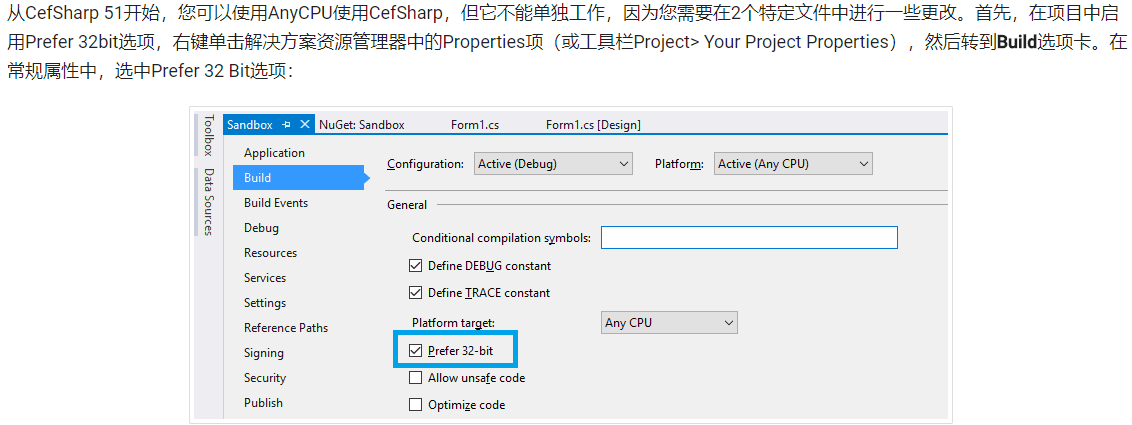
------------吾亦无他,唯手熟尔,谦卑若愚,好学若饥------------- 本篇博客讲述如何在AnyCPU模式下使用CefSharp 因为在某些情况下,不得不用AnyCPU,但是CefSharp支持的是86和64位俩种模式,所以在我查阅了很多国内外的资料下,总结出来的一些精华 参考地址: https://ourcodeworld.com/articles/read/173/how-to-use-cefsharp-chromium-embedded-framework-csharp-in-a-winforms-application https://github.com/cefsharp/CefSharp/issues/1714 https://github.com/cefsharp/CefSharp.MinimalExample/blob/demo/anycpu/CefSharp.MinimalExample.Wpf/App.xaml.cs 三篇结合就可以实现在AnyCPU下使用CefSharp 简单步骤记录 第一篇博客取其第二个,更改配置的那一块,这块不改,下面的没用,项目起不起来 简述一下: 1.修改为首选32位, 2.在你项目名.csproj文件下,加一段 <CefSharpAnyCpuSupport>true</CefSharpAnyCpuSupport> 位置如下: 3.在App.config下加一端 <runtime> <assemblyBinding xmlns="urn:schemas-microsoft-com:asm.v1"> <probing privatePath="x86"/> </assemblyBinding> </runtime> 位置如下: 第二篇博客取的精髓在这块,我给放过来 public partial class App : Application { public App() { //Add Custom assembly resolver AppDomain.CurrentDomain.AssemblyResolve += Resolver; //Any CefSharp references have to be in another method with NonInlining // attribute so the assembly rolver has time to do it's thing. InitializeCefSharp(); } [MethodImpl(MethodImplOptions.NoInlining)] private static void InitializeCefSharp() { var settings = new CefSettings(); // Set BrowserSubProcessPath based on app bitness at runtime settings.BrowserSubprocessPath = Path.Combine(AppDomain.CurrentDomain.SetupInformation.ApplicationBase, Environment.Is64BitProcess ? "x64" : "x86", "CefSharp.BrowserSubprocess.exe"); // Make sure you set performDependencyCheck false Cef.Initialize(settings, performDependencyCheck: false, browserProcessHandler: null); } // Will attempt to load missing assembly from either x86 or x64 subdir // Required by CefSharp to load the unmanaged dependencies when running using AnyCPU private static Assembly Resolver(object sender, ResolveEventArgs args) { if (args.Name.StartsWith("CefSharp")) { string assemblyName = args.Name.Split(new[] { ',' }, 2)[0] + ".dll"; string archSpecificPath = Path.Combine(AppDomain.CurrentDomain.SetupInformation.ApplicationBase, Environment.Is64BitProcess ? "x64" : "x86", assemblyName); return File.Exists(archSpecificPath) ? Assembly.LoadFile(archSpecificPath) : null; } return null; } } 第三篇博客 就是告诉你using指令怎么引,以及详细的写法,要用的话,还是用第二篇博客的这段代码 using System; using System.IO; using System.Reflection; using System.Runtime.CompilerServices; using System.Windows; namespace CefSharp.MinimalExample.Wpf { public partial class App : Application { public App() { //Add Custom assembly resolver AppDomain.CurrentDomain.AssemblyResolve += Resolver; //Any CefSharp references have to be in another method with NonInlining // attribute so the assembly rolver has time to do it's thing. InitializeCefSharp(); } [MethodImpl(MethodImplOptions.NoInlining)] private static void InitializeCefSharp() { //Perform dependency check to make sure all relevant resources are in our output directory. var settings = new CefSettings(); settings.BrowserSubprocessPath = Path.Combine(AppDomain.CurrentDomain.SetupInformation.ApplicationBase, Environment.Is64BitProcess ? "x64" : "x86", "CefSharp.BrowserSubprocess.exe"); Cef.Initialize(settings, performDependencyCheck: false, browserProcessHandler:null); } // Will attempt to load missing assembly from either x86 or x64 subdir // Required by CefSharp to load the unmanaged dependencies when running using AnyCPU private static Assembly Resolver(object sender, ResolveEventArgs args) { if (args.Name.StartsWith("CefSharp")) { string assemblyName = args.Name.Split(new[] { ',' }, 2)[0] + ".dll"; string archSpecificPath = Path.Combine(AppDomain.CurrentDomain.SetupInformation.ApplicationBase, Environment.Is64BitProcess ? "x64" : "x86", assemblyName); return File.Exists(archSpecificPath) ? Assembly.LoadFile(archSpecificPath) : null; } return null; } } } 三套组合拳打完,CefSharp就可以在AnyCPU模式下使用了