docker 安装 jdk linux
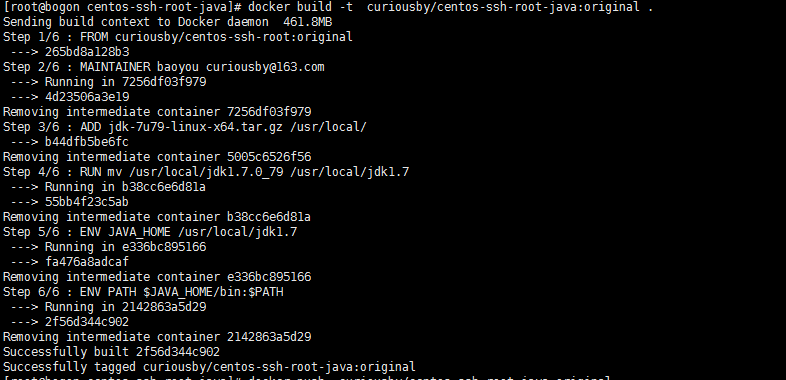
37.3 创建docker centos-ssh-root-java 37.3.0 前提 拥有一个centos-ssh-root 37.3.1 创建 dockerfile FROM curiousby/centos-ssh-root:original MAINTAINER baoyou curiousby@163.com ADD jdk-7u79-linux-x64.tar.gz /usr/local/ RUN mv /usr/local/jdk1.7.0_79 /usr/local/jdk1.7 ENV JAVA_HOME /usr/local/jdk1.7 ENV PATH $JAVA_HOME/bin:$PATH 37.3.2执行命令 mkdir centos-ssh-root-java cd centos-ssh-root-java cp ../jdk-7u79-linux-x64.tar.gz . vim Dockerfile docker build -t curiousby/centos-ssh-root-java:original . 37.3.3 运行日志 docker build -t curiousby/centos-ssh-root-java:original . #build 运行 日志 Sending build context to Docker daemon 461.8MB Step 1/6 : FROM curiousby/centos-ssh-root manifest for curiousby/centos-ssh-root:latest not found [root@bogon centos-ssh-root-java]# docker pull curiousby/centos-ssh-root Using default tag: latest Error response from daemon: manifest for curiousby/centos-ssh-root:latest not found [root@bogon centos-ssh-root-java]# vim Dockerfile [root@bogon centos-ssh-root-java]# docker build -t curiousby/centos-ssh-root-java:original . Sending build context to Docker daemon 461.8MB Step 1/6 : FROM curiousby/centos-ssh-root:original ---> 265bd8a128b3 Step 2/6 : MAINTAINER baoyou curiousby@163.com ---> Running in 7256df03f979 ---> 4d23506a3e19 Removing intermediate container 7256df03f979 Step 3/6 : ADD jdk-7u79-linux-x64.tar.gz /usr/local/ ---> b44dfb5be6fc Removing intermediate container 5005c6526f56 Step 4/6 : RUN mv /usr/local/jdk1.7.0_79 /usr/local/jdk1.7 ---> Running in b38cc6e6d81a ---> 55bb4f23c5ab Removing intermediate container b38cc6e6d81a Step 5/6 : ENV JAVA_HOME /usr/local/jdk1.7 ---> Running in e336bc895166 ---> fa476a8adcaf Removing intermediate container e336bc895166 Step 6/6 : ENV PATH $JAVA_HOME/bin:$PATH ---> Running in 2142863a5d29 ---> 2f56d344c902 Removing intermediate container 2142863a5d29 Successfully built 2f56d344c902 Successfully tagged curiousby/centos-ssh-root-java:original 37.3.4 测试 docker run -d curiousby/centos-ssh-root-java:original #build run test [root@bogon soft]docker run -d curiousby/centos-ssh-root-java:original 406ffbe6360d5d318a334030e212c03befd51a911c65c9331ecf459ae968d215 [root@bogon soft]# docker images REPOSITORY TAG IMAGE ID CREATED SIZE curiousby/centos-ssh-root-java original 2f56d344c902 37 minutes ago 937MB curiousby/centos-ssh-root original 265bd8a128b3 2 hours ago 325MB curiousby/jenkins original f274428f2ce4 2 hours ago 362MB hub.c.163.com/library/tomcat latest 72d2be374029 4 weeks ago 292MB centos latest 328edcd84f1b 5 weeks ago 193MB hub.c.163.com/library/maven latest e99cade99bfb 2 months ago 620MB hello-world latest 1815c82652c0 3 months ago 1.84kB [root@bogon soft]# docker ps CONTAINER ID IMAGE COMMAND CREATED STATUS PORTS NAMES 406ffbe6360d curiousby/centos-ssh-root-java:original "/usr/sbin/sshd -D" 23 seconds ago Up 23 seconds 22/tcp mystifying_shirley [root@bogon soft]# docker exec -it 406ffbe6360d bash [root@406ffbe6360d /]# [root@406ffbe6360d /]# ls anaconda-post.log bin dev etc home lib lib64 lost+found media mnt opt proc root run sbin srv sys tmp usr var [root@406ffbe6360d /]# [root@406ffbe6360d /]# [root@406ffbe6360d /]# [root@406ffbe6360d /]# [root@406ffbe6360d /]# cd /usr/local/jdk1.7/ [root@406ffbe6360d jdk1.7]# ls COPYRIGHT LICENSE README.html THIRDPARTYLICENSEREADME-JAVAFX.txt THIRDPARTYLICENSEREADME.txt bin db include jre lib man release src.zip [root@406ffbe6360d jdk1.7]# cd .. [root@406ffbe6360d local]# ls bin etc games include jdk1.7 lib lib64 libexec sbin share src [root@406ffbe6360d local]# cd [root@406ffbe6360d ~]# ls anaconda-ks.cfg original-ks.cfg [root@406ffbe6360d ~]# java -version java version "1.7.0_79" Java(TM) SE Runtime Environment (build 1.7.0_79-b15) Java HotSpot(TM) 64-Bit Server VM (build 24.79-b02, mixed mode) [root@406ffbe6360d ~]# 406ffbe6360d [root@406ffbe6360d ~]# exit exit [root@bogon soft]# docker ps CONTAINER ID IMAGE COMMAND CREATED STATUS PORTS NAMES 406ffbe6360d curiousby/centos-ssh-root-java:original "/usr/sbin/sshd -D" 7 minutes ago Up 7 minutes 22/tcp mystifying_shirley [root@bogon soft]# docker stop 40 40 捐助开发者 在兴趣的驱动下,写一个免费的东西,有欣喜,也还有汗水,希望你喜欢我的作品,同时也能支持一下。 当然,有钱捧个钱场(支持支付宝和微信 以及扣扣群),没钱捧个人场,谢谢各位。 个人主页:http://knight-black-bob.iteye.com/ 谢谢您的赞助,我会做的更好!