首页 文章 精选 留言 我的

精选列表

搜索[openstack],共3159篇文章
优秀的个人博客,低调大师

openstack nova-network 的小bug的排错经历

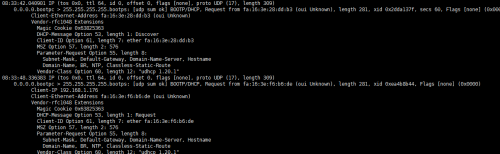
环境是nova-network +vmware+flatdhcp 错误表现为 开出来的虚拟机有一定几率获取不到dhcp地址,手工赋予ip则正常,用flat模式注入的ip正常,下面是排错过程 1首先找网络 防火墙已经把 dnsmasq对应的端口已经打开 抓包结果: 可以看到虚拟机dhcp 已经发到br100上面,但是br100 没有返回,基本可以排除网络原因 2 找dhcp 原因 首先kill掉 nova启动的 dnsmasq进程,手工去启一个dnsmasq,虚拟机是正常的。 其次 查看 dnsmasq 的日志 有如下 报错 Sep 12 08:32:31 centos-6568 dnsmasq[1947]: bad DHCP host name at line 3 of /var/lib/nova/networks/nova-br100.conf Sep 12 08:32:31 centos-6568 dnsmasq[1947]: bad DHCP host name at line 4 of /var/lib/nova/networks/nova-br100.conf Sep 12 08:32:31 centos-6568 dnsmasq[1947]: bad DHCP host name at line 7 of /var/lib/nova/networks/nova-br100.conf Sep 12 08:32:31 centos-6568 dnsmasq[1947]: bad DHCP host name at line 8 of /var/lib/nova/networks/nova-br100.conf Sep 12 08:44:41 centos-6568 dnsmasq-dhcp[1947]: DHCPDISCOVER(br100) fa:16:3e:4e:70:42 no address available 谷歌一下,很多人这个问题,但是没解决方案 于是看了下这个这个文件,再对比下同样的环境,使用neutron的文件截图如下 一眼可以看出 出错的行都是hostname 以数字开头的。 知道原因了,在开两台虚拟机 一台以数字开头 一台字母开头 一对比 果然是这个原因: nova-network +vmware+flatdhcp 这个环境下 nova-network是直接把虚拟机的hostname写进dnsmasq的列表中,但是dnsmaqs不认数字开头的hostname 解决办法: 修改源代码中 这条dhcp插入的方法 vim /usr/lib/python2.7/site-packages/nova/network/linux_net.py 改好的效果 本文转自 superbigsea 51CTO博客,原文链接:http://blog.51cto.com/superbigsea/1851829

优秀的个人博客,低调大师

OpenStack部署之前,如何搭建一个测试环境

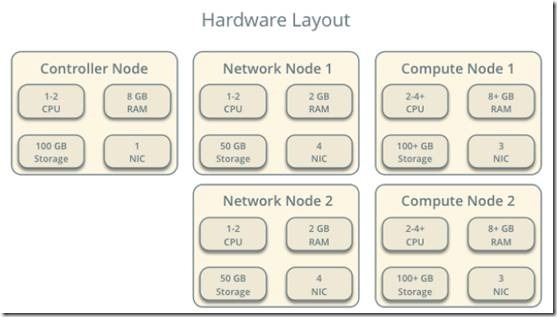
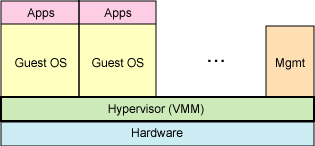
一、虚拟机安装 1、根据规划创建虚拟机 2、安装ubuntu14.04 二、网络配置 1、根据规划,在vmware workstation中创建好对应的虚拟网络 2、配置虚拟机的IP地址 3、在每台虚拟机的hosts文件中增加对应的hostname和IP地址对应关系 每个节点除了 IP 地址之外,还必须能够解析其他节点的名称。例如,controller1这个名称必须解析为 10.0.0.11,即控制节点上的管理网络接口的 IP 地址。 4、用于计算节点的虚拟机开启CPU VT选项 5、用于计算节点的虚拟机安装KVM 6、块存储节点对象存储节点各有2块100G的磁盘,分别配置为LVM 本文转自 TtrToby 51CTO博客,原文链接:http://blog.51cto.com/freshair/1883300

优秀的个人博客,低调大师

OpenStack —— 虚拟机的启动过程简述(八)

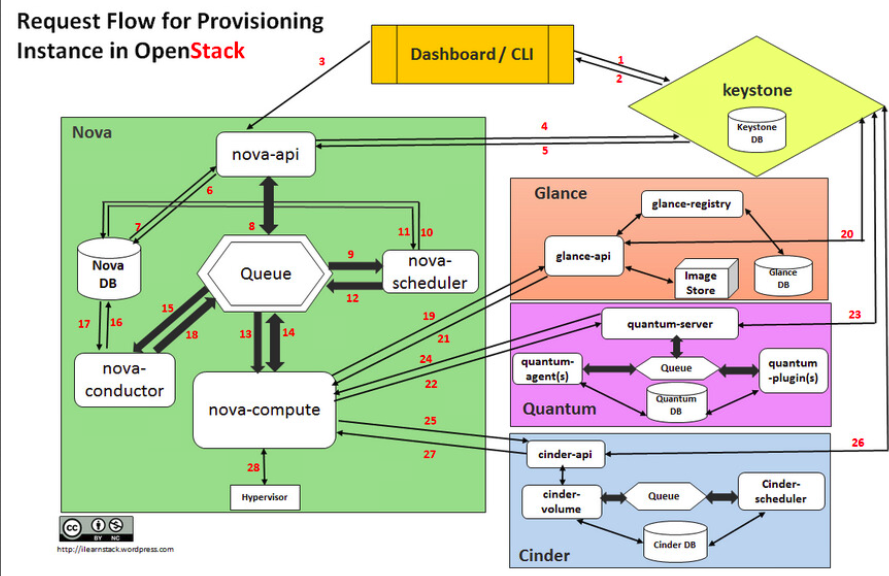
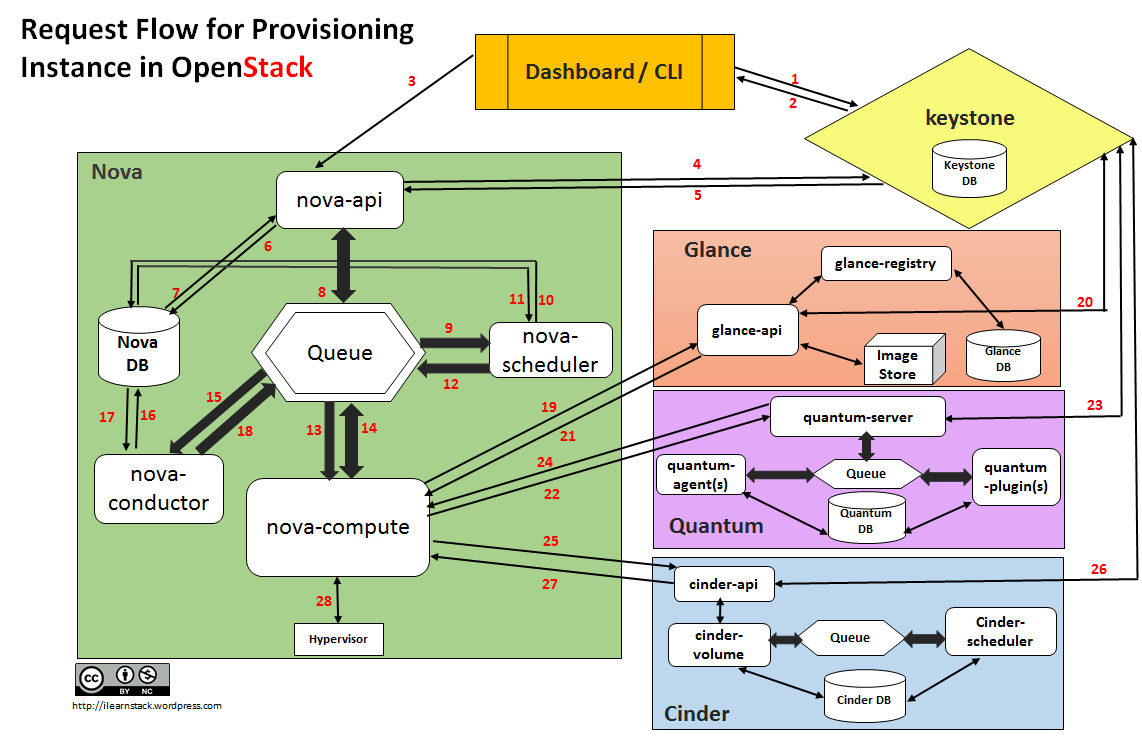
DashboardorCLIgets the user credential and does the REST call toKeystonefor authentication. Keystoneauthenticate the credentials and generate & send back auth-token which will be used for sending request to other Components through REST-call. DashboardorCLIconvert the new instance request specified in ‘launch instance’ or ‘nova-boot’ form to REST API request and send it tonova-api. nova-apireceive the request and sends the request for validation auth-token and access permission tokeystone. Keystonevalidates the token and sends updated auth headers with roles and permissions. nova-apiinteracts withnova-database. Creates initial db entry for new instance. nova-apisends therpc.callrequest tonova-schedulerexcepting to get updated instance entry with host ID specified. nova-schedulerpicks the request from thequeue. nova-schedulerinteracts withnova-databaseto find an appropriate host via filtering and weighing. Returns the updated instance entry with appropriate host ID after filtering and weighing. nova-schedulersends therpc.castrequest tonova-computefor ‘launching instance’ on appropriate host . nova-computepicks the request from thequeue. nova-computesend therpc.callrequest tonova-conductorto fetch the instance information such ashost ID and flavor( Ram , CPU ,Disk). nova-conductorpicks the request from thequeue. nova-conductorinteracts withnova-database. Return the instance information. nova-computepicks the instance information from thequeue. nova-computedoes the REST call by passing auth-token toglance-apito get the Image URI by Image ID from glance and upload image from image storage. glance-apivalidates the auth-token withkeystone. nova-computeget the image metadata. nova-computedoes the REST-call by passing auth-token toNetwork APIto allocate and configure the network such that instance gets the IP address. quantum-servervalidates theauth-token withkeystone. nova-computeget the network info. nova-computedoes the REST call by passingauth-token toVolume APIto attach volumes to instance. cinder-apivalidates the auth-token withkeystone. nova-computegets the block storage info. nova-computegenerates data for hypervisor driver and executes request on Hypervisor( vialibvirtorapi). 本文转自 wzlinux 51CTO博客,原文链接:http://blog.51cto.com/wzlinux/1964195,如需转载请自行联系原作者

资源下载

更多资源
Mario

Mario

马里奥是站在游戏界顶峰的超人气多面角色。马里奥靠吃蘑菇成长,特征是大鼻子、头戴帽子、身穿背带裤,还留着胡子。与他的双胞胎兄弟路易基一起,长年担任任天堂的招牌角色。

腾讯云软件源

腾讯云软件源

为解决软件依赖安装时官方源访问速度慢的问题,腾讯云为一些软件搭建了缓存服务。您可以通过使用腾讯云软件源站来提升依赖包的安装速度。为了方便用户自由搭建服务架构,目前腾讯云软件源站支持公网访问和内网访问。

Sublime Text

Sublime Text

Sublime Text具有漂亮的用户界面和强大的功能,例如代码缩略图,Python的插件,代码段等。还可自定义键绑定,菜单和工具栏。Sublime Text 的主要功能包括:拼写检查,书签,完整的 Python API , Goto 功能,即时项目切换,多选择,多窗口等等。Sublime Text 是一个跨平台的编辑器,同时支持Windows、Linux、Mac OS X等操作系统。

WebStorm

WebStorm

WebStorm 是jetbrains公司旗下一款JavaScript 开发工具。目前已经被广大中国JS开发者誉为“Web前端开发神器”、“最强大的HTML5编辑器”、“最智能的JavaScript IDE”等。与IntelliJ IDEA同源,继承了IntelliJ IDEA强大的JS部分的功能。


用户登录
用户注册