CentOS7下利用cobbler部署CentOS
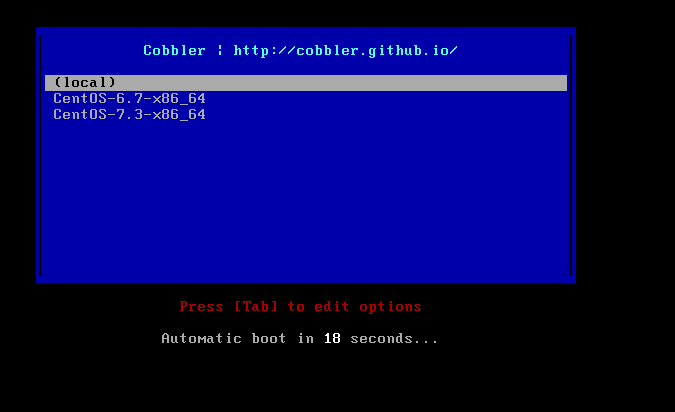
1)安装epel源和cobbler [root@cobbler~]#yum-yinstallhttp://mirrors.163.com/centos/7/extras/x86_64/Packages/epel-release-7-9.noarch.rpm [root@cobbler~]#yuminstallcobblercobbler-webdhcptftp-serverpykickstarthttpdxinetd-y [root@cobbler~]#systemctlstartxinetd.service [root@cobbler~]#systemctlenablexinetd.service [root@cobbler~]#systemctlstarthttpd [root@cobbler~]#systemctlenablehttpd Createdsymlinkfrom/etc/systemd/system/multi-user.target.wants/httpd.serviceto/usr/lib/systemd/system/httpd.service. [root@cobbler~]#systemctlstartcobblerd.service [root@cobbler~]#systemctlenablecobblerd.service Createdsymlinkfrom/etc/systemd/system/multi-user.target.wants/cobblerd.serviceto/usr/lib/systemd/system/cobblerd.service. 2)配置cobbler 检查cobbler: [root@cobbler~]#cobblercheck Thefollowingarepotentialconfigurationitemsthatyoumaywanttofix: 1:The'server'fieldin/etc/cobbler/settingsmustbesettosomethingotherthanlocalhost,orkickstartingfeatureswillnotwork.ThisshouldbearesolvablehostnameorIPforthebootserverasreachablebyallmachinesthatwilluseit. 2:ForPXEtobefunctional,the'next_server'fieldin/etc/cobbler/settingsmustbesettosomethingotherthan127.0.0.1,andshouldmatchtheIPofthebootserveronthePXEnetwork. 3:change'disable'to'no'in/etc/xinetd.d/tftp 4:somenetworkboot-loadersaremissingfrom/var/lib/cobbler/loaders,youmayrun'cobblerget-loaders'todownloadthem,or,ifyouonlywanttohandlex86/x86_64netbooting,youmayensurethatyouhaveinstalleda*recent*versionofthesyslinuxpackageinstalledandcanignorethismessageentirely.Filesinthisdirectory,shouldyouwanttosupportallarchitectures,shouldincludepxelinux.0,menu.c32,elilo.efi,andyaboot.The'cobblerget-loaders'commandistheeasiestwaytoresolvetheserequirements. 5:enableandstartrsyncd.servicewithsystemctl 6:debmirrorpackageisnotinstalled,itwillberequiredtomanagedebiandeploymentsandrepositories 7:Thedefaultpasswordusedbythesampletemplatesfornewlyinstalledmachines(default_password_cryptedin/etc/cobbler/settings)isstillsetto'cobbler'andshouldbechanged,try:"opensslpasswd-1-salt'random-phrase-here''your-password-here'"togeneratenewone 8:fencingtoolswerenotfound,andarerequiredtousethe(optional)powermanagementfeatures.installcmanorfence-agentstousethem Restartcobblerdandthenrun'cobblersync'toapplychanges. 修改cobbler的配置文件: [root@cobbler~]#vim/etc/cobbler/settings #ifyoudonotsetthiscorrectly,thiswillbemanifestedinTFTPopentimeouts. 将“next_server:127.0.0.1”修改为“next_server:10.10.10.222” 将“server:127.0.0.1”修改为“server:10.10.10.222” #setto1toenableCobbler'sDHCPmanagementfeatures. #thechoiceofDHCPmanagementengineisin/etc/cobbler/modules.conf 将“manage_dhcp:0”修改为“manage_dhcp:1” 修改cobbler默认的密码: 将“default_password_crypted:"$1$mF86/UHC$WvcIcX2t6crBz2onWxyac."”修改为“default_password_crypted:"$1$wanwan$K9lP0CajD0pbFaxI0if84/"” 随机生成一个密码: [root@cobbler~]#opensslpasswd-1-salt'wanwan''redhat12345' $1$wanwan$K9lP0CajD0pbFaxI0if84/ [root@cobbler~]#vim/etc/xinetd.d/tftp 将“disable=yes”修改为“disable=no” 重启rsync服务: [root@cobbler~]#systemctlstartrsyncd.service [root@cobbler~]#systemctlenablersyncd.service Createdsymlinkfrom/etc/systemd/system/multi-user.target.wants/rsyncd.serviceto/usr/lib/systemd/system/rsyncd.service. 下载cobbler相关的包: [root@cobbler~]#cobblerget-loaders taskstarted:2017-03-20_110931_get_loaders taskstarted(id=DownloadBootloaderContent,time=MonMar2011:09:312017) downloadinghttps://cobbler.github.io/loaders/READMEto/var/lib/cobbler/loaders/README downloadinghttps://cobbler.github.io/loaders/COPYING.eliloto/var/lib/cobbler/loaders/COPYING.elilo downloadinghttps://cobbler.github.io/loaders/COPYING.yabootto/var/lib/cobbler/loaders/COPYING.yaboot downloadinghttps://cobbler.github.io/loaders/COPYING.syslinuxto/var/lib/cobbler/loaders/COPYING.syslinux downloadinghttps://cobbler.github.io/loaders/elilo-3.8-ia64.efito/var/lib/cobbler/loaders/elilo-ia64.efi downloadinghttps://cobbler.github.io/loaders/yaboot-1.3.17to/var/lib/cobbler/loaders/yaboot downloadinghttps://cobbler.github.io/loaders/pxelinux.0-3.86to/var/lib/cobbler/loaders/pxelinux.0 downloadinghttps://cobbler.github.io/loaders/menu.c32-3.86to/var/lib/cobbler/loaders/menu.c32 downloadinghttps://cobbler.github.io/loaders/grub-0.97-x86.efito/var/lib/cobbler/loaders/grub-x86.efi downloadinghttps://cobbler.github.io/loaders/grub-0.97-x86_64.efito/var/lib/cobbler/loaders/grub-x86_64.efi ***TASKCOMPLETE*** [root@cobbler~]#systemctlrestartcobblerd.service [root@cobbler~]#cobblercheck Thefollowingarepotentialconfigurationitemsthatyoumaywanttofix: 1:debmirrorpackageisnotinstalled,itwillberequiredtomanagedebiandeploymentsandrepositories 2:fencingtoolswerenotfound,andarerequiredtousethe(optional)powermanagementfeatures.installcmanorfence-agentstousethem [root@cobbler~]#cd/etc/cobbler/ [root@cobblercobbler]#ls auth.confdhcp.templateldappowerrsync.templateusers.confzone_templates cheetah_macrosdnsmasq.templatemodules.confpxesecondary.templateusers.digest cobbler_bashimport_rsync_whitelistmongodb.confreportingsettingsversion completionsisonamed.templatersync.excludetftpd.templatezone.template 3)配置服务 [root@cobblercobbler]#vimdhcp.template subnet10.10.10.0netmask255.255.255.0{ optionrouters10.10.10.2; optiondomain-name-servers10.10.10.2; optionsubnet-mask255.255.255.0; rangedynamic-bootp10.10.10.10010.10.10.200; default-lease-time21600; max-lease-time43200; next-server$next_server; class"pxeclients"{ matchifsubstring(optionvendor-class-identifier,0,9)="PXEClient"; ifoptionpxe-system-type=00:02{ filename"ia64/elilo.efi"; }elseifoptionpxe-system-type=00:06{ filename"grub/grub-x86.efi"; }elseifoptionpxe-system-type=00:07{ filename"grub/grub-x86_64.efi"; }else{ filename"pxelinux.0"; } } } 备注:主要修改网段、DNS、网关等信息 [root@cobblercobbler]#cobblersync 通过cobbler管理的dhcp的配置文件 [root@cobblercobbler]#egrep-v'^#|^$'/etc/dhcp/dhcpd.conf ddns-update-styleinterim; allowbooting; allowbootp; ignoreclient-updates; setvendorclass=optionvendor-class-identifier; optionpxe-system-typecode93=unsignedinteger16; subnet10.10.10.0netmask255.255.255.0{ optionrouters10.10.10.2; optiondomain-name-servers10.10.10.2; optionsubnet-mask255.255.255.0; rangedynamic-bootp10.10.10.10010.10.10.200; default-lease-time21600; max-lease-time43200; next-server10.10.10.222; class"pxeclients"{ matchifsubstring(optionvendor-class-identifier,0,9)="PXEClient"; ifoptionpxe-system-type=00:02{ filename"ia64/elilo.efi"; }elseifoptionpxe-system-type=00:06{ filename"grub/grub-x86.efi"; }elseifoptionpxe-system-type=00:07{ filename"grub/grub-x86_64.efi"; }else{ filename"pxelinux.0"; } } } group{ } 挂载并导入数据: [root@cobbler~]#mount/dev/cdrom/mnt mount:/dev/sr0iswrite-protected,mountingread-only [root@cobbler~]#df-h FilesystemSizeUsedAvailUse%Mountedon /dev/mapper/cl-root50G9.8G41G20%/ devtmpfs1.9G01.9G0%/dev tmpfs1.9G144K1.9G1%/dev/shm tmpfs1.9G9.0M1.9G1%/run tmpfs1.9G01.9G0%/sys/fs/cgroup /dev/mapper/cl-home46G36M46G1%/home /dev/sda11014M175M840M18%/boot tmpfs378M12K378M1%/run/user/0 /dev/sr04.1G4.1G0100%/mnt [root@cobbler~]#cobblerimport--path=/mnt--name=CentOS-7.3--arch=x86_64 taskstarted:2017-03-20_113200_import taskstarted(id=Mediaimport,time=MonMar2011:32:002017) Foundacandidatesignature:breed=redhat,version=rhel6 Foundacandidatesignature:breed=redhat,version=rhel7 Foundamatchingsignature:breed=redhat,version=rhel7 Addingdistrosfrompath/var/www/cobbler/ks_mirror/CentOS-7.3-x86_64: creatingnewdistro:CentOS-7.3-x86_64 tryingsymlink:/var/www/cobbler/ks_mirror/CentOS-7.3-x86_64->/var/www/cobbler/links/CentOS-7.3-x86_64 creatingnewprofile:CentOS-7.3-x86_64 associatingrepos checkingforrsyncrepo(s) checkingforrhnrepo(s) checkingforyumrepo(s) startingdescentinto/var/www/cobbler/ks_mirror/CentOS-7.3-x86_64forCentOS-7.3-x86_64 processingrepoat:/var/www/cobbler/ks_mirror/CentOS-7.3-x86_64 needtoprocessrepo/comps:/var/www/cobbler/ks_mirror/CentOS-7.3-x86_64 lookingfor/var/www/cobbler/ks_mirror/CentOS-7.3-x86_64/repodata/*comps*.xml Keepingrepodataas-is:/var/www/cobbler/ks_mirror/CentOS-7.3-x86_64/repodata ***TASKCOMPLETE*** 说明:cobbler导入的镜像放在:/var/www/cobbler/ks_mirror [root@cobblerks_mirror]#pwd /var/www/cobbler/ks_mirror [root@cobblerks_mirror]#ls CentOS-7.3-x86_64config 默认kickstart文件存放位置:/var/lib/cobbler/kickstarts/ [root@cobbler~]#cd/var/lib/cobbler/kickstarts/ [root@cobblerkickstarts]#ll total52 -rw-r--r--1rootroot115Nov1703:09default.ks -rw-r--r--1rootroot22Nov1703:09esxi4-ks.cfg -rw-r--r--1rootroot22Nov1703:09esxi5-ks.cfg drwxr-xr-x2rootroot56Mar2010:39install_profiles -rw-r--r--1rootroot1424Nov1703:09legacy.ks -rw-r--r--1rootroot292Nov1703:09pxerescue.ks -rw-r--r--1rootroot2916Nov1703:09sample_autoyast.xml -rw-r--r--1rootroot1825Nov1703:09sample_end.ks -rw-r--r--1rootroot0Nov1703:09sample_esx4.ks -rw-r--r--1rootroot324Nov1703:09sample_esxi4.ks -rw-r--r--1rootroot386Nov1703:09sample_esxi5.ks -rw-r--r--1rootroot1784Nov1703:09sample.ks -rw-r--r--1rootroot3419Nov1703:09sample_old.seed -rw-r--r--1rootroot5879Nov1703:09sample.seed [root@cobbler~]#cobblerlist distros: CentOS-7.3-x86_64 profiles: CentOS-7.3-x86_64 systems: repos: p_w_picpaths: mgmtclasses: packages: files: [root@cobbler~]#cobblerprofilereport Name:CentOS-7.3-x86_64 TFTPBootFiles:{} Comment: DHCPTag:default Distribution:CentOS-7.3-x86_64 EnablegPXE?:0 EnablePXEMenu?:1 FetchableFiles:{} KernelOptions:{} KernelOptions(PostInstall):{} Kickstart:/var/lib/cobbler/kickstarts/sample_end.ks KickstartMetadata:{} ManagementClasses:[] ManagementParameters:<<inherit>> NameServers:[] NameServersSearchPath:[] Owners:['admin'] ParentProfile: Internalproxy: RedHatManagementKey:<<inherit>> RedHatManagementServer:<<inherit>> Repos:[] ServerOverride:<<inherit>> TemplateFiles:{} VirtAutoBoot:1 VirtBridge:xenbr0 VirtCPUs:1 VirtDiskDriverType:raw VirtFileSize(GB):5 VirtPath: VirtRAM(MB):512 VirtType:kvm 查看cobbler profile的帮助: [root@cobbler~]#cobblerprofileedit--help Usage:cobbler[options] Options: -h,--helpshowthishelpmessageandexit --name=NAMEName(Ex:F10-i386-webserver) --uid=UID --owners=OWNERSOwners(Ownerslistforauthz_ownership(space delimited)) --distro=DISTRODistribution(Parentdistribution) --parent=PARENTParentProfile --enable-gpxe=ENABLE_GPXE EnablegPXE?(UsegPXEinsteadofPXELINUXfor advancedbootingoptions) --enable-menu=ENABLE_MENU EnablePXEMenu?(ShowthisprofileinthePXEmenu?) --kickstart=KICKSTART Kickstart(Pathtokickstarttemplate) --kopts=KERNEL_OPTIONS KernelOptions(Ex:selinux=permissive) --kopts-post=KERNEL_OPTIONS_POST KernelOptions(PostInstall)(Ex:clocksource=pit noapic) --ksmeta=KS_METAKickstartMetadata(Ex:dog=fangagent=86) --proxy=PROXYInternalproxy(InternalproxyURL) --repos=REPOSRepos(Repostoauto-assigntothisprofile) --comment=COMMENTComment(Freeformtextdescription) --virt-auto-boot=VIRT_AUTO_BOOT VirtAutoBoot(AutobootthisVM?) --virt-cpus=VIRT_CPUS VirtCPUs(integer) --virt-file-size=VIRT_FILE_SIZE VirtFileSize(GB) --virt-disk-driver=VIRT_DISK_DRIVER VirtDiskDriverType(Theon-diskformatforthe virtualizationdisk) --virt-ram=VIRT_RAMVirtRAM(MB) --depth=DEPTH --virt-type=VIRT_TYPE VirtType(Virtualizationtechnologytouse)(valid options:xenpv,xenfv,qemu,kvm,vmware,openvz,SETTINGS:d efault_virt_type) --virt-path=VIRT_PATH VirtPath(Ex:/directoryORVolGroup00) --virt-bridge=VIRT_BRIDGE VirtBridge --dhcp-tag=DHCP_TAGDHCPTag(Seemanpageorleaveblank) --server=SERVERServerOverride(Seemanpageorleaveblank) --ctime=CTIME --mtime=MTIME --name-servers=NAME_SERVERS NameServers(spacedelimited) --name-servers-search=NAME_SERVERS_SEARCH NameServersSearchPath(spacedelimited) --mgmt-classes=MGMT_CLASSES ManagementClasses(Forexternalconfiguration management) --mgmt-parameters=MGMT_PARAMETERS ManagementParameters(Parameterswhichwillbehanded toyourmanagementapplication(MustbevalidYAML dictionary)) --boot-files=BOOT_FILES TFTPBootFiles(Filescopiedintotftpbootbeyondthe kernel/initrd) --fetchable-files=FETCHABLE_FILES FetchableFiles(Templatesfortftporwget/curl) --template-files=TEMPLATE_FILES TemplateFiles(Filemappingsforbuilt-inconfig management) --redhat-management-key=REDHAT_MANAGEMENT_KEY RedHatManagementKey(RegistrationkeyforRHN, Spacewalk,orSatellite) --redhat-management-server=REDHAT_MANAGEMENT_SERVER RedHatManagementServer(AddressofSpacewalkor SatelliteServer) --template-remote-kickstarts=TEMPLATE_REMOTE_KICKSTARTS --clobberallowaddtooverwriteexistingobjects --in-placeedititemsinkoptsorksmetawithoutclearingthe otheritems 修改kickstart文件: [root@cobbler~]#cobblerprofileedit--name=CentOS-7.3-x86_64--kickstart=/var/lib/cobbler/kickstarts/CentOS-7.3-x86_64.cfg 修改内核参数: [root@cobbler~]#cobblerprofileedit--name=CentOS-7.3-x86_64--kopts='net.ifnames=0biosdevname=0' [root@cobbler~]#cobblerprofilereport Name:CentOS-7.3-x86_64 TFTPBootFiles:{} Comment: DHCPTag:default Distribution:CentOS-7.3-x86_64 EnablegPXE?:0 EnablePXEMenu?:1 FetchableFiles:{} KernelOptions:{'biosdevname':'0','net.ifnames':'0'} KernelOptions(PostInstall):{} Kickstart:/var/lib/cobbler/kickstarts/CentOS-7.3-x86_64.cfg KickstartMetadata:{} ManagementClasses:[] ManagementParameters:<<inherit>> NameServers:[] NameServersSearchPath:[] Owners:['admin'] ParentProfile: Internalproxy: RedHatManagementKey:<<inherit>> RedHatManagementServer:<<inherit>> Repos:[] ServerOverride:<<inherit>> TemplateFiles:{} VirtAutoBoot:1 VirtBridge:xenbr0 VirtCPUs:1 VirtDiskDriverType:raw VirtFileSize(GB):5 VirtPath: VirtRAM(MB):512 VirtType:kvm [root@cobbler~]#cobblersync taskstarted:2017-03-20_135014_sync taskstarted(id=Sync,time=MonMar2013:50:142017) runningpre-synctriggers cleaningtrees removing:/var/www/cobbler/p_w_picpaths/CentOS-7.3-x86_64 removing:/var/lib/tftpboot/pxelinux.cfg/default removing:/var/lib/tftpboot/grub/p_w_picpaths removing:/var/lib/tftpboot/grub/grub-x86.efi removing:/var/lib/tftpboot/grub/grub-x86_64.efi removing:/var/lib/tftpboot/grub/efidefault removing:/var/lib/tftpboot/p_w_picpaths/CentOS-7.3-x86_64 removing:/var/lib/tftpboot/s390x/profile_list copyingbootloaders tryinghardlink/var/lib/cobbler/loaders/pxelinux.0->/var/lib/tftpboot/pxelinux.0 copying:/var/lib/cobbler/loaders/pxelinux.0->/var/lib/tftpboot/pxelinux.0 tryinghardlink/var/lib/cobbler/loaders/menu.c32->/var/lib/tftpboot/menu.c32 copying:/var/lib/cobbler/loaders/menu.c32->/var/lib/tftpboot/menu.c32 tryinghardlink/var/lib/cobbler/loaders/grub-x86.efi->/var/lib/tftpboot/grub/grub-x86.efi tryinghardlink/var/lib/cobbler/loaders/grub-x86_64.efi->/var/lib/tftpboot/grub/grub-x86_64.efi copyingdistrostotftpboot copyingfilesfordistro:CentOS-7.3-x86_64 tryinghardlink/var/www/cobbler/ks_mirror/CentOS-7.3-x86_64/p_w_picpaths/pxeboot/vmlinuz->/var/lib/tftpboot/p_w_picpaths/CentOS-7.3-x86_64/vmlinuz tryinghardlink/var/www/cobbler/ks_mirror/CentOS-7.3-x86_64/p_w_picpaths/pxeboot/initrd.img->/var/lib/tftpboot/p_w_picpaths/CentOS-7.3-x86_64/initrd.img copyingp_w_picpaths generatingPXEconfigurationfiles generatingPXEmenustructure copyingfilesfordistro:CentOS-7.3-x86_64 tryinghardlink/var/www/cobbler/ks_mirror/CentOS-7.3-x86_64/p_w_picpaths/pxeboot/vmlinuz->/var/www/cobbler/p_w_picpaths/CentOS-7.3-x86_64/vmlinuz tryinghardlink/var/www/cobbler/ks_mirror/CentOS-7.3-x86_64/p_w_picpaths/pxeboot/initrd.img->/var/www/cobbler/p_w_picpaths/CentOS-7.3-x86_64/initrd.img WritingtemplatefilesforCentOS-7.3-x86_64 renderingDHCPfiles generating/etc/dhcp/dhcpd.conf renderingTFTPDfiles generating/etc/xinetd.d/tftp processingboot_filesfordistro:CentOS-7.3-x86_64 cleaninglinkcaches runningpost-synctriggers runningpythontriggersfrom/var/lib/cobbler/triggers/sync/post/* runningpythontriggercobbler.modules.sync_post_restart_services running:dhcpd-t-q receivedonstdout: receivedonstderr: running:servicedhcpdrestart receivedonstdout: receivedonstderr:Redirectingto/bin/systemctlrestartdhcpd.service runningshelltriggersfrom/var/lib/cobbler/triggers/sync/post/* runningpythontriggersfrom/var/lib/cobbler/triggers/change/* runningpythontriggercobbler.modules.scm_track runningshelltriggersfrom/var/lib/cobbler/triggers/change/* ***TASKCOMPLETE*** 客户端设置从网卡启动: 安装完的CentOS6: cobbler的图形化管理界面(默认用户名cobbler,默认密码cobbler): 补充下,如果重启cobbler后发现dhcpd服务不能正常使用,很有可能是因为没设置自动启动 [root@cobbler~]#systemctlstartdhcpd.service [root@cobbler~]#systemctlenabledhcpd.serviceCreatedsymlinkfrom/etc/systemd/system/multi-user.target.wants/dhcpd.serviceto/usr/lib/systemd/system/dhcpd.service.