Docker 镜像小结---操作指令介绍(七)
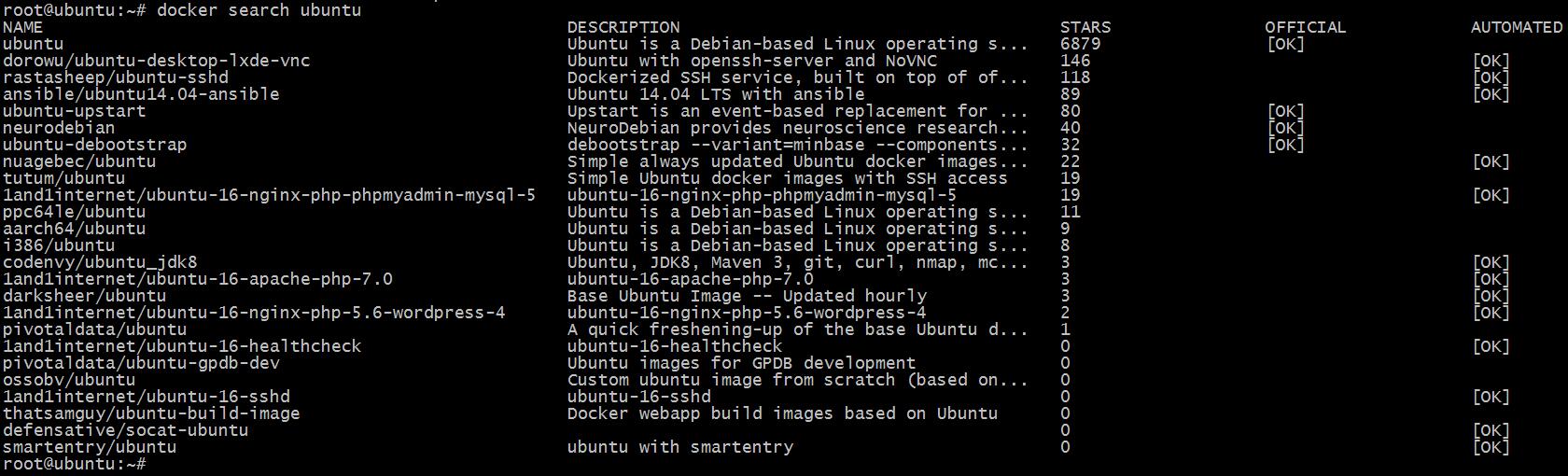
一、搜索镜像 很多情况下我们可能需要下载某一类别的镜像,这时候我们就会用到搜索功能,也可以去 docker hub 官网页面搜索。 使用语法如下。 Usage: docker search [OPTIONS] TERM Search the Docker Hub for images Options: -f, --filter filter Filter output based on conditions provided --format string Pretty-print search using a Go template --help Print usage --limit int Max number of search results (default 25) --no-trunc Don't truncate output 我们可以看到,第一个镜像是没有用户名的,并且 OFFICIAL 是 OK,这样的镜像是由 Docker 公司进行维护的。 二、下载镜像 使用方法如下。 Usage: docker pull [OPTIONS] NAME[:TAG|@DIGEST] Pull an image or a repository from a registry Options: -a, --all-tags Download all tagged images in the repository --disable-content-trust Skip image verification (default true) --help Print usage 正常情况下,我们输入查到的镜像的全称即可。 三、查看本地镜像 Usage: docker images [OPTIONS] [REPOSITORY[:TAG]] List images Options: -a, --all Show all images (default hides intermediate images) --digests Show digests -f, --filter filter Filter output based on conditions provided --format string Pretty-print images using a Go template --help Print usage --no-trunc Don't truncate output -q, --quiet Only show numeric IDs 四、显示镜像构建历史 Usage: docker history [OPTIONS] IMAGE Show the history of an image Options: --format string Pretty-print images using a Go template --help Print usage -H, --human Print sizes and dates in human readable format (default true) --no-trunc Don't truncate output -q, --quiet Only show numeric IDs 五、删除镜像 Usage: docker rmi [OPTIONS] IMAGE [IMAGE...] Remove one or more images Options: -f, --force Force removal of the image --help Print usage --no-prune Do not delete untagged parents 六、镜像创建 Usage: docker commit [OPTIONS] CONTAINER [REPOSITORY[:TAG]] Create a new image from a container's changes Options: -a, --author string Author (e.g., "John Hannibal Smith <hannibal@a-team.com>") -c, --change list Apply Dockerfile instruction to the created image --help Print usage -m, --message string Commit message -p, --pause Pause container during commit (default true) 之前我们已经演示过了。 七、上传镜像 Usage: docker push [OPTIONS] NAME[:TAG] Push an image or a repository to a registry Options: --disable-content-trust Skip image signing (default true) --help Print usage 之前已经演示过。 八、给镜像打 tag Usage: docker tag SOURCE_IMAGE[:TAG] TARGET_IMAGE[:TAG] Create a tag TARGET_IMAGE that refers to SOURCE_IMAGE Options: --help Print usage 之前已经演示过。 九、存出和载入镜像 Usage: docker save [OPTIONS] IMAGE [IMAGE...] Save one or more images to a tar archive (streamed to STDOUT by default) Options: --help Print usage -o, --output string Write to a file, instead of STDOUT Usage: docker load [OPTIONS] Load an image from a tar archive or STDIN Options: --help Print usage -i, --input string Read from tar archive file, instead of STDIN -q, --quiet Suppress the load output 本文转自 wzlinux 51CTO博客,原文链接:http://blog.51cto.com/wzlinux/2046045,如需转载请自行联系原作者